$5k Service dependencies
 Published on web.archive.org
Before getting to the bug itself, you should at least read the "Key concepts" part of this other bug, it will be useful for understanding this one.
The full write-up lives on its author's site
It belongs to its author, so we link to it rather than copy it. The other two tabs are our own rewrites, checked against it.
Context
The target here is the Google Service Management API, the control plane that lets developers describe a service through a Service object, push that configuration with the create or submit methods, and then roll it out so the settings take effect. A Service object carries several settings, and among them are usage settings: requirements a consumer must satisfy, or rules for calling particular methods.
One of those usage settings is a hidden option called dependsOnServices. It is documented as an array of strings, and the description reads:
Services that must be activated in order for this service to be used.The set of services activated as a result of these relations are allactivated in parallel with no guaranteed order of activation.Each string is a service name, e.g. `calendar.googleapis.com`.
That field was meant to be reachable only by Google internal clients. The behaviour it describes is simple: when a service is enabled, the services it depends on are activated alongside it.
Setup
The researcher worked with the Google Cloud Console client, which talks to servicemanagement.clients6.google.com and authenticates with a SAPISIDHASH header plus the usual Google cookies. The precondition for the interesting part of the bug is a project that satisfies the usage requirements of the services being pulled in. The report gives billing enabled for compute.googleapis.com as an example of such a requirement.
Finding it
On 18 November 2016 the researcher found the hidden dependsOnServices option while looking through the usage settings. It looked interesting enough to test, so the next step was to try setting it through the Cloud Console client, roll the configuration out, and then enable the service on one of the researcher's own projects.
Exploitation
Step 1: push a configuration containing the hidden field
The configuration was submitted with the following request, using the Cloud Console client:
POST /v1/services/<SERVICE NAME>/configs?key=[redacted] HTTP/1.1
Host: servicemanagement.clients6.google.com
Authorization: SAPISIDHASH <SAPISIDHASH>
X-Origin: https://console.cloud.google.com
Cookie: <GOOGLE COOKIES>
Content-Length: <CONTENT-LENGTH>

{
  "name": "<SERVICE NAME>",
  "producerProjectId": "<PROJECT>",
  "configVersion": 3,  "usage": {    "dependsOnServices": [      ...<SERVICES>...    ]  }
}
The body is a Service object: name identifies the service, producerProjectId the project that produces it, configVersion the version of the configuration, and usage.dependsOnServices the array of service names to pull in. The request creates a new configuration for the service.
Step 2: roll out and enable
After rolling the configuration out, the researcher enabled the service on one of their projects. The observed behaviour was that every service named in usage.dependsOnServices was enabled too, as long as the project satisfied that service's usage requirements.
Step 3: the authorisation gap
This is where the logic breaks. The enable path never checks whether the user has been granted permission to enable the service, servicemanagement.services.bind. The normal authorisation check is therefore bypassed: an attacker can enable other people's services without their permission, and probably without their knowledge either.
The report adds a note on why this matters beyond ordinary services. Among the private services reachable this way are private Google APIs meant only for internal use, APIs in development including staging and test versions, and APIs restricted to a few white-listed users such as Trusted Testers and the Google My Business API. Those APIs might not be held to the same security standards as public Google APIs, and may carry flaws that allow very dangerous attacks.
Step 4: reward and the first fix attempt
After the original report, and after the researcher successfully demonstrated that private internal Google APIs could be enabled and accessed, Google paid $5000. Some time later the researcher received the following email:
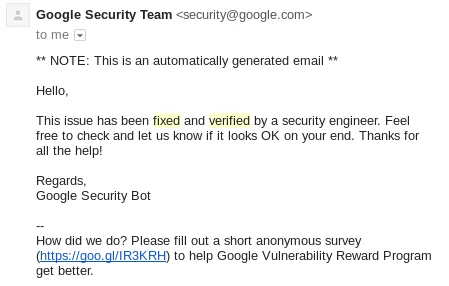
Following the message, the researcher checked whether the bug could still be replicated. Through the original vector, the Cloud Console client, it could not: that client no longer had access to the field. Since any client with the proper visibility access would still be able to set it, the researcher tried the Firebase client. That client not only had access to the field, the bug worked flawlessly as originally reported.
Step 5: the submit method vector
Google then blocked access to the field for the Firebase client, but not for other clients. The researcher also found a much better approach that let any client set the field: the submit configuration method. Setting usage.dependsOnServices through submit worked regardless of whether the client had access to the field through the API, because the field was set in the file handed to the method, and that file is checked differently.
Step 6: the second fix attempt
About a month after reporting the new vector, the researcher asked Google how it was going and received this reply:
A few months later Google implemented an internal validator on the submit configuration method, which successfully blocked that way of setting the field. Even so, it took until March 2018 to fix the original vector for all clients with access to the field.
Root cause
The flaw is in the enable logic. When a service is enabled, the services listed in usage.dependsOnServices are activated as a side effect, and that activation path does not perform the servicemanagement.services.bind authorisation check that a direct enable would. The dependency expansion does not perform the bind authorisation check that a direct enable would. The field was also only ever meant for Google internal clients, but the API surface did not enforce that consistently: the Cloud Console client, then the Firebase client, and finally the submit method each provided a way to set it.
Impact
An attacker who can set the field can enable any service on a project, including services the project owner never authorised, and including private Google APIs reserved for internal use, development and staging versions, or white-listed users. The only stated condition is that the target project satisfies the usage requirements of the services being enabled, for example billing being enabled for compute.googleapis.com. Because those private APIs may not follow the same security standards as public ones, the report treats the exposure as a serious one, with the potential for very dangerous attacks.
Fix
Google's final fix was to deprecate the usage.dependsOnServices field. It can still be set, but it has no effect at all when a service is enabled. Before that, an internal validator on the submit configuration method blocked the submit vector, and access to the field was blocked for the Firebase client.
Timeline (UTC-3)
| Date | Event |
|---|---|
| 2016-11-18 | Initial submission and triage |
| 2016-12-06 | Google Security team waiting on the product team to make a reward decision |
| 2016-12-13 | Working example of the bug requested and given |
| 2017-01-10 | A reward of 5000 dollars is issued |
| 2017-05-05 | Bug "fixed" and verified by a Google security engineer |
| 2017-05-08 | Sent example of bug still working with the Firebase client |
| 2017-05-20 | Discovered and reported the submit method vector |
| 2017-06-15 | Asked how the fix was going |
| 2017-06-19 | Google replied they were investigating ways to fix the submit method vector, but it was tricky |
| A few months later | Submit method vector fixed |
| March 2018 | usage.dependsOnServices field deprecated, thus fixed |
Variants to test
- Other clients with visibility into hidden fields. Try setting a restricted configuration field through each first-party client that can reach the same API. A positive result is a client that still accepts the field after another client has been blocked.
- File-based configuration methods. Where a configuration can be supplied as a file rather than as a structured request body, try the same field there. A positive result is the field being accepted because the file path is validated differently from the API field.
- Dependency expansion on enable. For any service platform with dependency or prerequisite activation, enable a service that lists another service as a dependency and check whether the dependency is activated without a bind permission on it. A positive result is the dependency becoming enabled for a user who lacks the permission to enable it directly.
- Private or restricted services as dependencies. Point the dependency list at internal, staging or white-listed services. A positive result is one of them being enabled and then reachable from the project.
- Requirement gating. Repeat the enable on a project that does and does not meet the dependency's usage requirements, such as billing. A positive result is the dependency activating only where the requirements are met, which confirms the expansion logic is running as designed apart from the missing authorisation check.
What happened, in plain words
A security researcher found a hidden setting in Google's service management system that let him enable services on a project without permission. By abusing this setting, he could turn on private Google APIs that were meant only for internal use. Google paid him $5000 for the original report, but the bug kept coming back through different paths until it was finally fixed in March 2018.
Key concepts you need to know
Before diving into the bug, let's explain some basic ideas. If you already know what an API is, skip ahead.
- API (Application Programming Interface): Think of it as a waiter in a restaurant. You (the app) tell the waiter what you want, the waiter goes to the kitchen (the server), and brings back your food (the data or action). You don't need to know how the kitchen works; you just use the menu (the API).
- Service: In Google's world, a service is a product or feature that you can turn on for your project, like Google Maps or Google Compute Engine. Each service has a name, such as
calendar.googleapis.com. - Project: A container for your Google Cloud resources. It's like a folder that holds your services and settings.
- Enable a service: Activating a service for your project so you can use it. Usually you need permission to do this.
- Configuration: Settings that control how a service behaves. You can create a configuration, then roll it out (make it active).
- Rollout: The process of applying a configuration so it takes effect.
- Cookie: A small piece of data stored in your browser that identifies you to a website. When you log in, the site gives your browser a cookie, and you send it back with each request to prove who you are.
- Token (SAPISIDHASH): A special header used by Google's internal clients to authenticate requests. It's like a temporary password derived from your cookies.
- Authorization check: Verifying that you have permission to do something. For example, checking if you're allowed to enable a service.
- Vulnerability class: Logic flaw: A bug where the code works as programmed but the logic is wrong, allowing unintended behaviour. Here, the system fails to check permissions when enabling dependent services.
The bug
The Google Service Management API lets developers describe a service using a Service object. This object contains various settings, including usage settings that define requirements or rules for using the service.
Among these usage settings, the researcher discovered a hidden option called dependsOnServices on November 18, 2016. It was documented as an array of strings with this description:
Services that must be activated in order for this service to be used.The set of services activated as a result of these relations are allactivated in parallel with no guaranteed order of activation.Each string is a service name, e.g. `calendar.googleapis.com`.
In plain words: if you enable a service, any services listed in its dependsOnServices array will also be enabled automatically. This was meant only for Google's internal use, not for external developers.
How the researcher tested it
The researcher used the Google Cloud Console client, a web interface for managing Google Cloud services. This client communicates with servicemanagement.clients6.google.com and authenticates using a SAPISIDHASH header and Google cookies.
To test the hidden field, he sent a request to create a new configuration for his service, including the dependsOnServices array. Then he rolled out the configuration and enabled the service on one of his projects.
Here is the exact request he used:
POST /v1/services/<SERVICE NAME>/configs?key=[redacted] HTTP/1.1
Host: servicemanagement.clients6.google.com
Authorization: SAPISIDHASH <SAPISIDHASH>
X-Origin: https://console.cloud.google.com
Cookie: <GOOGLE COOKIES>
Content-Length: <CONTENT-LENGTH>

{
  "name": "<SERVICE NAME>",
  "producerProjectId": "<PROJECT>",
  "configVersion": 3,  "usage": {    "dependsOnServices": [      ...<SERVICES>...    ]  }
}
Let's break down this request line by line:
POST /v1/services/<SERVICE NAME>/configs?key=...: This sends a POST request to create a new configuration for the service named<SERVICE NAME>. Thekeyparameter is an API key (a public identifier for the application).Host: servicemanagement.clients6.google.com: The server address.Authorization: SAPISIDHASH <SAPISIDHASH>: The authentication header.SAPISIDHASHis a value computed from cookies to prove identity.X-Origin: https://console.cloud.google.com: Indicates the request comes from the Cloud Console web app.Cookie: <GOOGLE COOKIES>: The browser cookies that identify the user.Content-Length: <CONTENT-LENGTH>: The length of the request body.- The body is a JSON object representing the Service configuration:
name: The service name.producerProjectId: The project that owns the service.configVersion: The version number of the configuration.usage.dependsOnServices: An array of service names to enable automatically when this service is enabled.
After sending this request, the researcher rolled out the configuration and then enabled his service on a project. He observed that every service listed in dependsOnServices was also enabled, as long as the project met the usage requirements of those services (for example, billing enabled for compute.googleapis.com).
The security flaw
The critical issue: the system never checked whether the user had permission to enable the dependent services. The permission is called servicemanagement.services.bind. Normally, to enable a service, you need this permission. But when services are enabled as a side effect of dependsOnServices, this check is skipped.
This means an attacker could enable services on someone else's project without their permission or knowledge. Even worse, among the private services that could be enabled this way were internal Google APIs meant only for Google's own use, development versions, and APIs restricted to a few white-listed users (like Trusted Testers or the Google My Business API). These private APIs might not have the same security protections as public APIs, so enabling them could open the door to very dangerous attacks.
Reward and first fix attempt
After the researcher reported the bug and demonstrated that he could enable and access private internal Google APIs, Google awarded him $5000. Later, he received an email:
The researcher then checked if he could still reproduce the bug using the original method (the Cloud Console client). He could not, because that client no longer had access to the dependsOnServices field.
However, he knew that any client with the right visibility could still set the field. So he tried the Firebase client. Surprisingly, not only did the Firebase client have access to the field, but the bug worked perfectly: he could still enable dependent services without permission.
The submit method vector
Google then blocked access to the field for the Firebase client, but not for other clients. The researcher also found a better way that allowed any client to set the field: using the submit configuration method. The field was set in the file given to the method, which is checked differently. By setting usage.dependsOnServices in that file, the field was accepted regardless of whether the client had direct access to it through the API, because the file is validated differently.
Second fix attempt
About a month after reporting this new vector, the researcher asked Google for an update and received this reply:
A few months later, Google added an internal validator to the submit configuration method that successfully blocked this way of setting the field. However, it took until March 2018 to fully fix the original vector for all clients with access to the field. The final fix was to deprecate the usage.dependsOnServices field: it can still be set, but it has no effect when enabling a service.
Root cause
The flaw was in the enable logic. When a service is enabled, the services listed in usage.dependsOnServices are activated as a side effect, and this activation path did not perform the servicemanagement.services.bind authorization check that a direct enable would. The dependency expansion did not perform the bind authorisation check that a direct enable would. Additionally, the field was only meant for Google internal clients, but the API surface did not enforce that consistently: the Cloud Console client, then the Firebase client, and finally the submit method each provided a way to set it.
Impact
An attacker who can set the field can enable any service on a project, including services the project owner never authorized, and including private Google APIs reserved for internal use, development and staging versions, or white-listed users. The only stated condition is that the target project satisfies the usage requirements of the services being enabled, for example billing being enabled for compute.googleapis.com. Because those private APIs may not follow the same security standards as public ones, the report treats the exposure as serious, with the potential for very dangerous attacks.
Fix
Google's final fix was to deprecate the usage.dependsOnServices field. It can still be set, but it has no effect at all when a service is enabled. Before that, an internal validator on the submit configuration method blocked the submit vector, and access to the field was blocked for the Firebase client.
Timeline (UTC-3)
| Date | Event |
|---|---|
| 2016-11-18 | Initial submission and triage |
| 2016-12-06 | Google Security team waiting on the product team to make a reward decision |
| 2016-12-13 | Working example of the bug requested and given |
| 2017-01-10 | A reward of 5000 dollars is issued |
| 2017-05-05 | Bug "fixed" and verified by a Google security engineer |
| 2017-05-08 | Sent example of bug still working with the Firebase client |
| 2017-05-20 | Discovered and reported the submit method vector |
| 2017-06-15 | Asked how the fix was going |
| 2017-06-19 | Google replied they were investigating ways to fix the submit method vector, but it was tricky |
| A few months later | Submit method vector fixed |
| March 2018 | usage.dependsOnServices field deprecated, thus fixed |
Variants to test
If you're testing similar systems, here are some ideas:
- Other clients with visibility into hidden fields. Try setting a restricted configuration field through each first-party client that can reach the same API. A positive result is a client that still accepts the field after another client has been blocked.
- File-based configuration methods. Where a configuration can be supplied as a file rather than as a structured request body, try the same field there. A positive result is the field being accepted because the file path is validated differently from the API field.
- Dependency expansion on enable. For any service platform with dependency or prerequisite activation, enable a service that lists another service as a dependency and check whether the dependency is activated without a bind permission on it. A positive result is the dependency becoming enabled for a user who lacks the permission to enable it directly.
- Private or restricted services as dependencies. Point the dependency list at internal, staging or white-listed services. A positive result is one of them being enabled and then reachable from the project.
- Requirement gating. Repeat the enable on a project that does and does not meet the dependency's usage requirements, such as billing. A positive result is the dependency activating only where the requirements are met, which confirms the expansion logic is running as designed apart from the missing authorization check.
Glossary
- API (Application Programming Interface): A set of rules that allows different software applications to communicate with each other.
- Service: A product or feature provided by Google Cloud, such as Compute Engine or Cloud Storage.
- Project: A container for Google Cloud resources, used to organize and manage them.
- Enable a service: Activate a service for a project so it can be used.
- Configuration: Settings that control the behaviour of a service.
- Rollout: The process of applying a configuration to make it active.
- Cookie: A small piece of data stored by a website in your browser to remember you.
- Token (SAPISIDHASH): An authentication value used by Google clients, derived from cookies.
- Authorization check: The process of verifying that a user has permission to perform an action.
- Logic flaw: A vulnerability where the code works as intended but the logic is incorrect, leading to unintended behaviour.
dependsOnServices: A hidden field in the Service configuration that lists services to enable automatically when the main service is enabled.servicemanagement.services.bind: The permission required to enable a service.- Submit configuration method: An API method that allows submitting a configuration file, which may be validated differently from direct API calls.
- Deprecate: To mark a feature as obsolete and discourage its use, often by making it have no effect.

