Google adwords 3133.7 Stored XSS
A stored cross-site scripting vulnerability existed in Google AdWords where a conversation name field accepted an SVG payload with an onload handler, which executed when the page was revisited. An attacker could run arbitrary JavaScript in the context of a victim's session.
 Published on medium.com
There was a dream called Google and its HOF without thinking about reward or anything else.
The full write-up lives on its author's site
It belongs to its author, so we link to it rather than copy it. The other two tabs are our own rewrites, checked against it.
Context
This write-up describes a stored cross-site scripting (XSS) vulnerability that Emad Shanab (@Alra3ees) found in Google AdWords, reported to Google on 8 March 2018 and disclosed on 21 March 2018. The feature involved is the conversions area of the AdWords interface, reached at:
https://adwords.google.com/aw/conversions
Conversions are the actions a customer takes after clicking an ad, and the AdWords interface lets an account holder create and name conversion entries.
The author frames the work as a personal goal of getting into the Google Hall of Fame (HOF), and says this was the easiest vulnerability he had found and the one that had been rewarded the most at that point.
Setup
The report gives few setup details. The researcher was logged in to AdWords and browsing the interface manually, moving from page to page. He describes his available time as six hours a day, alongside his work as a lawyer. No specific browser build numbers, proxy tools or extensions are named. The payload was shown working in the latest versions of Firefox on Kali Linux and on Windows, and the report says it works on all the latest versions of browsers.
Finding it
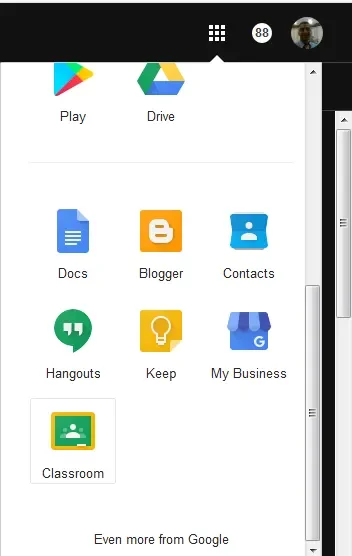
On 8 March 2018, while browsing Gmail, the author clicked the "even more from Google" link in the top right of the page, which leads to the list of Google products.
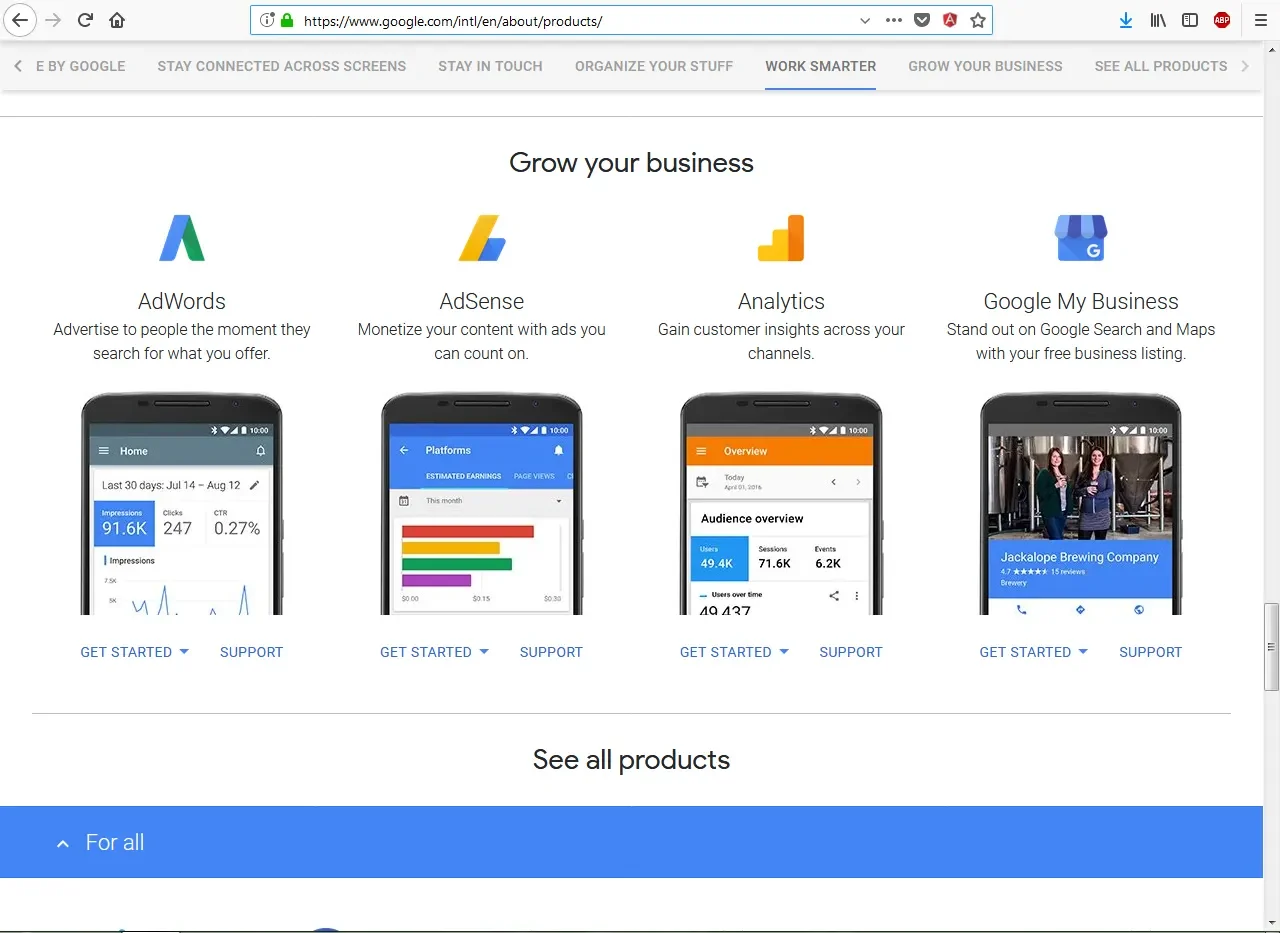
From that product page he picked Google AdWords as his target. He logged in and moved through the interface, adding a range of payloads to input fields in the hope that an alert would fire. He describes this as playing around without expecting to find anything.
Exploitation
Step 1: reach the conversions page
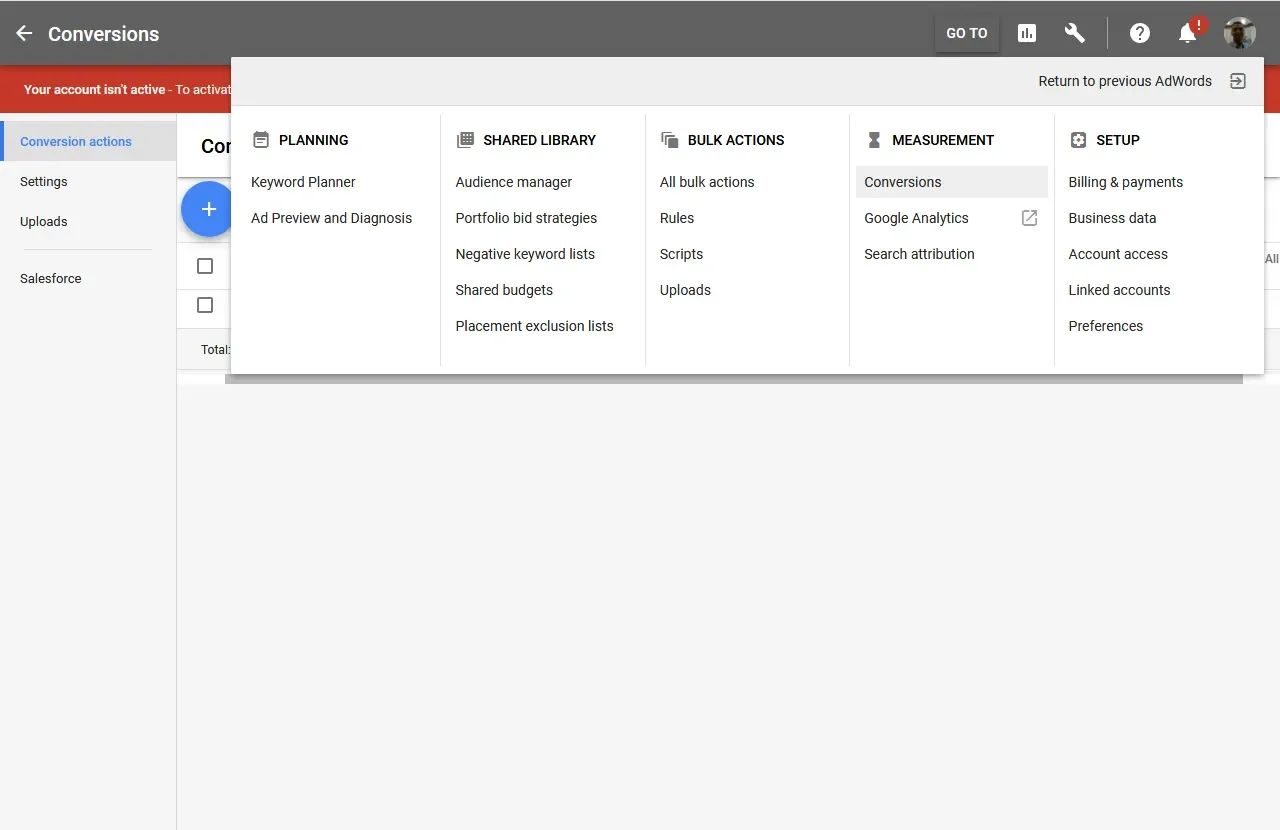
He navigated to the conversions page of the AdWords interface:
https://adwords.google.com/aw/conversions
Step 2: create a conversion with a payload in the name
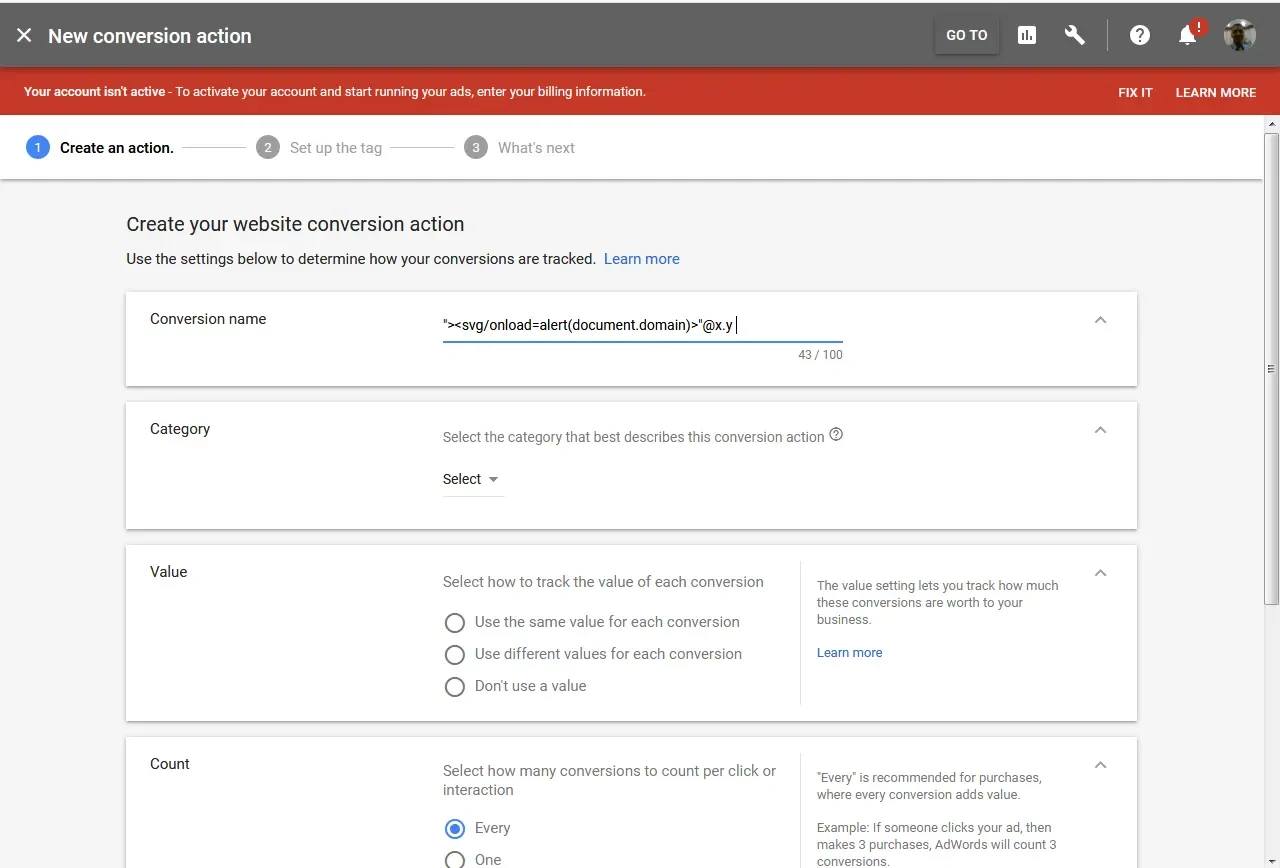
He added a new conversion and put the following payload in the conversion name field:
The payload closes the surrounding attribute or tag with ">, then injects an SVG element whose onload handler runs alert(document.domain). The trailing "@x.y keeps the value looking like a plausible name and closes the quote. Because the handler uses document.domain, the alert shows which origin the script is executing in, which is what distinguishes a real XSS from a self-XSS confined to the tester's own session.
Step 3: distinguish stored XSS from self-XSS
After the payload was added, the alert popped up several times. The author suspected self-XSS, so he clicked the option to prevent the message from appearing again and carried on. He then clicked Save Conversation. Because he had suppressed the alert, nothing fired at that point.
Step 4: reload the saved URL in a new tab
He copied the entire URL and pasted it into a new tab. This time the payload executed again, which showed that the value had been stored and was not only a self-XSS in his own session.
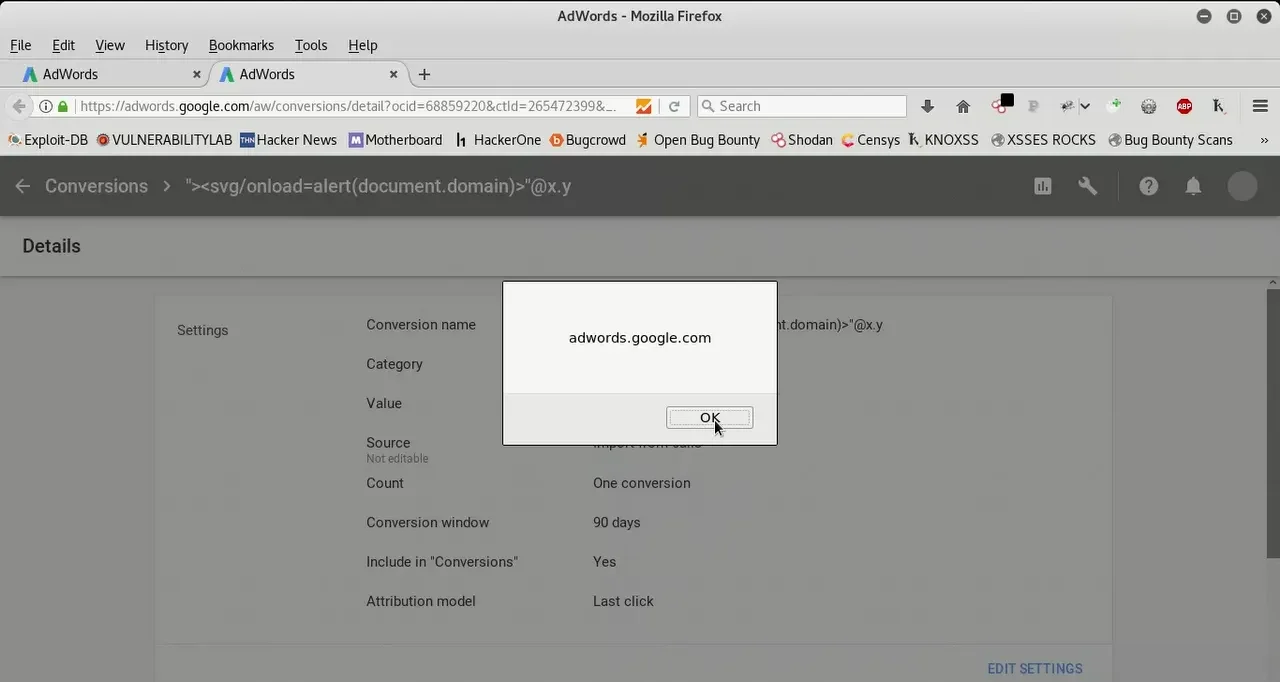
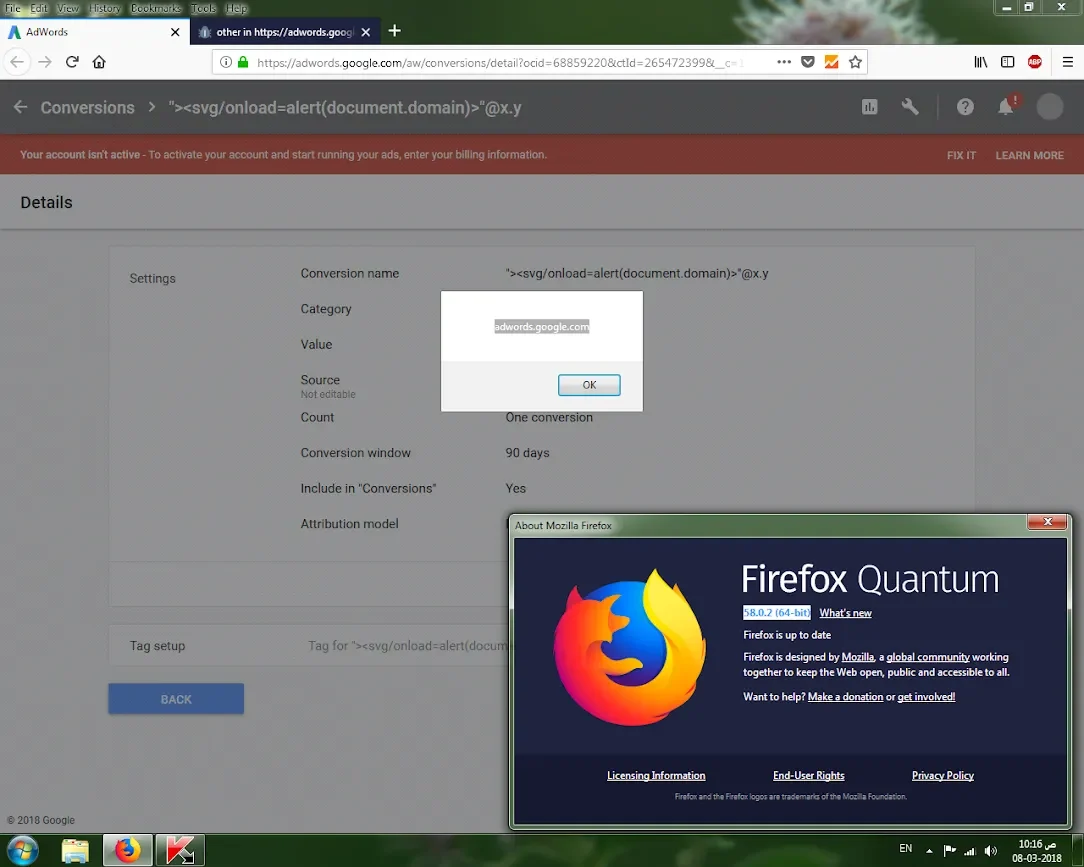
The report states that the payload worked in the latest versions of Firefox on Kali Linux and on Windows, and on all the latest browsers he tested.
Step 5: report and triage
He wrote the report, recorded a video explaining the vulnerability, and submitted it to Google, hoping it would not be marked as a duplicate. Google accepted the vulnerability and replied with "nice catch ( i loved it )".

Timeline
The report gives the following dates:
| Date | Event |
|---|---|
| 08/03/2018 | Vulnerability found and email sent to Google |
| 08/03/2018 | Automatic reply confirming receipt |
| 08/03/2018 | Google accepts the vulnerability |
| 08/03/2018 | Google replies "nice catch ( i loved it )" |
| 20/03/2018 | Report closed and status changed to Resolved |
| 20/03/2018 | Reward of $3133.7 paid for stored XSS in Google AdWords |

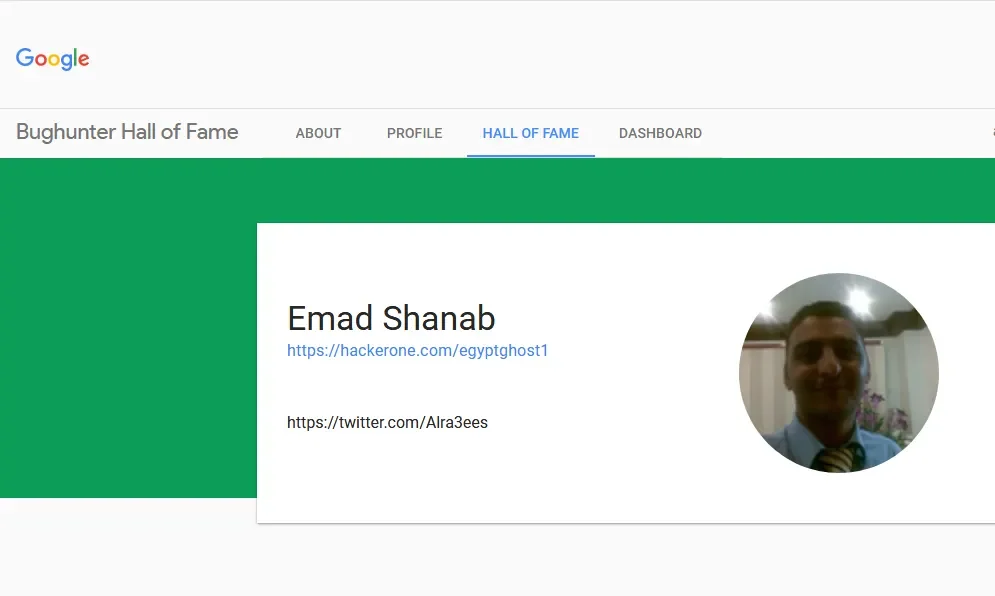
The reward was $3133.70, and the author's name was added to the Google HOF.
Root cause
The report does not include any source code or server response, so the exact defect is not shown. What the behaviour implies is that the conversion name was stored and later written into the page without adequate output encoding, so the "> sequence could break out of the context the value was placed in and the <svg onload=...> element was parsed and executed. The fact that the alert fired repeatedly during entry and again after saving and reloading the URL in a new tab indicates the value was persisted and re-rendered, not merely reflected.
The report does not say which defence failed or whether a filter was present. The author's own initial assumption, that the repeated alert might be self-XSS, is the reason he suppressed it and saved, which is what proved persistence.
Impact
The stored payload executed in the context of the AdWords origin, as shown by alert(document.domain). The report does not describe who else could view the affected conversion entry, so the set of possible victims is not stated. The author's demonstration stops at the alert; no data theft or account action is shown.
Fix
Google closed the report as Resolved on 20 March 2018 and paid the bounty.
Variants to test
- Other free-text name fields in the same product, such as campaign, ad group or audience names. A positive result is the payload executing after saving and reloading the page in a fresh tab.
- Fields that are echoed into HTML attributes rather than element bodies, using the
">breakout shown here. A positive result is the attribute closing and a new element with an event handler being parsed. - Values that are rendered in more than one place, for example a list view and a detail view. A positive result is execution in a view other than the one used to enter the value, which confirms server-side storage.
- Suppressing the alert during entry and then reloading the saved URL, as the author did. A positive result is the alert returning on reload, which rules out self-XSS.
- Using
alert(document.domain)rather thanalert(1)so the executing origin is visible. A positive result shows the target's domain, confirming the script runs in the application's context.
What happened, in plain words
A security researcher named Emad Shanab (@Alra3ees) found a bug in Google AdWords, the part of Google that lets people create and manage online ads. The bug let him type a small piece of code into a name field, save it, and have that code run again when the saved page was reopened. This kind of bug is called stored cross-site scripting, or stored XSS for short.
He reported it to Google on 8 March 2018, Google accepted it the same day, and the report was closed as Resolved on 20 March 2018 with a reward of $3133.70. His name was added to the Google Hall of Fame (HOF), a public list of people who have reported valid security bugs to Google.
Before going further, a few ideas from zero, because the rest of the article depends on them:
- A web page is a document your browser builds from instructions. The server sends text (HTML), the browser reads it and draws the page. Some of that text can be instructions the browser will run, not just display. That is what makes XSS possible.
- JavaScript is the programming language browsers run. A short JavaScript instruction like
alert(...)makes a pop-up box appear. Researchers use pop-ups as a harmless proof that their code ran. - XSS (cross-site scripting) means getting your own JavaScript to run inside someone else's website, in that website's context. Think of slipping a note into a letter someone else is writing: the reader trusts the letter because it came from a trusted sender, but the note is yours.
- Stored XSS is the variant where the malicious text is saved by the website (in a database, for example) and shown again later to other visitors. It is like writing graffiti on a wall: it stays there and everyone who walks past sees it, not just you.
- Self-XSS is a false alarm. The code only runs because you pasted it into your own browser. Nobody else is affected, so it is not a real vulnerability. Telling the two apart is the central skill in this report.
- A conversion in advertising is the action a customer takes after clicking an ad, such as buying something or signing up. AdWords lets an account holder create conversion entries and give each one a name.
- The Hall of Fame (HOF) is Google's public thank-you page listing researchers whose reports were accepted.
Context
The feature involved is the conversions area of the AdWords interface, reached at this address:
https://adwords.google.com/aw/conversions
Reading that address from left to right: https:// means the connection is encrypted; adwords.google.com is the Google server that hosts the AdWords product; /aw/conversions is the specific page inside it, the conversions list. Typing an address like this into the browser's address bar is how you visit a page directly.
Conversions are the actions a customer takes after clicking an ad, and the AdWords interface lets an account holder create and name conversion entries. The name is text the user supplies. The application saves that text and later shows it back in the interface. That round trip, save then show, is exactly where this bug lived: if the site shows the saved name without neutralising any code inside it, the browser will run that code.
The author frames the work as a personal goal of getting into the Google Hall of Fame, and says this was the easiest vulnerability he had found and the one that had been rewarded the most at that point.
Setup
The report gives few setup details. The researcher was logged in to AdWords and browsing the interface by hand, moving from page to page. He describes his available time as six hours a day, alongside his work as a lawyer. No specific browser build numbers, proxy tools or extensions are named. The payload was shown working in the latest versions of Firefox on Kali Linux and on Windows, and the report says it works on all the latest versions of browsers.
Two terms worth knowing here: Firefox is a web browser, the program you use to view pages. Kali Linux is an operating system popular with security testers; it is just another place to run a browser, and testing on more than one system helps show a bug is not a quirk of one machine.
Finding it
On 8 March 2018, while browsing Gmail, the author clicked the "even more from Google" link in the top right of the page, which leads to the list of Google products.
From that product page he picked Google AdWords as his target. He logged in and moved through the interface, adding a range of payloads to input fields in the hope that an alert would fire. He describes this as playing around without expecting to find anything.
A payload here simply means the text you type into a field to test whether the site mishandles it. The goal of the test is an alert, the pop-up box mentioned earlier: if it appears, your text was treated as code.
Exploitation
Step 1: reach the conversions page
He navigated to the conversions page of the AdWords interface:
https://adwords.google.com/aw/conversions
This is the same address as in the Context section. Visiting it directly, rather than clicking through menus, is a habit testers pick up: it removes doubt about which page you are actually on.
Step 2: create a conversion with a payload in the name
He added a new conversion and put the following payload in the conversion name field:
Line by line, in plain words:
">closes whatever quote and tag the site had wrapped around the name. Imagine the site writes your name inside quotation marks in its page code; this sequence ends the quote early and steps outside it.<svg ...>starts an SVG element. SVG is a format for drawing graphics on a web page, and the browser treats it as real page content, not as text to display.onload=alert(document.domain)attaches an instruction to that element: when the element finishes loading, run this JavaScript.alert(...)opens the pop-up.document.domainis the address of the site the code is running on, so the pop-up shows the site's own domain name rather than a plain1. That detail matters: it proves the code is running inside the target site, not somewhere harmless."@x.ycloses the quote again and adds a tail that makes the whole value look like a plausible name, so the field does not look obviously malicious.
Step 3: distinguish stored XSS from self-XSS
After the payload was added, the alert popped up several times. The author suspected self-XSS, so he clicked the option to prevent the message from appearing again and carried on. He then clicked Save Conversation. Because he had suppressed the alert, nothing fired at that point.
Why do this? If the pop-up only appears while you are typing, it might be your own browser reacting to your own input, which is self-XSS and worthless as a finding. Suppressing the pop-up and then saving is a deliberate test: it clears the stage so that the next step can show whether the site remembered the payload.
Step 4: reload the saved URL in a new tab
He copied the entire URL and pasted it into a new tab. This time the payload executed again, which showed that the value had been stored and was not only a self-XSS in his own session.
The report states that the payload worked in the latest versions of Firefox on Kali Linux and on Windows, and on all the latest browsers he tested.
This is the moment the bug became real. A fresh tab loading the saved address asks the server for the page again. If the pop-up returns, the server must have kept the payload and sent it back inside the page. That is stored XSS: the graffiti is on the wall, not just on your own notepad.
Step 5: report and triage
He wrote the report, recorded a video explaining the vulnerability, and submitted it to Google, hoping it would not be marked as a duplicate. Google accepted the vulnerability and replied with "nice catch ( i loved it )".
A duplicate is a report of a bug someone else already reported. Bug bounty programmes usually pay only the first valid report, so a duplicate earns nothing. Triage is the programme's process of reviewing a report, confirming it is real, and deciding what to do about it.
Timeline
The report gives the following dates:
| Date | Event |
|---|---|
| 08/03/2018 | Vulnerability found and email sent to Google |
| 08/03/2018 | Automatic reply confirming receipt |
| 08/03/2018 | Google accepts the vulnerability |
| 08/03/2018 | Google replies "nice catch ( i loved it )" |
| 20/03/2018 | Report closed and status changed to Resolved |
| 20/03/2018 | Reward of $3133.7 paid for stored XSS in Google AdWords |
The reward was $3133.70, and the author's name was added to the Google HOF.
Root cause
The report does not include any source code or server response, so the exact defect is not shown. What the behaviour implies is that the conversion name was stored and later written into the page without adequate output encoding, so the "> sequence could break out of the context the value was placed in and the <svg onload=...> element was parsed and executed. The fact that the alert fired repeatedly during entry and again after saving and reloading the URL in a new tab indicates the value was persisted and re-rendered, not merely reflected.
Output encoding means converting characters that have special meaning in HTML into harmless equivalents before putting them on the page, so that a < stays a visible character instead of starting a tag. Think of it as sealing a letter in an envelope: the words are still there, but nobody mistakes them for instructions. When a site skips this step, user text is read as page structure, and that is the whole bug.
The report does not say which defence failed or whether a filter was present. The author's own initial assumption, that the repeated alert might be self-XSS, is the reason he suppressed it and saved, which is what proved persistence.
Impact
The stored payload executed in the context of the AdWords origin, as shown by alert(document.domain). The report does not describe who else could view the affected conversion entry, so the set of possible victims is not stated. The author's demonstration stops at the alert; no data theft or account action is shown.
Origin means the combination of scheme, host and port that a browser uses to decide what a page is allowed to touch, roughly the site's identity. Authenticated session means the state of being logged in: the browser holds proof that you signed in, and any code running on the site can act as you while that proof is valid. That is why XSS matters: the attacker's code inherits your logged-in powers.
Fix
Google closed the report as Resolved on 20 March 2018 and paid the bounty.
Server-side validation means the server itself checks what it receives and refuses bad input, rather than trusting the browser to behave. Checking only in the browser is like a bouncer who only guards the door you can see.
Variants to test
- Other free-text name fields in the same product, such as campaign, ad group or audience names. A positive result is the payload executing after saving and reloading the page in a fresh tab.
- Fields that are echoed into HTML attributes rather than element bodies, using the
">breakout shown here. A positive result is the attribute closing and a new element with an event handler being parsed. - Values that are rendered in more than one place, for example a list view and a detail view. A positive result is execution in a view other than the one used to enter the value, which confirms server-side storage.
- Suppressing the alert during entry and then reloading the saved URL, as the author did. A positive result is the alert returning on reload, which rules out self-XSS.
- Using
alert(document.domain)rather thanalert(1)so the executing origin is visible. A positive result shows the target's domain, confirming the script runs in the application's context.
Glossary
- AdWords: Google's advertising product, where account holders create and manage ads and conversions.
- Alert: a browser pop-up box; researchers use it as harmless proof that their JavaScript ran.
- Authenticated session: the state of being logged in, where the browser holds proof of sign-in and code on the site can act with your permissions.
- Bug bounty programme: a scheme where an organisation pays people for reporting security bugs responsibly.
- Conversion: the action a customer takes after clicking an ad, such as a purchase; also the named entry an account holder creates to track it.
- Cross-site scripting (XSS): getting your own JavaScript to run inside someone else's website, in that site's context.
- Duplicate: a report of a bug that has already been reported, usually unpaid.
- Firefox: a web browser.
- Hall of Fame (HOF): Google's public list of researchers whose reports were accepted.
- HTML: the text format browsers read to build a web page.
- JavaScript: the programming language browsers run.
- Kali Linux: an operating system popular with security testers.
- Origin: the scheme, host and port combination a browser uses to decide what a page may access.
- Output encoding: converting characters with special meaning in HTML into harmless equivalents before displaying user text.
- Payload: the text typed into a field to test whether the site mishandles it.
- Self-XSS: a false alarm where code runs only because you pasted it into your own browser; nobody else is affected.
- Server-side validation: the server checking incoming input itself and rejecting bad values, rather than trusting the browser.
- Stored XSS: XSS where the malicious text is saved by the site and shown again later to other visitors.
- SVG: a format for drawing graphics on a web page, which the browser treats as real page content.
- Triage: a programme's process of reviewing a report, confirming it, and deciding what to do.




