ApatchMe - Authenticated Stored XSS Vulnerability in AWS and GCP Apache Airflow Services
AWS and GCP managed Apache Airflow services used an outdated version vulnerable to CVE-2023-29247, a stored XSS in the task instance details page. An authenticated attacker could store a JavaScript payload that runs automatically when a victim visits the page, allowing actions with the victim's privileges.

Subscribe
The full write-up lives on its author's site
It belongs to its author, so we link to it rather than copy it. The other two tabs are our own rewrites, checked against it.
Context
Apache Airflow is an open-source platform for programmatically authoring, scheduling and monitoring workflows. AWS and GCP both offer managed Airflow services: Amazon Managed Workflows for Apache Airflow (MWAA) and Google Cloud Composer. Each managed Airflow instance is attached to a managed web panel that authenticates its users and grants them session cookies, which those users then use to perform sensitive authenticated operations.
When creating a new environment, users of these managed services can choose from a number of images containing different Apache Airflow versions. The web panel image versions offered by AWS and GCP were all vulnerable to CVE-2023-29247, a stored XSS in the task instance details page. The vulnerability had previously been reported and fixed by Apache, but the managed services were still deploying an outdated, unpatched version. The research team, then part of Ermetic and now part of Tenable Research, called the issue ApatchMe.

Setup
The work involved an authenticated threat actor: the payload is stored through the task instance edit page, where the attacker controls some elements. The victim is any user who later views the affected page, and can be an admin or another user with more permissions than the attacker.
No publicly available reproduction or PoC for the CVE existed, so the team reproduced it themselves to achieve a stored XSS on a managed Apache Airflow web panel. They built a custom PoC and subsequently reported the vulnerability to AWS and GCP. They also examined Microsoft Azure, which uses vulnerable managed Apache Airflow instances in its Data Factory service: the specific version Azure uses was found to be vulnerable, but the team deemed it non-exploitable there.
Finding it
The starting point was the patch. Since Apache Airflow is open-source, the fix is visible in GitHub, and the team used it to locate the vulnerable code. The following patches took place on April 7, 2023.
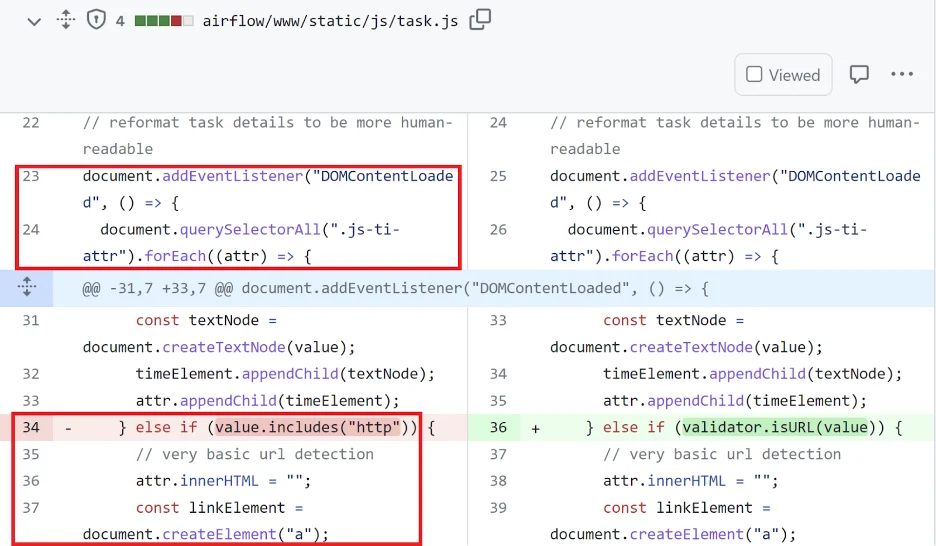
Source: github
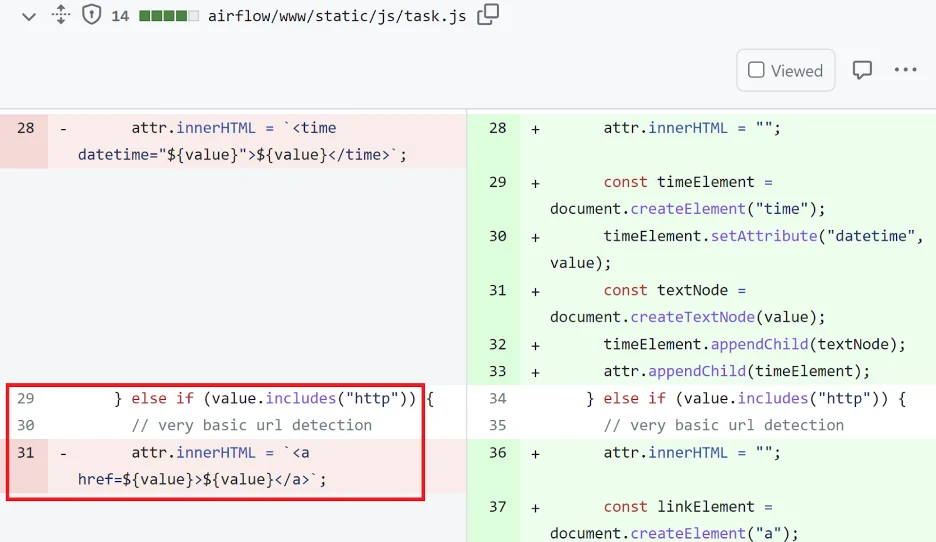
Source: github
Their main conclusions from analysing the patches were:
- The vulnerable code references only elements with the
js-ti-attrattribute, and through the task instance edit page the attacker controls some of these elements. - Although a check is conducted for a URL or date input, the URL check is flawed because the
httpstring usescontains. This makes the check easy to bypass and means it does not really check for a properly constructed URL. - The vulnerable code uses the
innerHtmlproperty, which parses HTML tags. This property, as opposed toinnerTextand other alternatives, is known to be vulnerable to XSS when populated with malicious user input. - The fix involves using a dedicated library for URL validation and not using the vulnerable and dangerous
innerHtmlproperty.
Exploitation
Step 1: Bypass the URL validation
The flawed URL validation can be abused by putting http anywhere in the payload. The check only looks for the substring, so the value does not need to be a well-formed URL.
Step 2: Reach the sink
The payload is inputted to a sink: an innerHtml property that is vulnerable to XSS. While injecting different payloads, the team found they could not close the HTML a tag to open a new one, because the server encodes the closing and opening tag characters (greater than > and less than <) before returning them to the innerHtml property.
The only remaining option is to inject into the href or close the attribute, and then inject more attributes into the a tag.
Step 3: A first payload that needs a click
As a first step to exploit the XSS, they injected:
javascript:alert('has-to-include-http')
This works as a PoC, but it requires a click on the payload, which did not suffice for the team.
Step 4: Make it run on page visit
Searching for more vectors to run the XSS automatically on a page visit, they inspected the CSS of the page and noticed that it uses animations. One of the events that can be abused on the a tag is onanimationend, which will (apparently) execute automatically on the animation end.
They targeted the fa-spin animation found by inspecting the CSS of the page and injected the following:
pochttp" style="animation-name:fa-spin"onanimationend="prompt(document.domain)"
With this payload, the XSS runs automatically on a page visit.
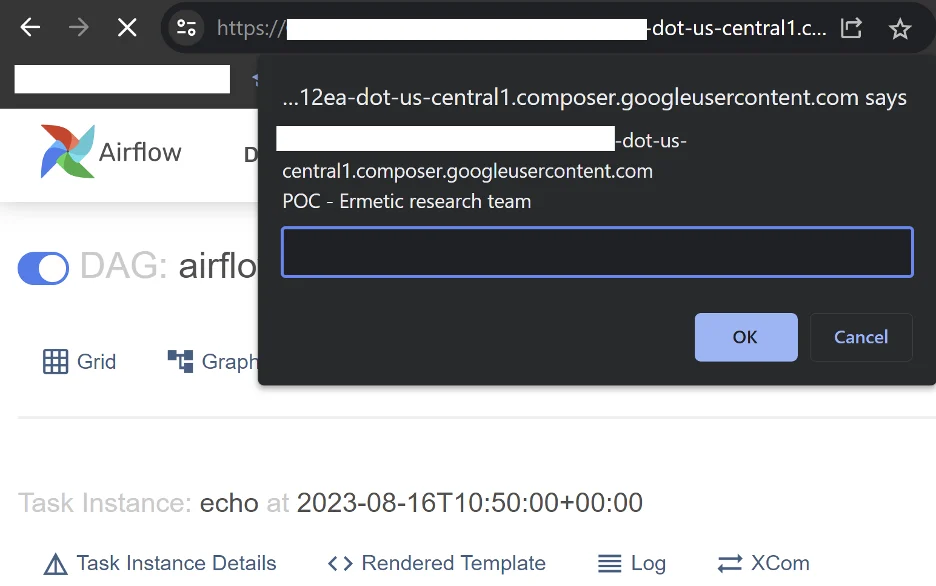
Source: Tenable, November 2023
Root cause
The vulnerable code references elements carrying the js-ti-attr attribute, some of which the attacker controls through the task instance edit page. It validates a URL or date input, but the URL check is a substring contains test for http, so any value containing that string passes. The value then reaches the innerHtml property, which parses HTML tags and is known to be vulnerable to XSS when populated with malicious user input.
The server encodes < and > before returning the value to innerHtml, which blocks breaking out of the a element and opening a new tag. That defence does not stop attribute injection: the attacker can still inject into href or close the attribute and add further attributes to the existing a tag. The onanimationend handler combined with the page's own fa-spin animation then gives automatic execution without a click.
The fix uses a dedicated library for URL validation and stops using the innerHtml property.
Impact
Authenticated threat actors can use ApatchMe to store their JavaScript payload in the victim's managed Apache Airflow and run JavaScript on behalf of the victim, who can be an admin or another user with more permissions than the threat actor, leading to privilege escalation. With JavaScript, the attacker can run any operation in the session that the victim could: edit tasks, read jobs, job runs, read plugins and configurations, list connections, add variables and more.
The exposure is broad: Apache Airflow has 12 million downloads per month, and a sampling from the research showed managed services for Apache Airflow in use by 20% of their customers. All web panel image versions offered by AWS and GCP were vulnerable to CVE-2023-29247. Azure's Data Factory also uses vulnerable managed Apache Airflow instances, but the team deemed the vulnerability non-exploitable there.
Fix
AWS released a new version of MWAA and, for the unpatched versions, added a Content Security Policy (CSP) as a guardrail. MWAA users can perform an environment update through the AWS Console by selecting the affected environment and then selecting Edit->Next->Next->Save to ensure that their current Airflow version has the latest security fixes. GCP was working on releasing a new, updated version, but the vulnerable image versions were still available, making all instances deployed prior to the patch still vulnerable.
Users should update their Apache Airflow instances and choose the updated version when creating a new one. Organisations should review and identify already deployed instances in their AWS or GCP managed services, since those may still be running outdated images and remain susceptible if not updated.
Variants to test
- Substring-based URL validation elsewhere. Submit values that contain the expected substring but are not valid URLs, for example a
javascript:URI with the required string appended. A positive result is the value being accepted and reaching an HTML sink. - Attribute injection where tag characters are encoded. When
<and>are encoded but the value lands inside an existing tag, try closing the attribute and adding new attributes (event handlers,style) to the existing element. A positive result is a new attribute appearing in the rendered markup. - Animation-driven handlers. Inspect the page CSS for animations and target them with
onanimationend(or similar animation events) on an injected attribute. A positive result is the handler firing on page load without user interaction. - Other
js-ti-attrelements. Enumerate elements carrying thejs-ti-attrattribute and check which ones are writable through the task instance edit page. A positive result is a writable element whose value is later rendered throughinnerHtml. - Managed service image versions. When assessing a managed Airflow offering, check which image versions are selectable and whether they predate the April 7, 2023 patches. A positive result is an offered image still containing the vulnerable code.
What happened, in plain words
Apache Airflow is a free, open-source tool that lets people describe, schedule and watch over automated data jobs. Think of it as a very capable alarm clock and to-do list for computers: you write down the steps of a job, tell Airflow when to run them, and Airflow runs them and shows you what happened. Because it is open-source, anyone can read its code, and anyone can offer it as a hosted service.
Two big cloud providers do exactly that. Amazon Web Services (AWS) offers a hosted Airflow service called Amazon Managed Workflows for Apache Airflow, or MWAA. Google Cloud Platform (GCP) offers one called Google Cloud Composer. "Managed" means the provider runs the software for you: you do not install or maintain it, you just log in to a web page and use it.
That web page is the important part. Each hosted Airflow instance comes with a web panel where users log in. After logging in, the panel gives the browser a session cookie, which is a small piece of data the browser sends back with every request so the panel knows who you are. With that cookie, a user can do sensitive things: edit tasks, read job runs, look at configurations and more.
The research team, then part of Ermetic and now part of Tenable Research, found that the AWS and GCP managed Airflow services were vulnerable to a known bug called CVE-2023-29247. A CVE is a public catalogue number for a security flaw, so people can talk about the same bug unambiguously. This particular bug is a stored cross-site scripting (stored XSS) flaw in the task instance details page. The finding was called ApatchMe.

Stored XSS means this: an attacker manages to save some JavaScript (code that runs in a victim's browser) inside the application, and later, when another user opens the page where that saved content is shown, the victim's browser runs the attacker's code. The code runs as if it came from the trusted site, with the victim's permissions. The everyday comparison is a noticeboard in an office: if someone pins a note that looks official, everyone who reads it trusts it, even though the person who pinned it may have no authority at all.
The bug had already been reported to Apache and fixed by them. The problem was that the managed services from AWS and GCP were still handing out an old, unpatched version of Airflow. So the fix existed, but the hosted services had not picked it up.
The team confirmed the issue by building their own proof of concept (PoC), a small demonstration that proves a vulnerability is real, and subsequently reported it to AWS and GCP. AWS responded by offering a new, non-vulnerable Airflow version and, for the old versions, adding a Content Security Policy (CSP) as a guardrail. A CSP is a set of instructions a website sends to the browser saying which kinds of content are allowed to run, so it can block injected scripts even when the underlying bug is present. GCP was working on releasing a new, non-vulnerable version.
Microsoft Azure also uses managed Airflow instances in its Data Factory service. The specific version Azure uses was found to be vulnerable, but the team judged it non-exploitable there, meaning they did not find a practical way to abuse it in that setup.
When you create a new environment on MWAA or Cloud Composer, you pick from a list of images, each containing a particular Airflow version. An image here is a pre-built package of software, like a sealed box containing a complete installation. All the web panel image versions offered by AWS and GCP were vulnerable to CVE-2023-29247. Current users of vulnerable services may still be running unpatched instances, so organisations should patch their instances as soon as possible by deploying an updated image version.
How common is Apache Airflow?
Apache Airflow is one of the most popular orchestration tools, with 12 million downloads per month. Orchestration here means coordinating many separate jobs so they run in the right order. A sampling from the research showed managed Airflow services in use by 20% of their customers.
The attack scenario
An authenticated attacker, meaning someone with a valid login on the Airflow panel, can use ApatchMe to store their JavaScript payload in the victim's managed Airflow. A payload is the piece of code an attacker wants to get executed. When the victim later opens the affected page, the payload runs in the victim's browser on the victim's behalf.
The victim can be an admin or another user with more permissions than the attacker. That is privilege escalation: starting with low permissions and ending up able to do what a more powerful user can do. With JavaScript running in the victim's session, the attacker can perform any operation the victim could: edit tasks, read jobs and job runs, read plugins and configurations, list connections, add variables and more.
Reproduction process
No publicly available reproduction or PoC for the CVE existed, so the team reproduced it themselves to achieve a stored XSS on a managed Airflow web panel. They hooked a CSS animation to force the XSS to run automatically when a victim's page is visited. CSS is the language that describes how a web page looks, and animations are one of its features; "hooking" an animation means attaching the payload to an animation event so it fires when the animation finishes.
First, they noticed that the managed Airflow image versions that AWS, Azure and GCP were deploying were vulnerable. Since Apache Airflow is open-source, the patch can be viewed on GitHub, and the team used it to find their starting point. Reading a fix is often the fastest way to understand a bug: the change shows exactly which line was wrong and what the developers did about it.
The following patches took place on April 7, 2023:
Source: github
Source: github
Their main conclusions from analysing the patches were:
- The vulnerable code references only elements with the
js-ti-attrattribute, and through the task instance edit page the attacker controls some of these elements. An attribute is extra information attached to an HTML element, such as a label or a setting.js-ti-attris simply a marker the code uses to find certain elements on the page. - Although a check is conducted for a URL or date input, the URL check is flawed because the
httpstring usescontains. In other words, the code does not verify that the value is a proper web address; it only asks whether the texthttpappears somewhere inside it. That is like a bouncer who lets you in if your name contains the letter "a". - The vulnerable code uses the
innerHtmlproperty, which parses HTML tags. HTML is the language web pages are written in, and tags are its building blocks, such as<a>for a link.innerHtmltakes a piece of text and treats it as HTML, so any tags inside it become real page elements. That property, as opposed toinnerTextand other alternatives, is known to be vulnerable to XSS when populated with malicious user input.innerTexttreats the same text as plain words and never turns it into working tags. - The fix involves using a dedicated library for URL validation and not using the vulnerable and dangerous
innerHtmlproperty. A library here is a ready-made piece of code written by someone else that does a job properly, in this case checking that a value really is a valid URL.
Exploitation
Step 1: Bypass the URL validation
The flawed URL validation can be abused by putting http anywhere in the payload. The check only looks for the substring, so the value does not need to be a well-formed URL. This step matters because the application will refuse values that do not pass the check; finding a way around the check is what lets the payload reach the page at all.
Step 2: Reach the sink
The payload is inputted to a sink: an innerHtml property that is vulnerable to XSS. A sink is the place where data finally gets used in a dangerous way, in this case where text is turned into live HTML. While injecting different payloads, the team found they could not close the HTML a tag to open a new one, because the server encodes the closing and opening tag characters (greater than > and less than <) before returning them to the innerHtml property. Encoding means replacing a character with a safe stand-in so the browser shows it as text instead of treating it as part of the page structure.
The only remaining option is to inject into the href or close the attribute, and then inject more attributes into the a tag. href is the attribute of a link that holds its destination address. If you cannot create a brand-new element, you can still change the settings of the element that is already there.
Step 3: A first payload that needs a click
As a first step to exploit the XSS, they injected:
javascript:alert('has-to-include-http')
Line by line: javascript: is a prefix that tells the browser the link does not point to a web page but to a piece of JavaScript to run. alert(...) is a built-in browser function that shows a small pop-up box with the text inside the brackets. The text has-to-include-http is chosen because it contains the string http, which is what gets the value past the flawed check described above. The single quotes simply mark the text as a piece of text.
This works as a PoC, but it requires a click on the payload, which did not suffice for the team. A payload that needs a click is much weaker in practice, because the victim has to be tricked into clicking it, and a careful user may not.
Step 4: Make it run on page visit
Searching for more vectors to run the XSS automatically on a page visit, they inspected the CSS of the page and noticed that it uses animations. A vector here is a route or technique for delivering an attack. One of the events that can be abused on the a tag is onanimationend, which will (apparently) execute automatically on the animation end. An event is something the browser notices happening, such as a click or an animation finishing, and an event handler is code attached to that event so it runs when the event occurs.
They targeted the fa-spin animation found by inspecting the CSS of the page and injected the following:
pochttp" style="animation-name:fa-spin"onanimationend="prompt(document.domain)"
Line by line: pochttp is filler text that contains http, so the flawed check passes. The " closes the attribute the value was being placed into, which lets the rest of the text become new attributes on the same a tag. style="animation-name:fa-spin" adds a style attribute that applies the page's own fa-spin animation to the element. onanimationend="prompt(document.domain)" attaches a handler that runs when that animation ends. prompt(...) is a browser function that shows a pop-up asking for input, and document.domain is the address of the current page, so the pop-up proves the code is running in the context of the real site.
With this payload, the XSS runs automatically on a page visit:
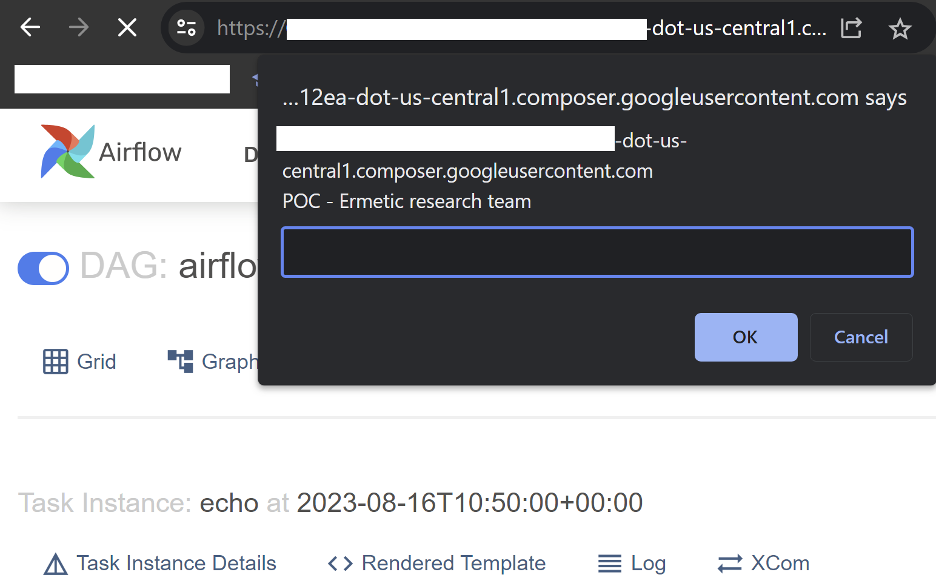
Source: Tenable, November 2023
Root cause
The vulnerable code references elements carrying the js-ti-attr attribute, some of which the attacker controls through the task instance edit page. It validates a URL or date input, but the URL check is a substring contains test for http, so any value containing that string passes. The value then reaches the innerHtml property, which parses HTML tags and is known to be vulnerable to XSS when populated with malicious user input.
The server encodes < and > before returning the value to innerHtml, which blocks breaking out of the a element and opening a new tag. That defence does not stop attribute injection: the attacker can still inject into href or close the attribute and add further attributes to the existing a tag. The onanimationend handler combined with the page's own fa-spin animation then gives automatic execution without a click.
The fix uses a dedicated library for URL validation and stops using the innerHtml property.
Impact
Authenticated threat actors can use ApatchMe to store their JavaScript payload in the victim's managed Airflow and run JavaScript on behalf of the victim, who can be an admin or another user with more permissions than the threat actor, leading to privilege escalation. With JavaScript, the attacker can run any operation in the session that the victim could: edit tasks, read jobs, job runs, read plugins and configurations, list connections, add variables and more.
The exposure is broad: Apache Airflow has 12 million downloads per month, and a sampling from the research showed managed services for Apache Airflow in use by 20% of their customers. All web panel image versions offered by AWS and GCP were vulnerable to CVE-2023-29247. Azure's Data Factory also uses vulnerable managed Apache Airflow instances, but the team deemed the vulnerability non-exploitable there.
Fix
AWS released a new version of MWAA and, for the unpatched versions, added a Content Security Policy (CSP) as a guardrail. MWAA users can perform an environment update through the AWS Console by selecting the affected environment and then selecting Edit->Next->Next->Save to ensure that their current Airflow version has the latest security fixes. GCP was working on releasing a new, updated version, but the vulnerable image versions were still available, making all instances deployed prior to the patch still vulnerable.
Users should update their Apache Airflow instances and choose the updated version when creating a new one. Organisations should review and identify already deployed instances in their AWS or GCP managed services, since those may still be running outdated images and remain susceptible if not updated.
Variants to test
- Substring-based URL validation elsewhere. Submit values that contain the expected substring but are not valid URLs, for example a
javascript:URI with the required string appended. A positive result is the value being accepted and reaching an HTML sink. - Attribute injection where tag characters are encoded. When
<and>are encoded but the value lands inside an existing tag, try closing the attribute and adding new attributes (event handlers,style) to the existing element. A positive result is a new attribute appearing in the rendered markup. - Animation-driven handlers. Inspect the page CSS for animations and target them with
onanimationend(or similar animation events) on an injected attribute. A positive result is the handler firing on page load without user interaction. - Other
js-ti-attrelements. Enumerate elements carrying thejs-ti-attrattribute and check which ones are writable through the task instance edit page. A positive result is a writable element whose value is later rendered throughinnerHtml. - Managed service image versions. When assessing a managed Airflow offering, check which image versions are selectable and whether they predate the April 7, 2023 patches. A positive result is an offered image still containing the vulnerable code.
Glossary
- Apache Airflow: an open-source platform for writing, scheduling and monitoring automated workflows.
- Workflow: a set of jobs that run in a defined order.
- Managed service: software that a cloud provider runs and maintains for you, so you only use it through a web page.
- AWS (Amazon Web Services): Amazon's cloud platform.
- GCP (Google Cloud Platform): Google's cloud platform.
- MWAA (Amazon Managed Workflows for Apache Airflow): AWS's managed Airflow service.
- Google Cloud Composer: GCP's managed Airflow service.
- Azure Data Factory: Microsoft's cloud data service, which also uses managed Airflow instances.
- Web panel: the web page where users log in and operate the service.
- Session cookie: a small piece of data the browser stores and sends back so the site knows who is logged in.
- CVE: a public catalogue number for a security vulnerability.
- CVE-2023-29247: the identifier of the stored XSS bug in Airflow that this research is about.
- XSS (cross-site scripting): a flaw that lets an attacker get their own code to run in another user's browser on a trusted site.
- Stored XSS: XSS where the malicious code is saved on the server and runs when a victim later opens the affected page.
- JavaScript: the programming language that runs in web browsers.
- Payload: the piece of code an attacker wants to get executed.
- PoC (proof of concept): a small demonstration that proves a vulnerability is real.
- Image: a pre-built package containing a complete software installation.
- Patch: a fix for a piece of software.
- GitHub: a website where open-source code and its changes are published.
- HTML: the language web pages are written in.
- Tag: a building block of HTML, such as
<a>for a link. - Attribute: extra information attached to an HTML element, such as a setting or label.
js-ti-attr: a marker attribute the vulnerable code uses to find certain page elements.href: the attribute of a link that holds its destination address.innerHtml: a property that treats a piece of text as HTML, turning tags inside it into real page elements.innerText: a property that treats a piece of text as plain words, never as working tags.- Sink: the place where data is finally used in a dangerous way, such as where text becomes live HTML.
- Encoding: replacing a character with a safe stand-in so it is shown as text rather than treated as page structure.
- Attribute injection: adding new attributes to an existing element when you cannot create a new element.
- CSS: the language that describes how a web page looks.
- Animation: a CSS feature that changes how an element looks over time.
- Event: something the browser notices happening, such as a click or an animation finishing.
- Event handler: code attached to an event so it runs when that event occurs.
onanimationend: an event handler that runs when an animation finishes.fa-spin: the name of an animation found in the page's CSS.javascript:URI: a link prefix that tells the browser to run the code that follows instead of opening a page.alert: a browser function that shows a pop-up with text.prompt: a browser function that shows a pop-up asking for input.document.domain: the address of the current page, often used to prove code is running on the real site.- Vector: a route or technique for delivering an attack.
- Authenticated attacker: someone with a valid login on the target system.
- Victim: the user whose browser runs the attacker's code.
- Privilege escalation: starting with low permissions and ending up able to do what a more powerful user can do.
- CSP (Content Security Policy): instructions a website sends to the browser saying which kinds of content are allowed to run.
- Guardrail: a protective measure that limits damage even when a bug is present.
- Library: ready-made code written by someone else that performs a task properly.
- URL: a web address.
- Substring: a piece of text that appears inside a longer piece of text.
contains: a check that asks whether one piece of text appears inside another.- Non-exploitable: a vulnerability that exists in the code but that the researchers found no practical way to abuse in that setup.



