Unveiling the Secrets: My Journey of Hacking Google’s OSS
A Python code sample in Google's open-source repository reflected unsanitised user input into an HTML page, allowing script execution. The author chained this self-XSS with CSRF to make the attack meaningful, though the text does not demonstrate a real victim scenario.
 Published on 7h3h4ckv157.medium.com
I am excited to share with you my experience of discovering a security vulnerability in Google’s open-source software (OSS) last year. Imagine acquiring an acknowledgement from one of the biggest tech companies in the world for uncovering a security vulnerability in their open-source software.
The full write-up lives on its author's site
It belongs to its author, so we link to it rather than copy it. The other two tabs are our own rewrites, checked against it.
Context
In August 2022 I spent time reviewing code in Google's open-source repositories. The target was the Google Cloud Platform organisation on GitHub, which hosts code samples used on cloud.google.com. I picked a Python repository from that organisation because Python is a language I am comfortable with. The repository name is redacted in my write-up, so I cannot name it here.
The feature I looked at is a small HTTP handler that receives a task payload and renders it back into an HTML page returned to the user. In normal use it accepts a payload, prints it to the server log, and echoes it to the browser as part of the response.
Setup
The precondition for the interesting behaviour is that the handler only accepts its payload over an HTTP POST request. A plain GET to the endpoint is rejected.
Finding it
While reading the code I found that unsanitised input is accepted from the HTTP request inside the handler and then used to render an HTML page returned to the user. The function in question is:
def exam_task_handler(): payload = request.get_data(as_text=True) or '(empty payload)' print('Received task with payload: {}'.format(payload)) return'Printed task payload: {}'.format(payload)
The request body is read as text, logged, and then interpolated straight into the response body with no encoding or filtering. Because the response is an HTML page, anything the caller puts in the body becomes part of that page.
Exploitation
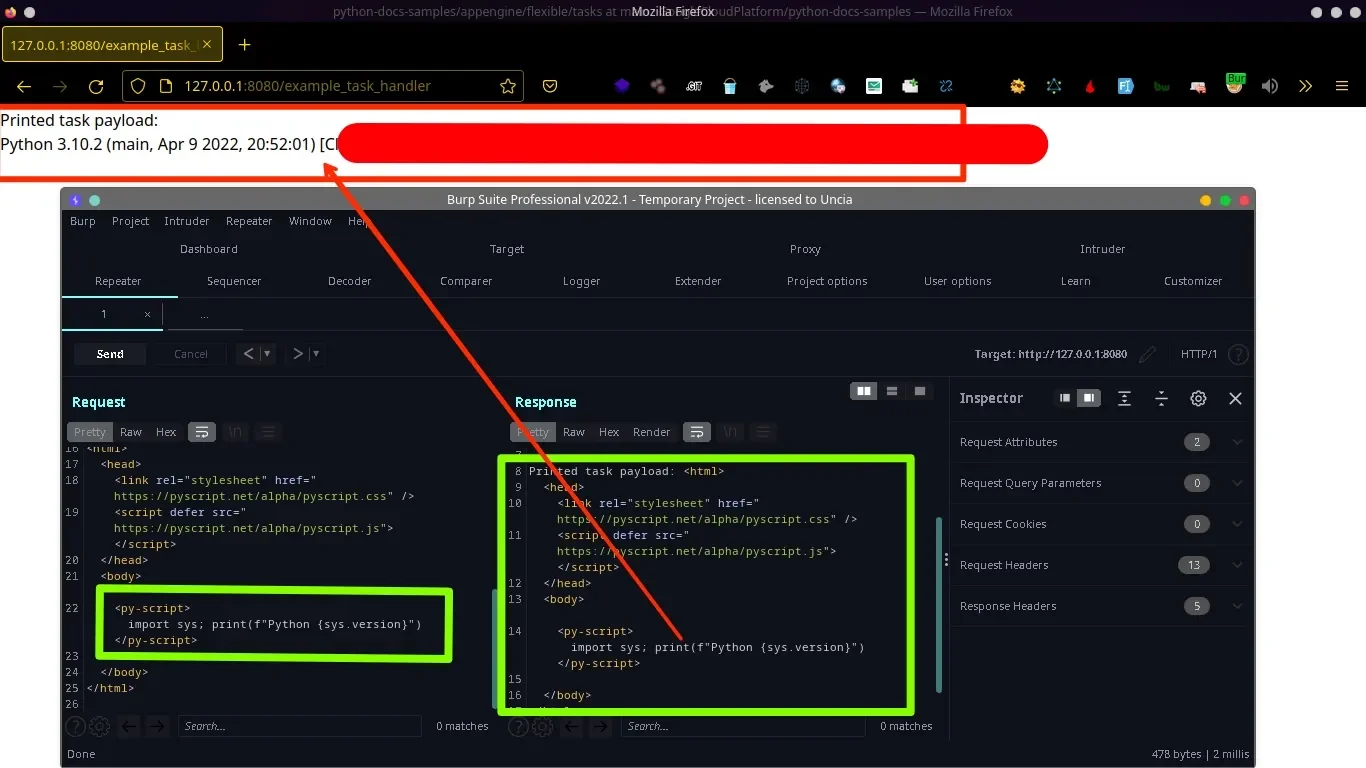
The handler only takes its value through a POST request. If the endpoint only accepts the payload via POST, a payload that executes JavaScript would only run in the browser of the person who sent it, which is the definition of Self-XSS. The chain I used combines that Self-XSS with CSRF so that the request is submitted from a victim's browser rather than the attacker's own.
Step 1: Reach the endpoint
1. Visit the service2. Navigate to the /example_task_handler endpoint3. You will receive a "Method not allowed" error because only HTTP POST requests are allowed.4. Intercept the request and change the method type from GET to POST. 5. Trigger the XSS payload which will allow you to execute malicious code on your own system (Self-XSS) 6. Chain the Self-XSS vulnerability with a CSRF attack (meaningful impact)
A GET to /example_task_handler returns a "Method not allowed" error because only HTTP POST is accepted. Intercepting the request and switching the method to POST lets the payload through.
Step 2: Deliver a payload that the page treats as script
The payload I used relies on PyScript, the framework that lets Python run in the browser through HTML's interface, Pyodide, WASM and modern web technologies. The tags involved are:
<py-script>
PyScript is a framework that allows users to create rich Python applicationsin the browser using HTML's interface and the power of PyodideWASM, and modern web technologies. The PyScript framework provides users at every experience level with access to an expressive, easy-to-learn programming language with countless applications.(Copied)
</py-script>
Because the handler echoes the body unencoded, the <py-script> element is parsed as part of the returned page rather than displayed as text.
Step 3: Chain with CSRF
On its own the payload only runs in the sender's own browser. The CSRF step makes a victim's browser send the malicious POST request to the vulnerable application, so the request appears to come from a legitimate user. The victim's browser is tricked into submitting the request, which can cause the application to perform an unintended action on behalf of the user. When the POST body carries the Self-XSS payload, the script executes in the victim's browser, allowing the attacker to execute arbitrary code and potentially steal sensitive information or perform unauthorised actions.
Root cause
The handler takes the raw request body and formats it directly into an HTML response. There is no sanitisation step: no removal or encoding of characters that could be interpreted as markup or code. The report notes that to prevent JavaScript execution in the browser it is essential to sanitise all input from the HTTP request before using it in any context, including rendering an HTML page, for example by removing or encoding potentially malicious characters so they cannot be executed as code.
The POST-only restriction is what would normally limit the bug to Self-XSS. Chaining it with CSRF removes that limit, because the attacker no longer needs the victim to paste anything: the victim's browser submits the request.
Impact
With the two bugs chained, an attacker can execute arbitrary code in a victim's browser in the context of the vulnerable application, and potentially steal sensitive information or perform unauthorised actions as that user.
I reported the issue to Google and discussed it with them through comments before they accepted the report. The timeline shown was:
triaged14:17 | 22.08.2022closed15:59 | 22.08.2022triaged17:56 | 22.08.2022accepted19:38 | 23.08.2022fixed05:53 | 22.09.2022
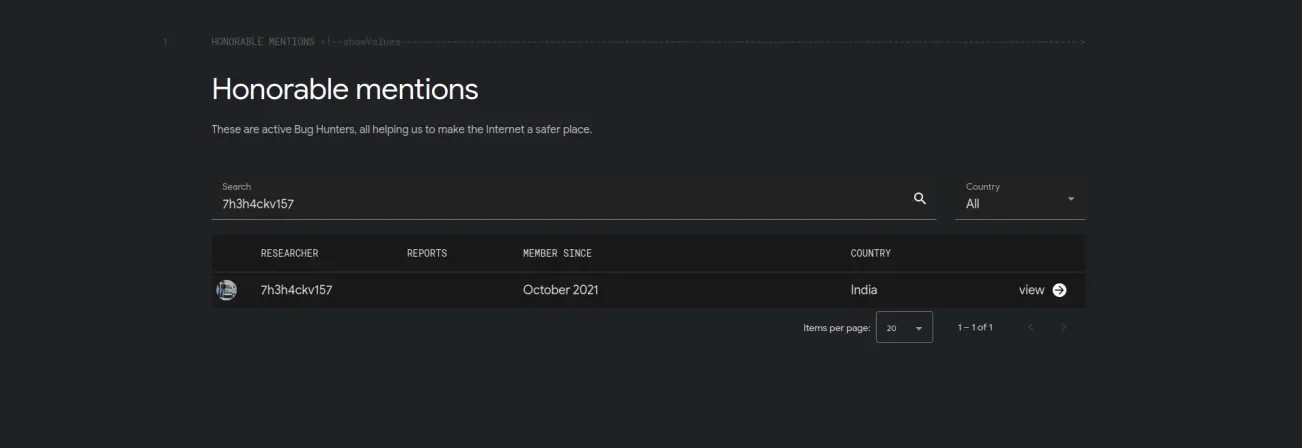
For credit, Google said I could be visible on honourable mentions:
ks…@google.com 26.09.2022 | 12:46 | #34
Hello! For credit you can be visible on Honorable mentions
Securing code samples in open-source projects does not always result in a monetary bounty, but the work still improves software that people rely on. I later reported another bug directly through GitHub Issues.

Fix
The report records that the issue was marked fixed on 22.09.2022. The change itself is not described in the write-up. The fix that the reasoning calls for is to sanitise the request body before it is placed into the HTML response, removing or encoding characters that could be interpreted as markup or code, so that the echoed payload is rendered as text rather than parsed as part of the page.
Variants to test
- Look for handlers that echo
request.get_data()or similar raw body accessors into an HTML response. A positive result is a response where your marker appears as live markup rather than escaped text. - Check endpoints that reject GET with "Method not allowed" but accept POST. If the body is reflected, try a CSRF form that submits the same payload from another origin; a positive result is the payload executing in the victim's browser without any paste step.
- Look for framework-specific script tags such as
<py-script>in pages that embed client-side interpreters. A positive result is the interpreter executing code supplied through the reflected body. - Review sample and documentation repositories in cloud provider organisations, since they are often deployed as live demos. A positive result is a demo endpoint whose response contains your input unencoded.

What happened, in plain words
In August 2022 I spent some time reading code that Google publishes openly on GitHub. GitHub is a website where programmers keep and share the source code of their projects, and much of it is public, so anyone can read it. Google runs an organisation there called Google Cloud Platform, which holds small example programs used on cloud.google.com, Google's site for its cloud services. I chose a Python repository from that organisation because Python is a programming language I know well. The name of the repository is hidden in my write-up, so I cannot tell you which one it was.
Inside that code I found a small piece of software that takes text sent to it over the web and prints that text back into a web page. The text is not cleaned or checked in any way before it goes into the page. That is the whole bug in one sentence. The rest of this article explains what that means, why it matters, and how I turned it into something more serious by combining it with a second, related weakness.
Let's dive into it!
The background you need first
Before the details, a few ideas from zero, because everything below depends on them.
A server and a browser. When you open a website, your browser (Chrome, Firefox, Safari) asks a computer somewhere else, called a server, for a page. The server sends back text, and the browser turns that text into the page you see. The browser is the program on your machine; the server is the program on the other side.
HTTP and requests. The conversation between browser and server follows a set of rules called HTTP. Each message the browser sends is called a request, and each answer is called a response. A request has a method, which is a word saying what kind of action you want. The two you need here are GET and POST. GET means "please give me this page". POST means "here is some data, please do something with it". A search box that sends what you typed is a typical POST; clicking a link is a typical GET.
An endpoint. An endpoint is one specific address on a server that does one specific job, like a counter in a shop. The endpoint in this story is called /example_task_handler. You reach it by asking the server for that path.
An API. An API is a way for one program to talk to another, a fixed set of addresses and rules. Think of a restaurant menu: you do not walk into the kitchen, you order from the menu and food comes back. The handler I found is a tiny API: you send it a task, it sends back a page.
HTML. HTML is the language web pages are written in. It is made of tags in angle brackets, like <b> for bold, and the browser reads those tags and draws the result. Crucially, the browser does not just display tags, it obeys them. If a tag tells the browser to run a program, the browser runs it.
JavaScript. JavaScript is the programming language that browsers understand natively. It is what makes pages interactive. It can also read what is on the page, including things like your login session, which is why running someone else's JavaScript in your browser is dangerous.
XSS (Cross-Site Scripting). XSS is the name for the class of bug where an attacker manages to get their own code, usually JavaScript, into a page that another person's browser will load. The browser cannot tell that the code came from an attacker; it treats it as part of the site. A simple comparison: imagine a noticeboard where anyone can pin a note, and the person who reads the board follows any instruction written on a note. If you can pin a note, you can give instructions to every reader.
Self-XSS. Self-XSS is the weak version of the same thing: the malicious code only runs in the browser of the person who typed or sent it. It is like a note that only instructs the person who wrote it. On its own it is not very useful to an attacker, because the victim would have to be tricked into pasting code themselves.
CSRF (Cross-Site Request Forgery). CSRF is a different trick. Your browser automatically attaches your credentials, such as cookies, to requests sent to a site you are logged into. A cookie is a small piece of data a site stores in your browser so it can recognise you on the next request, like a wristband at an event. CSRF means an attacker gets your browser to send a request to a site you are logged into, without you meaning to. Your browser adds the wristband automatically, so the site believes the request is genuinely yours.
Sanitising input. Sanitising means cleaning data before you use it: removing or encoding characters that could be read as instructions rather than as plain text. If a user types <b>hello</b> and you want to show it as text, you encode the angle brackets so the browser displays them instead of treating them as a bold tag. Without that step, whatever the user sends becomes part of your page's structure.
Finding the bug
The one precondition that matters is that this handler only accepts its text through a POST request. A plain GET to the endpoint is refused.
While reading, I found that unsanitised input is accepted from the HTTP request inside the handler and then used to render an HTML page returned to the user. Here is the function:
def exam_task_handler(): payload = request.get_data(as_text=True) or '(empty payload)' print('Received task with payload: {}'.format(payload)) return'Printed task payload: {}'.format(payload)
Line by line, in plain words:
def exam_task_handler():starts the definition of the function, the named block of code that runs when this endpoint is called.payload = request.get_data(as_text=True) or '(empty payload)'takes whatever data arrived in the request body, reads it as text, and stores it in a variable calledpayload. If nothing arrived, it uses the literal text(empty payload)instead. The important part is that the data is taken exactly as sent, with no cleaning.print('Received task with payload: {}'.format(payload))writes the payload into the server's log, with the payload slotted into the{}placeholder. This is only for the operator to read.return'Printed task payload: {}'.format(payload)builds the response by gluing the fixed textPrinted task payload:together with the payload, and sends it back. Because the response is an HTML page, anything the caller put in the body becomes part of that page.
That last line is the bug. The payload is pasted into the page with no encoding and no filtering, so the browser will treat it as page structure, not as text.
Proof
Turning it into something that runs
The handler only takes its value through a POST request. If the endpoint only accepts the payload via POST, a payload that executes JavaScript would only run in the browser of the person who sent it, which is the definition of Self-XSS. So on its own, this is a weak finding. The chain I used combines that Self-XSS with CSRF so that the request is submitted from a victim's browser rather than from my own.
Step 1: Reach the endpoint
1. Visit the service2. Navigate to the /example_task_handler endpoint3. You will receive a "Method not allowed" error because only HTTP POST requests are allowed.4. Intercept the request and change the method type from GET to POST. 5. Trigger the XSS payload which will allow you to execute malicious code on your own system (Self-XSS) 6. Chain the Self-XSS vulnerability with a CSRF attack (meaningful impact)
What each step means and why it is there:
- Open the service in a browser, as any normal visitor would.
- Go to the address of the handler,
/example_task_handler. - The server answers with a "Method not allowed" error, because it only accepts POST and the browser sent a GET. This confirms the restriction exists.
- Intercept the request and change its method from GET to POST. Intercepting means using a tool that pauses the request between your browser and the server so you can edit it before it is sent. This step is needed because a browser address bar can only send GET; to send POST with a chosen body you have to craft the request yourself.
- Send the XSS payload. It runs in your own browser, which is the Self-XSS part. This proves the page will execute what you send.
- Chain the Self-XSS with a CSRF attack, which is what gives the bug real impact, because now the request can come from someone else's browser.
Step 2: Deliver a payload that the page treats as script
The payload I used relies on PyScript. PyScript is a framework that lets Python code run inside a web page, using HTML's interface together with Pyodide, WASM and modern web technologies. In other words, it is a tag that tells the browser "run the Python written inside me". The tags involved are:
<py-script>
PyScript is a framework that allows users to create rich Python applicationsin the browser using HTML's interface and the power of PyodideWASM, and modern web technologies. The PyScript framework provides users at every experience level with access to an expressive, easy-to-learn programming language with countless applications.(Copied)
</py-script>
What this means: <py-script> is an opening tag and </py-script> is a closing tag, and whatever sits between them is meant to be Python that the browser runs. The middle block is the description of PyScript that I copied from its documentation, placed between the tags as the content. Because the handler echoes the body unencoded, the <py-script> element is parsed as part of the returned page rather than displayed as text. The browser sees a real tag, not a sentence about a tag, and acts on it.
Step 3: Chain with CSRF
On its own the payload only runs in the sender's own browser. The CSRF step makes a victim's browser send the malicious POST request to the vulnerable application, so the request appears to come from a legitimate user. The victim's browser is tricked into submitting the request, which can cause the application to perform an unintended action on behalf of the user. When the POST body carries the Self-XSS payload, the script executes in the victim's browser, allowing the attacker to execute arbitrary code and potentially steal sensitive information or perform unauthorised actions.
In everyday terms: the attacker builds a page that, when opened, quietly sends a POST to the vulnerable endpoint with the payload inside. The victim only has to visit that page. Their browser adds their credentials automatically, the vulnerable site accepts the request as genuine, and the response page contains the attacker's script, which now runs in the victim's browser as if the site itself had written it.
Why it worked
The handler takes the raw request body and formats it directly into an HTML response. There is no sanitisation step: no removal or encoding of characters that could be interpreted as markup or code. To prevent JavaScript execution in the browser it is essential to sanitise all input from the HTTP request before using it in any context, including rendering an HTML page, for example by removing or encoding potentially malicious characters so they cannot be executed as code.
The POST-only restriction is what would normally limit the bug to Self-XSS. Chaining it with CSRF removes that limit, because the attacker no longer needs the victim to paste anything: the victim's browser submits the request.
What the impact was
With the two bugs chained, an attacker can execute arbitrary code in a victim's browser in the context of the vulnerable application, and potentially steal sensitive information or perform unauthorised actions as that user.
I reported the issue to Google and discussed it with them through comments before they accepted the report. The timeline shown was:
triaged14:17 | 22.08.2022closed15:59 | 22.08.2022triaged17:56 | 22.08.2022accepted19:38 | 23.08.2022fixed05:53 | 22.09.2022
Read that as a sequence of status changes with times and dates: the report was triaged, then closed, then triaged again, then accepted, and finally marked fixed. Triaged means the security team had a first look and sorted it; accepted means they agreed it was a real issue.
For credit, Google said I could be visible on honourable mentions:
ks…@google.com 26.09.2022 | 12:46 | #34
Hello! For credit you can be visible on Honorable mentions
Honorable Mention
Securing code samples in open-source projects does not always result in a monetary bounty, but the work still improves software that people rely on. I later reported another bug directly through GitHub Issues.
How it was fixed
The report records that the issue was marked fixed on 22.09.2022. The change itself is not described in the write-up. The fix that the reasoning calls for is to sanitise the request body before it is placed into the HTML response, removing or encoding characters that could be interpreted as markup or code, so that the echoed payload is rendered as text rather than parsed as part of the page.
Similar places to look
If you want to try this kind of review yourself, these are the patterns worth checking. Each one is a place where the same mistake can hide.
- Look for handlers that echo
request.get_data()or similar raw body accessors into an HTML response. A positive result is a response where your marker appears as live markup rather than escaped text. In plain words: send something like a bold tag and see whether the page shows it bold or shows the tag itself. - Check endpoints that reject GET with "Method not allowed" but accept POST. If the body is reflected, try a CSRF form that submits the same payload from another origin; a positive result is the payload executing in the victim's browser without any paste step. Origin here means the site the page came from; a form on a different site can still post to the vulnerable one.
- Look for framework-specific script tags such as
<py-script>in pages that embed client-side interpreters. A positive result is the interpreter executing code supplied through the reflected body. - Review sample and documentation repositories in cloud provider organisations, since they are often deployed as live demos. A positive result is a demo endpoint whose response contains your input unencoded.
Glossary
- API: a fixed set of addresses and rules that lets one program talk to another, like a menu you order from.
- Browser: the program on your computer that asks servers for pages and draws them on screen.
- Cookie: a small piece of data a site stores in your browser so it can recognise you on later requests, like a wristband at an event.
- CSRF (Cross-Site Request Forgery): tricking a victim's browser into sending a request to a site the victim is logged into, so the site treats it as genuine.
- Endpoint: one specific address on a server that performs one specific job.
- GET: an HTTP method meaning "give me this page".
- Handler: the piece of code on the server that runs when a particular endpoint is called.
- HTML: the tag-based language web pages are written in, which browsers read and obey.
- HTTP: the set of rules browsers and servers use to exchange requests and responses.
- JavaScript: the programming language browsers run natively, used to make pages interactive.
- Method: the word in an HTTP request (such as GET or POST) that says what kind of action is wanted.
- Origin: the site a page or request comes from, identified by its scheme, host and port.
- POST: an HTTP method meaning "here is some data, please do something with it".
- PyScript: a framework that lets Python code run inside a web page through HTML tags.
- Pyodide: a project that brings Python to the browser, used by PyScript.
- Request: a message a browser sends to a server asking for something or sending data.
- Response: the server's answer to a request.
- Sanitising: cleaning data before use by removing or encoding characters that could be read as instructions.
- Self-XSS: an XSS bug where the malicious code only runs in the browser of the person who sent it.
- Server: the computer and program on the other side that answers browser requests.
- Tag: a piece of HTML in angle brackets, such as
<b>, that tells the browser what to do. - Triaged: the stage where a security team has had a first look at a report and sorted it.
- WASM (WebAssembly): a format that lets programs written in other languages run efficiently in the browser.
- XSS (Cross-Site Scripting): getting an attacker's code into a page that another person's browser will load, so the browser runs it as if the site had written it.



