Hacked Google-Meet…??!
A single Google account could join a Google Meet many times via automation, and when that account presented its screen, the meeting entered an infinite loop of screen reflections. The attacker could also turn on the microphone to disrupt the meeting, and the host could not remove all the duplicate sessions.
 Published on infosecwriteups.com
Hello, infosec community ✋ Today I’m here to reveal an occurrence in my life which happened in June 2021. If you’re a complete beginner, leet, or off folk in infosec, whatever, it doesn’t matter.
The full write-up lives on its author's site
It belongs to its author, so we link to it rather than copy it. The other two tabs are our own rewrites, checked against it.
Context
In June 2021 I found an authorisation weakness in Google Meet. It is not a server takedown and it is not a compromise of Google Meet across the globe, but it is a real abuse case: a single Google account can be used to flood a meeting with its own duplicate participants, and the meeting host has no way to remove the abuse.
The feature involved is screen presentation. When a participant starts presenting, Google Meet adds an extra participant to the count for that same client. So a meeting with N users becomes N+1 while the presentation runs, whether the presenter is the host or an ordinary user. The count always goes from N to N+1.
Google's published limits at the time, as quoted in the report: anyone with a Google Account can create an online meeting with up to 100 participants for 60 minutes per meeting, and businesses, schools and other organisations get advanced features including meetings with up to 250 internal or external participants and live streaming to up to 100,000 viewers within a domain.

Setup
The only precondition is a Google account and a meeting that the account is allowed to join: an online class, a job meeting, or anything else. No special role is needed. The report notes that the same behaviour occurs whether the account is the host or an ordinary user.
The tooling discussed is Selenium, described in the report as an open-source tool that automates web browsers and provides bindings for languages including Python. The report does not give a version, a driver setup or a script; it only states that the joining can be automated and that it can equally be done manually by opening tabs and joining the same meeting repeatedly.
A second precondition is the absence of a CAPTCHA on the join flow. The report recalls that in the previous year a community member, Mahshooq Zubair, published a simple program for entering each class on Google Meet and marking attendance, entirely by automation, and states that at the time of writing there is no CAPTCHA. The report uses the phrase CAPTCHA 404 in its reproduction steps to mean the same thing.
Finding it
The observation is simple. While a participant presents their screen, the participant count in the meeting increases by one, because the same client appears twice: once as host or user, and once as the presenter.
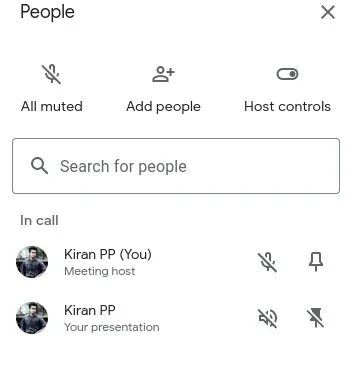
If one account can occupy many seats at once, and each of those seats gains an extra entry when it presents, then a single account can multiply its presence in the meeting. The report frames it as: fill the whole meeting with a single account by automation, then present your screen, and make it N*2.

Exploitation
Step 1: create the account
Use a Gmail account to create the identity that will join the meeting.
Step 2: log in to the meeting
Join the target meeting, whether it is an online class, a job meeting or anything else.
Step 3: fill the meeting with that one account
Use automation to join the same meeting repeatedly. The report notes that this can also be done manually by opening tabs and joining the same meeting, and that the participant count visibly increases. The report's own reproduction block, copied exactly, is:
Exploitation / Reproduction Steps1. Use your Gmail for creating an account2. Login to the meet (online class, job meeting, or whatever)3. Fill the meet by your account (use automation) : CAPTCHA 404It can be done manually. Open the Tabs & join the same meeting. You will see the count increasing4. Start screen presentation & turn On your mic5. Boom
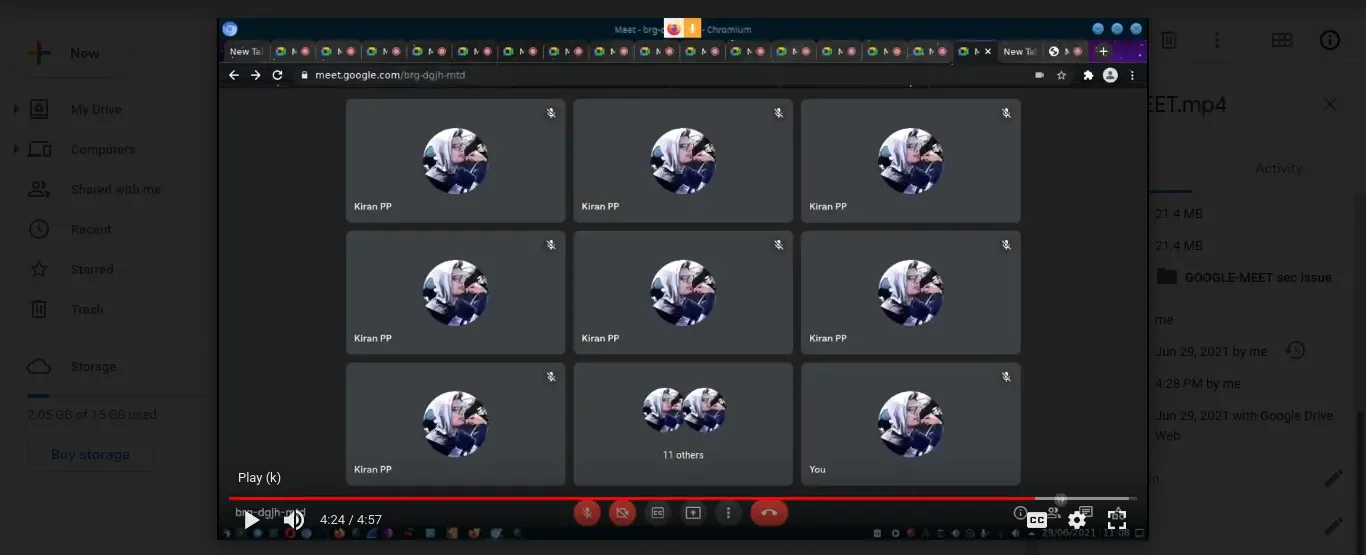
Once the meeting is filled by a single account, the report describes the meeting as being like bees on a honeycomb.
Step 4: present the screen and turn on the microphone
With N instances of the account in the meeting, start the screen presentation. Each instance that presents adds its own extra entry, so the count can reach N*2. The report describes the result as the meeting falling into a loop: you are showing your screen, the other shadow of yours inside the meeting is showing your screen, and the reflection of circles emerges until it falls into an infinite loop.

Turning on the microphone finishes it. The report's words: it is just a matter of turning on your mic, and the entire meeting is done.

The kick/block limitation
The report records an important limit on the host's response. Even if the admin kicks or blocks that account from the meeting, only one instance is affected and the remaining instances stay in the meeting without any issue. The report's case, copied exactly:
Note: Even if the admin "kicked/blocked" that account from the meet, that one gets influenced & still, the remaining exist without any issue.Case:An attacker logged 50 accounts by automating & the admin kicked/blocked him, then "only one" gets restricted. The remaining 49 accounts of that aggressor exist within the meet & can perform any action without further issues. So there aren't any options to wipe out the abuse by the admin.
Root cause
The report frames the weakness as broken authorisation rather than authentication. The host decides who may join the meeting, which is the authentication side, and Google's first reply pointed there. The researcher's argument is that the host cannot control an automation attack carried out by a client: the exploit script can flood the meeting with a single account replicating like a virus, the attacker can bring down the entire meeting with a simple script, and there is no way to trigger controls on the attacker's microphone and screen presentations. The infinite loops build up once the microphone is turned on.
The report does not describe the server-side implementation, so the exact design mistake is not stated.
Impact
Under the conditions above, a single account can occupy the seats of a meeting and then multiply its presence through screen presentation, disrupting the meeting for everyone in it. The host cannot clean it up, because kicking or blocking the account removes only one instance and leaves the rest. The report is explicit that it did not fill an entire meeting, only a PoC, and that it could have.
Fix
The report states that Google successfully patched the issue that was detailed. The report's own argument is that the fix itself is the evidence that the issue was valid.




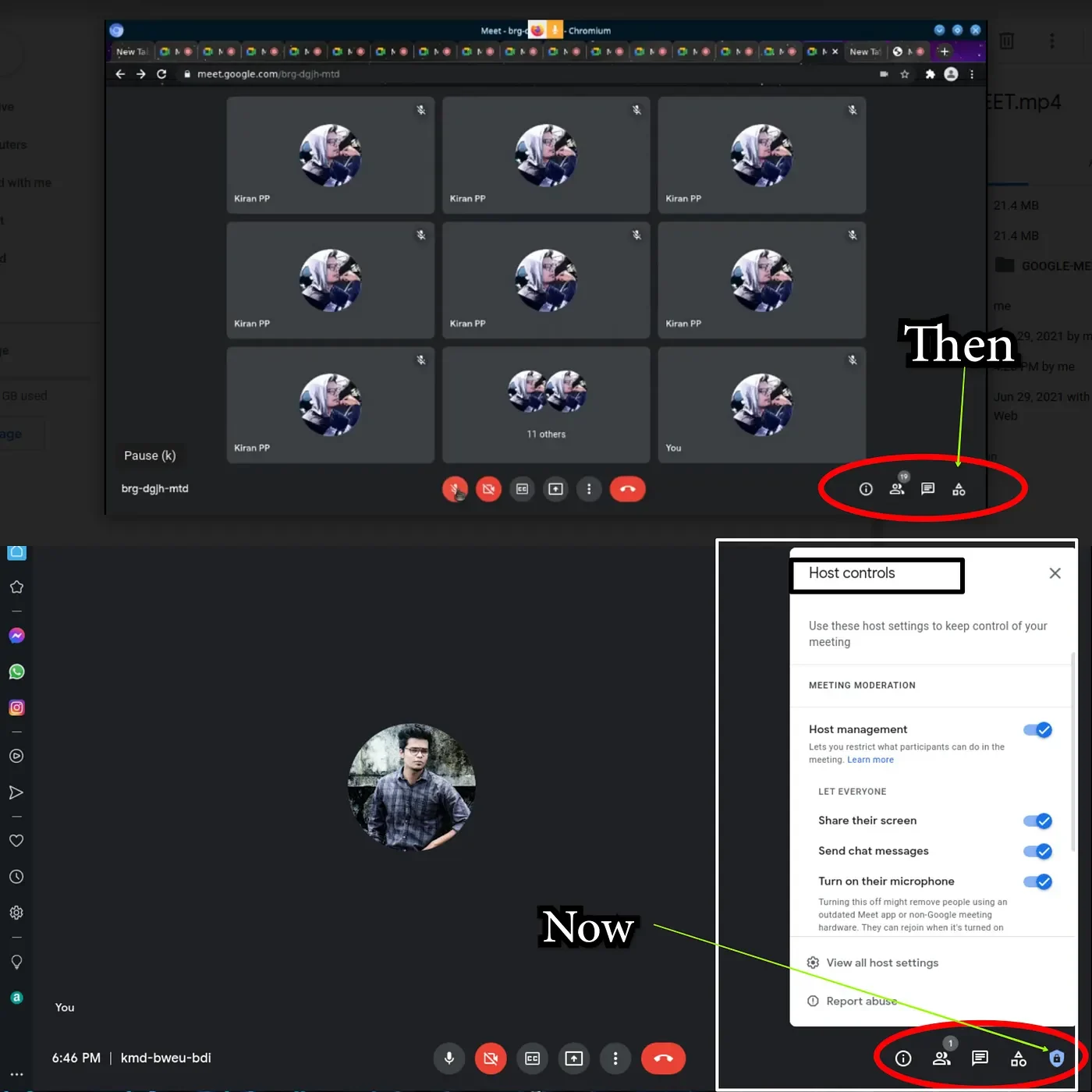
Variants to test
- Per-account session limits on any conferencing product: join the same meeting many times with one account and watch the participant count. A positive result is the count rising with each join and no per-account cap being enforced.
- Presentation side effects: start a screen share from each joined instance and check whether each one adds an extra participant entry. A positive result is the count growing beyond the number of joined instances.
- Host moderation reach: have the host kick or block the account while several instances are present. A positive result is only one instance being removed and the rest continuing to act.
- Automated join without a challenge: script the join flow and check whether any CAPTCHA or equivalent challenge appears. A positive result is joining repeatedly with no challenge.
- Feedback loops: with several instances of the same account presenting, check whether the shared screen and microphone create a recursive visual or audio loop. A positive result is the meeting becoming unusable for the other participants.

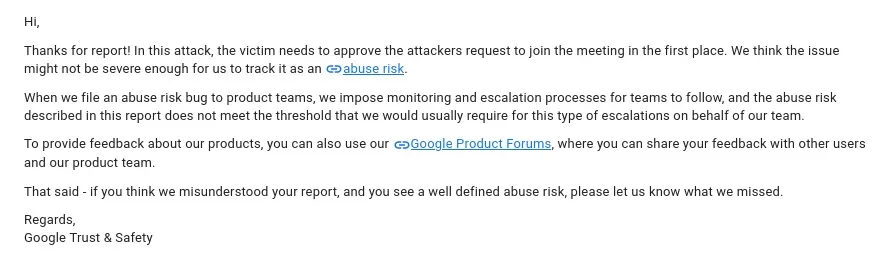
I can declare that it was a valid bug and abuse risk, and I still respect Google's decision. If you are unsure whether it was an issue, look at the fix Google carried out. It is not an end either: it is a fair start to a career, and my best is yet to come.
What happened, in plain words
In June 2021 I found a weakness in Google Meet, the video meeting product that runs in your browser. It is not a story about bringing down Google's servers, and it is not a story about breaking into Google Meet for everyone around the world. It is a story about one Google account being able to flood a single meeting with copies of itself, and about the meeting host having no way to clean up the mess.
The feature at the centre of it is screen presentation, the button that lets you show your screen to everyone in the meeting. When a participant starts presenting, Google Meet adds one extra participant to the count for that same person. So a meeting with N users becomes N+1 while the presentation runs. This happens whether the presenter is the host or an ordinary user. The count always goes from N to N+1.
Google's published limits at the time, as I quoted them in the report: anyone with a Google Account can create an online meeting with up to 100 participants for 60 minutes per meeting, and businesses, schools and other organisations get advanced features including meetings with up to 250 internal or external participants and live streaming to up to 100,000 viewers within a domain.
The basics, from zero
Before the bug, a few ideas. If you already know them, skip ahead.
A CAPTCHA is the little puzzle a website shows you before letting you do something: distorted letters to type, or a grid of pictures to pick from. The name stands for Completely Automated Public Turing test to tell Computers and Humans Apart. Its job is to check that the thing on the other side is a person and not a program. A program can repeat an action far faster than a person can. So a CAPTCHA is a speed bump placed in front of anything a bot might want to repeat.
Selenium is a free, open-source tool that drives a web browser for you. You write a short program, in Python or another language, and it opens tabs, clicks buttons and types into fields exactly as a person would, only faster and without getting bored. People use it to test websites; it can also be used to repeat an action many times. The report does not give a version, a driver setup or a script, only the statement that the joining can be automated.
A meeting host is the person who created the meeting. In Google Meet the host can kick or block someone from the meeting.
Setup
The only precondition is a Google account and a meeting that the account is allowed to join: an online class, a job meeting, or anything else. No special role is needed. The same behaviour occurs whether the account is the host or an ordinary user.
The tooling is Selenium, as described above. The report does not give a version, a driver setup or a script; it only states that the joining can be automated and that it can equally be done manually by opening tabs and joining the same meeting repeatedly.
A second precondition is the absence of a CAPTCHA on the join flow. In the previous year a community member, Mahshooq Zubair, published a simple program for entering each class on Google Meet and marking attendance, entirely by automation, and at the time of writing there is no CAPTCHA. In my reproduction steps I use the phrase CAPTCHA 404 to mean the same thing: the challenge is not there.
Finding it
The observation is simple. While a participant presents their screen, the participant count in the meeting increases by one, because the same client appears twice: once as host or user, and once as the presenter.
If one account can occupy many seats at once, and each of those seats gains an extra entry when it presents, then a single account can multiply its presence in the meeting. Fill the whole meeting with a single account by automation, then present your screen, and make it N*2.
Exploitation
Step 1: create the account
Use a Gmail account to create the identity that will join the meeting. This is the account that will be copied many times over.
Step 2: log in to the meeting
Join the target meeting, whether it is an online class, a job meeting or anything else. Nothing special is required: the account just has to be allowed in.
Step 3: fill the meeting with that one account
Use automation to join the same meeting repeatedly. This can also be done manually by opening tabs and joining the same meeting, and the participant count visibly increases. My own reproduction block, copied exactly, is:
Exploitation / Reproduction Steps1. Use your Gmail for creating an account2. Login to the meet (online class, job meeting, or whatever)3. Fill the meet by your account (use automation) : CAPTCHA 404It can be done manually. Open the Tabs & join the same meeting. You will see the count increasing4. Start screen presentation & turn On your mic5. Boom
Line by line:
Use your Gmail for creating an account: one Google account is enough to start. You are not creating many accounts; you are reusing one.Login to the meet (online class, job meeting, or whatever): join the meeting you want to affect. The type of meeting does not matter.Fill the meet by your account (use automation) : CAPTCHA 404: join the same meeting over and over with that one account.CAPTCHA 404is shorthand for "no CAPTCHA is in the way", so a script can repeat the join without being stopped. The next sentence,It can be done manually. Open the Tabs & join the same meeting. You will see the count increasing, says you do not even need a script: open several browser tabs, join the same meeting in each, and watch the participant count go up.Start screen presentation & turn On your mic: once the meeting is full of your copies, share your screen and switch on your microphone. This is the step that turns a crowded meeting into an unusable one, for the reason explained below.Boom: the meeting is disrupted.
Once the meeting is filled by a single account, the meeting is like bees on a honeycomb.
Step 4: present the screen and turn on the microphone
With N instances of the account in the meeting, start the screen presentation. Each instance that presents adds its own extra entry, so the count can reach N*2. The result is that the meeting falls into a loop: you are showing your screen, the other shadow of yours inside the meeting is showing your screen, and the reflection of circles emerges until it falls into an infinite loop.
Turning on the microphone finishes it. It is just a matter of turning on your mic, and the entire meeting is done.
The kick/block limitation
There is an important limit on the host's response. Even if the admin kicks or blocks that account from the meeting, only one instance is affected and the remaining instances stay in the meeting without any issue. My case, copied exactly:
Note: Even if the admin "kicked/blocked" that account from the meet, that one gets influenced & still, the remaining exist without any issue.Case:An attacker logged 50 accounts by automating & the admin kicked/blocked him, then "only one" gets restricted. The remaining 49 accounts of that aggressor exist within the meet & can perform any action without further issues. So there aren't any options to wipe out the abuse by the admin.
In plain words: the host's remove button acts on one connection, not on the account behind it. If the attacker has 50 copies of the same account in the meeting and the host removes one, 49 remain and can keep doing whatever they were doing. There is no button that removes all of them at once, so the host cannot wipe out the abuse.
Root cause
The weakness is broken authorisation rather than authentication. The two words sound alike and mean different things.
Authentication is how a system works out who you are. Logging in with a password is authentication. In a meeting, the host deciding who may join is the authentication side, and Google's first reply pointed there.
Authorisation is what you are then allowed to do. Being allowed into a building is authentication; being allowed into a particular room is authorisation.
My argument is that the host cannot control an automation attack carried out by a client. The exploit script can flood the meeting with a single account replicating like a virus, the attacker can bring down the entire meeting with a simple script, and there is no way to trigger controls on the attacker's microphone and screen presentations. The infinite loops build up once the microphone is turned on.
Impact
Under the conditions above, a single account can occupy the seats of a meeting and then multiply its presence through screen presentation, disrupting the meeting for everyone in it. The host cannot clean it up, because kicking or blocking the account removes only one instance and leaves the rest. I did not fill an entire meeting, only a PoC, and I could have.
Fix
Google successfully patched the issue that was detailed. My own argument is that the fix itself is the evidence that the issue was valid.
Variants to test
If you want to look for the same shape of problem in other products, here are five things to try. Each one is a small experiment you can run with a browser and an account.
- Per-account session limits on any conferencing product: join the same meeting many times with one account and watch the participant count. A positive result is the count rising with each join and no per-account cap being enforced.
- Presentation side effects: start a screen share from each joined instance and check whether each one adds an extra participant entry. A positive result is the count growing beyond the number of joined instances.
- Host moderation reach: have the host kick or block the account while several instances are present. A positive result is only one instance being removed and the rest continuing to act.
- Automated join without a challenge: script the join flow and check whether any CAPTCHA or equivalent challenge appears. A positive result is joining repeatedly with no challenge.
- Feedback loops: with several instances of the same account presenting, check whether the shared screen and microphone create a recursive visual or audio loop. A positive result is the meeting becoming unusable for the other participants.
I can declare that it was a valid bug and abuse risk, and I still respect Google's decision. If you are unsure whether it was an issue, look at the fix Google carried out. It is not an end either: it is a fair start to a career, and my best is yet to come.
Glossary
- Authentication: the process of working out who a user is, for example by checking a password at login.
- Authorisation: the process of deciding what an identified user is allowed to do, and which resources they may reach.
- Broken authorisation: a weakness where the system knows who you are but does not correctly limit what you can do, or does not apply the limit to every session you hold.
- CAPTCHA: a puzzle shown to a visitor to prove they are a human and not an automated program.
- Client: the browser or app on your side that connects to a service.
- Host: the person who created a meeting and holds its moderation controls.
- Instance: one running copy of a connection or program; here, one joined session of the same account.
- Meeting participant count: the number Google Meet displays for how many people are in the meeting.
- Microphone loop: a feedback cycle where sound picked up by a microphone is played back into it, repeating and growing.
- N and N+1: N stands for the number of users in the meeting; N+1 is that number plus one, the extra entry added while someone presents.
- N*2: N multiplied by two, the doubled count when every instance of the account presents.
- PoC: proof of concept, a small demonstration that shows a problem is real without doing the full damage.
- Screen presentation (screen share): the feature that shows your screen to everyone else in the meeting.
- Selenium: an open-source tool that automates web browsers, driven by a script in a language such as Python.
- Session: one active connection of a logged-in user to a service; the same account can hold several at once.
- Triaged: the state where a bug report has been reviewed and accepted as a real issue by the receiving team.




