Bypassing GCP Org Policy with Custom Metadata
 Published on kattraxler.github.io
The AI Notebooks API serves as an abstraction layer on top of the GCP Compute API. The same ML optimized, deep learning VM can be created with the Compute APIs as it can with the Notebooks APIs, albeit with more friction and fuss.
The full write-up lives on its author's site
It belongs to its author, so we link to it rather than copy it. The other two tabs are our own rewrites, checked against it.
Context
AI Notebooks are Google Cloud's managed Jupyter Notebook offering. The infrastructure behind them is ordinary Compute instances that live as resources in a customer's project: create an AI Notebook and a Compute instance is spun up in the background to support it. The Notebooks API is an abstraction layer on top of the Compute API, so the same ML-optimised deep learning VM can be created through either API, though the Compute route involves more friction.
Part of the value of AI Notebooks is the automatically generated web interface. These PaaS services register instances with Google's Inverting Proxy to expose a GUI for the underlying compute instance. Content served from the domain googleusercontent.com is generally being served through that proxy.
When an AI Notebook is deployed in Single-User Mode it carries a metadata tag, proxy-user-mail. The value of that tag tells the Inverting Proxy who is authorised to access the Jupyter Notebook UI.
Setup
- An AI Notebook instance running in Single-User Mode, which means it has the
proxy-user-mailmetadata property set. - A service account serving as the identity for the notebook instance.
- The ability to change instance metadata and to stop and start the instance.
- For the organisation policy angle, a GCP organisation with the
iam.allowedPolicyMemberDomainsconstraint in place, restricting which members may hold IAM policy in the organisation.
Finding it
At creation time the Notebooks API checks whether the user named in proxy-user-mail holds the Service Account User role on the service account that serves as the identity for the AI Notebook instance. That check is what ensures a Single-User Mode notebook only grants access to users who have at least the iam.serviceAccounts.actAs permission on the Compute instance service account.
The check, however, only runs when the notebook is created, at the moment it is first registered with the Inverting Proxy. The proxy-user-mail metadata property can be changed after creation. Stopping and restarting the instance forces it to re-register with the Inverting Proxy, and on that re-registration the Notebooks API does not check whether the user named in proxy-user-mail holds the Service Account User role.
That gap is the vulnerability: authorisation for the web UI is driven by a mutable metadata field whose validation happens once, at a point in time the attacker does not have to respect.
Exploitation
Step 1: create the notebook with a legitimate user
Step 2: change the metadata
Step 3: stop and start the instance
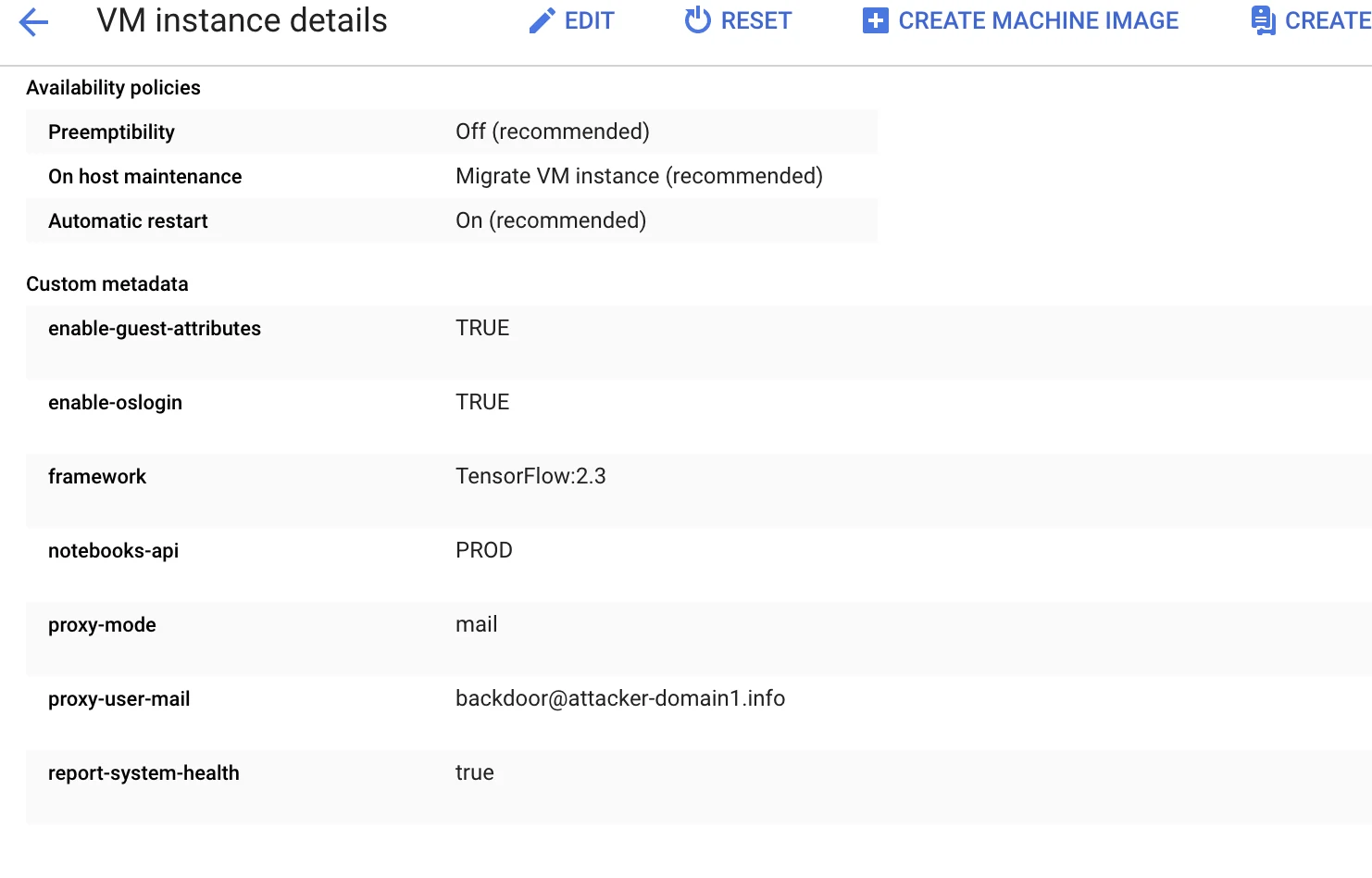
The image shows the backdoored VM: the notebook instance re-registering with the Inverting Proxy, at the point where the Notebooks API fails to check whether the user in the metadata property holds the Service Account User role.
Step 4: access the notebook UI
Bypassing Org Policy
The demo shows the vulnerability bypassing the organisation policy constraint iam.allowedPolicyMemberDomains. That constraint lets administrators limit which members can hold IAM policy in a GCP organisation. A common use is to restrict access to resources to members of the company's own domain, so that only users with @companyX.com addresses can be granted access.
The fine print on this constraint, and on all organisation policy constraints, is that they only affect IAM policy. When access control is defined by some other mechanism, the constraint does not apply. Here the other mechanism is the proxy-user-mail metadata value, which the Inverting Proxy trusts and which the organisation policy does not govern.
The report includes a video of the demo.
Root cause
The authorisation decision for the notebook web UI is carried in instance metadata, proxy-user-mail, and is validated only at notebook creation. Re-registration with the Inverting Proxy, triggered by a stop and start, skips the Service Account User role check. The design therefore treats a one-time validation as if it were a continuing property of the instance.
Existing defences did not stop it because organisation policy constraints only constrain IAM policy. Access granted through custom metadata sits outside that model entirely, so a domain restriction on IAM members has no effect on who the Inverting Proxy will let through.
Impact
An attacker able to change the metadata and restart the instance can grant a chosen user access to the Jupyter Notebook UI. That user needs no IAM permissions on the compute instance, no permissions on the service account running the notebook, and does not need to be a member of the organisation. Where iam.allowedPolicyMemberDomains is relied on to keep access inside a company domain, this path bypasses it.
The report notes that there does not appear to be any ongoing risk, as described in the follow-up report on remediation. The remaining question for GCP customers is whether an attacker ever used this as a backdoor.
Identifying whether you were affected
Query Cloud Audit Logs and review any setMetadata events. If a setMetadata event set the proxy-user-mail metadata property to a user outside your domain, treat it as suspicious.
gcloud logging read "resource.type=gce_instance AND logName:projects/[PROJECT-ID]/logs/cloudaudit.googleapis.com%2Factivity" --format json
Fix
On 10 September 2021 Google VRP said the patch was being pushed that day and would be rolled out to all servers by end of day. The researcher reported on 11 September 2021 that the patch, together with the expiration of the DATALAB_TUNNEL_TOKEN cookie, resulted in a complete fix.
Reporting timeline
| Date | Event |
|---|---|
| 05/15/21 | Originally reported via the Google Vulnerability Rewards Program from a corporate email address. |
| June 2021 | Verbally informed the fix would roll out in the first week of July. |
| July 2021 | Lost access to the original report, which had been submitted from the corporate address, after changing jobs. |
| 07/27/2021 | Re-reported the same issue via the Google VRP from a personal email account. Ticket number 194849420. |
| 07/28/2021 | Identified as an Abuse Risk and triaged to Google Trust & Safety. Categorised as Priority P1, Severity S4. |
| 7/29/2021 | Google VRP communicated that the fix had been rolled out that week. |
| 7/29/2021 | Researcher informed Google that the fix was insufficient and that AI Notebooks and the Inverting Proxy were still vulnerable. |
| 08/05/2021 | Provided further details on how the issue bypassed the Domain Restriction Constraint, and confirmed awareness that the constraint is not retroactive and that this quirk was not relevant. |
| 08/09/2021 | Google VRP thanked the researcher and said the product team confirmed the issue was different from the May report. |
| 08/09/2021 | Researcher disagreed, considering it the same issue. |
| 08/11/2021 | Given an estimate of three weeks to fix. |
| 08/11/2021 | Accepted the timeline and informed Google VRP of an intention to disclose on 10 September. |
| 08/22/2021 | Google VRP thanked the researcher for the flexibility. |
| 08/19/2021 | Informed of the bug bounty award: "The VRP panel has decided to issue a reward of $1337.00 for your report. Congratulations" |
| 09/09/2021 | Asked for an update as the issue remained open and reconfirmed the intention to publish on 10 September. |
| 09/10/2021 | Google VRP informed the researcher the patch was being pushed that day and would reach all servers by end of day. |
| 09/10/2021 | Informed Google VRP of the publication of the report, despite the issue not being resolved. |
| 09/11/2021 | Informed Google that the patch plus expiration of the DATALAB_TUNNEL_TOKEN cookie resulted in a complete fix. |
Variants to test
- Other metadata-driven authorisation fields. Look for PaaS services that store an authorised principal in instance or resource metadata and validate it only at creation. A positive result is a field you can change after creation and have honoured on the next registration or restart.
- Re-registration paths. For any service that registers with a proxy or control plane, try stop/start, restart, or re-registration triggers after changing the authorisation metadata. A positive result is the new value being accepted without the original role check.
- Organisation policy assumptions. Where a constraint such as
iam.allowedPolicyMemberDomainsis treated as a boundary, test whether access can be granted through a non-IAM mechanism. A positive result is a principal outside the allowed domain reaching a resource without any IAM binding. - Audit log coverage. Check whether metadata changes that alter authorisation appear as
setMetadataevents in Cloud Audit Logs. A positive result is a change that grants access but is easy to miss in routine review.
What happened, in plain words
Google Cloud lets customers create something called an AI Notebook. It is a managed Jupyter Notebook: a web page where you can write and run code, a bit like a shared online document, except the document runs code on a computer in Google's data centres. Behind every AI Notebook sits an ordinary Google Cloud virtual machine (a computer rented by the minute in a data centre).
To let the right person open the notebook's web page, Google uses a small piece of information attached to that virtual machine, called metadata. Metadata is like a label stuck on the side of the machine: it is not the machine itself, just a note that other Google systems read. One label is called proxy-user-mail, and its value is the email address of the person allowed to open the notebook's web page.
When the notebook is first created, Google checks that the email address on that label belongs to someone who is genuinely allowed to use the account the notebook runs as. That check is sensible. The problem was that the label can be changed afterwards, and when the machine is stopped and started again it re-announces itself to the system that serves the web page, without the check being repeated. So someone could create a notebook with a legitimate address, then swap the label to a different address, restart the machine, and the new person would get in, even though they had no permission on the machine, no permission on the account it runs as, and did not even have to belong to the same company.
That is a broken authorisation bug: the system decides who is allowed to do something, but it decides once and then trusts a value that can change. The Google VRP panel decided to issue a reward of $1337.00 for the report.
Background: what an AI Notebook is
AI Notebooks are Google Cloud's managed Jupyter Notebooks. The infrastructure underneath them is ordinary Compute instances (virtual machines) that live as resources in a customer's project. A project is a container in Google Cloud that holds a customer's resources and bills. Create an AI Notebook and a Compute instance is spun up in the background to support it.
The Notebooks API is an abstraction layer on top of the Compute API. An API (application programming interface) is the set of commands one piece of software offers to another, like a restaurant menu: you pick an item by name and the kitchen does the work. An abstraction layer is a simpler menu placed on top of a more complicated one. The same ML-optimised deep learning VM can be created through either API, though the Compute route involves more friction: more steps, more settings to get right.
The web interface and the Inverting Proxy
Part of the value of AI Notebooks is the automatically generated web interface. These PaaS services (platform as a service: Google runs the servers and you just use the product) register instances with Google's Inverting Proxy to expose a GUI (graphical user interface, the page you click around in) for the underlying compute instance.
A proxy is a middleman. Normally a proxy sits between you and the internet and forwards your requests outward. An inverting proxy works the other way round: the machine inside Google's network connects out to the proxy and keeps that connection open, and the proxy forwards incoming visitors down that connection. It is like a shop with no front door on the street: the shopkeeper keeps a phone line open to a call centre, and customers ring the call centre, which passes them through. Content served from the domain googleusercontent.com is generally being served through that proxy.
When an AI Notebook is deployed in Single-User Mode (one notebook, one named user) it carries a metadata tag, proxy-user-mail. The value of that tag tells the Inverting Proxy who is authorised to access the Jupyter Notebook UI. Authorised here simply means allowed in.
Setup: what you need before you can try this
- An AI Notebook instance running in Single-User Mode, which means it has the
proxy-user-mailmetadata property set. - A service account serving as the identity for the notebook instance. A service account is a non-human account, a robot identity that a machine uses to prove who it is when it talks to other Google services.
- The ability to change instance metadata and to stop and start the instance.
- For the organisation policy angle, a GCP organisation with the
iam.allowedPolicyMemberDomainsconstraint in place, restricting which members may hold IAM policy in the organisation. An organisation is the top-level container above all of a company's projects; a constraint is a rule an administrator sets that applies across it.
Finding it: the check that only happens once
At creation time the Notebooks API checks whether the user named in proxy-user-mail holds the Service Account User role on the service account that serves as the identity for the AI Notebook instance. A role is a bundle of permissions. The Service Account User role includes the permission to act as that service account, which is what the notebook needs in order to run.
That check is what ensures a Single-User Mode notebook only grants access to users who have at least the iam.serviceAccounts.actAs permission on the Compute instance service account. The permission name reads literally: act as. If you can act as the robot identity, you can use it.
The check, however, only runs when the notebook is created, at the moment it is first registered with the Inverting Proxy. The proxy-user-mail metadata property can be changed after creation. Stopping and restarting the instance forces it to re-register with the Inverting Proxy, and on that re-registration the Notebooks API does not check whether the user named in proxy-user-mail holds the Service Account User role.
That gap is the vulnerability: authorisation for the web UI is driven by a mutable metadata field whose validation happens once, at a point in time the attacker does not have to respect. Think of a club where the bouncer checks your name against the guest list at the door on opening night, then afterwards anyone can rewrite the guest list and the door staff simply read whatever is written on it.
Exploitation: how it was done, step by step
Step 1: create the notebook with a legitimate user
Why this step: the check only exists at creation, so the first value has to be a name that passes it. Once the notebook exists, the check is behind you.
Step 2: change the metadata
IAM (Identity and Access Management) is Google Cloud's system for saying who may do what; having no IAM permissions means the person has no legitimate claim to the machine at all.
Why this step: the whole point is to name someone who should not be allowed in. The metadata label is the only thing that will tell the proxy who to let through, so it is the thing to change.
Step 3: stop and start the instance
Why this step: the proxy only learns the name when the machine announces itself. A restart is the trigger that makes the machine announce itself again, and this time nobody checks the name against the role.
The image shows the backdoored VM: the notebook instance re-registering with the Inverting Proxy, at the point where the Notebooks API fails to check whether the user in the metadata property holds the Service Account User role. A backdoor here means a way in that was not part of the original design.
Step 4: access the notebook UI
Why this matters: the person is inside a machine they were never granted anything on. The only thing that let them in was a text label that had been changed after the one and only check.
Bypassing Org Policy
The demo shows the vulnerability bypassing the organisation policy constraint iam.allowedPolicyMemberDomains. That constraint lets administrators limit which members can hold IAM policy in a GCP organisation. A common use is to restrict access to resources to members of the company's own domain, so that only users with @companyX.com addresses can be granted access.
An organisation policy is a company-wide rule, like a building rule that only staff badges open the doors. The fine print on this constraint, and on all organisation policy constraints, is that they only affect IAM policy. When access control is defined by some other mechanism, the constraint does not apply. Here the other mechanism is the proxy-user-mail metadata value, which the Inverting Proxy trusts and which the organisation policy does not govern.
In everyday terms: the building rule says only staff badges open the doors, but there is a side entrance with a paper sign on it, and the rule says nothing about paper signs. The vulnerability is that side entrance.
The report includes a video of the demo.
Root cause
The authorisation decision for the notebook web UI is carried in instance metadata, proxy-user-mail, and is validated only at notebook creation. Re-registration with the Inverting Proxy, triggered by a stop and start, skips the Service Account User role check. The design therefore treats a one-time validation as if it were a continuing property of the instance.
Existing defences did not stop it because organisation policy constraints only constrain IAM policy. Access granted through custom metadata sits outside that model entirely, so a domain restriction on IAM members has no effect on who the Inverting Proxy will let through.
Impact
An attacker able to change the metadata and restart the instance can grant a chosen user access to the Jupyter Notebook UI. That user needs no IAM permissions on the compute instance, no permissions on the service account running the notebook, and does not need to be a member of the organisation. Where iam.allowedPolicyMemberDomains is relied on to keep access inside a company domain, this path bypasses it.
The report notes that there does not appear to be any ongoing risk, as described in the follow-up report on remediation. The remaining question for GCP customers is whether an attacker ever used this as a backdoor.
Identifying whether you were affected
Query Cloud Audit Logs and review any setMetadata events. Cloud Audit Logs are Google Cloud's record of who did what and when, like a security camera log for the cloud. A setMetadata event is a log entry recording that someone changed metadata on a resource. If a setMetadata event set the proxy-user-mail metadata property to a user outside your domain, treat it as suspicious.
gcloud logging read "resource.type=gce_instance AND logName:projects/[PROJECT-ID]/logs/cloudaudit.googleapis.com%2Factivity" --format json
Line by line:
gcloud logging readasks thegcloudcommand-line tool to read log entries.gcloudis Google Cloud's command-line program, a way to type instructions instead of clicking.- The quoted string is a filter that narrows down which entries come back.
resource.type=gce_instancemeans only entries about Compute instances (GCE stands for Google Compute Engine). ANDjoins the conditions, so both must be true.logName:projects/[PROJECT-ID]/logs/cloudaudit.googleapis.com%2Factivitymeans only entries from the activity audit log of the project named[PROJECT-ID]. The%2Fis a URL-encoded slash, so the log name readscloudaudit.googleapis.com/activity.--format jsonasks for the output as JSON, a structured text format that is easy to read or process further.
Why this step: the vulnerability leaves a trace. Changing the label is an action, and actions on metadata are logged. Searching for those log entries tells you whether anyone ever pointed the label at an address outside your company.
Fix
On 10 September 2021 Google VRP said the patch was being pushed that day and would be rolled out to all servers by end of day. The researcher reported on 11 September 2021 that the patch, together with the expiration of the DATALAB_TUNNEL_TOKEN cookie, resulted in a complete fix. A cookie is a small piece of data a website stores in your browser so it can recognise you on the next request; a token is a value used to prove you are allowed in. If an old token stays valid, a fix can be incomplete, which is why its expiration mattered here.
Reporting timeline
| Date | Event |
|---|---|
| 05/15/21 | Originally reported via the Google Vulnerability Rewards Program from a corporate email address. |
| June 2021 | Verbally informed the fix would roll out in the first week of July. |
| July 2021 | Lost access to the original report, which had been submitted from the corporate address, after changing jobs. |
| 07/27/2021 | Re-reported the same issue via the Google VRP from a personal email account. Ticket number 194849420. |
| 07/28/2021 | Identified as an Abuse Risk and triaged to Google Trust & Safety. Categorised as Priority P1, Severity S4. |
| 7/29/2021 | Google VRP communicated that the fix had been rolled out that week. |
| 7/29/2021 | Researcher informed Google that the fix was insufficient and that AI Notebooks and the Inverting Proxy were still vulnerable. |
| 08/05/2021 | Provided further details on how the issue bypassed the Domain Restriction Constraint, and confirmed awareness that the constraint is not retroactive and that this quirk was not relevant. |
| 08/09/2021 | Google VRP thanked the researcher and said the product team confirmed the issue was different from the May report. |
| 08/09/2021 | Researcher disagreed, considering it the same issue. |
| 08/11/2021 | Given an estimate of three weeks to fix. |
| 08/11/2021 | Accepted the timeline and informed Google VRP of an intention to disclose on 10 September. |
| 08/22/2021 | Google VRP thanked the researcher for the flexibility. |
| 08/19/2021 | Informed of the bug bounty award: "The VRP panel has decided to issue a reward of $1337.00 for your report. Congratulations" |
| 09/09/2021 | Asked for an update as the issue remained open and reconfirmed the intention to publish on 10 September. |
| 09/10/2021 | Google VRP informed the researcher the patch was being pushed that day and would reach all servers by end of day. |
| 09/10/2021 | Informed Google VRP of the publication of the report, despite the issue not being resolved. |
| 09/11/2021 | Informed Google that the patch plus expiration of the DATALAB_TUNNEL_TOKEN cookie resulted in a complete fix. |
A bug bounty is a programme where companies pay people for reporting security problems responsibly. A VRP, vulnerability rewards program, is Google's version.
Variants to test
These are the general lessons a security tester can carry to other products:
- Other metadata-driven authorisation fields. Look for PaaS services that store an authorised principal in instance or resource metadata and validate it only at creation. A positive result is a field you can change after creation and have honoured on the next registration or restart.
- Re-registration paths. For any service that registers with a proxy or control plane, try stop/start, restart, or re-registration triggers after changing the authorisation metadata. A positive result is the new value being accepted without the original role check.
- Organisation policy assumptions. Where a constraint such as
iam.allowedPolicyMemberDomainsis treated as a boundary, test whether access can be granted through a non-IAM mechanism. A positive result is a principal outside the allowed domain reaching a resource without any IAM binding. - Audit log coverage. Check whether metadata changes that alter authorisation appear as
setMetadataevents in Cloud Audit Logs. A positive result is a change that grants access but is easy to miss in routine review.
Glossary
- API: the set of commands one piece of software offers to another, like a menu you order from.
- Abstraction layer: a simpler interface placed on top of a more complicated one, so you do not have to deal with the details underneath.
- AI Notebook: Google Cloud's managed Jupyter Notebook product, backed by a virtual machine.
- Audit log: a record of who did what and when in a system.
- Authorisation: the decision about whether someone is allowed to do something.
- Backdoor: a way into a system that was not part of its intended design.
- Bug bounty: a programme that pays people for responsibly reporting security problems.
- Cloud Audit Logs: Google Cloud's record of actions taken on resources in a project.
- Compute instance: a virtual machine rented in a data centre.
- Constraint: a rule an administrator sets that applies across an organisation.
- Cookie: a small piece of data a website stores in your browser so it can recognise you later.
- Deep learning VM: a virtual machine preconfigured for machine learning work.
- GCE: Google Compute Engine, Google Cloud's virtual machine service.
- GUI: graphical user interface, the part of a product you see and click.
- IAM: Identity and Access Management, Google Cloud's system for deciding who may do what.
- Inverting Proxy: a proxy where the protected machine connects outward to the proxy and the proxy forwards visitors down that connection.
- Jupyter Notebook: a web page where you write and run code in cells, alongside notes and output.
- Metadata: labels attached to a cloud resource, read by other systems, separate from the resource itself.
- Organisation: the top-level container above all of a company's Google Cloud projects.
- Organisation policy: company-wide rules applied across a Google Cloud organisation.
- PaaS: platform as a service, where the provider runs the servers and you use the product.
- Permission: a single allowed action, such as acting as a service account.
- Principal: an identity, such as a user or a service account.
- Project: a container in Google Cloud that holds resources and is billed.
- Proxy: a middleman that forwards requests between two parties.
- Role: a bundle of permissions given to an identity.
- Service account: a non-human identity a machine uses to prove who it is.
- Service Account User role: the role that includes permission to act as a service account.
- Single-User Mode: a notebook configuration where one named user is allowed into the web interface.
- Token: a value used to prove you are allowed in.
- VRP: vulnerability rewards program, Google's bug bounty programme.
- Vulnerability: a weakness in a system that can be used to make it behave in a way its designers did not intend.

