Bypassing Google’s authentication to access their Internal Admin panels — Vishnu Prasad P G
Google's internal admin panels for YouTube Broadcasting Satellite and YouTube TV were accessible from the internet because Google's Data Saver proxy allowed access to internal IP addresses. An attacker could reach these panels and log in without credentials, gaining administrative access.
 Published on medium.com
I’mVishnu prasad, a third-year engineering student, a passionate developer, and a noob in bug hunting ( Please forgive my mistakes in this writeup, if any ).
The full write-up lives on its author's site
It belongs to its author, so we link to it rather than copy it. The other two tabs are our own rewrites, checked against it.
Context
Google runs internal admin panels for several of its broadcast and television products, including YouTube's Broadcasting Satellite and YouTube TV. These panels sit on internal IP addresses that are not meant to be reachable from the public internet. Earlier, two similar findings had been reported by other researchers: one about internal device IP addresses, and one about a subdomain that exposed admin panels. Those issues had already been fixed, and Google had blocked public access to the entire IP ranges involved.
The author, Vishnu Prasad P G, describes himself as a third-year engineering student and a newcomer to bug hunting. He found a way to reach those blocked internal IP addresses again and to log in to the admin panels behind them. He reported it through the Google VRP and was rewarded $13337.
Setup
The report describes no special accounts, roles or tooling. The key factor turned out to be a Chrome mobile browser with Google's Data saver feature turned on. The researcher also had a list of Google IP addresses, some of which belonged to internal devices, obtained from some domain during reconnaissance. No proxy or VPN was configured deliberately at the start.
Finding it
While searching for bugs in Google, the researcher collected a set of Google IP addresses from a domain. Looking at them, he recognised that the list contained internal device addresses as well. He knew that public access to those ranges had been blocked after the earlier reports, so he needed a way around the restriction.

He searched for ways to reach the blocked addresses. Every article, blog, forum thread and comment he read said that Google's own proxy or VPN was required. Then his power supply failed and he had no battery backup, so he picked up his mobile phone and continued searching. Out of curiosity he opened one of the IP addresses in his Chrome mobile browser, and an HTTP login page appeared.
That was unexpected: a login page for what looked like an internal Google system, reachable from an ordinary mobile browser. He did not have credentials.
Exploitation
Step 1: Submit the login form with no credentials
Instead of stopping at the login prompt, he clicked the log in button without entering a username or password. A page with many buttons and options appeared, and he realised he was inside the admin panel of a Google product. He credits the idea of trying null credentials against a Google login to SREERAM's blog post about his earlier finding.
At that moment he did not understand why it had worked. He only knew he had access to an admin panel.
Step 2: Reproduce it on the desktop, and fail
When the power came back, he opened the same IP address on his computer. The login page never appeared. The same address that worked on the phone did not work on the laptop, and he could not explain the difference.
Within an hour he built a proof of concept on his phone and submitted the report to Google. About five hours later Google triaged it and replied "Nice Catch!". Google then asked which IP addresses he had used for the access, essentially wanting to know which proxy he had connected through. He did not know, so he went back to investigate.
Step 3: Identify the proxy: Google Data saver
About two hours later he found the loop that had let him into the admin panels. The difference between the two devices was Google's Data saver, which was turned on in his Chrome mobile browser. The report says this proxy acted as their access proxy and gave access to their internal pages.
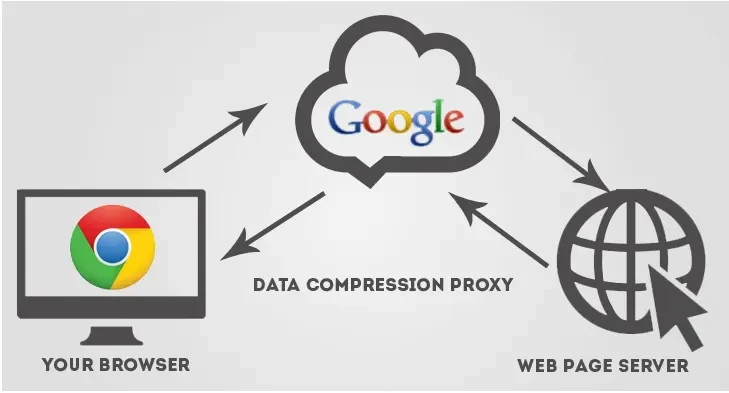
Once he understood this, he added the same proxy to his computer and could then reach the admin panel from the laptop browser as well. With that, anyone could reach the Google admin panels from anywhere in the world, provided the traffic went through that proxy.
He sent Google a detailed write-up and received a reply within 30 minutes.

Step 4: What was reachable
He included screenshots of the admin panels he had accessed.
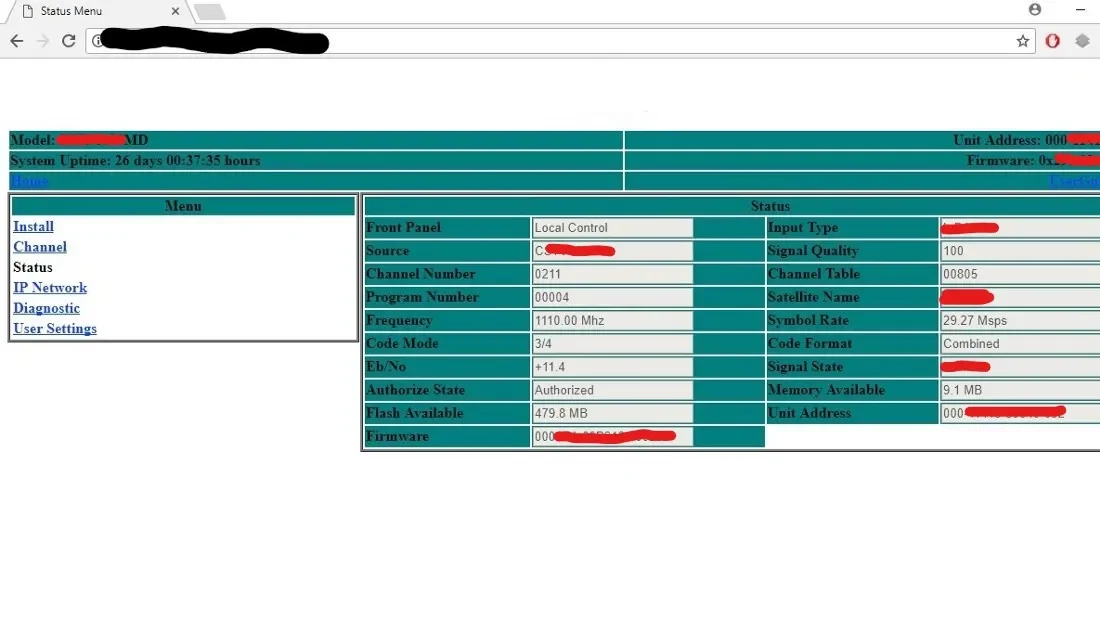
Their Satelite reciever admin panel
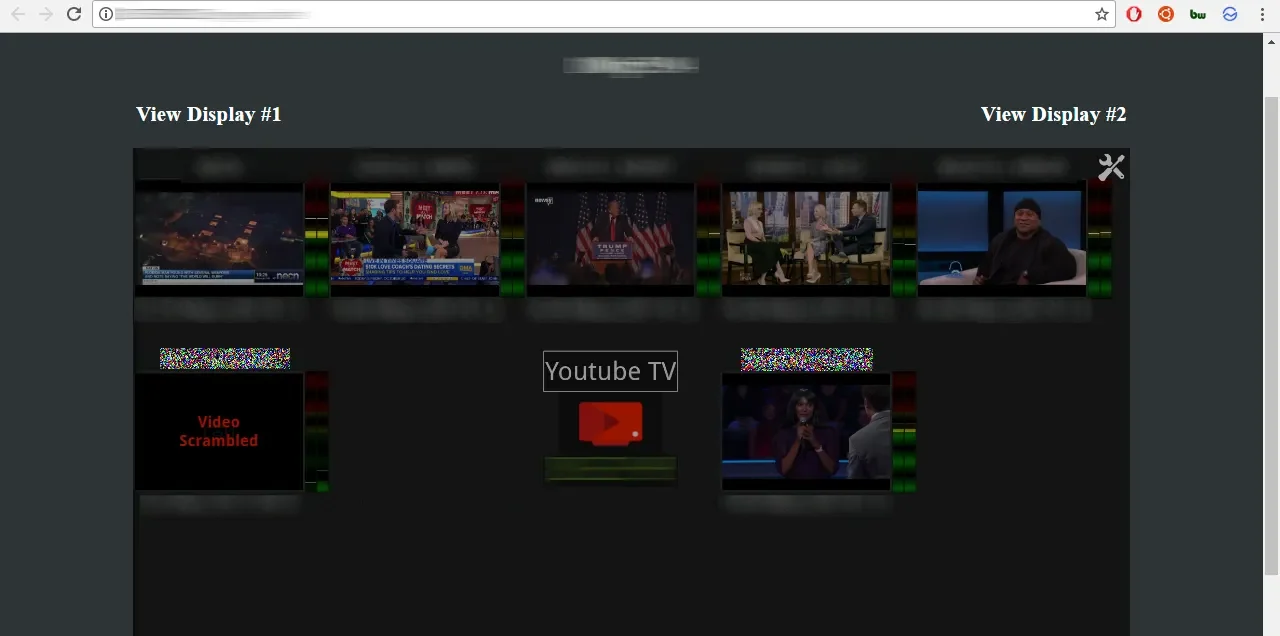
YouTube TV Admin panel (Screen Control)
Beyond these, he also reached the broadcasting panel, internal PCSC configuration and many similar locations using the same technique.
Root cause
The report does not describe the server-side code or configuration. What it shows is a combination of two weaknesses, and the report only implies the mechanism.
- Clicking log in with no credentials produced an admin interface, which the report presents as the direct cause of the access.
- Requests through Google's Data saver proxy reached the internal IP ranges despite the block on public access. The report does not explain why traffic through the proxy was allowed to reach the panels.
The earlier fix blocked public access to the IP ranges, yet the Data saver proxy still reached them.
Impact
Under the conditions described, anyone using a browser with Data saver enabled, or otherwise routing traffic through the same Google proxy, could reach the internal admin panels from anywhere in the world. The panels shown include a satellite receiver admin panel and the YouTube TV admin panel with screen control, and the researcher also reached a broadcasting panel and internal PCSC configuration. The report does not enumerate what actions those panels allow, so the full operational impact is not stated. The researcher describes the outcome as scary, and Google paid a $13337 reward.
Fix
Based on the root cause, two changes are needed: the admin panels must reject logins without valid credentials, and the network boundary must treat traffic from Google's own proxies the same way it treats any other external traffic, rather than trusting it because of where it originates.
Variants to test
- Submit login forms with empty or null credentials on internal-looking panels. A positive result is an authenticated interface appearing without a valid account.
- Compare behaviour between a mobile browser with a data-saving or traffic-optimising proxy enabled and a desktop browser without it. A positive result is an internal address that responds only through the proxy.
- Look for other Google-operated proxies and gateways that originate traffic inside the trusted network, such as optimisers, caches and translation services, and check whether they can reach restricted ranges. A positive result is any restricted host answering through such a service.
- During reconnaissance, resolve domains to IP addresses and check whether any returned addresses fall in ranges that are supposed to be internal. A positive result is an internal device address appearing in public DNS data.
What happened, in plain words
Google runs internal admin panels for several of its broadcast and television products, including YouTube's Broadcasting Satellite and YouTube TV. An admin panel is a private web page that lets staff control a system: think of it as the back office of a shop, where the staff manage stock and prices, rather than the shop window the public sees. These panels sit on internal IP addresses. An IP address is the number that identifies a device or server on a network, a bit like a postal address for computers. Internal addresses are not meant to be reachable from the public internet, the same way a staff-only door is not meant to open onto the street.
Earlier, two similar findings had been reported by other researchers: one about internal device IP addresses, and one about a subdomain that exposed admin panels. A subdomain is a smaller name under a main domain, for example mail.example.com under example.com. Those issues had already been fixed, and Google had blocked public access to the entire IP ranges involved. A range is simply a block of addresses that belong together.
The author, Vishnu Prasad P G, describes himself as a third-year engineering student and a newcomer to bug hunting. Bug hunting means looking for mistakes in software and reporting them, usually for a reward. He found a way to reach those blocked internal IP addresses again and to log in to the admin panels behind them. He reported it through the Google VRP, Google's Vulnerability Reward Program, which pays people for reporting security problems. He was rewarded $13337.
Setup
The report describes no special accounts, roles or tooling. The key factor turned out to be a Chrome mobile browser with Google's Data saver feature turned on. Data saver is a browser feature that routes traffic through a Google server. It saves mobile data, but it also means your requests arrive at websites from Google's own network rather than from your phone's network.
The researcher also had a list of Google IP addresses, some of which belonged to internal devices, obtained from some domain during reconnaissance. Reconnaissance (often shortened to recon) is the information-gathering phase of security work: looking at public information to learn what a company owns and how it is laid out, before trying anything. No proxy or VPN was configured deliberately at the start. A proxy is a middleman server that forwards your requests for you; a VPN is a private tunnel that makes your traffic appear to come from somewhere else.
Finding it
While searching for bugs in Google, the researcher collected a set of Google IP addresses from a domain. Looking at them, he recognised that the list contained internal device addresses as well. He knew that public access to those ranges had been blocked after the earlier reports, so he needed a way around the restriction.
He searched for ways to reach the blocked addresses. Every article, blog, forum thread and comment he read said that Google's own proxy or VPN was required. Then his power supply failed and he had no battery backup, so he picked up his mobile phone and continued searching. Out of curiosity he opened one of the IP addresses in his Chrome mobile browser, and an HTTP login page appeared. HTTP is the basic language browsers and web servers use to exchange pages and data; an HTTP login page is simply a web page asking for a username and password.
That was unexpected: a login page for what looked like an internal Google system, reachable from an ordinary mobile browser. He did not have credentials. Credentials are the username and password that prove who you are.
Exploitation
Step 1: Submit the login form with no credentials
Instead of stopping at the login prompt, he clicked the log in button without entering a username or password. A page with many buttons and options appeared, and he realised he was inside the admin panel of a Google product. He credits the idea of trying null credentials against a Google login to SREERAM's blog post about his earlier finding. Null credentials means leaving the fields empty, or sending them with no value at all.
At that moment he did not understand why it had worked. He only knew he had access to an admin panel. Clicking log in with no credentials produced an admin interface, which the report presents as the core of the bug. It is like a door with a lock that opens when you simply push it without turning the key.
Step 2: Reproduce it on the desktop, and fail
When the power came back, he opened the same IP address on his computer. The login page never appeared. The same address that worked on the phone did not work on the laptop, and he could not explain the difference.
Within an hour he built a proof of concept on his phone and submitted the report to Google. A proof of concept (PoC) is a small, repeatable demonstration that a bug is real, usually a few steps or a short recording. About five hours later Google triaged it and replied "Nice Catch!". Triaged means the security team reviewed the report and confirmed it is worth investigating. Google then asked which IP addresses he had used for the access, essentially wanting to know which proxy he had connected through. He did not know, so he went back to investigate.
Step 3: Identify the proxy: Google Data saver
About two hours later he found the loop that had let him into the admin panels. The difference between the two devices was Google's Data saver, which was turned on in his Chrome mobile browser. Data saver routes the browser's traffic through a Google proxy, and that proxy acted as an access proxy to Google's internal pages. The report does not explain why traffic through the proxy was allowed to reach the panels.
Once he understood this, he added the same proxy to his computer and could then reach the admin panel from the laptop browser as well. With that, anyone could reach the Google admin panels from anywhere in the world, provided the traffic went through that proxy.
He sent Google a detailed write-up and received a reply within 30 minutes.
Step 4: What was reachable
He included screenshots of the admin panels he had accessed.
Their Satelite reciever admin panel
YouTube TV Admin panel (Screen Control)
Beyond these, he also reached the broadcasting panel, internal PCSC configuration and many similar locations using the same technique. PCSC is a standard interface for talking to smart cards, the small chip cards used in some receivers and set-top boxes; the report does not describe what the configuration page itself contained.
Root cause
What it shows is a combination of two weaknesses, and the report only implies the mechanism.
- The internal admin panels accepted a login submission with empty credentials, so the authentication check did not actually require a valid username and password. Authentication is the process of proving who you are. This is the direct cause of the access.
- The network restriction that was supposed to keep the public away from the internal IP ranges did not cover Google's own Data saver proxy. Because that proxy originates traffic from inside Google's network, requests through it were treated as internal and allowed to reach the panels.
The earlier fix blocked public access to the IP ranges, yet the Data saver proxy still reached them.
Impact
Under the conditions described, anyone using a browser with Data saver enabled, or otherwise routing traffic through the same Google proxy, could reach the internal admin panels from anywhere in the world. The panels shown include a satellite receiver admin panel and the YouTube TV admin panel with screen control, and the researcher also reached a broadcasting panel and internal PCSC configuration. The report does not enumerate what actions those panels allow, so the full operational impact is not stated. The researcher describes the outcome as scary, and Google paid a $13337 reward.
Fix
Based on the root cause, two changes are needed: the admin panels must reject logins without valid credentials, and the network boundary must treat traffic from Google's own proxies the same way it treats any other external traffic, rather than trusting it because of where it originates.
Variants to test
- Submit login forms with empty or null credentials on internal-looking panels. A positive result is an authenticated interface appearing without a valid account.
- Compare behaviour between a mobile browser with a data-saving or traffic-optimising proxy enabled and a desktop browser without it. A positive result is an internal address that responds only through the proxy.
- Look for other Google-operated proxies and gateways that originate traffic inside the trusted network, such as optimisers, caches and translation services, and check whether they can reach restricted ranges. A positive result is any restricted host answering through such a service.
- During reconnaissance, resolve domains to IP addresses and check whether any returned addresses fall in ranges that are supposed to be internal. A positive result is an internal device address appearing in public DNS data. DNS is the system that translates human-friendly names like
example.cominto IP addresses.
Glossary
- Admin panel: a private web page used by staff to manage and control a system.
- IP address: the number that identifies a device or server on a network.
- Internal IP address: an address meant to be reachable only from inside an organisation's own network.
- IP range: a block of IP addresses that belong together.
- Subdomain: a smaller name under a main domain, such as
mail.example.comunderexample.com. - Bug hunting: searching for mistakes in software and reporting them, often for a reward.
- VRP (Vulnerability Reward Program): a program that pays people for reporting security problems.
- Data saver: a browser feature that routes traffic through a Google server to shrink pages and save mobile data.
- Reconnaissance (recon): the information-gathering phase of security work, using public information to learn what a company owns.
- Proxy: a middleman server that forwards your requests on your behalf.
- VPN: a private tunnel that makes your traffic appear to come from another location.
- HTTP: the basic language browsers and web servers use to exchange pages and data.
- Credentials: the username and password that prove who you are.
- Null credentials: a login attempt with empty or missing username and password values.
- Proof of concept (PoC): a small, repeatable demonstration that a bug is real.
- Triaged: reviewed by a security team and confirmed worth investigating.
- Authentication: the process of proving who you are.
- Access proxy: a proxy that sits inside a trusted network and can therefore reach internal systems.
- PCSC: a standard interface for communicating with smart cards.
- DNS: the system that translates names like
example.cominto IP addresses. - Authentication bypass: a flaw that lets someone get past a login check without valid credentials.

