Discovering and Exploiting a Vulnerability in Android’s Personal Dictionary (CVE-2018-9375)
The Android personal dictionary content provider performed its caller-authorisation check after the database update or delete had already run, so any installed app could modify or wipe the user's dictionary without permission. Because a successful update takes measurably longer than one that matches no rows, an attacker could also use timing as an oracle to extract the stored words character by character.
 Published on ioactive.com
I was auditing an Android smartphone, and all installed applications were in scope. My preferred approach, when time permits, is to manually inspect as much code as I can.
The full write-up lives on its author's site
It belongs to its author, so we link to it rather than copy it. The other two tabs are our own rewrites, checked against it.
Context
During an audit of an Android smartphone where all installed applications were in scope, I spent time manually reading as much code as I could. That is how I came across a subtle flaw in the user's personal dictionary, a content provider that recent Android versions are supposed to protect.
Android ships a custom dictionary that can be edited by hand or populated automatically as the user types. It is normally reached from "Settings → Language & keyboard → Personal dictionary" (sometimes under "Advanced" or a slightly different label). It can hold names, addresses, phone numbers, emails, passwords, commercial brands, unusual words such as illnesses, medicines or technical jargon, and even credit card numbers.
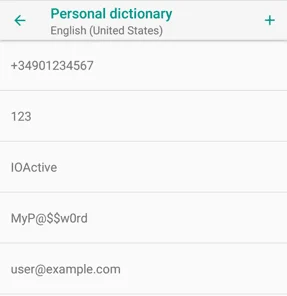
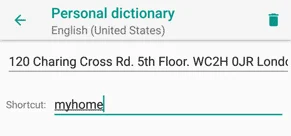
Each entry can also carry a shortcut, so instead of typing a full home address the user adds an entry and types something like "myhome" to trigger autocompletion.
Internally the words live in a SQLite database with a table named words (plus android_metadata). The words table has six columns:
_id (INTEGER, PRIMARY KEY)word (TEXT)frequency (INTEGER)locale (TEXT)appid (INTEGER)shortcut (TEXT)
The word column is the interesting one, but every other column and table in the same database is reachable through the same flaw.
The vulnerability is classified as elevation of privilege, rated moderate risk, and was fixed in June 2018. It affects Android 6.0, 6.0.1, 7.0, 7.1.1, 7.1.2, 8.0 and 8.1.
Setup
The audit was performed against an Android smartphone with all installed applications in scope. A malicious application can exploit it without requiring any permission or user interaction.
On the defensive side, the relevant component is the UserDictionary content provider, exposed at content://user_dictionary/words. In older Android versions, read and write access was gated by two permissions:
android.permission.READ_USER_DICTIONARYandroid.permission.WRITE_USER_DICTIONARY
That changed with API 23. The official documentation states: "Starting on API 23, the user dictionary is only accessible through IME and spellchecker". The old permissions were replaced by internal checks, so in theory only privileged accounts such as root and system, enabled Input Method Editors (IMEs) and spell checkers could touch the provider.
Finding it
Looking at the AOSP code repository, I found the change that introduced a new private function, canCallerAccessUserDictionary, called from all the standard query, insert, update and delete functions of the UserDictionary content provider to block unauthorised calls.
The change works for query and insert, but in update and delete the authorisation check happens too late. By the time the caller is validated, the database has already been modified. Any application can therefore invoke those two functions through the exported provider and bypass the misplaced check.
In the UserDictionaryProvider class, the highlighted fragments show the checks running after the database would already have been altered:
@Override

public int delete(Uri uri, String where, String[] whereArgs) {
   SQLiteDatabase db = mOpenHelper.getWritableDatabase();
   int count;
   switch (sUriMatcher.match(uri)) {
      case WORDS:
          count = db.delete(USERDICT_TABLE_NAME, where, whereArgs);
          break;

      case WORD_ID:
          String wordId = uri.getPathSegments().get(1);
          count = db.delete(USERDICT_TABLE_NAME, Words._ID + "=" + wordId
               + (!TextUtils.isEmpty(where) ? " AND (" + where + ')' : ""), whereArgs);
          break;

       default:
          throw new IllegalArgumentException("Unknown URI " + uri);
   }

   // Only the enabled IMEs and spell checkers can access this provider.
   if (!canCallerAccessUserDictionary()) {
       return 0;
   }

   getContext().getContentResolver().notifyChange(uri, null);
   mBackupManager.dataChanged();
   return count;
}

@Override

public int update(Uri uri, ContentValues values, String where, String[] whereArgs) {
   SQLiteDatabase db = mOpenHelper.getWritableDatabase();
   int count;
   switch (sUriMatcher.match(uri)) {
      case WORDS:
         count = db.update(USERDICT_TABLE_NAME, values, where, whereArgs);
         break;

      case WORD_ID:
         String wordId = uri.getPathSegments().get(1);
         count = db.update(USERDICT_TABLE_NAME, values, Words._ID + "=" + wordId
+ (!TextUtils.isEmpty(where) ? " AND (" + where + ')' : ""), whereArgs);
         break;

      default:
         throw new IllegalArgumentException("Unknown URI " + uri);
   }

   // Only the enabled IMEs and spell checkers can access this provider.
   if (!canCallerAccessUserDictionary()) {
      return 0;
   }

   getContext().getContentResolver().notifyChange(uri, null);
   mBackupManager.dataChanged();
   return count;
}
The AndroidManifest.xml adds no further protection such as intent filters or permissions to the explicitly exported provider:
<manifest xmlns:android="http://schemas.android.com/apk/res/android"
       package="com.android.providers.userdictionary"
       android:sharedUserId="android.uid.shared">

   <application android:process="android.process.acore"
       android:label="@string/app_label"
       android:allowClearUserData="false"
       android:backupAgent="DictionaryBackupAgent"
       android:killAfterRestore="false"
       android:usesCleartextTraffic="false"
       >

       <provider android:name="UserDictionaryProvider"
          android:authorities="user_dictionary"
          android:syncable="false"
          android:multiprocess="false"
          android:exported="true" />

   </application>
</manifest>
Exploitation
Step 1: update arbitrary entries
Any malicious application can rewrite the dictionary without asking for a permission:
ContentValues values = new ContentValues();
values.put(UserDictionary.Words.WORD, "IOActive");

getContentResolver().update(UserDictionary.Words.CONTENT_URI, values,
        null, null);
Step 2: delete arbitrary entries
Deleting is just as easy, including wiping the whole personal dictionary:
getContentResolver().delete(UserDictionary.Words.CONTENT_URI, null, null);
Both methods are supposed to return the number of affected rows. For non-legitimate invocations they always return zero, which makes it slightly harder for an attacker to infer anything from the return value.
Step 3: turn blind writes into a time-based oracle
At this point it looks as if destruction and tampering are all an attacker can do. The more interesting part is reading personal data. query is not directly affected, but the whole database can still be dumped through a time-based side channel. The where argument is fully controllable by the attacker, and a successful update of any row takes more time to execute than the same statement when it affects no row.
Consider this fragment running locally inside a malicious application:
ContentValues values = new ContentValues();
values.put(UserDictionary.Words._ID, 1);

long t0 = System.nanoTime();
for (int i=0; i<200; i++) {
    getContentResolver().update(UserDictionary.Words.CONTENT_URI, values,
                    "_id = 1 AND word LIKE 'a%'", null);
}
long t1 = System.nanoTime();
Repeating the same statement enough times (200 here, depending on the device) makes the time difference t1-t0 between a condition that evaluates to true and one that evaluates to false noticeable. That is a classic time-based Boolean blind SQL injection. If the first user-defined word starts with "a", the condition is true and the fragment takes longer, say 5 seconds, against roughly 2 seconds when the guess is false and no row is updated. A wrong guess is followed by "b", "c" and so on. A correct guess reveals the first character, then the same technique moves to the second character, then to the next word, until the whole dictionary or any filterable subset of rows and fields is dumped.
To avoid altering the database, the _id column is updated to its original value, so the inner idempotent statement is:
UPDATE words SET _id=N WHERE _id=N AND (condition)
When the condition is true, the row with identifier N is written with the same identifier it already had, leaving it unmodified. Execution time becomes a non-intrusive oracle.
Because the condition can be replaced with any sub-select, the attack extends to any SQL expression SQLite supports, for example:
- Is the word 'something' stored in the dictionary?
- Retrieve all 16-character words (e.g. credit card numbers)
- Retrieve all words that have a shortcut
- Retrieve all words that contain a dot
Step 4: automate it in a PoC application
I built a simple Android application to prove exploitability and measure effectiveness. It assumes we can blindly update arbitrary rows through the provider: if the inner UPDATE affects one or more rows, it takes longer, which is all that is needed to decide whether a SQL condition is true or false.
At the start we know nothing about the content, not even the internal identifiers. Rather than iterating over every possible identifier, the tool starts with the row with the lowest identifier and smashes the original value of its frequency field to an arbitrary number. Other valid approaches exist for this step.
Several shared processes run concurrently on Android, so the elapsed time for the same invocation varies between executions and depends on the device's processing power and performance. Statistically, repeating the invocation a significant number of times gives a differentiable average, so the iteration count has to be adjusted per device and current configuration, for example in battery saving mode.
I first tried a more complex way of deciding whether a response time means true or false, then settled on a much simpler one that gave accurate and reliable results. Repeat the same number of requests that always evaluate to true (e.g. WHERE 1=1) and false (e.g. WHERE 1=0) and take the average time as the threshold. Measured times greater than the threshold are interpreted as true, otherwise as false. It is not AI or big data, nor does it use blockchain or the cloud, but the K.I.S.S. principle applies and works.
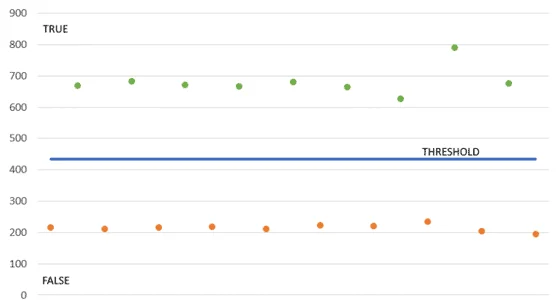
With a way to tell correct from wrong assumptions, dumping the entire database is trivial. The example above is easy to understand but not the most efficient. The PoC uses binary search for any numeric query:
-
Determine the number of rows of the table (optional)
SELECT COUNT(*) FROM words
-
Determine the lowest identifier
SELECT MIN(_id) FROM words
-
Determine the number of characters of the word with that identifier
SELECT length(word) FROM words WHERE _id=N
-
Iterate through that word, extracting character by character (in ASCII/Unicode)
SELECT unicode(substr(word, i, 1)) FROM words WHERE _id=N
-
Determine the lowest identifier which is greater than the one we got and repeat
SELECT MIN(_id) FROM words WHERE _id > N
No numeric or string value can be retrieved directly, so each expression is translated into a set of Boolean queries evaluated by execution time. Instead of asking for a number, the tool asks "is it greater than X?" repeatedly, adjusting X until the value is found after log(n) queries. For a value of 97, the trace looks like this:
| Iteration | Condition | Result | Max | Min | Mid |
|---|---|---|---|---|---|
| , | , | , | 255 | 0 | 127 |
| 1 | Is N > 127? | No | 127 | 0 | 63 |
| 2 | Is N > 63? | Yes | 127 | 63 | 95 |
| 3 | Is N > 95? | Yes | 127 | 95 | 111 |
| 4 | Is N > 111? | No | 111 | 95 | 103 |
| 5 | Is N > 103? | No | 103 | 95 | 99 |
| 6 | Is N > 99? | No | 99 | 95 | 97 |
| 7 | Is N > 97? | No | 97 | 95 | 96 |
| 8 | Is N > 96? | Yes | 97 | 96 | 96 |
Step 5: the exploitation tool
The process is implemented in a PoC tool. Source code and a compiled APK are in the GitHub repository at https://github.com/IOActive/AOSP-ExploitUserDictionary. Its interface is minimal:
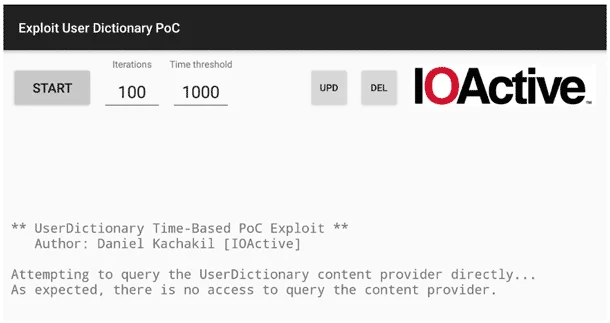
On launch the application tries to access the personal dictionary provider directly and query the number of entries. Under normal circumstances, not running as root and so on, that access should fail. If direct access ever succeeds, there is no point in a time-based blind approach, though you are welcome to waste CPU cycles with the PoC instead of mining cryptocurrencies.
Two parameters are adjustable:
- Initial number of iterations: how many times the same call is repeated to obtain a significant time difference.
- Minimum time threshold (in milliseconds): the lowest acceptable value.
The current version adjusts both automatically, but in the first stage everything was manual and the tool took these values as provided, which is why the controls exist. Larger numbers give better accuracy but slower extraction; smaller numbers run faster but are more likely to be inaccurate. Hence the hardcoded minimum of 10 iterations and 200 milliseconds.
Pressing START begins auto-adjustment. The application runs some queries and discards the results, since the initial ones were usually quite high and not representative. It then executes the initial number of iterations and estimates the threshold. If the threshold is above the configured minimum, it tests accuracy with 20 consecutive queries alternating true and false statements. If accuracy is not good enough (only one mistake is allowed), it increases the iteration count and repeats a set number of times until the parameters are properly adjusted, or gives up and exits.
Once the process starts, some controls are disabled and verbose output appears in a scrollable log window, also visible via logcat. It shows the current row identifier, all SQL subqueries, the total time and the inferred trueness. Retrieved characters appear in the upper line as soon as they are extracted.
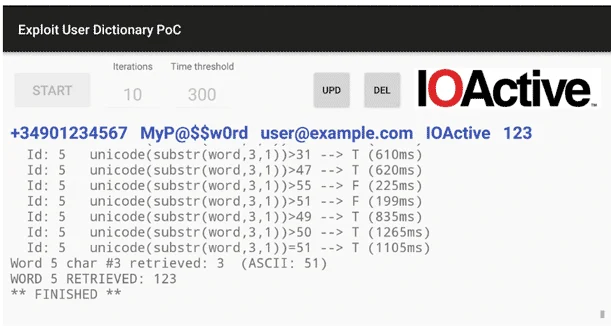
The UPD and DEL buttons on the right are unrelated to the time-based extraction. They make direct UPDATE and DELETE calls to the provider and were intentionally limited to words starting with "123" to avoid accidental deletion of a personal dictionary. To test them, add such an entry manually unless it already exists.
Step 6: watch it run
The easiest summary of the process is the tool running on a real device in the following videos.
Practical issues encountered
The tool is a quick and dirty PoC. Its goal was to prove that exploitation was possible and straightforward to implement, so it has limitations and does not follow many recommended programming practices; it is not meant to be maintainable, efficient or pleasant to use.
In the early stages everything was dumped to the Android log. When results were shown in the GUI as well, all code had to run on a separate thread to avoid blocking the UI thread, which can make the app unresponsive and get it killed by the OS. Accuracy dropped considerably with that change because the thread had low priority, so I set it to "-20", the maximum allowed priority, and it worked fine again.
Updating the UI from a separate thread can crash and is generally restricted via runtime exceptions, so log messages are posted through runOnUiThread. A real exploit needs no UI at all.
If the personal dictionary is empty there is no row to force an update, so all queries take roughly the same time. There is nothing to extract, the tool should fail to adjust its parameters and eventually stop. In odd cases it might calibrate randomly even with an empty database and try to extract garbage or pseudo-random data.
A regular smartphone goes to sleep after a while and performance drops considerably, pushing execution time far above expected values so that every call is evaluated as true. A simpler solution was chosen: keep the screen on and acquire a wake lock via the power manager to stop the OS suspending the app. The lock is never released, so the application has to be killed when no longer used.
Screen rotation also caused problems, so the app is forced to landscape mode, which also gives the extra width to show each message on a single line.
After START is pressed some controls are permanently disabled. To readjust parameters or run again, close and reopen the app.
External events and parallel executions, such as synchronising email or receiving a push message, can interfere and produce inaccurate results. Retry under more stable conditions, for example with network access disabled or all other applications closed.
The UI has no internationalisation and was not designed to extract Unicode words; adapting it should be trivial but was not the goal of a simple PoC. Extraction is intentionally limited to the first 5 words, sorted by internal identifier.
Root cause
The authorisation check was placed after the database operation in update and delete. The provider is exported with android:exported="true" and the manifest adds no permission or intent filter, so any installed application can reach it. The canCallerAccessUserDictionary check does run, but only after db.update or db.delete has already executed, and its failure path merely returns 0. The old READ_USER_DICTIONARY and WRITE_USER_DICTIONARY permissions no longer apply from API 23 onwards, so nothing else stands in the way. The change that was meant to restrict access to privileged accounts, IMEs and spell checkers therefore allowed access without requiring any specific permission, and went unnoticed for almost three years.
Impact
A malicious application with no permissions and no user interaction can update, delete or retrieve the entire contents of the user's personal dictionary. That dictionary may contain names, addresses, phone numbers, emails, passwords, brands, unusual words and credit card numbers. The flaw is rated moderate risk and classified as elevation of privilege. Direct reads through query are not possible, and the return value of the abused calls is always zero, so extraction depends on the timing side channel and on the device behaving consistently enough for the threshold to be meaningful.
Fix
The source fix is simple: move the call that checks the caller's permissions to the beginning of the affected functions. A patch file with the suggested fix was provided to Google along with the advisory, and the vulnerability was fixed in commit https://android.googlesource.com/platform/packages/providers/UserDictionaryProvider/+/[redacted].
End users should confirm that their installed security patch level contains the fix for CVE-2018-9375. On Google Pixel and Nexus devices it was released in June 2018, per https://source.android.com/security/bulletin/pixel/2018-06-01. If a device cannot be updated, review the personal dictionary and make sure it holds no sensitive information, in the unlikely event the issue becomes actively exploited.
Variants to test
- Other exported content providers with late checks. Read the provider source and look for permission or caller checks placed after the database call. A positive result is a provider you can reach from an unprivileged app and whose
updateordeletechanges rows despite the check failing. - Providers relying on removed permissions. Look for components still documented around
READ_USER_DICTIONARYorWRITE_USER_DICTIONARYstyle permissions that were replaced by internal checks. A positive result is a call that succeeds without holding any declared permission. - Timing oracles on blind writes. Where a write returns no useful data, measure whether a condition that matches a row takes measurably longer than one that matches none. A positive result is a stable gap between
WHERE 1=1andWHERE 1=0averages across repeated calls. - Idempotent update trick. Set a column to its own value under a guessed condition, as in
UPDATE words SET _id=N WHERE _id=N AND (condition), to read data without modifying it. A positive result is a timing difference that tracks the truth of the condition while the row stays unchanged. - Binary search over numeric expressions. Use
length,unicode(substr(...)),MIN(_id)andCOUNT(*)style sub-selects as Boolean questions. A positive result is a value reconstructed in roughlylog(n)queries per character or number. - Empty or noisy environments. Test on a device with an empty dictionary and under load or sleep. A positive result is a tool that fails to calibrate or produces garbage, which tells you the oracle needs a populated table and stable timing.
What happened, in plain words
An Android phone keeps a small private list of words for you. It is called the personal dictionary. It remembers spellings the phone does not know, and it can also store shortcuts: you type myhome and the phone fills in your full address. Because people put real things in there, the list can hold names, addresses, phone numbers, emails, passwords, brand names, unusual words such as illnesses or medicines, and even credit card numbers.
Android is supposed to keep that list private. Only a few trusted parts of the system should be able to read or change it: the keyboard app you have chosen (an Input Method Editor, or IME), the spell checker, and privileged system accounts. A normal app you install from a shop should not be able to touch it at all.
While reading Android's source code by hand, I found that this protection was in the wrong place for two operations, update (change an entry) and delete (remove an entry). The check that asks "is this caller allowed?" ran after the change had already been made. So any installed app could change or wipe the dictionary without asking for a permission and without any user interaction.
That alone would be bad but limited: an attacker could damage data but not read it. The more serious part came next. By measuring how long a change takes, an attacker can ask the phone yes/no questions about the contents and slowly rebuild the whole list, character by character. This is a timing attack, and it turned a data-tampering bug into a full data leak.
The bug is classified as elevation of privilege (a lower-privileged app gaining abilities it should not have), rated moderate risk, and was fixed in June 2018. It affects Android 6.0, 6.0.1, 7.0, 7.1.1, 7.1.2, 8.0 and 8.1.
Background: what the personal dictionary is
Android ships a custom dictionary that you can edit by hand or that fills itself as you type. You normally reach it from "Settings → Language & keyboard → Personal dictionary", sometimes under "Advanced" or a slightly different label. It can hold names, addresses, phone numbers, emails, passwords, commercial brands, unusual words such as illnesses, medicines or technical jargon, and even credit card numbers.
Each entry can also carry a shortcut. Instead of typing a full home address, you add an entry and type something like myhome, and the keyboard offers the full text as autocompletion.
Inside the phone, the words live in a SQLite database. SQLite is a small database engine that stores data in a single file, the same way a spreadsheet stores rows and columns but with a query language on top. The database has a table named words (plus a bookkeeping table called android_metadata). The words table has six columns:
_id (INTEGER, PRIMARY KEY)word (TEXT)frequency (INTEGER)locale (TEXT)appid (INTEGER)shortcut (TEXT)
A column is one field of a record, like one column in a spreadsheet. _id is the row's unique number, the primary key. word holds the custom word itself. frequency is a number the system uses to rank how often a word is used. locale records the language or region. appid records which app the entry belongs to. shortcut holds the shortcut text.
The word column is the interesting one, but every other column and table in the same database is reachable through the same flaw.
Background: how apps talk to each other on Android
Android apps are isolated from each other. When one app needs data from another, it goes through a component called a content provider. Think of a content provider as a reception desk: other apps do not walk into the back office, they hand a request to the desk, and the desk decides what to do. The request is addressed with a URI, which is a string that names the data, much like a web address names a page. The personal dictionary provider is exposed at content://user_dictionary/words.
A content provider offers four standard operations, and they map to the four things you can do with stored data:
query: read rows.insert: add a row.update: change existing rows.delete: remove rows.
In older Android versions, reading and writing the dictionary was gated by two permissions:
android.permission.READ_USER_DICTIONARYandroid.permission.WRITE_USER_DICTIONARY
A permission is a declared capability. An app lists the permissions it wants, and the user or the system grants them. That changed with API 23. API level is Android's version number for developers; API 23 corresponds to Android 6.0. The official documentation states: "Starting on API 23, the user dictionary is only accessible through IME and spellchecker". The old permissions were replaced by internal checks, so in theory only privileged accounts such as root and system, enabled IMEs and spell checkers could touch the provider.
Finding the flaw
I was auditing an Android smartphone where all installed applications were in scope, and I spent time manually reading as much code as I could. That is how I found the problem. Reading source code is like reading the recipe rather than tasting the cake: you can see the order in which steps happen, and order is exactly what went wrong here.
Looking at the AOSP code repository, I found the change that introduced a new private function, canCallerAccessUserDictionary, called from all the standard query, insert, update and delete functions of the UserDictionary content provider to block unauthorised calls. AOSP is the Android Open Source Project, the public source code of Android. A function is a named block of code that does one job; calling it runs that job.
The change works for query and insert, but in update and delete the authorisation check happens too late. By the time the caller is validated, the database has already been modified. Any application can therefore invoke those two functions through the exported provider and bypass the misplaced check. An exported component is one that other apps are allowed to reach; the opposite, not exported, is private to its own app.
In the UserDictionaryProvider class, the highlighted fragments show the checks running after the database would already have been altered:
@Override

public int delete(Uri uri, String where, String[] whereArgs) {
   SQLiteDatabase db = mOpenHelper.getWritableDatabase();
   int count;
   switch (sUriMatcher.match(uri)) {
      case WORDS:
          count = db.delete(USERDICT_TABLE_NAME, where, whereArgs);
          break;

      case WORD_ID:
          String wordId = uri.getPathSegments().get(1);
          count = db.delete(USERDICT_TABLE_NAME, Words._ID + "=" + wordId
               + (!TextUtils.isEmpty(where) ? " AND (" + where + ')' : ""), whereArgs);
          break;

       default:
          throw new IllegalArgumentException("Unknown URI " + uri);
   }

   // Only the enabled IMEs and spell checkers can access this provider.
   if (!canCallerAccessUserDictionary()) {
       return 0;
   }

   getContext().getContentResolver().notifyChange(uri, null);
   mBackupManager.dataChanged();
   return count;
}

@Override

public int update(Uri uri, ContentValues values, String where, String[] whereArgs) {
   SQLiteDatabase db = mOpenHelper.getWritableDatabase();
   int count;
   switch (sUriMatcher.match(uri)) {
      case WORDS:
         count = db.update(USERDICT_TABLE_NAME, values, where, whereArgs);
         break;

      case WORD_ID:
         String wordId = uri.getPathSegments().get(1);
         count = db.update(USERDICT_TABLE_NAME, values, Words._ID + "=" + wordId
+ (!TextUtils.isEmpty(where) ? " AND (" + where + ')' : ""), whereArgs);
         break;

      default:
         throw new IllegalArgumentException("Unknown URI " + uri);
   }

   // Only the enabled IMEs and spell checkers can access this provider.
   if (!canCallerAccessUserDictionary()) {
      return 0;
   }

   getContext().getContentResolver().notifyChange(uri, null);
   mBackupManager.dataChanged();
   return count;
}
Line by line, in plain words:
@Overridemarks that this function replaces one defined in a parent class. It is a label, not an action.public int delete(Uri uri, String where, String[] whereArgs)declares the delete operation. It receives the address of the data (uri), a filter saying which rows to delete (where) and the values that fill in that filter (whereArgs). It returns a number, the count of affected rows.SQLiteDatabase db = mOpenHelper.getWritableDatabase();opens the database for writing. This is the first step, before any permission check.int count;prepares a variable to hold how many rows were affected.switch (sUriMatcher.match(uri))looks at the address and decides which kind of request it is.case WORDS:means the request targets the whole table.count = db.delete(USERDICT_TABLE_NAME, where, whereArgs);deletes the matching rows right away.case WORD_ID:means the request targets one row by its number.String wordId = uri.getPathSegments().get(1);pulls that number out of the address. The next lines build a filter that matches that_idand, if the caller also supplied awhere, adds it withAND. Thendb.delete(...)deletes the matching rows.default:throws an error for an address it does not recognise.// Only the enabled IMEs and spell checkers can access this provider.is a comment describing the intent of the next lines.if (!canCallerAccessUserDictionary()) { return 0; }is the permission check. If the caller is not allowed, it returns 0. The crucial point is where this sits: after the delete has already run. The!means "not", so the block runs when the caller is not allowed.getContext().getContentResolver().notifyChange(uri, null);tells anyone listening that the data changed.mBackupManager.dataChanged();tells the backup system that the data changed.return count;returns the number of affected rows.
The update function follows the same shape. It opens the database, switches on the address, calls db.update(...) to write the new values, and only afterwards runs the same canCallerAccessUserDictionary check. In both functions the order is: change the data first, ask permission second. That is the whole bug.
The AndroidManifest.xml adds no further protection such as intent filters or permissions to the explicitly exported provider:
<manifest xmlns:android="http://schemas.android.com/apk/res/android"
       package="com.android.providers.userdictionary"
       android:sharedUserId="android.uid.shared">

   <application android:process="android.process.acore"
       android:label="@string/app_label"
       android:allowClearUserData="false"
       android:backupAgent="DictionaryBackupAgent"
       android:killAfterRestore="false"
       android:usesCleartextTraffic="false"
       >

       <provider android:name="UserDictionaryProvider"
          android:authorities="user_dictionary"
          android:syncable="false"
          android:multiprocess="false"
          android:exported="true" />

   </application>
</manifest>
The manifest is the file where an app declares what it contains and what it exposes. Line by line:
<manifest ...>opens the declaration.package="com.android.providers.userdictionary"names the app package.android:sharedUserId="android.uid.shared"puts it in a shared system user identity.<application ...>describes the app.android:process="android.process.acore"says which process it runs in.android:label="@string/app_label"is its display name.android:allowClearUserData="false"says its data cannot be cleared by the user.android:backupAgent="DictionaryBackupAgent"names the component that handles backups.android:killAfterRestore="false"controls behaviour after a restore.android:usesCleartextTraffic="false"blocks unencrypted network traffic.<provider android:name="UserDictionaryProvider" android:authorities="user_dictionary" android:syncable="false" android:multiprocess="false" android:exported="true" />declares the content provider.android:authorities="user_dictionary"is the name other apps use to reach it.android:exported="true"is the key line: it says any app may talk to this provider. No permission is attached to it here, and no intent filter is added.
So the manifest does not stand in the way. The only guard is the misplaced check in the code.
Exploitation
Step 1: update arbitrary entries
Any malicious application can rewrite the dictionary without asking for a permission:
ContentValues values = new ContentValues();
values.put(UserDictionary.Words.WORD, "IOActive");

getContentResolver().update(UserDictionary.Words.CONTENT_URI, values,
        null, null);
ContentValues values = new ContentValues();creates an empty set of column/value pairs, like a blank form to fill in.values.put(UserDictionary.Words.WORD, "IOActive");fills thewordcolumn with the textIOActive.getContentResolver().update(UserDictionary.Words.CONTENT_URI, values, null, null);sends an update request to the dictionary provider.CONTENT_URIis the address of the words table. The twonullarguments mean "no filter" and "no filter values", so the change applies to every row.
Step 2: delete arbitrary entries
Deleting is just as easy, including wiping the whole personal dictionary:
getContentResolver().delete(UserDictionary.Words.CONTENT_URI, null, null);
This sends a delete request to the same address. Again the two null arguments mean no filter, so every row is deleted. The user's whole personal dictionary is gone.
Both methods are supposed to return the number of affected rows. For non-legitimate invocations they always return zero, which makes it slightly harder for an attacker to infer anything from the return value. In other words, the app cannot simply ask "how many rows did I change?" and learn from the answer, because the answer is always zero.
Step 3: turn blind writes into a time-based oracle
At this point it looks as if destruction and tampering are all an attacker can do. The more interesting part is reading personal data. query is not directly affected, but the whole database can still be dumped through a time-based side channel. A side channel is information that leaks through something other than the intended answer, here the clock. The where argument is fully controllable by the attacker, and a successful update of any row takes more time to execute than the same statement when it affects no row. Changing a row means writing to disk; matching nothing means the database can stop early. That difference is tiny per call, but it is measurable when repeated.
Consider this fragment running locally inside a malicious application:
ContentValues values = new ContentValues();
values.put(UserDictionary.Words._ID, 1);

long t0 = System.nanoTime();
for (int i=0; i<200; i++) {
    getContentResolver().update(UserDictionary.Words.CONTENT_URI, values,
                    "_id = 1 AND word LIKE 'a%'", null);
}
long t1 = System.nanoTime();
ContentValues values = new ContentValues();creates the set of values to write.values.put(UserDictionary.Words._ID, 1);sets the_idcolumn to 1. This is the trick that keeps the row unchanged: we write the identifier back to the value it already has.long t0 = System.nanoTime();records the current time in nanoseconds before the loop. A nanosecond is one billionth of a second.for (int i=0; i<200; i++) { ... }repeats the next call 200 times.getContentResolver().update(UserDictionary.Words.CONTENT_URI, values, "_id = 1 AND word LIKE 'a%'", null);sends an update with a filter. The filter says: the row whose_idis 1, and whosewordstarts with the lettera.LIKE 'a%'is a pattern match where%means "anything after this".long t1 = System.nanoTime();records the time after the loop.
Repeating the same statement enough times (200 here, depending on the device) makes the time difference t1-t0 between a condition that evaluates to true and one that evaluates to false noticeable. That is a classic time-based Boolean blind SQL injection. Boolean means the question has a yes/no answer. Blind means we never see the data itself, only a side effect. SQL injection here means our text is being used as part of a database query, so we can shape the question. If the first user-defined word starts with "a", the condition is true and the fragment takes longer, say 5 seconds, against roughly 2 seconds when the guess is false and no row is updated. A wrong guess is followed by "b", "c" and so on. A correct guess reveals the first character, then the same technique moves to the second character, then to the next word, until the whole dictionary or any filterable subset of rows and fields is dumped.
To avoid altering the database, the _id column is updated to its original value, so the inner idempotent statement is:
UPDATE words SET _id=N WHERE _id=N AND (condition)
UPDATE words targets the table. SET _id=N writes the identifier back as N. WHERE _id=N AND (condition) only matches the row whose identifier is N, and only if our condition is also true. When the condition is true, the row with identifier N is written with the same identifier it already had, leaving it unmodified. Execution time becomes a non-intrusive oracle. An oracle is any source that answers yes/no questions; here the stopwatch is the oracle.
Because the condition can be replaced with any sub-select, the attack extends to any SQL expression SQLite supports. A sub-select is a query nested inside another query, like a question asked inside a question. For example:
- Is the word 'something' stored in the dictionary?
- Retrieve all 16-character words (e.g. credit card numbers)
- Retrieve all words that have a shortcut
- Retrieve all words that contain a dot
Each of these becomes a yes/no question the stopwatch can answer.
Step 4: automate it in a PoC application
I built a simple Android application to prove exploitability and measure effectiveness. A PoC, proof of concept, is a small demonstration that a flaw is real and can be used. It assumes we can blindly update arbitrary rows through the provider: if the inner UPDATE affects one or more rows, it takes longer, which is all that is needed to decide whether a SQL condition is true or false.
At the start we know nothing about the content, not even the internal identifiers. Rather than iterating over every possible identifier, the tool starts with the row with the lowest identifier and smashes the original value of its frequency field to an arbitrary number. Other valid approaches exist for this step.
Several shared processes run concurrently on Android, so the elapsed time for the same invocation varies between executions and depends on the device's processing power and performance. Statistically, repeating the invocation a significant number of times gives a differentiable average, so the iteration count has to be adjusted per device and current configuration, for example in battery saving mode.
I first tried a more complex way of deciding whether a response time means true or false, then settled on a much simpler one that gave accurate and reliable results. Repeat the same number of requests that always evaluate to true (e.g. WHERE 1=1) and false (e.g. WHERE 1=0) and take the average time as the threshold. Measured times greater than the threshold are interpreted as true, otherwise as false. It is not AI or big data, nor does it use blockchain or the cloud, but the K.I.S.S. principle applies and works. K.I.S.S. stands for "keep it simple, stupid": the plainest solution that works is usually the best.
With a way to tell correct from wrong assumptions, dumping the entire database is trivial. The example above is easy to understand but not the most efficient. The PoC uses binary search for any numeric query. Binary search is the guessing game where you halve the range each time: is it higher or lower than the middle? Each answer removes half the possibilities.
-
Determine the number of rows of the table (optional)
SELECT COUNT(*) FROM words
-
Determine the lowest identifier
SELECT MIN(_id) FROM words
-
Determine the number of characters of the word with that identifier
SELECT length(word) FROM words WHERE _id=N
-
Iterate through that word, extracting character by character (in ASCII/Unicode)
SELECT unicode(substr(word, i, 1)) FROM words WHERE _id=N
-
Determine the lowest identifier which is greater than the one we got and repeat
SELECT MIN(_id) FROM words WHERE _id > N
In plain words, each query asks the database a question:
SELECT COUNT(*) FROM wordscounts how many rows the table has.COUNT(*)means "count the rows".SELECT MIN(_id) FROM wordsfinds the smallest identifier.MINreturns the lowest value.SELECT length(word) FROM words WHERE _id=Nreturns how many characters the word in rowNhas.lengthcounts characters.SELECT unicode(substr(word, i, 1)) FROM words WHERE _id=Nreturns the numeric code of the character at positioniin that word.substr(word, i, 1)takes one character starting at positioni, andunicodeturns it into its number. ASCII and Unicode are standard numbering schemes for characters, so a letter is stored as a number.SELECT MIN(_id) FROM words WHERE _id > Nfinds the next row afterN, so the tool can move on to the next word.
No numeric or string value can be retrieved directly, so each expression is translated into a set of Boolean queries evaluated by execution time. Instead of asking for a number, the tool asks "is it greater than X?" repeatedly, adjusting X until the value is found after log(n) queries. log(n) here means the number of halvings needed to narrow a range down to one value; for a range of 256 possibilities it is 8 questions. For a value of 97, the trace looks like this:
| Iteration | Condition | Result | Max | Min | Mid |
|---|---|---|---|---|---|
| , | , | , | 255 | 0 | 127 |
| 1 | Is N > 127? | No | 127 | 0 | 63 |
| 2 | Is N > 63? | Yes | 127 | 63 | 95 |
| 3 | Is N > 95? | Yes | 127 | 95 | 111 |
| 4 | Is N > 111? | No | 111 | 95 | 103 |
| 5 | Is N > 103? | No | 103 | 95 | 99 |
| 6 | Is N > 99? | No | 99 | 95 | 97 |
| 7 | Is N > 97? | No | 97 | 95 | 96 |
| 8 | Is N > 96? | Yes | 97 | 96 | 96 |
Read the table as a narrowing window. Min and Max are the lowest and highest possible values still in play, and Mid is the middle of that window, the number the tool asks about. Each answer moves one of the two edges, and after eight questions only 97 is left.
Step 5: the exploitation tool
The process is implemented in a PoC tool. Source code and a compiled APK are in the GitHub repository at https://github.com/IOActive/AOSP-ExploitUserDictionary. An APK is the installable package file of an Android app. Its interface is minimal:
The screenshot shows the tool's minimalistic user interface.
On launch the application tries to access the personal dictionary provider directly and query the number of entries. Under normal circumstances, not running as root and so on, that access should fail. If direct access ever succeeds, there is no point in a time-based blind approach, though you are welcome to waste CPU cycles with the PoC instead of mining cryptocurrencies. CPU cycles are units of processor work; the joke is that the tool would be doing pointless computation.
Two parameters are adjustable:
- Initial number of iterations: how many times the same call is repeated to obtain a significant time difference.
- Minimum time threshold (in milliseconds): the lowest acceptable value.
A millisecond is one thousandth of a second. The current version adjusts both automatically, but in the first stage everything was manual and the tool took these values as provided, which is why the controls exist. Larger numbers give better accuracy but slower extraction; smaller numbers run faster but are more likely to be inaccurate. Hence the hardcoded minimum of 10 iterations and 200 milliseconds.
Pressing START begins auto-adjustment. The application runs some queries and discards the results, since the initial ones were usually quite high and not representative. It then executes the initial number of iterations and estimates the threshold. If the threshold is above the configured minimum, it tests accuracy with 20 consecutive queries alternating true and false statements. If accuracy is not good enough (only one mistake is allowed), it increases the iteration count and repeats a set number of times until the parameters are properly adjusted, or gives up and exits.
Once the process starts, some controls are disabled and verbose output appears in a scrollable log window, also visible via logcat. Logcat is Android's system-wide log where apps write messages. It shows the current row identifier, all SQL subqueries, the total time and the inferred trueness. Retrieved characters appear in the upper line as soon as they are extracted.
The UPD and DEL buttons on the right are unrelated to the time-based extraction. They make direct UPDATE and DELETE calls to the provider and were intentionally limited to words starting with "123" to avoid accidental deletion of a personal dictionary. To test them, add such an entry manually unless it already exists.
Step 6: watch it run
The easiest summary of the process is the tool running on a real device in the following videos.
Practical issues encountered
The tool is a quick and dirty PoC. Its goal was to prove that exploitation was possible and straightforward to implement, so it has limitations and does not follow many recommended programming practices; it is not meant to be maintainable, efficient or pleasant to use.
In the early stages everything was dumped to the Android log. When results were shown in the GUI as well, all code had to run on a separate thread to avoid blocking the UI thread, which can make the app unresponsive and get it killed by the OS. A thread is one line of execution inside a program; the UI thread is the one that draws the screen and handles taps, so if it is busy the app freezes. Accuracy dropped considerably with that change because the thread had low priority, so I set it to "-20", the maximum allowed priority, and it worked fine again. Priority tells the operating system how urgently a thread should be scheduled.
Updating the UI from a separate thread can crash and is generally restricted via runtime exceptions, so log messages are posted through runOnUiThread. A runtime exception is an error raised while the program runs. runOnUiThread hands a piece of work back to the UI thread so it is safe to touch the screen. A real exploit needs no UI at all.
If the personal dictionary is empty there is no row to force an update, so all queries take roughly the same time. There is nothing to extract, the tool should fail to adjust its parameters and eventually stop. In odd cases it might calibrate randomly even with an empty database and try to extract garbage or pseudo-random data.
A regular smartphone goes to sleep after a while and performance drops considerably, pushing execution time far above expected values so that every call is evaluated as true. A simpler solution was chosen: keep the screen on and acquire a wake lock via the power manager to stop the OS suspending the app. A wake lock is a request to the system to stay awake. The lock is never released, so the application has to be killed when no longer used.
Screen rotation also caused problems, so the app is forced to landscape mode, which also gives the extra width to show each message on a single line.
After START is pressed some controls are permanently disabled. To readjust parameters or run again, close and reopen the app.
External events and parallel executions, such as synchronising email or receiving a push message, can interfere and produce inaccurate results. Retry under more stable conditions, for example with network access disabled or all other applications closed.
The UI has no internationalisation and was not designed to extract Unicode words; adapting it should be trivial but was not the goal of a simple PoC. Internationalisation means making an app work in many languages and scripts. Extraction is intentionally limited to the first 5 words, sorted by internal identifier.
Root cause
The authorisation check was placed after the database operation in update and delete. The provider is exported with android:exported="true" and the manifest adds no permission or intent filter, so any installed application can reach it. An intent filter is a manifest entry that declares which requests a component accepts. The canCallerAccessUserDictionary check does run, but only after db.update or db.delete has already executed, and its failure path merely returns 0. The old READ_USER_DICTIONARY and WRITE_USER_DICTIONARY permissions no longer apply from API 23 onwards, so nothing else stands in the way. The change that was meant to restrict access to privileged accounts, IMEs and spell checkers therefore opened write access to every application, and went unnoticed for almost three years.
Impact
A malicious application with no permissions and no user interaction can update, delete or retrieve the entire contents of the user's personal dictionary. That dictionary may contain names, addresses, phone numbers, emails, passwords, brands, unusual words and credit card numbers. The flaw is rated moderate risk and classified as elevation of privilege. Direct reads through query are not possible, and the return value of the abused calls is always zero, so extraction depends on the timing side channel and on the device behaving consistently enough for the threshold to be meaningful.
Fix
The source fix is simple: move the call that checks the caller's permissions to the beginning of the affected functions. A patch file with the suggested fix was provided to Google along with the advisory, and the vulnerability was fixed in commit https://android.googlesource.com/platform/packages/providers/UserDictionaryProvider/+/[redacted]. A commit is a recorded change in a source code repository.
End users should confirm that their installed security patch level contains the fix for CVE-2018-9375. CVE is the public catalogue number for a known vulnerability. On Google Pixel and Nexus devices it was released in June 2018, per https://source.android.com/security/bulletin/pixel/2018-06-01. If a device cannot be updated, review the personal dictionary and make sure it holds no sensitive information, in the unlikely event the issue becomes actively exploited.
Variants to test
- Other exported content providers with late checks. Read the provider source and look for permission or caller checks placed after the database call. A positive result is a provider you can reach from an unprivileged app and whose
updateordeletechanges rows despite the check failing. - Providers relying on removed permissions. Look for components still documented around
READ_USER_DICTIONARYorWRITE_USER_DICTIONARYstyle permissions that were replaced by internal checks. A positive result is a call that succeeds without holding any declared permission. - Timing oracles on blind writes. Where a write returns no useful data, measure whether a condition that matches a row takes measurably longer than one that matches none. A positive result is a stable gap between
WHERE 1=1andWHERE 1=0averages across repeated calls. - Idempotent update trick. Set a column to its own value under a guessed condition, as in
UPDATE words SET _id=N WHERE _id=N AND (condition), to read data without modifying it. A positive result is a timing difference that tracks the truth of the condition while the row stays unchanged. - Binary search over numeric expressions. Use
length,unicode(substr(...)),MIN(_id)andCOUNT(*)style sub-selects as Boolean questions. A positive result is a value reconstructed in roughlylog(n)queries per character or number. - Empty or noisy environments. Test on a device with an empty dictionary and under load or sleep. A positive result is a tool that fails to calibrate or produces garbage, which tells you the oracle needs a populated table and stable timing.
Glossary
- API (Application Programming Interface): a defined way for one piece of software to ask another for data or actions.
- API level: Android's version number for developers; API 23 corresponds to Android 6.0.
- APK: the installable package file of an Android app.
- AOSP (Android Open Source Project): the public source code of Android.
- ASCII / Unicode: standard numbering schemes that give every character a number.
- Binary search: a guessing method that halves the remaining range with each yes/no answer.
- Blind SQL injection: shaping a database query so that a yes/no side effect reveals data you cannot see directly.
- Boolean: having only two possible answers, true or false.
- Column: one field of a record, like one column in a spreadsheet.
- Commit: a recorded change in a source code repository.
- Content provider: an Android component that lets one app offer data to other apps through a controlled interface.
- CPU cycles: units of processor work.
- CVE: the public catalogue number for a known vulnerability.
- Elevation of privilege: a lower-privileged app gaining abilities it should not have.
- Exported component: a component other apps are allowed to reach.
- Function: a named block of code that does one job.
- GUI: the graphical user interface, the part of an app you see and tap.
- Hardcoded: written directly into the code rather than configurable.
- Idempotent: an operation that leaves the data unchanged when repeated.
- IME (Input Method Editor): the keyboard app used to type text.
- Intent filter: a manifest entry declaring which requests a component accepts.
- Internationalisation: making an app work in many languages and scripts.
- K.I.S.S.: "keep it simple, stupid", the principle of choosing the plainest solution that works.
- Logcat: Android's system-wide log where apps write messages.
- Manifest: the file where an app declares what it contains and what it exposes.
- Millisecond: one thousandth of a second.
- Nanosecond: one billionth of a second.
- Oracle: any source that answers yes/no questions, here the stopwatch.
- Permission: a declared capability an app must hold to use a protected feature.
- PoC (proof of concept): a small demonstration that a flaw is real and can be used.
- Primary key: the column whose value uniquely identifies each row.
- Priority: how urgently the operating system schedules a thread.
- Runtime exception: an error raised while a program is running.
- Side channel: information that leaks through something other than the intended answer, such as timing.
- SQLite: a small database engine that stores data in a single file.
- Sub-select: a query nested inside another query.
- Thread: one line of execution inside a program.
- Timing attack: learning data by measuring how long operations take.
- UI thread: the thread that draws the screen and handles taps.
- URI: a string that names a piece of data, much like a web address names a page.
- Wake lock: a request to the system to stay awake.
WHEREclause: the part of a database query that says which rows to act on.

