Exploiting YouTube’s Permission Model : A Privilege Escalation case
The Subtitle Editor role in YouTube Studio could view private videos and channel-wide viewership metrics that should only be available to owners or managers. An attacker with that low-privilege role could access confidential unpublished content and sensitive analytics.
 Published on prakhar0x01.github.io
1 - My approach does not involves reconnaissance, instead focusing directly on the main application.
The full write-up lives on its author's site
It belongs to its author, so we link to it rather than copy it. The other two tabs are our own rewrites, checked against it.
Context
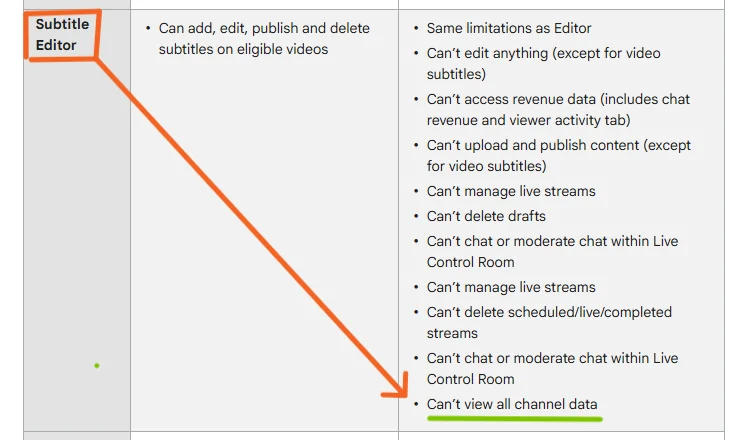
YouTube Studio is the channel management console at studio.youtube.com, where a channel owner manages uploads, analytics and collaborators. Channels can delegate work by inviting other accounts and giving them a role. One of those roles is Subtitle Editor, which Google's own documentation describes as being able to add and edit subtitles on assigned videos. The role is meant to be narrow: captions only, on the videos the owner has shared with that person.
The report examines whether that narrow role is actually enforced across the whole Studio surface, both in the UI and in the internal API the UI talks to. The report lists the severity as Medium and the vulnerability type as privilege escalation and role-based access control bypass.
Setup
The test needs two accounts and one channel:
- A channel owner account, referred to in the report as User-A.
- A second account, User-B, invited to the channel with the Subtitle Editor role.
- At least one video uploaded to the channel and set to Private.
User-B then signs in to YouTube Studio and works from the Subtitles tab. The proof of concept uses a captured request to YouTube's internal browse endpoint, sent with User-B's session cookie and authorisation token, from a Chrome 133 browser on Windows. The request body carries the usual context block (client name WEB, client version 2.20250423.01.00, locale en-GB, region IN, timezone Asia/Calcutta) plus a continuation token.
Finding it
The researcher's stated approach deliberately skips reconnaissance and goes straight at the main application. After two to three hours of examining the permission model without notable findings, attention shifted to accounts with lower privileges. That is where the gap appeared.
Two behaviours stood out for a Subtitle Editor:
- Private videos uploaded to the channel were listed and accessible in the Subtitles tab, even though they had not been explicitly shared with that user.
- Through a combination of UI access and direct API calls, the same user could reach total channel viewership metrics, data that should be reserved for owners and managers.
Both are wrong for the role. A Subtitle Editor should only touch subtitles on videos they are allowed to manage, should not see Private videos unless explicitly shared, and should never see channel-wide analytics.
Exploitation
Step 1: create the channel and the private video
As User-A, create a YouTube channel, invite User-B and assign the Subtitle Editor role, then upload one or more videos and set them to Private.
Step 2: confirm the UI exposure
As User-B, log in to YouTube Studio and open the Subtitles tab. Private videos appear in the list and are accessible. This alone is a visibility problem, but the UI is only part of the surface.
Step 3: query the internal browse endpoint
With User-B's session, send a crafted request to YouTube's internal browse endpoint to pull detailed video and channel data, including total viewership metrics:
POST /youtubei/v1/browse?prettyPrint=false HTTP/2
Host: www.youtube.com
Cookie: {USER-B_SSSION}
Content-Length: 4412
Sec-Ch-Ua-Full-Version-List:
Sec-Ch-Ua-Platform: "Windows"
Authorization: {USER-B_TOKEN}
Sec-Ch-Ua: "Chromium";v="133", "Not(A:Brand";v="99"
...snip...
Referer: https://www.youtube.com/channel/{channel-id}/about
Accept-Encoding: gzip, deflate, br
Priority: u=1, i

{"context":{"client":{"hl":"en-GB","gl":"IN","remoteHost":"[redacted]","deviceMake":"","deviceModel":"","visitorData":"{visitor_tdata}","userAgent":"Mozilla/5.0 (Windows NT 10.0; Win64; x64) AppleWebKit/537.36 (KHTML, like Gecko) Chrome/[redacted] Safari/537.36,gzip(gfe)","clientName":"WEB","clientVersion":"2.20250423.01.00","osName":"Windows","osVersion":"10.0","originalUrl":"{TARGET_VIDEO_URL}","platform":"DESKTOP","clientFormFactor":"UNKNOWN_FORM_FACTOR","configInfo":{"appInstallData":"{AppInstallData}","coldConfigData":"{cold_config_data}","coldHashData":"{cold-hash_data}","hotHashData":"{hotHashData}"},"userInterfaceTheme":"USER_INTERFACE_THEME_DARK","timeZone":"Asia/Calcutta","browserName":"Chrome","browserVersion":"[redacted]","acceptHeader":"text/html,application/xhtml+xml,application/xml;q=0.9,image/avif,image/webp,image/apng,*/*;q=0.8,application/signed-exchange;v=b3;q=0.7","deviceExperimentId":"{device_experiment_id}","rolloutToken":"{roll_out_token}","screenWidthPoints":1366,"screenHeightPoints":633,"screenPixelDensity":1,"screenDensityFloat":1,"utcOffsetMinutes":330,"connectionType":"CONN_CELLULAR_4G","memoryTotalKbytes":"8000000","mainAppWebInfo":{"graftUrl":"https://www.youtube.com/channel/{CHANNEL-ID}/about","pwaInstallabilityStatus":"PWA_INSTALLABILITY_STATUS_UNKNOWN","webDisplayMode":"WEB_DISPLAY_MODE_BROWSER","isWebNativeShareAvailable":true}},"user":{"lockedSafetyMode":false,"serializedDelegationContext":"serialized_delegation_context"},"request":{"useSsl":true,"internalExperimentFlags":[],"consistencyTokenJars":[]},"clickTracking":{"clickTrackingParams":"[redacted]-Q=="},"adSignalsInfo":{"params":[{"key":"dt","value":"174549581"},{"key":"flash","value":"0"},{"key":"frm","value":"0"},{"key":"u_tz","value":"330"},{"key":"u_his","value":"2"},{"key":"u_h","value":"768"},{"key":"u_w","value":"1366"},{"key":"u_ah","value":"720"},{"key":"u_aw","value":"1366"},{"key":"u_cd","value":"24"},{"key":"bc","value":"31"},{"key":"bih","value":"633"},{"key":"biw","value":"1351"},{"key":"brdim","value":"0,0,0,0,1366,0,1366,720,1366,633"},{"key":"vis","value":"1"},{"key":"wgl","value":"true"},{"key":"ca_type","value":"image"}],"bid":"{bid}"}},"continuation":"{continuation}"}
The important parts:
CookieandAuthorizationcarry User-B's own credentials, so the server sees a genuine Subtitle Editor session, not a forged one.Refererpoints at the channel's About page, matching the UI flow the request is meant to belong to.- The JSON body's
context.clientblock identifies the web client and version, andcontinuationselects which slice of channel data to return. - The
userobject includes aserializedDelegationContextfield.
The request returned analytics data and private video information, both of which should have been inaccessible to the Subtitle Editor.
Root cause
The report does not describe the server-side implementation, so the exact mistake is not stated. The report does not state the cause. The behaviour shows the delegated session could reach channel-level data and private videos not shared with that user.
Impact
The report lists three consequences:
- Exposure of confidential unpublished content. Private videos intended for internal review or embargoed releases become visible to lower-privileged users.
- Leak of sensitive analytics data. Total channel viewership and performance metrics could give competitors unfair insights or lead to insider leaks.
- Role-based access control failure. Trust in YouTube Studio's permission system is undermined, with operational risk for creators.
The real-world scenario given is a company preparing a confidential product launch on YouTube. Subtitle editors are assigned to caption unrelated videos, but because of the flaw they can reach the unreleased launch videos and their performance metrics, and could leak that information externally.
Fix
The issue has been confirmed fixed. The expected behaviour it sets out is the specification for a correct fix: Subtitle Editors should only add or edit subtitles on videos they are explicitly allowed to manage, should not see Private videos unless explicitly shared, and analytics and total viewership metrics should be restricted to channel Owners and Managers.
Variants to test
- Other delegated roles. Repeat the same flow with roles such as Editor or Viewer on a channel you control. A positive result is any private video or channel-level metric appearing for a role that should not have it.
- Other Studio tabs. Walk each tab (Content, Analytics, Subtitles, Comments) as the low-privilege user and capture the requests each one fires. A positive result is a response containing data outside the role's stated scope.
- Direct
browsecontinuations. Take continuation tokens from a high-privilege session and replay them with the low-privilege session. A positive result is the same data returned for the weaker session. - Unshared private videos. Upload a private video and never share it with the delegated user, then check both the UI listing and the API. A positive result is the video appearing in either.
- Delegation context handling. Compare responses with and without the
serializedDelegationContextfield in theuserobject. A positive result is the server returning channel data regardless of the delegation context supplied.
Timeline
| Event | Date |
|---|---|
| Reported | 27/Apr/2025 |
| Triaged | 27/Apr/2025 |
| Need More Info | 07/May/2025 |
| Reviewing | 19/May/2025 |
| Nice catch! | 26/May/2025 |
| $500 paid | 24/July/2025 |
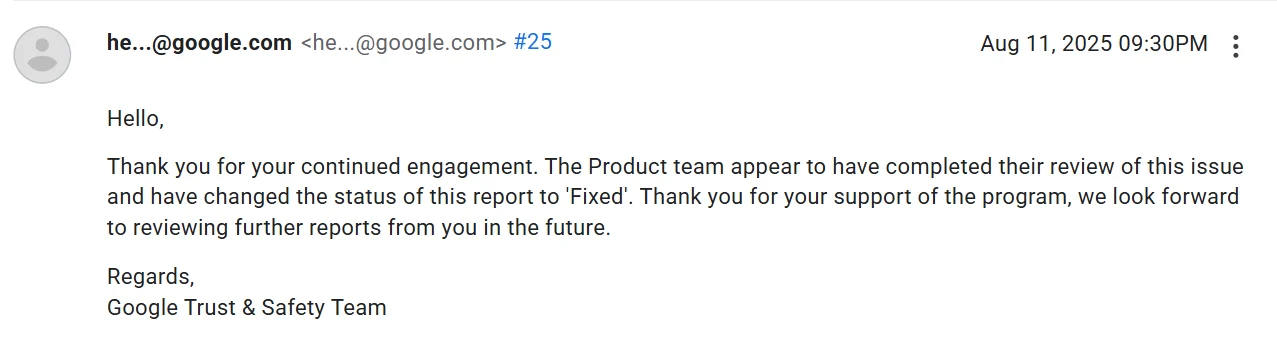
| Fixed | 11/Aug/2025 |
The issue was reported through Google's VRP and has been confirmed fixed.
What happened, in plain words
YouTube lets a channel owner hand out small jobs to other people without giving them the keys to the whole channel. One of those jobs is Subtitle Editor: a person who is only supposed to add and edit captions (subtitles) on the videos the owner has chosen to share with them. Google's own help pages describe the role that way.
A security researcher, Prakhar0x01, tested whether that narrow role is actually respected everywhere in YouTube Studio, the website where channels are managed. It was not. A Subtitle Editor could see Private videos on the channel (videos the owner has not published and has not shared with that person), and could also pull out channel-wide viewership numbers that should only be visible to the owner or managers.
The researcher reported it to Google through Google's bug bounty programme (the VRP, or Vulnerability Reward Program), the issue has been confirmed fixed, and a 500 USD reward was paid. The report lists the severity as Medium and the vulnerability type as privilege escalation and role-based access control bypass.
Before the details, a few ideas from scratch, because the rest of the article leans on them.
- A role is a named bundle of permissions. Think of a hotel: the owner has a master key, the cleaner has a key to the rooms they clean, the receptionist can open the booking system but not the rooms. Same building, different keys.
- Privilege escalation means someone with a small key manages to open a door that should need a bigger key. Nothing is hacked or forged; the person simply uses their own legitimate login and finds that the system lets them do more than it promised.
- Access control is the part of a system that decides who may see or do what. When it fails, the security world calls it an access control bypass or, when roles are involved, a role-based access control bypass (RBAC bypass).
- An API is the set of addresses a website's own pages use behind the scenes to fetch and send data. When you click a tab, your browser quietly sends a request to one of these addresses and draws the answer on screen. You can send the same requests yourself with a tool, which is how testers check whether the server really enforces the rules or only the buttons on screen do.
- A cookie is a small piece of text your browser stores for a site and sends back with every request, so the site can recognise you. A session cookie is the one that says "this is the logged-in person". A token is a similar piece of text, often sent in an
Authorizationheader, that also proves who you are. If someone else gets your cookie or token, they can act as you, which is why they are treated as secrets. - A header is a line of extra information attached to a web request, such as what browser you use or what page you came from. The body is the actual content of the request, often in JSON, a text format made of names and values in curly braces.
With that in mind, here is the whole story, step by step.
The product and the role being tested
YouTube Studio lives at studio.youtube.com. It is the control room for a channel: uploads, analytics, comments, captions and the list of people who help run the channel.
A channel owner can invite other accounts and give each one a role. The role examined here is Subtitle Editor. According to Google's documentation, a Subtitle Editor can add and edit subtitles on assigned videos. The word assigned matters: the role is meant to be narrow, captions only, on the videos the owner has shared with that person, and nothing else.
The question the report asks is simple: is that narrow role enforced everywhere, both in the pages you see and in the API those pages talk to? The answer turned out to be no.
Setting up the test
The test needs two accounts and one channel:
- A channel owner account, called User-A in the report.
- A second account, User-B, invited to the channel with the Subtitle Editor role.
- At least one video uploaded to the channel and set to Private. A Private video is one only the channel can see; it is not published to viewers.
User-B then signs in to YouTube Studio and works from the Subtitles tab. The proof of concept uses a captured request to YouTube's internal browse endpoint, sent with User-B's own session cookie and authorisation token, from a Chrome 133 browser on Windows. The request body carries the usual context block (client name WEB, client version 2.20250423.01.00, locale en-GB, region IN, timezone Asia/Calcutta) plus a continuation token, which is a marker that tells the server which slice of data to return next.
How the researcher found it
The approach is stated plainly: no reconnaissance, meaning no broad scanning or mapping of the target beforehand. The researcher went straight at the main application.
After two to three hours of examining the permission model without notable findings, attention shifted to accounts with lower privileges. That is where the gap appeared. The lesson for anyone starting out: the interesting bugs often sit at the edges of a system, in the accounts that are supposed to have the least power.
Two behaviours stood out for a Subtitle Editor:
- Private videos uploaded to the channel were listed and accessible in the Subtitles tab, even though they had not been explicitly shared with that user.
- Through a combination of UI access and direct API calls, the same user could reach total channel viewership metrics, data that should be reserved for owners and managers.
Both are wrong for the role. A Subtitle Editor should only touch subtitles on videos they are allowed to manage, should not see Private videos unless explicitly shared, and should never see channel-wide analytics.
The image above appears next to the description of the Subtitle Editor role.
Reproducing it
Step 1: create the channel and the private video
As User-A, create a YouTube channel, invite User-B and assign the Subtitle Editor role, then upload one or more videos and set them to Private. This builds the exact situation the role is designed for: a helper with a small job and some content they were never meant to see.
Step 2: confirm the UI exposure
As User-B, log in to YouTube Studio and open the Subtitles tab. Private videos appear in the list and are accessible. This alone is a visibility problem: the page is showing content to someone who was never given it. But the UI is only part of the surface. The next step checks whether the server behind the page is just as loose.
Step 3: query the internal browse endpoint
With User-B's session, send a crafted request to YouTube's internal browse endpoint to pull detailed video and channel data, including total viewership metrics:
POST /youtubei/v1/browse?prettyPrint=false HTTP/2
Host: www.youtube.com
Cookie: {USER-B_SSSION}
Content-Length: 4412
Sec-Ch-Ua-Full-Version-List:
Sec-Ch-Ua-Platform: "Windows"
Authorization: {USER-B_TOKEN}
Sec-Ch-Ua: "Chromium";v="133", "Not(A:Brand";v="99"
...snip...
Referer: https://www.youtube.com/channel/{channel-id}/about
Accept-Encoding: gzip, deflate, br
Priority: u=1, i

{"context":{"client":{"hl":"en-GB","gl":"IN","remoteHost":"[redacted]","deviceMake":"","deviceModel":"","visitorData":"{visitor_tdata}","userAgent":"Mozilla/5.0 (Windows NT 10.0; Win64; x64) AppleWebKit/537.36 (KHTML, like Gecko) Chrome/[redacted] Safari/537.36,gzip(gfe)","clientName":"WEB","clientVersion":"2.20250423.01.00","osName":"Windows","osVersion":"10.0","originalUrl":"{TARGET_VIDEO_URL}","platform":"DESKTOP","clientFormFactor":"UNKNOWN_FORM_FACTOR","configInfo":{"appInstallData":"{AppInstallData}","coldConfigData":"{cold_config_data}","coldHashData":"{cold-hash_data}","hotHashData":"{hotHashData}"},"userInterfaceTheme":"USER_INTERFACE_THEME_DARK","timeZone":"Asia/Calcutta","browserName":"Chrome","browserVersion":"[redacted]","acceptHeader":"text/html,application/xhtml+xml,application/xml;q=0.9,image/avif,image/webp,image/apng,*/*;q=0.8,application/signed-exchange;v=b3;q=0.7","deviceExperimentId":"{device_experiment_id}","rolloutToken":"{roll_out_token}","screenWidthPoints":1366,"screenHeightPoints":633,"screenPixelDensity":1,"screenDensityFloat":1,"utcOffsetMinutes":330,"connectionType":"CONN_CELLULAR_4G","memoryTotalKbytes":"8000000","mainAppWebInfo":{"graftUrl":"https://www.youtube.com/channel/{CHANNEL-ID}/about","pwaInstallabilityStatus":"PWA_INSTALLABILITY_STATUS_UNKNOWN","webDisplayMode":"WEB_DISPLAY_MODE_BROWSER","isWebNativeShareAvailable":true}},"user":{"lockedSafetyMode":false,"serializedDelegationContext":"serialized_delegation_context"},"request":{"useSsl":true,"internalExperimentFlags":[],"consistencyTokenJars":[]},"clickTracking":{"clickTrackingParams":"[redacted]-Q=="},"adSignalsInfo":{"params":[{"key":"dt","value":"174549581"},{"key":"flash","value":"0"},{"key":"frm","value":"0"},{"key":"u_tz","value":"330"},{"key":"u_his","value":"2"},{"key":"u_h","value":"768"},{"key":"u_w","value":"1366"},{"key":"u_ah","value":"720"},{"key":"u_aw","value":"1366"},{"key":"u_cd","value":"24"},{"key":"bc","value":"31"},{"key":"bih","value":"633"},{"key":"biw","value":"1351"},{"key":"brdim","value":"0,0,0,0,1366,0,1366,720,1366,633"},{"key":"vis","value":"1"},{"key":"wgl","value":"true"},{"key":"ca_type","value":"image"}],"bid":"{bid}"}},"continuation":"{continuation}"}
Line by line, in plain words:
POST /youtubei/v1/browse?prettyPrint=false HTTP/2is the request line.POSTmeans "I am sending data"./youtubei/v1/browseis the address of the internal endpoint that returns channel and video information.prettyPrint=falseis a small option asking for a compact answer.HTTP/2is the version of the web protocol being used.Host: www.youtube.comsays which site the request is for.Cookie: {USER-B_SSSION}carries User-B's session cookie, the text that proves they are logged in. It is User-B's own cookie, not a stolen one.Content-Length: 4412says how large the body is, in bytes.Sec-Ch-Ua-Full-Version-List:,Sec-Ch-Ua-Platform: "Windows"andSec-Ch-Ua: "Chromium";v="133", "Not(A:Brand";v="99"are headers in which the browser describes itself. They are ordinary browser chatter....snip...marks headers the report left out.Authorization: {USER-B_TOKEN}carries User-B's token, a second proof of identity, like a badge next to the cookie.Referer: https://www.youtube.com/channel/{channel-id}/aboutsays the request came from the channel's About page. It matches the page the request is meant to belong to, so the request looks like normal traffic.Accept-Encoding: gzip, deflate, brlists the compression formats the client can accept.Priority: u=1, iis a hint about how urgent the request is.- The blank line separates the headers from the body.
- The body is one JSON object.
context.clientdescribes the client: languageen-GB, regionIN, aremoteHostvalue, avisitorDatavalue, the browser's user agent string,clientNameWEB,clientVersion2.20250423.01.00, the operating system, the timezoneAsia/Calcutta, screen sizes and so on. These are the details a real browser would send. usercontainslockedSafetyModeandserializedDelegationContext.requestholds small flags such asuseSsl.clickTrackingandadSignalsInfoare tracking and advertising details that the real site sends along with such requests.continuationat the end selects which slice of channel data to return.
The important parts, and why they matter:
CookieandAuthorizationcarry User-B's own credentials, so the server sees a genuine Subtitle Editor session, not a forged one. Nothing is impersonated; the question is only what the server allows this real, low-privilege user to receive.Refererpoints at the channel's About page, matching the UI flow the request is meant to belong to.- The JSON body's
context.clientblock identifies the web client and version, andcontinuationselects which slice of channel data to return. - The
userobject includesserializedDelegationContext, which is how the delegated role is conveyed to the backend.
The request returned analytics data and private video information, both of which should have been inaccessible to the Subtitle Editor. In other words, the server answered a Subtitle Editor with data meant for the owner.
Why it worked
The report does not describe the server-side implementation, so the exact mistake is not stated. The report does not state the cause. The behaviour shows the delegated session could reach channel-level data and private videos not shared with that user.
A useful way to picture it: the hotel gives the cleaner a key to certain rooms, but the master key cabinet was left unlocked in the corridor. The cleaner did not break in; the building simply did not check the key at that door.
What could go wrong
The report lists three consequences:
- Exposure of confidential unpublished content. Private videos intended for internal review or embargoed releases become visible to lower-privileged users.
- Leak of sensitive analytics data. Total channel viewership and performance metrics could give competitors unfair insights or lead to insider leaks.
- Role-based access control failure. Trust in YouTube Studio's permission system is undermined, with operational risk for creators.
The real-world scenario given is a company preparing a confidential product launch on YouTube. Subtitle editors are assigned to caption unrelated videos, but because of the flaw they can reach the unreleased launch videos and their performance metrics, and could leak that information externally.
Proof of concept
The video above is the proof of concept.
The fix
The issue has been confirmed fixed. The expected behaviour it sets out is the specification for a correct fix: Subtitle Editors should only add or edit subtitles on videos they are explicitly allowed to manage, should not see Private videos unless explicitly shared, and analytics and total viewership metrics should be restricted to channel Owners and Managers.
The image above accompanies the note that the issue was reported responsibly to Google and has been confirmed fixed.
Other places to look
If you want to try the same idea on a channel you control, these are the variations the report suggests. Each one is a small experiment with a clear pass or fail.
- Other delegated roles. Repeat the same flow with roles such as Editor or Viewer on a channel you control. A positive result is any private video or channel-level metric appearing for a role that should not have it.
- Other Studio tabs. Walk each tab (Content, Analytics, Subtitles, Comments) as the low-privilege user and capture the requests each one fires. A positive result is a response containing data outside the role's stated scope.
- Direct
browsecontinuations. Take continuation tokens from a high-privilege session and replay them with the low-privilege session. A positive result is the same data returned for the weaker session. - Unshared private videos. Upload a private video and never share it with the delegated user, then check both the UI listing and the API. A positive result is the video appearing in either.
- Delegation context handling. Compare responses with and without the
serializedDelegationContextfield in theuserobject. A positive result is the server returning channel data regardless of the delegation context supplied.
Timeline
| Event | Date |
|---|---|
| Reported | 27/Apr/2025 |
| Triaged | 27/Apr/2025 |
| Need More Info | 07/May/2025 |
| Reviewing | 19/May/2025 |
| Nice catch! | 26/May/2025 |
| $500 paid | 24/July/2025 |
| Fixed | 11/Aug/2025 |
The issue was reported through Google's VRP and has been confirmed fixed.
Glossary
- API: the set of addresses a website's own pages use behind the scenes to fetch and send data; you can send the same requests yourself with a tool.
- Access control: the part of a system that decides who may see or do what.
- Access control bypass: a failure in which someone reaches data or actions they should not be allowed to reach.
- Authorisation: the process of checking whether a logged-in user is allowed to do a particular thing.
- Authorization header: a request header that carries a token proving who the user is.
- Body: the content of a request, as opposed to its headers; here it is a JSON object.
- Bug bounty programme: a scheme in which an organisation pays researchers who report security problems responsibly; Google's is called the VRP (Vulnerability Reward Program).
- Channel: a YouTube account's home for its videos, analytics and collaborators.
- Continuation token: a marker in a request that tells the server which slice of data to return next.
- Cookie: a small piece of text a browser stores for a site and sends back with every request, so the site can recognise the user.
- Credentials: the proof of identity a user sends, such as a session cookie or a token.
- Endpoint: a specific address on a server that accepts requests, such as
/youtubei/v1/browse. - Header: a line of extra information attached to a web request, such as the browser type or the referring page.
- HTTP/2: a version of the protocol browsers and servers use to exchange web requests and responses.
- JSON: a text format for data made of names and values in curly braces, used in request and response bodies.
- Medium severity: a rating in the middle of a scale from low to critical, used to describe how serious a security issue is.
- Permission model: the design that decides which roles may do what.
- Private video: a video visible only to the channel, not published to viewers.
- Privilege escalation: a situation where a user with limited rights can reach data or actions meant for a more powerful user.
- Reconnaissance: the early phase of testing in which a researcher maps a target broadly before digging in.
- Referer: a request header that says which page the request came from.
- Role: a named bundle of permissions given to a user, such as Subtitle Editor.
- Role-based access control (RBAC): a system that grants permissions according to roles rather than to individual people.
- Role-based access control bypass: a failure in which a role's limits are not enforced.
- Session cookie: the cookie that identifies a logged-in user to a site.
- Subtitle Editor: a YouTube Studio role meant only to add and edit subtitles on assigned videos.
- Token: a piece of text, often sent in an
Authorizationheader, that proves a user's identity. - Triaged: the stage at which a security team has reviewed a report and accepted it for investigation.
- UI (user interface): the pages and buttons a person sees and clicks.
- User-A / User-B: the two accounts used in the test, the channel owner and the Subtitle Editor.
- VRP: Google's Vulnerability Reward Program, the bug bounty scheme through which this issue was reported.

