GCP CloudSQL Vulnerability Leads to Internal Container Access and Data Exposure
A flaw in GCP's security layer for CloudSQL SQL Server allowed a default user to escalate privileges to a GCP admin role and then to sysadmin on the database, granting access to the host operating system. This could expose sensitive files, secrets, and internal service agent credentials.
 Published on dig.security
One of the top three cloud providers is Google Cloud Platform (GCP), which offers a range of services including a managed database service called CloudSQL. CloudSQL is capable of supporting three different database engines: MySQL, PostgreSQL, and SQL Server.
The full write-up lives on its author's site
It belongs to its author, so we link to it rather than copy it. The other two tabs are our own rewrites, checked against it.
Context
Google Cloud Platform (GCP) offers a managed database service called CloudSQL, which supports three database engines: MySQL, PostgreSQL and SQL Server. Databases tend to hold large amounts of information, often including sensitive data such as PII, developer secrets and financial data, which is why the researchers chose CloudSQL as a target.
MySQL and PostgreSQL are open source, so cloud providers can modify the engines themselves. SQL Server is not open source, so to integrate it into their environments cloud providers built their own security layer on top of the database engine. The research described here found a critical vulnerability in that layer for GCP CloudSQL for SQL Server.
Setup
SQL Server has four system databases:
| Database Name | Description |
|---|---|
| Master | contains all the system objects, and information about the SQL Server instance |
| MSDB | used by SQL Server Agent for scheduling alerts and jobs |
| Model | used as a template, for every new database created on the SQL Server instance |
| Temp | used to hold temporary objects and result sets for sorting, aggregation etc. |
Permissions in SQL Server are split between two levels:
- Server permissions cover operations on the instance level, for example CREATE / ALTER / DROP database, or other objects like logins and audit.
CONTROL SERVERis the most powerful permission a user can be granted at the instance level. - Database permissions cover CREATE / ALTER / DROP on objects inside a database, such as tables, triggers and users.
CONTROL DATABASEis the most powerful permission at the database level.
The default permissions on GCP SQL Server define the starting point:
- The default login and user for SQL Server on GCP is
sqlserver, and it is granted the GCP roleCustomerDbRootRole. - This role does not allow the default
sqlserveruser to create or alter anything at the server level. - The default user has no permissions on sys objects, so it cannot create objects in any system database.
Finding it
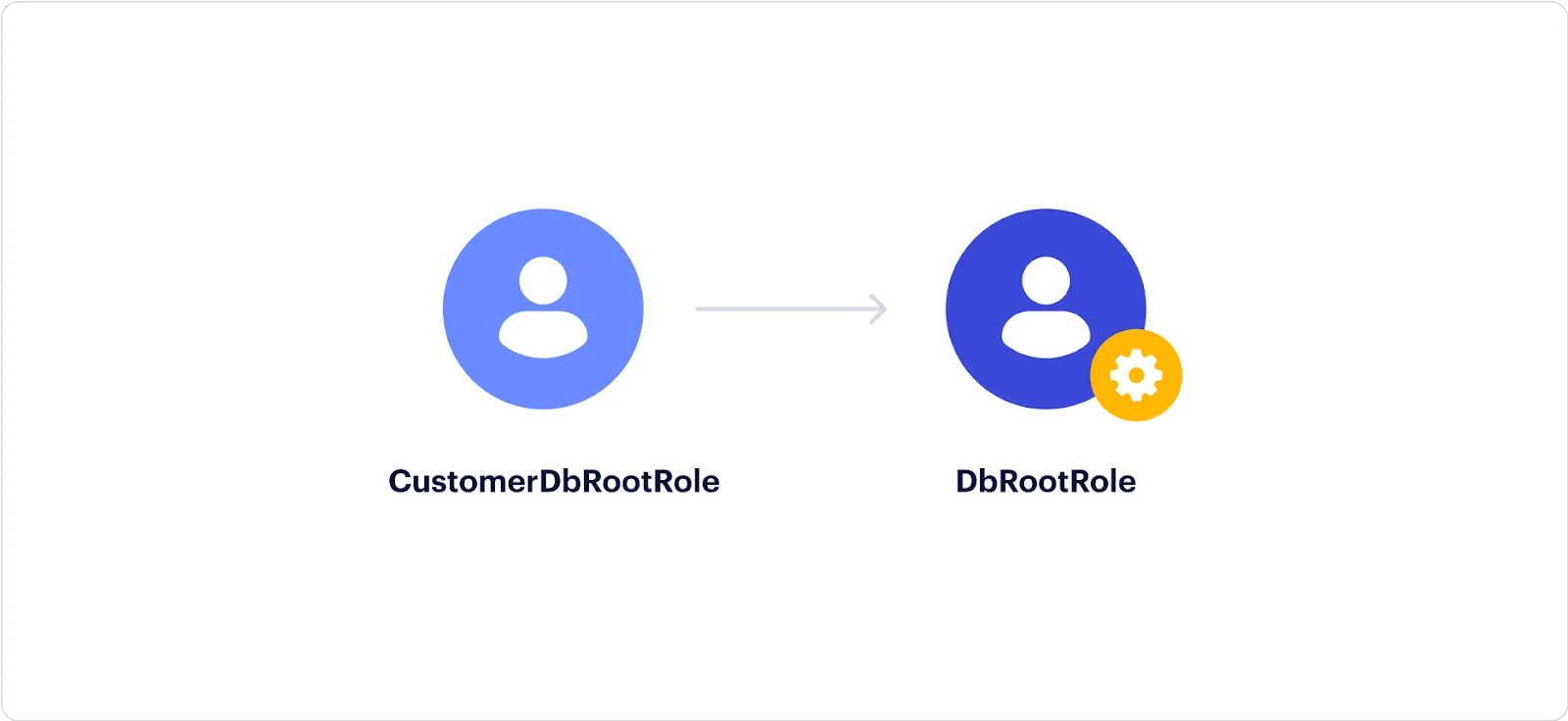
The researchers identified a gap in the security layer GCP created for SQL Server. That gap allowed them to escalate their initial privilege and add their user to the DbRootRole role, a GCP admin role.
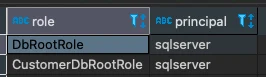
After the first escalation, the principal sqlserver is a member of both DbRootRole and CustomerDbRootRole:
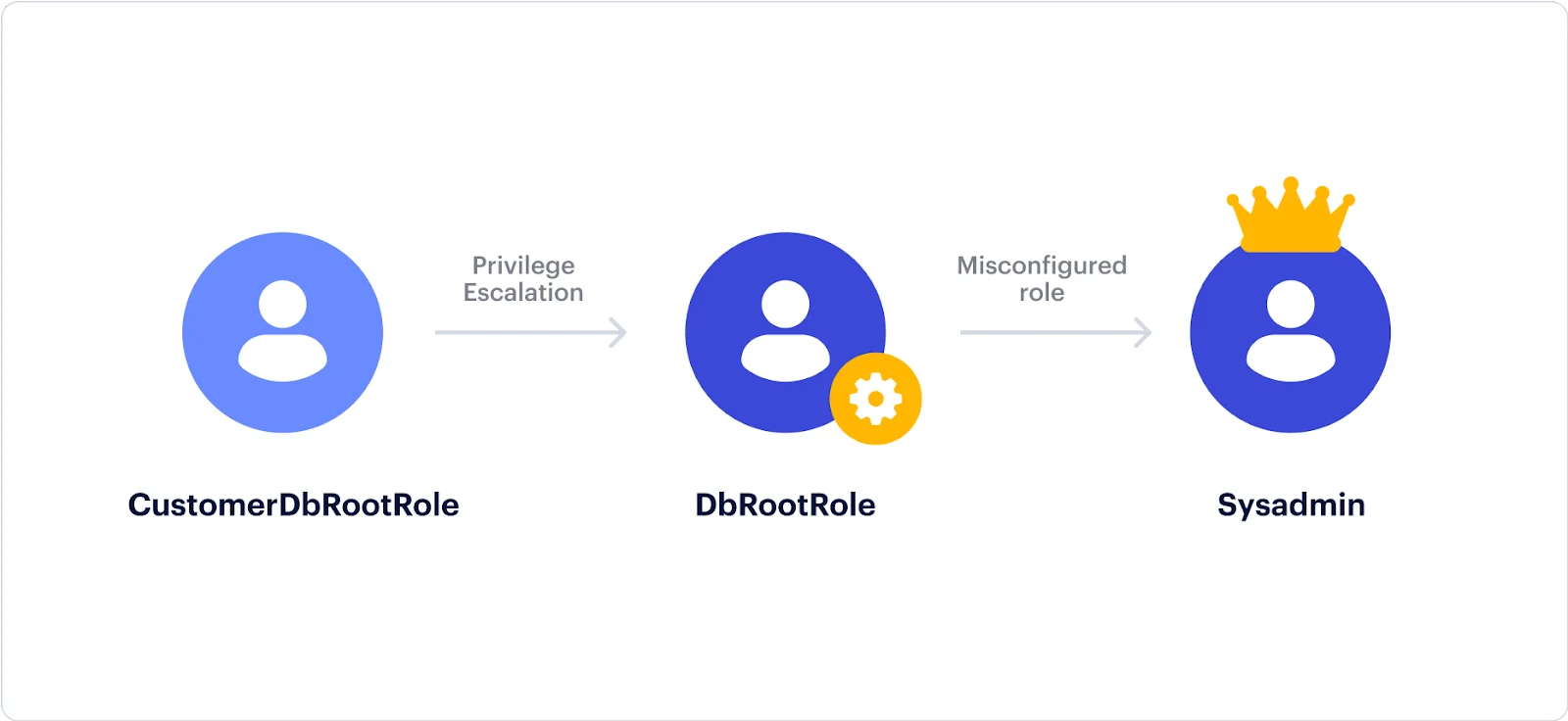
DbRootRole allowed many operations that were previously forbidden, but it is not a sysadmin role and does not give full permissions on the SQL Server instance. Continuing the research, the team found another critical misconfiguration in the roles permissions architecture. This one allowed a further escalation, this time granting the user the sysadmin role.
Exploitation
Step 1: privilege escalation to DbRootRole
The first hop exploited the gap in GCP's SQL Server security layer to add the sqlserver user to the DbRootRole GCP admin role. The report does not include the request or statement used for this step; it shows only the resulting role membership, where sqlserver appears in both DbRootRole and CustomerDbRootRole.
Step 2: gaining control of the host container
With DbRootRole in place, the researchers could perform operations that were previously blocked, but the role still did not provide full control of the instance. The second misconfiguration in the roles permissions architecture let them grant their user the sysadmin role. At that point the barrier was bypassed and they had full control of the SQL Server.
The report contrasts the default privileges of the sqlserver user with its privileges after the second escalation:
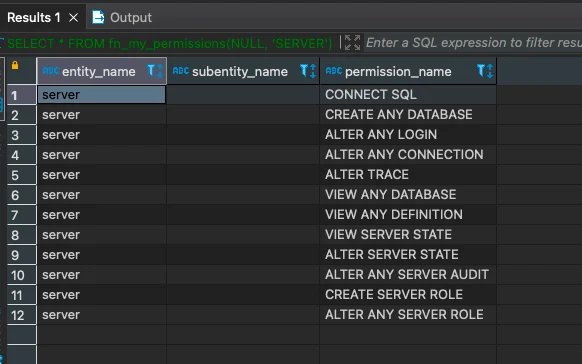
sqlserver user default privileges
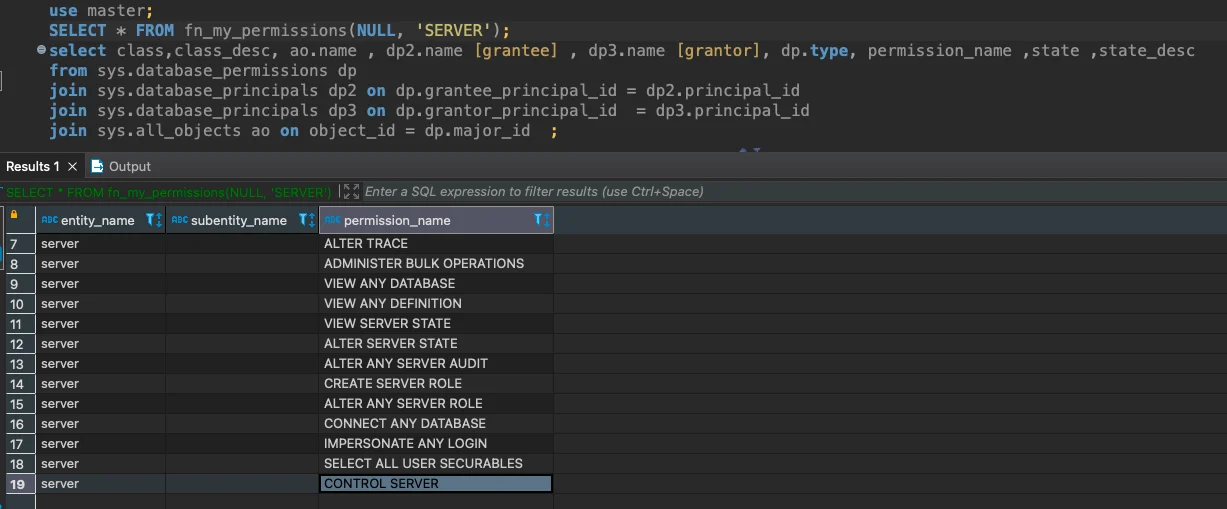
sqlserver user privileges after second privilege escalation
Step 3: reaching the operating system and its data
Full control of the database engine gave the user access to the operating system hosting the database. From there the researchers could access sensitive files in the host OS, list files and sensitive paths, read passwords and extract secrets from the machine. The host also has access to the underlying service agents, which could potentially lead to further escalation into other environments.
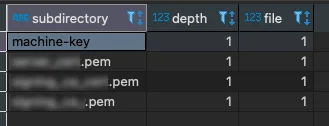
Among the internal data found were Google URLs related to the docker image repository. The researchers could also access the internal repository itself; this was later fixed and access from non-internal IPs was blocked.
Google's internal docker image repository URL:

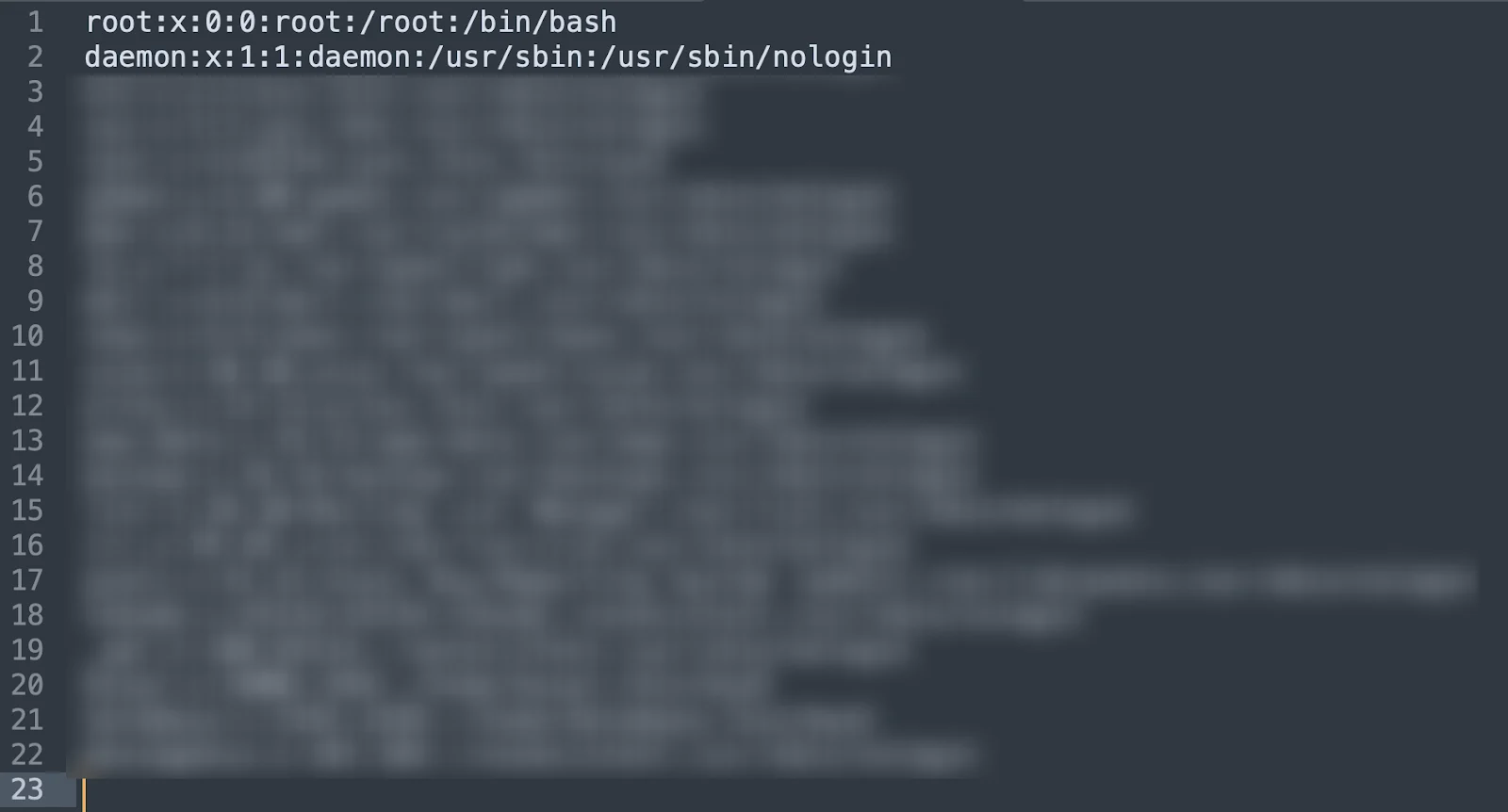
Reading /etc/passwd:
Root cause
The vulnerability sits in the security layer GCP built on top of SQL Server, because the engine itself could not be modified. That layer defines GCP roles such as CustomerDbRootRole and DbRootRole and maps them onto SQL Server principals. The first flaw was a gap in that layer that allowed the default sqlserver user to be added to DbRootRole, an admin role it should not have been able to reach. The second was a misconfiguration in the roles permissions architecture that allowed a further escalation, this time granting the user the sysadmin role, even though DbRootRole is not a sysadmin role.
The default configuration keeps the user away from server-level changes and from sys objects, but the escalations bypassed that barrier. The report does not describe the specific statements or code behind either misconfiguration, so the exact mechanism is not public.
Impact
With sysadmin on the instance, the attacker controls the database engine and, through it, the operating system hosting the database. In the researchers' words, they could access sensitive files in the host OS, list files and sensitive paths, read passwords, and extract secrets from the machine. The host's access to underlying service agents could potentially lead to further escalation into other environments.
Exposure of internal data such as secrets, URLs and passwords can lead to exposure of the cloud provider's data and of customers' sensitive data, which the researchers describe as a major security incident. The internal docker image repository was reachable during the research; access from non-internal IPs was blocked afterwards. Google stated that no customers were impacted.
Fix
The vulnerability was addressed and resolved during April 2023, and access to the internal docker image repository from non-internal IPs was blocked. The researchers confirm that following the hops described above is no longer possible. The report does not detail the code or configuration changes Google made.
Disclosure timeline
- February 5th 2023: the GCP CloudSQL vulnerability was discovered by Dig's research team.
- February 13th 2023: Google's vulnerability reward program identified the activity and reached out to the team, within 8 days of the initial discovery.
- During April 2023: the vulnerability was successfully addressed and resolved.
- April 25 2023: the team was rewarded by the GCP VRP program.

A Google spokesperson's statement quoted in the report: "An external party recently identified a vulnerability with Cloud SQL for SQL Server and reported it through the VRP program. Google security teams investigated and mitigated the issue and no customers were impacted."
Variants to test
- Role mapping on managed engines. On any managed database service where the provider layers its own roles over an engine it cannot modify, try to add the default user to a provider admin role. A positive result is the default principal appearing in both the customer role and the admin role, as
sqlserverdid withCustomerDbRootRoleandDbRootRole. - Escalation from a provider admin role to engine sysadmin. After reaching a provider-level admin role, attempt to grant the user
sysadmin. A positive result is the user holdingsysadmindespite the provider role not being documented as a sysadmin role. - Reach from the database engine to the host. Once
sysadminis held, check whether the engine can read host files such as/etc/passwdand list sensitive paths. A positive result is file contents returned from the host OS. - Service agent reachability. From the host, check whether the underlying service agents are accessible. A positive result is access that could potentially lead to further escalation into other environments.
- Internal repository exposure. Test whether internal repositories referenced from the host are reachable from outside the internal network. A positive result is access to the repository from a non-internal IP.
What happened, in plain words
Google Cloud Platform (GCP) is one of the big three cloud providers, alongside Amazon Web Services and Microsoft Azure. A cloud provider rents out computers, storage and software over the internet, so a company can run its systems without owning any hardware. One of GCP's services is called CloudSQL: a managed database service. "Managed" means Google takes care of installing, patching and running the database software for you, and you just use it. CloudSQL can run three kinds of database software, called engines: MySQL, PostgreSQL and SQL Server.
A database is an organised store of information. Companies keep customer records, personal details, passwords used by their own software and sometimes financial data in databases, so a database is a very attractive target for an attacker. That is why the researchers at Dig chose CloudSQL to study.
MySQL and PostgreSQL are open source: their underlying code is publicly available and anyone, including Google, is allowed to change it. SQL Server is not open source. Google cannot modify it, so to make SQL Server fit into its cloud, Google built its own extra layer of security and management on top of the database engine. The researchers found a serious flaw in that layer. Starting from an ordinary CloudSQL user, they were able to climb step by step until they controlled the database completely, and through it the underlying computer (the host) that runs it. From there they could read files on that machine, including a file listing user accounts, and reach internal Google resources such as an internal repository of container images.
A container is a packaged, self-contained bundle of software and everything it needs to run; a container image is the file that bundle is built from. A repository is a storage service where such images are kept and downloaded from.
Google's security team noticed the researchers' activity within eight days, worked with them, fixed the problem during April 2023, and rewarded them through its bug bounty programme. A bug bounty programme is a scheme where a company pays people who report security problems to it responsibly instead of exploiting them. Google stated that no customers were impacted.
Background you need first
What a database engine and a database instance are
Think of a database engine as a very capable filing clerk. You give it instructions in a special language (SQL, Structured Query Language), such as "store this record" or "give me every customer from Leeds", and it does the work. A database instance is one running copy of that clerk, with its own set of databases inside it. CloudSQL gives each customer their own instance.
The four system databases
Every SQL Server instance comes with four built-in databases that the engine uses for its own housekeeping. They are not yours to store business data in, but they matter for this story because they are part of how the engine organises itself.
| Database Name | Description |
|---|---|
| Master | contains all the system objects, and information about the SQL Server instance |
| MSDB | used by SQL Server Agent for scheduling alerts and jobs |
| Model | used as a template, for every new database created on the SQL Server instance |
| Temp | used to hold temporary objects and result sets for sorting, aggregation etc. |
In plain words: Master is the engine's own address book and rulebook. MSDB is where scheduled tasks and alerts live. Model is a blank template copied whenever someone creates a new database. Temp is scratch space for work in progress, such as sorting a long list.
Two levels of permission
SQL Server decides what a user may do using permissions, which are simply "you are allowed to do X" rules. They exist at two levels.
- Server permissions apply to the whole instance: creating, changing or deleting a database, managing logins, and so on. The strongest permission at this level is
CONTROL SERVER. Holding it is like having the master key to the whole building. - Database permissions apply inside one database: creating, changing or deleting tables, triggers (small automatic actions that fire when data changes) or users. The strongest permission at this level is
CONTROL DATABASE. That is the key to one room, not the building.
A role is a named bundle of permissions. Instead of granting permissions one by one to each person, an administrator grants a role, and everyone with that role gets everything inside it. It is like a job title on a badge: the badge says "manager", and the building's rules already spell out what managers may open.
The starting point on GCP
The default permissions on GCP SQL Server are where the research begins:
- The default login and user for SQL Server on GCP is
sqlserver, and it is granted the GCP roleCustomerDbRootRole. - This role does not allow the default
sqlserveruser to create or alter anything at the server level. - The default user has no permissions on sys objects, so it cannot create objects in any system database.
A login is the account name you use to connect; a user is the identity that account has inside a particular database. "Sys objects" are the engine's internal objects, the machinery behind those four system databases. So the default account is deliberately limited: it can work with its own data but cannot touch the engine's own settings or internals. That is the fence the researchers set out to climb.
Finding it
The researchers identified a gap in the security layer GCP created for SQL Server. That gap allowed them to escalate their initial privilege and add their user to the DbRootRole role, a GCP admin role.
Privilege escalation means getting more rights than you were given. A simple everyday comparison: you are issued a visitor badge that opens the lobby, but a flaw in how badges are printed lets you reprint your own badge as a manager's badge. Nothing was hacked in the sense of guessing a password; the rules themselves could be bent.
After the first escalation, the principal sqlserver is a member of both DbRootRole and CustomerDbRootRole:
A principal is simply "the thing that is allowed to do something", here the sqlserver account. Being a member of both roles means the account kept its ordinary customer rights and gained the admin role on top. The screenshots show that membership; the report does not include the request or statement that produced it.
DbRootRole allowed many operations that were previously forbidden, but it is not a sysadmin role and does not give full permissions on the SQL Server instance. sysadmin is SQL Server's own top-level role: a member can do anything on the instance. Continuing the research, the team found another critical misconfiguration in the roles permissions architecture. This one allowed a further escalation, this time granting the user the sysadmin role.
Exploitation
Step 1: privilege escalation to DbRootRole
The first hop exploited the gap in GCP's SQL Server security layer to add the sqlserver user to the DbRootRole GCP admin role. The report does not include the request or statement used for this step; it shows only the resulting role membership, where sqlserver appears in both DbRootRole and CustomerDbRootRole.
Why take this step? Because the default account was fenced off from server-level changes. Reaching an admin role removes that fence and opens the door to the next move. The evidence is the role listing in the screenshots above: the same account now appears under the customer role and the admin role at once.
Step 2: gaining control of the host container
With DbRootRole in place, the researchers could perform operations that were previously blocked, but the role still did not provide full control of the instance. The second misconfiguration in the roles permissions architecture let them grant their user the sysadmin role. At that point the barrier was bypassed and they had full control of the SQL Server.
Why does this matter so much? Because sysadmin is the engine's own master key. Once you hold it, the database software will do whatever you ask, including things that reach outside the databases themselves. The report contrasts the default privileges of the sqlserver user with its privileges after the second escalation:
sqlserver user default privileges
sqlserver user privileges after second privilege escalation
The two screenshots are the before and after picture: the same account, first with its limited default rights, then with the full set that comes with sysadmin.
Step 3: reaching the operating system and its data
Full control of the database engine gave the user access to the operating system hosting the database. From there the researchers could access sensitive files in the host OS, list files and sensitive paths, read passwords and extract secrets from the machine. The host also has access to the underlying service agents, which could potentially lead to further escalation into other environments.
A few terms here. The operating system (OS) is the base software of the machine, such as Linux, that manages files and programs. A secret is any piece of data that is meant to stay private, such as a password or an access key. A service agent is an identity that a cloud service uses to act on your behalf towards other Google services; if an attacker can borrow it, they may be able to act in other parts of the cloud too.
Among the internal data found were Google URLs related to the docker image repository. The researchers could also access the internal repository itself; this was later fixed and access from non-internal IPs was blocked.
An IP address is the numeric label a machine uses on a network, a bit like a postal address for computers. "Non-internal IPs" means addresses from outside Google's own network. Blocking those means only machines inside Google's network can reach the repository.
Google's internal docker image repository URL:
Reading /etc/passwd:
/etc/passwd is a standard file on Linux systems that lists the user accounts on the machine. It does not normally contain passwords despite the name, but it tells an attacker which accounts exist, which is useful groundwork for further attacks. Being able to read it proves the attacker is no longer confined to the database: they are reading files on the underlying computer.
Root cause
The vulnerability sits in the security layer GCP built on top of SQL Server, because the engine itself could not be modified. That layer defines GCP roles such as CustomerDbRootRole and DbRootRole and maps them onto SQL Server principals. The first flaw was a gap in that layer that allowed the default sqlserver user to be added to DbRootRole, an admin role it should not have been able to reach. The second was a misconfiguration in the roles permissions architecture that allowed a further escalation, this time granting the user the sysadmin role, even though DbRootRole is not a sysadmin role.
The default configuration keeps the user away from server-level changes and from sys objects, but the escalations bypassed that barrier. The report does not describe the specific statements or code behind either misconfiguration, so the exact mechanism is not public.
In everyday terms: the building's own rules were fine on paper, but the desk that hands out badges had two mistakes. It would print an admin badge for a visitor, and it would let an admin badge holder print themselves the master key.
Impact
With sysadmin on the instance, the attacker controls the database engine and, through it, the operating system hosting the database. In the researchers' words, they could access sensitive files in the host OS, list files and sensitive paths, read passwords, and extract secrets from the machine. The host's access to underlying service agents could potentially lead to further escalation into other environments.
Exposure of internal data such as secrets, URLs and passwords can lead to exposure of the cloud provider's data and of customers' sensitive data, which the researchers describe as a major security incident. The internal docker image repository was reachable during the research; access from non-internal IPs was blocked afterwards.
Fix
The vulnerability was addressed and resolved during April 2023, and access to the internal docker image repository from non-internal IPs was blocked. The researchers confirm that following the hops described above is no longer possible. The report does not detail the code or configuration changes Google made.
Disclosure timeline
Disclosure is the process of telling the vendor about a security problem and agreeing how and when it becomes public, so that it can be fixed before others learn of it.
- February 5th 2023: the GCP CloudSQL vulnerability was discovered by Dig's research team.
- February 13th 2023: Google's vulnerability reward program identified the activity and reached out to the team, within 8 days of the initial discovery.
- During April 2023: the vulnerability was successfully addressed and resolved.
- April 25 2023: the team was rewarded by the GCP VRP program.
VRP stands for Vulnerability Reward Program, Google's bug bounty scheme.
A Google spokesperson's statement quoted in the report: "An external party recently identified a vulnerability with Cloud SQL for SQL Server and reported it through the VRP program. Google security teams investigated and mitigated the issue and no customers were impacted."
Variants to test
These are the same ideas generalised, so that someone testing a similar cloud service knows what to look for. Each one names a positive result, meaning the observation that tells you the problem is real.
- Role mapping on managed engines. On any managed database service where the provider layers its own roles over an engine it cannot modify, try to add the default user to a provider admin role. A positive result is the default principal appearing in both the customer role and the admin role, as
sqlserverdid withCustomerDbRootRoleandDbRootRole. - Escalation from a provider admin role to engine sysadmin. After reaching a provider-level admin role, attempt to grant the user
sysadmin. A positive result is the user holdingsysadmindespite the provider role not being documented as a sysadmin role. - Reach from the database engine to the host. Once
sysadminis held, check whether the engine can read host files such as/etc/passwdand list sensitive paths. A positive result is file contents returned from the host OS. - Service agent reachability. From the host, check whether the underlying service agents are accessible. A positive result is access that could potentially lead to further escalation into other environments. A token here is a short piece of data that proves an identity, like a temporary pass.
- Internal repository exposure. Test whether internal repositories referenced from the host are reachable from outside the internal network. A positive result is access to the repository from a non-internal IP.
Glossary
- API: an agreed way for one piece of software to ask another to do something, like a service counter with a fixed list of requests.
- Bug bounty programme: a scheme where a company pays people who report security flaws to it responsibly.
- Cloud provider: a company that rents out computing, storage and software over the internet.
- Container: a packaged, self-contained bundle of software and its dependencies that runs the same way anywhere.
- Container image: the file a container is built from.
CONTROL DATABASE: the strongest permission at the database level in SQL Server.CONTROL SERVER: the strongest permission at the instance level in SQL Server.CustomerDbRootRole: the GCP role granted to the defaultsqlserveruser, which does not allow server-level changes.- Database: an organised store of information that software can query and update.
- Database engine: the software that stores and answers queries against databases, such as MySQL, PostgreSQL or SQL Server.
DbRootRole: a GCP admin role that the default user should not have been able to reach.- Disclosure: the process of reporting a security problem to the vendor and agreeing when it becomes public.
- Docker image repository: a storage service where container images are kept and downloaded from.
- GCP (Google Cloud Platform): Google's cloud computing service.
- Host: the computer (or virtual computer) on which a service such as a database runs.
- Instance: one running copy of a database engine with its own databases.
- IP address: the numeric label a machine uses on a network.
- Login: the account name used to connect to a database engine.
- Managed service: a service where the provider handles installation, patching and operation for you.
- MySQL: an open-source database engine supported by CloudSQL.
- Operating system (OS): the base software of a machine that manages files and programs, such as Linux.
/etc/passwd: a standard Linux file listing the user accounts on a machine.- Permission: a rule saying a user is allowed to perform a particular action.
- PII (personally identifiable information): data that can identify a specific person, such as a name or address.
- PostgreSQL: an open-source database engine supported by CloudSQL.
- Principal: the identity that is allowed to do something, such as a user account.
- Privilege escalation: gaining more rights than you were granted.
- Repository: a storage service holding software artefacts such as container images.
- Role: a named bundle of permissions that can be granted to users.
- Secret: any data meant to stay private, such as a password or access key.
- Service agent: an identity a cloud service uses to act on your behalf towards other services.
- SQL (Structured Query Language): the language used to give instructions to a database.
- SQL Server: Microsoft's database engine, which is not open source.
sqlserver: the default login and user for SQL Server on GCP.sysadmin: SQL Server's top-level role, whose members can do anything on the instance.- Sys objects: the engine's internal objects that sit behind the system databases.
- System databases: the four built-in databases (Master, MSDB, Model, Temp) an instance uses for housekeeping.
- Token: a short piece of data that proves an identity, often temporary.
- Trigger: a small automatic action that fires when data changes in a database.
- User: the identity an account has inside a particular database.
- VRP (Vulnerability Reward Program): Google's bug bounty programme.

