Google Groups Authorization Bypass
A missing authorization check in a Google Groups GWT endpoint allowed an authenticated user to retrieve basic information (email and description) about a private group they were not a member of. The attacker could not access the group's conversations.
 Published on medium.com
I’ve recently been playing around with Google services, poking here and there for security vulnerabilities. It’s been a quite a roller-coaster experience with some interesting results as well as some devastating rejections (I should definitely write a separate blog about those).
The full write-up lives on its author's site
It belongs to its author, so we link to it rather than copy it. The other two tabs are our own rewrites, checked against it.
Context
Google Groups is a forum platform: you create your own forums ('groups'), invite participants to discuss topics, and manage the group's permissions, deciding who is allowed to view or update which thread. The service is built with Google Web Toolkit (GWT), a framework that dates back to 2006 and became open source in 2013. GWT compiles Java to JavaScript and exchanges RPC calls with the server in a distinctive format: a body of pipe-separated numbers at the beginning and the end, with the actual parameters in the middle. To anyone used to JSON or form-encoded APIs, the requests look unusual at first glance.
The bug described here is a broken authorization check in that GWT backend: a request that should only return data about groups the caller belongs to would happily return data about a private group belonging to someone else.
Setup
The work was done with two Google accounts and Burp Suite, using Burp Intruder for enumeration. The preconditions are simple:
- A first Google account, used to send the requests.
- A second Google account, used to create a target group with all permissions set to 'private', meaning only invited users are allowed to view anything about the group.
- A testing group created under the first account, whose name appears in the GWT request body.
No special tooling beyond a proxy that can intercept and replay GWT requests is required.
Finding it
Before touching Google Groups, the researcher spent time reading up on GWT. Because the technology is old, prior security research exists, including a GWT RPC write-up and an OWASP presentation on attacking GWT, and those helped decipher the request elements.
The general approach to manipulating GWT requests was to 'stick to the middle': leave the signature part alone, that is the pipe-separated numbers at the beginning and the end of the body, and only modify the parameters in between.
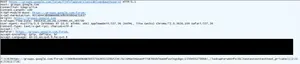
The screenshot shows a typical GWT request body, the 'Googley witchcraft' that greets anyone opening one of these calls for the first time.
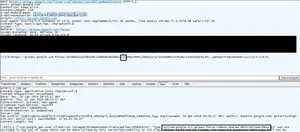
While reading the parameters, the researcher found an integer that points to a specific class on the server side. In the request shown below, the number 4 points to the AbstractSearchKey class:
and the number 8 points to the Shared.Categoty class:
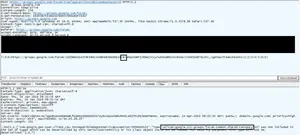
The integer in the request points to a specific class on the server side. Being able to name arbitrary classes from the client side is interesting on its own, so the next step was to see how many class names could be extracted.
Exploitation
Step 1: enumerate server-side classes
A Burp Intruder session was launched against the integer parameter to extract class names:
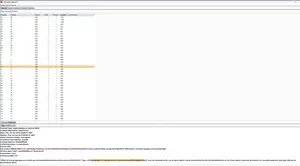
On its own this was not a huge issue: it was reported to Google, which justifiably deemed it 'low risk'. It did, however, give the researcher the motivation to keep going and to believe there might be a gap in this GWT implementation.
Step 2: look at what the request actually queries
Going back to the initial GWT request, one of the strings in the body was the name of the testing group created under the first account:
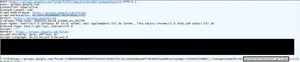
The screenshot shows the group name testestest... in the request. The response to that request included basic information about the group, including the group's email, topic and description. The obvious question was whether this only worked for one's own groups.
Step 3: query a private group from a non-member account
A new group was created under the second Google account, with all permissions set to 'private', so that only invited users are allowed to view anything about the group. The same request was then sent from the first account, which is not a member of that group. The authorization check was lacking, and some of the private group's data came back:
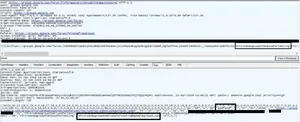
The screenshot shows the private group's data being available even without being a member.
Root cause
The GWT endpoint that returns basic group information did not verify that the caller is a member of, or otherwise authorised for, the group named in the request. The group name was supplied by the client in the request, and the server returned the group's email, topic and description to an account that was not a member. The signature portion of the GWT body was left untouched throughout: the parameters in the middle were modified, not the pipe-separated numbers at the edges.
Impact
An authenticated user could retrieve basic information about groups they do not belong to, including private groups: the group's email and description, which might be sensitive. The researcher was not able to extract the group's conversations, only that metadata. The issue is an auth bypass, but not a critical one, and it was paid as a $500 bounty.
Fix
The report does not describe the fix that was applied. The change needed is a server-side authorization check on the group lookup: before returning any data for a group identifier supplied by the client, confirm that the caller is a member of, or otherwise permitted to view, that group.
Variants to test
- Other GWT methods taking a group or object identifier. Replay the same request with identifiers belonging to a second account and look for metadata in the response. A positive result is any field (email, topic, description) returned for an object the caller does not own.
- Class-name enumeration on other GWT services. Fuzz the integer that selects the server-side class, as done here with Burp Intruder. A positive result is a list of class names that reveals server-side structure, which may point at further methods to test.
- Permission levels other than private. Create groups with each visibility setting and query them from a non-member account. A positive result is data returned for any setting that should restrict it.
- Identifier substitution in batch or search calls. Where a request carries several identifiers, swap one for a foreign object and check whether the response mixes in data the caller should not see.
Timeline
- January 21st: bug reported to Google
- January 21st: bug was triaged
- January 24th: bug was accepted
- February 5th: $500 bounty was granted
What happened, in plain words
A security researcher spent some time poking around Google services looking for bugs. Most attempts ended in rejections, but one turned up a simple and interesting flaw in Google Groups that paid a $500 bounty.
Google Groups is a forum platform. You create your own forums (called "groups"), invite people to discuss topics, and set permissions that decide who is allowed to view or update which thread. Think of it like a private club room: the organiser decides who gets a key, and the door should only open for people holding one.
The flaw was in how Google Groups checks who is allowed to see information about a group. A request that should only return details about groups you belong to would happily return details about a private group belonging to someone else. In the club comparison: you ask the receptionist about your own room and, by swapping the room number in your question, you get told about a room you were never given a key to.
This kind of flaw is called a broken authorization (or auth bypass). Authentication is proving who you are (logging in). Authorization is what you are then allowed to do. Here, the system knew perfectly well who was asking; it simply failed to check whether that person was allowed to see the answer.
Background: what Google Web Toolkit is
Google Groups is built with Google Web Toolkit (GWT). GWT is a framework that dates back to 2006 and became open source in 2013. It lets developers write the browser-side part of an application in Java, and GWT compiles that Java into JavaScript that the browser can run.
When the browser-side code needs something from the server, it does not send a neat, readable request like a normal web form. It sends an RPC call (remote procedure call): the browser asks the server to run a named function and return the result, much like phoning a restaurant and ordering a dish by its number on the menu rather than describing the ingredients.
The format of these calls is distinctive. The body has a run of pipe-separated numbers at the beginning and at the end, with the actual parameters in the middle. If you are used to JSON or ordinary form-encoded APIs, the requests look unusual at first glance.
The screenshot shows a typical GWT request body, the "Googley witchcraft" that greets anyone opening one of these calls for the first time.
Because the technology is old, prior security research already exists. The researcher read a GWT RPC write-up and an OWASP presentation on attacking GWT, and those helped decipher the request elements. This is a useful habit: before attacking a technology, read what others have already published about it.
Setting up
The work was done with two Google accounts and Burp Suite, a tool that sits between your browser and the server so you can look at, change and resend requests. Burp Intruder, the part of Burp that automatically repeats a request many times with different values, was used for enumeration.
The preconditions were simple:
- A first Google account, used to send the requests.
- A second Google account, used to create a target group with all permissions set to "private", meaning only invited users are allowed to view anything about the group.
- A testing group created under the first account, whose name appears in the GWT request body.
No special tooling beyond a proxy that can intercept and replay GWT requests was required. A proxy here means software that stands in the middle of the conversation between your browser and the website, so you can read and edit each message.
Finding it
The general approach to manipulating GWT requests was to "stick to the middle": leave the signature part alone, that is the pipe-separated numbers at the beginning and the end of the body, and only modify the parameters in between.
Why leave the signature alone? Those numbers at the edges are the signature part of the request, which the researcher chose not to touch. The parameters in the middle, by contrast, are ordinary inputs, and inputs are where bugs usually live. It is like editing the order on a receipt but leaving the shop's stamp at the top and the total at the bottom untouched.
While reading the parameters, the researcher found an integer that points to a specific class on the server side. In the request shown below, the number 4 points to the AbstractSearchKey class:
and the number 8 points to the Shared.Categoty class:
A class is a named building block in the server's code, a bit like a labelled drawer in a filing cabinet. This is a serialisation detail of GWT RPC: the browser sends type identifiers, and the server resolves them to classes. In other words, the client tells the server "use drawer number 4", and the server knows that drawer 4 is called AbstractSearchKey.
Being able to name arbitrary classes from the client side is interesting on its own, because it means the browser can ask the server about parts of its internal structure. So the next step was to see how many class names could be extracted.
Exploitation
Step 1: enumerate server-side classes
A Burp Intruder session was launched against the integer parameter to extract class names:
Enumeration means asking a system the same question over and over with slightly different inputs, and collecting the answers. Fuzzing means feeding in many different values, often automatically, to see what comes back. Here the integer was replaced with a range of numbers, and each response revealed the name of the class that number pointed to.
On its own this was not a huge issue. It was reported to Google, which justifiably deemed it "low risk". It did, however, give the researcher the motivation to keep going and to believe there might be a gap in this GWT implementation. A low-risk finding is often a signpost: it shows the code is worth a closer look.
Step 2: look at what the request actually queries
Going back to the initial GWT request, one of the strings in the body was the name of the testing group created under the first account:
The screenshot shows the group name testestest... in the request.
This is the key observation. The request was not just carrying numbers and class identifiers; it was carrying the name of a group, supplied by the browser. Whenever a value that identifies your data is sent by the browser, the natural question is: what happens if I send a different value?
The response to that request included basic information about the group, including the group's email, topic and description. The obvious question was whether this only worked for one's own groups.
Step 3: query a private group from a non-member account
A new group was created under the second Google account, with all permissions set to "private", so that only invited users are allowed to view anything about the group. The same request was then sent from the first account, which is not a member of that group. The authorization check was lacking, and some of the private group's data came back:
The screenshot shows the private group's data being available even without being a member.
This is the whole bug in one step. The server received a well-formed request naming a group, looked the group up, and returned its details without first asking "is the person making this request allowed to see this group?". The server looked the group up and returned its details to an account that was not a member.
Root cause
The GWT endpoint that returns basic group information did not verify that the caller is a member of, or otherwise authorised for, the group named in the request. The group name was supplied by the client in the request, and the server returned the group's email, topic and description to a non-member account.
The signature portion of the GWT body was left untouched throughout: only the parameters in the middle were modified. Integrity protection proves the message was not altered in transit; it says nothing about whether the sender is allowed to receive the answer. Those are two different questions, and this code answered only the first.
Impact
An authenticated user could retrieve basic information about groups they do not belong to, including private groups: the group's email and description, which might be sensitive. The researcher was not able to extract the group's conversations, only that metadata.
Metadata means data about data: here, the details describing a group (its email, topic and description) rather than the messages inside it. The issue is an auth bypass, but not a critical one, and it was paid as a $500 bounty.
Fix
The report does not describe the fix that was applied. The change needed is a server-side authorization check on the group lookup: before returning any data for a group identifier supplied by the client, confirm that the caller is a member of, or otherwise permitted to view, that group. The important word is server-side: a check performed in the browser can be skipped by anyone who edits the request, so the decision has to be made where the data lives.
Variants to test
- Other GWT methods taking a group or object identifier. Replay the same request with identifiers belonging to a second account and look for metadata in the response. A positive result is any field (email, topic, description) returned for an object the caller does not own.
- Class-name enumeration on other GWT services. Fuzz the integer that selects the server-side class, as done here with Burp Intruder. A positive result is a list of class names that reveals server-side structure, which may point at further methods to test.
- Permission levels other than private. Create groups with each visibility setting and query them from a non-member account. A positive result is data returned for any setting that should restrict it.
- Identifier substitution in batch or search calls. Where a request carries several identifiers, swap one for a foreign object and check whether the response mixes in data the caller should not see.
Timeline
- January 21st: bug reported to Google
- January 21st: bug was triaged
- January 24th: bug was accepted
- February 5th: $500 bounty was granted
Glossary
- API: a defined way for one piece of software to ask another for data or actions, like a menu you order from rather than walking into the kitchen.
- Authentication: proving who you are, usually by logging in.
- Authorization: deciding what an identified user is allowed to see or do.
- Auth bypass: a flaw that lets someone get past an authorization check they should have failed.
- Broken authorization: an authorization check that is missing or wrong, so the wrong people get access.
- Burp Suite: a tool that sits between browser and server so requests can be inspected, edited and resent.
- Burp Intruder: the part of Burp Suite that repeats a request automatically with many different values.
- Class: a named building block in a program's code, like a labelled drawer in a filing cabinet.
- Endpoint: a specific address or function on a server that a request is sent to.
- Enumeration: asking a system the same question repeatedly with different inputs to collect the answers.
- Fuzzing: sending many varied or unexpected inputs automatically to see how a system responds.
- Google Web Toolkit (GWT): a framework that compiles Java into JavaScript for the browser and exchanges RPC calls with the server in a distinctive format.
- Integrity protection: a mechanism that lets the server tell whether a message was altered on its way to it.
- Metadata: data that describes other data, such as a group's email, topic and description rather than its messages.
- Parameter: a named value sent with a request, such as a group name or an identifier.
- Private group: a group whose permissions allow only invited users to view anything about it.
- Proxy: software that stands in the middle of a connection so messages can be read and changed.
- RPC (remote procedure call): asking a server to run a named function and return the result, as opposed to just fetching a page.
- Serialisation: turning program data into a format that can be sent over the network and rebuilt on the other side.
- Signature: a value attached to a message so the receiver can check it was not tampered with.
- Triaged: reviewed and sorted by the receiving team to decide how serious and valid it is.

