Hijacking shared report links in Google Data Studio
An authorization flaw in Google Data Studio allowed an attacker to overwrite existing short report links by manipulating the shortLink.id parameter, redirecting them to the attacker's own report. The attacker could also manipulate the reportId parameter to point a short link to any valid report ID, bypassing access controls.
 Published on medium.com
In this blog post, I will explain the process of how I discovered an authorization flaw in Google Data Studio which allows me to gain control of shared report links.
The full write-up lives on its author's site
It belongs to its author, so we link to it rather than copy it. The other two tabs are our own rewrites, checked against it.
Context
Google Data Studio (now part of Looker Studio) is a reporting and dashboard product hosted at datastudio.google.com. Reports can be shared in several ways, and one of them is a short report link: a string of characters appended after a custom endpoint, so that a report can be reached at a URL of the form https://datastudio.google.com/s/<id>. By default, users without permissions cannot view a report unless the owner has allowed access.
The bug described here is a broken authorisation flaw in the endpoint that creates and updates those short links. It lets an authenticated user substitute another person's short link so that it points at the attacker's own report, and the reportId parameter is also accepted from the client.

Setup
The researcher had started hunting on Google a fortnight earlier, mostly by reading published write-ups. Two of the write-ups he had read described vulnerabilities in the same sub-domain, Google Data Studio, which prompted the question of whether more unseen bugs were still there. The linked write-ups were a Google referer leak bug on Medium and a write-up titled "The journey of 5k$ (idor) bounty at google".
No special tooling is described beyond the ability to intercept the request sent to the server when the share checkbox is clicked. The precondition is an authenticated Google account that can create a report in Data Studio; a valid report id from another Google account was later used as a foreign value.
Finding it
The approach was deliberate: rather than spamming payloads everywhere, the researcher spent time studying the functionalities inside Data Studio and fiddling with them, on the reasoning that finding authorisation flaws is about understanding how the application works and trying to outsmart it.
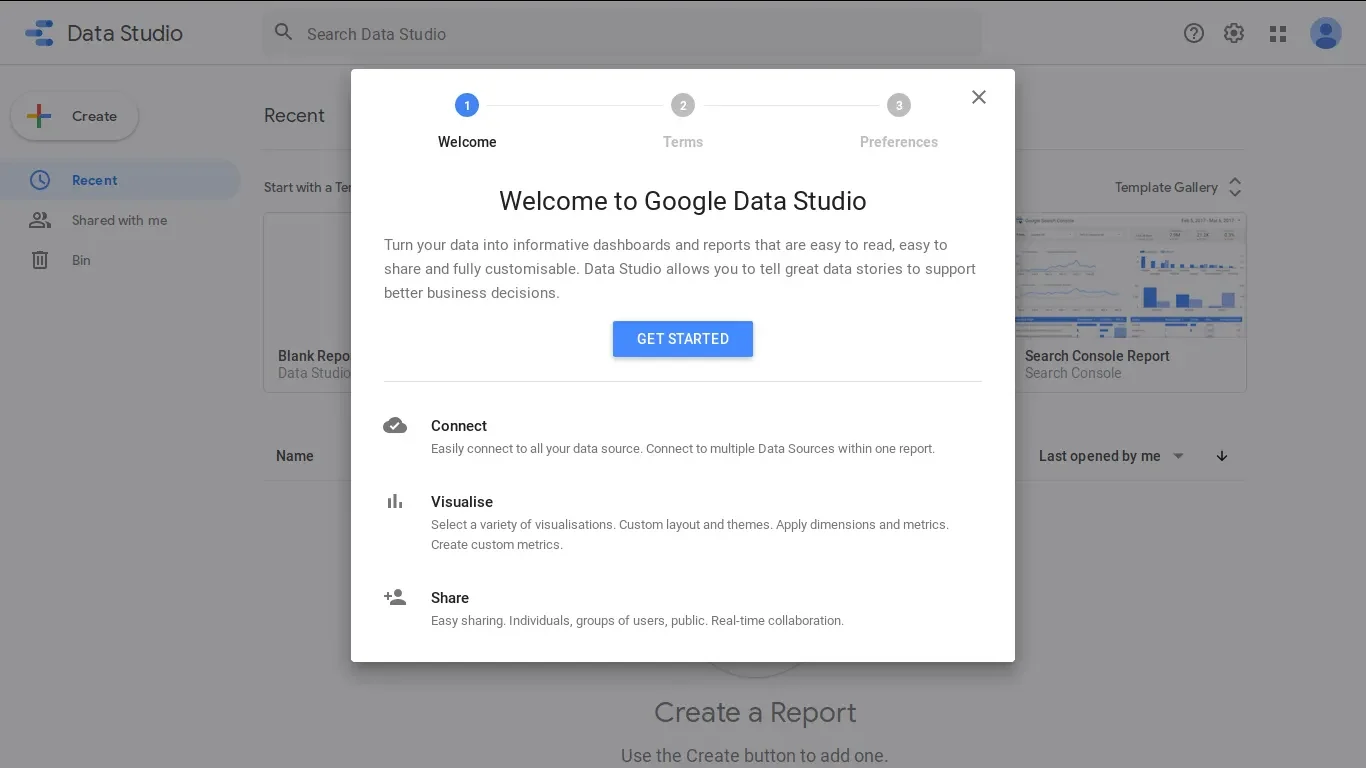
A blank report was created first.
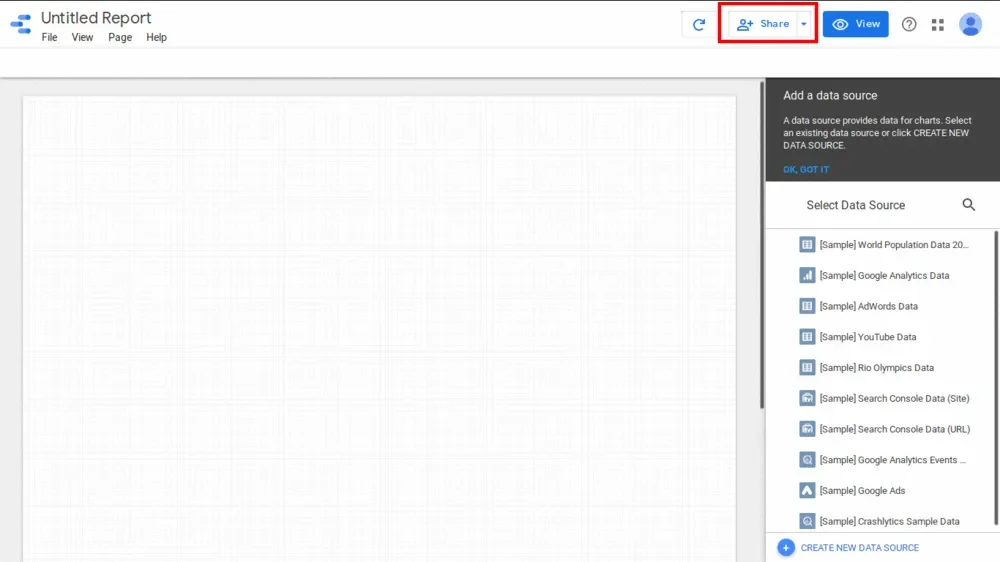
Clicking the arrow beside the Share function, highlighted in a red rectangle, shows the features available for sharing a report. One of them is Get report link.
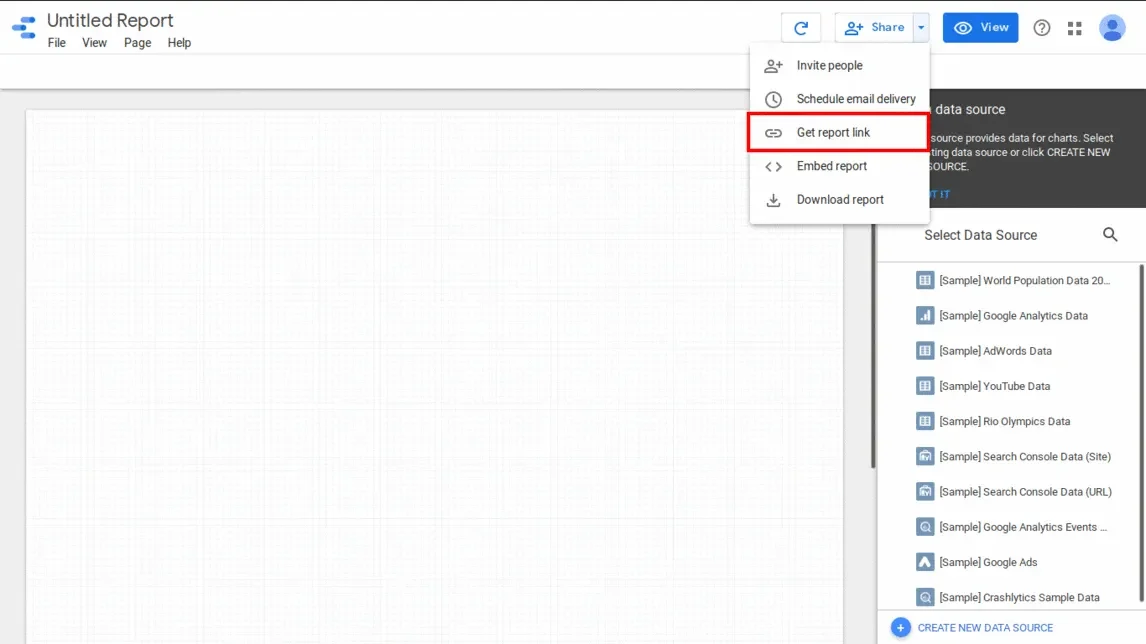
As the name suggests, it creates a report link for the report by appending a string of characters after a custom endpoint.
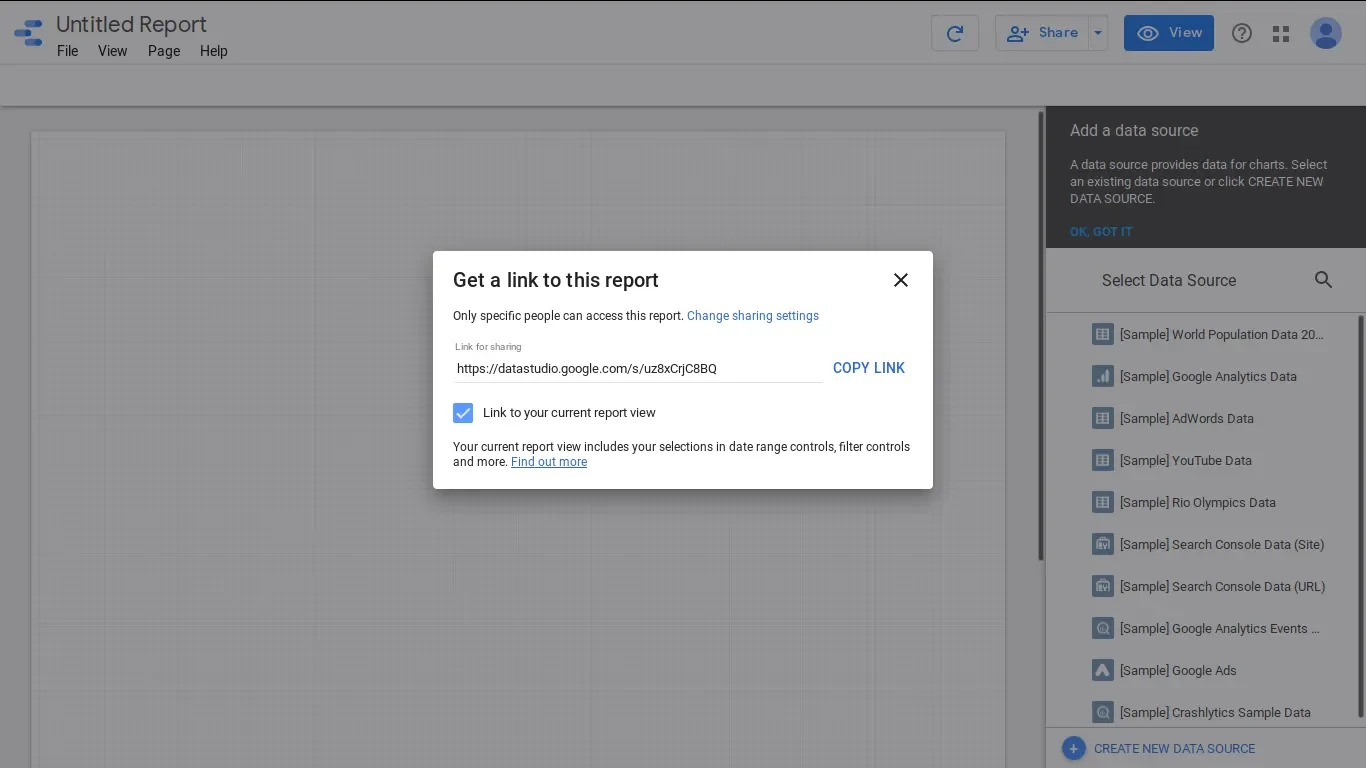
The interesting request is the one sent to the server when the checkbox Link to your current report view is clicked.
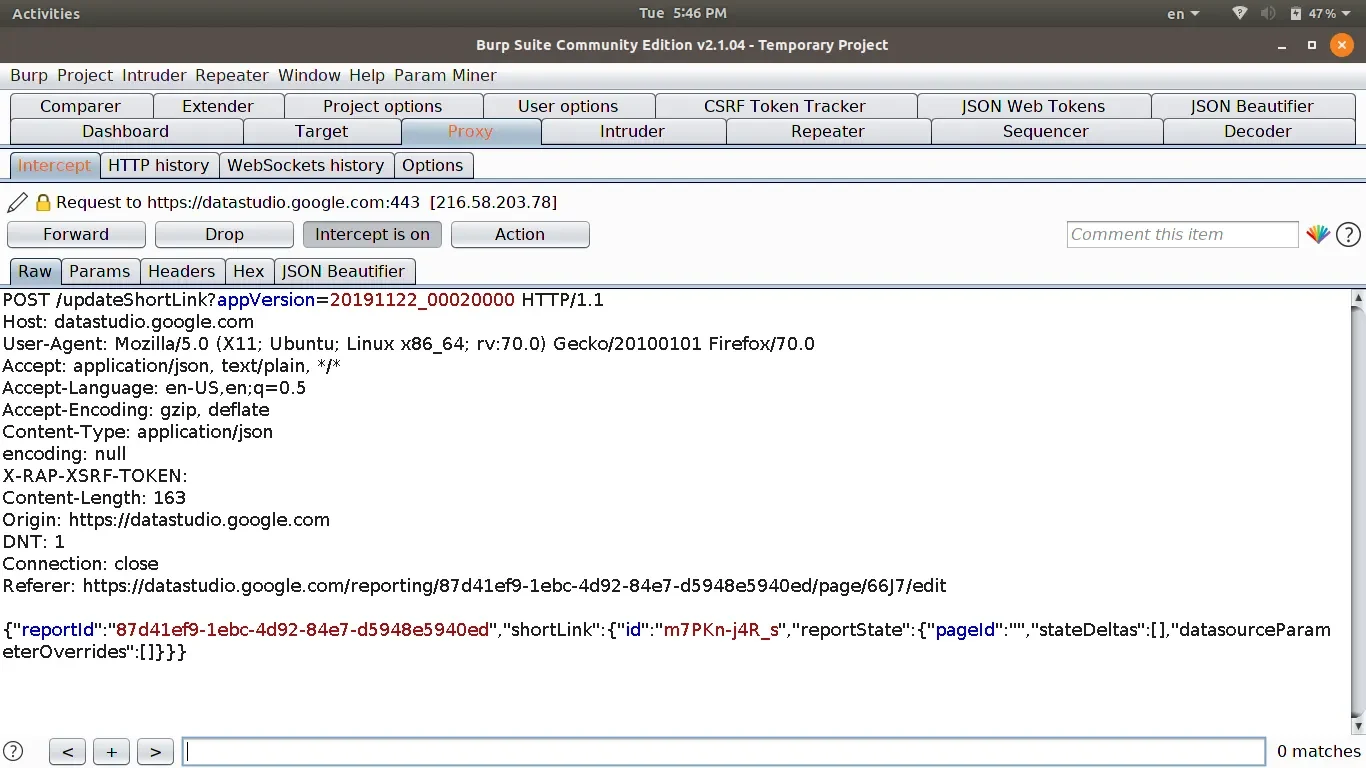
The JSON payload carries two parameters, reportId and shortLink.id, with the values shown in red in the intercepted request:
reportId : 87d41ef9–1ebc-4d92–84e7-d5948e5940ed

id : m7PKn-j4R_s
At first glance the id value looks like the report link generated when the checkbox was clicked. That is the observation that made the parameter worth attacking: if the client supplies the short-link identifier, the server may accept whatever identifier it is given.
Exploitation
Step 1: a random string as the short link id
The first test was to throw a random string into the id parameter and see what happened.
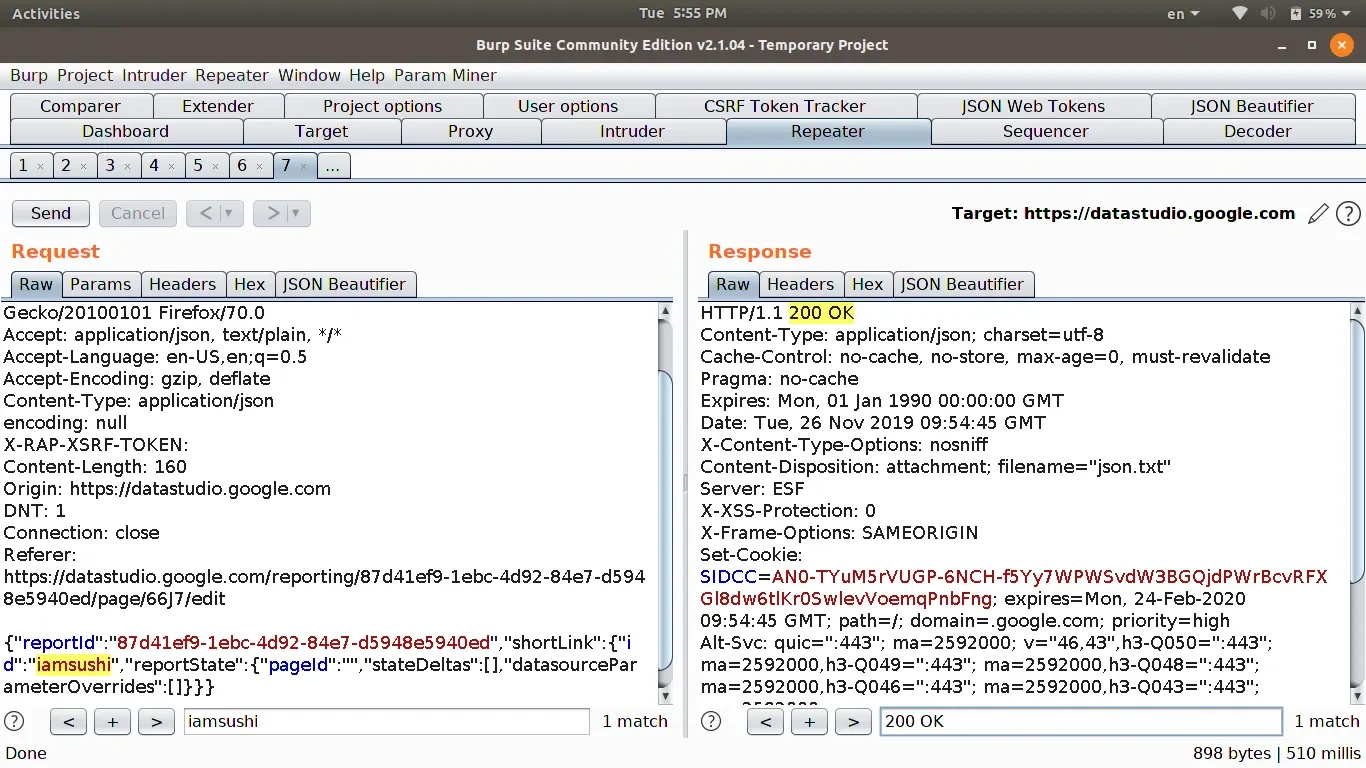
The value was set to iamsushi. Navigating to https://datastudio.google.com/s/iamsushi redirected to the researcher's own reportId, 87d41ef9–1ebc-4d92–84e7-d5948e5940ed. Users without permissions are not able to view the report unless specified otherwise, so the redirect alone does not grant access to anyone else.
Step 2: an existing short link id
Next, the id parameter was set to a value that already existed. The server still returned 200 OK. This was the surprise: the report link section was not the first authorisation issue tested, and the expectation was a 403 Forbidden when the id parameter was set to an existing value.
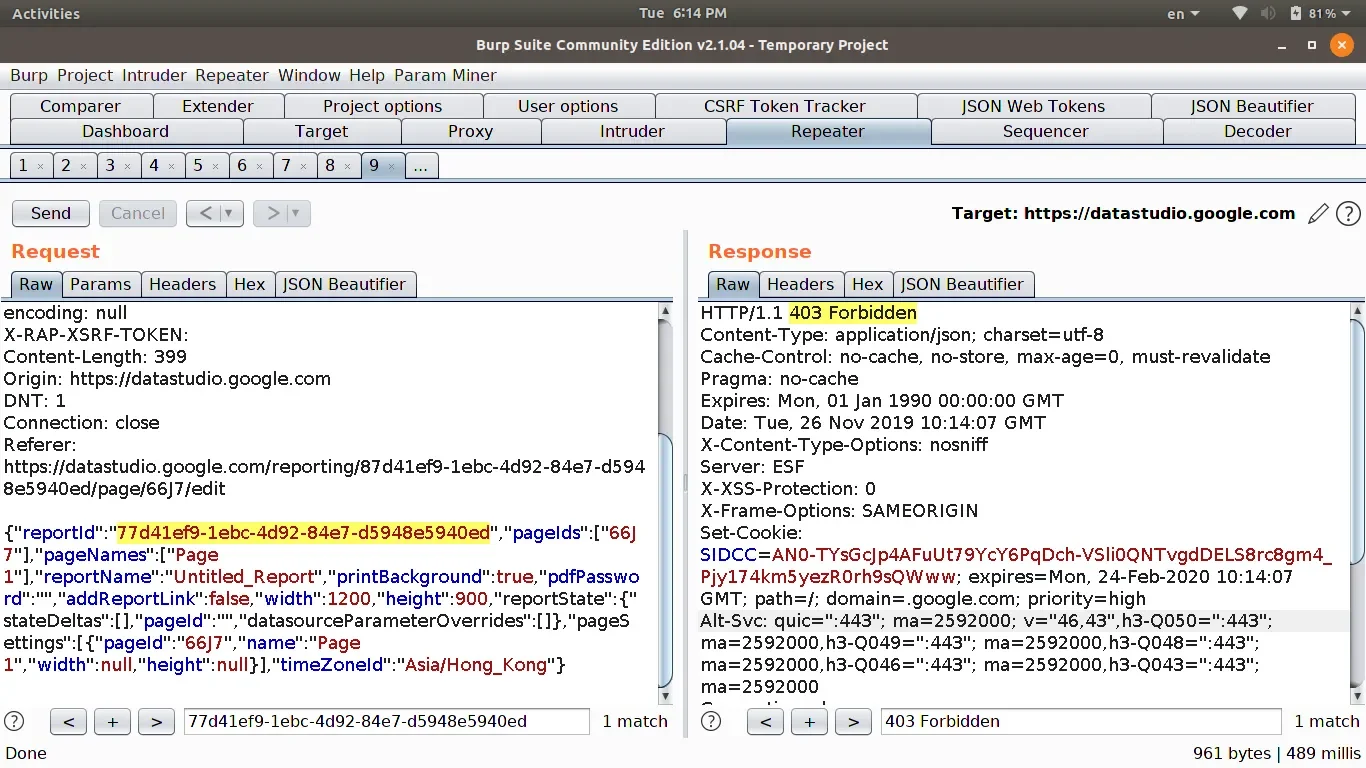
For comparison, the Download report request does return 403 Forbidden when attempting to download someone else's report.
Step 3: finding live short links and overwriting them
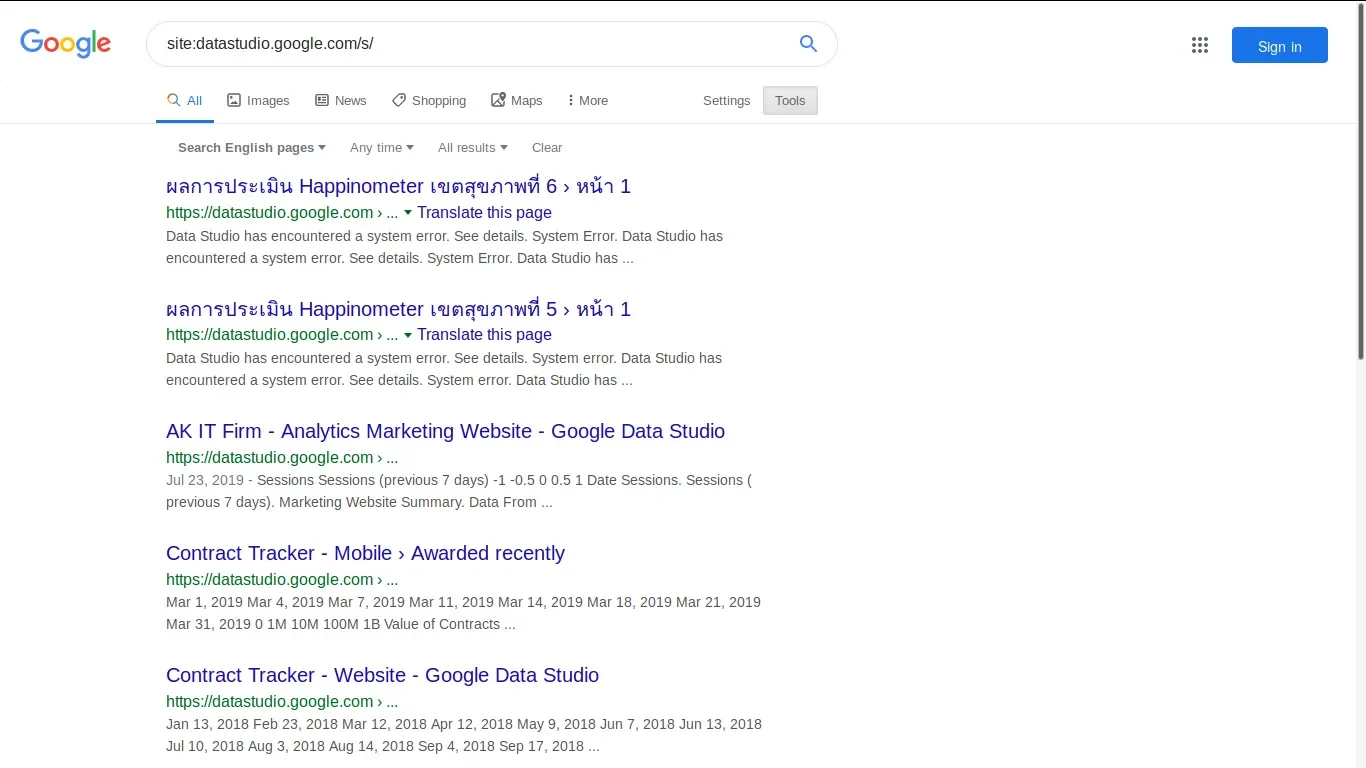
A simple dork was used to find existing short links online. The conclusion was that the short links found through the Google dork could be overwritten simply by changing the shortLink.id parameter's value to theirs.
The report to the Google Vulnerability Reward Program explained that a user can substitute another person's report link and point it to his own report, after allowing global read access on that report.
Step 4: the report was triaged
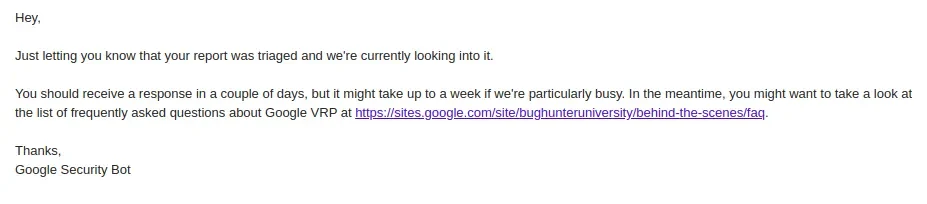
A day later an email from Google stated the report was Assigned, which essentially means it was triaged at first sight. The researcher notes that Assigned was only the first process.
Step 5: testing the reportId parameter
While continuing to look for other authorisation flaws, the researcher looked at the same request twice and realised the reportId parameter had not been tested.

Changing the reportId value to 77d41ef9–1ebc-4d92–84e7-d5948e5940ed produced a 500 Internal Server Error.
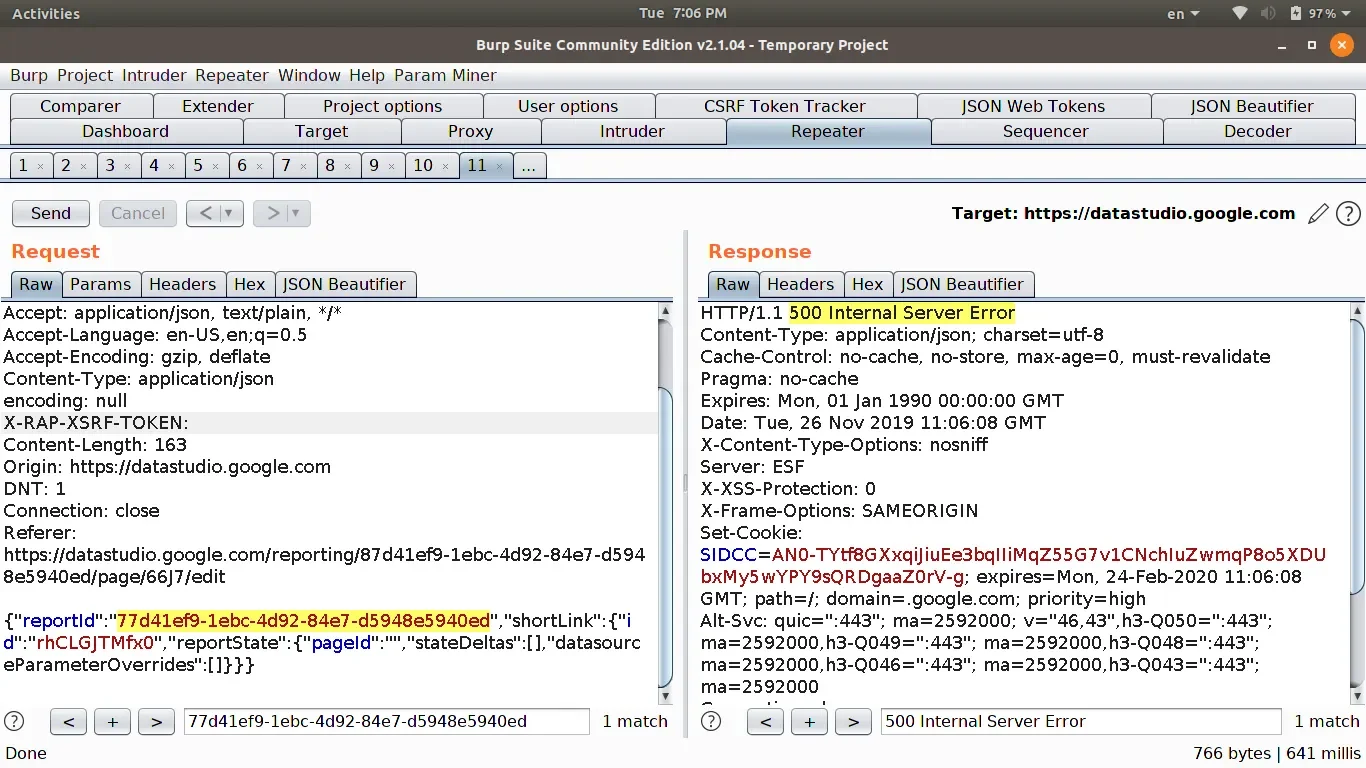
The request was rejected by the server. The reasoning was that 77d41ef9–1ebc-4d92–84e7-d5948e5940ed is an invalid report id: only the first character of the original report id had been changed, from 8 into 7.
Step 6: a valid report id from another account
The reportId was then set to a valid report id obtained from another Google account. The response was 200 OK.
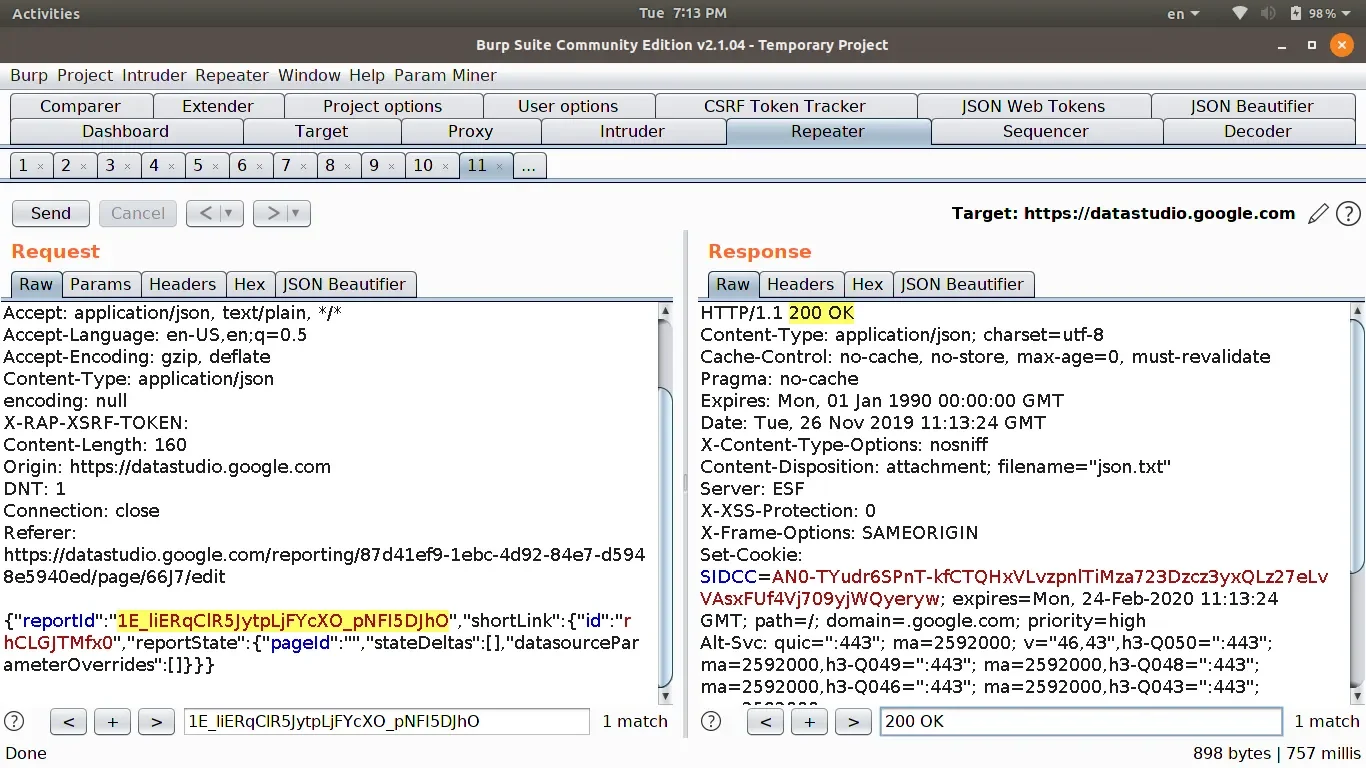
The conclusions drawn from these trials and errors were:
500 Internal Server Erroroccurs when I used an invalid report id
403 Forbiddenoccurs when a user tries to perform unauthorized action, which should happen when I perform the actions, but in this case it didn’t
200 OKoccurs when the unauthorized action is approved by the server
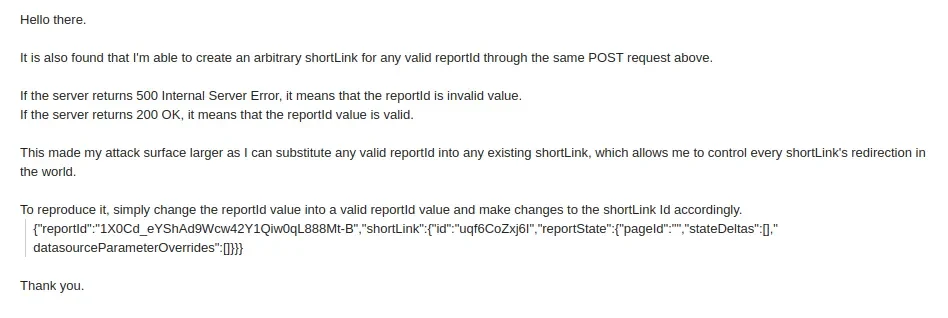
A follow-up email was sent to explain this.
A proof of concept video was also provided.
Root cause
The short-link creation endpoint takes both the report identifier and the short-link identifier from the client, and supplying an existing shortLink.id updated that link rather than being refused. Supplying an existing shortLink.id therefore updates that link rather than being refused, and the link is repointed at the caller's own report. The reportId parameter is likewise accepted from the client: an invalid id is rejected with a 500, but a valid id belonging to another account is accepted with a 200, so the server validates the format or existence of the report but not the caller's authorisation over it.
The comparison with Download report, which correctly returns 403 for someone else's report, shows that the authorisation check existed elsewhere in the product but was missing on this path.
Impact
An authenticated user can substitute another person's report link so that it points to the attacker's own report, provided the attacker has allowed global read access on that report. Because the short link keeps its original identifier, anyone who follows the victim's existing link, including links found through search-engine dorking, is redirected to the attacker's report. The same request also accepts a valid reportId from another Google account and returns 200 OK.
Fix
Google security team confirmed the fix between 04 and 05 Feb. The report does not describe the code change itself.
Variants to test
- On any product with shareable short links, intercept the request that creates or updates the link and replace the link identifier with one belonging to another account. A positive result is a 200 response and the victim's link resolving to your content.
- Replace the resource identifier (
reportIdhere) with a valid identifier from a second account. A positive result is 200 OK where a 403 is expected; a 500 for a syntactically altered identifier shows the server validates existence but not ownership. - Compare the same object across sibling endpoints: if
Download reportreturns 403 for a foreign object but the share endpoint returns 200, the missing check is on the share path. - Dork for live short links in the wild before testing, so that overwriting can be demonstrated against real links rather than only your own.
- Watch the response pattern for unsuccessful attempts. A different pattern from the usual failure response is the signal that an IDOR has succeeded.
What happened, in plain words
Google Data Studio is a free tool from Google for building reports and dashboards: charts, tables and numbers laid out on a page that you can share with other people. It lives at datastudio.google.com. When you want to share a report, the product can give you a short link: a web address with a short random-looking code at the end, of the form https://datastudio.google.com/s/<id>. Users without permissions cannot open the report unless the owner has allowed it.
The researcher found a flaw in the part of the service that creates and updates those short links. In plain terms, the browser sent the short link identifier and the report identifier, and the server accepted an existing short link identifier and a valid report id from another account. So one user could take somebody else's short link and make it point at their own report. The victim's link stayed the same, but it now delivered the attacker's content to anyone who clicked it.
A second problem turned up in the same request: the reportId parameter had not been tested, and a valid report id from a different Google account returned 200 OK. That is the kind of mistake security people call a broken authorisation flaw, or more specifically an IDOR (Insecure Direct Object Reference): the application uses an identifier supplied by the user to reach an object, and forgets to check that this user is allowed to touch that object.
Background: what a bug bounty programme is
Google runs its own vulnerability reward programme, usually called a bug bounty programme. Security researchers who find a flaw report it through a form, and Google's security team looks at it. If the report is valid, the researcher may receive a reward. Google's process has several stages of triage, which is the initial sorting and checking of a report, and it can take more than one round before a report is accepted.
The researcher had started hunting on Google about a fortnight earlier, and most of that time went into reading write-ups published by other researchers. Reading how other people found bugs is one of the cheapest ways to learn how a product behaves.
Picking the target
Two of the write-ups the researcher had read described vulnerabilities in the same sub-domain: Google Data Studio. A sub-domain is a part of a website's address, here datastudio.google.com rather than google.com. The two write-ups were a Google referer leak bug published on Medium, and a write-up titled "The journey of 5k$ (idor) bounty at google".
That raised a simple question: if a vulnerability can be found twice in the same sub-domain, are there still unseen ones lying there? That question is why Data Studio became the target.
Understanding the application first
Before touching anything, the researcher spent time using Data Studio normally: creating reports, clicking the share options, watching what the product does. The reasoning is worth spelling out, because it is the opposite of the usual beginner instinct of firing random payloads at every input. A payload is a deliberately malformed or unexpected value sent to a server to see how it reacts. Finding authorisation flaws is about understanding how the application works and then trying to outsmart it. If two people have already blogged about the same sub-domain, spamming payloads everywhere is unlikely to take you far.
Discovering the issue
The first step was to create a blank report. This is what it looked like after creation.
Next to the Share function there is an arrow. Clicking it opens the features available for sharing a report, and one of them is Get report link.
As the name suggests, Get report link creates a link for your report by appending a string of characters after a custom endpoint. An endpoint is simply a particular address on a server that performs a particular job; here it is the address that hands out short links.
Now the interesting part. When you tick the checkbox Link to your current report view, your browser sends a request to the server. A request is the message your browser sends when you click something: it says what you want and carries the data needed to do it. The researcher intercepted that request, meaning he captured it on its way out so he could read and later change its contents. Intercepting is normally done with a proxy tool that sits between the browser and the server; the report does not name the tool used.
Looking at the JSON payload carefully, two parameters are being sent: reportId and shortLink.id, with the values shown in red in the captured request.
JSON is a text format for structured data, a bit like a very strict shopping list: names on the left, values on the right. A parameter is one of those name/value pairs, a single piece of information in the request. The payload is the body of the request, the part that carries the data rather than the address.
reportId : 87d41ef9–1ebc-4d92–84e7-d5948e5940ed

id : m7PKn-j4R_s
Line by line:
reportId : 87d41ef9–1ebc-4d92–84e7-d5948e5940edtells the server which report is involved. The long string of letters, digits and dashes is an identifier, a unique name for one specific report. Think of it as a passport number for the report.id : m7PKn-j4R_sis the short-link identifier, the code that will appear at the end of the short URL. Think of it as the label on a forwarding address: the label is short and public, and behind it sits the real destination.
At first glance, the id value looks like the report link generated when the checkbox was clicked. That is the observation that made the parameter worth attacking: if the browser is the one choosing the short-link identifier, the server may simply accept whatever identifier it is given, including one that already belongs to somebody else.
Exploitation
Step 1: a random string as the short link id
The first test was to put a random string into the id parameter and see what happened.
The value was set to iamsushi. Navigating to https://datastudio.google.com/s/iamsushi redirected to the researcher's own reportId, 87d41ef9–1ebc-4d92–84e7-d5948e5940ed. A redirect is the server's way of saying "the thing you asked for is over there", and the browser follows it automatically.
Navigating to the link redirected to the researcher's own report id. It is worth noting that users without permissions cannot view a report unless the owner has specified otherwise, so this redirect alone does not give anyone access to somebody else's data. The interesting question is not whether a stranger can read your report, but whether you can take over a link that belongs to a stranger.
Step 2: an existing short link id
Next, the id parameter was set to a value that already existed, that is, a short-link code already in use by someone else. The server still returned 200 OK.
HTTP status codes are the server's short answers. 200 OK means "done, no problem". 403 Forbidden means "I understood you, but you are not allowed to do that". 500 Internal Server Error means "something broke on my side while handling this".
This was the surprise. The report-link section was not the first authorisation issue the researcher had tested, and the expectation was a 403 Forbidden when the id parameter was set to an existing value. Getting 200 OK instead was a surprise, since a 403 Forbidden was expected.
For comparison, the Download report request does return 403 Forbidden when you attempt to download someone else's report.
That comparison matters: the Download report request returned 403 for someone else's report, while the share-link request returned 200.
Step 3: finding live short links and overwriting them
The researcher used a simple dork to find existing short links online. A dork is a search query crafted to surface pages that match a pattern, in this case short links that had been indexed by a search engine.
The conclusion was that the short links found through the Google dork could be overwritten simply by changing the shortLink.id parameter's value to theirs.
The report sent to the Google Vulnerability Reward Programme explained that a user can substitute another person's report link and point it to his own report, after allowing global read access on that report. Global read access means the attacker's own report is set to be viewable by anyone with the link, so that whoever follows the hijacked link sees something.
Step 4: the report was triaged
A day later an email from Google stated the report was Assigned, which essentially means it was triaged at first sight. The researcher notes that Assigned was only the first process, not an acceptance.
Step 5: testing the reportId parameter
While continuing to look for other authorisation flaws, the researcher looked at the same request twice and realised the reportId parameter had not been tested. This is a common pattern in testing: you focus on one input, find something, and forget that the request carries a second input that deserves the same treatment.
Changing the reportId value to 77d41ef9–1ebc-4d92–84e7-d5948e5940ed produced a 500 Internal Server Error.
The request was rejected by the server. The reasoning was that 77d41ef9–1ebc-4d92–84e7-d5948e5940ed is an invalid report id: only the first character of the original report id had been changed, from 8 into 7. In other words, the server checked whether the identifier existed, and this one did not, so it failed.
Step 6: a valid report id from another account
The reportId was then set to a valid report id obtained from another Google account. The response was 200 OK.
A made-up identifier returned 500, but a real identifier belonging to somebody else returned 200 OK.
The conclusions drawn from these trials and errors were:
500 Internal Server Erroroccurs when I used an invalid report id
403 Forbiddenoccurs when a user tries to perform unauthorized action, which should happen when I perform the actions, but in this case it didn't
200 OKoccurs when the unauthorized action is approved by the server
A follow-up email was sent to explain this.
A proof of concept video was also provided. A proof of concept is a small demonstration that the bug really works, usually recorded so the security team can reproduce it without guessing.
Root cause
The short-link creation endpoint takes both the report identifier and the short-link identifier from the client, and supplying an existing shortLink.id updated that link rather than being refused. Supplying an existing shortLink.id therefore updates that link rather than being refused, and the link is repointed at the caller's own report. The reportId parameter is likewise accepted from the client: an invalid id is rejected with a 500, but a valid id belonging to another account is accepted with a 200, so the server validates the format or existence of the report but not the caller's authorisation over it.
The comparison with Download report, which correctly returns 403 for someone else's report, shows that the authorisation check existed elsewhere in the product but was missing on this path.
Impact
An authenticated user can substitute another person's report link so that it points to the attacker's own report, provided the attacker has allowed global read access on that report. Because the short link keeps its original identifier, anyone who follows the victim's existing link, including links found through search-engine dorking, is redirected to the attacker's report. The same request also accepts a valid reportId from another Google account and returns 200 OK.
Fix
Google security team confirmed the fix between 04 and 05 Feb. The report does not describe the code change itself.
Variants to test
- On any product with shareable short links, intercept the request that creates or updates the link and replace the link identifier with one belonging to another account. A positive result is a 200 response and the victim's link resolving to your content.
- Replace the resource identifier (
reportIdhere) with a valid identifier from a second account. A positive result is 200 OK where a 403 is expected; a 500 for a syntactically altered identifier shows the server validates existence but not ownership. - Compare the same object across sibling endpoints: if
Download reportreturns 403 for a foreign object but the share endpoint returns 200, the missing check is on the share path. - Dork for live short links in the wild before testing, so that overwriting can be demonstrated against real links rather than only your own.
- Watch the response pattern for unsuccessful attempts. A different pattern from the usual failure response is the signal that an IDOR has succeeded.
Glossary
- API: the set of addresses and rules a service exposes so that software (including your browser) can ask it to do things.
- Authorisation: the check that a user is allowed to perform a particular action on a particular object, as opposed to authentication, which is only about who the user is.
- Broken authorisation: a flaw where the application does not correctly check whether the user is allowed to do what they are asking.
- Bug bounty programme: a scheme where an organisation pays researchers for reporting security flaws responsibly.
- Client: the software making a request, normally your browser, as opposed to the server that answers it.
- Dashboard: a page of charts and figures summarising data at a glance.
- Dork: a search-engine query crafted to find pages matching a specific pattern, such as exposed short links.
- Endpoint: a specific address on a server that performs a specific job.
- Global read access: a sharing setting that lets anyone with the link view a report.
- HTTP status code: the three-digit number a server returns to say how a request went, such as 200, 403 or 500.
- IDOR (Insecure Direct Object Reference): a flaw where the application uses an identifier supplied by the user to reach an object without checking that the user is allowed to access that object.
- Identifier: a unique name for a thing, such as a report or a short link, usually a long string of letters, digits and dashes.
- Intercept: to capture a request between the browser and the server so it can be read and modified.
- JSON: a text format for structured data made of name/value pairs.
- Parameter: one named piece of data in a request, such as
reportIdorid. - Payload: the part of a request that carries data, as opposed to the address it is sent to; also used for a deliberately crafted value sent to test a server.
- Proof of concept: a small demonstration that a bug really works.
- Redirect: a server response telling the browser to go to a different address instead.
- Request: the message a browser sends to a server asking it to do something.
- Response: the message a server sends back, including a status code and usually some data.
- Root cause: the underlying reason a bug exists, as opposed to its visible symptom.
- Server: the computer (or program) that receives requests and answers them.
- Short link: a short web address that redirects to a longer destination.
- Sub-domain: a part of a website's address, such as
datastudio.google.comundergoogle.com. - Triage: the first stage of handling a bug report, where it is sorted and checked for validity.
- Vulnerability: a weakness in software that someone could abuse to do something the owner did not intend.
- Write-up: a public article in which a researcher explains a bug they found and how.

