How i was able to get critical bug on google by get full access on [Google Cloud BI Hackathon]
A Google employee accidentally published Looker API client credentials in a public GitHub repository. An attacker who found them could authenticate to the Looker instance used for the Cloud BI Hackathon and access, modify, or delete employee data, groups, dashboards, and logs.
 Published on orwaatyat.medium.com
google launch a event for developers Cloud BI Hackathonhttps://cloud.google.com/blog/products/data-analytics/join-the-google-cloud-bi-hackathon
The full write-up lives on its author's site
It belongs to its author, so we link to it rather than copy it. The other two tabs are our own rewrites, checked against it.
Context
Google ran a developer event called Cloud BI Hackathon, announced on the Google Cloud blog. The event's data experience ran on Looker and Looker Studio, and the researcher recognised the underlying service as Looker, which is owned by Google. He had a strong background in testing Looker from previous work and reports, which is what made the target interesting to him.
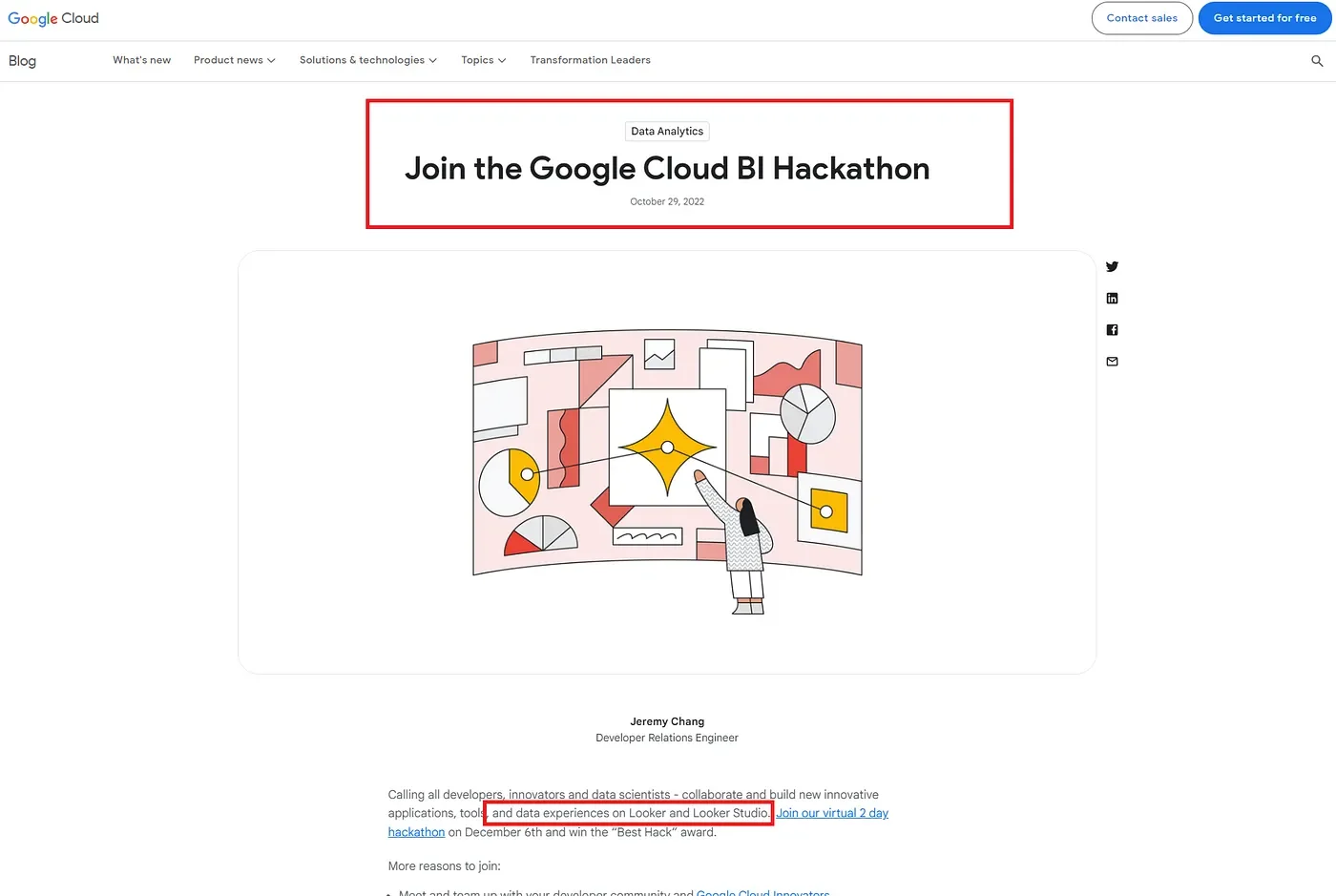
The image shows the data experiences on Looker and Looker Studio referenced in the announcement.
The bug he found was a set of Looker API credentials (a client ID and client secret) committed to GitHub by a Google employee, which gave full API access to the Looker instance behind the Cloud BI Hackathon event.
He breaks the finding into three parts:
- The application runs on the Looker service, and Looker is owned by Google.
- The access and impact apply to the Google Cloud BI Hackathon.
- The leak came from a Google employee working for a company that is also owned by Google.
In short: leaked by a Google employee of a Google-owned company, inside a Google-owned Looker instance, affecting the Google Cloud BI Hackathon.
Setup
The tooling described in the report is the Looker command line client, gazer, installed as a Ruby gem on Linux, plus a curl login request he tried first. The precondition was simply finding a valid client_id and client_secret pair for a Looker instance, which he did by searching public code repositories.
Finding it
While looking at the hackathon, the researcher identified that the event ran on Looker. Because he had tested Looker before, he knew what a credential leak for it looks like and where to search. He searched for leaks in Google Groups, GitLab and GitHub, looking for the pattern target.looker.com together with a secret.
That search turned up a configuration block containing a Looker base URL, client ID and client secret, published in the work of a Google employee at a Google-owned company. The leaked data as shown in the report is:
base_url=https://GoogleAPP.looker.com/:19999client_id=XXXXXXXXXXXXXXXXXclient_secret=XXXXXXXXXXXX
The block gives the instance host, the API client ID and the API client secret. Those two values are what Looker uses to authenticate API clients, so anyone who reads them can act as that client.
Exploitation
Step 1: Try the classic Looker login request
The researcher's usual proof of concept for a Looker credential leak was a single curl request against the login endpoint on port 19999:
curl -d "client_id=ENTERHERE&client_secret=ENTERHERE" https://DOMAIN.looker.com:19999/login
This posts the client ID and secret as form data to the /login endpoint of the Looker API. In his experience this command no longer worked: when he tried it, it returned wrong credentials. He notes this happened after he had dropped a lot of Looker leak reports, and so he needed another way to validate the data. So he needed another way to validate the data.
Step 2: Install gazer
To validate Looker credentials he used gazer, the Looker command line tool, installed as a Ruby gem:
sudo gem install gazer
Step 3: Validate the credentials
With gazer installed, he checked whether the leaked pair was valid by asking the API who the authenticated user is:
gzr user me --host X.looker.com --client_id XXXXXXXXX --client_secret XXXXXXXXXX
The --host flag points at the Looker instance, and the client ID and secret are passed directly. The user me subcommand returned a row identifying the user behind the credentials.
A valid pair returned a response in this shape:
id|email|last_name|first_name|personal_space_id|home_space_id
The columns are the user ID, email, last name, first name, personal space ID and home space ID. Getting this back confirmed the credentials were valid and gave him the identity behind them.
Step 4: Enumerate and act on the instance
From that point he had API access to the Cloud BI Hackathon's Looker instance. The impact he describes is:
- Access to all Google employees' info.
- Access to all Google groups on the Cloud BI Hackathon.
- Adding anyone to things.
- Removing anyone from things.
- Access to all logs there.
- Removing the complete dashboard.
He summarises the impact as: an attacker with these credentials can list all the groups of Looker, access all the employees of each group, access all the spaces, dashboards, Looks and models, including some Google-related ones, dump all the available spaces, dashboards, Looks and models, and delete or remove available spaces and dashboards.
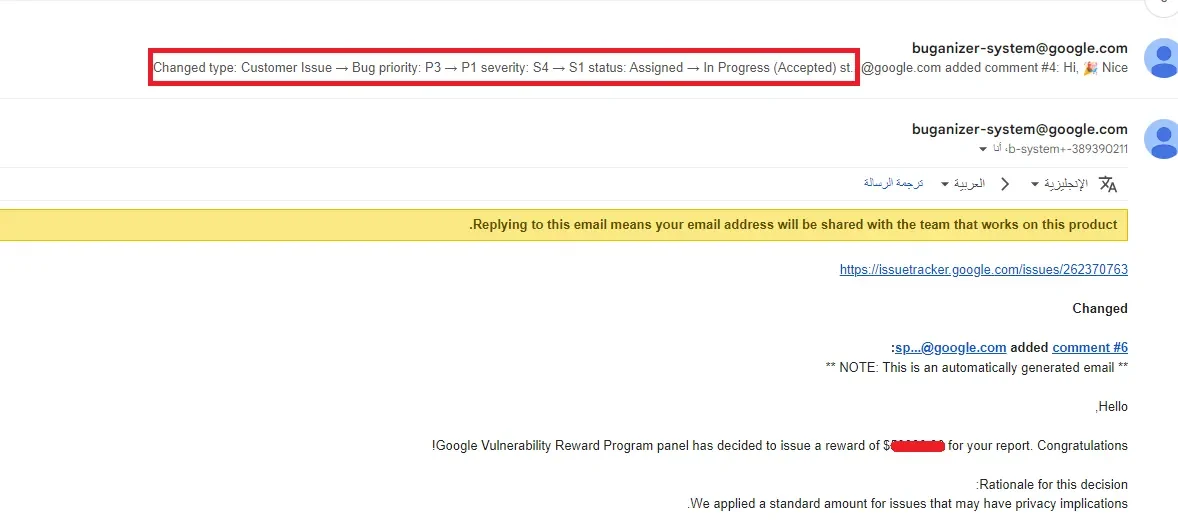
The image shows the report being triaged and accepted as P1/S1 the next day, with a bounty from the Google team.
Root cause
The root cause is a secret committed to a public code repository: a Looker API client ID and client secret were published in a Google employee's work on GitHub. Looker API clients authenticate with exactly this pair, so possession of the pair is equivalent to being that client. The report does not say whether the credentials were scoped or rotated; the only obstacle he describes is that the /login route returned wrong credentials, which he worked around with gazer. The report does not describe any additional control that stopped the access.
Impact
The credentials gave full API access to the Looker instance behind the Cloud BI Hackathon. According to the report, that meant reading employee information and group membership, adding and removing people, reading logs, and reading or deleting spaces, dashboards, Looks and models, including removing the complete dashboard. The report was triaged and accepted the next day and marked P1/S1, with what the researcher calls a very good bounty from the Google team.
Fix
The obvious fix, given the root cause, is to revoke and rotate the leaked client ID and secret, remove the secret from the repository and its history, and avoid committing Looker API credentials to code at all.
Variants to test
The researcher's own tip is to search for leaks in Google Groups, GitLab and GitHub, looking for target.looker.com together with a secret, and then to test any credentials found with gazer. He says he found the same issue on Google, Uber and about nine private programs, and that it was marked directly as critical each time.
Concretely, on other targets:
- Search public repositories and groups for Looker instance hostnames alongside
client_idandclient_secret. A positive result is a Looker hostname alongside a client ID and client secret. - Run
gzr user me --host <host> --client_id <id> --client_secret <secret>. A positive result is the pipe-delimited user row (id|email|last_name|first_name|personal_space_id|home_space_id) rather than an authentication error. - If the
/loginroute rejects the pair, do not conclude the credentials are dead; validate through the API client path withgazerinstead, as the researcher did. - Once validated, check what the client can reach: group listings, group membership, spaces, dashboards, Looks, models and logs. A positive result is read access to any of these, and write access such as adding or removing members or deleting dashboards raises the severity further.
Orwa
What happened, in plain words
A security researcher found a set of secret login details for a Google service, published by accident on GitHub, a public website where people share code. Those details gave API access to the Looker instance used for a developer event called the Cloud BI Hackathon. According to the report, the access allowed reading employee information, adding and removing people, and deleting dashboards. He reported it to Google, and the next day Google accepted it as a critical (P1/S1) issue and paid a bounty.
This article explains the whole story from scratch, assuming you only know how to use a browser. It covers what the service is, what the leaked details are, how the researcher checked them, and what he could do with them. Every technical term is explained where it first appears, and there is a glossary at the end.
Background: the event and the service
Google announced a developer event called Cloud BI Hackathon on its Cloud blog. "BI" stands for Business Intelligence: tools that turn raw data into charts, reports and dashboards so people can understand it. The event's data experience ran on two products, Looker and Looker Studio. Looker is a data platform owned by Google; it lets organisations connect to their data and build reports, dashboards and models (a model is a description of how data tables relate to each other). Looker Studio is a related reporting tool.
The image shows the data experiences on Looker and Looker Studio mentioned in the announcement.
The researcher recognised that the event was running on the Looker service. He had tested Looker before and had written reports about it, so he knew what a leaked credential for Looker looks like and where to search for one. That prior knowledge is why this target caught his eye.
The bug in one sentence
A Google employee, working for a company that Google also owns, had published a Looker client ID and client secret on GitHub. Those two values are the username and password that a program uses to talk to Looker's API. Anyone who finds them can act as that program, with all its permissions.
The researcher splits the finding into three parts:
- The application runs on the Looker service, and Looker is owned by Google.
- The access and impact apply to the Google Cloud BI Hackathon.
- The leak came from a Google employee working for a company that is also owned by Google.
In short: leaked by a Google employee of a Google-owned company, inside a Google-owned Looker instance, affecting the Google Cloud BI Hackathon.
Key concepts you need
Before the steps, here are the ideas that make the rest understandable.
- API (Application Programming Interface): a way for one program to talk to another over the internet, like a waiter taking your order to the kitchen. You send a request (for example, "list all users") and get a structured answer back. Looker has an API that lets programs read and change everything in the Looker instance.
- Client ID and client secret: a pair of long random strings that identify a program to an API. Think of the client ID as a name badge and the client secret as the password that goes with it. If someone else gets both, they can pretend to be that program.
- Credential: any piece of information used to prove identity, such as a username and password, or a client ID and secret.
- GitHub: a website where developers store and share code. Public repositories are visible to everyone, so anything committed (uploaded) there can be read by anyone.
- Port: a numbered channel on a server. Web traffic normally uses port 443 for HTTPS; Looker's API in this story uses port 19999. Think of a server as a building and ports as different doors.
- curl: a command-line tool for sending HTTP requests. It is like a browser without a window: you type a request and see the raw response.
- gazer: a command-line program for talking to Looker's API. It is written in Ruby (a programming language) and installed as a "gem" (a Ruby package).
- Information disclosure: the security term for secrets or private data being exposed to people who should not see them. Here, the secret was the client ID and secret pair.
Finding the leak
Because he had tested Looker before, the researcher knew that leaked Looker credentials often appear in public places. He searched Google Groups (public discussion forums), GitLab and GitHub (code hosting sites) for the pattern target.looker.com together with a secret. The idea is simple: developers sometimes paste configuration files into public places, and those files can contain credentials.
That search turned up a configuration block containing a Looker base URL, client ID and client secret, published in the work of a Google employee at a Google-owned company. The leaked data as shown in the report is:
base_url=https://GoogleAPP.looker.com/:19999client_id=XXXXXXXXXXXXXXXXXclient_secret=XXXXXXXXXXXX
Line by line:
base_url=https://GoogleAPP.looker.com/:19999is the address of the Looker instance.https://means the connection is encrypted.GoogleAPP.looker.comis the hostname (the server's name on the internet).:19999is the port, the door on that server where the Looker API listens.client_id=XXXXXXXXXXXXXXXXXis the public half of the credential pair, the name badge.client_secret=XXXXXXXXXXXXis the private half, the password. Together with the client ID, it lets a program authenticate to the Looker API.
The values are shown as Xs in the report to avoid republishing the secret. In reality they were real strings. Because Looker uses exactly this pair to authenticate API clients, anyone who reads them can act as that client.
Checking whether the credentials work
Step 1: Try the classic Looker login request
The researcher's usual quick test for a Looker credential leak was a single curl request against the login endpoint on port 19999:
curl -d "client_id=ENTERHERE&client_secret=ENTERHERE" https://DOMAIN.looker.com:19999/login
What this does:
curlis the tool sending the request.-dtells curl to send the following text as the body of the request, in the same format a web form uses."client_id=ENTERHERE&client_secret=ENTERHERE"is that body: two fields,client_idandclient_secret, separated by&. The placeholdersENTERHEREare where the real values go.https://DOMAIN.looker.com:19999/loginis the address being called: the/loginendpoint of the Looker API on port 19999.DOMAINis a placeholder for the instance's hostname.
In his experience this command no longer worked: when he tried it, it returned wrong credentials. He notes this happened after he had dropped a lot of Looker leak reports, and so he needed another way to check whether the data was valid. So he needed another way to check whether the data was valid.
Step 2: Install gazer
To validate Looker credentials he used gazer, the Looker command-line tool, installed as a Ruby gem:
sudo gem install gazer
What this does:
sudoruns the command with administrator rights, which are often needed to install software system-wide.gemis the package manager for Ruby, a programming language.install gazertells it to download and install thegazerprogram.
After this, the gzr command (the short name for gazer) is available in the terminal.
Step 3: Validate the credentials
With gazer installed, he checked whether the leaked pair was valid by asking the API who the authenticated user is:
gzr user me --host X.looker.com --client_id XXXXXXXXX --client_secret XXXXXXXXXX
What this does:
gzris the gazer program.user meis the subcommand he used to check the credentials and see the identity behind them.--host X.looker.comtells gazer which Looker instance to talk to.Xis a placeholder for the real hostname.--client_id XXXXXXXXXand--client_secret XXXXXXXXXXsupply the credential pair. The Xs are placeholders for the real values.
A valid pair returned a response in this shape:
id|email|last_name|first_name|personal_space_id|home_space_id
This is a table with one row of data and six columns, separated by vertical bars (|):
id: the user's numeric ID in Looker.email: the user's email address.last_nameandfirst_name: the user's name.personal_space_id: the ID of the user's personal space, a private area in Looker where they keep their own content.home_space_id: the ID of the user's home space, the area they land in by default.
Getting this back confirmed the credentials were valid and showed which identity they belonged to. That is why this step matters: it turns a guess into proof.
Step 4: Enumerate and act on the instance
From that point he had API access to the Cloud BI Hackathon's Looker instance. The impact he describes is:
- Access to all Google employees' info.
- Access to all Google groups on the Cloud BI Hackathon.
- Adding anyone to things.
- Removing anyone from things.
- Access to all logs there.
- Removing the complete dashboard.
He summarises the impact as: an attacker with these credentials can list all the groups of Looker, access all the employees of each group, access all the spaces, dashboards, Looks and models, including some Google-related ones, dump all the available spaces, dashboards, Looks and models, and delete or remove available spaces and dashboards.
A few terms here:
- Space: a folder in Looker that holds dashboards, Looks and other content.
- Dashboard: a page of charts and numbers giving an overview of data.
- Look: a saved query and its visualisation, a single chart or table.
- Model: a description of how data tables relate, used to build queries.
- Dump: to copy out all the data, often in bulk.
The image shows the report being triaged and accepted as P1/S1 the next day, with a bounty from the Google team.
Why it happened (root cause)
The root cause is a secret committed to a public code repository: a Looker API client ID and client secret were published in a Google employee's work on GitHub. Looker API clients authenticate with exactly this pair, so having the pair is the same as being that client. The report does not say whether the credentials were limited in scope or changed; the only problem he describes is that the /login route returned wrong credentials, which he worked around with gazer. The report does not describe any other control that stopped the access.
Impact
The credentials gave full API access to the Looker instance behind the Cloud BI Hackathon. According to the report, that meant reading employee information and group membership, adding and removing people, reading logs, and reading or deleting spaces, dashboards, Looks and models, including removing the complete dashboard. The report was triaged and accepted the next day and marked P1/S1, with what the researcher calls a very good bounty from the Google team.
Fix
The obvious fix, given the root cause, is to revoke and rotate the leaked client ID and secret, remove the secret from the repository and its history, and avoid committing Looker API credentials to code at all. "Revoke" means making the old pair stop working; "rotate" means issuing a new pair.
Variants to test
The researcher's own tip is to search for leaks in Google Groups, GitLab and GitHub, looking for target.looker.com together with a secret, and then to test any credentials found with gazer. He says he found the same issue on Google, Uber and about nine private programs, and that it was marked directly as critical each time.
Concretely, on other targets:
- Search public repositories and groups for Looker instance hostnames alongside
client_idandclient_secret. A positive result is a Looker hostname alongside a client ID and client secret. - Run
gzr user me --host <host> --client_id <id> --client_secret <secret>. A positive result is the pipe-delimited user row (id|email|last_name|first_name|personal_space_id|home_space_id) rather than an authentication error. - If the
/loginroute rejects the pair, do not conclude the credentials are dead; validate through the API client path withgazerinstead, as the researcher did. - Once validated, check what the client can reach: group listings, group membership, spaces, dashboards, Looks, models and logs. A positive result is read access to any of these, and write access such as adding or removing members or deleting dashboards raises the severity further.
Orwa
Glossary
- API (Application Programming Interface): a way for one program to talk to another over the internet, sending requests and getting structured answers.
- Base URL: the main address of a service, here the Looker instance's hostname and port.
- Bounty: a payment made by a company to a researcher who reports a valid security issue.
- Client ID: the public half of a credential pair that identifies a program to an API, like a name badge.
- Client secret: the private half of a credential pair, like a password that goes with the client ID.
- Cloud BI Hackathon: a Google developer event whose data experience ran on Looker and Looker Studio.
- Credential: any information used to prove identity, such as a username and password or a client ID and secret.
- Critical (P1/S1): the highest severity rating for a security issue, meaning it can cause major damage.
- curl: a command-line tool for sending HTTP requests and seeing the raw response.
- Dump: to copy out data in bulk.
- gazer (gzr): a command-line program for talking to Looker's API, installed as a Ruby gem.
- Gem: a package for the Ruby programming language, installed with the
gemcommand. - GitHub: a website where developers store and share code; public repositories are visible to everyone.
- GitLab: another website for storing and sharing code, similar to GitHub.
- Google Groups: public discussion forums hosted by Google.
- Look: a saved query and its visualisation in Looker, a single chart or table.
- Looker: a Google-owned data platform for building reports, dashboards and models.
- Looker Studio: a related Google reporting tool.
- Port: a numbered channel on a server; Looker's API here uses port 19999.
- Repository: a storage location for code, often on GitHub or GitLab.
- Revoke: to make a credential stop working.
- Rotate: to replace a credential with a new one.
- Ruby: a programming language; its package manager is
gem. - sudo: a command that runs another command with administrator rights.
- Triaged: the process by which a company reviews a report and decides whether it is valid and how severe it is.




