How to download eBooks from Google Play Store without paying for them
The book annotation endpoint returned text surrounding a bookmark, including content beyond the free sample, so a user could walk through the book page by page. An attacker could therefore read and download the full text of any ebook without buying it.
 Published on webs3c.com
Bug Bounty Write-ups
The full write-up lives on its author's site
It belongs to its author, so we link to it rather than copy it. The other two tabs are our own rewrites, checked against it.
Context
Google Play Books is the ebook store and reader that sits under play.google.com/store/books. A signed-in user can open any book's detail page, click Free sample, and land in the web reader at https://play.google.com/books/reader?id=<volumeId>. The sample only exposes a limited number of pages, and the reader is not supposed to reveal text beyond them.
The feature involved here is the bookmark/annotation API at books.clients6.google.com. When a reader adds a bookmark, the web app sends the annotation together with a small window of surrounding text: beforeSelectedText and afterSelectedText. In its response, the server returns the annotation with the surrounding context resolved. That context is what the reader uses to render the bookmark in place.
The weakness is a payment bypass and logic flaw: sending text from the end of the sample makes the server return the text that follows it.
Setup
- A normal Google account, logged in to the Play Store.
- Any book with a free sample, for example The Web Application Hacker's Handbook: Finding and Exploiting Security Flaws, Edition 2, volume id
NSBHAAAAQBAJ. - Burp Suite Proxy to intercept and resend the annotation request.
- A browser on Windows (the captured requests show Firefox 92.0 on Windows NT 10.0).
- Later, a Python script to automate the extraction.
No special role or entitlement is needed: the sample access that any account gets is enough.
Finding it
The researcher had been working on DRM bug bounty programmes for several years and found this one in about ten minutes. The observation is simple: the bookmark request carries the text around the bookmark, and the response comes back with the surrounding text resolved by the server. If the server resolves context from whatever the client sends, then sending text from the last page of the sample should make the server return the text that follows it, which is outside the sample.
Exploitation
Step 1: reach the reader with a sample
- Go to
https://play.google.com/store/books. - Log in with your account.
- Open any book, for example The Web Application Hacker's Handbook: Finding and Exploiting Security Flaws, Edition 2 at
https://play.google.com/store/books/details/Dafydd_Stuttard_The_Web_Application_Hacker_s_Handb?id=NSBHAAAAQBAJ. - Click Free sample. You are redirected to
https://play.google.com/books/reader?id=NSBHAAAAQBAJ. - Go to the last available page (page 99).
Step 2: capture the bookmark request
On the last page, select the page, click Add bookmark, and intercept the request. It looks like this:
POST https://books.clients6.google.com/books/v1/mylibrary/annotations?source=ge-web-app&alt=json&key=[redacted]
Host: books.clients6.google.com
User-Agent: Mozilla/5.0 (Windows NT 10.0; Win64; x64; rv:92.0) Gecko/20100101 Firefox/92.0
Accept: */*
Accept-Language: es-MX,en-US;q=0.7,en;q=0.3
Accept-Encoding: gzip, deflate
X-JavaScript-User-Agent: google-api-javascript-client/1.1.0
X-Requested-With: XMLHttpRequest
Content-Type: application/json
X-Goog-Encode-Response-If-Executable: base64
X-Goog-AuthUser: 0
Authorization: SAPISIDHASH REDACTED
X-ClientDetails: appVersion=5.0%20(Windows)&platform=Win32&userAgent=Mozilla%2F5.0%20(Windows%20NT%2010.0%3B%20Win64%3B%20x64%3B%20rv%3A92.0)%20Gecko%2F20100101%20Firefox%2F92.0
Content-Length: 559
Origin: https://play.google.com
DNT: 1
Connection: close
Referer: https://play.google.com/
Cookie: REDACTED
Sec-Fetch-Dest: empty
Sec-Fetch-Mode: cors
Sec-Fetch-Site: same-site

{"volumeId":"NSBHAAAAQBAJ","layerId":"bookmarks","annotationType":"bookmark","data":"{}","highlightStyle":"{}","clientVersionRanges":{"contentVersion":"1.7.5.0.preview.3","gbTextRange":{"startPosition":"GBS.PT98.w.4.0.0","startOffset":"261","endPosition":"GBS.PT98.w.4.0.0","endOffset":"261"}},"selectedText":"","beforeSelectedText":"y made it easy for programmers to unwittingly introduce security bugs into their code. These factors","afterSelectedText":" have meant that applications written in PHP have suffered from a disproportionate number of securit"}
The body identifies the book with volumeId, the annotation layer with layerId: "bookmarks", and the position with gbTextRange. The two fields that matter are beforeSelectedText and afterSelectedText: the text immediately before and after the bookmark position, as the reader sees it. The Authorization header is a SAPISIDHASH value and the Cookie header carries the session; both are redacted here.
Step 3: ask for text past the end of the sample
- Replace the value of
beforeSelectedTextwith the last word in the document,fields., and delete the value ofafterSelectedText. - Resend the request with Burp Suite Proxy.
- Inspect the response and analyse the value of
afterSelectedText. It contains the next paragraph of the ebook, which the sample should not let you see:
SQL uses queries to perform common tasks such as reading, adding, updating, and deleting data. For e
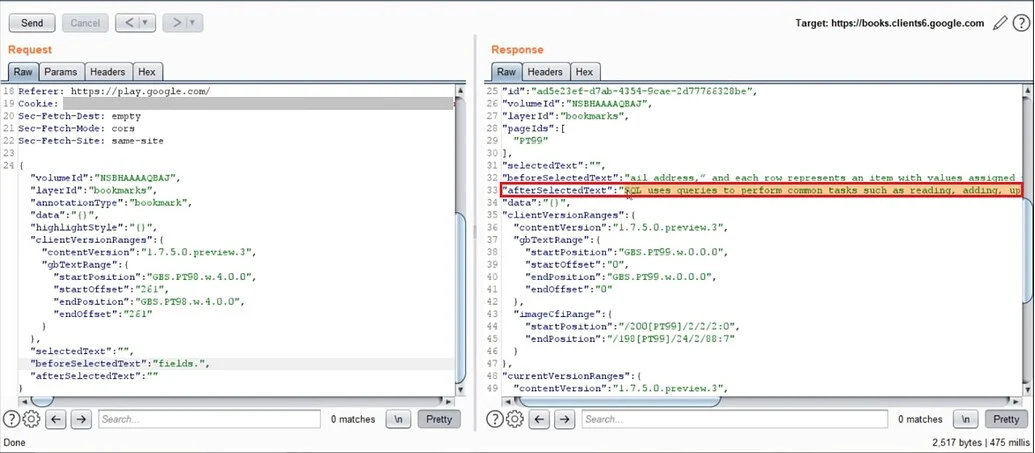
The screenshot shows the response with that paragraph returned in afterSelectedText.
Step 4: chain the returned text
- Replace the value of
beforeSelectedTextwith the value extracted in the previous step:
POST https://books.clients6.google.com/books/v1/mylibrary/annotations?source=ge-web-app&alt=json&key=[redacted]
Host: books.clients6.google.com
User-Agent: Mozilla/5.0 (Windows NT 10.0; Win64; x64; rv:92.0) Gecko/20100101 Firefox/92.0
Accept: */*
Accept-Language: es-MX,en-US;q=0.7,en;q=0.3
Accept-Encoding: gzip, deflate
X-JavaScript-User-Agent: google-api-javascript-client/1.1.0
X-Requested-With: XMLHttpRequest
Content-Type: application/json
X-Goog-Encode-Response-If-Executable: base64
X-Goog-AuthUser: 0
Authorization: SAPISIDHASH REDACTED
X-ClientDetails: appVersion=5.0%20(Windows)&platform=Win32&userAgent=Mozilla%2F5.0%20(Windows%20NT%2010.0%3B%20Win64%3B%20x64%3B%20rv%3A92.0)%20Gecko%2F20100101%20Firefox%2F92.0
Content-Length: 459
Origin: https://play.google.com
DNT: 1
Connection: close
Referer: https://play.google.com/
Cookie: REDACTED
Sec-Fetch-Dest: empty
Sec-Fetch-Mode: cors
Sec-Fetch-Site: same-site

{"volumeId":"NSBHAAAAQBAJ","layerId":"bookmarks","annotationType":"bookmark","data":"{}","highlightStyle":"{}","clientVersionRanges":{"contentVersion":"1.7.5.0.preview.3","gbTextRange":{"startPosition":"GBS.PT98.w.4.0.0","startOffset":"261","endPosition":"GBS.PT98.w.4.0.0","endOffset":"261"}},"selectedText":"","beforeSelectedText":"*SQL uses queries to perform common tasks such as reading, adding, updating, and deleting data. For e*","afterSelectedText":""}
- Resend the request and analyse
afterSelectedText. It now contains the missing part of the sentence, again outside the sample:
xample, to retrieve a user's e-mail address with a specified name, an application might perform the
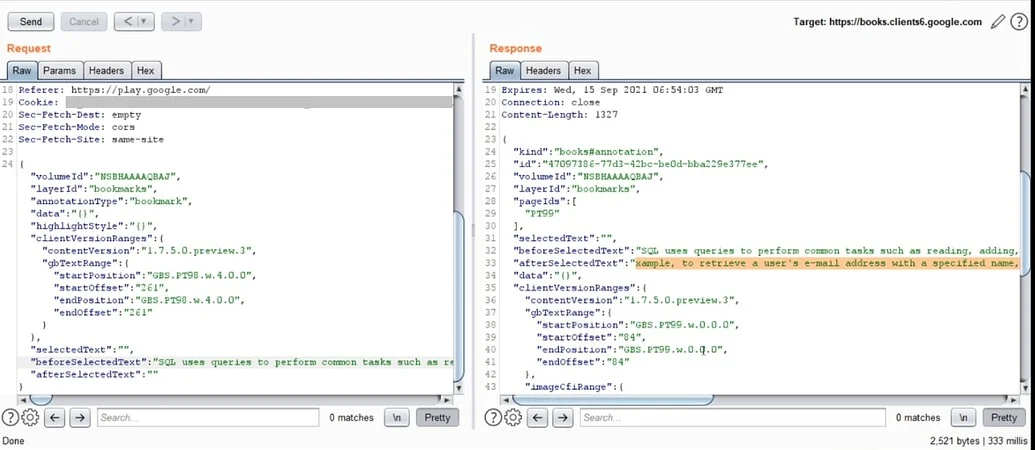
The screenshot shows the second response with the continuation of the sentence in afterSelectedText.
Each response gives the next chunk of text, so repeating the step walks through the book. The researcher generated a Python script to download the whole book this way.
Step 5: handle line feeds
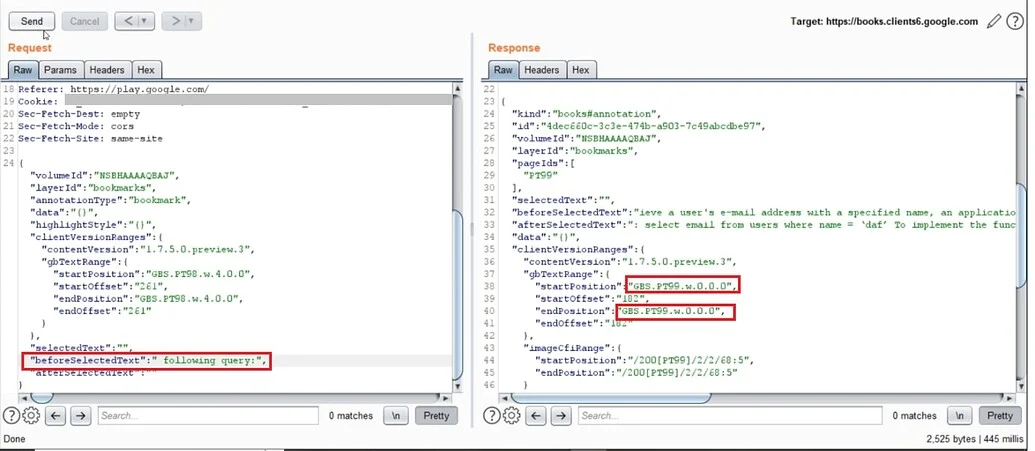
A line feed in the ebook changes the position value. To detect one, compare the startPosition and endPosition for two different beforeSelectedText values.
With beforeSelectedText set to following query:, both positions are GBS.PT99.w.0.0.0:
With beforeSelectedText set to following query: select, the positions change to GBS.PT99.w.1.0.0, because the word select must be on a new line:
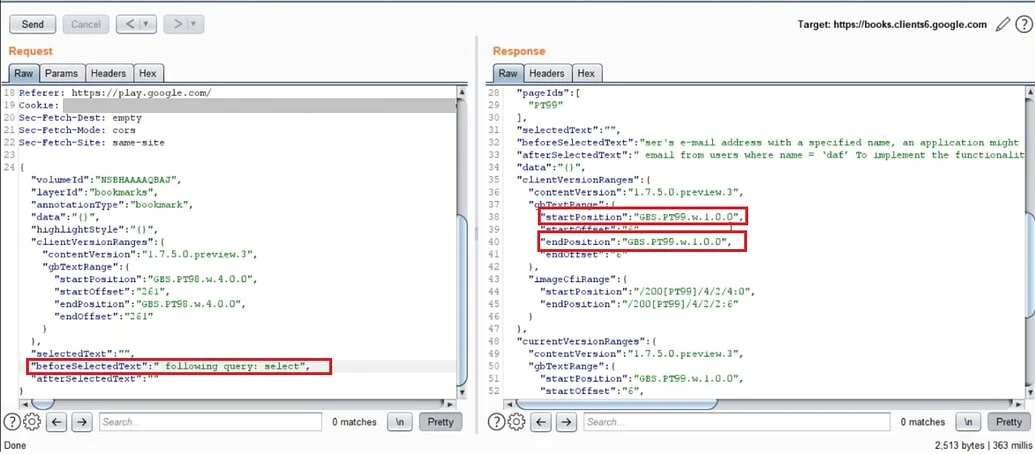
That difference is enough to build a script that produces an HTML file with the correct line feeds and styles.
Root cause
The annotation endpoint resolves the surrounding text from the client-supplied beforeSelectedText and returns the following text in afterSelectedText, without checking that the requested position lies inside the pages the account is entitled to read. The annotation service returns text from beyond the sample. The report does not describe the server-side implementation, so the exact check that is missing is likely an entitlement check on the resolved range.
Impact
An attacker with a normal Google account and sample access to a book can download the full text of that book without paying. The researcher notes the bug was systemic: the Python script was tested with different ebooks and worked on them. The report does not state which titles or how many were tested.
Fix
Timeline
Sep 15, 2021, 03:27 AM - Reported
Sep 15, 2021, 02:23 PM - Status: Identified as an Abuse Risk and triaged to the Trust & Safety team
Sep 16, 2021, 06:39 AM - Status: Assigned (P2, S4)
Sep 22, 2021, 07:16 PM - Status: Accepted (P1, S1)
Oct 21, 2021, 02:00 PM - The reward panel awards me $X,XXX USD
Nov 4, 2021, 02:09 PM - Google authorizes its disclosure
Variants to test
- Other annotation types. Send the same body with a different
annotationTypeorlayerId(for example a highlight rather than a bookmark) and see whetherafterSelectedTextstill resolves text beyond the sample. A positive result is a response containing text from a page you cannot open in the reader. - Other context fields. Try setting only
afterSelectedTextand leavingbeforeSelectedTextempty, or sending text from a page before the sample. A positive result is the server returning the preceding or following text. - Other position values. Change
startPositionandendPositioningbTextRangeto a page beyond the sample while keeping the context text from the last allowed page. A positive result is text from the later page coming back. - Other Google content services. Look for endpoints that accept client-supplied context and return resolved text, such as preview or search APIs. A positive result is any response that includes content outside the preview window.
- Line-feed detection on other readers. Compare position values for two context strings that differ only by a line break, as done here. A positive result is a position change that lets a script reconstruct the layout of the text.
A reader in the thread asked where to run the script.
What happened, in plain words
Google Play Books is Google's online bookshop and book reader. You can browse it at play.google.com/store/books, buy a book, and read it in your browser. Many books also offer a free sample: a short preview, usually the first few pages, so you can decide whether to buy. The reader shows you those pages and stops. The whole point of the sample is that you cannot read past it unless you pay.
A security researcher found that the sample limit could be walked around. When you add a bookmark in the reader, the web page quietly sends a message to a Google server saying "the user bookmarked this spot, and here is the text just before and just after it". The server replies with the same bookmark, and it fills in the surrounding text for you. The researcher noticed that sending the last words of the sample made the server return the text that follows. By sending the last words of the sample and asking the server to look up what comes next, the server returned the next paragraph of the book, which is behind the paywall. Repeating the trick, feeding each returned chunk back in as the new starting point, walks through the whole book, page after page, without buying it.
This kind of bug is called a payment bypass (you get paid content for free) and a logic flaw (the program does what it was told, but the rules it follows are wrong: nobody checked whether you are entitled to that text). The researcher found it in about ten minutes and later wrote a small Python script to download entire books automatically. The bug was systemic: the same script worked on different ebooks.
Below I walk through the whole thing from zero. You only need a browser and a computer to follow along; the interception tool is explained when it appears.
The pieces involved
Before the steps, here is what each part of the picture is, in everyday terms.
- The store and the reader.
play.google.com/store/booksis the shop. When you click Free sample on a book, you are sent tohttps://play.google.com/books/reader?id=<volumeId>, the web reader. Theidin that address is the book's identifier, called the volume id. For the example book in this report it isNSBHAAAAQBAJ. - An API. An API is a way for one program to talk to another, like a waiter in a restaurant: you do not walk into the kitchen, you tell the waiter what you want and he brings it back. Here, the reader (the web page in your browser) is the customer and
books.clients6.google.comis the kitchen. The page sends a request and the server sends a response. - A request and a response. A request is a message your browser sends to a server: "please do this". A response is the server's reply. Both are just text with a fixed structure: a first line saying what is wanted, some headers (labelled details such as who you are), a blank line, and a body (the actual data).
- A cookie and a token. When you log in, the server gives your browser a small piece of secret text, the cookie, which your browser sends back with every request so the server knows it is you. A token works the same way: a secret string that proves you are logged in. In the captured request below, the
Cookieheader carries the session and theAuthorizationheader carries aSAPISIDHASHvalue, which is a token derived from your Google login. Both are redacted in the report, meaning the real values were removed before publishing, because anyone holding them could act as the researcher. - An annotation. In a book reader, an annotation is a note attached to a place in the text: a bookmark, a highlight, a comment.
- Burp Suite Proxy. A tool that sits between your browser and the internet, like a post office clerk who opens every letter, lets you read it, change it, and send it on. It lets you pause a request, edit it, and resend it as many times as you like. That is essential here, because the browser will not let you hand-edit the bookmark message.
- Python. A programming language often used for small automation scripts. Here it is used to repeat the same request over and over, each time with the previous answer as input, so the whole book is collected without clicking.
Finding it
The researcher had spent several years on DRM bug bounty programmes. DRM stands for Digital Rights Management: the technology that stops people copying or sharing paid digital content. Bug bounty programmes are schemes where companies pay researchers for finding and reporting security problems. This particular bug was found in roughly ten minutes.
The observation is simple once you see it. The bookmark request carries the text around the bookmark, and the response comes back with the surrounding text resolved by the server. If the server resolves that context from whatever the client sends, then sending text from the last page of the sample should make the server return the text that follows it, which is outside the sample. That is the whole idea: make the server do the reading for you, and it will read past the paywall.
Exploitation
Step 1: reach the reader with a sample
- Go to
https://play.google.com/store/books. - Log in with your account.
- Open any book, for example The Web Application Hacker's Handbook: Finding and Exploiting Security Flaws, Edition 2 at
https://play.google.com/store/books/details/Dafydd_Stuttard_The_Web_Application_Hacker_s_Handb?id=NSBHAAAAQBAJ. - Click Free sample. You are redirected to
https://play.google.com/books/reader?id=NSBHAAAAQBAJ. - Go to the last available page (page 99).
Why these steps: you need a normal account with sample access, because the bug does not require any special role or entitlement. The sample that any account gets is enough. You also need to be on the last page of the sample, because that is the edge of what you are allowed to read, and the trick works by asking the server what comes immediately after that edge.
Step 2: capture the bookmark request
On the last page, select the page, click Add bookmark, and intercept the request. It looks like this:
POST https://books.clients6.google.com/books/v1/mylibrary/annotations?source=ge-web-app&alt=json&key=[redacted]
Host: books.clients6.google.com
User-Agent: Mozilla/5.0 (Windows NT 10.0; Win64; x64; rv:92.0) Gecko/20100101 Firefox/92.0
Accept: */*
Accept-Language: es-MX,en-US;q=0.7,en;q=0.3
Accept-Encoding: gzip, deflate
X-JavaScript-User-Agent: google-api-javascript-client/1.1.0
X-Requested-With: XMLHttpRequest
Content-Type: application/json
X-Goog-Encode-Response-If-Executable: base64
X-Goog-AuthUser: 0
Authorization: SAPISIDHASH REDACTED
X-ClientDetails: appVersion=5.0%20(Windows)&platform=Win32&userAgent=Mozilla%2F5.0%20(Windows%20NT%2010.0%3B%20Win64%3B%20x64%3B%20rv%3A92.0)%20Gecko%2F20100101%20Firefox%2F92.0
Content-Length: 559
Origin: https://play.google.com
DNT: 1
Connection: close
Referer: https://play.google.com/
Cookie: REDACTED
Sec-Fetch-Dest: empty
Sec-Fetch-Mode: cors
Sec-Fetch-Site: same-site

{"volumeId":"NSBHAAAAQBAJ","layerId":"bookmarks","annotationType":"bookmark","data":"{}","highlightStyle":"{}","clientVersionRanges":{"contentVersion":"1.7.5.0.preview.3","gbTextRange":{"startPosition":"GBS.PT98.w.4.0.0","startOffset":"261","endPosition":"GBS.PT98.w.4.0.0","endOffset":"261"}},"selectedText":"","beforeSelectedText":"y made it easy for programmers to unwittingly introduce security bugs into their code. These factors","afterSelectedText":" have meant that applications written in PHP have suffered from a disproportionate number of securit"}
Line by line, in plain words:
POST https://books.clients6.google.com/books/v1/mylibrary/annotations?...is the first line.POSTmeans "I am sending data to be stored". The address is the annotation service. The part after the?is the query string, a set of small labelled values:source=ge-web-appsays the request comes from the web app,alt=jsonasks for the answer in JSON (a common text format for data), andkey=...is an API key, a public identifier for the application.Host: books.clients6.google.comnames the server being talked to.User-Agent: ...says which browser and operating system sent the request. Here it is Firefox 92.0 on Windows NT 10.0.Accept: */*says the browser will accept any kind of reply.Accept-Language: ...lists the languages the user prefers.Accept-Encoding: gzip, deflatesays the browser can accept compressed replies.X-JavaScript-User-Agent: ...is a custom header identifying the JavaScript client library used by the page.X-Requested-With: XMLHttpRequestmarks the request as one made by page code rather than by typing an address.Content-Type: application/jsonsays the body is JSON.X-Goog-Encode-Response-If-Executable: base64asks Google to encode certain replies.X-Goog-AuthUser: 0picks which signed-in account to use when several are active.Authorization: SAPISIDHASH REDACTEDis the login token. The real value is hidden.X-ClientDetails: ...carries browser details in encoded form.Content-Length: 559says the body is 559 bytes long.Origin: https://play.google.comsays which site the request came from.DNT: 1is the "do not track" preference.Connection: closeasks to close the connection after the reply.Referer: https://play.google.com/says which page the request was made from.Cookie: REDACTEDis the session cookie. The real value is hidden.Sec-Fetch-Dest,Sec-Fetch-Mode,Sec-Fetch-Siteare modern browser headers describing the kind of request.- After the blank line comes the body, a single JSON object.
volumeIdidentifies the book.layerId: "bookmarks"says which annotation layer this belongs to.annotationType: "bookmark"says it is a bookmark.dataandhighlightStyleare empty objects here.clientVersionRangesholds the position:contentVersionis the book content version, andgbTextRangegivesstartPositionandendPosition(bothGBS.PT98.w.4.0.0) with offsets261.selectedTextis empty because nothing was highlighted. The two fields that matter arebeforeSelectedTextandafterSelectedText: the text immediately before and after the bookmark position, as the reader sees it.
Why capture it: the browser builds this message for you, and you cannot edit it by hand in the page. Intercepting it gives you a copy you can change and resend.
Step 3: ask for text past the end of the sample
- Replace the value of
beforeSelectedTextwith the last word in the document,fields., and delete the value ofafterSelectedText. - Resend the request with Burp Suite Proxy.
- Inspect the response and analyse the value of
afterSelectedText. It contains the next paragraph of the ebook, which the sample should not let you see:
SQL uses queries to perform common tasks such as reading, adding, updating, and deleting data. For e
The screenshot shows the response with that paragraph returned in afterSelectedText.
Why this works: the server takes the text you say comes before the bookmark and returns what follows it in the book. So by claiming the bookmark sits right after the last word of the sample, you make the server hand you the first words of the next page.
Step 4: chain the returned text
- Replace the value of
beforeSelectedTextwith the value extracted in the previous step:
POST https://books.clients6.google.com/books/v1/mylibrary/annotations?source=ge-web-app&alt=json&key=[redacted]
Host: books.clients6.google.com
User-Agent: Mozilla/5.0 (Windows NT 10.0; Win64; x64; rv:92.0) Gecko/20100101 Firefox/92.0
Accept: */*
Accept-Language: es-MX,en-US;q=0.7,en;q=0.3
Accept-Encoding: gzip, deflate
X-JavaScript-User-Agent: google-api-javascript-client/1.1.0
X-Requested-With: XMLHttpRequest
Content-Type: application/json
X-Goog-Encode-Response-If-Executable: base64
X-Goog-AuthUser: 0
Authorization: SAPISIDHASH REDACTED
X-ClientDetails: appVersion=5.0%20(Windows)&platform=Win32&userAgent=Mozilla%2F5.0%20(Windows%20NT%2010.0%3B%20Win64%3B%20x64%3B%20rv%3A92.0)%20Gecko%2F20100101%20Firefox%2F92.0
Content-Length: 459
Origin: https://play.google.com
DNT: 1
Connection: close
Referer: https://play.google.com/
Cookie: REDACTED
Sec-Fetch-Dest: empty
Sec-Fetch-Mode: cors
Sec-Fetch-Site: same-site

{"volumeId":"NSBHAAAAQBAJ","layerId":"bookmarks","annotationType":"bookmark","data":"{}","highlightStyle":"{}","clientVersionRanges":{"contentVersion":"1.7.5.0.preview.3","gbTextRange":{"startPosition":"GBS.PT98.w.4.0.0","startOffset":"261","endPosition":"GBS.PT98.w.4.0.0","endOffset":"261"}},"selectedText":"","beforeSelectedText":"*SQL uses queries to perform common tasks such as reading, adding, updating, and deleting data. For e*","afterSelectedText":""}
This request is the same as the previous one except for the body. The headers are unchanged, and Content-Length is now 459 because the body is shorter. In the body, beforeSelectedText now holds the paragraph that came back last time, and afterSelectedText is empty. Everything else, including volumeId, layerId, annotationType, gbTextRange and the positions, is the same.
- Resend the request and analyse
afterSelectedText. It now contains the missing part of the sentence, again outside the sample:
xample, to retrieve a user's e-mail address with a specified name, an application might perform the
The screenshot shows the second response with the continuation of the sentence in afterSelectedText.
Why chain: each response gives the next chunk of text. If you take that chunk and put it back in as the new beforeSelectedText, the server looks up what follows it, which is the chunk after that. Repeating the step walks through the book, one piece at a time. The researcher generated a Python script to download the whole book this way, because doing it by hand for hundreds of pages is impractical.
Step 5: handle line feeds
A line feed is the invisible character that ends a line and starts a new one. Books have them, and they matter because the position value changes when a line break falls between two pieces of text. To detect one, compare the startPosition and endPosition for two different beforeSelectedText values.
With beforeSelectedText set to following query:, both positions are GBS.PT99.w.0.0.0:
With beforeSelectedText set to following query: select, the positions change to GBS.PT99.w.1.0.0, because the word select must be on a new line:
Why this matters: if you just glue the returned chunks together, you lose the line breaks and the text comes out as one long run. By watching how the position value changes, you can tell where a new line belongs. That difference is enough to build a script that produces an HTML file with the correct line feeds and styles. HTML is the language web pages are written in, so the result is a file you can open in a browser and read like a normal book page.
Root cause
The annotation endpoint resolves the surrounding text from the client-supplied beforeSelectedText and returns the following text in afterSelectedText, without checking that the requested position lies inside the pages the account is entitled to read. The annotation service returns text from beyond the sample. The report does not describe the server-side implementation, so the exact check that is missing is likely an entitlement check on the resolved range.
In everyday terms: the bouncer is standing at the front door of the shop, but the stockroom has a second door with no lock. The reader page refuses to show you page 100, but the annotation service, which is a different program, never asks whether you are allowed to see page 100. It just answers the question it is given.
Impact
An attacker with a normal Google account and sample access to a book can download the full text of that book without paying. The researcher notes the bug was systemic: the Python script was tested with different ebooks and worked on them. The report does not state which titles or how many were tested.
Fix
In the shop comparison: put the same bouncer on the stockroom door.
Timeline
Sep 15, 2021, 03:27 AM - Reported
Sep 15, 2021, 02:23 PM - Status: Identified as an Abuse Risk and triaged to the Trust & Safety team
Sep 16, 2021, 06:39 AM - Status: Assigned (P2, S4)
Sep 22, 2021, 07:16 PM - Status: Accepted (P1, S1)
Oct 21, 2021, 02:00 PM - The reward panel awards me $X,XXX USD
Nov 4, 2021, 02:09 PM - Google authorizes its disclosure
A few words on the timeline. Triaged means the report was read and sorted to the right team. Trust & Safety is the team that deals with abuse of a product rather than pure software bugs. P2, S4 and P1, S1 are priority and severity labels: P1 is higher priority than P2, and S1 is more severe than S4, so the rating went up after review. The reward amount is shown as $X,XXX, with the digits hidden. Disclosure means making the report public, which Google authorised on 4 November 2021.
Variants to test
These are follow-up ideas in the same spirit: if the server trusts one field, maybe it trusts others too. Each one is a small experiment you can run with the same intercepted request.
- Other annotation types. Send the same body with a different
annotationTypeorlayerId(for example a highlight rather than a bookmark) and see whetherafterSelectedTextstill resolves text beyond the sample. A positive result is a response containing text from a page you cannot open in the reader. - Other context fields. Try setting only
afterSelectedTextand leavingbeforeSelectedTextempty, or sending text from a page before the sample. A positive result is the server returning the preceding or following text. - Other position values. Change
startPositionandendPositioningbTextRangeto a page beyond the sample while keeping the context text from the last allowed page. A positive result is text from the later page coming back. - Other Google content services. Look for endpoints that accept client-supplied context and return resolved text, such as preview or search APIs. A positive result is any response that includes content outside the preview window.
- Line-feed detection on other readers. Compare position values for two context strings that differ only by a line break, as done here. A positive result is a position change that lets a script reconstruct the layout of the text.
A reader in the thread asked where to run the script.
Glossary
- API: a way for one program to ask another program to do something, like a waiter taking your order to the kitchen.
- Annotation: a note attached to a place in a book, such as a bookmark, highlight or comment.
- Bug bounty programme: a scheme where a company pays researchers for finding and reporting security problems.
- Burp Suite Proxy: a tool that sits between your browser and the internet so you can pause, read, edit and resend requests.
- Cookie: a small piece of secret text your browser stores after login and sends back with each request so the server knows who you are.
- DRM (Digital Rights Management): technology that restricts copying and sharing of paid digital content.
- Endpoint: a specific address on a server that accepts requests, such as the annotations address in this report.
- Entitlement: the right to access something, for example the pages you paid for or the sample you are allowed to read.
- Header: a labelled line in a request or response carrying details such as the browser type or the login token.
- HTML: the language web pages are written in.
- JSON: a common text format for structured data, made of names and values in curly braces.
- Line feed: the invisible character that ends a line and starts a new one.
- Logic flaw: a bug where the program follows its rules correctly but the rules themselves are wrong, so it does something it should not.
- Payment bypass: a bug that lets someone get paid content or features without paying.
- POST: an HTTP method meaning "I am sending data to be stored or processed".
- Query string: the part of a web address after the
?, made of small labelled values. - Request: a message your browser sends to a server asking it to do something.
- Response: the server's reply to a request.
- SAPISIDHASH: a token derived from your Google login, sent in the
Authorizationheader to prove who you are. - Severity / priority label (P1, P2, S1, S4): ratings a company gives a report to say how urgent and how serious it is; lower numbers mean higher priority or severity.
- Systemic: affecting many products or titles in the same way, not just one.
- Token: a secret string that proves you are logged in, similar in purpose to a cookie.
- Triaged: read and sorted to the right team after being reported.
- Trust & Safety: the team that handles abuse of a product rather than pure software bugs.
- Volume id: the identifier of a book, such as
NSBHAAAAQBAJ.

