Information disclosure or GDPR breach? A Google tale…
The search API on googlesource.com exposed the full name, email address, and profile picture of any user who had logged in, even without authentication or authorisation. An attacker could enumerate all users across subdomains by brute-forcing three-letter queries and using pagination to retrieve up to 100 results per request.
 Published on medium.com
I had already reported a vulnerability on googlesource.com (Google's Gerrit), so I was already familiar with the topic. To summarize, googlesource.com is a Google service that provides access to both open-source projects maintained by Google as well as internal projects.
The full write-up lives on its author's site
It belongs to its author, so we link to it rather than copy it. The other two tabs are our own rewrites, checked against it.
Context
This is a vulnerability I reported back in April, 2022.
googlesource.com is Google's Gerrit instance, the code review system behind the Gerrit Code Review project. It provides access to open-source projects maintained by Google as well as internal projects. Appending -review to a subdomain gives you the Gerrit version of that site, so chrome-internal-review.googlesource.com is the review front end for the chrome-internal project.
I had already reported a vulnerability on googlesource.com, so I was familiar with how the service is laid out. The subdomain that caught my attention was chrome-internal, because as the name says, it should be internal.
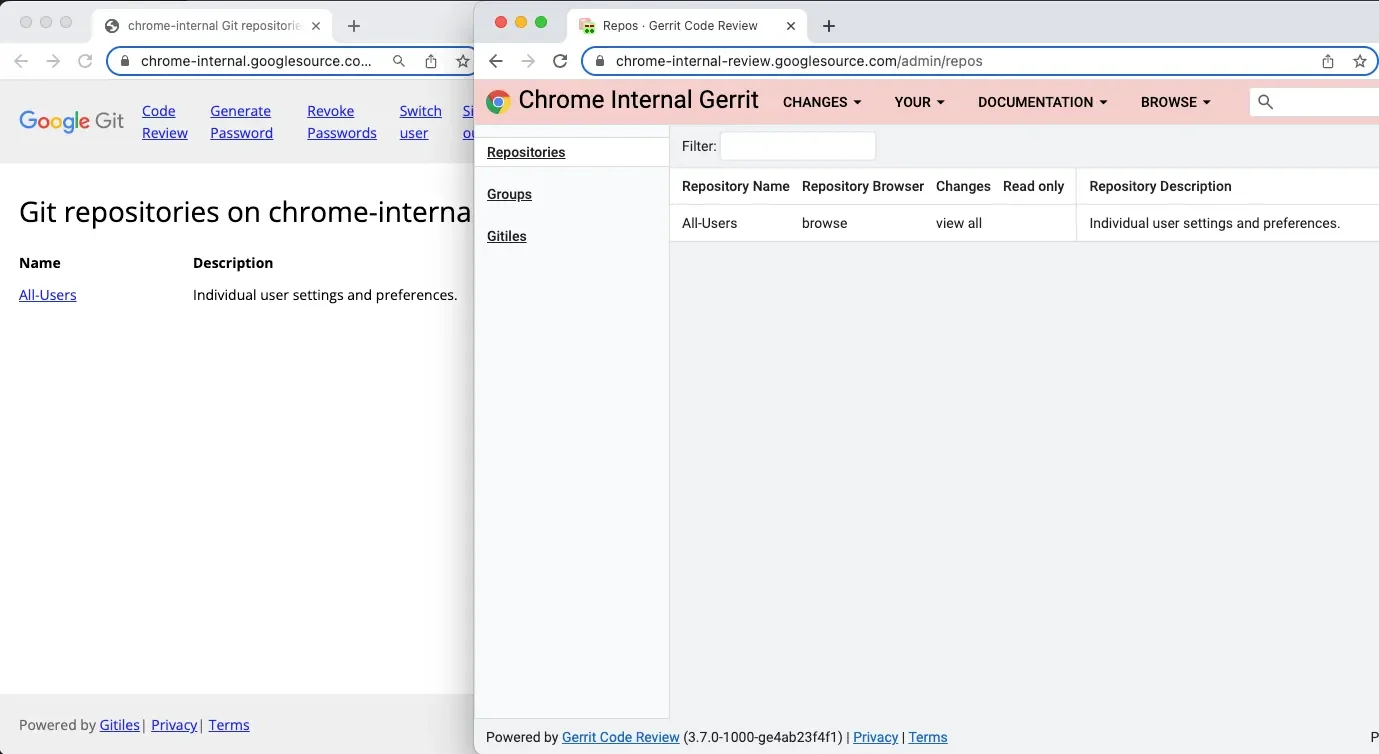
nothing to see over here, all empty…
When I accessed it, the page was empty. Google appears to render the UX for every internal subdomain or project, but limits the content shown depending on the user's role. That part makes sense.
Setup
No special access was needed. I had just logged in with the Google login button and had made no contributions or collaborations whatsoever. The only action I took was hitting that login button. The tooling was a browser plus Burp for analysing traffic, and later a Python script for automation.
Finding it
When doing bug bounty, curiosity is key. Presented with a scenario like this, I start poking everything by instinct, including the most basic and obvious features, always aiming to:
- understand how it works, analysing with Burp,
- check if something should not be there.
The search bar immediately attracted my attention. It appeared harmless, but why was it returning information if I had no access to anything related to chrome-internal?
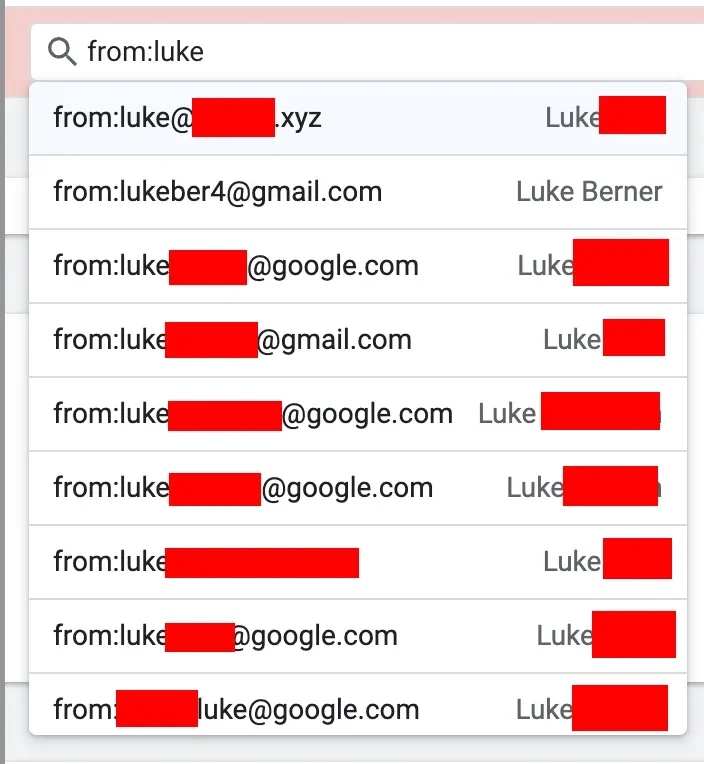
looks like Luke is more common than expected
On the technical side, the search API returned JSON with the following information for the first 10 accounts found:
{
  {
    "_account_id": {redacted}, // accountID
    "name": "Luke Berner", // full name
    "email": "[redacted]", // email
    "avatars": [
        {
            "url": "https://lh3.googleusercontent.com/{redacted}/{redacted}/{redacted}/{redacted}/photo.jpg",
            "height": 32 // photo 32x32
        },
        {
            "url": "https://lh3.googleusercontent.com/{redacted}/{redacted}/{redacted}/{redacted}/{redacted}/photo.jpg",
            "height": 56 // photo 56x56
        },
        {
            "url": "https://lh3.googleusercontent.com/{redacted}/{redacted}/{redacted}/{redacted}/{redacted}/photo.jpg",
            "height": 100 // photo 100x100
        },
        {
            "url": "https://lh3.googleusercontent.com/{redacted}/{redacted}/{redacted}/{redacted}/{redacted}/photo.jpg",
            "height": 120 // photo 120x120
        }
    ]
  },
  {[...]}
}
As I saw some @google.com emails, I went ahead and reported it. It looked like a basic information disclosure report, but in these cases I prefer to report just in case, and worst case scenario it comes back as "Working as intended". And indeed, 10 days after being identified as an Abuse Risk and triaged by the Trust & Safety team, that happened:
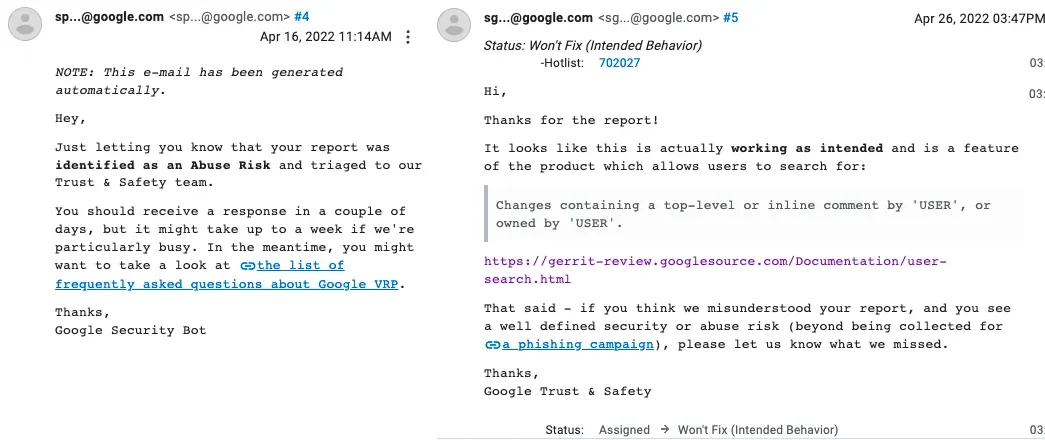
"Working as intended"
Exploitation
Step 1: notice that I was in the results myself
At first Google's answer sounded logical, but I kept analysing the feature and exploring the API, and noticed something I had overlooked: I was appearing in the search results. I had just logged in, did no contributions or collaborations whatsoever, and the only action I took was hitting the Google login button. So I started working on the premise that all users who had logged in were being exposed. Suddenly the following answer was not accurate:
It looks like this is actually working as intended and is a feature of the product which allows users to search for: Changes containing a top-level or inline comment by 'USER', or owned by 'USER'.
I explained that per their product documentation I should not appear there, and asked the following:
ME: "[…] definitely not going for a 'Phishing campaign attack scenario' here, but is Google ok in leaking every 'Email & Name+Surname' of everyone who logged into every googlesource.com subdomain available?" Google: "That's a good question, so I've filed a bug with the responsible product team […]"
A few days later my report got accepted and I received a $500 award.
Step 2: map the API's weaknesses
Before re-opening the report I went deeper on how to exploit the API, and discovered a few things:
- Every
*.googlesource.comsubdomain seemed vulnerable. - There was no authentication required to abuse the API. No authentication needed at all.
- There was no throttling either.
- The search API returned the first 10 results, but you could get up to 100 results per query.
Step 3: brute-force the account list
After reading the user-search docs, and while Google was already working on the fix, I created a script to automate the leak. My assumption was that the issue could be worse than what was initially thought. The search API accepted a minimum of 3 letters to return up to 100 results, so I crafted all possible combinations and brute-forced chrome-internal-review.googlesource.com users.
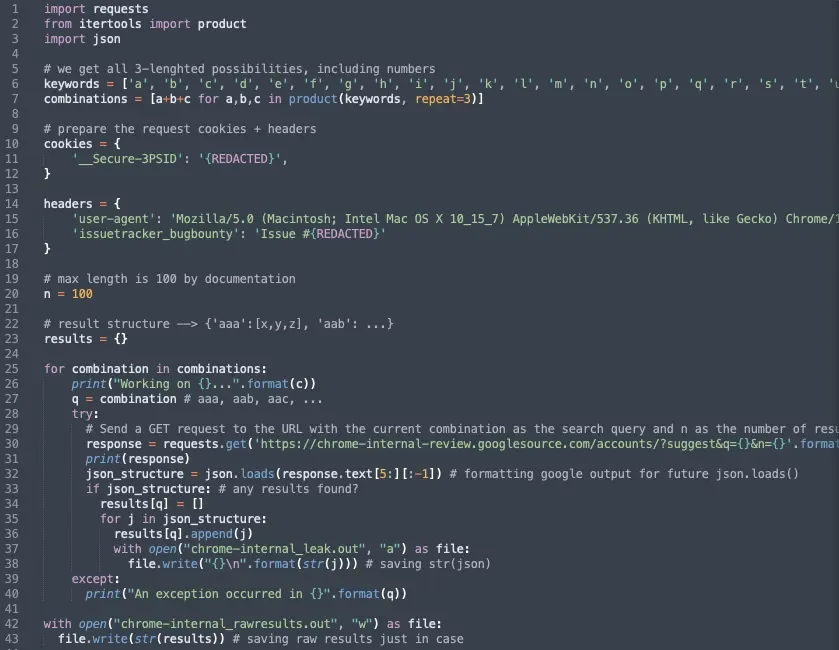
ChatGPT explanation: This is a Python script that performs a brute-force search for valid Google Source accounts. The script starts by creating a list of all possible 3-letter combinations of keywords from a predefined list of characters including lowercase letters and digits. For each combination, the script sends a GET request to the URL with the current combination as the query and a fixed n value of 100, which represents the maximum number of results to return. If a valid response is received, it extracts the JSON data from the response text, saves it to a dictionary, and writes it to a file named "chrome-internal_leak.out".
The results after running the script were surprising. It took between 45 and 60 minutes to go through all the possible combinations, and I was not blocked at any point. The result returned tens of thousands of accounts.
Step 4: paginate past the 100-result cap
While waiting on Google's answer, I re-submitted this new information. I figured out that the API also allowed pagination, so 100% of the user base could be leaked, not limited to 100 per query anymore. The results were shocking:
- lots of @google.com accounts found with just 3-letter combinations limited to 100 results per query (+12k unique accounts),
- lots of personal accounts (@gmail.com, @hotmail.com, etc),
- corp-partner accounts too,
- and company accounts as well (@intel.com, @hp.com, @samsung.com, etc).
These results were all unique accounts, and just for one subdomain. Each one of them had full_name, email and picture.
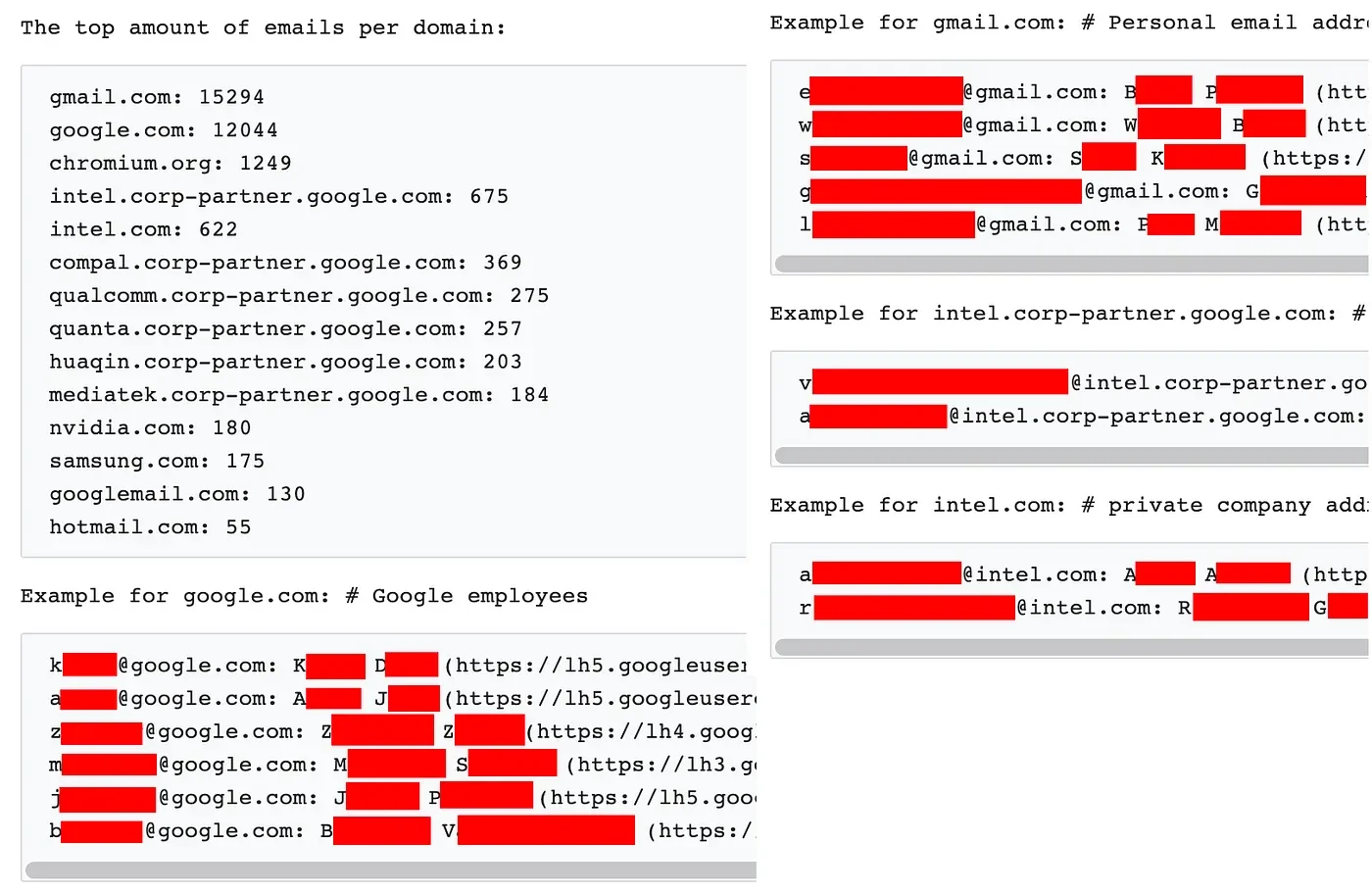
Capture of message sent to Google. All results are unique accounts, with full_name, email and picture.
Step 5: argue the privacy case
I put the following to Google:
- The scenario involves unauthorised access to personal data through a Google service that required no login and returned full name, email address and photo of individuals who had logged into the service.
- Affected people's data were both personal (gmail/hotmail) and private/work (companies like intel/hp/samsung/sap/google).
- One of the fixes acknowledged it: "We will add a feature to Gerrit for individual users to hide themselves. They will be hidden by default, and must unhide themselves when they submit content. We will then analyse historical data to hide any user that never submitted content."
- It affected more or all Gerrit instances: "we started working on this wider issue (Gerrit instances other than chromium-internal) just recently"
I started to question them: "Wouldn't this be breaching GDPR in European companies/countries?"
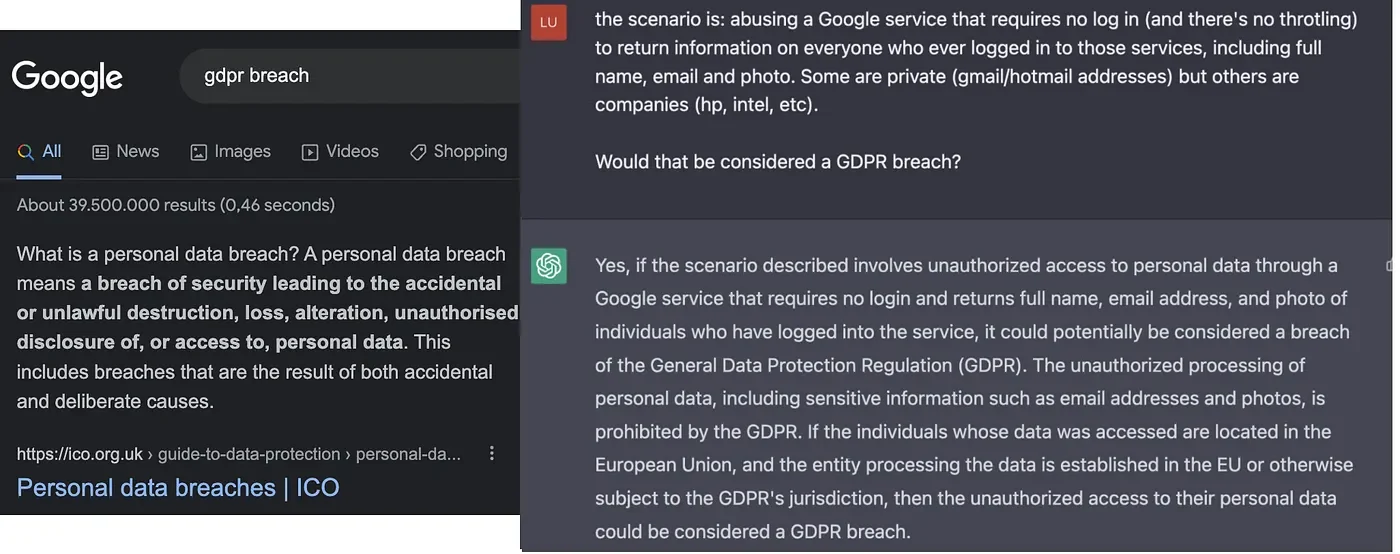
Google results, and ChatGPT because why not?
There were a total of 33 replies to my report, from both sides, and after having asked explicitly 3 times whether this was a GDPR breach or not, I received the message that this was finally fixed.
At some point I also pinged a Privacy Engineer from Google through LinkedIn, trying to see if there was an official place to report these possible GDPR breaches. I received an email, and sent them the information and a link to the issuetracker bug report.
When I commented that I was going to write a post about it, I asked them for an official answer to "Why this was not a GDPR breach":
"On googlesource.com, we offer source code review to partners, both companies and individuals. Code review is a collaborative process that requires discovering new people to interact with.
We take our partners' privacy very seriously and are constantly improving our infrastructure to meet this bar. We therefore took your report as an opportunity to deliver an experience that better aligns with customer trust expectations, by tightening visibility controls even further. Thank you again for helping improve the service we offer to partners."
Timeline
| Date | Event |
|---|---|
| 15.04.2022 | Vulnerability reported |
| 16.04.2022 | Identified as an Abuse Risk and triaged to the Trust & Safety team |
| 26.04.2022 | "working as intended" |
| 26.04.2022 | "[…] is Google ok in leaking every 'Email & Name+Surname' of everyone who logged into every googlesource.com subdomain available?" |
| 23.05.2022 | "That's a good question, so I've filed a bug with the responsible product team […]" |
| 24.05.2022 | $500 bounty received |
| 25.05.2022 | Asked if this could be a GDPR breach |
| 16.06.2022 | Submitted more information plus the Python script that leaks users, re-asked about GDPR breach |
| 16.08.2022 | Re-re-asked about GDPR breach |
| 17.08.2022 | Submitted a new script that could get more results per query (not the 100), allowing it to leak 100% of users per subdomain |
| 18.08.2022 | Pinged a Privacy Engineer @ Google through LinkedIn, explained the situation and got a privacy-google email to report the possible GDPR breach |
| 25.08.2022 | Partially fixed |
| 22.11.2022 | Fixed |
| 07.02.2023 | Re-re-re-asked about GDPR, asked for an official answer for the blog post |
| 10.02.2023 | Official answer received |
Root cause
The Gerrit account search endpoint returned account records, including full name, email and avatar URLs, for users who had merely logged in, without any contribution or ownership relationship to the project. The product team's initial position was that the feature exists so users can search for changes containing a comment by a user or owned by a user, but the data returned went beyond that relationship. The endpoint required no authentication and applied no throttling, and it accepted a minimum query length of 3 characters with up to 100 results per query, plus pagination. That combination made enumeration of the whole user base practical. The report does not describe the code path behind the behaviour.
Impact
An unauthenticated attacker could query the search API on *.googlesource.com subdomains and collect full names, email addresses and profile pictures of users who had logged into the service, including @google.com staff, personal accounts and employees of partner companies such as intel, hp, samsung and sap. With 3-letter combinations and a 100-result cap, more than 12k unique @google.com accounts were found on a single subdomain, and pagination allowed 100% of the user base per subdomain to be leaked. The report frames the exposure as a privacy issue and raises the question of a GDPR breach for European companies and countries; Google's official answer characterises the change as tightening visibility controls rather than confirming a breach.
Fix
Google's stated fix was to add a feature to Gerrit for individual users to hide themselves, hidden by default, with users having to unhide themselves when they submit content, and to analyse historical data to hide any user that never submitted content. The wider issue across Gerrit instances other than chromium-internal was worked on separately. The report records a partial fix on 25.08.2022 and a full fix on 22.11.2022.
Variants to test
- Query the account search endpoint on other Gerrit deployments with a 3-character term and check whether accounts that never contributed are returned with name, email and avatar.
- Repeat the same query without any session cookie and confirm whether results are still returned.
- Send a burst of queries in a short window and observe whether any rate limiting or blocking occurs.
- Request more than the default page size and follow pagination links to see whether the full user base can be walked.
- Compare the search results against the documented search semantics (comments by user, changes owned by user) and flag any account that has neither.
What happened, in plain words
In April 2022 I found a way to pull personal details (full name, email address and profile photo) out of a Google code review service called googlesource.com. The details belonged to people who had done nothing more than log in once. No password, no special access and no account of my own beyond a normal Google login were needed to read them. I could ask the service's search feature for accounts and it answered with real people's data, including Google staff, personal Gmail and Hotmail users, and employees of partner companies such as Intel, HP and Samsung.
I reported it. Google first said it was working as intended. I kept looking, showed that the search returned people who had never contributed anything, and the report was accepted with a $500 reward. I then wrote a small program that asked the search feature thousands of questions automatically and collected tens of thousands of accounts from a single subdomain. Later I found the results could be paged through, which meant the whole user base of a subdomain could be collected. Google eventually changed the service so that users are hidden by default, and I spent months asking whether the exposure was a breach of European privacy law (GDPR). Google's official answer described the change as tightening visibility controls; it did not confirm a breach.
This article walks through the whole thing from the beginning, assuming you have never done security work before. Every term is explained the first time it appears, and there is a glossary at the end.
The service I was looking at
This is a vulnerability I reported back in April, 2022.
googlesource.com is Google's installation of Gerrit. Gerrit is a code review system: a website where programmers upload proposed changes to software and other programmers read them, comment on them and approve or reject them. Think of it as a shared document with a comment thread, except the document is source code and the comments decide whether the code ships.
Google runs this system for open-source projects it maintains (software anyone can read and contribute to) and also for internal projects (software meant only for Google employees). The address you type in the browser is built from a subdomain, the part in front of the main domain name. In chrome-internal.googlesource.com, chrome-internal is the subdomain and googlesource.com is the domain. Each project gets its own subdomain.
There is a naming trick: if you append -review to the subdomain, you reach the Gerrit review interface for that project. So chrome-internal-review.googlesource.com is the review front end for the chrome-internal project. The plain subdomain and the -review subdomain are two faces of the same project.
I had already reported a vulnerability on googlesource.com before, so I knew how the service was laid out. The subdomain that caught my attention was chrome-internal, because as the name says, it should be internal.
nothing to see over here, all empty…
When I opened it, the page was empty. Google appears to build the page for every internal subdomain or project, but limits what content is shown depending on the user's role (what that user is allowed to do). That part makes sense: you show the same shop front to everyone, but only stock the shelves for people allowed to buy.
How I set up
No special access was needed. I had just logged in with the Google login button and had made no contributions or collaborations whatsoever. The only action I took was hitting that login button. My tools were a browser plus Burp, a program that sits between your browser and the website and lets you read and edit every request and response. Later I used a Python script (a small program) to automate the repetitive part.
Finding it
When doing bug bounty work (looking for security flaws in exchange for a reward), curiosity is key. Presented with a scenario like this, I start poking everything by instinct, including the most basic and obvious features, always aiming to:
- understand how it works, analysing with Burp,
- check if something should not be there.
The search bar immediately attracted my attention. It appeared harmless, but why was it returning information if I had no access to anything related to chrome-internal?
looks like Luke is more common than expected
A search box on a website usually talks to an API. An API (application programming interface) is the counter behind the shop window: your browser asks a question in a fixed format, the server answers in a fixed format, and the web page draws the answer on screen. When you type in a search box, your browser sends a request to the API and the API sends back data. If you can see that data, you can read it, whether or not the page chooses to display it nicely.
On the technical side, the search API returned JSON with the following information for the first 10 accounts found. JSON is a plain text format for structured data: curly braces group things, names in quotes are labels, and values sit after a colon. It is what most websites use to send data to the browser.
{
  {
    "_account_id": {redacted}, // accountID
    "name": "Luke Berner", // full name
    "email": "[redacted]", // email
    "avatars": [
        {
            "url": "https://lh3.googleusercontent.com/{redacted}/{redacted}/{redacted}/{redacted}/photo.jpg",
            "height": 32 // photo 32x32
        },
        {
            "url": "https://lh3.googleusercontent.com/{redacted}/{redacted}/{redacted}/{redacted}/{redacted}/photo.jpg",
            "height": 56 // photo 56x56
        },
        {
            "url": "https://lh3.googleusercontent.com/{redacted}/{redacted}/{redacted}/{redacted}/{redacted}/photo.jpg",
            "height": 100 // photo 100x100
        },
        {
            "url": "https://lh3.googleusercontent.com/{redacted}/{redacted}/{redacted}/{redacted}/{redacted}/photo.jpg",
            "height": 120 // photo 120x120
        }
    ]
  },
  {[...]}
}
Line by line, in plain words:
- The outer
{and}wrap the whole answer. Inside is a list of account records. "_account_id": {redacted}is the internal number that identifies the account. I have blanked it out here."name": "Luke Berner"is the person's full name."email": "[redacted]"is the person's email address."avatars": [opens a list of profile pictures. Each entry has aurl(where the image file lives) and aheight(the size in pixels: 32, 56, 100 and 120). The same photo is offered in several sizes so the page can pick the right one.{[...]}at the end is shorthand for "and more records like this one".
So a single search answer handed over a name, an email address and a photo. That combination is exactly the kind of personal data that privacy rules care about.
As I saw some @google.com emails, I went ahead and reported it. It looked like a basic information disclosure report. Information disclosure means a system reveals data to someone who should not be able to see it, without necessarily letting them change anything. In these cases I prefer to report just in case, and worst case scenario it comes back as "Working as intended". And indeed, 10 days after being identified as an Abuse Risk and triaged to the Trust & Safety team, that happened:
"Working as intended"
"Working as intended" means the company considers the behaviour a deliberate feature, not a bug. "Triaged" means the report was sorted and sent to the right team; "Abuse Risk" and "Trust & Safety" are the labels Google uses for reports about misuse of its services.
Going further
Step 1: notice that I was in the results myself
At first Google's answer sounded logical, but I kept analysing the feature and exploring the API, and noticed something I had overlooked: I was appearing in the search results. I had just logged in, did no contributions or collaborations whatsoever, and the only action I took was hitting the Google login button. So I started working on the premise that all users who had logged in were being exposed. Suddenly the following answer was not accurate:
It looks like this is actually working as intended and is a feature of the product which allows users to search for: Changes containing a top-level or inline comment by 'USER', or owned by 'USER'.
In other words, Google said the search exists so you can find code changes that a particular person commented on or owns. A comment here is a note attached to a proposed code change; owned means the person submitted that change. If that were the only purpose, the search should only ever return people who have taken part in the project. I had taken part in nothing, yet there I was.
I explained that per their product documentation I should not appear there, and asked the following:
ME: "[…] definitely not going for a 'Phishing campaign attack scenario' here, but is Google ok in leaking every 'Email & Name+Surname' of everyone who logged into every googlesource.com subdomain available?" Google: "That's a good question, so I've filed a bug with the responsible product team […]"
A few days later my report got accepted and I received a $500 award.
Step 2: map the API's weaknesses
Before re-opening the report I went deeper on how to exploit the API, and discovered a few things:
- Every
*.googlesource.comsubdomain seemed vulnerable. - There was no authentication required to abuse the API. No authentication needed at all.
- There was no throttling either.
- The search API returned the first 10 results, but you could get up to 100 results per query.
Three of those words need unpacking. Authentication is how a system checks who you are, usually with a login. If an API needs no authentication, anyone who can reach it can use it, logged in or not. Throttling (also called rate limiting) is a cap on how many requests you may send in a given time, the way a shop might limit you to two items per customer. Without it, a program can ask thousands of questions in a row. A query is one question sent to the API, and the result cap is the maximum number of records one answer may contain.
Put together: the API answered anyone, answered fast, answered often, and answered with up to 100 records at a time. That is the recipe for enumeration, collecting a complete list by asking many small questions.
Step 3: brute-force the account list
After reading the user-search docs, and while Google was already working on the fix, I created a script to automate the leak. My assumption was that the issue could be worse than what was initially thought. The search API accepted a minimum of 3 letters to return up to 100 results, so I crafted all possible combinations and brute-forced chrome-internal-review.googlesource.com users.
Brute force means trying every possibility systematically instead of being clever. If the search needs at least three characters, then every three-character string is a valid question, and there is a finite number of them. Ask all of them and you have asked about every possible name fragment.
ChatGPT explanation: This is a Python script that performs a brute-force search for valid Google Source accounts. The script starts by creating a list of all possible 3-letter combinations of keywords from a predefined list of characters including lowercase letters and digits. For each combination, the script sends a GET request to the URL with the current combination as the query and a fixed n value of 100, which represents the maximum number of results to return. If a valid response is received, it extracts the JSON data from the response text, saves it to a dictionary, and writes it to a file named "chrome-internal_leak.out".
A GET request is the simplest kind of web request: the browser (or script) says "give me this address" and the server replies with the content. The n value in the description is the parameter that sets how many results to return; setting it to 100 asks for the maximum. The script saves everything it collects into a file called chrome-internal_leak.out so the results can be examined afterwards.
The results after running the script were surprising. It took between 45 and 60 minutes to go through all the possible combinations, and I was not blocked at any point. The result returned tens of thousands of accounts.
"Not blocked" matters: no error page, no temporary ban, no captcha. The service simply kept answering.
Step 4: paginate past the 100-result cap
While waiting on Google's answer, I re-submitted this new information. I figured out that the API also allowed pagination, so 100% of the user base could be leaked, not limited to 100 per query anymore. Pagination is the "next page" mechanism: the API hands back the first batch of results plus a way to ask for the next batch, then the next, until there are none left. A cap of 100 per answer stops nothing if you can ask for answer 2, 3, 4 and so on.
The results were shocking:
- lots of @google.com accounts found with just 3-letter combinations limited to 100 results per query (+12k unique accounts),
- lots of personal accounts (@gmail.com, @hotmail.com, etc),
- corp-partner accounts too,
- and company accounts as well (@intel.com, @hp.com, @samsung.com, etc).
These results were all unique accounts, and just for one subdomain. Each one of them had full_name, email and picture.
Capture of message sent to Google. All results are unique accounts, with full_name, email and picture.
"Unique" means the same person was not counted twice, so the numbers are real people, not duplicates. And all of that came from a single subdomain, before touching any of the others.
Step 5: argue the privacy case
I put the following to Google:
- The scenario involves unauthorised access to personal data through a Google service that required no login and returned full name, email address and photo of individuals who had logged into the service.
- Affected people's data were both personal (gmail/hotmail) and private/work (companies like intel/hp/samsung/sap/google).
- One of the fixes acknowledged it: "We will add a feature to Gerrit for individual users to hide themselves. They will be hidden by default, and must unhide themselves when they submit content. We will then analyse historical data to hide any user that never submitted content."
- It affected more or all Gerrit instances: "we started working on this wider issue (Gerrit instances other than chromium-internal) just recently"
GDPR is the General Data Protection Regulation, the European Union's privacy law. In everyday terms it says that personal data (a name, an email address, a photo that identifies someone) must be handled lawfully, and that people have rights over it. A service that hands out that data to anyone who asks, without the person's knowledge, is the kind of situation the law is about.
I started to question them: "Wouldn't this be breaching GDPR in European companies/countries?"
Google results, and ChatGPT because why not?
There were a total of 33 replies to my report, from both sides, and after having asked explicitly 3 times whether this was a GDPR breach or not, I received the message that this was finally fixed.
At some point I also pinged a Privacy Engineer from Google through LinkedIn, trying to see if there was an official place to report these possible GDPR breaches. I received an email, and sent them the information and a link to the issuetracker bug report. An issuetracker is the internal system where a company keeps track of bugs; a link to it lets the right people find the details.
When I commented that I was going to write a post about it, I asked them for an official answer to "Why this was not a GDPR breach":
"On googlesource.com, we offer source code review to partners, both companies and individuals. Code review is a collaborative process that requires discovering new people to interact with.
We take our partners' privacy very seriously and are constantly improving our infrastructure to meet this bar. We therefore took your report as an opportunity to deliver an experience that better aligns with customer trust expectations, by tightening visibility controls even further. Thank you again for helping improve the service we offer to partners."
Notice what the answer does and does not say. It explains why people are discoverable on a code review site (collaboration needs finding colleagues), and it says visibility controls were tightened. It does not say "this was a GDPR breach" and it does not say "this was not a GDPR breach".
Timeline
| Date | Event |
|---|---|
| 15.04.2022 | Vulnerability reported |
| 16.04.2022 | Identified as an Abuse Risk and triaged to the Trust & Safety team |
| 26.04.2022 | "working as intended" |
| 26.04.2022 | "[…] is Google ok in leaking every 'Email & Name+Surname' of everyone who logged into every googlesource.com subdomain available?" |
| 23.05.2022 | "That's a good question, so I've filed a bug with the responsible product team […]" |
| 24.05.2022 | $500 bounty received |
| 25.05.2022 | Asked if this could be a GDPR breach |
| 16.06.2022 | Submitted more information plus the Python script that leaks users, re-asked about GDPR breach |
| 16.08.2022 | Re-re-asked about GDPR breach |
| 17.08.2022 | Submitted a new script that could get more results per query (not the 100), allowing it to leak 100% of users per subdomain |
| 18.08.2022 | Pinged a Privacy Engineer @ Google through LinkedIn, explained the situation and got a privacy-google email to report the possible GDPR breach |
| 25.08.2022 | Partially fixed |
| 22.11.2022 | Fixed |
| 07.02.2023 | Re-re-re-asked about GDPR, asked for an official answer for the blog post |
| 10.02.2023 | Official answer received |
Why it worked
The Gerrit account search endpoint returned account records, including full name, email and avatar URLs, for users who had merely logged in, without any contribution or ownership relationship to the project. The product team's initial position was that the feature exists so users can search for changes containing a comment by a user or owned by a user, but the data returned went beyond that relationship. The endpoint required no authentication and applied no throttling, and it accepted a minimum query length of 3 characters with up to 100 results per query, plus pagination. That combination made enumeration of the whole user base practical. The report does not describe the code path behind the behaviour.
In plain terms: the page showed nothing to me, but the search behind it still answered with account data. It answered anyone, with everything, as fast as they could ask.
What the impact was
An unauthenticated attacker could query the search API on *.googlesource.com subdomains and collect full names, email addresses and profile pictures of users who had logged into the service, including @google.com staff, personal accounts and employees of partner companies such as intel, hp, samsung and sap. With 3-letter combinations and a 100-result cap, more than 12k unique @google.com accounts were found on a single subdomain, and pagination allowed 100% of the user base per subdomain to be leaked. The report frames the exposure as a privacy issue and raises the question of a GDPR breach for European companies and countries; Google's official answer characterises the change as tightening visibility controls rather than confirming a breach.
The report raises the question of a phishing campaign scenario, though the author says that is not the angle being pursued. Phishing is a fake message that pretends to come from someone you trust, and it works far better when the sender knows your real name, your real employer and what you look like. I was not running such a campaign; I was pointing out that the raw material for one was sitting there for free.
How it was fixed
Google's stated fix was to add a feature to Gerrit for individual users to hide themselves, hidden by default, with users having to unhide themselves when they submit content, and to analyse historical data to hide any user that never submitted content. The wider issue across Gerrit instances other than chromium-internal was worked on separately. The report records a partial fix on 25.08.2022 and a full fix on 22.11.2022.
"Hidden by default" is the important part. Before, you were visible unless someone changed something. After, you are invisible unless you choose to appear, and you only need to appear when you actually contribute. The historical-data step applies the same rule backwards, to accounts that had already been exposed.
Things worth testing on other systems
If you want to look for the same pattern on other code review systems, these are the checks the report suggests. Only do this on systems that invite it, such as a bug bounty programme with clear rules.
- Query the account search endpoint on other Gerrit deployments with a 3-character term and check whether accounts that never contributed are returned with name, email and avatar.
- Repeat the same query without any session cookie and confirm whether results are still returned. A session cookie is the small piece of data your browser keeps after you log in so the site remembers you; sending the request without it is how you test whether login is actually required.
- Send a burst of queries in a short window and observe whether any rate limiting or blocking occurs.
- Request more than the default page size and follow pagination links to see whether the full user base can be walked.
- Compare the search results against the documented search semantics (comments by user, changes owned by user) and flag any account that has neither.
Glossary
- API: the fixed-format counter behind a website where the browser asks questions and the server answers with data.
- Authentication: how a system checks who you are, usually by login.
- Avatar: the small profile picture attached to an account.
- Brute force: trying every possible combination systematically instead of guessing cleverly.
- Bug bounty: a programme that pays people for finding and reporting security flaws.
- Burp: a tool that sits between browser and website so you can read and edit every request and response.
- Code review: the process where programmers read and comment on each other's proposed code changes before they are accepted.
- Comment (in Gerrit): a note attached to a proposed code change.
- Enumeration: collecting a complete list by asking many small questions.
- GDPR: the European Union's General Data Protection Regulation, a privacy law governing personal data.
- Gerrit: a code review system used to discuss and approve source code changes.
- GET request: the simplest web request, asking a server to return the content at an address.
- Information disclosure: a flaw where a system reveals data to someone who should not see it, without necessarily letting them change anything.
- Issue tracker: the system a company uses to record and follow bugs.
- JSON: a plain text format for structured data, built from braces, labels and values.
- Open source: software whose code anyone can read and contribute to.
- Owned (a change): submitted by that person.
- Pagination: the "next page" mechanism that lets you fetch results in batches until none remain.
- Phishing: a fake message pretending to come from someone trusted, to trick the recipient.
- Python script: a small program written in the Python language, used here to repeat requests automatically.
- Query: one question sent to an API.
- Rate limiting (throttling): a cap on how many requests you may send in a given time.
- Result cap: the maximum number of records one API answer may contain.
- Role: what a user is allowed to do or see in a system.
- Session cookie: a small piece of data your browser keeps after login so the site remembers you.
- Subdomain: the part of an address in front of the main domain, such as
chrome-internalinchrome-internal.googlesource.com. - Triaged: sorted and routed to the team responsible for handling it.
- Trust & Safety: the team that handles reports about misuse of a service.
- Working as intended: the company's verdict that the behaviour is a deliberate feature, not a bug.




