Cloning internal Google repos for fun and… info?
An internal Google code repository subdomain allowed any Google account to sign in, exposing internal repositories and Gerrit group information. An attacker could access sensitive data such as internal hostnames, IP addresses, credentials, and private bucket files.
 Published on medium.com
As a normal bug-bounty exercise, I was checking Google subdomains to see if I could find anything interesting. One of them caught my attention: googlesource.com
The full write-up lives on its author's site
It belongs to its author, so we link to it rather than copy it. The other two tabs are our own rewrites, checked against it.
Context
googlesource.com is the domain that hosts Google's source code. Most of what lives there is public: open source projects such as android.googlesource.com, or forks such as apache.googlesource.com/activemq-website/. The domain is split into two kinds of host:
project_name.googlesource.com, where the repositories are listed and browsable.project_name-review.googlesource.com, which serves the Gerrit instance for that project. Gerrit is Google's code review and project management tool for Git based projects, so on the-reviewhost you get changes, comments and commits, as you would in any code review tool.
The rule the researcher learned is that for every project_name.googlesource.com you can add -review to reach the Gerrit version. With Android as the example, the Gerrit URL is https://android-review.googlesource.com/.
The target of this report is chrome-internal.googlesource.com, a host whose name marks it as internal, and its Gerrit counterpart chrome-internal-review.googlesource.com.
Setup
The work was done as a normal bug bounty exercise against Google's program, with no special access: the researcher used a personal @gmail.com account. The only tooling mentioned is subdomain enumeration with Tomnomnom's assetfinder, plus a script the researcher wrote later to clone repositories. No versions are given.
Finding it
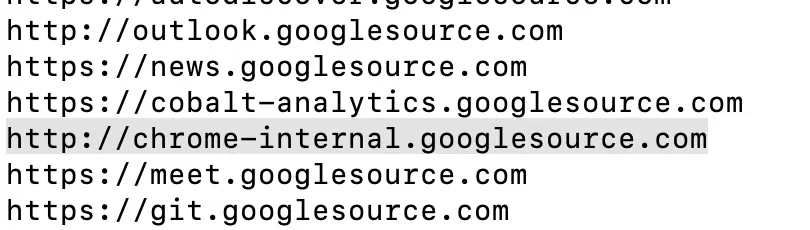
The starting point was enumerating Google subdomains. The word corp was of interest because it may refer to the *.corp.google.com world, but the enumeration found no corp subdomain. It did surface one host that looked worth a try: anything with the word internal in it deserves at least a shot.
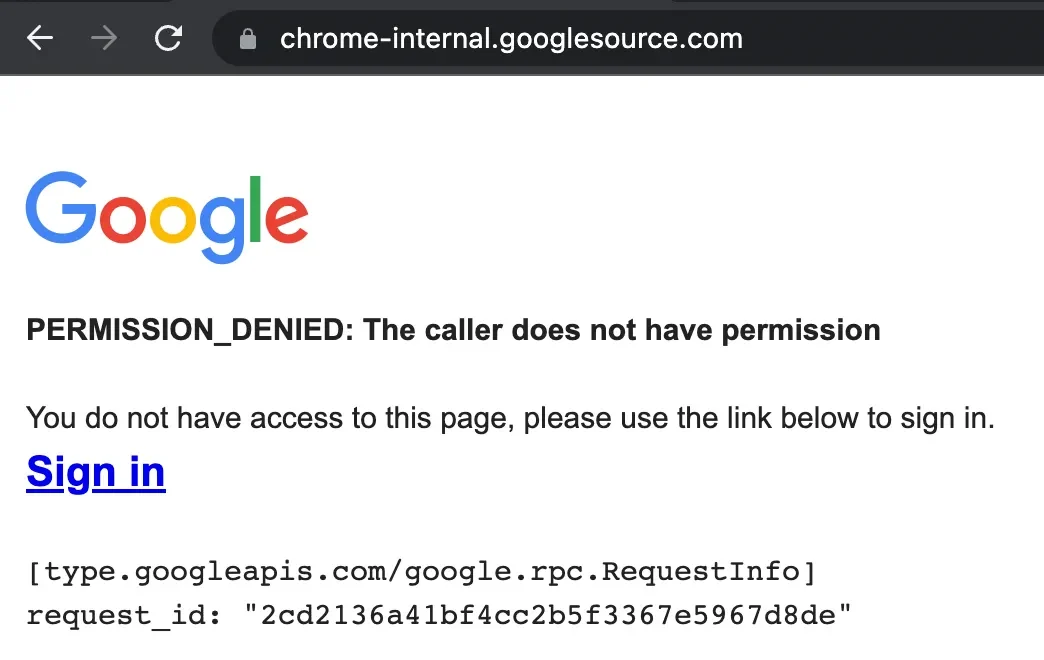
Opening chrome-internal.googlesource.com returned a PERMISSION_DENIED error page. That is consistent with the name: the URL says it is internal related.
Exploitation
Step 1: sign in with a personal account
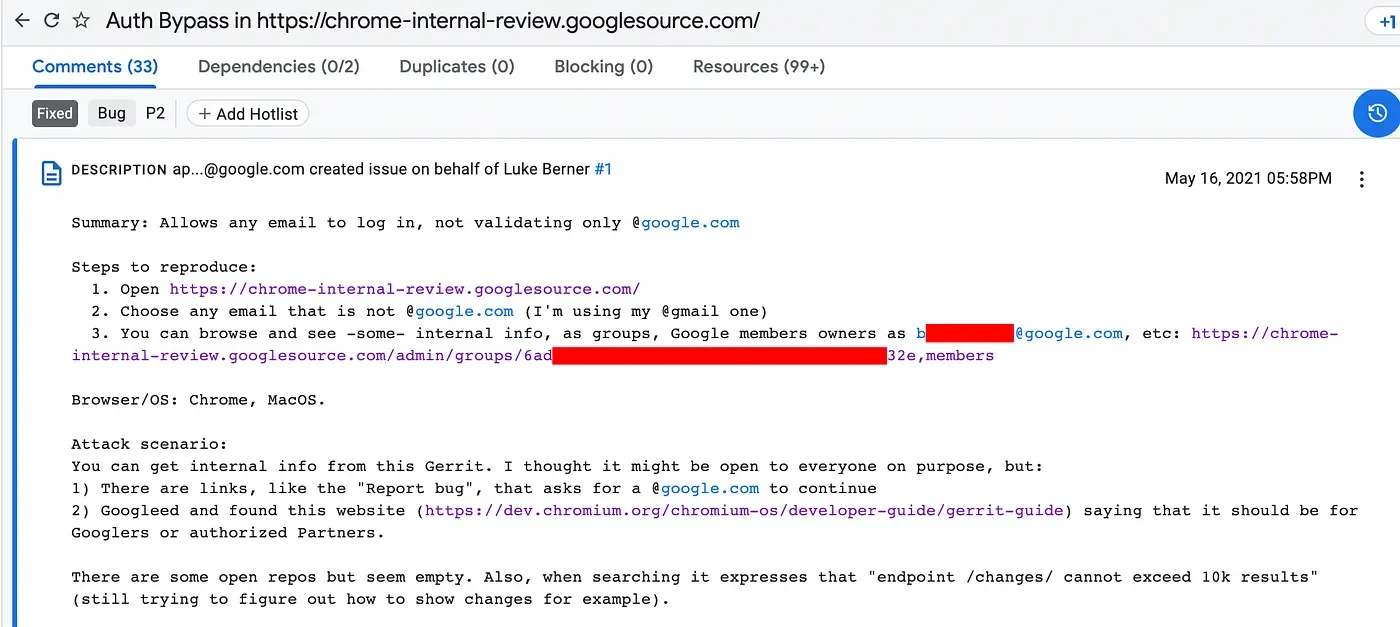
Instead of stopping at the error page, the researcher pressed Sign In. The login form did not require a @google.com account, unlike many other internal Google services. Selecting the personal @gmail.com email was enough to get in.
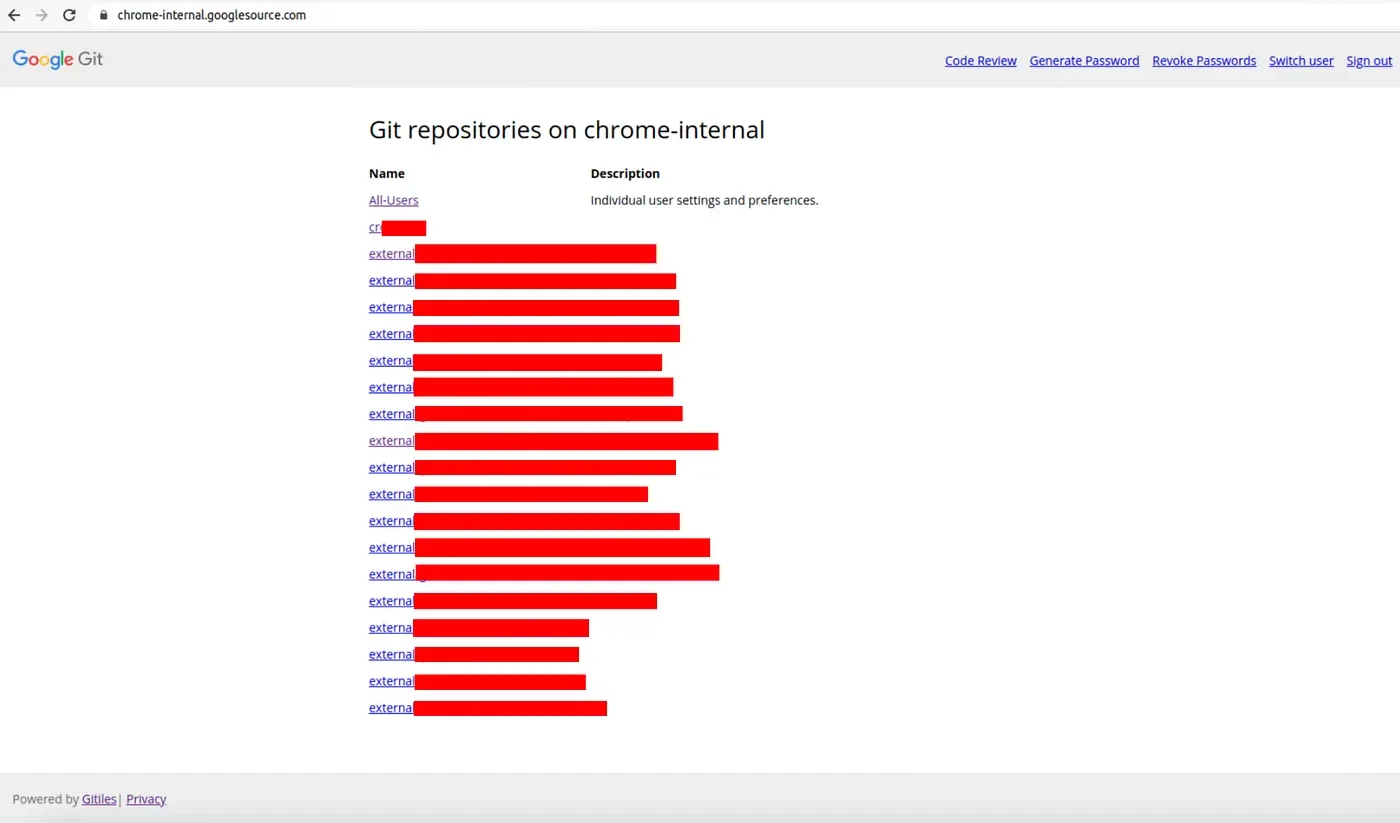
The result was a list of repositories on chrome-internal.googlesource.com. At this point it was still unclear whether the host was genuinely internal.
Step 2: reach the Gerrit side and read group data
Following the -review pattern, the researcher went to chrome-internal-review.googlesource.com and could access the project's group information. That data included internal mail-lists and information about Googlers: full name, photo and @google.com email address.
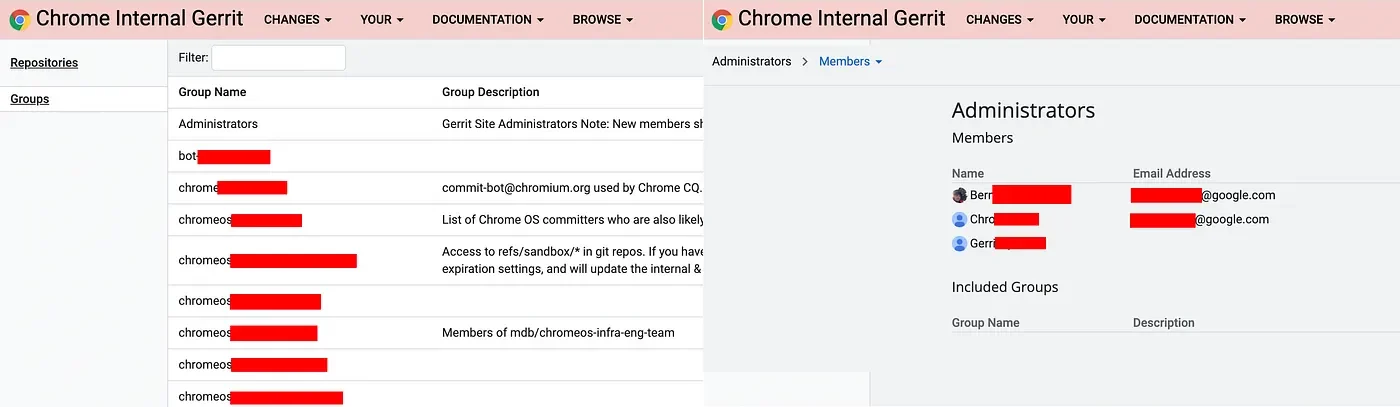
Two further signals suggested the host really was internal:
- Some links, for example Report a bug pointing at
http://goto.google.com/gerritbug, asked for a@google.comemail to continue. - The
gerrit-guideon chromium.org states that this subdomain is intended for Googlers only: "Go to http://google.com/ and verify you are logged into your @google.com account."
At that point the researcher filed a security vulnerability report and kept poking.
Step 3: browse repositories and spot secrets
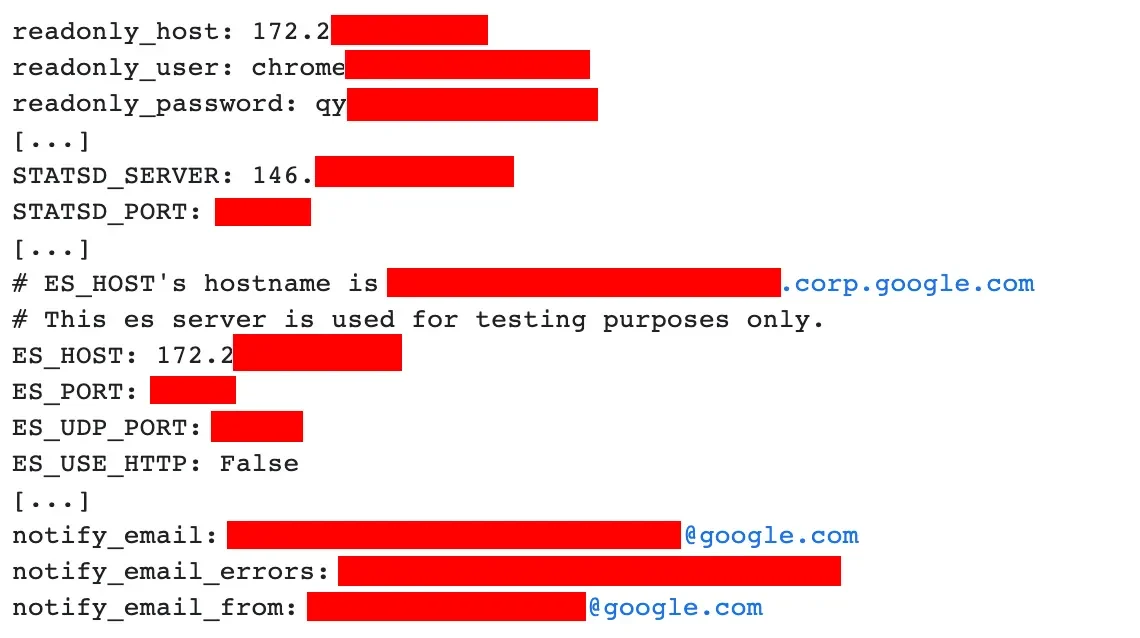
On the Gerrit side the researcher could not see anything change-related, but could visit all repositories. Some of them immediately looked interesting, listing internal *.corp.google.com subdomains and read-only credentials.
Step 4: clone everything and grep
The next goal was a fast way to search all code for keywords such as passwords, internal IPs, API keys and corp.google.com subdomains. After submitting the new information, the researcher wrote a quick script to clone all repositories and branches, not only for this subdomain but for all *.googlesource.com subdomains. The reasoning was that if this host held internal or sensitive material, others might too.
Grepping for bucket URLs (storage.googleapis.com) led to terraform files for GKE internal services. The buckets themselves were private, but a full link to a file allowed downloading it without any authentication.

Step 5: what the cloned code contained
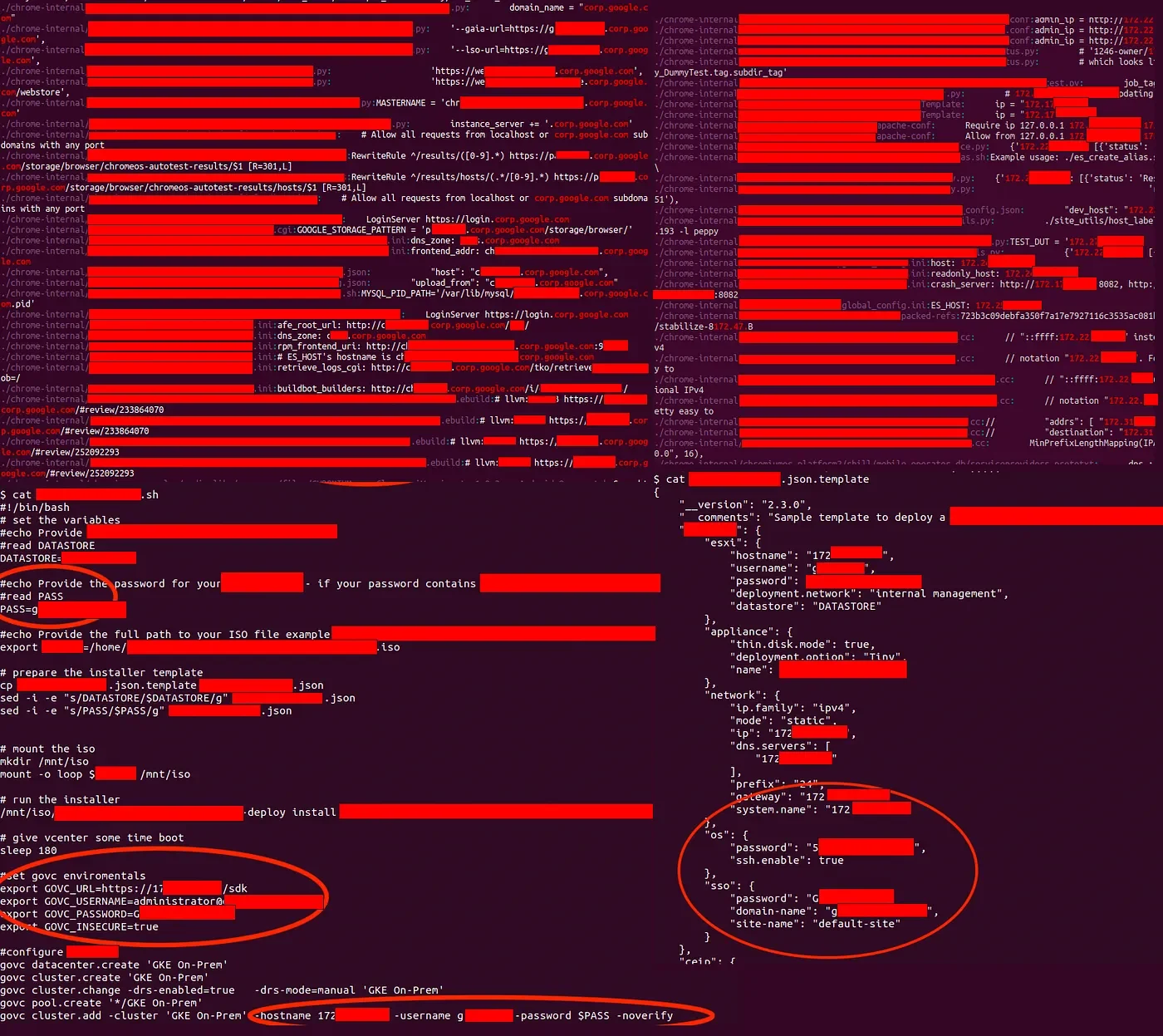
The material gathered included:
*.corp.google.comsubdomains, both internal and external ones,- internal IPs in
[redacted]/8and[redacted]/12, - files hosted in Google private buckets,
- config files with staging and production credentials,
- deploy scripts containing build steps and credentials, found in private buckets,
- deploy templates containing credentials as well, found in private buckets.
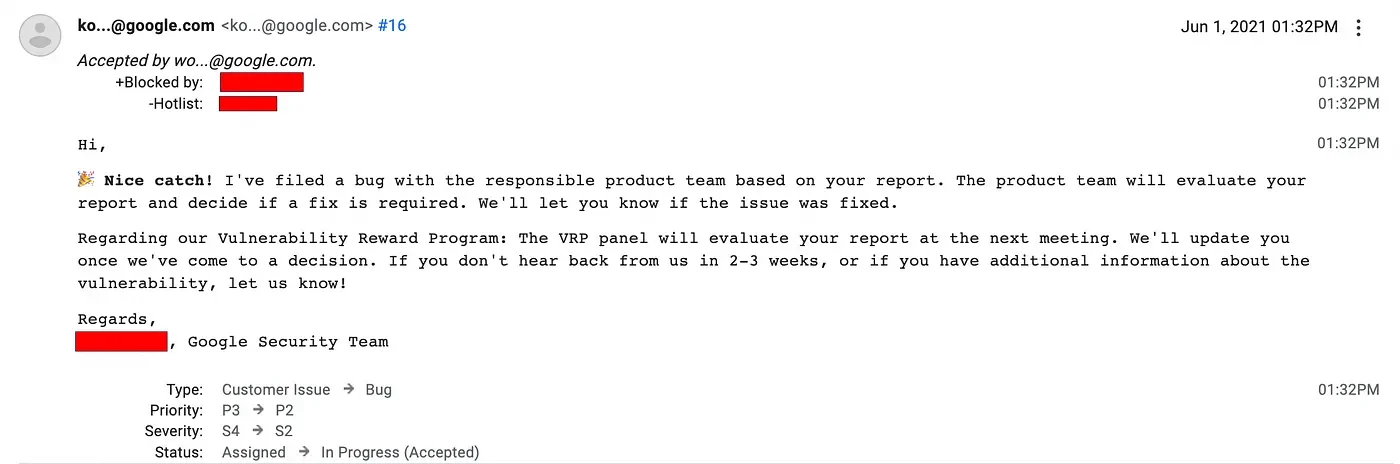
The extra information was re-submitted, and after some back and forth providing all the evidence, the report received the "Nice catch!" message.
Root cause
The report does not describe the code or configuration behind the flaw. What it shows is a broken authorisation decision: a host named and documented as internal accepted a personal @gmail.com identity, and the Gerrit instance behind it exposed repository listings, group information and code to that identity. The existing defences did not stop it: the login form did not restrict the account domain the way other internal Google services do, and the PERMISSION_DENIED page on the repository host did not prevent signing in and reaching the content. The private buckets added a second layer of exposure, since possession of a full object link was enough to download a file without authentication.
Impact
An outsider with an ordinary Google account could read internal Chrome repositories, the project's group information including internal mail-lists and Googlers' names, photos and @google.com addresses, and, through the cloned code, internal *.corp.google.com subdomains, internal IP ranges, staging and production credentials, deploy scripts and templates, and files in private buckets reachable by full link. The report does not state which systems those credentials would have unlocked.
Fix
Google confirmed on 11.04.2022 that all the bugs had been fixed.
Variants to test
- Enumerate
*.googlesource.comsubdomains and look for names containinginternalorcorp. A positive result is a host that returnsPERMISSION_DENIEDbut lets you sign in with a non-corporate account. - For any
project_name.googlesource.com, tryproject_name-review.googlesource.com. A positive result is a Gerrit instance that shows project groups, members or repositories to your account. - On any login form in front of an internal-looking service, try a personal account. A positive result is a session that reaches content the error page implied was restricted.
- Clone all repositories and branches of every reachable host and grep for
storage.googleapis.com,corp.google.com,10.and172.16.ranges, and credential keywords. A positive result is a bucket URL, internal hostname or credential in the code. - Take a full object link from a private bucket and request it without credentials. A positive result is the file contents returned without authentication.
- Check links inside the application that ask for a corporate account, such as bug-report links. A positive result is a link that gates on
@google.comwhile the surrounding application does not.
Timeline
- 16.05.2021: vulnerability reported.
- 17.05.2021: report triaged.
- 20.05.2021: more information sent.
- 01.06.2021: "Nice catch!" received.
- 01.06.2021: VRP reward received.
- 07.06.2021: extra information sent about private bucket files exposed on other
googlesource.comsubdomains. - 22.06.2021: second VRP reward received.
- 11.04.2022: Google confirms all bugs have been fixed.
One practical lesson from the report: Google's security team receives many reports a day and has limited time per report, so send information organised in as few messages as possible, and screenshots help.
What happened, in plain words
Google runs a website called googlesource.com where it keeps the source code of many of its projects. Most of what sits there is public: anyone can browse it, the same way anyone can read a public library's catalogue. The researcher in this report was taking part in Google's bug bounty programme, which is a scheme where outside people are invited to look for security mistakes and report them, sometimes for a reward. While poking around Google's websites, he found a corner of googlesource.com whose name said it was meant for Google staff only, yet it let him walk in with his ordinary personal Gmail account. Behind that door were lists of internal projects, information about Google employees, and source code containing internal server names, internal network addresses and what looked like passwords. He reported it, kept digging, and eventually received a reward.
This article retells that story for someone who has never done security work. Every technical word is explained the first time it appears, and there is a glossary at the end.
Some background you need first
What a subdomain is
A domain name is the address you type to reach a website, like google.com. A subdomain is a name placed in front of it, separated by a dot: mail.google.com and maps.google.com are two subdomains of google.com. Companies use subdomains to split up their services, so one machine or one team can own something.company.com without disturbing the rest. Think of a large office building: the street address is the domain, and the floor and room number is the subdomain.
What source code and a repository are
Source code is the text that programmers write to build software. A repository (often shortened to repo) is a folder of source code plus the full history of every change ever made to it, who made it and when. A code hosting site is a website that stores repositories and lets people read them in a browser.
What googlesource.com is
googlesource.com is the domain where Google hosts source code. Most of what lives there is public: open source projects such as android.googlesource.com, or copies of other people's projects that Google has taken and modified, such as apache.googlesource.com/activemq-website/. Open source means the code is published for anyone to read and reuse.
The domain is split into two kinds of host:
project_name.googlesource.com, where the repositories of that project are listed and can be browsed.project_name-review.googlesource.com, which serves the Gerrit instance for that project.
What Gerrit is
Gerrit is Google's code review and project management tool for Git based projects. Git is the system programmers use to track changes to code; a code review tool is the place where a proposed change is shown to colleagues, who comment on it and either approve or reject it before it is merged into the project. On a -review host you therefore see changes, comments and commits, just as in any code review tool.
The rule the researcher learned is simple: for every project_name.googlesource.com you can add -review to reach the Gerrit version. With Android as the example, the Gerrit URL is https://android-review.googlesource.com/.
The target of this report is chrome-internal.googlesource.com, a host whose name marks it as internal, and its Gerrit counterpart chrome-internal-review.googlesource.com.
What "internal" means, and why it matters
"Internal" means meant for employees only, not for the public. Companies keep internal tools on separate names so that staff can reach them and outsiders cannot. When a host is named internal, the expectation is that a stranger who finds it will be stopped at the door.
How the search started
The work was done as a normal bug bounty exercise against Google's programme, with no special access: the researcher used a personal @gmail.com account. The only tooling mentioned is subdomain enumeration with Tomnomnom's assetfinder, plus a script the researcher wrote later to clone repositories. No versions are given.
The starting point was listing Google's subdomains, that is, collecting as many names under Google's domains as possible so you can look at each one. The word corp was of interest because it may refer to the *.corp.google.com world, the naming pattern Google uses for corporate machines. The enumeration found no corp subdomain. It did surface one host that looked worth a try: anything with the word internal in it deserves at least a shot.
Opening chrome-internal.googlesource.com returned a PERMISSION_DENIED error page. That is consistent with the name: the URL says it is internal related. A PERMISSION_DENIED page is the web equivalent of a locked door with a sign on it: the server is telling your browser that you are not allowed to see what is behind this address.
Getting in
Step 1: sign in with a personal account
Most people would stop at the error page. The researcher pressed Sign In instead. Signing in means proving who you are to the website, usually by picking an account you already have with the same company, such as a Google account, and letting the site ask that account provider to confirm it.
The login form did not require a @google.com account, unlike many other internal Google services. That is the crucial detail: the form accepted any Google account, including a personal one. Selecting the personal @gmail.com email was enough to get in.
A repository listing is just a directory of projects, each one a folder of code you can open.
At this point it was still unclear whether the host was genuinely internal. A list of project names alone does not prove much: it could have been a public mirror with a misleading name.
Step 2: reach the Gerrit side and read group data
Following the -review pattern, the researcher went to chrome-internal-review.googlesource.com and could access the project's group information. Groups are the lists that say which people belong to which team or mailing list. That data included internal mail-lists and information about Googlers: full name, photo and @google.com email address. A mail-list is a single address that delivers a message to a whole group of people, so its name often reveals what a team works on.
Two further signals suggested the host really was internal:
- Some links, for example Report a bug pointing at
http://goto.google.com/gerritbug, asked for a@google.comemail to continue. A link that demands a corporate account is a strong hint that the surrounding application was supposed to demand one too. - The
gerrit-guideon chromium.org states that this subdomain is intended for Googlers only: "Go to http://google.com/ and verify you are logged into your @google.com account."
At that point the researcher filed a security vulnerability report and kept poking. Filing early is a deliberate habit: you tell the company what you have found so they can start fixing it, and you carry on looking in case there is more.
The image shows the report thread, which ran to 33 replies.
Step 3: browse repositories and spot secrets
On the Gerrit side the researcher could not see anything change-related, but could visit all repositories. Some of them immediately looked interesting, listing internal *.corp.google.com subdomains and read-only credentials. A credential is anything that proves identity to a system: a username and password, an access key, a token. Read-only means it can fetch data but not modify it, which sounds harmless until you remember that the data itself may be secret.
Step 4: clone everything and grep
Cloning a repository means downloading the whole thing, history included, to your own computer. Grepping means searching text for a word or pattern, named after the grep command that does it.
The next goal was a fast way to search all code for keywords such as passwords, internal IPs, API keys and corp.google.com subdomains. An API key is a long string a program uses instead of a password when it talks to another service; anyone holding it can act as that program. An IP address is the numeric address of a machine on a network, and an internal IP is one that only makes sense inside a company's own network, so seeing one in public code tells you something about the private layout of that network.
After submitting the new information, the researcher wrote a quick script to clone all repositories and branches, not only for this subdomain but for all *.googlesource.com subdomains. A branch is a parallel line of development inside a repository, so cloning all branches means you get every version of the code, not just the main one. The reasoning was that if this host held internal or sensitive material, others might too.
Grepping for bucket URLs (storage.googleapis.com) led to terraform files for GKE internal services. A bucket is a storage container in the cloud, roughly a folder you can put files into and fetch them from over the web. Terraform is a tool that describes cloud infrastructure as text files, so a terraform file tells you which servers and storage a team runs. GKE is Google's managed service for running containerised applications. The buckets themselves were private, but a full link to a file allowed downloading it without any authentication. Authentication here means proving who you are; the bucket was private in the sense that you could not list its contents, yet anyone who already knew the exact address of a file could fetch it.
Step 5: what the cloned code contained
The material gathered included:
*.corp.google.comsubdomains, both internal and external ones,- internal IPs in
[redacted]/8and[redacted]/12, - files hosted in Google private buckets,
- config files with staging and production credentials,
- deploy scripts containing build steps and credentials, found in private buckets,
- deploy templates containing credentials as well, found in private buckets.
A few of those need unpacking. [redacted]/8 and [redacted]/12 are address ranges reserved for private networks, the same way a phone extension is only meaningful inside one office; they never route on the public internet. A config file is a small text file that tells a program how to run, and it often holds the password for the database it connects to. Staging means a test copy of a system that mirrors the real one; production means the real one that customers use. A deploy script is an automated recipe for putting new code onto servers, and it needs credentials to log in and do that. A deploy template is a reusable version of the same recipe.
The extra information was re-submitted, and after some back and forth providing all the evidence, the report received the "Nice catch!" message.
Why it worked
The report does not describe the code or configuration behind the flaw. What it shows is a broken authorisation decision. Authorisation is the step after authentication: authentication asks "who are you?", authorisation asks "are you allowed to do this?". Here the site knew perfectly well who the visitor was, a personal Gmail user, and still let him through a door labelled internal.
A host named and documented as internal accepted a personal @gmail.com identity, and the Gerrit instance behind it exposed repository listings, group information and code to that identity. The existing defences did not stop it: the login form did not restrict the account domain the way other internal Google services do, and the PERMISSION_DENIED page on the repository host did not prevent signing in and reaching the content. The private buckets added a second layer of exposure, since possession of a full object link was enough to download a file without authentication.
What the impact was
An outsider with an ordinary Google account could read internal Chrome repositories, the project's group information including internal mail-lists and Googlers' names, photos and @google.com addresses, and, through the cloned code, internal *.corp.google.com subdomains, internal IP ranges, staging and production credentials, deploy scripts and templates, and files in private buckets reachable by full link. The report does not state which systems those credentials would have unlocked.
How it was fixed
Google confirmed on 11.04.2022 that all the bugs had been fixed.
Things worth trying yourself
These are the checks the report suggests, written so you can follow them with nothing but a browser.
- Enumerate
*.googlesource.comsubdomains and look for names containinginternalorcorp. A positive result is a host that returnsPERMISSION_DENIEDbut lets you sign in with a non-corporate account. - For any
project_name.googlesource.com, tryproject_name-review.googlesource.com. A positive result is a Gerrit instance that shows project groups, members or repositories to your account. - On any login form in front of an internal-looking service, try a personal account. A positive result is a session that reaches content the error page implied was restricted.
- Clone all repositories and branches of every reachable host and grep for
storage.googleapis.com,corp.google.com,10.and172.16.ranges, and credential keywords. A positive result is a bucket URL, internal hostname or credential in the code. - Take a full object link from a private bucket and request it without credentials. A positive result is the file contents returned without authentication.
- Check links inside the application that ask for a corporate account, such as bug-report links. A positive result is a link that gates on
@google.comwhile the surrounding application does not.
Timeline
- 16.05.2021: vulnerability reported.
- 17.05.2021: report triaged.
- 20.05.2021: more information sent.
- 01.06.2021: "Nice catch!" received.
- 01.06.2021: VRP reward received.
- 07.06.2021: extra information sent about private bucket files exposed on other
googlesource.comsubdomains. - 22.06.2021: second VRP reward received.
- 11.04.2022: Google confirms all bugs have been fixed.
Triaged means the company has read the report and confirmed it is worth investigating. VRP stands for Vulnerability Reward Program, Google's name for the scheme that pays for reports like this one.
One practical lesson from the report: Google's security team receives many reports a day and has limited time per report, so send information organised in as few messages as possible, and screenshots help.
Glossary
- API key: a long string a program presents to another service instead of a password, so the service knows which program is calling.
- Assetfinder: a tool by Tomnomnom that collects subdomains for a given domain.
- Authentication: proving who you are to a system, for example by signing in.
- Authorisation: deciding whether the identity that has been proven is allowed to do or see a particular thing.
- Branch: a parallel line of development inside a repository, holding its own version of the code.
- Bucket: a cloud storage container, roughly a folder you can upload files to and fetch them from over the web.
- Bug bounty: a scheme where a company invites outsiders to find security mistakes and pays for good reports.
- Clone: to download a whole repository, including its history, to your own computer.
- Code review: the process where colleagues read a proposed change to code, comment on it and approve or reject it.
- Commit: a recorded change to a repository, with its author and message.
- Config file: a small text file that tells a program how to run, often including the credentials it needs.
- Credential: anything that proves identity to a system, such as a password, key or token.
- Deploy script: an automated recipe for putting new code onto servers, which needs credentials to log in and do so.
- Deploy template: a reusable version of a deploy script.
- Domain: the address of a website, such as
google.com. - Gerrit: Google's code review and project management tool for Git based projects.
- Git: the system programmers use to track changes to code.
- GKE: Google's managed service for running containerised applications.
- Grep: to search text for a word or pattern, named after the command that does it.
- Group: in Gerrit, a list saying which people belong to a team or mailing list.
- Internal: meant for employees only, not for the public.
- Internal IP: an address that only makes sense inside a company's own network and never routes on the public internet.
- IP address: the numeric address of a machine on a network.
- Mail-list: a single email address that delivers a message to a whole group of people.
- Open source: code published for anyone to read and reuse.
PERMISSION_DENIED: an error page telling your browser you are not allowed to see what is at this address.- Production: the real system that customers use.
- Read-only: able to fetch data but not modify it.
- Repository (repo): a folder of source code plus the full history of every change made to it.
- Source code: the text programmers write to build software.
- Staging: a test copy of a system that mirrors the real one.
- Subdomain: a name placed in front of a domain, separated by a dot, such as
mailinmail.google.com. - Terraform: a tool that describes cloud infrastructure as text files.
- Triaged: read by the company and confirmed worth investigating.
- VRP: Vulnerability Reward Program, Google's name for its bug bounty scheme.

