1) The initial bug
A logic flaw in the two-factor authentication (2FA) login flow allowed an attacker who already had a victim's password to keep a 2FA page open, wait while the victim changed their password and reset sessions, and then still submit a valid 2FA code to regain access without knowing the new password. The attacker could also renew the waiting session by choosing 'Try another way' and re-selecting 2FA, and the code worked even after 2FA was disabled.
 Published on medium.com
This is a logic flaw vulnerability I initially found in Google, and then tested in other top companies (such as Microsoft, Instagram, Cloudflare, etc) to find out they were vulnerable as well.
The full write-up lives on its author's site
It belongs to its author, so we link to it rather than copy it. The other two tabs are our own rewrites, checked against it.
Context
This is a logic flaw in the login flow of sites that use two-factor authentication (2FA). The feature involved is the 2FA input page: the step shown after a correct password, where the user types a one-time code to finish logging in. Normally that page is a short-lived, tightly scoped step: if the password changes, if sessions are terminated, or if 2FA is switched off, the pending login should become invalid.
The researcher first found the flaw in Google, then tested the same idea against other large companies (Microsoft, Instagram, Cloudflare and others) and reports that several were vulnerable. The core claim is that a session parked on the 2FA input page can survive a password change and later be completed with a valid 2FA code, without the attacker knowing the current password.
Setup
The report does not describe specific tools, browser versions or account configuration beyond the following:
- A victim account with 2FA available, and an attacker who can reach the 2FA input page (for example after hijacking the account, since leaks happen every day).
- Two browsers or sessions: one parked on the 2FA input page, another used to change the password, terminate sessions, or toggle 2FA.
- A way to generate valid 2FA codes for the account, since the attack completes the login with a valid code.
The researcher automated the session-renewal test and built a proof of concept for it.
Finding it
The starting idea was that 2FA is newer than most login flows, so it was probably implemented by different teams at different times, sometimes years apart. As with any project split across teams, communication is hindered and coordination can be impacted. That raised the question: what happens if you change something in the process, such as changing your password, while you are in the middle of logging in, for example on the 2FA login page?
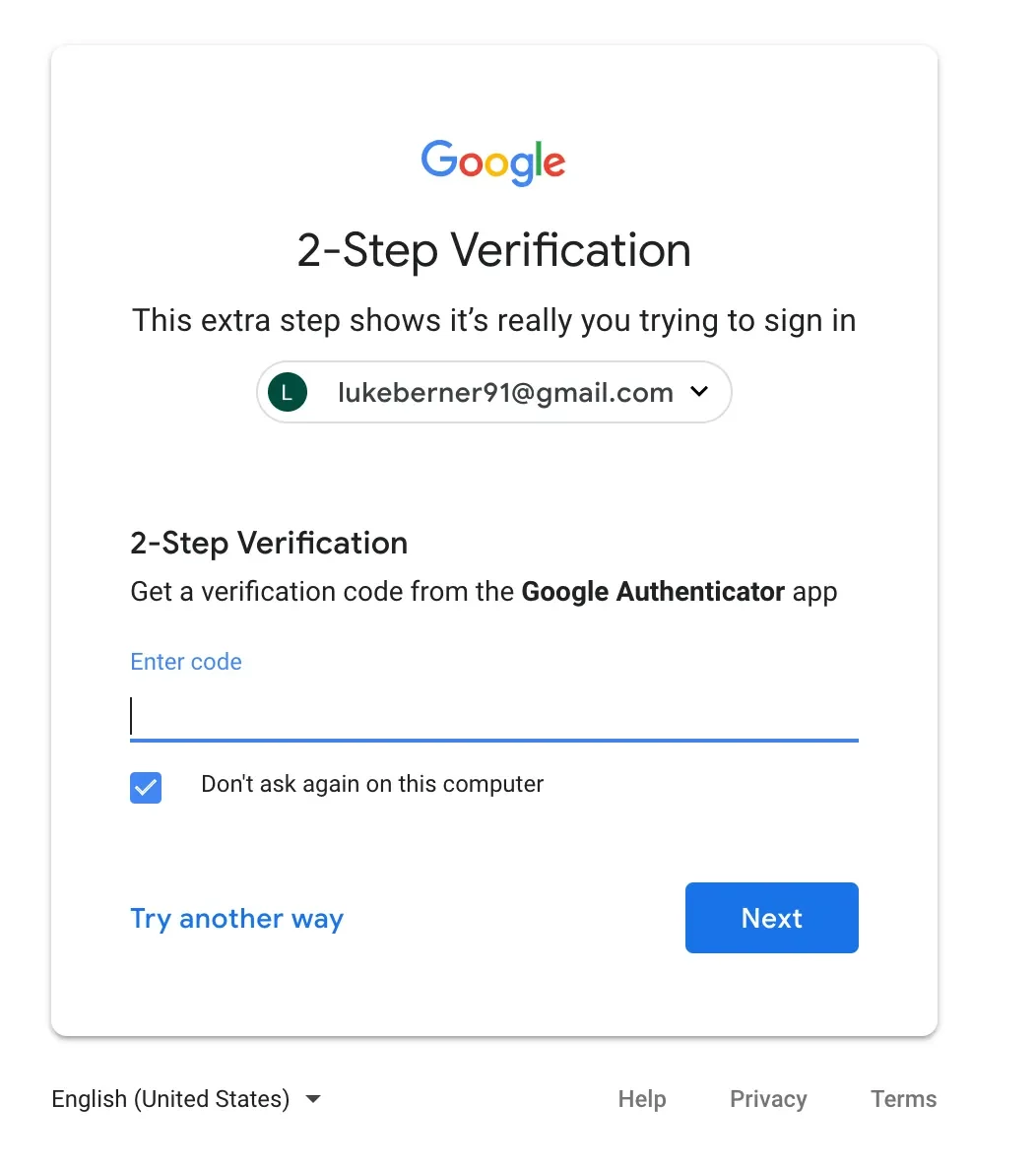
Image 1 shows the 2FA input page where the attacker waits until the password is changed. The researcher notes the email shown is not their real one.
The test was simple: change the password, which triggers all sessions to be terminated, wait 10 to 15 minutes, then try the 2FA code. It worked. The pending 2FA step was still valid after the password change and session termination.
With this proof of concept the researcher reported it to Google. After some exchange of emails, Google acknowledged the issue but remarked that the sessions expired after 20 minutes:
"If you find a way to make this attack work for more than, say, two hours please let us know. This would indicate a problem in our session logic."
Exploitation
Step 1: park a session on the 2FA input page
Start a login with the victim's credentials so that the flow stops at the 2FA input page, and leave that page open. This is the state the attacker holds while the victim (or the attacker, in the hijack scenario) changes the password.
Step 2: change the password and terminate sessions
Change the password, which triggers all sessions to be terminated, then wait 10 to 15 minutes. Submitting the 2FA code from the parked page still worked: the pending login was not invalidated by the password change or the session termination.
Step 3: bypass the 20-minute session expiration
Google's position was that the window was limited to 20 minutes. The researcher found a way around that limit: on the 2FA input page, go to Try another way, choose 2FA as a method again, and the session is renewed with another 20 minutes. The researcher automated this test, made a proof of concept, waited for more than 2 hours, and it still worked.
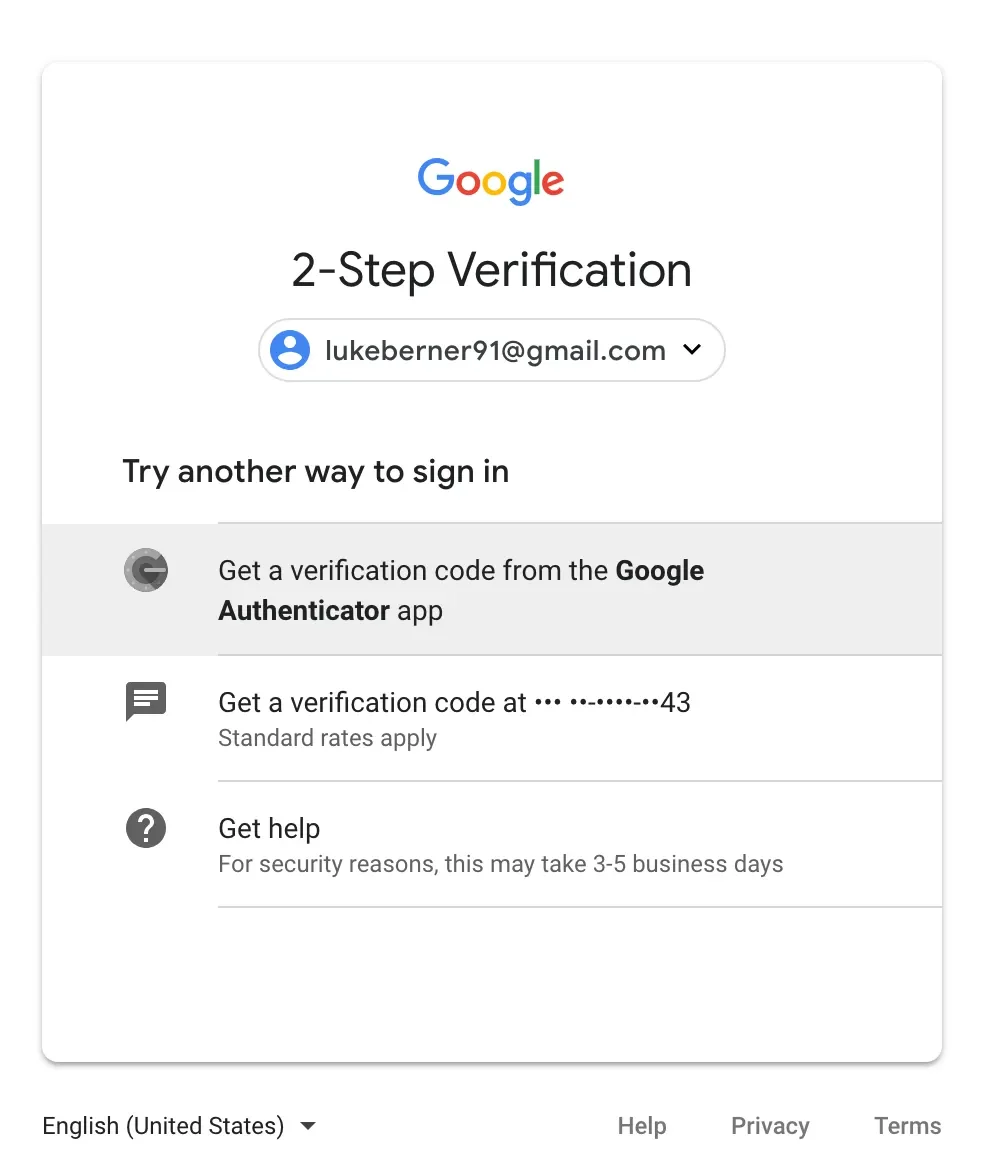
Image 2 shows the way to bypass session expiration, through the Try another way option on the 2FA input page.
Step 4: turn 2FA off mid-flow
Poking around the available options and all the possible flows, the researcher ran the process again but turned off 2FA in the middle. The expectation was that, being on the 2FA input page, the code should not work if 2FA is off. It did: the 2FA code was working even when the 2FA option was off.
This changed everything, because the attack scenario got bigger. If an attacker hijacks an account, the flow becomes:
- An attacker enables 2FA in the victim's account.
- In another browser, the attacker waits indefinitely on the 2FA input page (Image 1).
- The attacker disables 2FA.
- The victim regains access to the account, changing the password and resetting sessions.
- The attacker inputs a valid 2FA code and has access again to the account, without knowing the current password.
The researcher sent this new information to Google and got confirmation of the bug.
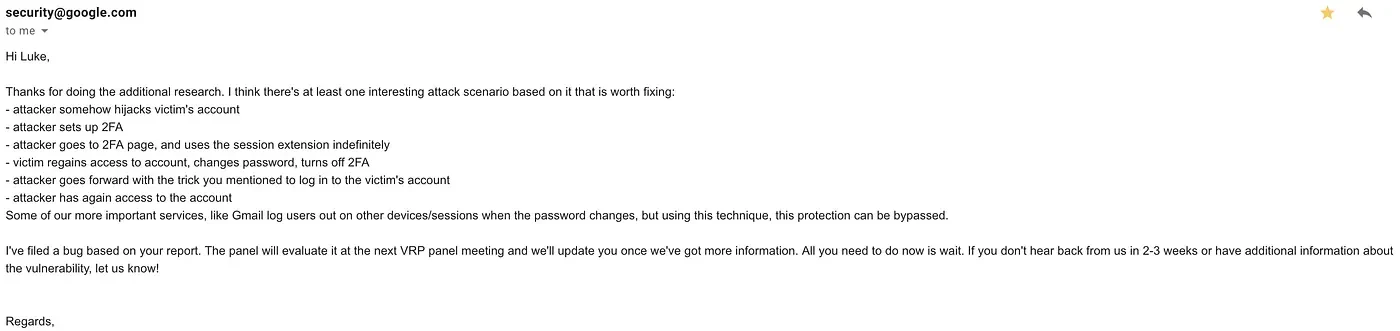
After a few weeks, the panel awarded a bounty and fixed the issue.
Root cause
The pending 2FA step is not bound tightly enough to the account state it was created under. Changing the password, terminating sessions, and disabling 2FA are all events that should invalidate a half-finished login, but the session waiting on the 2FA input page survived all of them. The Try another way flow renewing the session shows that the expiry is refreshed by re-entering the 2FA method selection, so the 20-minute limit is not a real bound on the window.
The report does not describe the server-side implementation, so the exact code mistake is not stated. The existing defences (session termination on password change, a 20-minute expiry, and the 2FA on/off setting) did not stop the parked session from completing.
Impact
An attacker who has hijacked an account can keep access after the victim recovers it. The attacker enables 2FA, parks a session on the 2FA input page, disables 2FA, and waits. When the victim changes the password and resets sessions, the parked session still accepts a valid 2FA code, giving the attacker access again without knowing the current password. The window is not limited to 20 minutes, because the session can be renewed through Try another way.
The researcher tested other large companies (Facebook, GitHub, LinkedIn) and it did not work there: whenever the password was changed or 2FA was disabled, the session waiting on the 2FA input page was no longer valid. Instagram was vulnerable but labelled it a "theoretical attack". Microsoft Login was vulnerable too but did not fix it. Other companies found through HackerOne and Bugcrowd directories (Cloudflare, Algolia, some private programs) were vulnerable, fixed the vulnerability, and awarded bounty or swag.
Fix
Google fixed the issue after a few weeks and awarded a bounty.
Microsoft and Instagram labelled the vulnerability as "working as intended". For Microsoft, the researcher escalated through LinkedIn to someone in Security for a re-review, wrote a blog post explaining the vulnerability with two proof-of-concept videos, and reports that one answer was "if you are still seeing this issue post 24 hours of logout, this could potentially meet the bar." A proof of concept showing this was possible was sent, but they still would not agree to fix it. The researcher asked whether it was OK to publicly disclose, and they agreed. Communications with Microsoft started 06/2017, and the researcher states the vulnerability still works in Microsoft Login.
For Instagram, the response was:
"[the attack] seems unlikely to happen commonly, making this more of a theoretical attack. The protection in this case is to not allow someone to steal your password"
The researcher remarked that an "unlikely" event on a platform with more than a billion users could mean millions of users affected, but it was still not marked as valid. After Facebook's security breach in 09/2018, the researcher re-opened the issue asking whether it could be reconsidered, and was told they were not the first to report it, so even if it were someday marked valid, the report would be ineligible for a reward.
Variants to test
- Password change during a pending 2FA step. Park a session on the 2FA input page, change the password from another session, wait, then submit a valid code. A positive result is the code being accepted after the password change and session termination.
- 2FA disabled during a pending 2FA step. Park a session on the 2FA input page, disable 2FA, then submit a valid code. A positive result is the code being accepted while 2FA is off.
- Session renewal through method selection. On the 2FA input page, use Try another way, choose 2FA again, and check whether the expiry is extended. A positive result is the session staying valid well beyond the original expiry, for example more than 2 hours.
- Other account-state changes.
- Other providers. Run the same sequence against other login flows that separate password and 2FA steps. A positive result is the parked 2FA step completing after the account state has changed.
What happened, in plain words
Imagine you are halfway through getting into a club. You have shown your ID at the door (that is your password), and now you are standing at a second checkpoint where a guard asks for a special one-time code from your phone (that is two-factor authentication, or 2FA). While you are standing there, someone back at the front desk changes the rules: your ID is cancelled, all your passes are torn up, and the second checkpoint is even switched off. You would expect to be thrown out. Instead, the guard at the second checkpoint still accepts your code and lets you in.
That is the bug described here. It is a logic flaw: nothing crashes, no secret is cracked, the program simply follows a sequence of steps it was never designed to handle. The researcher found it in Google's login, then tried the same trick against other big companies and reports that several of them had the same weakness.
The feature involved is the 2FA input page: the screen you see after typing a correct password, where you type a short code from your phone to finish logging in. Normally that screen should only be valid for a short time and only while the account is in the state it was in when the screen appeared. If the password changes, if all sessions are ended, or if 2FA is switched off, that half-finished login should become worthless.
The core claim is simple: a login left waiting on the 2FA input page can survive a password change and later be finished with a valid 2FA code, without the attacker knowing the current password.
The setup
The report does not describe specific tools, browser versions or account settings beyond the following:
- A victim account with 2FA available, and an attacker who can reach the 2FA input page. The report's example is an attacker who has already hijacked the account, since leaks happen every day.
- Two browsers or sessions: one left sitting on the 2FA input page, another used to change the password, end sessions, or switch 2FA on and off.
- A way to generate valid 2FA codes for the account, because the attack finishes the login with a valid code.
The researcher automated the session-renewal test and built a proof of concept for it.
A few words before we go further, because they come up constantly:
- A session is the server's memory of "this browser is logged in as this person". When you log in, the server hands your browser a small piece of data (often a cookie) and remembers it on its side. Every later request carries that piece of data so the server knows who you are. Ending a session means the server forgets it, so the browser's copy stops working.
- A cookie is a small label your browser stores for a website and sends back with every request to that site. Think of a cloakroom ticket: the ticket itself is not the coat, but it is what lets you collect it.
- A token is similar in spirit: a value that stands in for proof of who you are or what you are allowed to do. If someone else gets your token, the server cannot easily tell you apart from them.
- A proof of concept (PoC) is a small, repeatable demonstration that a bug is real. It is not a weapon; it is evidence you can show to the people who can fix it.
- Automating a test means writing a small program to repeat the same steps over and over, so you can check things like "does this still work after two hours?" without sitting there clicking.
Finding it
The starting idea was that 2FA is newer than most login flows, so it was probably built by different teams at different times, sometimes years apart. As with any project split across teams, communication is hindered and coordination can be impacted. That raised the question: what happens if you change something in the process, such as changing your password, while you are in the middle of logging in, for example on the 2FA login page?
Image 1 shows the 2FA input page where the attacker waits until the password is changed. The researcher notes the email shown is not their real one.
The test was simple: change the password, which triggers all sessions to be terminated, wait 10 to 15 minutes, then try the 2FA code. It worked. The pending 2FA step was still valid after the password change and session termination.
Why does that matter? Because changing your password is the main thing you do when you think someone else is in your account. The whole point of ending all sessions on a password change is to kick the intruder out. If a half-finished login survives that, the safety net has a hole in it.
With this proof of concept the researcher reported it to Google. After some exchange of emails, Google acknowledged the issue but remarked that the sessions expired after 20 minutes:
"If you find a way to make this attack work for more than, say, two hours please let us know. This would indicate a problem in our session logic."
In plain words: Google was saying the window is short, so the damage is limited. The researcher took that as a challenge.
Exploitation
Step 1: park a session on the 2FA input page
Start a login with the victim's credentials so that the flow stops at the 2FA input page, and leave that page open. This is the state the attacker holds while the victim (or the attacker, in the hijack scenario) changes the password.
Think of it as leaving a browser tab open at the second checkpoint and walking away. The tab is not doing anything, but the server still remembers that this particular login is waiting for a code.
Step 2: change the password and terminate sessions
Change the password, which triggers all sessions to be terminated, then wait 10 to 15 minutes. Submitting the 2FA code from the parked page still worked: the pending login was not invalidated by the password change or the session termination.
This is the heart of the bug. Two separate defences fired (password changed, sessions ended) and neither of them reached the waiting 2FA step. The waiting step was treated as its own little world, not as part of the account it belonged to.
Step 3: bypass the 20-minute session expiration
Google's position was that the window was limited to 20 minutes. The researcher found a way around that limit: on the 2FA input page, go to Try another way, choose 2FA as a method again, and the session is renewed with another 20 minutes. The researcher automated this test, made a proof of concept, waited for more than 2 hours, and it still worked.
Image 2 shows the way to bypass session expiration, through the Try another way option on the 2FA input page.
Why does this matter so much? Because a 20-minute limit is only a limit if it cannot be reset. If you can reset the clock by simply re-selecting the same method, then the real window is "as long as the attacker is willing to keep clicking". The researcher automated the clicking, so the attacker does not even have to be present.
Step 4: turn 2FA off mid-flow
Poking around the available options and all the possible flows, the researcher ran the process again but turned off 2FA in the middle. The expectation was that, being on the 2FA input page, the code should not work if 2FA is off. It did: the 2FA code was working even when the 2FA option was off.
This is the strangest part. If 2FA is switched off, there is no second factor any more, so a screen asking for a second factor should be meaningless. Instead the screen kept accepting codes. It is like a guard still asking for a password at a door that has been removed.
This changed everything, because the attack scenario got bigger. If an attacker hijacks an account, the flow becomes:
- An attacker enables 2FA in the victim's account.
- In another browser, the attacker waits indefinitely on the 2FA input page (Image 1).
- The attacker disables 2FA.
- The victim regains access to the account, changing the password and resetting sessions.
- The attacker inputs a valid 2FA code and has access again to the account, without knowing the current password.
Read that list again slowly, because the order is what makes it dangerous. The attacker first switches 2FA on, so that a 2FA screen exists to park on. Then the attacker switches 2FA off, so the account looks normal again. The victim then does everything right: changes the password and resets sessions. And the parked screen still accepts a code, so the attacker walks back in without ever knowing the new password.
The researcher sent this new information to Google and got confirmation of the bug.
After a few weeks, the panel awarded a bounty and fixed the issue. A bounty is a payment a company makes to someone who reports a security problem responsibly, instead of selling it or using it.
Root cause
The pending 2FA step is not bound tightly enough to the account state it was created under. Changing the password, terminating sessions, and disabling 2FA are all events that should invalidate a half-finished login, but the session waiting on the 2FA input page survived all of them. The Try another way flow renewing the session shows that the expiry is refreshed by re-entering the 2FA method selection, so the 20-minute limit is not a real bound on the window.
The report does not describe the server-side implementation, so the exact code mistake is not stated. The existing defences (session termination on password change, a 20-minute expiry, and the 2FA on/off setting) did not stop the parked session from completing.
In everyday terms: the server kept a sticky note saying "this login is waiting for a code". When the code arrived, it checked the code against the note, but never looked up whether the password had changed, whether the sessions had been ended, or whether 2FA was still on. The note was trusted on its own.
Impact
An attacker who has hijacked an account can keep access after the victim recovers it. The attacker enables 2FA, parks a session on the 2FA input page, disables 2FA, and waits. When the victim changes the password and resets sessions, the parked session still accepts a valid 2FA code, giving the attacker access again without knowing the current password. The window is not limited to 20 minutes, because the session can be renewed through Try another way.
The researcher tested other large companies (Facebook, GitHub, LinkedIn) and it did not work there: whenever the password was changed or 2FA was disabled, the session waiting on the 2FA input page was no longer valid. Instagram was vulnerable but labelled it a "theoretical attack". Microsoft Login was vulnerable too but did not fix it. Other companies found through HackerOne and Bugcrowd directories (Cloudflare, Algolia, some private programs) were vulnerable, fixed the vulnerability, and awarded bounty or swag.
A quick note on those names: HackerOne and Bugcrowd are platforms where companies list what they want tested and researchers send in reports. A private program is one you can only see if the company invites you. Swag is company merchandise, sometimes given instead of money.
Fix
Google fixed the issue after a few weeks and awarded a bounty.
Microsoft and Instagram labelled the vulnerability as "working as intended". For Microsoft, the researcher escalated through LinkedIn to someone in Security for a re-review, wrote a blog post explaining the vulnerability with two proof-of-concept videos, and reports that one answer was "if you are still seeing this issue post 24 hours of logout, this could potentially meet the bar." A proof of concept showing this was possible was sent, but they still would not agree to fix it. The researcher asked whether it was OK to publicly disclose, and they agreed. Communications with Microsoft started 06/2017, and the researcher states the vulnerability still works in Microsoft Login.
For Instagram, the response was:
"[the attack] seems unlikely to happen commonly, making this more of a theoretical attack. The protection in this case is to not allow someone to steal your password"
The researcher remarked that an "unlikely" event on a platform with more than a billion users could mean millions of users affected, but it was still not marked as valid. After Facebook's security breach in 09/2018, the researcher re-opened the issue asking whether it could be reconsidered, and was told they were not the first to report it, so even if it were someday marked valid, the report would be ineligible for a reward.
That last point is worth pausing on. "Theoretical" here means "we think it will not happen often", not "it cannot happen". The researcher's argument is about scale: a small chance multiplied by a very large number of users is still a large number of people.
Variants to test
If you ever want to check a login flow yourself, these are the patterns the report describes. Only ever do this on accounts you own or have explicit permission to test.
- Password change during a pending 2FA step. Park a session on the 2FA input page, change the password from another session, wait, then submit a valid code. A positive result is the code being accepted after the password change and session termination.
- 2FA disabled during a pending 2FA step. Park a session on the 2FA input page, disable 2FA, then submit a valid code. A positive result is the code being accepted while 2FA is off.
- Session renewal through method selection. On the 2FA input page, use Try another way, choose 2FA again, and check whether the expiry is extended. A positive result is the session staying valid well beyond the original expiry, for example more than 2 hours.
- Other account-state changes.
- Other providers. Run the same sequence against other login flows that separate password and 2FA steps. A positive result is the parked 2FA step completing after the account state has changed.
Glossary
- 2FA (two-factor authentication): logging in with two different proofs, usually a password plus a short code from your phone, so a stolen password alone is not enough.
- 2FA input page: the screen shown after a correct password where you type the one-time code to finish logging in.
- Automating: writing a small program to repeat the same steps many times, so long waits and repeated clicks do not need a person.
- Bounty: a payment a company makes to someone who reports a security problem responsibly.
- Bugcrowd: a platform where companies list testing programmes and researchers submit reports.
- Cookie: a small piece of data a website stores in your browser and gets back with each request, used to remember who you are.
- HackerOne: a platform where companies list testing programmes and researchers submit reports.
- Logic flaw: a bug where the program does exactly what it was written to do, but the sequence of steps was never thought through, so it can be misused.
- Private program: a testing programme on a bug bounty platform that you can only see and join if the company invites you.
- Proof of concept (PoC): a small, repeatable demonstration that a bug is real, used as evidence when reporting it.
- Session: the server's memory that a particular browser is logged in as a particular person, usually carried by a cookie or token.
- Session expiration: the point at which the server stops accepting a session, for example after a fixed number of minutes.
- Session termination: deliberately ending sessions, for example all of them when a password changes, so old browsers are logged out.
- Swag: company merchandise sometimes given to researchers instead of money.
- Token: a value that stands in for proof of who you are or what you may do; whoever holds it can often act as you.
- Try another way: the option on the 2FA input page that lets you pick a different second factor; in this report, re-choosing 2FA renewed the session.
- Working as intended: a company's verdict that the behaviour, although surprising, is what they meant it to do, so they will not treat it as a bug.


