Multiple security vulnerabilities in domains belonging to Google
Several Google-owned domains had flaws: a tour builder let anyone download private tours as CSV by changing the URL, a training site allowed reading files outside the intended folder, and Kaggle stored and reflected script injection. An attacker could read other users' private data and run script in victims' browsers.

Several vulnerabilities have been discovered in domains recently acquired by Google between 2017, April and 2017, September.
The full write-up lives on its author's site
It belongs to its author, so we link to it rather than copy it. The other two tabs are our own rewrites, checked against it.
Context
Between April and September 2017, several vulnerabilities were found in domains that had recently been acquired by Google. The affected domains were withgoogle.com and kaggle.com, and the flaws fell into three categories: broken access control, directory traversal and cross-site scripting.
The first target, tourbuilder.withgoogle.com, serves tours identified by an ID, and the site refused access to a private tour through the builder route. The site is expected to enforce that restriction whenever a tour is requested.
The second target, edutrainingcenter.withgoogle.com, has a trainer_course/edu_assets/images/ path. The third target, kaggle.com, lets users set a display name and follow one another, and offers a Facebook login return endpoint.
Setup
No special tooling is described beyond a browser and a logged-in session. For the first issue the researcher logs in at https://tourbuilder.withgoogle.com. For the third issue the researcher logs in to kaggle.com and notes that the reflected XSS is triggered using Firefox. The private tour identifiers used in the examples are taken from search results and from brute forcing.
Finding it
The researcher worked through three separate features. On Tour Builder, a private tour returned a permission error when opened through the normal builder URL, which suggested access control existed; the question was whether it covered every route that serves tour data.
Exploitation
1. Broken access control in tourbuilder.withgoogle.com
Vulnerability: CWE-284 Access Vector: Remote Security Risk: High CVSS Base Score: 7.5 CVSS Vector string: CVSS:3.0/AV:N/AC:L/PR:N/UI:N/S:U/C:H/I:N/A:N
Access control relies on authentication, authorisation and accountability. Here the site failed to restrict access to private resources for an unauthorised user, so an attacker could read other users' private tours.
Steps to reproduce:
- Log in here:
https://tourbuilder.withgoogle.com - Try to access the following private tour:
https://tourbuilder.withgoogle.com/builder#play/[redacted] - You get the message:
"You do not have permission to view this tour." - The protection was bypassed and the private tour was accessed with the link below:
https://tourbuilder.withgoogle.com/tours/[redacted]/csv
Checking the downloaded CSV file reveals all information related to the private tour. The proof of concept is shown in the following picture:
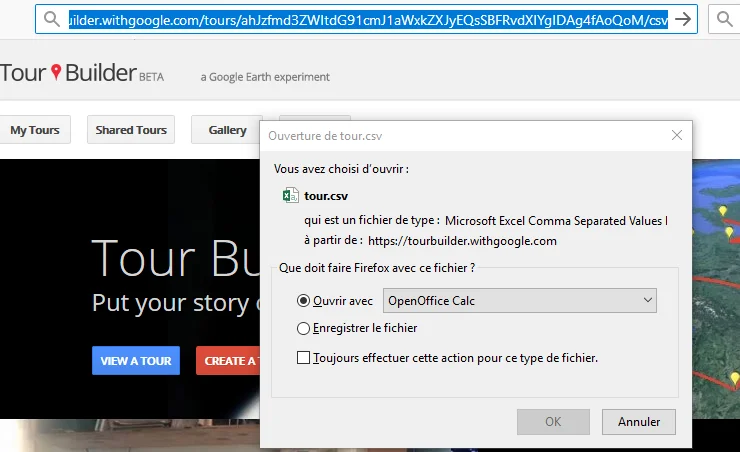
Because every private tour follows the format https://tourbuilder.withgoogle.com/builder#play/ID, any tour can be reached without authorisation by using https://tourbuilder.withgoogle.com/tours/ID/csv.
The IDs of private tours can also be enumerated. Using the following GHDB query:
site:tourbuilder.withgoogle.com/tour intitle:"Sign in"
several links of the form https://tourbuilder.withgoogle.com/builder#play/ID were returned:
https://tourbuilder.withgoogle.com/builder#play/[redacted]
https://tourbuilder.withgoogle.com/builder#play/[redacted]
https://tourbuilder.withgoogle.com/builder#play/[redacted]
https://tourbuilder.withgoogle.com/builder#play/[redacted]
...
Brute forcing private IDs also works, because only a few characters change (7 chars).
Timeline (dd/mm/yyyy):
- 28/05/2017 : Initial discovery
- 28/05/2017 : Contact with vendor team
- 30/05/2017 : Vendor response : Nice catch!
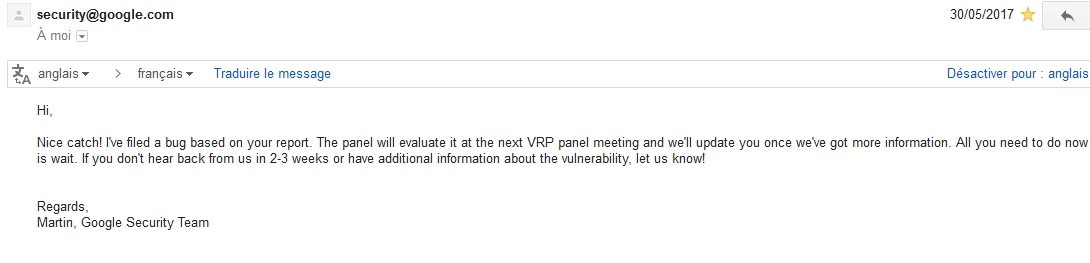
- 01/06/2017 : Vendor release fix
2. Directory traversal in edutrainingcenter.withgoogle.com
Vulnerability: CWE-22 Access Vector: Remote Security Risk: High CVSS Base Score: 8.6 CVSS Vector string: CVSS:3.0/AV:N/AC:L/PR:N/UI:N/S:C/C:H/I:N/A:N
This vulnerability allows remote attackers to access restricted directories and read arbitrary files.
Steps to reproduce:
- Click on the link below:
https://edutrainingcenter.withgoogle.com/trainer_course/edu_assets/images/%5C../%5C../Gemfile
It is possible to download the Gemfile file.
Timeline (dd/mm/yyyy):
- 16/04/2017 : Initial discovery
- 16/04/2017 : Contact with vendor team
- 18/04/2017 : Vendor acknowledgement: Nice catch!
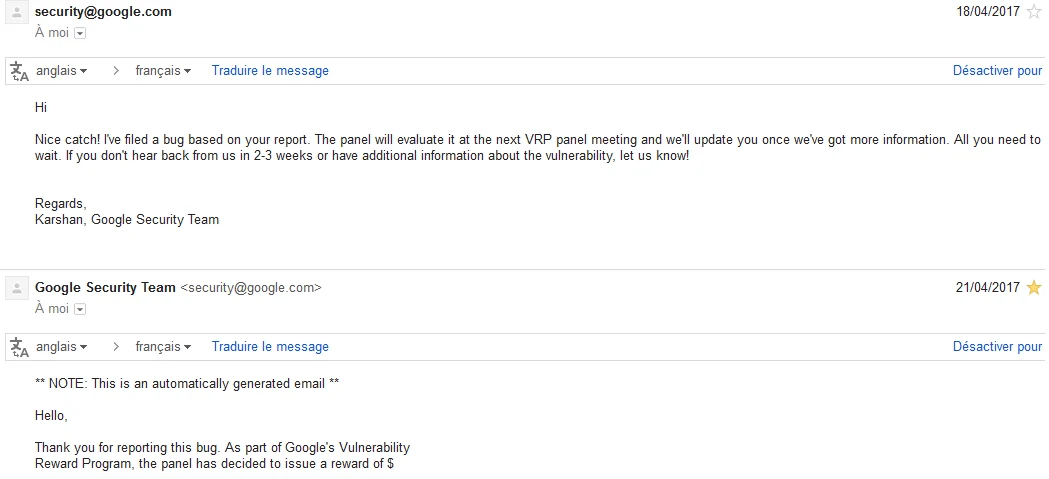
- 05/05/2017 : Bug Patched
3. Stored and reflected XSS in kaggle.com
Access Vector: Remote Security Risk: High Vulnerability: CWE-79 CVSS Base Score: 7.2 CVSS Vector string: CVSS:3.0/AV:N/AC:L/PR:N/UI:N/S:C/C:L/I:L/A:N
Two cross-site scripting vulnerabilities were found on kaggle.com. They allow remote attackers to inject arbitrary JavaScript.
Steps to reproduce:
- Log in to kaggle.com
- Change your display name to the following payload:
<marquee onstart=alert(1)>test - As soon as a victim follows you (
https://www.kaggle.com/AttackerUsername), the injection is triggered.
There is also a reflected XSS in the link below, triggered using Firefox: https://www.kaggle.com/account/authenticate/facebook/return?returnUrl=data:text/html;base64,[redacted]
Timeline (dd/mm/yyyy):
- 07/09/2017 : Initial discovery
- 07/09/2017 : Vendor notification
- 12/09/2017 : Vendor responses are shown in the following picture:
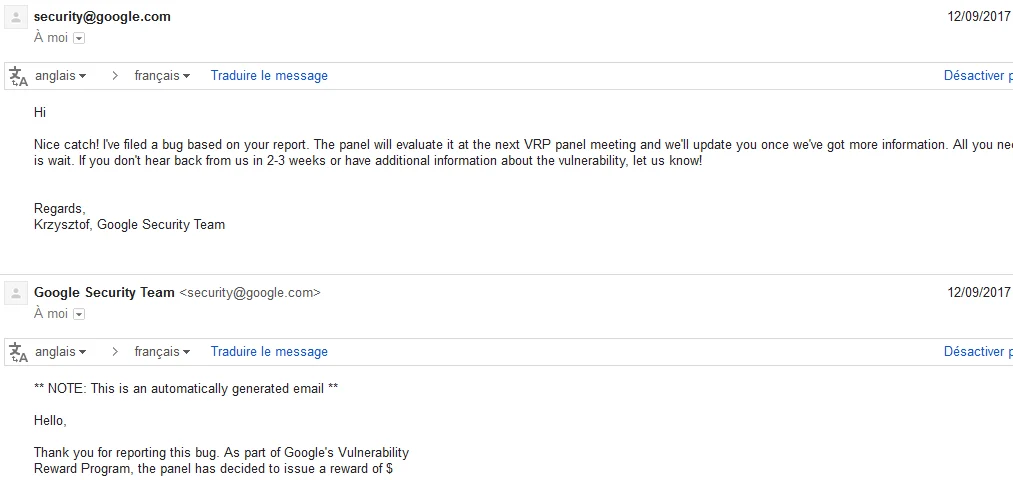
- 28/11/2017 : Vendor fixes vulnerabilities
Root cause
The builder route returned "You do not have permission to view this tour.", while the /tours/ID/csv route returned the tour's CSV data. The report does not describe the cause. The predictable, enumerable ID format made the gap easy to exploit at scale.
The education training centre issue is a path traversal: the request with encoded backslashes (%5C) followed by ../ returned the Gemfile file. The report does not describe the validation that was bypassed.
The Kaggle issues are XSS: a display name set to <marquee onstart=alert(1)>test triggered when a victim followed the attacker, and a returnUrl value using data:text/html;base64,... triggered in Firefox.
Impact
On Tour Builder, an attacker could read any private tour by ID, including all information contained in the CSV export, and could enumerate IDs through search engines or brute force because only a few characters vary. On the education training centre, a remote attacker could read arbitrary files; the report demonstrates the Gemfile. On Kaggle, an attacker could run arbitrary JavaScript in the context of a victim who follows the attacker's profile, and the reflected variant could run script through the Facebook return endpoint in Firefox.
Fix
The vendor released a fix for Tour Builder on 01/06/2017, patched the directory traversal on 05/05/2017, and fixed the Kaggle vulnerabilities on 28/11/2017. In general terms, the CSV route should apply the same authorisation check as the builder route, the file-serving path should reject traversal sequences including encoded backslashes, and user-controlled fields and redirect parameters should be output-encoded and restricted to expected schemes.
Variants to test
- Parallel export or API routes. For any resource protected in the UI, look for sibling routes such as
/tours/ID/csv,/export,/downloador JSON endpoints. A positive result is the same resource returned without the permission error. - Encoded traversal sequences. Try
%5C../,%2e%2e%2fand mixed encodings against file-serving paths. A positive result is a file outside the intended directory, such as a manifest or configuration file. - Stored XSS in profile fields. Set display names, bios and similar fields to payloads like
<marquee onstart=alert(1)>testand view the profile as another user. A positive result is script execution when the profile is loaded. - Open redirect and script URLs in return parameters. Supply
returnUrlvalues usingdata:,javascript:and protocol-relative URLs. A positive result is script execution or a redirect to an attacker-controlled destination.
Credits
- Issam Rabhi (i dot rabhi at sysdream dot com)
What happened, in plain words
Between April and September 2017, a security researcher looked at domains recently acquired by Google. The report covers withgoogle.com and kaggle.com. A website is like a building with many doors: most doors are meant for the public, but some are meant to be locked. In each case here, a door that should have been locked was open, or a door let people wander into rooms they should never see.
The three websites were:
- tourbuilder.withgoogle.com, a site where tours are identified by an ID.
- edutrainingcenter.withgoogle.com, a site with a
trainer_course/edu_assets/images/path. - kaggle.com, a site where users set a display name and follow each other.
The three kinds of problem were:
- Broken access control: the site knows who you are but forgets to check whether you are allowed to see something.
- Directory traversal: a request for a file can be tricked into walking out of the folder it should stay in, like asking a librarian for a book and adding "and while you are there, bring me the staff room ledger".
- Cross-site scripting (XSS): the site lets an attacker's text be treated as a program by a victim's browser, so the attacker's code runs as if the site itself had written it.
Below, each issue is explained from scratch, in the same order as the researcher worked through them.
Before you start: a few ideas you will need
You only need a browser and a normal computer to follow along. A few words come up again and again, so here they are first.
- URL: the address in your browser's address bar, such as
https://example.com/page. The part after the site name is called the path. - Logging in: proving to a site who you are, usually with a username and password. After that, the site gives your browser a small piece of data (often called a session cookie or token) so it can recognise you on the next page. Think of it as a wristband at an event: you show it at each door instead of your passport.
- Authorisation: the separate question of what a logged-in person is allowed to do. Authentication is "who are you?"; authorisation is "are you allowed in this room?".
- API / endpoint: a specific address on a site that returns data rather than a pretty page. When a page loads a list of tours, it often calls an endpoint behind the scenes. Endpoints are the doors of the building.
- CSV file: a plain text file where each line is a row of data, with commas between the values. Spreadsheet programs open them. It is a simple way to export a table.
- ID: a short string that identifies one item, such as one tour. If IDs are guessable, an attacker can try many of them.
- Enumeration: trying many IDs, one after another, to find the ones that exist.
- Brute forcing: guessing many possibilities quickly until one works.
- Payload: the piece of text an attacker sends hoping the site will treat it as code.
- CWE: a catalogue number for a known kind of weakness. CWE-284 is improper access control, CWE-22 is path traversal, CWE-79 is cross-site scripting.
- CVSS: a scoring system for how serious a flaw is, from 0 to 10. The vector string is the detailed breakdown behind the score.
1. Broken access control in tourbuilder.withgoogle.com
Vulnerability: CWE-284
Access Vector: Remote
Security Risk: High
CVSS Base Score: 7.5
CVSS Vector string: CVSS:3.0/AV:N/AC:L/PR:N/UI:N/S:U/C:H/I:N/A:N
What the problem is
Access control is the set of checks a site uses to decide who may see what. It rests on three ideas: authentication (proving who someone is), authorisation (deciding what they may do) and accountability (keeping a record of what happened).
Tour Builder lets people create tours. Some tours are public and some are private. A private tour should only be visible to the person who made it. The normal builder page refused access to a private tour, but a CSV export address returned the tour's data. An attacker could therefore read other people's private tours.
How it was found and shown
The researcher logged in and tried to open a private tour through the normal page. The site refused, which showed a check existed. The next question was whether every route that serves tour data applied the same check. It did not.
Steps to reproduce:
- Log in here:
https://tourbuilder.withgoogle.com - Now try to access to the following private tour:
https://tourbuilder.withgoogle.com/builder#play/[redacted] - Then you will get the following message :
"You do not have permission to view this tour." - We were able to bypass this protection and get access to this private tour with the link below:
https://tourbuilder.withgoogle.com/tours/[redacted]/csv
Line by line:
- The first address is the site's home page. Logging in gives your browser its wristband, so the site knows who you are.
- The second address is the normal way to open a tour. The long string after
#play/is the tour's ID. The#part is handled by the browser and is not sent to the server, but the page's own code reads it and asks the server for that tour. - The message is the site's polite refusal. This is the locked door working as intended.
- The fourth address is a different door to the same tour: instead of the builder page, it asks for a CSV export of the tour. The site returned the file.
Then, by checking the downloaded csv file, it is possible to find all information related to this private tour.
The proof of concept is shown in the following picture:
The picture shows the proof of concept.
Because every private tour follows the same pattern, the trick works for any tour, not just the one in the example. The report puts it like this: since all private tours have the same format https://tourbuilder.withgoogle.com/builder#play/ID, it is possible to get an unauthorized access to any tour by following this format: https://tourbuilder.withgoogle.com/tours/ID/csv.
In other words, swap the ID into the export address and the file comes back. The only thing an attacker needs is the ID.
Finding IDs
IDs can be collected in two ways. The first is to let a search engine do the work. Google lets you search with special operators, and there is a public collection of such search recipes called GHDB (Google Hacking Database). The researcher used this query:
site:tourbuilder.withgoogle.com/tour intitle:"Sign in"
This asks the search engine for pages on that site whose title contains "Sign in". It returned several links of the form https://tourbuilder.withgoogle.com/builder#play/ID:
https://tourbuilder.withgoogle.com/builder#play/[redacted]
https://tourbuilder.withgoogle.com/builder#play/[redacted]
https://tourbuilder.withgoogle.com/builder#play/[redacted]
https://tourbuilder.withgoogle.com/builder#play/[redacted]
...
Each line is a tour address with its ID at the end. The ... means the list went on. The search returned several tour addresses with their IDs.
The second way is guessing. Brute forcing private IDs also works, as in fact only a few characters change (7 chars). If only seven characters vary between IDs, a computer can try every combination in a reasonable time. Think of a bike lock with seven dials: not trivial, but far from impossible for a machine.
Timeline (dd/mm/yyyy)
-
28/05/2017 : Initial discovery
-
28/05/2017 : Contact with vendor team
-
30/05/2017 : Vendor response : Nice catch!
Vendor response From the original on sysdream.com -
01/06/2017 : Vendor release fix
The picture shows the vendor's reply, confirming the finding. The fix arrived two days after the reply.
2. Directory traversal in edutrainingcenter.withgoogle.com
Vulnerability: CWE-22
Access Vector: Remote
Security Risk: High
CVSS Base Score: 8.6
CVSS Vector string: CVSS:3.0/AV:N/AC:L/PR:N/UI:N/S:C/C:H/I:N/A:N
What the problem is
Web servers store files in folders, just like your computer. A path like images/photo.png means "the file photo.png inside the images folder". There is a special notation, ../, which means "go up one folder". It is useful when a page needs to refer to a file in a parent folder. It is also dangerous: if a site accepts ../ from a visitor without cleaning it, the visitor can walk up out of the folder they were meant to stay in and read files elsewhere on the server.
This is called directory traversal or path traversal. The everyday comparison: a hotel clerk is told to fetch a towel from cupboard 12. If the clerk blindly follows any instruction written on the request slip, a guest can write "cupboard 12, then the manager's office" and get the office keys.
On edutrainingcenter.withgoogle.com, images live under a path that begins trainer_course/edu_assets/images/. The researcher suspected that this path might accept traversal sequences.
How it was shown
Steps to reproduce:
- Click on the link below:
https://edutrainingcenter.withgoogle.com/trainer_course/edu_assets/images/%5C../%5C../Gemfile
It is possible to download the Gemfile file.
Line by line:
- The address starts in the images folder, as a normal picture request would. Then comes
%5C, which is how a backslash (\) is written when it has to travel inside a URL, followed by../. The sequence repeats. Each../asks the server to go up one folder. Two of them climb two levels. The last part,Gemfile, names a file that lives at the top of the application, not in the images folder. The server followed the instructions and returned the file.Gemfileis a file the researcher was able to download.
The report does not describe the validation that was bypassed, only that the request worked.
Timeline (dd/mm/yyyy)
-
16/04/2017 : Initial discovery
-
16/04/2017 : Contact with vendor team
-
18/04/2017 : Vendor acknowledgement: Nice catch!
Vendor response From the original on sysdream.com -
05/05/2017 : Bug Patched
The picture shows the vendor acknowledging the report. The patch came about two and a half weeks later.
3. Stored and reflected XSS in kaggle.com
Access Vector: Remote
Security Risk: High
Vulnerability: CWE-79
CVSS Base Score: 7.2
CVSS Vector string: CVSS:3.0/AV:N/AC:L/PR:N/UI:N/S:C/C:L/I:L/A:N
What the problem is
A browser does not just display text: it also runs small programs called JavaScript that pages include. Normally the site writes those programs and the browser trusts them. Cross-site scripting happens when a site lets a visitor's text be treated as one of those programs. The browser cannot tell the difference, so the attacker's code runs with the site's trust, inside the victim's logged-in session.
There are two common flavours:
- Stored XSS: the malicious text is saved on the server, for example in a profile field, and runs for everyone who later views it.
- Reflected XSS: the malicious text is not saved; it is placed in a link, and the site echoes it back into the page when the victim clicks the link.
Kaggle had one of each. The report says two cross-site scripting vulnerabilities were found on kaggle.com, and that they allow remote attackers to inject arbitrary JavaScript.
The stored one
Steps to reproduce:
- Please login to kaggle.com
- Then change your display name to the following payload:
<marquee onstart=alert(1)>test - As soon as a victim follows you (
https://www.kaggle.com/AttackerUsername), the injections are triggered.
Line by line:
- Logging in gives the attacker an account and a profile page.
- The display name is the name shown on the profile. The payload is a piece of HTML:
<marquee>is an old tag that makes text scroll, andonstartis an attribute that tells the browser to run some JavaScript when the scrolling starts. The JavaScript here isalert(1), which pops up a small box with the number 1. The wordtestafter the tag is ordinary text. If the site stores this name and later shows it without neutralising the tag, every visitor's browser runsalert(1). - Following someone on Kaggle means subscribing to their updates. When a victim follows the attacker, the victim's browser loads the attacker's profile, sees the stored name, and runs the script. That is why this is called stored: the payload sits on the server waiting for victims.
The report does not describe the encoding or filtering that was bypassed.
The reflected one
There is also a reflected XSS in the link below (triggered using Firefox): https://www.kaggle.com/account/authenticate/facebook/return?returnUrl=data:text/html;base64,[redacted]
Line by line:
- The address is the page Kaggle sends you back to after a Facebook login. It takes a
returnUrlparameter, which tells it where to go next. - The value here is not a normal web address. It begins
data:text/html;base64,, which is a way of embedding a whole web page inside a link. The long string after the comma is that page, encoded in base64 so it survives being put in a URL. - Decoded, the base64 part is a tiny HTML page containing a script that calls
alert('XSS'). When the browser follows thedata:link, it renders that page and runs the script. - The report notes this was triggered using Firefox, which at the time was willing to follow a
data:address in this position.
Timeline (dd/mm/yyyy)
-
07/09/2017 : Initial discovery
-
07/09/2017 : Vendor notification
-
12/09/2017 : Vendor responses are shown in the following picture:
Reflected XSS From the original on sysdream.com -
28/11/2017 : Vendor fixes vulnerabilities
The picture shows the vendor's replies. The fixes came in late November, a little over two months after the report.
Why it worked, and what it means
On Tour Builder, the builder page refused with "You do not have permission to view this tour.", but the /tours/ID/csv route returned the tour's data. The IDs were predictable and could be collected from search engines or guessed, so the gap could be used at scale. An attacker could read any private tour by ID, including everything in the CSV export.
On the education training centre, the request with encoded backslashes (%5C) followed by ../ returned the Gemfile file. A remote attacker could read files they should never see.
On Kaggle, a display name set to <marquee onstart=alert(1)>test triggered when a victim followed the attacker, and a returnUrl value using data:text/html;base64,... triggered in Firefox. An attacker could run JavaScript in the browser of anyone who followed their profile, and the reflected variant could run script through the Facebook return page in Firefox.
How the vendor fixed it
The vendor released a fix for Tour Builder on 01/06/2017, patched the directory traversal on 05/05/2017, and fixed the Kaggle vulnerabilities on 28/11/2017. In general terms, the export route should apply the same permission check as the builder page, the file-serving path should reject traversal sequences including encoded backslashes, and user-controlled fields and redirect parameters should be output-encoded and limited to expected address types.
Similar things to look for
These patterns repeat on many sites. The list below is a way to think about where to look next, not a set of instructions to attack anyone.
- Other export or data routes. If a page protects something in the interface, look for sibling addresses such as
/tours/ID/csv,/export,/downloador JSON endpoints. A sign of trouble is the same data coming back without the permission message. - Encoded traversal sequences. Try
%5C../,%2e%2e%2fand mixed encodings against paths that serve files. A sign of trouble is a file from outside the intended folder, such as a manifest or configuration file. - Stored XSS in profile fields. Set display names, bios and similar fields to payloads like
<marquee onstart=alert(1)>testand view the profile as another user. A sign of trouble is script running when the profile loads. - Script addresses in return parameters. Supply
returnUrlvalues usingdata:,javascript:and protocol-relative addresses. A sign of trouble is script running, or a redirect to a destination the attacker chose.
Credits
- Issam Rabhi (i dot rabhi at sysdream dot com)
Glossary
- Access control: the rules a site uses to decide who may see or do what.
- Authentication: proving who you are, usually by logging in.
- Authorisation: deciding what a logged-in person is allowed to do.
- Accountability: keeping a record of who did what.
- API / endpoint: a specific address on a site that returns data rather than a page.
- Base64: a way of writing any data using only letters, digits and a few symbols, so it can travel safely inside a URL.
- Broken access control: a flaw where the site fails to check whether a person is allowed to see something.
- Brute forcing: trying many guesses quickly until one works.
- Cookie / token: a small piece of data your browser keeps after you log in, so the site can recognise you on later pages.
- Cross-site scripting (XSS): a flaw where a site lets an attacker's text be run as a program by a victim's browser.
- CSV: a plain text file where each line is a row of data, with commas between values.
- CWE: a catalogue number for a known kind of weakness, such as CWE-22 for path traversal or CWE-79 for XSS.
- CVSS: a scoring system for how serious a flaw is, from 0 to 10, with a vector string giving the breakdown.
data:URL: an address that contains the whole page inside the link itself, rather than pointing to a server.- Directory traversal (path traversal): a flaw where a request for a file can be tricked into leaving its intended folder using
../. - Display name: the name shown on a user's profile.
- GHDB: Google Hacking Database, a public collection of search-engine queries used to find exposed pages.
- HTML: the language web pages are written in, made of tags such as
<marquee>and attributes such asonstart. - JavaScript: the programming language browsers run inside web pages.
marquee: an old HTML tag that makes text scroll across the page.- Reflected XSS: XSS where the malicious text is placed in a link and echoed back by the site when the victim clicks it.
- Remote: the attacker works over the network, not sitting at the machine.
- Session: the period during which a site remembers you as logged in.
- Stored XSS: XSS where the malicious text is saved on the server and runs for everyone who later views it.
- URL: the address in your browser's address bar.
%5C: how a backslash (\) is written inside a URL.../: notation meaning "go up one folder" in a file path.

