OK Google: bypass the authentication!
The application stored the user ID in a global context before password verification, and the password intent accepted any non-empty input. Saying 'a capo' (new line) sent an empty input, triggering an exception that jumped to the default main menu, bypassing authentication and allowing access to any user's data.
 Published on techblog.mediaservice.net
During a recent assessment of a voice application we found a very intriguing vulnerability that, besides being a lot of fun to exploit, demonstrates how the complexity of modern applications, built on top of several separate components and technologies, may allow chains of bad practices to lead to surprising results.
The full write-up lives on its author's site
It belongs to its author, so we link to it rather than copy it. The other two tabs are our own rewrites, checked against it.
Context
The target was a voice application built for Google Assistant. A user could "speak" to a device in order to log into their utilities' provider account, retrieve personal information such as payments statuses and active subscriptions, and perform some dispositive actions.
The application was implemented as a Google Conversational Action. The conversation is sent to and elaborated by a DialogFlow Conversation Fulfillment, a Google cloud component that lets a developer define a series of states (intents) and, based on the voice input received, decide which intent comes next. Each intent can also elaborate the user input with custom code written by the developer, which communicates with a third service, usually fully controlled by the developer, and can communicate back to the user's device.
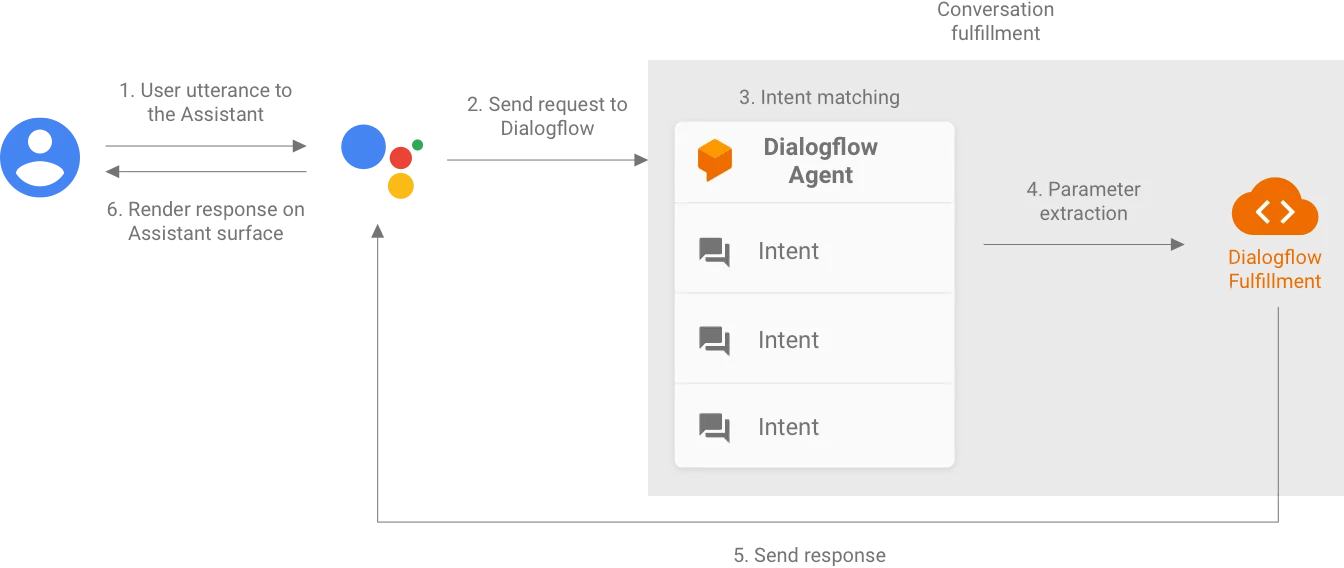
Conversation fulfillment when using Dialogflow (from Google's documentation)
The assessment followed the "Double Gray Box" approach described by the Open Source Security Testing Methodology Manual 3.0: the testers simulated a threat agent with limited knowledge of the target. They knew the application implemented a Google Conversational Action and roughly how it worked, and they had access to the developer's JavaScript code used by DialogFlow to elaborate the user input and talk to the client's backend systems. They did not have access to the DialogFlow dashboard and therefore could not observe the application flow design.
Setup
The testers had the developer's JavaScript handlers, an Android device with Google Assistant, and user codes provided by the client for testing. The client later provided access to the DialogFlow application so the flow could be reconstructed. No specific versions, endpoints or parameters beyond those shown in the code excerpts below are given.
Finding it
Analysing the JavaScript handlers, the testers immediately noticed that the application did not implement adequate authorization mechanisms: it contained a hardcoded API key used to retrieve an authenticated token to access the backend. The token was initially used in the login phase to communicate with the database and validate the user's password. It turned out that this API key gave full authorized access to the backend APIs.
The first problem was one of least privilege: although the JavaScript code is invisible to the user (hosted on Google's servers and accessible only by DialogFlow), the token should have been authorized only to validate users' passwords. An unlikely vulnerability in Google, a more likely DialogFlow account takeover, or, as happened here, a vulnerability in the application, could leverage the excessive authorization of this API key to reach critical data. A more robust mechanism would obtain an authorized token only after the password is found to be correct, restricted to the logged-in user.
With source code available, the testers combined static and dynamic analysis. While evaluating a regular expression that was validating the login, one of them had a first interaction with the actual application from an Android device. The application greeted him and asked for the username; he replied by pronouncing the user code provided by the client for the tests. The application then asked for the password. After a first attempt with the correct password, he tried a second time saying "a capo", the Italian equivalent of "return", "enter" or "new line". To his surprise, the application considered it a valid password and let him in, ready to provide all the available functionalities and information for that particular user. The testers tried with the other accounts they were allowed to use and confirmed that the magic word gave full access to all functionalities and information for all users.
Exploitation
Step 1: set the user id in the context
The initial "welcome" intent asked for the user id. If the user provided a valid one, the JavaScript code stored it inside the global "context", available to all DialogFlow intents, as shown by the simplified and anonymized code below.
function showWelcomeMessage(user){
// if the user id has been provided
// variable "user" contains user information retrieved by the backend
if (user) {
// store user information globally (available to subsequent states)
agent.setContext({ name: 'user_personal_information', lifespan: 500, parameters: { clientId: user.client_id, fiscalCode: user.fiscal_code}});
} else {
// ASK USER ID
}
}
The important part is the agent.setContext call: it writes clientId and fiscalCode into a context named user_personal_information with a lifespan of 500, so every later intent can read the user id from there. The user id is stored before any password has been checked.
Step 2: send "a capo" as the password
In the following step the user was asked to insert the password. The DialogFlow intent was set to accept an input of type "@sys.any", the most generic type possible, often used as a catch-all to accept any kind of user input. According to the system entities documentation, it matches any non-empty input.
When a user pronounces the words "a capo" (Italian for "new line", "new paragraph"), the Google Assistant application translates this as the control character \n, interpreting the phrase as if the user had pressed the Enter key and hence submitting the input. The keyboard that can be used as an alternative to voice input does not let a user press Enter until there is an actual input to be sent. This is what the testers consider a bug in Google Assistant: an incorrect interpretation of a special character and an incoherent treatment of an empty input.
When this input is sent to the DialogFlow intent, it triggers an exception, since the intent expects a non-empty input, while \n is considered a lack of content.
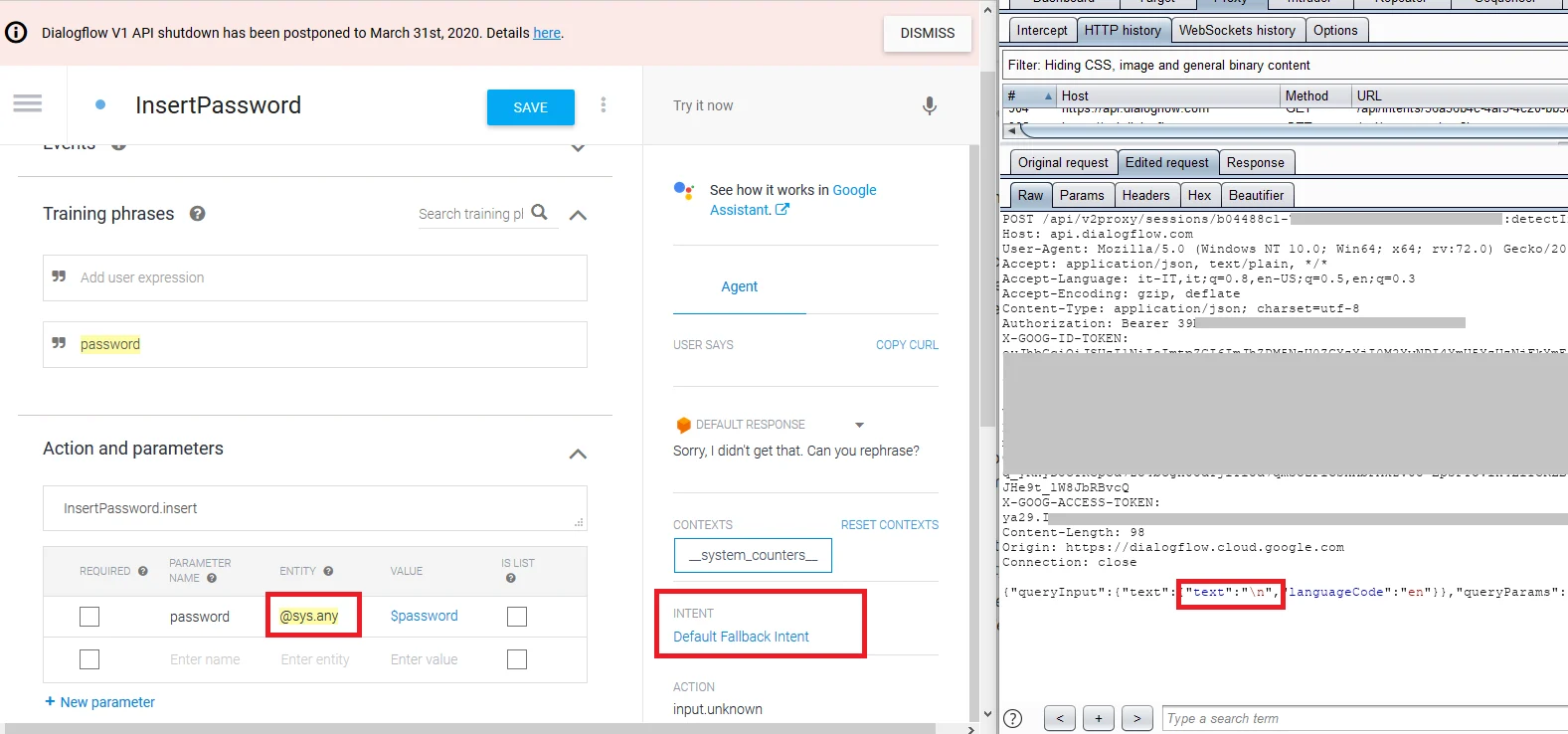
The character \n triggers the Default Intent when an entity of type @sys.any is expected
Step 3: fall into the Default Intent
Here the incorrect DialogFlow application design comes into play. The developers had set the "Main Menu" intent as the Default Intent, probably reasoning that no exceptions could be triggered before authentication. That assumption was wrong. After saying "a capo", the application, instead of going from the intent "Insert Password" to the intent "Wrong password", triggered what could be called an exception and went directly to the Default Intent, which was set as the intent providing the application menu.
Step 4: call the APIs with the stored user id and the global token
From the Main Menu, all API functionalities are called with the user id as the parameter and the authorized API token hardcoded inside the JavaScript code, as the simplified and anonymized code below shows.
function get_client_details(){
// 1. get the user id from the context
let clientId = agent.getContext('user_personal_information').parameters.clientId.replace(/\s+/g, '');

var serviceToCall = function(token) {
return new Promise((resolve, reject) => {
// 2. set the user id for the API call
let url = url_client_details.replace('<id_cliente>', encodeURIComponent(clientId));

var getClientDetails = thenRequest('GET', url,{
headers: {
// 3. use the global, fully authorized access token
'Authorization': 'Bearer ' + token.access_token,
'Content-Type': 'application/json'
}});

getClientDetails.done(function (res) {
var response = JSON.parse(res.getBody('utf8'));
// 4. do things with the response
});
});
}

return doCall(getToken, serviceToCall);
}
The handler reads clientId from the user_personal_information context and strips whitespace with replace(/\s+/g, ''), substitutes it into the URL template url_client_details, and sends a GET with Authorization: Bearer plus the token obtained through getToken. Because the token is authorized for all users and the attacker chose the user id in step 1, the attacker can access any functionality for any user.
Root cause
The chain of issues is:
- The user enters any client id, which is stored inside the DialogFlow application context.
- The user says "a capo" ("new line"), which is interpreted as a control character by Google Assistant, which in turn sends an empty (
\n) content to DialogFlow. - The intent receiving the password is set to expect an entity of type
@sys.any, which matches any non-empty input. The input\nis considered empty content: this triggers an exception in the flow, falling into the Default Intent. - The Default Intent is set to the Main application Menu, which provides access to all application functionalities.
- From here, the attacker can access any functionality for any user, because the API token stored inside DialogFlow's custom JavaScript is authorized for all users and because the attacker can set any user id during the login phase.
Even if the Google Assistant bug were fixed, the problem would remain, although it would be harder to exploit: it would be possible to intercept HTTP requests made from the device to the DialogFlow backend and replace any valid input with the character \n (or an equivalent such as \r).
Impact
Saying "a capo" in place of the password bypasses authentication. The testers confirmed full access to all functionalities and information for all users whose accounts they were allowed to use, and the design implies the same for any user id an attacker supplies.
Fix
The testers alerted the client immediately, providing an immediate mitigation: setting the user id inside the context only after the correct password was inserted. They also provided detailed remediation for all the issues in the post.
Google was alerted through its Vulnerability Reward Program on 12 November 2019 about the incoherent treatment of special characters such as \n. Google replied on 28 November 2019 saying it did not consider the issue severe enough to be tracked as a security bug, assigning it the status "Won't Fix (Infeasible)", and added that it is the developers' responsibility to write applications able to deal with unexpected input.
Later, while preparing a vulnerable demo application, the author was presented with an alert he had never noticed before when creating the DialogFlow project and recreating the vulnerable "Insert password" intent:
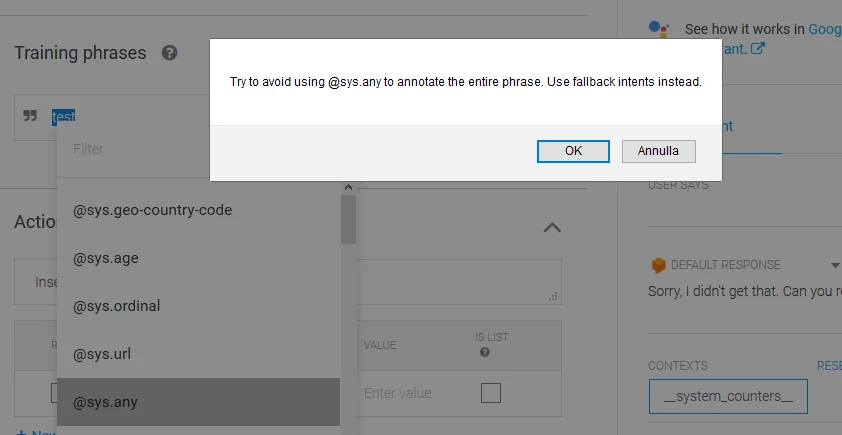
New DialogFlow alert
Furthermore, pronouncing "a capo" in place of the password field was no longer interpreted as a control character by Google Assistant: the words were literally interpreted as "a capo", as the image below shows.
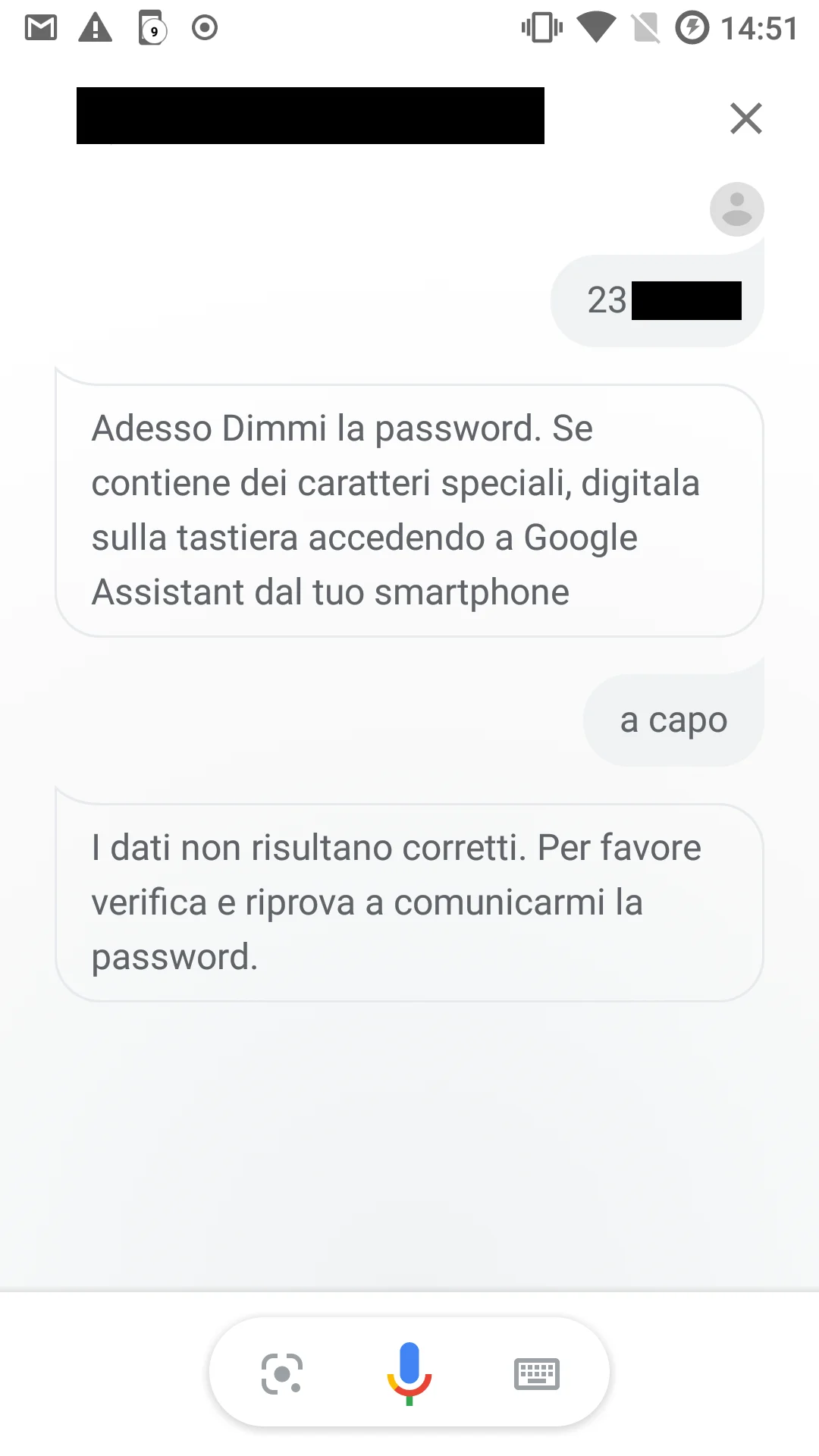
The words "a capo" are nomore treated as a control character
So it seems Google addressed the problem in both components (DialogFlow and Google Assistant). When the author reached out to understand these updates, Google said that "those changes are not made as a result of [his] report".
Variants to test
- Empty or whitespace-only input against a catch-all entity. Send
\n,\ror a bare newline where a@sys.anyslot is expected. A positive result is the conversation jumping to a menu or any state that should only be reachable after authentication. - Identity stored before authentication. Walk the login flow with a valid user id and an invalid password, then inspect whether later intents still resolve that id. A positive result is any authenticated data returned without a successful password step.
- Over-privileged fulfillment token. Review the JavaScript for a hardcoded key or token used during login. A positive result is that the same token authorises calls for other users or other operations than password validation.
- Default Intent reachable from the password state. Trigger any exception in the password intent (empty input, unexpected type, malformed value) and observe the next state. A positive result is landing on the main menu instead of an error or retry prompt.
- Client-side substitution of the voice input. Intercept the request from the device to the DialogFlow backend and replace a valid password with
\nor\r. A positive result is the same bypass without relying on the Assistant's interpretation of "a capo". - User id manipulation in the context. Change the client id in the context between the welcome intent and an API call. A positive result is data belonging to a different user being returned.
What happened, in plain words
A company built a voice assistant for Google Assistant. You could talk to it, give your customer number, say your password, and it would read back private things from your utilities account: whether a bill is paid, which subscriptions are active, and so on. It could also perform some actions on the account.
The security testers found that if, instead of saying your password, you say the Italian words "a capo" (which means "new line" or "press Enter"), the assistant lets you in. No password needed. And once inside, you can use the functions and information for any customer, not just your own.
That sounds like magic, so it is worth understanding the pieces. The assistant is not one program. It is a chain of separate services that pass messages to each other, and the bug lives in the gaps between them. Three things combined to make it work:
- The conversation was designed so that the customer number was saved before the password was ever checked.
- The code that talks to the company's servers used one single key that was allowed to do everything for everyone.
- Google Assistant treated the spoken words "a capo" as a special control character (a newline), while the service receiving it treated that same character as "nothing was typed".
Each of these alone is a bad practice. Together they let anyone walk straight past the login screen.
Background: what all these pieces are
Before the details, here is the vocabulary you need. None of it requires any prior security knowledge.
Google Assistant is the voice helper on Android phones, Google Home speakers and similar devices. You speak, it turns your speech into text, and it sends that text to whatever application is listening.
A Conversational Action is the name Google gives to an application that plugs into Google Assistant. It is a conversation with states: first it greets you, then it asks for your name, then your password, and so on. Each of those states is called an intent. An intent is simply "a thing the application is waiting to hear or do next".
DialogFlow is Google's cloud service for building those conversations. The developer defines the intents and the order they can follow. DialogFlow receives the text of what you said and decides which intent should handle it.
Fulfillment is the custom code a developer attaches to an intent. When DialogFlow decides "this is the password intent", it can run a piece of JavaScript written by the developer. That code can do real work: call the company's servers, look things up, and send an answer back to your device. The diagram below, taken from Google's own documentation, shows this round trip: your words go to DialogFlow, DialogFlow matches an intent and runs the fulfillment, the fulfillment talks to the company's systems, and the answer is rendered back on your phone or speaker.
Conversation fulfillment when using Dialogflow (from Google's documentation)
A backend is the company's own server, the one that actually holds customer records. The voice application is only a front door; the backend is the room with the filing cabinets.
An API is the way one program asks another program for something. Think of it as a service counter: you hand over a request in an agreed format, and you get back an answer in an agreed format. The voice code uses the backend's API to fetch a customer's details.
A token (or API key) is a secret string that proves to the backend who is asking. It works like a wristband at an event: show it and you are let in without explaining yourself again. If a token is too powerful, anyone holding it can do too much.
Authentication means proving who you are, usually with a password. Authorisation means deciding what you are allowed to do once you are in. They are different questions: "is this really you?" and "are you allowed to open this drawer?".
An authentication bypass is the vulnerability class here: a way to get past the identity check without knowing the secret. You do not guess the password; you make the application skip the step where the password mattered.
A control character is a character that is not printed but tells a program to do something, like starting a new line. When you press Enter on a keyboard, you are inserting one. It is invisible on screen but very real to the software reading it.
A regular expression is a pattern used to check text, for example "does this look like a valid customer code?". The testers were reading one of these when they first tried the live application.
How the test was set up
The testers followed an approach called Double Gray Box, from a methodology document, the Open Source Security Testing Methodology Manual 3.0. "Gray box" means the testers are not completely in the dark: they know something about how the system is built, but not everything. Here they knew the application was a Google Conversational Action and roughly how it worked, and they had the developer's JavaScript code. They did not have access to the DialogFlow dashboard, so they could not see the conversation design itself. That is why the first discovery came as a surprise and the explanation came later.
They tested from an Android device with Google Assistant, using customer codes the client had given them for testing. Later the client gave them access to the DialogFlow application so they could reconstruct the flow.
Finding the first problem in the code
Reading the JavaScript handlers, the testers noticed straight away that the application did not implement adequate authorisation mechanisms. Inside the code there was a hardcoded API key, and that key was used to obtain an authenticated token for the backend. The token was meant for the login step: it let the code talk to the database and check whether the password was correct. But in reality that key gave full authorised access to the backend APIs, not just to password checking.
Why is that a problem? The JavaScript is invisible to the ordinary user: it runs on Google's servers and only DialogFlow can reach it. But invisible is not the same as safe. A security principle called least privilege says every key and every account should be allowed to do only the minimum it needs. This key needed to check passwords. It could do everything. So if anything went wrong anywhere in the chain, an unlikely flaw in Google, a more likely takeover of the DialogFlow account, or, as happened, a flaw in the application itself, that over-powerful key could be used to reach critical data.
A better design would be: check the password first, and only if it is correct obtain a token, with that token limited to the one logged-in user.
The accidental discovery
When testers have source code, they like to combine reading it (static analysis) with actually using the application (dynamic analysis). While looking at a regular expression that validated the login, one of them opened the real application on an Android device.
The application greeted him and asked for the username. He said the customer code the client had provided for tests. The application then asked for the password. He first tried the correct password. Then he tried a second time, saying "a capo", the Italian for "return", "enter" or "new line".
To his surprise, the application accepted it as a valid password and let him in, with all the functions and information for that customer available. The team then tried the other accounts they were allowed to use and confirmed that the magic word gave full access to all functions and information for all users. In the author's words: Apriti sesamo! (open sesame).
At this point they had a working bypass but no explanation. The client then gave them access to the DialogFlow application, and a colleague noticed what happened after saying "a capo": instead of moving from the intent "Insert Password" to the intent "Wrong password", the conversation threw what you can think of as an exception and jumped directly to the Default Intent, which was configured as the application menu. That observation let them rebuild the whole flow.
Step by step: how the bypass works
Step 1: the customer number is saved before any password check
The first intent, the welcome, asked for the user id. If the user gave a valid one, the JavaScript stored it in a global context, a shared memory that every later intent can read. Here is the simplified and anonymised code:
function showWelcomeMessage(user){
// if the user id has been provided
// variable "user" contains user information retrieved by the backend
if (user) {
// store user information globally (available to subsequent states)
agent.setContext({ name: 'user_personal_information', lifespan: 500, parameters: { clientId: user.client_id, fiscalCode: user.fiscal_code}});
} else {
// ASK USER ID
}
}
Line by line:
function showWelcomeMessage(user){declares a function that receives auserobject. That object is what the backend returned when the code looked up the customer code.- The comment
// if the user id has been providedexplains the check that follows. if (user) {means: if a user was actually found for the code that was spoken, continue.agent.setContext({ name: 'user_personal_information', ... })is the important line. It writes information into a named storage area calleduser_personal_information, so that every later intent can read it.agentis the object DialogFlow gives the code to talk to the conversation.lifespan: 500says how many conversation turns this memory should survive. A large number means it stays for a long time.parameters: { clientId: user.client_id, fiscalCode: user.fiscal_code}stores the customer's identifier and their fiscal code (an Italian tax identifier) in that memory.} else { // ASK USER ID }is the branch taken when no valid user was found: the application asks for the id again.
The key point: the customer number is written into shared memory before any password has been checked. From that moment on, the rest of the conversation already knows who you claim to be.
Step 2: saying "a capo" sends an empty input
Next the user was asked for the password. That intent was configured to accept an input of type @sys.any. In DialogFlow, @sys.any is the most generic input type there is, a catch-all that accepts any kind of text. According to Google's documentation on system entities, it matches any non-empty input. That word "non-empty" is the hinge the whole bug turns on.
When someone says "a capo", Google Assistant translates the phrase into the control character \n, as if the user had pressed Enter and submitted the input. A physical keyboard used instead of voice does not let you press Enter until there is something typed to send. The testers consider this a bug in Google Assistant: a special character interpreted incorrectly, and an empty input treated inconsistently.
When that input reaches the DialogFlow intent, it triggers an exception, because the intent expects a non-empty input and \n counts as no content at all.
The character \n triggers the Default Intent when an entity of type @sys.any is expected
Step 3: the exception lands on the main menu
Here the incorrect DialogFlow application design matters. The developers had set the "Main Menu" intent as the Default Intent. The Default Intent is the fallback: where the conversation goes when nothing else matches or something goes wrong. They probably reasoned that no exception could happen before authentication, so the fallback was safe. That assumption was wrong.
After "a capo", the conversation did not go from "Insert Password" to "Wrong password". It threw the exception and went straight to the Default Intent, which is the application menu. In other words, the error path led to the logged-in area.
Step 4: the menu calls the backend with the saved id and the all-powerful token
From the main menu, every API function is called using the customer id as a parameter and the authorised API token hardcoded in the JavaScript.
function get_client_details(){
// 1. get the user id from the context
let clientId = agent.getContext('user_personal_information').parameters.clientId.replace(/\s+/g, '');

var serviceToCall = function(token) {
return new Promise((resolve, reject) => {
// 2. set the user id for the API call
let url = url_client_details.replace('<id_cliente>', encodeURIComponent(clientId));

var getClientDetails = thenRequest('GET', url,{
headers: {
// 3. use the global, fully authorized access token
'Authorization': 'Bearer ' + token.access_token,
'Content-Type': 'application/json'
}});

getClientDetails.done(function (res) {
var response = JSON.parse(res.getBody('utf8'));
// 4. do things with the response
});
});
}

return doCall(getToken, serviceToCall);
}
Line by line:
function get_client_details(){declares the function that fetches a customer's details.let clientId = agent.getContext('user_personal_information').parameters.clientId.replace(/\s+/g, '');reads the customer id back out of the shared memory written in step 1, then removes any whitespace from it with a regular expression. So the id comes from whatever the user said at the start, not from a verified login.var serviceToCall = function(token) {defines a function that will run once a token is available.return new Promise((resolve, reject) => {sets up a Promise, a standard JavaScript way of handling something that finishes later, such as a network call.let url = url_client_details.replace('<id_cliente>', encodeURIComponent(clientId));builds the request address by putting the customer id into a template.encodeURIComponentmakes the id safe to place inside a URL.var getClientDetails = thenRequest('GET', url,{sends an HTTPGETrequest, the same kind your browser sends when you open a page, to that address.headers: { 'Authorization': 'Bearer ' + token.access_token, 'Content-Type': 'application/json' }attaches the credentials.Authorization: Bearerfollowed by a token is the standard way of saying "let me in, here is my wristband".Content-Type: application/jsonsays the body is in JSON, a common text format for structured data.getClientDetails.done(function (res) { var response = JSON.parse(res.getBody('utf8')); ... });runs when the answer arrives: it takes the response body as text and parses it from JSON into a usable object.return doCall(getToken, serviceToCall);obtains a token throughgetTokenand then runsserviceToCallwith it.
Because that token is authorised for all users, and because the attacker chose the customer id back in step 1, the attacker can use any function for any customer.
Why it worked, in one chain
The sequence of issues, in order:
- The user enters any customer id, and it is stored in the DialogFlow application context.
- The user says "a capo" ("new line"), which Google Assistant interprets as a control character and sends as empty (
\n) content to DialogFlow. - The password intent expects an entity of type
@sys.any, which matches any non-empty input. The input\ncounts as empty, so an exception is triggered and the flow falls into the Default Intent. - The Default Intent is set to the main application menu, which gives access to all application functions.
- From there the attacker can use any function for any user, because the API token in DialogFlow's custom JavaScript is authorised for all users, and because the attacker can set any customer id during login.
Even if the Google Assistant bug were fixed, the problem would remain, though it would be harder to exploit: someone could intercept the HTTP requests sent from the device to the DialogFlow backend and replace any valid input with the character \n, or an equivalent such as \r.
What the impact was
Saying "a capo" instead of the password bypasses authentication. The testers confirmed full access to all functions and information for all the users whose accounts they were allowed to use, and the design implies the same for any customer id an attacker supplies.
The fix and Google's response
The testers alerted the client immediately. They gave an immediate mitigation: set the customer id in the context only after the correct password has been entered. They also gave detailed remediation for every issue in the post.
They also alerted Google through its Vulnerability Reward Program on 12 November 2019 about the inconsistent treatment of special characters such as \n. Google replied on 28 November 2019 saying it did not consider the issue severe enough to be tracked as a security bug, gave it the status "Won't Fix (Infeasible)", and added that it is the developers' responsibility to write applications able to deal with unexpected input.
Later, while preparing a vulnerable demo application for readers to try, the author was creating the DialogFlow project and recreating the vulnerable "Insert password" intent when he was shown an alert he had never noticed before:
New DialogFlow alert
And when he pronounced "a capo" in place of the password, the words were no longer interpreted as a control character by Google Assistant. They were taken literally as the words "a capo", as the image below shows:
The words "a capo" are nomore treated as a control character
So it looks as though Google addressed the problem in both components, DialogFlow and Google Assistant. The author reached out to understand these updates, and Google said that "those changes are not made as a result of [his] report".
Things worth trying if you test something similar
- Empty or whitespace-only input against a catch-all entity. Send
\n,\ror a bare newline where a@sys.anyslot is expected. A positive result is the conversation jumping to a menu, or to any state that should only be reachable after authentication. - Identity stored before authentication. Walk the login flow with a valid customer id and an invalid password, then check whether later intents still resolve that id. A positive result is any authenticated data returned without a successful password step.
- Over-privileged fulfillment token. Review the JavaScript for a hardcoded key or token used during login. A positive result is that the same token authorises calls for other users, or other operations than password validation.
- Default Intent reachable from the password state. Trigger any exception in the password intent (empty input, unexpected type, malformed value) and watch the next state. A positive result is landing on the main menu instead of an error or retry prompt.
- Client-side substitution of the voice input. Intercept the request from the device to the DialogFlow backend and replace a valid password with
\nor\r. A positive result is the same bypass without relying on the Assistant's interpretation of "a capo". - User id manipulation in the context. Change the customer id in the context between the welcome intent and an API call. A positive result is data belonging to a different user being returned.
Glossary
- API: the agreed way one program asks another program for data or actions, like a service counter with a fixed request and answer format.
- Authentication: proving who you are, usually with a password.
- Authorisation: deciding what an identified user or program is allowed to do.
- Authentication bypass: a flaw that lets someone get past the identity check without knowing the secret.
- Backend: the company's own server that holds the real data, behind the voice application.
- Context (DialogFlow): a named shared memory that intents can write to and read from, so information survives between conversation steps.
- Control character: a character that is not printed but instructs software, such as a newline produced by pressing Enter.
- Conversational Action: a Google application that plugs into Google Assistant and holds a spoken conversation with the user.
- Default Intent: the fallback intent a conversation goes to when nothing else matches or an error occurs.
- DialogFlow: Google's cloud service for designing and running voice conversations.
- Double Gray Box: a testing approach where the testers have partial knowledge of how the system is built.
- Entity (@sys.any): a DialogFlow input type;
@sys.anyis the catch-all that matches any non-empty text. - Exception: an error raised by a program when something unexpected happens, which interrupts the normal flow.
- Fulfillment: the developer's custom code attached to an intent, which can call other services and answer the user.
- Google Assistant: Google's voice helper on phones, speakers and similar devices.
- Hardcoded: written directly into the source code as a fixed value, rather than looked up or configured securely.
- HTTP GET: the standard request a browser makes to fetch something from a server.
- Intent: a state in a conversation, meaning "the thing the application is waiting to hear or do next".
- JSON: a common text format for structured data, used in requests and responses.
- Least privilege: the principle that every key, account or program should have only the minimum access it needs.
- Lifespan (context): how many conversation turns a stored context survives before it is forgotten.
- Promise: a JavaScript construct for handling something that finishes later, such as a network request.
- Regular expression: a pattern used to check or transform text.
- Token / API key: a secret string that proves to a server who is asking, like a wristband at an event.
- Vulnerability Reward Program: Google's bug bounty programme, which pays researchers who report security issues.
- Whitespace: characters that take up space but do not print, such as spaces, tabs and newlines.

