The YouTube bug that allowed unlisted uploads to any channel
The YouTube Video Builder tool allowed an attacker to upload an unlisted video to any YouTube channel by changing the channel ID in the upload request. The attacker could also trigger a server error that leaked encryption key hashes.
 Published on medium.com
It was late June when I received an invitation to test out a new product from YouTube: a video building tool that made it easy to put together advertisements with custom fonts and logos.
The full write-up lives on its author's site
It belongs to its author, so we link to it rather than copy it. The other two tabs are our own rewrites, checked against it.
Context
In late June, Ryan Kovatch received an invitation to test a new YouTube product: a video building tool that made it easy to put together advertisements with custom fonts and logos. The tool works like this: you choose a template, customise it with colours, photos and text, and then the server renders it for you. The final step of the flow also uploads the rendered video to a YouTube channel, and the interface states that the video will be saved to your channel as "Unlisted".
The email notifying the researcher of the beta.
The researcher notes that new products are not usually as hardened against attacks, which is what made the invitation interesting.
Setup
- Target: the YouTube Video Builder beta, served from
director.youtube.com. - Account: a Google account with at least one YouTube channel, plus a separate test account with its own channel ID.
- Tooling: Charles, described by the author as his "swiss army knife of debugging proxies", used to watch the traffic as he followed the steps of the builder.
- Precondition worth noting: when he tried logging into the website a day after requesting access, it let him in, even though he had not received any notification that access had been granted.
Finding it
Nothing stood out at first. The file upload feature was secure, resources were identified with long encrypted strings, and all the fields were sanitised. The interesting part came at the final step.
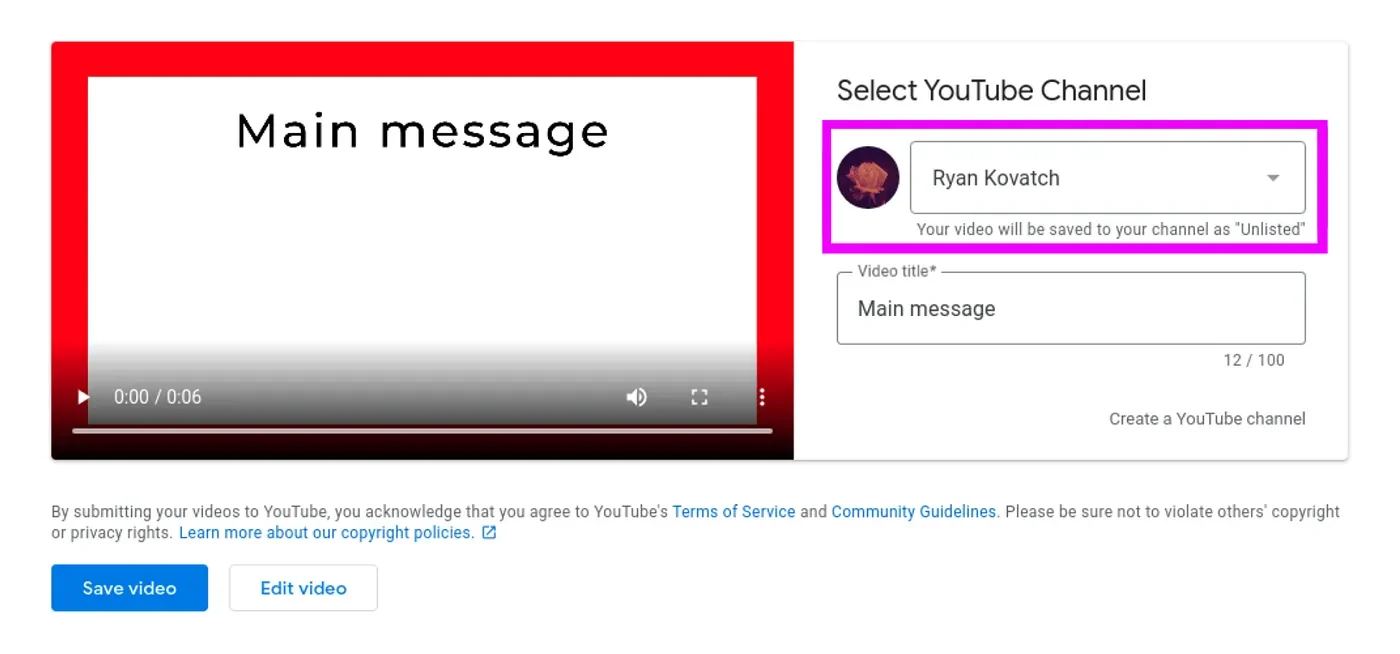
The upload screen of the video builder.
There is a menu that lets you choose from the channels associated with your Google account, and beneath it a small disclaimer: your video will be saved to your channel as "Unlisted". So the server was both rendering and uploading the video, and it was giving the user the option to choose a channel to upload to. That set off alarm bells.
Every YouTube channel has its own ID, usually in the form UCxXX0xx_X0XxxXXxxxx00Xx, found in a channel URL or the source of any video page. Looking at how the site fetched the channels on the account, the researcher found a response from the server like this:
HTTP/1.1 200 OKContent-Type: application/json; charset=utf-8{ "1": [{ "1": "UCBCW8XFPYIENZPC659Pk0kg", "2": "Ryan Kovatch", "3": "https://yt3.ggpht.com/a/..." }]}
That response contains the channel ID. He then hit "Save" to see what would happen.
Exploitation
Step 1: inspect the upload request
POST /u/0/videobuilder/_/rpc/Image2VideoUiService/UploadToYouTube HTTP/1.1Host: director.youtube.comContent-Length: 483Content-Type: application/x-www-form-urlencoded__ar=%7B%221%22%3A%7B%221%22%3A%22AFbu1Vq...%22%7D%2C%222%22%3A%22UCBCW8XFPYIENZPC659Pk0kg%22%2C%223%22%3A%221%22%2C%224%22%3A%22Created+with+YouTube+Video+Builder+using+template+%5C%22Introduce+your+brand+%286s%29.%5C%22%22%2C%225%22%3A%222755bb19-6e4b-4cd4-beca-46cc29f26625%22%7D
This is a form request. Decoded, the value of __ar was:
{ "1":{ "1":"AFbu1Vq..." }, "2":"UCBCW8XFPYIENZPC659Pk0kg", "3":"Main message", "4":"Created with YouTube Video Builder using template \"Introduce your brand (6s).\"", "5":"2755bb19-6e4b-4cd4-beca-46cc29f26625"}
The channel ID appears in field 2, alongside the title, description and template ID.
Step 2: swap the channel ID
His first move was to replace the channel ID with that of his test account. The server responded:
HTTP/1.1 200 OK
The server returned an ID to track the progress of the upload, and then he got a link to it on YouTube. The video had been uploaded as an Unlisted video to a channel he did not own. He reported it right away.
An email with the subject line "You now have access to YouTube Video Builder."
Step 3: understand the resource identifier
At this point the limitations were that he could not upload a video publicly, and he could only upload videos created by the site, not his own. The root issue was harmful enough, but bypassing these limits would make it considerably more serious. So he revisited the UploadToYouTube function and the payload:
{ "1":{ "1":"AFbu1Vq..." }, "2":"UCBCW8XFPYIENZPC659Pk0kg", "3":"Main message", "4":"Created with YouTube Video Builder using template \"Introduce your brand (6s).\"", "5":"2755bb19-6e4b-4cd4-beca-46cc29f26625"}
Field 1 is an encrypted string containing information about the video file (in reality much longer than shown). He later learned this is called a scottyResourceId, used all over YouTube to identify data uploaded to their servers. The idea: upload a file to another YouTube site, take the resource ID from there, and use it in this API, so the server would render and upload a custom video.
Step 4: obtain a resource ID from YouTube Studio
He uploaded a test file to YouTube Studio. The server responded with:
HTTP/1.1 200 OKX-GUploader-UploadID: ...X-Goog-Upload-Status: finalContent-Length: 405Server: UploadServerConnection: keep-alive{ "status":"STATUS_SUCCESS", "scottyResourceId":"ACKujmz..."}
This ID started with ACK but was just as long as the other one. He sent a new UploadToYouTube request to the video builder with the ID from YouTube Studio and got an error:
com.google.apps.framework.request.CanonicalCodeException:com.google.security.keymaster.KeyUnavailableException:No matching decryption key found; ciphertext had key hash XXYYZZ but no key version matched it; existing versions:keyhashes are 1:YYZZXX, 2:ZZXXYY, 3:YYXXZZ, 4:XXZZYY, see go/key_unavailable_exception.Code: PERMISSION_DENIED
The server had tried to decrypt the resource ID, but because it came from another server it could not find the matching decryption key. The exception included the hashes of all the keys it had stored, which the researcher describes as a critical data leak. He reported it and got another "Nice catch!". Further research around changing the video from unlisted to public was not successful, so he stopped there.
Root cause
The upload endpoint took the target channel ID from the client in the __ar payload, and swapping it uploaded the video to a channel the researcher did not own. That is a classic insecure direct object reference: the object identifier (the channel ID) is user-controlled and the authorisation check is missing.
The other defences in the product did not help here. File uploads were secure, resource identifiers were long encrypted strings, and fields were sanitised, but none of that protects a field that is meant to be chosen by the user and is simply not authorised. The second issue: when decryption of a foreign scottyResourceId failed, the KeyUnavailableException included the hashes of all the keys the server had stored.
Impact
With the first bug, an authenticated user of the beta could upload a video, created with the builder, as Unlisted to any channel whose ID they knew. Channel IDs are public and easy to obtain from a channel URL or any video page. The researcher points out the implications on a platform like YouTube: it would catalyse the spread of misinformation, the kind of content that sways elections and threatens democracy. The limits were that the video could not be made public and could only be content generated by the site, not an arbitrary file.
The second bug leaked the key hashes of the server's stored decryption keys through an exception message. The researcher rates this as a critical data leak, though he does not describe a way to use the hashes to decrypt anything.
Fix
The report does not describe the code change. Both bugs were confirmed as fixed on October 16.
Variants to test
- Channel or account ID in a render or upload request. Intercept the final request of any media builder and swap the destination identifier for one belonging to a second account. A positive result is a
200and the asset appearing on the other account. - Resource identifiers from a sibling service. Take an upload identifier from one Google property and submit it to another that accepts the same identifier type. A positive result is either successful reuse or, as here, a verbose decryption exception naming key versions.
- Error messages on decryption or signature checks. Send a tampered or foreign token and read the response. A positive result is a stack trace, key hash list, internal path or exception class name.
- Client-supplied ownership fields in general. Look for any request where the UI already knows the answer (your channels, your projects, your organisation) and check whether the server re-validates it. A positive result is a
200when the value is changed to something you do not own.
Timeline
All times are in PST.
| Event | Time |
|---|---|
| Received invitation | June 22 @ 9:53 AM |
| Reported first bug | June 23 @ 10:44 PM |
| Triaged as P1 | June 24 @ 6:10 AM |
| "Nice catch!" and escalated to S1 | June 24 @ 6:40 AM |
| Reported second bug | June 24 @ 6:09 PM |
| "Nice catch!" and escalated to P2S2 | June 25 @ 2:02 AM |
| Panel awards $6,337 bounty | July 2 @ 11:20 AM |
| Both bugs confirmed as fixed | October 16 @ 3:01 PM |
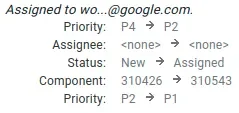
The report being escalated and assigned, at 6 AM.
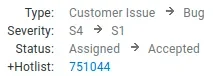
The report escalated further and then accepted, 30 minutes later.
Conclusion
Even the biggest players are prone to bugs like this. Sometimes they are more obvious, sometimes trickier to find, but they are there. There is no such thing as an impenetrable application.
What happened, in plain words
A security researcher was invited to try an early, unfinished version of a YouTube tool that builds short advertisement videos for you. While using it, he noticed that the final step of the tool asked his browser to tell the server which YouTube channel the finished video should be uploaded to. By changing that ID to a channel he did not own, he could upload a video to someone else's channel. By changing that name to a channel he did not own, he could upload a video to someone else's channel. He reported it, then kept digging and found a second, different problem: an error message that spilled internal details about the server's encryption keys. Both were fixed, and the programme paid a bounty of $6,337.
This article walks through the whole story slowly, explaining every technical idea as it appears. You only need to know how to use a browser.
Some background ideas first
Before the story starts, here are a few concepts that come up again and again.
- A server and a client. When you visit a website, your computer (the client) sends requests to a computer somewhere else (the server), which sends back answers. Think of a restaurant: you order, the kitchen prepares, the waiter brings the plate. Your browser is the customer, the server is the kitchen.
- A request. The message your browser sends to the server. It has a method (what kind of action, such as
GETto fetch something orPOSTto send something), a path (which part of the site), and often a body (the data being sent). - An API. A way for one piece of software to talk to another without a human clicking buttons. The website's buttons are just a friendly front end; behind them, the browser calls the API, which is a set of addresses the server understands. Think of a restaurant menu: the menu is the API, the kitchen only cooks what is on it.
- A proxy. A tool that sits between your browser and the server and lets you read and edit every message that passes. The researcher used one called Charles, which he calls his "swiss army knife of debugging proxies".
- A channel ID. Every YouTube channel has a unique code that identifies it, usually looking like
UCxXX0xx_X0XxxXXxxxx00Xx. It is public: you can find it in a channel's web address or in the page source of any video. - An IDOR (Insecure Direct Object Reference). A bug where the server lets you name the thing you want to act on (a channel, a file, an order) and never checks that the thing is actually yours. Like a hotel that gives you a key card and lets you type any room number into the door.
- Encryption. Scrambling data so that only someone with the right secret (a key) can read it. The scrambled result is called ciphertext.
- A hash. A short fingerprint computed from data. It cannot be turned back into the original, but it identifies it. Servers often store hashes of keys rather than the keys themselves.
The invitation
It was late June when the researcher received an invitation to test a new YouTube product: a video building tool that made it easy to put together advertisements with custom fonts and logos.
The email he got notifying him of the beta.
He did not know where YouTube got his details, joking that he must have filled in every Trusted Tester form on the web. But the invitation was an opportunity: brand new products are usually not yet hardened against attacks, because the team is still building features and security checks come later.
A day after requesting access, he tried logging in and, to his surprise, was let straight in, even though he had never received a notification saying access had been granted.
How the tool works
The tool is fairly basic. You choose a template, customise it with colours, photos and text, and then the server renders it for you. Rendering means the server takes your choices and produces the finished video file, the way a print shop takes your design and produces a poster.
To see what was really happening, he opened Charles and watched the traffic as he followed the steps. Nothing stood out at first: the file upload feature was secure, resources were identified with long encrypted strings, and all the fields were sanitised (cleaned of anything dangerous before being used). That is a discouraging result for a researcher, because it means the obvious doors are locked.
But then he reached the final step and noticed something.
The upload screen of the video builder.
There is a menu that lets you choose from the channels associated with your Google account, and beneath it a small disclaimer: your video will be saved to your channel as "Unlisted". An Unlisted video is one that does not appear in search or on the channel page, but anyone with the link can watch it.
This set off alarm bells. The server was both rendering and uploading the video, and it was letting the user choose which channel to upload to. Whenever a website lets you pick something that belongs to you, the interesting question is: what happens if you pick something that does not belong to you?
Watching how the channel list is fetched
He went back to see how the site was getting the list of YouTube channels on his account. The server answered with something like this:
HTTP/1.1 200 OKContent-Type: application/json; charset=utf-8{ "1": [{ "1": "UCBCW8XFPYIENZPC659Pk0kg", "2": "Ryan Kovatch", "3": "https://yt3.ggpht.com/a/..." }]}
Line by line:
HTTP/1.1 200 OKis the server saying the request succeeded.200is the standard code for "fine".Content-Type: application/json; charset=utf-8says the answer is in JSON, a simple text format for structured data, and uses the UTF-8 character encoding.- The body is a JSON object. The outer key
"1"holds a list (the square brackets). Inside the list is one entry, also numbered:"1"is the channel ID,"2"is the channel's display name, and"3"is a link to the channel's picture.
The important part: there was his channel ID, sitting in the response in plain sight. The website had asked the server "which channels does this logged-in person own?" and the server had answered. Now the question was what the site did with that answer when it uploaded a video.
Step 1: looking at the upload request
He hit "Save" and captured the request the browser sent:
POST /u/0/videobuilder/_/rpc/Image2VideoUiService/UploadToYouTube HTTP/1.1Host: director.youtube.comContent-Length: 483Content-Type: application/x-www-form-urlencoded__ar=%7B%221%22%3A%7B%221%22%3A%22AFbu1Vq...%22%7D%2C%222%22%3A%22UCBCW8XFPYIENZPC659Pk0kg%22%2C%223%22%3A%221%22%2C%224%22%3A%22Created+with+YouTube+Video+Builder+using+template+%5C%22Introduce+your+brand+%286s%29.%5C%22%22%2C%225%22%3A%222755bb19-6e4b-4cd4-beca-46cc29f26625%22%7D
Line by line:
POSTmeans "I am sending data to the server". The path/u/0/videobuilder/_/rpc/Image2VideoUiService/UploadToYouTubeis the address of the specific function being called. The name at the end,UploadToYouTube, tells you exactly what it does.Host: director.youtube.comis the server being talked to.Content-Length: 483says the body is 483 bytes long.Content-Type: application/x-www-form-urlencodedsays the body is formatted like a web form, with names and values joined by&and special characters percent-encoded.- The body has one field,
__ar, whose value is a long string of percent-encoded characters. Percent-encoding is how a browser writes characters that are not allowed in a URL, such as{or a space.
Decoded, the value of __ar was:
{ "1":{ "1":"AFbu1Vq..." }, "2":"UCBCW8XFPYIENZPC659Pk0kg", "3":"Main message", "4":"Created with YouTube Video Builder using template \"Introduce your brand (6s).\"", "5":"2755bb19-6e4b-4cd4-beca-46cc29f26625"}
Line by line:
- Field
"1"is a nested object holding"1", a long encrypted string. This is the identifier of the video file itself. - Field
"2"is the channel ID:UCBCW8XFPYIENZPC659Pk0kg. This is the destination channel. - Field
"3"is the title,Main message. - Field
"4"is the description, saying the video was created with the builder using a particular template. - Field
"5"is a long random-looking code, a unique identifier for this particular job.
The crucial observation: the channel ID appears in field 2, and it is sent by the browser. The channel ID appears in field 2, and it is sent by the browser. Swapping it for another channel's ID uploaded the video there.
Step 2: swapping the channel ID
His first move was to replace the channel ID with that of his separate test account. The server responded:
HTTP/1.1 200 OK
That is the server saying "done". It returned an ID to track the progress of the upload, and then he got a link to the video on YouTube. Sure enough, it had been uploaded as an Unlisted video to a channel he did not own. He reported it right away.
This is the IDOR in action: the channel ID in the request was user-controlled, and changing it uploaded the video to a channel he did not own.
An email with the subject line "You now have access to YouTube Video Builder."
Step 3: understanding the resource identifier
At this point the bug had limits. He could not upload a video publicly, and he could only upload videos created by the site, not his own file. The root issue was already harmful, but if he could get past those two limits it would be considerably more serious. So he went back to the UploadToYouTube request and its payload:
{ "1":{ "1":"AFbu1Vq..." }, "2":"UCBCW8XFPYIENZPC659Pk0kg", "3":"Main message", "4":"Created with YouTube Video Builder using template \"Introduce your brand (6s).\"", "5":"2755bb19-6e4b-4cd4-beca-46cc29f26625"}
Field "1" is an encrypted string containing information about the video file. In reality it is much longer than shown. He later learned that this kind of identifier is called a scottyResourceId, and that it is used all over YouTube to identify data uploaded to their servers. Think of it as a claim ticket at a cloakroom: the server keeps your file, and the ticket is how you refer to it later.
His idea: what if he uploaded a file to a different YouTube site, took the resource ID from there, and used it in this API? Then the video builder would render and upload a custom video of his choosing.
Step 4: getting a resource ID from YouTube Studio
He uploaded a test file to YouTube Studio, the tool creators use to manage their own videos. The server responded with:
HTTP/1.1 200 OKX-GUploader-UploadID: ...X-Goog-Upload-Status: finalContent-Length: 405Server: UploadServerConnection: keep-alive{ "status":"STATUS_SUCCESS", "scottyResourceId":"ACKujmz..."}
Line by line:
HTTP/1.1 200 OKagain means success.X-GUploader-UploadID: ...is a header (extra information attached to the response) identifying the upload. TheX-prefix is a common convention for custom headers.X-Goog-Upload-Status: finalsays the upload has finished.Content-Length: 405says the body is 405 bytes.Server: UploadServernames the software that handled it.Connection: keep-alivesays the connection can stay open for more requests.- The body is JSON:
"status":"STATUS_SUCCESS"confirms success, and"scottyResourceId":"ACKujmz..."is the claim ticket for the uploaded file.
This ID started with ACK, but was just as long as the other one. He sent a new UploadToYouTube request to the video builder, this time with the ID from YouTube Studio, and got an error:
com.google.apps.framework.request.CanonicalCodeException:com.google.security.keymaster.KeyUnavailableException:No matching decryption key found; ciphertext had key hash XXYYZZ but no key version matched it; existing versions:keyhashes are 1:YYZZXX, 2:ZZXXYY, 3:YYXXZZ, 4:XXZZYY, see go/key_unavailable_exception.Code: PERMISSION_DENIED
Line by line:
CanonicalCodeExceptionis the outer error type, meaning the request failed in a standard way.KeyUnavailableExceptionis the specific problem: a key needed to decrypt something was not available.No matching decryption key foundsays the server tried to decrypt the resource ID but could not find the right key.ciphertext had key hash XXYYZZ but no key version matched itsays the encrypted data was stamped with the fingerprint of the key that made it, and no stored key matched that fingerprint.existing versions:keyhashes are 1:YYZZXX, 2:ZZXXYY, 3:YYXXZZ, 4:XXZZYYlists the fingerprints of every key version the server has stored. This is the leak.Code: PERMISSION_DENIEDis the overall result code.
So the idea did not work: the resource ID from YouTube Studio was encrypted with a different key than the video builder uses, so the builder could not read it. But the error was worse than the failure. The server had tried to decrypt the resource ID, failed, and then told the caller the fingerprints of all its stored keys. The researcher describes this as a critical data leak. He reported it and got another "Nice catch!".
Further research around changing the video from unlisted to public was not successful, so he stopped there.
Why it worked
The upload endpoint took the target channel ID from the client in the __ar payload, and swapping it uploaded the video to a channel the researcher did not own. That is a classic insecure direct object reference: the object identifier (the channel ID) is user-controlled and the authorisation check is missing.
The other defences in the product did not help here. File uploads were secure, resource identifiers were long encrypted strings, and fields were sanitised, but none of that protects a field that is meant to be chosen by the user and is simply not authorised.
The second issue: when decryption of a foreign scottyResourceId failed, the KeyUnavailableException included the hashes of all the keys the server had stored.
What it could have been used for
With the first bug, a logged-in user of the beta could upload a video, created with the builder, as Unlisted to any channel whose ID they knew. Channel IDs are public and easy to obtain from a channel URL or any video page. The researcher points out the implications on a platform like YouTube: it would catalyse the spread of misinformation, the kind of content that sways elections and threatens democracy. The limits were that the video could not be made public and could only be content generated by the site, not an arbitrary file.
The second bug leaked the key hashes of the server's stored decryption keys through an exception message. The researcher rates this as a critical data leak, though he does not describe a way to use the hashes to decrypt anything.
The fix
The report does not describe the code change. Both bugs were confirmed as fixed on October 16.
Things worth trying elsewhere
- Channel or account ID in a render or upload request. Intercept the final request of any media builder and swap the destination identifier for one belonging to a second account. A positive result is a
200and the asset appearing on the other account. - Resource identifiers from a sibling service. Take an upload identifier from one Google property and submit it to another that accepts the same identifier type. A positive result is either successful reuse or, as here, a verbose decryption exception naming key versions.
- Error messages on decryption or signature checks. Send a tampered or foreign token and read the response. A positive result is a stack trace, key hash list, internal path or exception class name.
- Client-supplied ownership fields in general. Look for any request where the interface already knows the answer (your channels, your projects, your organisation) and check whether the server re-validates it. A positive result is a
200when the value is changed to something you do not own.
Timeline
All times are in PST.
| Event | Time |
|---|---|
| Received invitation | June 22 @ 9:53 AM |
| Reported first bug | June 23 @ 10:44 PM |
| Triaged as P1 | June 24 @ 6:10 AM |
| "Nice catch!" and escalated to S1 | June 24 @ 6:40 AM |
| Reported second bug | June 24 @ 6:09 PM |
| "Nice catch!" and escalated to P2S2 | June 25 @ 2:02 AM |
| Panel awards $6,337 bounty | July 2 @ 11:20 AM |
| Both bugs confirmed as fixed | October 16 @ 3:01 PM |
The report being escalated and assigned, at 6 AM.
The report escalated further and then accepted, 30 minutes later.
Conclusion
Even the biggest players are prone to bugs like this. Sometimes they are more obvious, sometimes trickier to find, but they are there. There is no such thing as an impenetrable application.
Glossary
- API: a set of addresses a server understands, used by software to talk to other software without a human clicking buttons.
- Authorisation: checking that a logged-in user is allowed to do the thing they are asking for.
- Beta: an early, unfinished version of a product released to a small group for testing.
- Bounty: money paid by a company to a researcher who reports a security bug.
- Channel ID: the unique public code that identifies a YouTube channel, usually looking like
UCxXX0xx_X0XxxXXxxxx00Xx. - Ciphertext: data that has been scrambled by encryption so it cannot be read without the key.
- Client: the program on your side, usually your browser, that sends requests to a server.
- Content-Type: a header saying what format the body of a request or response is in.
- Decryption: turning scrambled ciphertext back into readable data using the right key.
- Encryption: scrambling data so only someone with the right key can read it.
- Exception: an error raised by a program when something goes wrong; the message can accidentally reveal internal details.
- Hash: a short fingerprint computed from data, which cannot be turned back into the original.
- Header: extra information attached to a request or response, such as its type or length.
- IDOR (Insecure Direct Object Reference): a bug where the server lets you name the object you want to act on and never checks that it belongs to you.
- JSON: a simple text format for structured data, using curly braces, square brackets and quoted names.
- Key: the secret used to encrypt and decrypt data.
- Percent-encoding: how a browser writes characters that are not allowed in a URL, such as
{or a space, using%followed by codes. - POST: an HTTP method meaning "I am sending data to the server".
- Proxy: a tool that sits between your browser and the server and lets you read and edit every message.
- P1, S1, P2S2: internal priority and severity labels a company uses to rank a bug.
- Render: to produce a finished file (here, a video) from a design and its settings.
- Request: the message your browser sends to a server.
- Response: the message the server sends back.
scottyResourceId: YouTube's name for the long encrypted identifier used to refer to data uploaded to its servers.- Server: the computer somewhere else that answers your browser's requests.
- Session: the server's memory of who you are while you are logged in.
- Status code: a number in the response saying how it went, such as
200for success. - Unlisted: a video that does not appear in search or on the channel page, but anyone with the link can watch it.
- X-Goog-Upload-Status: a custom header used by Google's upload service to say whether an upload has finished.

