Open S3 Bucket Accessible by any Aws User
An AWS S3 bucket associated with the website was publicly accessible without authentication, allowing any AWS user to list directories and download files. The reporter also claimed an attacker could delete the bucket and re-register it to take it over, though this was not tested.

- Triaged in 3 days
- Fixed in 9 days
- Paid in 3 days
- Disclosed after 48 days
hi team,
vulnerable URL: http://grnhse-marketing-site-assets.s3.amazonaws.com/
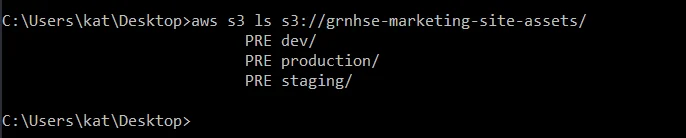
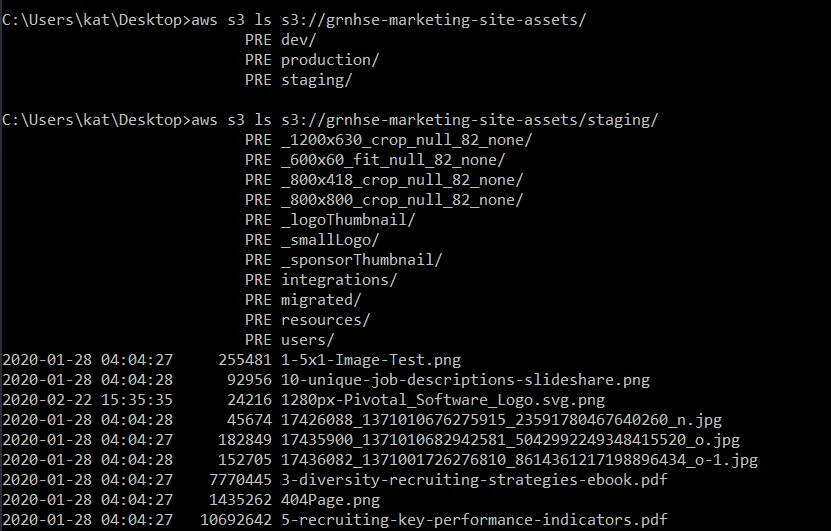
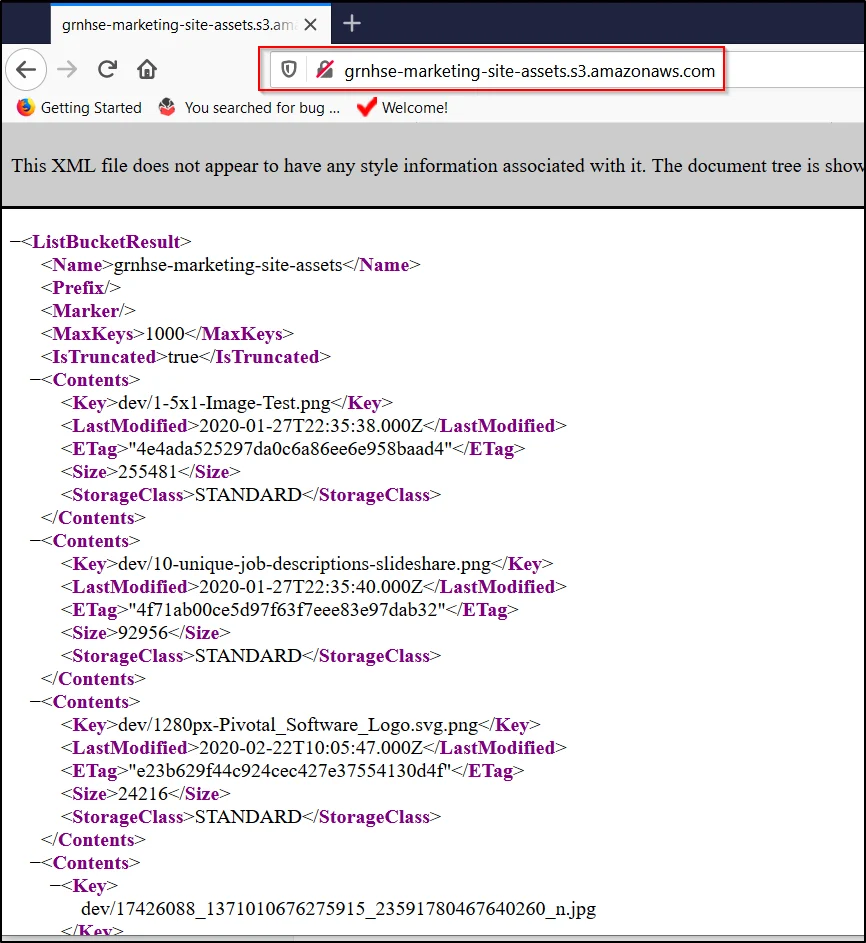
There is no authentication required to access the AWS bucket of the website. As your site was associated with AWS, any AWS user can view the content , navigate through directories and download files, public access is allowed.
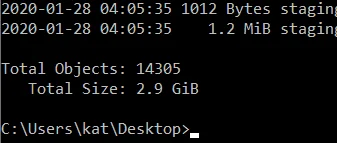
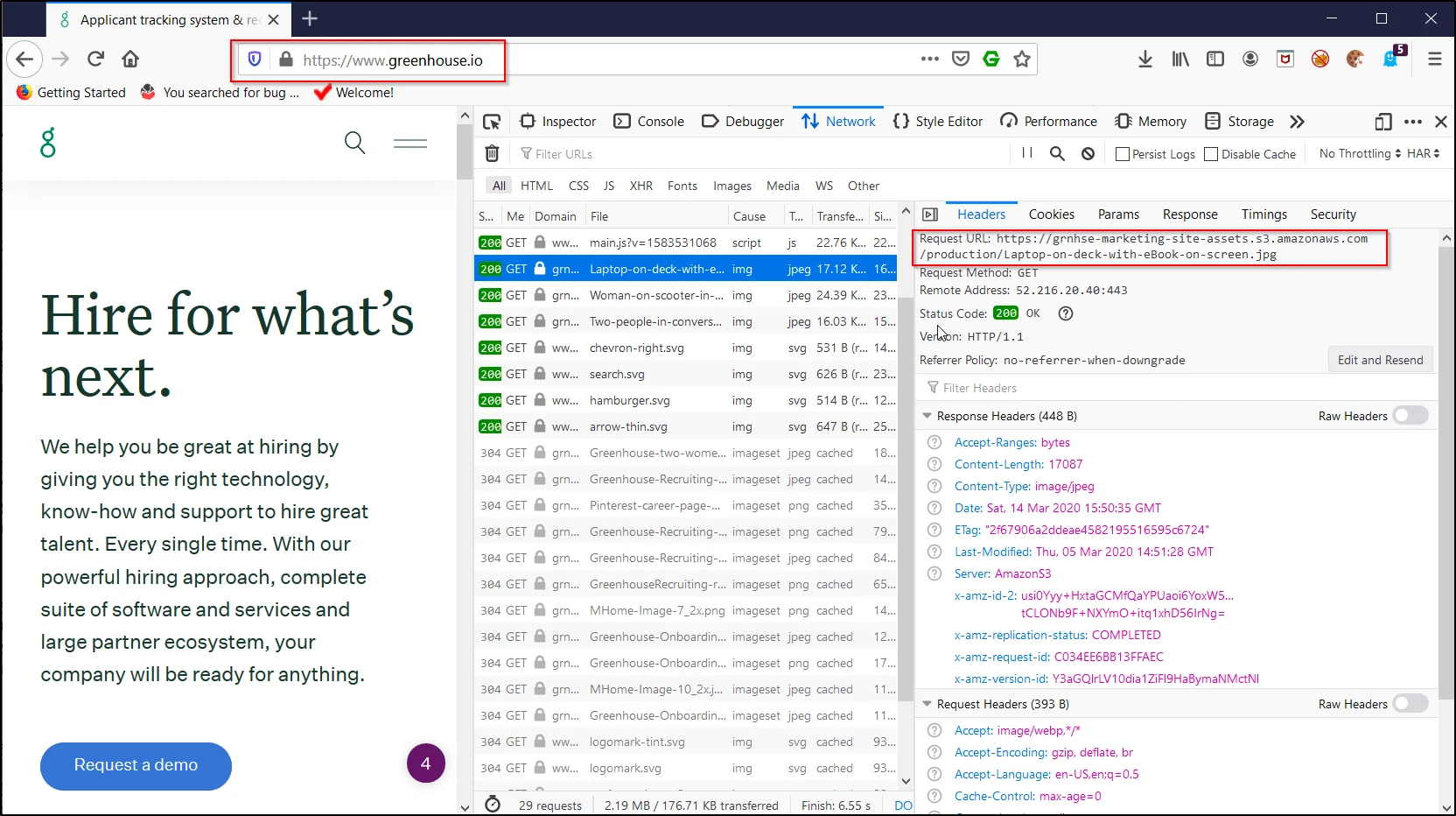
proof of concept: Please refer the screenshots attached.
[ note: I haven't modified any existing resources or harm any content ]
Impact
Impact
-
Sensitive information Leakage. -
Information disclosure about all the data in the cloud.
I haven't tried this yet as it may delete the bucket. (it is possible) an Attacker can delete the bucket using this command:- $ aws s3 rb s3://<The_bucket_name> and claim the bucket again to takeover the bucket
solution: secure the login access
Attachments

Context
Greenhouse.io is a hiring and applicant tracking platform, and the report concerns the marketing site assets served from an Amazon S3 bucket. The bucket in question is named grnhse-marketing-site-assets and is reachable at the following URL:
http://grnhse-marketing-site-assets.s3.amazonaws.com/
Normally an S3 bucket used to host site assets should serve the objects the site needs without letting arbitrary AWS users browse the bucket's contents. The researcher found that this bucket required no authentication at all.
Setup
The report does not describe any special accounts, roles, tools or versions. The only precondition is an AWS identity: the researcher frames the issue in terms of what "any AWS user" can do, and the proof of concept is a set of screenshots taken while browsing the bucket. No credentials, session tokens or configuration are shown.
Finding it
The researcher identified the bucket associated with the website and observed that it could be accessed without authentication. Because the site was associated with AWS, the researcher reasoned that any AWS user could view the content, navigate through directories and download files, since public access was allowed. This is the classic signature of an S3 bucket whose access control permits anonymous or broad read access rather than restricting it to the intended principals.
Exploitation
Step 1: Reach the bucket anonymously
The researcher opened the bucket URL directly:
http://grnhse-marketing-site-assets.s3.amazonaws.com/
No authentication was required to access the bucket. The report refers to the attached screenshots as the proof of concept.
Step 2: List the directory contents
With the bucket open, the researcher could list the objects it contained and navigate through the directory structure.
Step 3: Download files
The researcher could also download files from the bucket. The screenshots record the download access and the size of the exposed data.
Step 4: Inspect the bucket source
Step 5: Consider deletion and takeover
The researcher noted that they had not modified any existing resources or harmed any content. They also stated that they had not tried deleting the bucket because doing so might destroy it, but that deletion is possible. The command given for that is:
$ aws s3 rb s3://<The_bucket_name>
aws s3 rb removes a bucket. The researcher's reasoning is that after the bucket is deleted, an attacker could claim the bucket name again and thereby take over the bucket. The report presents this as a possibility rather than a demonstrated result.
Root cause
The bucket allowed public access: no authentication was required to view its content, navigate its directories or download files. The report says public access was allowed, without describing the policy or ACL behind it. The report does not describe the specific policy or ACL configuration, so the exact misconfiguration is not shown.
Impact
The researcher lists two impacts:
- Sensitive information leakage.
- Information disclosure about all the data in the cloud.
Beyond reading, the researcher states that an attacker could delete the bucket using the command above and then claim the bucket name again to take over the bucket. This is presented as possible but was not attempted, because of the risk of destroying the bucket. The report does not quantify how much data was exposed or what it contained.
Fix
The researcher's suggested solution is to secure the login access. In practice this means restricting the bucket so that it is not publicly readable and only the intended principals can list and fetch objects.
Variants to test
- Try the bucket URL without any credentials and see whether a listing is returned. A positive result is an XML
ListBucketResultenumerating keys. - Try fetching a known object key directly. A positive result is the object being served to an unauthenticated client.
- Try navigating into prefixes shown in the listing. A positive result is further keys being listed under each prefix.
- Check whether write or delete operations are also permitted, not just read. A positive result is an unauthenticated or broadly authorised
DeleteObjector bucket removal succeeding. The report only demonstrates read access and speculates about deletion. - Look for buckets referenced by the site's assets and check each one for the same open configuration.
Hunting notes
This kind of issue tends to hide in buckets used for static site assets, where convenience during deployment leads to broad read access. During recon, the signals are bucket hostnames appearing in page source, asset URLs and JavaScript, and any S3 URL that responds to an unauthenticated request with a listing rather than an access denied error. The researcher reported that the bucket could be listed, navigated and downloaded from without authentication, and explained the further deletion and takeover risk. The report was rated low severity and paid a 100 USD bounty.
What happened, in plain words
Greenhouse.io is a service that companies use to manage job applications. Its website loads things like images, scripts and styles from a storage service run by Amazon called S3 (Simple Storage Service). Think of S3 as a giant online filing cabinet: you create a “bucket” (a folder with a unique name) and put files in it. Normally, a bucket that holds website assets should serve the files the site needs, but it should not let strangers browse the whole cabinet or download everything inside it. In this report, the researcher found that the bucket named grnhse-marketing-site-assets could be opened by anyone, without logging in, and that its contents could be listed, navigated and downloaded. The researcher also warned that, in theory, someone could delete the bucket and then recreate it under their own control, which is called a bucket takeover. The report was rated low severity and paid a 100 USD bounty.
Context
Greenhouse.io is a hiring and applicant tracking platform. The report is about the files that the marketing website uses, which are stored in an Amazon S3 bucket. The bucket is called grnhse-marketing-site-assets and can be reached at this address:
http://grnhse-marketing-site-assets.s3.amazonaws.com/
This is a URL. The part grnhse-marketing-site-assets is the bucket name, and s3.amazonaws.com is Amazon's storage service. When you open this URL in a browser, you are asking Amazon to show you what is inside that bucket.
Normally, a bucket that serves website assets should only give out the files the site needs, and it should not let just any AWS user browse the whole bucket. AWS user means anyone with an Amazon Web Services account, which is free to create. The researcher found that this bucket required no authentication at all. Authentication means proving who you are, usually by logging in. Here, no login was needed.
Setup
The report does not describe any special accounts, roles, tools or versions. The only precondition is an AWS identity: the researcher frames the issue in terms of what “any AWS user” can do, and the proof of concept is a set of screenshots taken while browsing the bucket. No credentials, session tokens or configuration are shown.
Finding it
The researcher found the bucket that belongs to the website and saw that it could be opened without logging in. Because the site was associated with AWS, the researcher reasoned that any AWS user could view the content, navigate through directories and download files, since public access was allowed. This is the classic sign of an S3 bucket whose access control lets anonymous or very broad read access in, instead of limiting it to the intended users. Access control is the set of rules that decides who can do what with a resource.
Exploitation
Step 1: Reach the bucket anonymously
The researcher opened the bucket URL directly:
http://grnhse-marketing-site-assets.s3.amazonaws.com/
This is the same address as before. Opening it in a browser sends a request to Amazon S3 asking for the bucket's contents. No authentication was required to access the bucket. The report refers to the attached screenshots as the proof of concept.
Step 2: List the directory contents
With the bucket open, the researcher could list the objects it contained and navigate through the directory structure. “Listing” means seeing the names of the files and folders inside the bucket. “Navigating” means clicking into folders to see what is inside them.
Step 3: Download files
The researcher could also download files from the bucket. The screenshots record the download access and the size of the exposed data. “Exposed data” means information that should not have been visible to outsiders.
Step 4: Inspect the bucket source
“Source view” means the raw text that the browser receives before it draws the page. For an S3 bucket listing, that raw text is usually a structured document that lists the files.
Step 5: Consider deletion and takeover
The researcher noted that they had not modified any existing resources or harmed any content. They also stated that they had not tried deleting the bucket because doing so might destroy it, but that deletion is possible. The command given for that is:
$ aws s3 rb s3://<The_bucket_name>
This is a command for the AWS command-line tool. The $ is the prompt, not part of the command. aws is the program, s3 says you are working with S3 storage, and rb stands for “remove bucket”. s3://<The_bucket_name> is the address of the bucket, with <The_bucket_name> being a placeholder for the real name. Running this command deletes the bucket. The researcher's reasoning is that after the bucket is deleted, an attacker could claim the bucket name again and thereby take over the bucket. The report presents this as a possibility rather than a demonstrated result.
Root cause
The bucket allowed public access: no authentication was required to view its content, navigate its directories or download files. The report says public access was allowed, without describing the policy or ACL behind it. A bucket policy is a set of rules written in a special language that says who can do what. An ACL (Access Control List) is an older, simpler way to grant permissions. The report does not describe the specific policy or ACL configuration, so the exact misconfiguration is not shown.
Impact
The researcher lists two impacts:
- Sensitive information leakage.
- Information disclosure about all the data in the cloud.
“Sensitive information leakage” means private data becomes visible to people who should not see it. “Information disclosure” is the same idea in more general terms. Beyond reading, the researcher states that an attacker could delete the bucket using the command above and then claim the bucket name again to take over the bucket. This is presented as possible but was not attempted, because of the risk of destroying the bucket. The report does not quantify how much data was exposed or what it contained.
Fix
The researcher's suggested solution is to secure the login access. In practice this means restricting the bucket so that it is not publicly readable and only the intended users can list and fetch objects.
Variants to test
- Try the bucket URL without any credentials and see whether a listing is returned. A positive result is an XML
ListBucketResultenumerating keys. XML is a text format for structured data, and a key is the name of a file inside the bucket. - Try fetching a known object key directly. A positive result is the object being served to an unauthenticated client. An object is a file stored in the bucket.
- Try navigating into prefixes shown in the listing. A prefix is like a folder path inside the bucket. A positive result is further keys being listed under each prefix.
- Check whether write or delete operations are also permitted, not just read. A positive result is an unauthenticated or broadly authorised
DeleteObjector bucket removal succeeding. The report only demonstrates read access and speculates about deletion. - Look for buckets referenced by the site's assets and check each one for the same open configuration.
Hunting notes
This kind of issue tends to hide in buckets used for static site assets, where convenience during deployment leads to broad read access. During recon, the signals are bucket hostnames appearing in page source, asset URLs and JavaScript, and any S3 URL that responds to an unauthenticated request with a listing rather than an access denied error. Recon means the early information-gathering phase. The researcher reported that the bucket could be listed, navigated and downloaded from without authentication, and explained the further deletion and takeover risk.
Glossary
- S3 (Simple Storage Service): Amazon's online storage service for files, organised into buckets.
- Bucket: A container in S3 that holds files, like a folder with a unique name.
- Object: A file stored inside an S3 bucket.
- Key: The name or path of an object inside a bucket.
- Authentication: Proving who you are, usually by logging in.
- Access control: Rules that decide who can do what with a resource.
- Bucket policy: A set of rules in S3 that says who can access the bucket and how.
- ACL (Access Control List): A list of permissions attached to a resource, saying who can read or write it.
- Public access: Allowing anyone, even without logging in, to reach a resource.
- Anonymous request: A request made without identifying yourself.
- ListBucketResult: The XML document S3 returns when it lists the contents of a bucket.
- XML: A text format for structured data, using tags.
- Prefix: A folder-like path inside a bucket that groups keys.
- Bucket takeover: Deleting a bucket and recreating it under your own control, so that others who still use the name end up using your bucket.
- AWS user: Anyone with an Amazon Web Services account.
- Recon: The information-gathering phase of a security test.
- Severity: A rating of how serious a security issue is.
- Bounty: A reward paid for reporting a security issue.



