Unauthenticated user can upload an attachment at HackerOne
An unauthenticated user could upload an attachment to HackerOne's submission form because the attachment endpoint did not properly check authentication after the account was locked. This allowed files to be stored and linked to a tracer ID without login.
 Published on medium.com
Hi every one, i few week ago i was apply to find an a bug that lead to upload Unauthenticated file to HackerOne platform, the bug found when i was tested a brute-force attack against some endpoint at HackerOne.
The full write-up lives on its author's site
It belongs to its author, so we link to it rather than copy it. The other two tabs are our own rewrites, checked against it.
Context
HackerOne is a bug bounty platform where researchers submit reports to programs. Part of the submission flow is an attachment upload: while filling in a report, a researcher can attach files, and the platform stores them and links them to the report or to the submitting account. The report describes a behaviour in that upload path, reached through the /attachments endpoint, and a second behaviour in the session handling around /sessions, /draft_sync and /preview.
The report's impact statement is that an unauthenticated user can upload an attachment without logging in, and without using the Embedded Submission Form, whether that form is open or closed.
Setup
- A HackerOne account, logged in.
- Burp Suite, used as an intercepting proxy and for its Intruder tool.
- Two tabs on HackerOne, which is relevant to the session behaviour described below.
- A report submission form for any program or team, kept open in one tab.
No versions, endpoints beyond those named, or parameter names are given in the report.
Finding it
The researcher was testing a brute-force attack against an endpoint at HackerOne when the upload behaviour surfaced. The report describes it as related to another step, a function behaviour, that makes it possible.
The starting observation is about logout. If you log out of your HackerOne account while you have two tabs open, both tabs are signed out automatically. The researcher's interpretation is that this protects the platform from someone using the submit form while not logged in.
What the researcher found is that you can stay on the submit form while not logged in and still upload an attachment as Anonymous. The reasoning given is that /attachments checks whether you are logged in and then relates the attachment to your account, or, if you are Anonymous, generates a tracer id and links the attachment to that instead.
Exploitation
The steps below are the researcher's own reproduction sequence.
Step 1: Capture the session request
Turn on Burp Suite and log in to your HackerOne account. In Burp you will see a request sent to /sessions; send it to Intruder.
Step 2: Open the submit form
Click to create a report for any program or team you want, and stay on the submit page.
Step 3: Brute-force the session endpoint
Start a brute-force attack against the /sessions endpoint, for example with 100 passwords. HackerOne has protection against brute-force, so after 100 requests the account is Locked as a protection.
Step 4: Upload from the still-open form
After the attack finishes, go back to the submit form and upload an attachment. The file uploads, and the tracer id is connected to it.
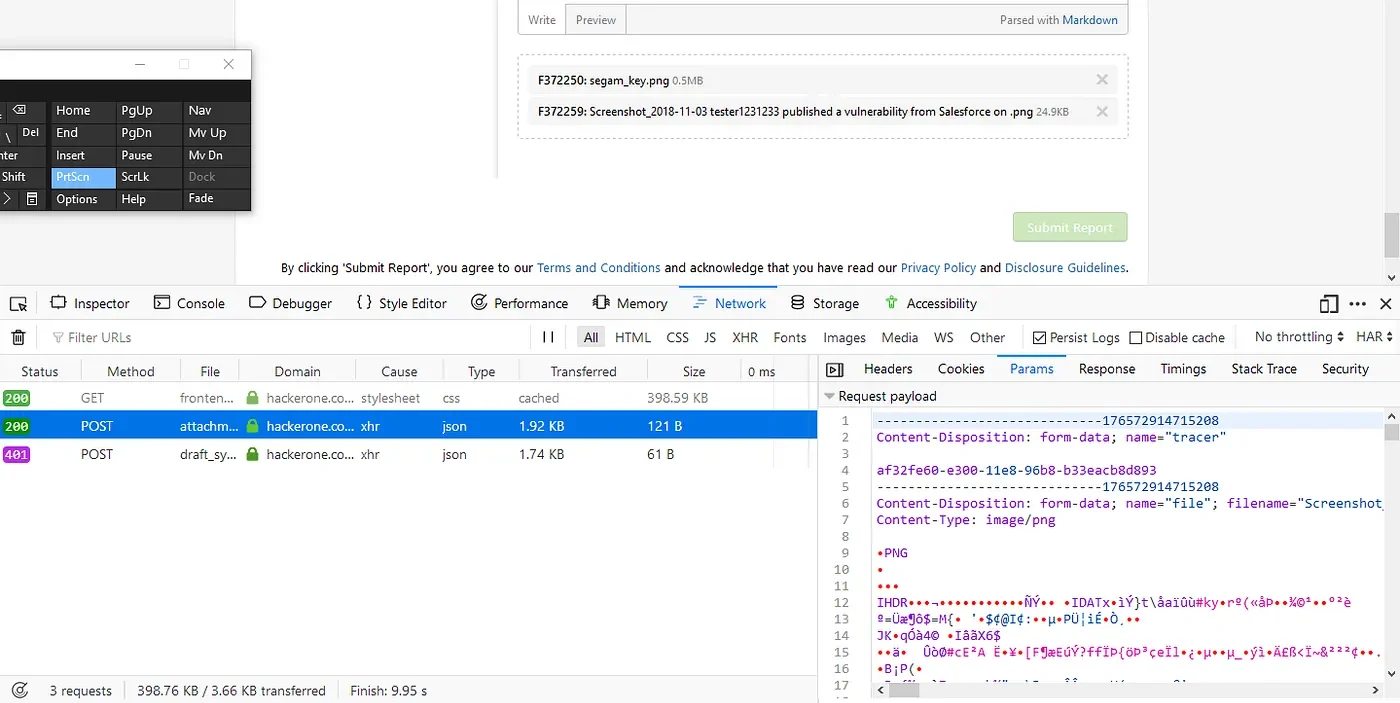
The screenshot shows the file uploaded while the account is in Locked mode.
What the other endpoints do
With the account logged out (locked), /draft_sync and /preview return a 401 Unauthorized error, but /attachments still lets you upload files.
Root cause
The researcher's account of what happens is:
- The account is brute-forced.
- The rate limiting protection locks the account as a safety step.
- The account is locked silently. There is no notification and no automatic logout if the user is already logged in. The only way to find out is to click a link or path on the site, at which point a message shows that the account is locked.
- If the user stays on the same page, they will not know the account is locked, and can still use some functions, such as uploading a file in the submit form.
- The attachment is uploaded and stored as
Anonymous, and is linked to thetracerid generated because there is no user information to link it to.
In practice, /draft_sync and /preview return 401 while the account is locked, but /attachments still accepts the upload and links it to a tracer id. The report does not show the server-side code, so the exact check that is missing is not stated.
Impact
An unauthenticated user can upload an attachment without needing to log in, and without using the Embedded Submission Form, whether that form is closed or open. The uploaded file is stored as Anonymous and linked to a generated tracer id.
The report does not describe any further consequence of the stored file, such as where it is served from or who can retrieve it.
Fix
The response from HackerOne was that the report was closed as a duplicate, and the researcher was given agreement to publish the write-up instead of having the duplicate disclosed.

The screenshot shows the duplicate response; the researcher notes being the first to get a duplicate from one of HackerOne's engineers.
Timeline
| Date | Event |
|---|---|
| Nov 8th 2018 | Bug found |
| Nov 8th 2018 | Report sent to HackerOne |
| Nov 8th 2018 | jobert replied and closed the report as Duplicate |
| Nov 8th 2018 | Researcher asked to disclose the report since it was a duplicate |
| Nov 14th 2018 | jobert responded that the duplicate report could not be disclosed and gave agreement to publish the write-up |
| Dec 24th 2018 | Write-up published |
Variants to test
- Lock and logout states across endpoints. After triggering a lock or a silent logout, replay requests to every endpoint in the submission flow (drafts, previews, uploads) and compare status codes. A positive result is an endpoint that still accepts writes while the others return
401. - Anonymous fallback paths. Look for features that generate an identifier for anonymous users (here a
tracerid) and check whether that path skips the authorisation check applied to logged-in users. A positive result is a stored object created without a session. - Silent account state changes. Trigger rate limiting or a lock and check whether the UI notifies the user or logs them out. A positive result is a state change the user cannot see until they navigate.
- Upload endpoints outside the form. Try the upload endpoint directly with no session, and with the Embedded Submission Form closed. A positive result is a successful upload and a returned identifier.
What happened, in plain words
A security researcher found that on HackerOne, a website where people report bugs to companies, you could upload a file to a report even when you were not properly logged in. The trick involved locking your own account by sending many login requests, then using a report form still open in your browser to upload a file. The site accepted the file and stored it as if it came from an anonymous visitor, linking it to a temporary identifier instead of a real user account. The researcher reported this to HackerOne, but the report was marked as a duplicate of one of HackerOne's own engineers. The researcher was allowed to publish this write-up about it.
Background: the pieces involved
Before walking through the steps, here are the main parts of the story and what they mean.
- HackerOne: a platform where security researchers send bug reports to companies (called programs). When you write a report, you can attach files such as screenshots or logs. The platform stores those files and links them to your report or your account.
- Attachment upload: the feature that lets you add a file to a report. Behind the scenes, the browser sends the file to a web address (an endpoint) called
/attachments. An endpoint is simply a URL that the website's server listens on to perform a specific action, like receiving a file or returning a list of items. - Session: when you log in, the server gives your browser a small piece of data (often a cookie) that proves who you are on each subsequent request. This is called a session. The server uses it to know that requests are coming from you, not from a stranger.
/sessionsendpoint: the address that handles login. When you submit your username and password, the browser sends them to/sessions. If they are correct, the server starts a session for you./draft_syncand/previewendpoints: other addresses used while writing a report./draft_syncsaves your draft, and/previewshows you a preview of what the report will look like. Both require you to be logged in.tracerid: a temporary identifier that the platform generates for anonymous users. When someone uploads a file without being logged in, the platform can still keep track of that file by attaching this id to it, instead of a user account.- Brute-force attack: trying many passwords in a row, hoping one is correct. Websites protect against this by limiting how many attempts you can make, for example by locking the account after too many failures.
- Burp Suite: a tool that sits between your browser and the website, letting you see and modify the requests your browser sends. It also has an Intruder component that can send many requests automatically, which is useful for brute-force testing.
- Broken authorisation: a class of security bug where a part of the website does not properly check whether the person making a request is allowed to do so. In this case, the upload endpoint accepted a file while the account was locked, when other endpoints refused the request.
How the researcher found it
The researcher was already testing a brute-force attack against an endpoint on HackerOne when they noticed this upload behaviour. The report says the behaviour is related to another step, a function behaviour, that makes it possible. In plain terms, the way the site handles logging out and locking accounts created a gap.
The starting observation is about logging out. If you are logged in to HackerOne and have two tabs open, logging out in one tab signs you out in both tabs automatically. The researcher believes this is meant to stop someone from using the report submission form while not logged in.
But the researcher found that you can stay on the submit form, not be logged in, and still upload an attachment as Anonymous. The reason given is that the /attachments endpoint checks whether you are logged in. If you are, it links the file to your account. If you are not, it generates a tracer id and links the file to that instead. So the upload does not simply fail when you are not logged in; it falls back to an anonymous path.
Step-by-step reproduction
The researcher's own steps to reproduce the issue are below. Each step is explained in plain words.
Step 1: Capture the login request
Turn on Burp Suite and log in to your HackerOne account. In Burp you will see a request sent to /sessions. Send that request to Intruder.
Why: capturing the request lets the researcher send it to Intruder and repeat it many times, which is the brute-force attack. Intruder is the part of Burp that automates sending many requests.
Step 2: Open the report form
Click to create a report for any program or team you want, and stay on the submit page.
Why: the submit form is where you attach files. Keeping it open in a tab means that even after the account gets locked, the form is still there in the browser, ready to be used.
Step 3: Brute-force the login endpoint
Start a brute-force attack against the /sessions endpoint, for example with 100 passwords. HackerOne has protection against brute-force, so after 100 requests the account is Locked as a protection.
Why: the goal is to trigger the account lock. The lock is a safety feature, and the report says it happens silently, with no notification or automatic logout.
Step 4: Upload from the still-open form
After the attack finishes, go back to the submit form and upload an attachment. The file uploads, and the tracer id is connected to it.
The screenshot shows the file uploaded while the account is in Locked mode. In other words, even though the account is locked, the upload still went through.
What the other endpoints do
With the account logged out (locked), /draft_sync and /preview return a 401 Unauthorized error, but /attachments still lets you upload files.
Why this matters: a 401 Unauthorized response means the server refused the request because you are not authenticated. So some endpoints refuse the request while the account is locked, but the upload endpoint still accepts files.
Root cause
The researcher's explanation of what happens is:
- The account is brute-forced.
- The rate limiting protection locks the account as a safety step.
- The account is locked silently. There is no notification and no automatic logout if the user is already logged in. The only way to find out is to click a link or path on the site, at which point a message shows that the account is locked.
- If the user stays on the same page, they will not know the account is locked, and can still use some functions, such as uploading a file in the submit form.
- The attachment is uploaded and stored as
Anonymous, and is linked to thetracerid generated because there is no user information to link it to.
In design terms, the lock is enforced per request on some endpoints (/draft_sync and /preview reject with 401) but not on /attachments, which falls back to an anonymous path with a tracer id instead of refusing the upload. The report does not show the server-side code, so the exact check that is missing is not stated.
Impact
An unauthenticated user can upload an attachment without needing to log in, and without using the Embedded Submission Form, whether that form is closed or open. The uploaded file is stored as Anonymous and linked to a generated tracer id.
The report does not describe any further consequence of the stored file, such as where it is served from or who can retrieve it.
What HackerOne said
The response from HackerOne was that the report was closed as a duplicate, and the researcher was given agreement to publish the write-up instead of having the duplicate disclosed.
The screenshot shows the duplicate response; the researcher notes being the first to get a duplicate from one of HackerOne's engineers.
Timeline
| Date | Event |
|---|---|
| Nov 8th 2018 | Bug found |
| Nov 8th 2018 | Report sent to HackerOne |
| Nov 8th 2018 | jobert replied and closed the report as Duplicate |
| Nov 8th 2018 | Researcher asked to disclose the report since it was a duplicate |
| Nov 14th 2018 | jobert responded that the duplicate report could not be disclosed and gave agreement to publish the write-up |
| Dec 24th 2018 | Write-up published |
Variants to test
These are ideas for similar things to look for, based on the same pattern.
- Lock and logout states across endpoints. After triggering a lock or a silent logout, replay requests to every endpoint in the submission flow (drafts, previews, uploads) and compare status codes. A positive result is an endpoint that still accepts writes while the others return
401. - Anonymous fallback paths. Look for features that generate an identifier for anonymous users (here a
tracerid) and check whether that path skips the authorisation check applied to logged-in users. A positive result is a stored object created without a session. - Silent account state changes. Trigger rate limiting or a lock and check whether the UI notifies the user or logs them out. A positive result is a state change the user cannot see until they navigate.
- Upload endpoints outside the form. Try the upload endpoint directly with no session, and with the Embedded Submission Form closed. A positive result is a successful upload and a returned identifier.
Glossary
- HackerOne: a bug bounty platform where researchers submit reports to programs.
- Endpoint: a URL that a server listens on to perform a specific action, such as receiving a file or returning data.
- Attachment: a file (like a screenshot or log) added to a report.
- Session: a temporary state that lets the server recognise a logged-in user across multiple requests, often maintained with a cookie.
- Cookie: a small piece of data stored by the browser and sent with requests to help the server remember who you are.
/sessions: the endpoint that handles login./draft_sync: an endpoint that saves a draft of a report./preview: an endpoint that shows a preview of a report.tracerid: a temporary identifier generated for anonymous users to link uploaded files to them.- Brute-force attack: trying many passwords in a row to guess the correct one.
- Rate limiting: a protection that restricts how many requests you can make in a certain time.
- Account lock: a state where an account is temporarily disabled, often after too many failed login attempts.
- Burp Suite: a tool that intercepts and modifies web traffic between your browser and a server.
- Intruder: a component of Burp Suite that automates sending many requests, used for brute-force testing.
401 Unauthorized: an HTTP status code meaning the request was refused because the user is not authenticated.- Broken authorisation: a security flaw where the server does not properly check whether a user is allowed to perform an action.
- Anonymous: not logged in; without a user account.
- Embedded Submission Form: a form that can be embedded on a company's website to submit reports to HackerOne.
- Duplicate: a report that describes an issue that has already been reported by someone else.


