Hyperlink Injection on Email Invitation
The organisation name field accepted a full URL, and that value was rendered as a clickable hyperlink in the email invitation sent to invited users. An attacker could make the invitation email contain a link to a site they control, which the report describes as an open redirect.

- Triaged in 5 days
- Fixed in 19 days
- Paid in 5 days
- Disclosed after 8 months
#DESCRIPTION Found an hyperlink injection of the name of Organization when the attacker invites the victim to his organization with injection hyperlink.
#STEPS
- Add organization with the name of https://attacker.com and switch it.
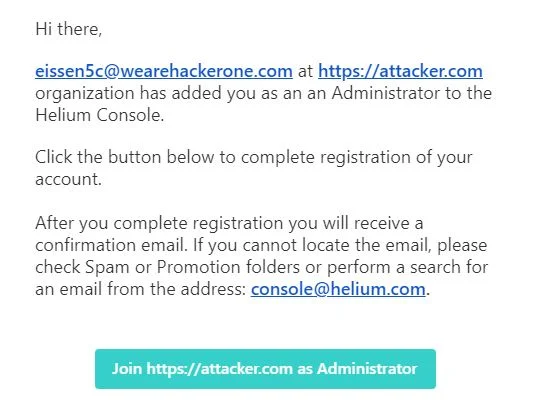
- Go to user and invite the victim using email.
- victim will seee the invitation with malicious link
#POC IMAGE
- Add organization name as https://attacker.com
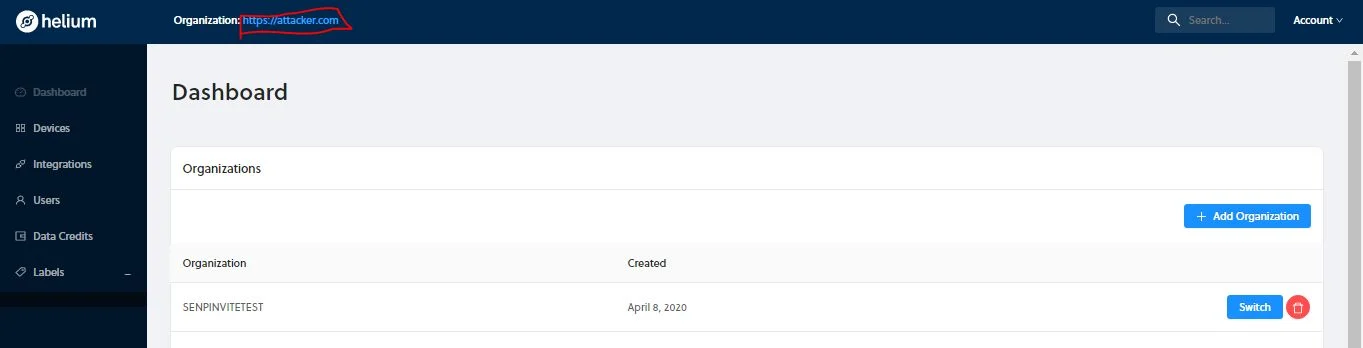
- Go to user and invite someone and the victim will see the invitation
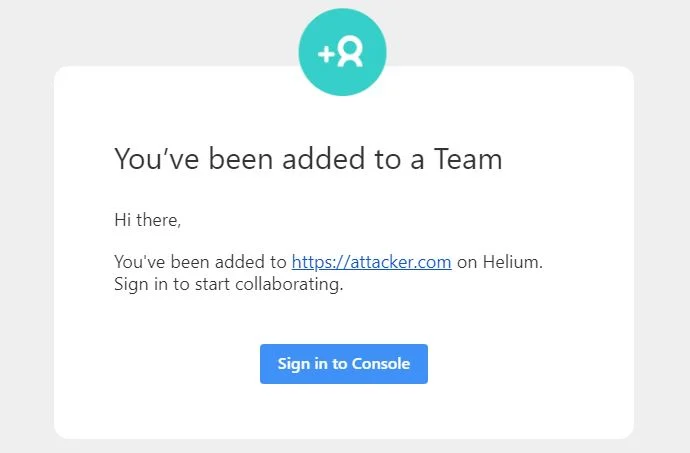
- accepted invitation for already registered
Impact
Open Redirect from hyperlink injection to malicious website.
What the report shows
The target is the Helium console application at https://helium-console-dev.herokuapp.com/, and the feature in question is organisation management with email invitations. The researcher, eissen5c, reported a hyperlink injection: the name given to an organisation is rendered as a clickable link when a victim receives an invitation to join that organisation.
The reproduction is short and consists of three steps:
- Create an organisation whose name is the URL
https://attacker.comand switch to it. - Go to the user section and invite the victim by email.
- The victim sees the invitation containing the malicious link.
The organisation name used throughout is:
https://attacker.com
The proof of concept is shown in three screenshots. The first shows the organisation being created with the URL as its name.
The second shows the invitation being sent to a user.
The third relates to accepting the invitation for an already registered account.
The report classifies the issue as an open redirect reached through hyperlink injection to a malicious website. The platform records it as low severity with a 50.00 USD bounty, disclosed on 2020-11-24. The report does not describe a fix.
Root cause
The report does not explain the cause; the name appears as a clickable link in the invitation. Because the name is attacker-controlled and the invitation is delivered to a different person, the attacker controls the destination of a link that appears inside a trusted message from the application. The report does not include the HTML or template responsible, so the exact rendering path is not shown.
Impact
The report's own framing is an open redirect: a victim who clicks the organisation name in the invitation leaves the application for an attacker-controlled site. The value to an attacker is the trust context. The link arrives in an invitation from a legitimate service, and the visible text is a URL the attacker chose, so it can be used to lend credibility to a phishing page or to move a user from a trusted origin to a hostile one. The report does not demonstrate any script execution, credential theft or account takeover.
How this kind of bug works
Hyperlink injection belongs to the broader family of injection into rendered output. Any field that a user can set and that another user will later see is a candidate: names, titles, descriptions, comments, display names, team or project labels. If the application escapes the value as text, the string stays inert. If it treats URL-like input as a link, or if it allows markup through, the attacker gains control over what the recipient can click.
When the injected value is a full URL with a scheme, the result is an open redirect in the application's own interface: the link looks native, sits inside a trusted page or email, and points anywhere. When markup is accepted, the same primitive can escalate to script execution in the victim's session, which is why output encoding matters more than input filtering alone.
How to test for it
Look for features where one user's input is displayed to another: invitations, sharing, mentions, notifications, exported documents and emails. Set the field to a distinctive URL on a domain you control, then view it as the recipient would, in the web interface and in the email itself.
- Identify every field that appears in the invitation or notification body.
- Set the field to a URL on a domain you control and trigger the message to a second account.
- Inspect the rendered output: is the value an anchor, plain text, or escaped markup?
- If it is an anchor, check whether the scheme is restricted. Try
javascript:anddata:variants to see whether the application filters schemes, and note whether the link opens in the same tab or a new one. - Confirm the click actually navigates to your domain, and capture the request and response that show the stored value being rendered.
A positive result is a stored value that becomes a working link to your domain in a message delivered to another user. Common false positives are values that are escaped and merely look like links, links that are rewritten through a safe redirector with an interstitial, and cases where the field is only visible to the person who set it, which removes the cross-user angle.
How it is fixed
If the product genuinely needs to turn URLs into links, generate the anchor server-side from a validated URL, allow only http and https, and reject or neutralise other schemes. Add a link warning or interstitial for external destinations, and apply the same encoding to email templates as to the web interface, since the invitation body is where the link is delivered.
Hunting notes
Invitation and sharing flows are productive because the attacker controls a field that is guaranteed to be shown to someone else, often outside the application in email. Recon signals include multi-tenant features with customisable organisation or workspace names, email templates that interpolate user data, and any place where a display name appears next to a call to action. Keep the demonstration on a domain you control and avoid payloads that could affect real users.
What happened, in plain words
Helium is a service with a web console at https://helium-console-dev.herokuapp.com/. One of its features lets you create an organisation (think of it as a workspace or a team space) and invite other people to join it by email. The researcher, eissen5c, found that the name you give your organisation is turned into a clickable link when the invitation reaches the person you invited.
That matters because the name is chosen by the person sending the invitation, not by the person receiving it. If the name is a web address, the invitation shows a link to that address, inside a message that appears to come from the real service. The researcher used the address https://attacker.com as the organisation name, and the report calls the result an open redirect: a link that sends the victim away from the application to a site the attacker controls.
The platform records this as a low severity issue with a 50.00 USD bounty, disclosed on 2020-11-24. The report does not describe a fix.
The steps in the report
The reproduction has three steps:
- Create an organisation whose name is the URL
https://attacker.comand switch to it. - Go to the user section and invite the victim by email.
- The victim sees the invitation containing the malicious link.
The organisation name used throughout is:
https://attacker.com
Why each step matters: step 1 is where the attacker plants the value. The organisation name is ordinary text that the application stores, and nothing stops it from being a web address. Step 2 is what makes the value reach another person: an invitation is a message the application sends to someone else, so the attacker is no longer the only one who sees the name. Step 3 is the payoff: the invited person opens the invitation and finds a link whose text is the attacker's address, sitting in a message from a service they may trust.
The proof of concept
The first screenshot shows the organisation being created with the URL as its name.
The second shows the invitation being sent to a user.
The third relates to accepting the invitation for an already registered account.
Why it works
The report does not explain the cause; the name appears as a clickable link in the invitation. Encoding here means converting characters so that the browser displays them as plain text instead of treating them as instructions. Because the name is controlled by the attacker and the invitation is delivered to a different person, the attacker decides where a link inside a trusted message points. The report does not include the HTML or template responsible, so the exact rendering path is not shown.
What the impact is
The report frames the issue as an open redirect: a victim who clicks the organisation name in the invitation leaves the application for an attacker-controlled site. The value to an attacker is the trust context. The link arrives in an invitation from a legitimate service, and the visible text is an address the attacker chose, so it can lend credibility to a phishing page or move a user from a trusted origin to a hostile one. The report does not demonstrate any script execution, credential theft or account takeover.
In general, how this kind of bug works
Hyperlink injection belongs to the wider family of injection into rendered output. Any field that a user can set and that another user will later see is a candidate: names, titles, descriptions, comments, display names, team or project labels. If the application escapes the value as text, the string stays inert, like a printed word on paper. If it treats URL-like input as a link, or lets markup through, the attacker gains control over what the recipient can click.
When the injected value is a full URL with a scheme (the https:// part that tells the browser how to reach the address), the result is an open redirect in the application's own interface: the link looks native, sits inside a trusted page or email, and points anywhere. When markup is accepted, the same primitive can escalate to script execution in the victim's session, which is why output encoding matters more than input filtering alone.
In general, how to test for it
Look for features where one user's input is displayed to another: invitations, sharing, mentions, notifications, exported documents and emails. Set the field to a distinctive URL on a domain you control, then view it as the recipient would, in the web interface and in the email itself.
- Identify every field that appears in the invitation or notification body.
- Set the field to a URL on a domain you control and trigger the message to a second account.
- Inspect the rendered output: is the value a link, plain text, or escaped markup?
- If it is a link, check whether the scheme is restricted. Try
javascript:anddata:variants to see whether the application filters schemes, and note whether the link opens in the same tab or a new one. - Confirm the click actually navigates to your domain, and capture the request and response that show the stored value being rendered.
A positive result is a stored value that becomes a working link to your domain in a message delivered to another user. Common false positives are values that are escaped and merely look like links, links that are rewritten through a safe redirector with an interstitial, and cases where the field is only visible to the person who set it, which removes the cross-user angle.
In general, how it is fixed
If the product genuinely needs to turn URLs into links, generate the link server-side from a validated URL, allow only http and https, and reject or neutralise other schemes. Add a link warning or interstitial for external destinations, and apply the same encoding to email templates as to the web interface, since the invitation body is where the link is delivered.
In general, where to look
Invitation and sharing flows are productive because the attacker controls a field that is guaranteed to be shown to someone else, often outside the application in email. Signals worth watching for include multi-tenant features with customisable organisation or workspace names, email templates that insert user data, and any place where a display name appears next to a call to action. Keep the demonstration on a domain you control and avoid payloads that could affect real users.
Glossary
- Organisation: a workspace or team space inside the application that groups users together.
- Invitation: a message the application sends to a person asking them to join an organisation.
- Hyperlink injection: putting a value into a field that later becomes a clickable link for another user.
- Open redirect: a link on a trusted site that sends the visitor to an address chosen by someone else.
- URL: a web address, such as
https://attacker.com. - Scheme: the first part of a URL (
https,http,javascript,data) that tells the browser how to handle it. - Encoding (output encoding): converting characters so the browser shows them as text instead of acting on them.
- Escaping: a form of encoding that neutralises characters with special meaning in a page.
- Markup: the code (such as HTML) that structures a page and can create links or other elements.
- Anchor: the HTML element that makes text clickable as a link.
- Phishing: a fake page or message designed to trick someone into handing over information or clicking further.
- Session: the period a logged-in user is recognised by the application.
- Script execution: running code in the victim's browser within the context of the site.
- Account takeover: an attacker gaining control of someone else's account.
- Severity: a rating of how serious a bug is, here low.
- Bounty: a payment made to a researcher for a valid report.
- Proof of concept (PoC): the demonstration, here screenshots, that shows the bug working.
- False positive: a finding that looks like a bug but is not exploitable in practice.
- Interstitial: a warning page shown before a link takes the user to an external site.
- Allowlist: a list of values that are permitted, with everything else rejected.
- Multi-tenant: a design where one application hosts many separate customer spaces.