Security Issue into Wallet lock protection
The wallet extension's lock feature only locked the tab where the lock was triggered, leaving other open tabs of the same extension fully unlocked. An attacker with access to another open tab could still perform transactions despite the wallet being locked.

- Fixed in 8 days
- Paid in 3 days
- Disclosed after 38 days
Description
While testing wallet extension i generally try to test multiple endpoints, so 2 tabs were open of wallet on chrome-extension://ldinpeekobnhjjdofggfgjlcehhmanlj/popup.html
So i tried to lock Wallet extension buti found that i can still use browser in 2nd tab, why i had already locked wallet,
So there is a security issue where wallet is not properly encrypted after user press lock
Wallet should close all open tabs of wallets and encrypt data for all tabs, It's very insecure way of password protection or lock protection
Steps To reproduce
To understand clearly i had created a POC video
- Open two tabs of chrome-extension://ldinpeekobnhjjdofggfgjlcehhmanlj/popup.html
- lock wallet in any of 1 tab and you can see you can access wallet on other tab and still able to do transaction as shown in POC
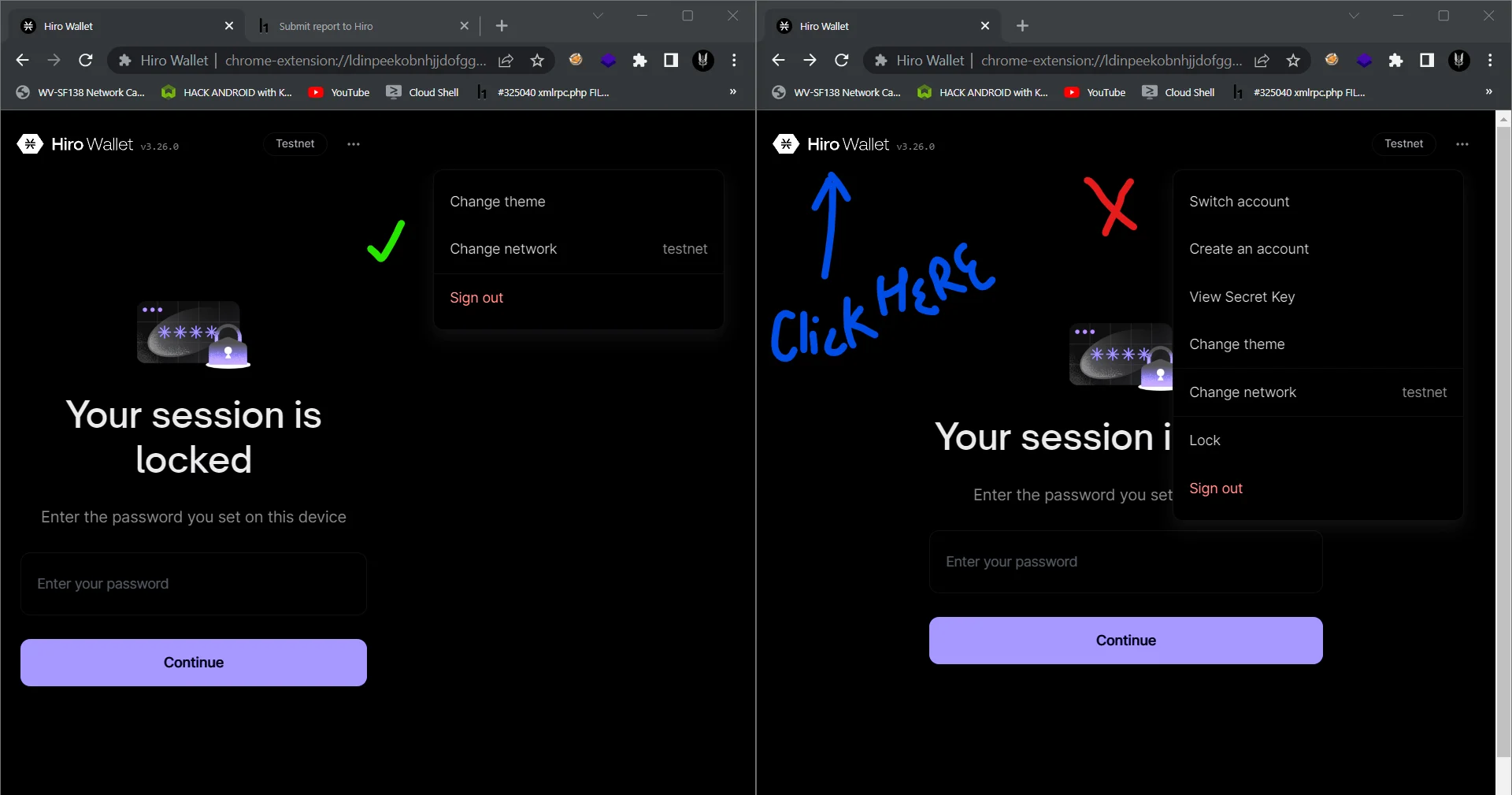
image.png From the original on HackerOne
HOW to fix?
Edit code and make sure when user click on lock wallet wallet should encrypt data in all tabs or close rest of the tabs to protect user and make lock protection work more securely
Thank you
Impact
This is totally fail of lock protection AND attacker can use this vulnerability to craft custom attacks
Context
The target is the Hiro wallet browser extension. The report refers to the extension's popup page, which is served from the Chrome extension origin:
chrome-extension://ldinpeekobnhjjdofggfgjlcehhmanlj/popup.html
That popup is the interface through which the user unlocks the wallet, views it and performs transactions. The extension also offers a lock function, intended to protect the wallet with a password: after the user locks it, the wallet should no longer be usable until it is unlocked again. The report frames the lock as a form of password protection over the wallet's data.
Setup
The researcher was testing the wallet extension in Chrome and, as part of trying multiple endpoints, had two tabs of the popup page open at the same time. No other accounts, roles, tools or versions are described in the report. The precondition for the issue is simply that more than one tab of the extension popup is open.
Finding it
With two tabs of popup.html open, the researcher locked the wallet in one of them. The expectation was that locking would take effect everywhere: the wallet would be encrypted and inaccessible in every open tab. Instead, the second tab remained usable. The researcher could still access the wallet there and still perform a transaction, even though the wallet had already been locked.
That mismatch between the stated purpose of the lock and the observed behaviour is what made it look wrong: a lock that only applies to the tab where it was pressed does not protect the wallet.
Exploitation
Step 1: Open two popup tabs
Open the extension popup page twice, so that two tabs point at the same extension origin:
chrome-extension://ldinpeekobnhjjdofggfgjlcehhmanlj/popup.html
Both tabs show the extension popup page.
Step 2: Lock the wallet in one tab
In either one of the two tabs, use the lock function.
Step 3: Keep using the other tab
The second tab is unaffected. The wallet can still be accessed there, and a transaction can still be performed from it, as demonstrated in the proof-of-concept recording.
The recording shows the two open popup tabs, the lock being applied in one of them, and the other tab continuing to give access to the wallet and to allow a transaction.
Root cause
The report describes the problem as the wallet not being properly encrypted after the user presses lock. The lock action does not propagate to the other open tabs of the extension, and the wallet data is not encrypted for all of them. Each tab therefore keeps its own usable state after the lock is pressed elsewhere. The report does not identify the specific code responsible.
Impact
The report characterises this as a total failure of the lock protection. Anyone who can reach a still-open tab of the wallet after it has been locked retains access to the wallet and can still transact from it. The researcher also states that an attacker could use the vulnerability to craft custom attacks, without describing a specific attack chain. The practical condition is that another tab of the extension popup is open at the time the wallet is locked.
Fix
The report's recommendation is to edit the code so that when the user clicks lock, the wallet encrypts its data in all tabs, or closes the remaining tabs, so that the lock protection actually holds. Which of the two approaches was adopted is not stated in the report.
Variants to test
- Open several popup tabs, lock in one, and check every other tab for continued access and for the ability to sign or send a transaction. A positive result is any tab that still operates after the lock.
- Lock the wallet and then reopen the popup. If the wallet comes back unlocked, the lock state is not being enforced on load.
- Lock in one tab and interact with another tab that was left idle for a while before the lock. A positive result is that the idle tab still holds usable wallet state.
- Repeat the same pattern on other extension surfaces that share wallet state, such as a full-page view or a notification window, and check whether the lock reaches them.
Hunting notes
This class of bug hides in features that keep state per tab or per window rather than in a single shared, authoritative place: lock screens, session timeouts, logout buttons and password re-prompt flows in browser extensions and single-page applications. During recon, the signal is a security control whose whole purpose is to revoke access, combined with an interface that can be opened in more than one tab. The way the researcher showed impact here was concrete and cheap to reproduce: two tabs, one lock, and a transaction still going through from the other tab, captured on video. That demonstration of the control failing in its stated purpose, rather than a theoretical argument, is what makes the report actionable.
A high severity rating and a 200.00 USD bounty were recorded for the report, which was disclosed on 2023-01-11.
What happened, in plain words
A browser extension called Hiro Wallet is a small program you install in Chrome to store cryptocurrency and send transactions. Like a banking app, it has a lock button: you press it and the wallet should stop working until you type your password again. The researcher found that the lock only worked in the tab where it was pressed. If a second copy of the wallet window was open, that second tab kept working normally, and a transaction could still be performed from it.
Think of a house with two doors and one lock button that only bolts the door you are standing at. Anyone standing at the other door walks straight in. The lock gives a false sense of safety, which is why this was treated as a serious problem.
Background you need
- Browser extension: a small add-on installed in Chrome that adds features to the browser. It runs as its own mini program, separate from normal websites.
- Extension origin: extensions are loaded from a special address that starts with
chrome-extension://instead ofhttps://. The long random-looking string is the extension's ID, a unique name Chrome gives it. - Popup page: the small window that appears when you click the extension's icon in the toolbar. It is a normal web page inside the extension, and Chrome lets you open it in a full tab too.
- Tab: one page view in the browser. You can open the same page in several tabs at once, and each tab is a separate running copy of that page.
- Wallet: software that holds the secret keys needed to control cryptocurrency. Locking it is meant to protect those keys with your password.
- Transaction: an instruction to move cryptocurrency from one address to another. It is signed with the wallet's secret key, so anyone who can use an unlocked wallet can send funds.
- Encryption: scrambling data with a key so that it cannot be read without the key. When a wallet is locked, the idea is that its sensitive data is encrypted and the password is needed to decrypt it again.
- Endpoint: a specific address or page that a program talks to. Here it simply means the extension's popup page.
- Proof of concept (POC): a recording or set of steps that shows a bug really happens, rather than just describing it.
The target
The report is about the Hiro wallet browser extension. The page involved is the extension's popup, which lives at this address:
chrome-extension://ldinpeekobnhjjdofggfgjlcehhmanlj/popup.html
This is the screen where you unlock the wallet, look at it and send transactions. The extension also has a lock function meant to protect the wallet with a password: once you lock it, it should not be usable until you unlock it again. The report treats the lock as the password protection over the wallet's data.
Setting up the test
The researcher was testing the extension in Chrome and, while trying several pages, had two tabs of the popup page open at the same time. Nothing else is described: no special accounts, tools or versions. The only thing needed to trigger the issue is having more than one tab of the extension popup open.
Finding the problem
With two popup tabs open, the researcher locked the wallet in one of them. The expectation was that locking would apply everywhere: the wallet would be encrypted and out of reach in every open tab. Instead, the second tab stayed usable. The researcher could still open the wallet there and still send a transaction, even though the wallet had already been locked.
That gap between what the lock promises and what it actually does is the bug. A lock that only applies to the tab where it was pressed does not protect the wallet.
Reproducing it step by step
Step 1: Open two popup tabs
Open the extension popup page twice, so two tabs point at the same extension address:
chrome-extension://ldinpeekobnhjjdofggfgjlcehhmanlj/popup.html
Both tabs show the extension popup page. This step matters because the bug only appears when a second copy of the interface exists: the lock has to be pressed in one place while another place stays open.
Step 2: Lock the wallet in one tab
In either of the two tabs, use the lock function.
Step 3: Keep using the other tab
The second tab is not affected. The wallet can still be opened there, and a transaction can still be sent from it, as the proof-of-concept recording shows.
The recording shows the two open popup tabs, the lock being applied in one of them, and the other tab still giving access to the wallet and still allowing a transaction.
Why it happens
The report describes the problem as the wallet not being properly encrypted after the user presses lock. The lock action does not reach the other open tabs of the extension, and the wallet data is not encrypted for all of them. Each tab therefore keeps its own usable state after the lock is pressed somewhere else. The report does not name the specific code responsible.
What an attacker could do
The report calls this a total failure of the lock protection. Anyone who can reach a tab of the wallet that is still open after it was locked keeps access to the wallet and can still send transactions from it. The researcher also says an attacker could use the vulnerability to build custom attacks, without describing a specific attack chain. The practical condition is that another tab of the extension popup is open when the wallet is locked.
How to fix it
The report recommends changing the code so that when the user clicks lock, the wallet encrypts its data in all tabs, or closes the remaining tabs, so that the lock protection actually holds. Which of the two approaches was chosen is not stated in the report.
Other cases worth testing
- Open several popup tabs, lock in one, and check every other tab for continued access and for the ability to sign or send a transaction. Any tab that still works after the lock is a positive result.
- Lock the wallet and then reopen the popup. If the wallet comes back unlocked, the lock state is not being enforced when the page loads.
- Lock in one tab and then use another tab that was left idle for a while before the lock. A positive result is that the idle tab still holds usable wallet state.
- Repeat the same pattern on other extension screens that share wallet state, such as a full-page view or a notification window, and check whether the lock reaches them.
Where to look for similar bugs
This kind of bug hides in features that keep their state per tab or per window instead of in one shared, authoritative place: lock screens, session timeouts, logout buttons and password re-prompt flows in browser extensions and single-page applications. During recon, the signal is a security control whose whole purpose is to revoke access, combined with an interface that can be opened in more than one tab. The way the researcher showed impact here was concrete and cheap to reproduce: two tabs, one lock, and a transaction still going through from the other tab, captured on video. Showing the control failing at its stated job, rather than arguing about it in theory, is what makes the report actionable.
A high severity rating and a 200.00 USD bounty were recorded for the report, which was disclosed on 2023-01-11.
Glossary
- Browser extension: a small add-on installed in a browser that adds features and runs as its own mini program.
- Chrome extension ID: the long random string in a
chrome-extension://address that uniquely identifies an installed extension. - Popup page: the small window shown when you click an extension's toolbar icon; it is a web page inside the extension.
- Tab: one page view in a browser; several tabs can show the same page at once, each running separately.
- Wallet: software that stores the secret keys used to control cryptocurrency and sign transactions.
- Transaction: an instruction to move cryptocurrency, signed with the wallet's secret key.
- Encryption: scrambling data with a key so it cannot be read without that key.
- Endpoint: a specific address or page a program talks to.
- Proof of concept (POC): a recording or set of steps proving a bug really happens.
- Root cause: the underlying reason a bug exists, as opposed to its visible symptom.
- Severity: a rating of how serious a bug is, often high, medium or low.
- Bounty: a reward paid to a researcher for reporting a valid security bug.
- Disclosure: the date a bug report is made public.
- Recon: the exploratory phase of testing where you look around a target for weak spots.
- Single-page application: a website that loads once and updates its content in the browser instead of loading new pages.
- Session timeout: a feature that automatically logs you out after a period of inactivity.
- Logout button: a control whose purpose is to end your access and require you to sign in again.