How I gained commit access to Homebrew in 30 minutes
A GitHub API token with write access to core Homebrew repositories was exposed in the environment variables of a publicly accessible Jenkins instance. An attacker could use this token to commit malicious changes to Homebrew formulae, potentially compromising users who install or update packages.
 Published on medium.com
Since the recent NPM, RubyGems, and Gentoo incidents, I’ve become increasingly interested, and concerned, with the potential for package managers to be used in supply chain attacks to distribute malicious software. Specifically with how the maintainers and infrastructure of these projects can be targeted as an attack…
The full write-up lives on its author's site
It belongs to its author, so we link to it rather than copy it. The other two tabs are our own rewrites, checked against it.
Context
Homebrew is a package manager for macOS, and its formulae and core code live in GitHub repositories under the Homebrew organisation. The report concerns the infrastructure behind those repositories: a publicly reachable Jenkins instance at https://jenkins.brew.sh, which builds Homebrew bottles and, as part of that work, pushes to the BrewTestBot/homebrew-core repository using a GitHub API token.
The author's interest was supply chain attacks against package managers, following the NPM, RubyGems and Gentoo incidents of the preceding year. The question was whether the maintainers and build infrastructure of such a project could be used as an entry point to distribute malicious software.
Setup
The work was done against the Homebrew GitHub organisation and its Jenkins instance. The only tool named in the report is gitrob, an OSSINT tool by Michael Henriksen used to search an organisation's repositories for leaked credentials. No account details, roles or software versions are given.
The Jenkins instance is described as intentionally publicly exposed. The report does not describe any authentication being needed to reach the pages used.
Finding it
The starting strategy was credential theft: look for credentials leaked by members of the Homebrew GitHub organisation. gitrob was run across the organisation, but it did not turn up anything interesting.
The author then read previously disclosed issues on https://hackerone.com/Homebrew, and from those learned that Homebrew runs the Jenkins instance at https://jenkins.brew.sh.
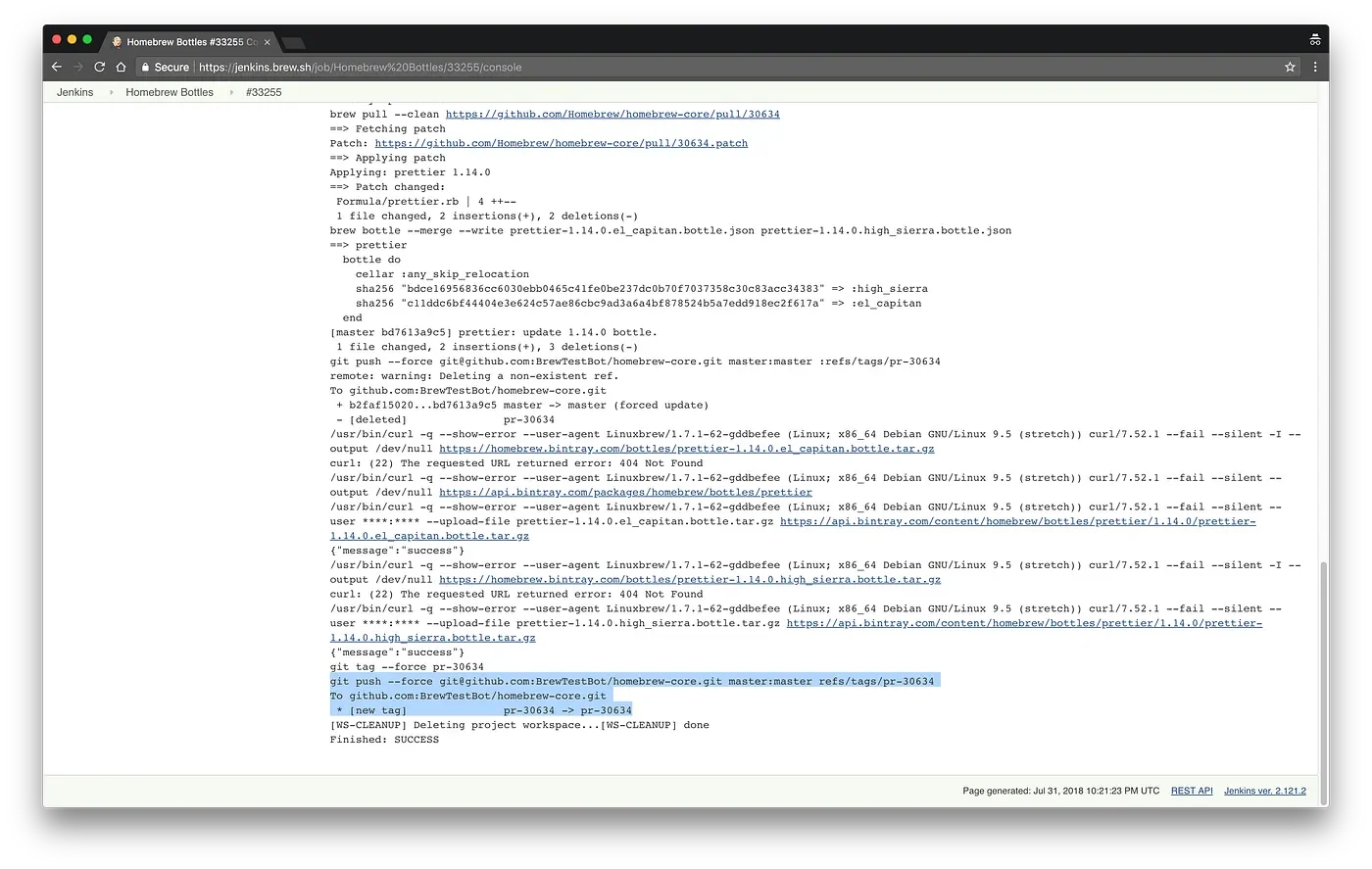
Looking through the Jenkins instance, the author noticed that builds in the "Homebrew Bottles" project were making authenticated pushes to the BrewTestBot/homebrew-core repository. An authenticated push from a build job implies a credential is available to that job, so the next question was where it is stored.
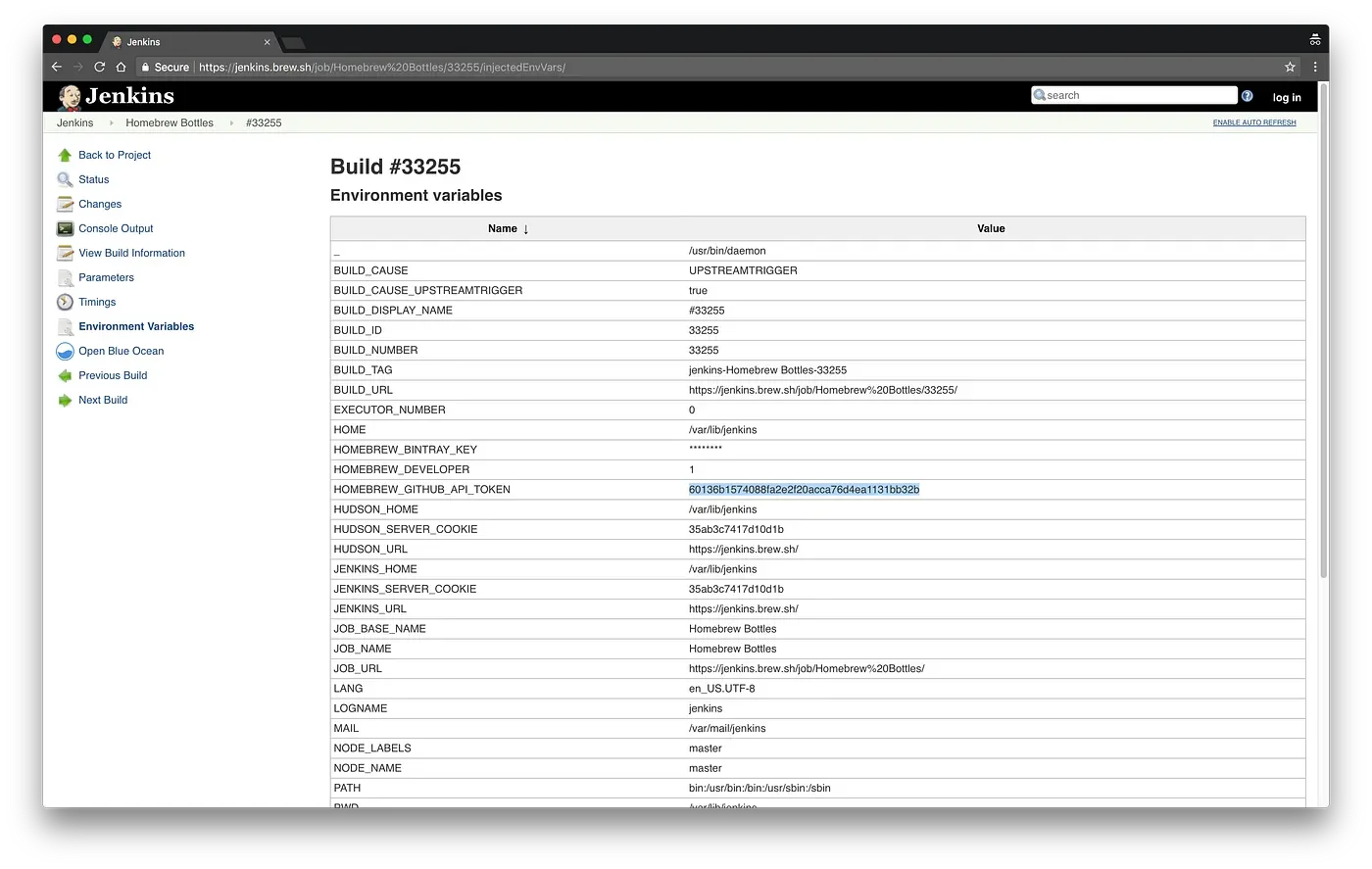
The Jenkins job page has an "Environment Variables" link on the left. Following it led to an exposed GitHub API token.
Exploitation
Step 1: check the token's scopes
The token was tested locally against the GitHub API to see which repositories it could reach and with what permissions:
$ curl https://api.github.com/user/repos -u $GITHUB_API_TOKEN:x-oauth-basic | jq '.[] | {repo: .full_name, permissions: .permissions}'
The request authenticates with HTTP basic auth, using the token as the username and x-oauth-basic as the password, and lists the repositories available to the token. The output was piped through jq to show each repository's full name and permission flags. The response showed:
{ "repo": "BrewTestBot/homebrew-core", "permissions": { "admin": true, "push": true, "pull": true }}{ "repo": "Homebrew/brew", "permissions": { "admin": false, "push": true, "pull": true }}{ "repo": "Homebrew/formulae.brew.sh", "permissions": { "admin": false, "push": true, "pull": true }}{ "repo": "Homebrew/homebrew-core", "permissions": { "admin": false, "push": true, "pull": true }}
So the token had admin rights on BrewTestBot/homebrew-core and push rights on Homebrew/brew, Homebrew/formulae.brew.sh and Homebrew/homebrew-core. That suggested commit access to these core Homebrew repositories:
- Homebrew/brew
- Homebrew/homebrew-core
- Homebrew/formulae.brew.sh
Step 2: confirm write access
To make sure the push permission was real, the author created a blob in Homebrew/homebrew-core:
$ curl https://api.github.com/repos/Homebrew/homebrew-core/git/blobs -u $GITHUB_API_TOKEN:x-oauth-basic -d '{"content":"test"}' -H "Content-Type: application/json"
This posts a JSON body containing the string test to the blobs endpoint of the repository, again authenticating with the token. The response confirmed the write:
{ "sha": "[redacted]", "url": "https://api.github.com/repos/Homebrew/homebrew-core/git/blobs/[redacted]"}
The returned SHA is the same one the author links to as the first commit made to Homebrew/homebrew-core. The issue was then reported to the Homebrew maintainers.
Root cause
The GitHub API token used by the "Homebrew Bottles" builds was found behind the job's "Environment Variables" link on a Jenkins instance that is publicly reachable. The report does not describe how the token was stored or why the page was readable without authentication, so the exact mechanism is not stated.
The token carried admin rights on BrewTestBot/homebrew-core and push rights on three core repositories.
Impact
With push access to Homebrew/homebrew-core, the author could have changed formulae that users install. At the time, the repository did not have a protected master branch, so a fast-forward change to refs/heads/master would have been possible. Anyone who freshly installed Homebrew, or ran brew update, would then have received the malicious formulae.
The report puts this in perspective: hundreds of thousands of people use Homebrew, including employees at some of the biggest companies in Silicon Valley, and the most frequently installed package in the last 30 days was openssl, installed over 500k times. A small, likely unnoticed change to the openssl formula could have placed a backdoor on any machine that installed it.
The author frames this as a systemic problem in the industry rather than a weakness specific to Homebrew, and asks what a nation state with dedicated resources could achieve against a team of 17 volunteers.
Fix
Homebrew publicly disclosed the issue on its blog. The Homebrew team worked with GitHub to audit and confirm that the token had not been used maliciously and that no unexpected commits had been made to the core repositories.
Variants to test
- Public CI job configuration pages. On Jenkins, GitLab CI, Travis or CircleCI, look for job settings, environment variable pages and build logs that are reachable without authentication. A positive result is a page showing a token, password or key used by the build, which can then be tested against the upstream API.
- Build logs that echo credentials. Search build output for commands that print environment variables or authentication headers. A positive result is a token or password appearing in plain text in a log.
- Over-scoped tokens. For any token found, list the repositories and permissions it reaches, as in the first request above. A positive result is push or admin rights on repositories beyond the one the build needs.
- Unprotected default branches. For a repository you can push to, check whether the default branch is protected. A positive result is the ability to push a fast-forward change to
refs/heads/masteror the equivalent default branch. - Organisation-wide credential search. Run a tool such as gitrob across an organisation's repositories. A positive result is a committed credential that is still valid against the service it belongs to.
What happened, in plain words
Homebrew is a package manager for macOS: a program that installs other programs for you. When you type brew install something, Homebrew downloads a recipe (called a formula) and the pre-built files (called bottles) and puts them on your machine. Those recipes and the code behind Homebrew live in repositories on GitHub, a website where software projects are stored and shared.
This report is about what sits behind those repositories. Homebrew runs a build server, a Jenkins instance at https://jenkins.brew.sh, which automatically builds the bottles. To do that, the build server has to upload files to a GitHub repository called BrewTestBot/homebrew-core. Uploading to GitHub requires a credential, a kind of digital key. The author found that key on a page of the publicly exposed build server, and it was powerful enough to write directly into Homebrew's core repositories.
The author's interest was supply chain attacks. A supply chain attack is when an attacker does not break into your computer directly, but instead tampers with something you trust and download, so that the harmful thing arrives through the normal channel. Think of it like someone changing a recipe in a cookbook that thousands of kitchens order from: nobody suspects the cookbook. The author had been following similar incidents at NPM, RubyGems and Gentoo in the preceding year, and wanted to know whether the people and build systems behind a package manager could be used as the way in.
About 30 minutes after starting, the author had made a first commit (an uploaded change) to Homebrew/homebrew-core.
The setup
The work was done against the Homebrew organisation on GitHub and its Jenkins instance. The only tool named in the report is gitrob, described as an OSSINT tool by Michael Henriksen. OSSINT here means open source intelligence: gathering information about a target from publicly available material. gitrob automates the search of an organisation's repositories for credentials that someone accidentally committed.
Jenkins is a build server: software that runs jobs automatically, for example compiling code or packaging files every time something changes. The report describes the Jenkins instance as intentionally publicly exposed, meaning the Homebrew team meant for people to be able to reach it. The report does not describe any login being needed to reach the pages the author used.
Finding it
The first strategy was credential theft: look for credentials that members of the Homebrew GitHub organisation had leaked. The reasoning is simple. If a developer accidentally saves a password or key into a public repository, anyone can read it, and it may still work.
gitrob was run across the organisation, but it did not turn up anything interesting.
So the author changed approach and read previously disclosed issues on https://hackerone.com/Homebrew. HackerOne is a platform where security researchers report bugs to companies; disclosed issues are reports the company has agreed to make public. From those reports, the author learned that Homebrew runs the Jenkins instance at https://jenkins.brew.sh.
Looking through that Jenkins instance, the author noticed that builds in the "Homebrew Bottles" project were making authenticated pushes to the BrewTestBot/homebrew-core repository. An authenticated push is an upload that proves who it is, using a credential. If a build job can push, then the credential it uses must be available to that job somewhere. The natural next question is: where is it stored?
On the Jenkins job page there is an "Environment Variables" link on the left. Environment variables are named settings that a program reads when it runs, often used to pass configuration such as a key. Following that link led to an exposed GitHub API token.
An API is the way one program talks to another over the internet, like a service counter where you hand over a request and get an answer back. GitHub's API lets programs list repositories, create files and so on. A token is a long string of characters that acts as a password for that API, so a program can prove it is allowed to act. Anyone who reads the token can use it, exactly as if they held the key.
Exploitation
Step 1: check the token's scopes
The token was tested locally against the GitHub API to see which repositories it could reach and with what permissions:
$ curl https://api.github.com/user/repos -u $GITHUB_API_TOKEN:x-oauth-basic | jq '.[] | {repo: .full_name, permissions: .permissions}'
Line by line:
curlis a command-line program for sending web requests. It is the browser equivalent of typing an address and pressing enter, but from a terminal.https://api.github.com/user/reposis the GitHub API address that lists the repositories the caller can see.-u $GITHUB_API_TOKEN:x-oauth-basicsupplies a username and password for the request. Here the username is the token itself (stored in a shell variable calledGITHUB_API_TOKEN) and the password is the literal textx-oauth-basic. This is a convention GitHub accepts for token authentication.- The
|symbol passes the answer from curl into the next program. jqis a tool for picking fields out of JSON, a common data format that looks like nested lists and labels. The filter.[] | {repo: .full_name, permissions: .permissions}means: for each item in the list, show its full name and its permissions.
The response showed:
{ "repo": "BrewTestBot/homebrew-core", "permissions": { "admin": true, "push": true, "pull": true }}{ "repo": "Homebrew/brew", "permissions": { "admin": false, "push": true, "pull": true }}{ "repo": "Homebrew/formulae.brew.sh", "permissions": { "admin": false, "push": true, "pull": true }}{ "repo": "Homebrew/homebrew-core", "permissions": { "admin": false, "push": true, "pull": true }}
What this says, in plain words: for each repository, there are three permission flags. pull means you can read and download. push means you can upload changes. admin means you can change the repository's settings and who has access.
So the token had admin rights on BrewTestBot/homebrew-core and push rights on Homebrew/brew, Homebrew/formulae.brew.sh and Homebrew/homebrew-core. That suggested commit access to these core Homebrew repositories:
- Homebrew/brew
- Homebrew/homebrew-core
- Homebrew/formulae.brew.sh
Commit access means the ability to add changes to the project, the same power a trusted maintainer has.
Step 2: confirm write access
Reading permissions from a listing is one thing; proving you can actually write is another. To make sure the push permission was real, the author created a blob in Homebrew/homebrew-core:
$ curl https://api.github.com/repos/Homebrew/homebrew-core/git/blobs -u $GITHUB_API_TOKEN:x-oauth-basic -d '{"content":"test"}' -H "Content-Type: application/json"
Line by line:
- The address points at the blobs endpoint of the
Homebrew/homebrew-corerepository. A blob is GitHub's term for a stored piece of file content. -u $GITHUB_API_TOKEN:x-oauth-basicauthenticates with the same token as before.-d '{"content":"test"}'sends a small JSON body saying the content is the wordtest.-H "Content-Type: application/json"tells the server that the body is JSON, so it knows how to read it.
The response confirmed the write:
{ "sha": "[redacted]", "url": "https://api.github.com/repos/Homebrew/homebrew-core/git/blobs/[redacted]"}
A SHA is a fingerprint of the stored content, a long string that identifies it. The returned SHA is the same one the author links to as the first commit made to Homebrew/homebrew-core. In other words, the write really happened. The issue was then reported to the Homebrew maintainers.
Root cause
The GitHub API token used by the "Homebrew Bottles" builds was found behind the job's "Environment Variables" link on a Jenkins instance that is publicly reachable. The report does not describe how the token was stored or why the page was readable without authentication, so the exact mechanism is not stated.
The token carried admin rights on BrewTestBot/homebrew-core and push rights on three core repositories. Over-scoped means the key opens more doors than the job actually needs.
Impact
With push access to Homebrew/homebrew-core, the author could have changed formulae that users install. At the time, the repository did not have a protected master branch. A branch is a line of development in a repository, and master was the main one. Protected means the repository refuses direct changes and requires review. Without that protection, a fast-forward change to refs/heads/master would have been possible: a fast-forward is a change that simply moves the branch forward to new content, with no review step in between.
Anyone who freshly installed Homebrew, or ran brew update, would then have received the malicious formulae. brew update is the command that refreshes your local copy of the recipes from the project.
The report puts this in perspective: hundreds of thousands of people use Homebrew, including employees at some of the biggest companies in Silicon Valley, and the most frequently installed package in the last 30 days was openssl, installed over 500k times. A small, likely unnoticed change to the openssl formula could have placed a backdoor on any machine that installed it. A backdoor is a hidden way in that the person who installed the software does not know about.
The author frames this as a systemic problem in the industry rather than a weakness specific to Homebrew, and asks what a nation state with dedicated resources could achieve against a team of 17 volunteers.
Fix
Homebrew publicly disclosed the issue on its blog. The Homebrew team worked with GitHub to audit and confirm that the token had not been used maliciously and that no unexpected commits had been made to the core repositories.
Variants to test
These are the same checks, phrased so you can try them on other projects.
- Public CI job configuration pages. CI means continuous integration, the automated build system. On Jenkins, GitLab CI, Travis or CircleCI, look for job settings, environment variable pages and build logs that are reachable without authentication. A positive result is a page showing a token, password or key used by the build, which can then be tested against the upstream API.
- Build logs that echo credentials. Search build output for commands that print environment variables or authentication headers. A positive result is a token or password appearing in plain text in a log.
- Over-scoped tokens. For any token found, list the repositories and permissions it reaches, as in the first request above. A positive result is push or admin rights on repositories beyond the one the build needs.
- Unprotected default branches. For a repository you can push to, check whether the default branch is protected. A positive result is the ability to push a fast-forward change to
refs/heads/masteror the equivalent default branch. - Organisation-wide credential search. Run a tool such as gitrob across an organisation's repositories. A positive result is a committed credential that is still valid against the service it belongs to.
Glossary
- API: the way one program asks another program over the internet to do something, like a service counter for software.
- Admin (permission): the right to change a repository's settings and who has access.
- Authenticated push: an upload to a repository that proves who is doing it, using a credential.
- Backdoor: a hidden way into software that the person who installed it does not know about.
- Blob: GitHub's term for a stored piece of file content.
- Bottle: a pre-built package file that Homebrew installs, so you do not have to compile the software yourself.
- Branch: a line of development inside a repository;
masterwas the main one here. - Build server / CI: software that runs jobs automatically, such as packaging files when code changes.
- Commit: a saved change added to a repository.
- Commit access: permission to add changes to a repository.
- Credential: a secret that proves identity, such as a password or token.
- curl: a command-line program for sending web requests.
- Environment variable: a named setting a program reads when it runs, often used to pass configuration such as a key.
- Fast-forward: a change that simply moves a branch forward to new content, with no review step.
- Formula: Homebrew's recipe describing how to install a piece of software.
- gitrob: an OSSINT tool by Michael Henriksen that searches an organisation's repositories for leaked credentials.
- GitHub: a website where software projects are stored and shared.
- HackerOne: a platform where researchers report security bugs to companies and some reports are later disclosed publicly.
- Jenkins: a build server used to run automated jobs.
- JSON: a common data format that looks like nested lists and labels.
- jq: a tool for picking fields out of JSON.
- NPM, RubyGems, Gentoo: package managers and projects cited as earlier supply chain incidents.
- OSSINT: open source intelligence, gathering information from publicly available material.
- Over-scoped: a credential that has more permissions than the job actually needs.
- Package manager: a program that installs and updates other software for you.
- Protected branch: a branch that refuses direct changes and requires review.
- Pull (permission): the right to read and download from a repository.
- Push (permission): the right to upload changes to a repository.
- Repository: a project's storage on GitHub, holding its files and their history.
- SHA: a long fingerprint string that identifies stored content.
- Supply chain attack: tampering with something people trust and download, so harm arrives through the normal channel.
- Token: a long string of characters that acts as a password for an API.
brew update: the Homebrew command that refreshes your local copy of the recipes from the project.



