XSS Vulnerability in IBM Content Navigator (CVE-2020-4757)
IBM Content Navigator allowed users to upload HTML files that were then served and rendered in the browser, enabling stored cross-site scripting. An attacker with a low-privilege account could upload a malicious HTML file and trick a victim into opening or previewing it, causing JavaScript to run in the victim's session.
 Published on gosecure.net
by GoSecure Titan Labs | Jun 21, 2022
The full write-up lives on its author's site
It belongs to its author, so we link to it rather than copy it. The other two tabs are our own rewrites, checked against it.
Context
IBM Content Navigator is, according to IBM, a flexible, full featured content management solution. Among its features, users can upload files that are then served by the platform. That upload and serving behaviour is the surface behind CVE-2020-4757, a stored cross-site scripting (XSS) vulnerability that GoSecure Titan Labs documented. The affected product is IBM Content Navigator, and the fix is version 3.0.9 or above.
The vulnerability is a stored XSS reached through the file upload functionality: an attacker can upload malicious HTML content and then trick a user into clicking the malicious link generated by the application, or into previewing the document that contains the JavaScript code. Once triggered, the malicious JavaScript executes in the victim's browser.

Setup
Exploitation requires authentication to the platform using a low privilege account, plus interaction of the targeted user with the malicious link generated by the platform. The technical requirements are low: only basic JavaScript coding knowledge is needed to perform the attack. The write-up does not describe the specific account, role configuration or tooling used beyond that.
Finding it
The researcher identified that the application is vulnerable to stored XSS injections via its file upload functionality. The reasoning is straightforward: uploaded files are served by the platform, and if an uploaded file contains HTML with script, that content runs in the browser of whoever opens or previews it.
Exploitation
Step 1: Create the HTML file containing the malicious payload
For the demonstration, the following payload was used:
<html>
<head>POC Cookie Grabber</head>
<body>
<img src=# onerror=alert(document.cookie)>
"><iframe/src=javascript:alert(document.cookie)>
</body>
</html>
Step 2: Select the upload file option
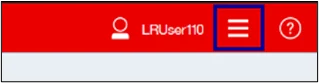
Click on the drop-down icon to select the upload file option.
Step 3: Upload the file
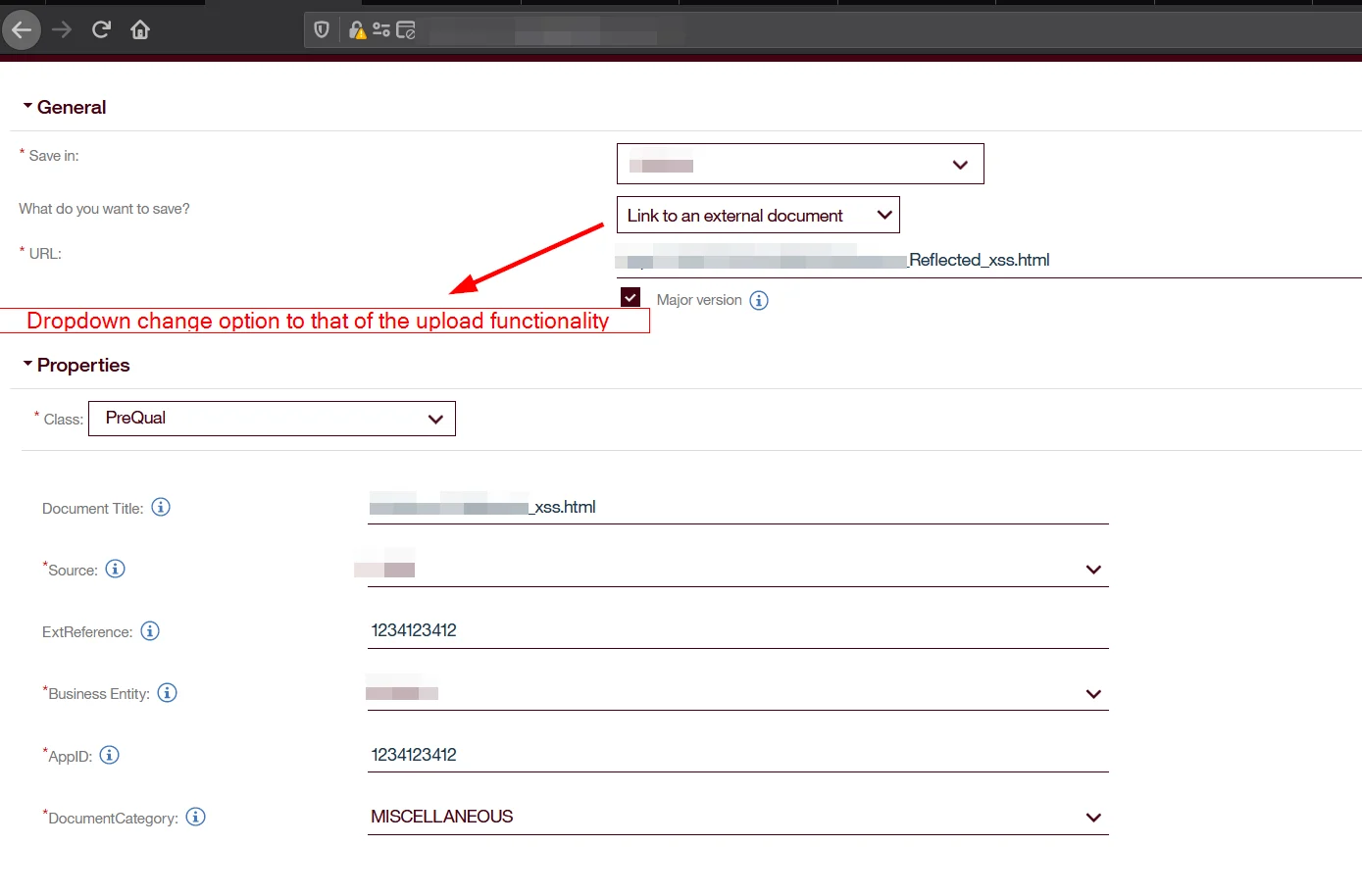
Upload the file.
Step 4: Search for the file and open it
Search for the file via the AppID assigned in step 2, then select the result for the search AppID and either "Preview" or "Open in a new tab".
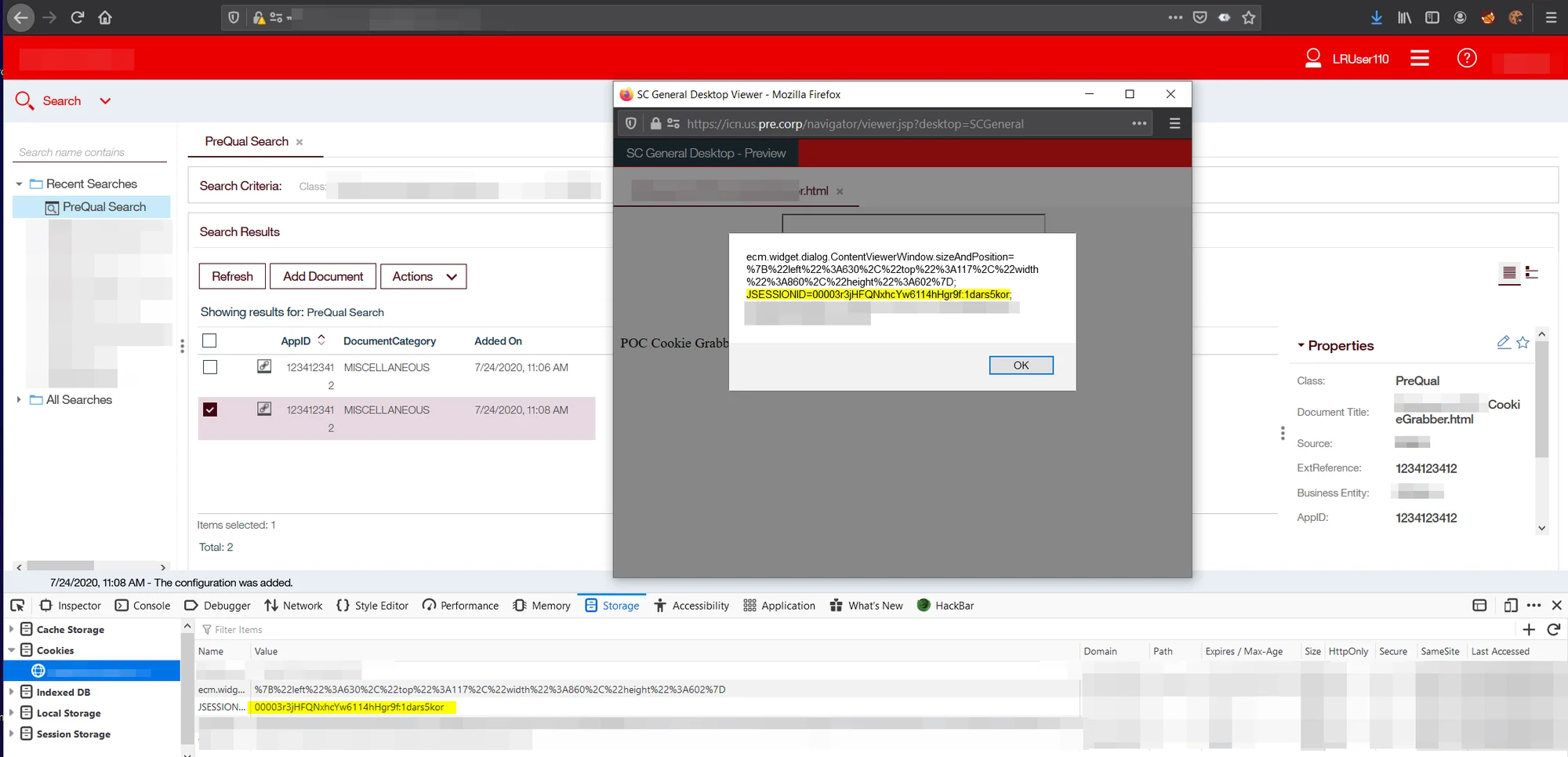
This will display the XSS and the user's cookie.
Root cause
The write-up frames the issue as a lack of user-input filtering. The report does not describe the specific server-side code path or the exact response headers involved, so the precise mechanism by which the file is served as HTML rather than as an inert download is not stated. The upload functionality accepted HTML content and the platform served it back to users who opened or previewed it.
Impact
IBM rated this vulnerability with a CVSS 3.0 rating of 6.4 (CVSS:3.0/AV:N/AC:L/PR:L/UI:N/S:C/C:L/I:L/A:N), which results in a medium severity vulnerability.
Exploitation could allow attackers to execute code in the victim's browser that could lead to accessing certain types of data such as cookies or credentials within a trusted session. Successful exploitation could allow the attacker to obtain the victim's session cookie or conduct social engineering attacks. A valid attack scenario given in the write-up is to clone the application's login page within the malicious HTML file: once opened, it would alert the end-user that their session has expired, prompting them to enter their credentials, and therefore potentially lead to account takeover.
The conditions are explicit: exploitation requires authentication to the platform using a low privilege account, and interaction of the targeted user with the malicious link generated by the platform. The technical requirements remain low since only basic JavaScript coding knowledge is required.
Fix
Update IBM Content Navigator to version 3.0.9 and above. If that is not currently possible, as mentioned by IBM, the IBM Content Navigator viewer map can be configured to prevent users from opening or previewing certain types of documents, as described in IBM's documentation at https://www-03preprod.ibm.com/support/knowledgecenter/SSEUEX_3.0.8/com.ibm.installingeuc.doc/eucco011.htm. The IBM Security Bulletin is available at https://www.ibm.com/support/pages/node/6388806.
The vulnerability was assigned CVE-2020-4757 and was disclosed to the vendor following a responsible disclosure process. It was identified and documented by Olivier Laflamme, with the blog post by Louis-Philippe Frenette Blais.
Variants to test
- Upload an HTML file through any file upload feature and then open or preview it. A positive result is the browser executing script from the uploaded file in the application's origin, for example an
alert(document.cookie)firing when the file is previewed or opened in a new tab. - A positive result is the response being rendered as a document rather than downloaded as an attachment.
- Test the preview and "open in a new tab" paths separately, since they may handle the stored file differently. A positive result is script execution on either path.
- A positive result is a second user triggering the payload by following the generated link.
- A positive result is the cloned page rendering inside the application's origin and capturing input.
What happened, in plain words
IBM Content Navigator is a product made by IBM. IBM describes it as a flexible, full featured content management solution. One of its features lets users upload files, and the platform then serves those files back to anyone who opens them.
That upload-and-serve behaviour is where the problem lives. GoSecure Titan Labs found a stored cross-site scripting (XSS) vulnerability in IBM Content Navigator, tracked as CVE-2020-4757. The fix is version 3.0.9 or above.
Before going further, two ideas need explaining.
What a vulnerability is. A vulnerability is a weakness in software that lets someone make the software do something its designers did not intend. A useful comparison is a letterbox with a flap that does not close: the box still works, but anyone can push something through it that the owner did not expect.
What cross-site scripting (XSS) is. A website is built from text that a browser reads and turns into a page. Some of that text can be instructions (JavaScript) that the browser runs. XSS means an attacker manages to get their own instructions into a page that another person's browser will read, so the browser runs the attacker's code as if the site itself had written it. The word "stored" means the malicious content is saved on the server first and handed out later, rather than being slipped in on the fly. A comparison: instead of shouting a fake instruction through someone's letterbox, you post a letter into the building's own mail room, and the mail room later delivers it to every resident with the building's stamp on it.
In this case, an attacker can upload malicious HTML content and then trick a user into clicking the malicious link generated by the application, or into previewing the document that contains the JavaScript code. Once triggered, the malicious JavaScript executes in the victim's browser.
Setup
To exploit this, the attacker needs to be logged in to the platform with a low privilege account. "Low privilege" means an ordinary account with the fewest permissions, not an administrator. The attack also needs the targeted user to interact with the malicious link that the platform generates.
The technical requirements are low: only basic JavaScript coding knowledge is needed to perform the attack. The write-up does not describe the specific account, role configuration or tooling used beyond that.
Finding it
The researcher identified that the application is vulnerable to stored XSS injections via its file upload functionality. The reasoning is straightforward: uploaded files are served by the platform, and if an uploaded file contains HTML with script, that content runs in the browser of whoever opens or previews it.
Two terms in that paragraph deserve unpacking.
HTML is the language used to describe what a web page contains: headings, images, links, and so on. A browser reads HTML and draws the page. Crucially, HTML can also carry JavaScript, which the browser will run.
Context of the application (often called the "origin") means the browser treats the code as coming from the same website the user is logged in to. That matters because browsers give code from a site access to that site's stored data, including the user's session. A comparison: a visitor wearing the building's own staff badge can open staff-only doors, even if the badge was not issued to them.
Exploitation
Step 1: Create the HTML file containing the malicious payload
For the demonstration, the following payload was used:
<html>
<head>POC Cookie Grabber</head>
<body>
<img src=# onerror=alert(document.cookie)>
"><iframe/src=javascript:alert(document.cookie)>
</body>
</html>
<html>and</html>mark the start and end of the page. Everything between them is the page.<head>POC Cookie Grabber</head>is a heading section. "POC" stands for proof of concept, meaning a small demonstration that the problem is real rather than a full attack tool. The text between the tags is just a label.<body>and</body>mark the part of the page a visitor actually sees.<img src=# onerror=alert(document.cookie)>asks the browser to show an image.src=#points at nothing useful, so the image fails to load.onerror=is an instruction that runs when that failure happens. It callsalert(document.cookie), which pops up a box showing the browser's cookie for the current site."><iframe/src=javascript:alert(document.cookie)>is deliberately broken markup. The stray"is there to close off whatever HTML the page already contains, in the hope that the rest is treated as new markup.iframeis a box that loads another page inside the current one, andsrc=javascript:...tells it to run JavaScript instead of loading a page. That JavaScript again pops up the cookie.</body>and</html>close the page.
What a cookie is. When you log in to a website, the server gives your browser a small piece of text called a session cookie. Your browser sends it back with every request so the site knows who you are, without asking for your password each time. A comparison: it is like a wristband given at a venue entrance. Anyone wearing it is let back in without showing ID again. If someone else copies the wristband, they can walk in as you. That is why a cookie shown in a pop-up is serious: the same value, in the wrong hands, can mean someone else is treated as logged in as you.
Step 2: Select the upload file option
Click on the drop-down icon to select the upload file option.
Step 3: Upload the file
Upload the file.
Step 4: Search for the file and open it
Search for the file via the AppID assigned in step 2, then select the result for the search AppID and either "Preview" or "Open in a new tab".
This will display the XSS and the user's cookie.
Root cause
The write-up frames the issue as a lack of user-input filtering: uploaded HTML content is served by the platform and rendered as HTML in the browser, so script inside the file executes in the application's origin. The report does not describe the specific server-side code path or the exact response headers involved, so the precise mechanism by which the file is served as HTML rather than as an inert download is not stated.
A comparison: a mail room that accepts any parcel and then hands it to residents already opened is different from one that accepts the parcel but leaves it sealed until the resident chooses to open it themselves.
Impact
IBM rated this vulnerability with a CVSS 3.0 rating of 6.4 (CVSS:3.0/AV:N/AC:L/PR:L/UI:N/S:C/C:L/I:L/A:N), which results in a medium severity vulnerability.
What CVSS is. CVSS is a scoring system for how serious a vulnerability is. The number runs from 0 to 10, and the string in brackets is the breakdown of how that number was reached. You do not need to memorise the letters to follow the story, but they explain the rating: the attack can be carried out over a network, the complexity is low, the attacker needs privileges (an account), user interaction is involved, the scope changes (the code affects more than the vulnerable component), and the impact on confidentiality and integrity is low while availability is not affected.
Exploitation of this issue could allow attackers to execute code in the victim's browser that could lead to accessing certain types of data such as cookies or credentials within a trusted session. Successful exploitation could allow the attacker to obtain the victim's session cookie or conduct social engineering attacks.
What social engineering is. Social engineering means manipulating a person rather than a machine: convincing someone to do something they would not do if they understood the situation. A valid attack scenario given in the write-up is to clone the application's login page within the malicious HTML file. Once opened, it would alert the end-user that their session has expired, prompting them to enter their credentials, and therefore potentially lead to account takeover. A comparison: a fake till inside a real shop, staffed convincingly, that asks you to re-enter your card PIN because "the system reset".
The conditions are explicit: exploitation requires authentication to the platform using a low privilege account, and interaction of the targeted user with the malicious link generated by the platform. The technical requirements remain low since only basic JavaScript coding knowledge is required.
Fix
Update IBM Content Navigator to version 3.0.9 and above. If that is not currently possible, as mentioned by IBM, the IBM Content Navigator viewer map can be configured to prevent users from opening or previewing certain types of documents, as described in IBM's documentation at https://www-03preprod.ibm.com/support/knowledgecenter/SSEUEX_3.0.8/com.ibm.installingeuc.doc/eucco011.htm. The IBM Security Bulletin is available at https://www.ibm.com/support/pages/node/6388806.
The vulnerability was assigned CVE-2020-4757 and was disclosed to the vendor following a responsible disclosure process. Responsible disclosure means telling the maker of the software first, giving them time to fix it, before publishing details. A CVE is a public catalogue number for a known vulnerability, so people can refer to the same issue unambiguously. It was identified and documented by Olivier Laflamme, with the blog post by Louis-Philippe Frenette Blais.
Variants to test
These are the same checks, written for someone who wants to try them on a system they are authorised to test:
- Upload an HTML file through any file upload feature and then open or preview it. A positive result is the browser executing script from the uploaded file in the application's origin, for example an
alert(document.cookie)firing when the file is previewed or opened in a new tab. - A positive result is the response being rendered as a document rather than downloaded as an attachment.
- Test the preview and "open in a new tab" paths separately, since they may handle the stored file differently. A positive result is script execution on either path.
- A positive result is a second user triggering the payload by following the generated link.
- A positive result is the cloned page rendering inside the application's origin and capturing input.
Glossary
- AppID: an identifier the platform assigns to an uploaded item so it can be found again.
- Authentication: proving who you are to a system, usually by logging in.
- Browser: the program you use to view web pages.
- Confidentiality: keeping data secret from people who should not see it.
- Cookie (session cookie): a small piece of text a site stores in your browser after you log in, sent back with each request so the site recognises you.
- Credentials: the details used to log in, such as a username and password.
- Cross-site scripting (XSS): getting an attacker's JavaScript to run in another person's browser as if the website itself had supplied it.
- CVE: a public catalogue number for a known vulnerability.
- CVSS: a scoring system from 0 to 10 for how serious a vulnerability is, with a breakdown of the reasons.
- HTML: the language that describes what a web page contains.
- Iframe: a box inside a page that loads another page or runs content inside it.
- Integrity: keeping data accurate and unaltered by people who should not change it.
- JavaScript: the programming language browsers run to make pages interactive.
- Low privilege account: an ordinary account with the fewest permissions, not an administrator.
- Origin: the identity of a website as the browser sees it; code from one origin is treated as belonging to that site.
- Payload: the piece of content an attacker uses to trigger the weakness.
- Proof of concept (POC): a small demonstration that a problem is real, not a full attack tool.
- Responsible disclosure: telling the software maker first and giving them time to fix the issue before details are published.
- Social engineering: manipulating a person into doing something, rather than attacking a machine.
- Stored XSS: XSS where the malicious content is saved on the server and served to later visitors.
- Vulnerability: a weakness in software that lets someone make it behave in a way its designers did not intend.