Stored XSS on promo.indrive.com
The promocode activation endpoint stored the activationDate parameter without sanitisation, allowing an attacker to inject a script payload. When a victim looked up the same driver ID, the stored script executed in their browser.
 Originally disclosed on HackerOne
- Triaged in under an hour
- Fixed in 20 days
- Paid in 7 days
- Disclosed after 54 days
Summary:
The functionality on https://promo.indrive.com/promocodes allows drivers to find and activate promocodes. It requires a driver ID. When user activates their promocode, the browser makes a POST request to https://id.indrive.com/api/spreadsheet/promocodes with parameters id (driver id) and activationDate (the date of the promocode activation). It is possible for an attacker to set parameter activationDate value to an XSS payload. When a user inputs the same ID when looking for promocodes, the XSS payload will trigger, executing arbitrary JavaScript code in the victims's browser.
Steps To Reproduce:
- Make a POST request to https://id.indrive.com/api/spreadsheet/promocodes with the following body:
{"id":"4","activationDate":"<script>alert(1)</script>"}
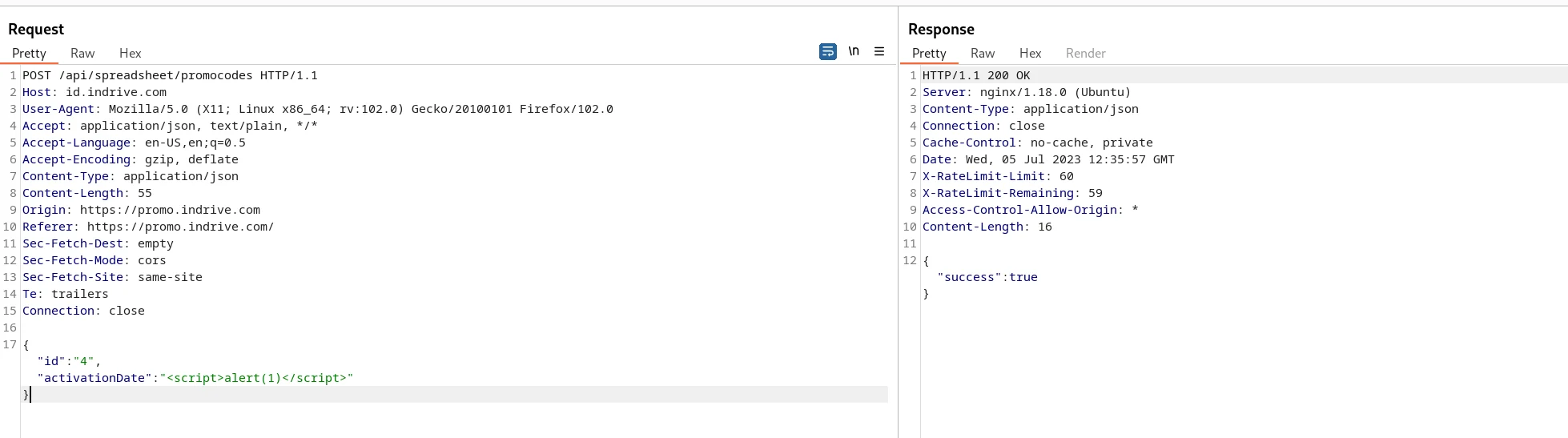
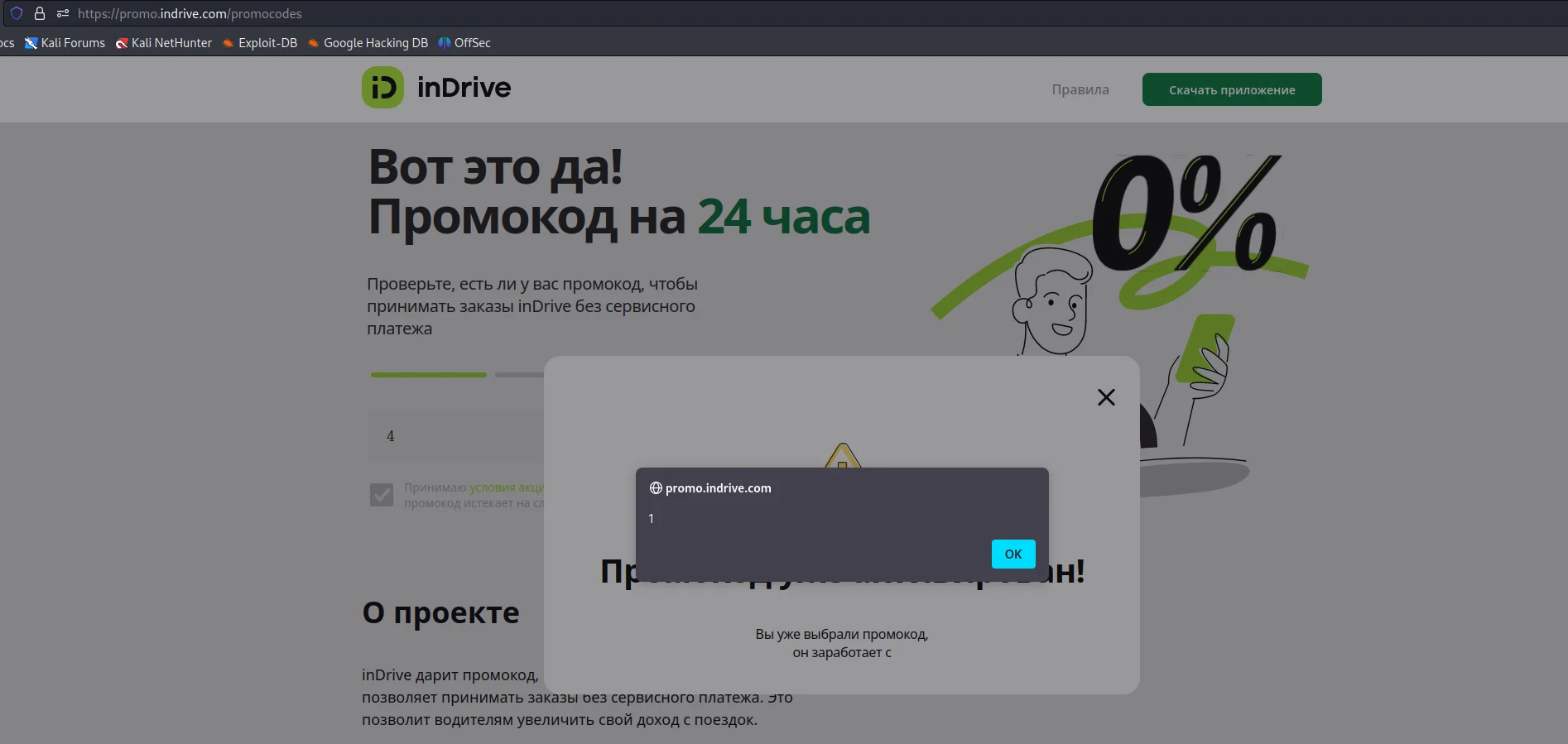
The driver ID value of 4 is used, but the attacker can enumerate through valid driver IDs to inject the payload into every user's promocode. 2. Go to https://promo.indrive.com/promocodes 3. Input a driver ID (in my example 4) and click "Проверить ID". The XSS payload will be triggered
Supporting Material/References:
Full POST Request:
POST /api/spreadsheet/promocodes HTTP/1.1
Host: id.indrive.com
User-Agent: Mozilla/5.0 (X11; Linux x86_64; rv:102.0) Gecko/20100101 Firefox/102.0
Accept: application/json, text/plain, */*
Accept-Language: en-US,en;q=0.5
Accept-Encoding: gzip, deflate
Content-Type: application/json
Content-Length: 55
Origin: https://promo.indrive.com
Referer: https://promo.indrive.com/
Sec-Fetch-Dest: empty
Sec-Fetch-Mode: cors
Sec-Fetch-Site: same-site
Te: trailers
Connection: close

{"id":"4","activationDate":"<script>alert(1)</script>"}
Impact
This vulnerability allows an attacker to execute arbitrary JavaScript code in any user's browser. Despite this being a retired functionality, an attacker could trick users to try and get a promocode. This could also potentially make promocodes usable infinite amount of times by directly making POST requests to renew the code every 24 hours.
Context
The target is inDrive's promotional code feature. The page at https://promo.indrive.com/promocodes lets drivers look up and activate promocodes. To do so, a driver supplies a driver ID. When a promocode is activated, the browser sends a POST request to https://id.indrive.com/api/spreadsheet/promocodes with two parameters: id (the driver ID) and activationDate (the date of the activation).
The report describes this as a retired functionality.
Setup
No accounts, roles or special tooling are described. The only precondition is the ability to send a POST request to the API endpoint, which the researcher did with a normal browser request. The driver ID used throughout the example is 4.
Finding it
The activationDate value supplied during activation is stored and later rendered back on the promocode lookup page. Because the value is attacker-controlled and the page displays it when the same driver ID is looked up, the field looked like a candidate for stored cross-site scripting. The report does not describe how the rendering was first observed beyond this.
Exploitation
Step 1: Inject the payload through the activation request
Send a POST request to https://id.indrive.com/api/spreadsheet/promocodes with the following body:
{"id":"4","activationDate":"<script>alert(1)</script>"}
The id field selects the driver record, and activationDate carries the payload. The value of 4 is only an example: the report notes that an attacker can enumerate valid driver IDs and inject the payload into every user's promocode.
The full request as captured by the researcher:
POST /api/spreadsheet/promocodes HTTP/1.1
Host: id.indrive.com
User-Agent: Mozilla/5.0 (X11; Linux x86_64; rv:102.0) Gecko/20100101 Firefox/102.0
Accept: application/json, text/plain, */*
Accept-Language: en-US,en;q=0.5
Accept-Encoding: gzip, deflate
Content-Type: application/json
Content-Length: 55
Origin: https://promo.indrive.com
Referer: https://promo.indrive.com/
Sec-Fetch-Dest: empty
Sec-Fetch-Mode: cors
Sec-Fetch-Site: same-site
Te: trailers
Connection: close

{"id":"4","activationDate":"<script>alert(1)</script>"}
The request is a same-site cross-origin call from promo.indrive.com to id.indrive.com, sent as JSON. The report does not show the response body.
Step 2: Visit the promocode page
Go to https://promo.indrive.com/promocodes.
Step 3: Trigger the payload by looking up the same ID
Input a driver ID (in the example, 4) and click "Проверить ID". The stored payload is rendered and executes.
The script runs in the victim's browser, which is the impact the researcher demonstrates.
Root cause
The activationDate parameter is accepted from the client, stored, and later written into the promocode lookup page without being treated as data.
Impact
An attacker can execute arbitrary JavaScript in any user's browser when that user looks up the affected driver ID on the promocode page. Because driver IDs can be enumerated, the injection can be applied across many users' promocodes rather than a single record.
The researcher also notes that, even though the functionality is retired, an attacker could trick users into trying to get a promocode, and that promocodes could potentially be made usable an unlimited number of times by sending POST requests directly to renew the code every 24 hours. Both points are hedged in the report.
Fix
The measure implied by the finding is to stop treating activationDate as trusted markup: validate it as a date on the server and encode it on output so the stored value is rendered as text.
Variants to test
- Other stored fields on the same record. Try injecting into any other parameter accepted by the activation endpoint and rendered on the lookup page. A positive result is the payload executing when the record is viewed.
- Other ID-driven lookup pages. Look for pages that take an identifier and display stored data for it. A positive result is a payload stored through one request firing on another user's view of that identifier.
- Date and numeric fields. Fields that are expected to hold dates or numbers are often validated loosely. A positive result is a value that is accepted by the API and later rendered unescaped.
Hunting notes
This bug sits in a cross-origin API that writes user-supplied values into records later displayed by a separate front-end. During recon, the signal is a page that takes an identifier and renders stored data for it, paired with an API endpoint that accepts more fields than the UI sends. The researcher demonstrated impact by showing the payload firing on the promocode page after a lookup, and by noting that IDs can be enumerated to reach other users.
What happened, in plain words
inDrive is a ride-hailing app. Drivers who use it can collect promotional codes, or promocodes: short codes that give a discount or a bonus. The page at https://promo.indrive.com/promocodes is where a driver looks up and activates their promocode. To find the right record, the page asks for a driver ID, a number that identifies each driver.
When a driver activates a promocode, their browser sends a message to a different inDrive server, at https://id.indrive.com/api/spreadsheet/promocodes. That message carries two pieces of information: the driver ID and the activation date. The researcher found that the activation date is saved and later shown back on the promocode page. If someone sends a piece of JavaScript code instead of a date, that code is saved and then runs in the browser of anyone who looks up that driver ID.
This kind of bug is called stored cross-site scripting, or stored XSS. "Cross-site scripting" means getting your own code to run inside someone else's web page. "Stored" means the malicious value is saved on the server first and served to victims later, rather than being reflected back immediately.
Background you need
A few ideas come up again and again below, so here they are from scratch.
API. An API is a way for one piece of software to talk to another. Think of a restaurant: the menu and the waiter are the API. You do not walk into the kitchen; you tell the waiter what you want in a fixed format, and food comes back. Here, the promocode page is the customer and the server at id.indrive.com is the kitchen. The page sends a request in a fixed format and gets data back.
POST request. When your browser loads a page, it usually sends a GET request, which just asks for something. A POST request is used to send data to the server, for example to create or change a record. Activating a promocode changes a record, so it uses POST.
JSON. JSON is a simple text format for structured data, built from names and values in curly braces, like {"name":"value"}. APIs commonly accept and return JSON.
Parameter. A parameter is one named piece of data inside a request. In the body below there are two: id and activationDate.
Payload. In security, a payload is the piece of input an attacker crafts to cause an effect. Here it is a small script.
Script and JavaScript. A script is a small program. JavaScript is the language that web pages run inside your browser. If an attacker can get their own JavaScript to run on a page you trust, they can act as you on that page: read what you see, click things, send requests.
XSS. Cross-site scripting is the class of bug where untrusted input ends up being treated as code by a browser instead of as plain text. The browser cannot tell the difference between a script the site meant to include and one an attacker slipped in, so it runs both.
Stored XSS. The input is saved on the server and shown to other people later. This is worse than a one-off reflection because one injection can reach many victims.
Escaping and encoding. When a website shows text that came from a user, it should mark it as text, not as markup. For example, the characters < and > should be shown as literal characters rather than starting an HTML tag. This is called output encoding or escaping. When it is missing, a <script> tag in the data becomes a real script tag in the page.
Enumeration. Trying a series of values in order, such as 1, 2, 3, to find which ones exist. Driver IDs are numbers, so they can be guessed in sequence.
Same-site and cross-origin. Two addresses on the same parent domain, like promo.indrive.com and id.indrive.com, are same-site but different origins. Browsers apply rules about what one origin may do with another's data; the request below is a normal same-site call between the two.
The setup
The report describes no accounts, roles or special tools. The only thing needed is the ability to send a POST request to the API, which the researcher did with an ordinary browser request. The driver ID used in every example is 4.
Finding it
The researcher noticed that the activationDate value sent during activation is stored and later shown back on the promocode lookup page. Because the value comes from the person sending the request and the page displays it when the same driver ID is looked up, the field looked like a good candidate for stored XSS. The report does not describe how the display was first observed beyond this.
Exploitation
Step 1: Inject the payload through the activation request
The first step is to send a POST request to https://id.indrive.com/api/spreadsheet/promocodes with this body:
{"id":"4","activationDate":"<script>alert(1)</script>"}
Line by line:
- The outer curly braces mark the start and end of one JSON object, the whole message.
"id":"4"names the driver record to work on. The value4is only an example."activationDate":"<script>alert(1)</script>"is where a date should go. Instead it holds a tiny script.alert(1)is a built-in browser function that pops up a box showing the number 1. It does nothing harmful; it is the standard way to prove that code ran.- The comma separates the two parameters.
Why this step: the goal is to get the malicious value saved on the server. The activation request is the door through which the value enters the record.
The id field selects the driver record and activationDate carries the payload. The value 4 is just an example: the report notes that an attacker can enumerate valid driver IDs and inject the payload into every user's promocode.
Here is the full request as the researcher captured it:
POST /api/spreadsheet/promocodes HTTP/1.1
Host: id.indrive.com
User-Agent: Mozilla/5.0 (X11; Linux x86_64; rv:102.0) Gecko/20100101 Firefox/102.0
Accept: application/json, text/plain, */*
Accept-Language: en-US,en;q=0.5
Accept-Encoding: gzip, deflate
Content-Type: application/json
Content-Length: 55
Origin: https://promo.indrive.com
Referer: https://promo.indrive.com/
Sec-Fetch-Dest: empty
Sec-Fetch-Mode: cors
Sec-Fetch-Site: same-site
Te: trailers
Connection: close

{"id":"4","activationDate":"<script>alert(1)</script>"}
Line by line:
POST /api/spreadsheet/promocodes HTTP/1.1is the request line: the method (POST, sending data), the path on the server, and the version of the HTTP protocol.Host: id.indrive.comsays which server the request is for. One server can host many sites, so the name matters.User-Agentidentifies the browser and operating system that sent the request. Here it is Firefox 102 on 64-bit Linux.Acceptlists the kinds of response the browser will accept. Here it prefers JSON and plain text, and will take anything else as a fallback (*/*).Accept-Languagesays which human languages the browser prefers, here American English.Accept-Encodingsays which compression formats the browser can unpack, here gzip and deflate.Content-Type: application/jsontells the server the body is JSON, so it should be read as structured data.Content-Length: 55is the size of the body in bytes.Origin: https://promo.indrive.comsays which page started the request. Servers use this to decide whether to allow it.Referer: https://promo.indrive.com/says which page the browser was on when the request was made.Sec-Fetch-Dest,Sec-Fetch-ModeandSec-Fetch-Siteare hints the browser adds about the request: what kind of resource it is for, what mode it uses, and that it is same-site (both addresses share theindrive.comparent).Te: trailersandConnection: closeare low-level transport details: the client can accept trailing headers, and the connection should be closed after this exchange.- The blank line separates the headers from the body.
- The body is the same JSON shown above.
The request is a same-site cross-origin call from promo.indrive.com to id.indrive.com, sent as JSON. The report does not show the response body.
Step 2: Visit the promocode page
Go to https://promo.indrive.com/promocodes.
Why this step: the payload is now saved, but it only runs when a page displays it. This is the page that shows the stored activation date.
Step 3: Trigger the payload by looking up the same ID
Type a driver ID into the field (in the example, 4) and click "Проверить ID", which is Russian for "Check ID". The stored payload is shown on the page and runs.
Why this step: looking up the ID makes the page fetch the record and render the activation date. The script runs in the victim's browser, which is the impact the researcher demonstrates.
Root cause
The activationDate parameter is accepted from the client, stored, and later written into the promocode lookup page without being treated as data. The behaviour is consistent with the stored value being inserted into the page as HTML rather than escaped or assigned as text.
In everyday terms: the site took a note from a stranger, filed it, and later read it aloud as if it were an instruction from the site's own staff.
Impact
An attacker can run arbitrary JavaScript in any user's browser when that user looks up the affected driver ID on the promocode page. Because driver IDs can be enumerated, the injection can be applied across many users' promocodes rather than a single record.
The researcher also notes that, even though the functionality is retired, an attacker could trick users into trying to get a promocode, and that promocodes could potentially be made usable an unlimited number of times by sending POST requests directly to renew the code every 24 hours. Both points are hedged in the report.
Fix
The measure implied by the finding is to stop treating activationDate as trusted markup: validate it as a date on the server and encode it on output so the stored value is rendered as text.
Variants to test
- Other stored fields on the same record. Try injecting into any other parameter accepted by the activation endpoint and rendered on the lookup page. A positive result is the payload executing when the record is viewed.
- Other ID-driven lookup pages. Look for pages that take an identifier and display stored data for it. A positive result is a payload stored through one request firing on another user's view of that identifier.
- Date and numeric fields. Fields that are expected to hold dates or numbers are often validated loosely. A positive result is a value that is accepted by the API and later rendered unescaped.
Hunting notes
This bug sits in a cross-origin API that writes user-supplied values into records later displayed by a separate front-end. During recon, the signal is a page that takes an identifier and renders stored data for it, paired with an API endpoint that accepts more fields than the UI sends. The researcher demonstrated impact by showing the payload firing on the promocode page after a lookup, and by noting that IDs can be enumerated to reach other users.
Glossary
- API: a fixed way for one program to ask another for data or actions, like a menu and waiter between you and the kitchen.
- POST request: an HTTP request that sends data to the server to create or change something.
- GET request: an HTTP request that asks the server for a page or resource.
- HTTP: the protocol browsers and servers use to exchange requests and responses.
- JSON: a text format for structured data made of names and values in curly braces.
- Parameter: one named piece of data in a request, such as
idoractivationDate. - Payload: the crafted input an attacker sends to cause an effect.
- Script: a small program, often run by a browser.
- JavaScript: the programming language web pages run in the browser.
- XSS (cross-site scripting): a bug where untrusted input is treated as code by the browser instead of as text.
- Stored XSS: XSS where the malicious value is saved on the server and shown to victims later.
- Self-XSS: XSS that only affects the person who injects it, usually by pasting code into their own browser.
- Output encoding / escaping: converting user data so the browser displays it as text rather than interpreting it as markup or code.
- Sanitisation: cleaning input or output so dangerous parts are removed or neutralised.
- Enumeration: trying values in sequence, such as 1, 2, 3, to discover which exist.
- Origin: the combination of scheme, host and port that identifies where a page came from, for example
https://promo.indrive.com. - Same-site: two addresses that share the same parent domain, such as
promo.indrive.comandid.indrive.com. - Cross-origin: a request or access between two different origins.
- Header: a named line in an HTTP request or response carrying metadata, such as
HostorContent-Type. - Body: the part of an HTTP request or response that carries the actual data.
- User-Agent: a header describing the browser and operating system that sent the request.
- Origin header: a header telling the server which page started the request.
- Referer header: a header telling the server which page the browser was on when the request was made.
- Content-Type: a header saying what format the body is in, such as JSON.
- Content-Length: a header giving the size of the body in bytes.
- CORS: browser rules that decide whether a page from one origin may read responses from another origin.
- alert(): a built-in browser function that shows a pop-up box, commonly used to prove that JavaScript ran.
- Recon: the early phase of looking around a target to find pages, endpoints and behaviours worth testing.
- Endpoint: a specific address on a server that accepts requests, such as
/api/spreadsheet/promocodes. - Bounty: a payment a company makes to a researcher who reports a valid security bug.