Pwn2Own Miami 2022: Inductive Automation Remote Code Execution
The SSO authentication for Active Directory user sources in Inductive Automation Ignition did not verify any cryptographic proof, only the username and AD domain name, allowing an attacker to bypass authentication. Combined with a script execution endpoint available to any authenticated user, this allowed remote code execution as SYSTEM.

This write-up is part 2 of a series of write-ups about the 5 vulnerabilities we demonstrated last April at Pwn2Own Miami. This is the write-up for a Remote Code Execution vulnerability in Inductive Automation Ignition, by using an authentication bypass (CVE-2022-35871).
The full write-up lives on its author's site
It belongs to its author, so we link to it rather than copy it. The other two tabs are our own rewrites, checked against it.

This is the second in a series of write-ups about the five vulnerabilities Computest Sector 7 demonstrated at Pwn2Own Miami in April 2022. It covers a remote code execution vulnerability in Inductive Automation Ignition, reached through an authentication bypass that was assigned CVE-2022-35871. The ZDI announcement credited Computest Sector 7 with using a missing authentication for critical function vulnerability to execute code on Ignition, winning $20,000 and 20 Master of Pwn points.
The root cause was a weak authentication implementation when Active Directory single sign-on is used. The researchers combined it with what they assume is intended functionality that lets an authenticated user execute Python on the server, running as SYSTEM.
Context
Inductive Automation Ignition competed in the "Control Server" category at Pwn2Own. Control servers supervise and communicate with lower-level devices such as PLCs, which makes them a critical element in any ICS network.
Ignition is organised into projects, managed through a web interface. Each project needs a user source that determines authentication and authorisation for that project. A user source can be internal, database-backed, or based on Active Directory, and the AD option has sub-options that determine how authorisation is handled. Projects are then used from Ignition Perspective, a desktop application that talks to the Ignition server through the gateway API.
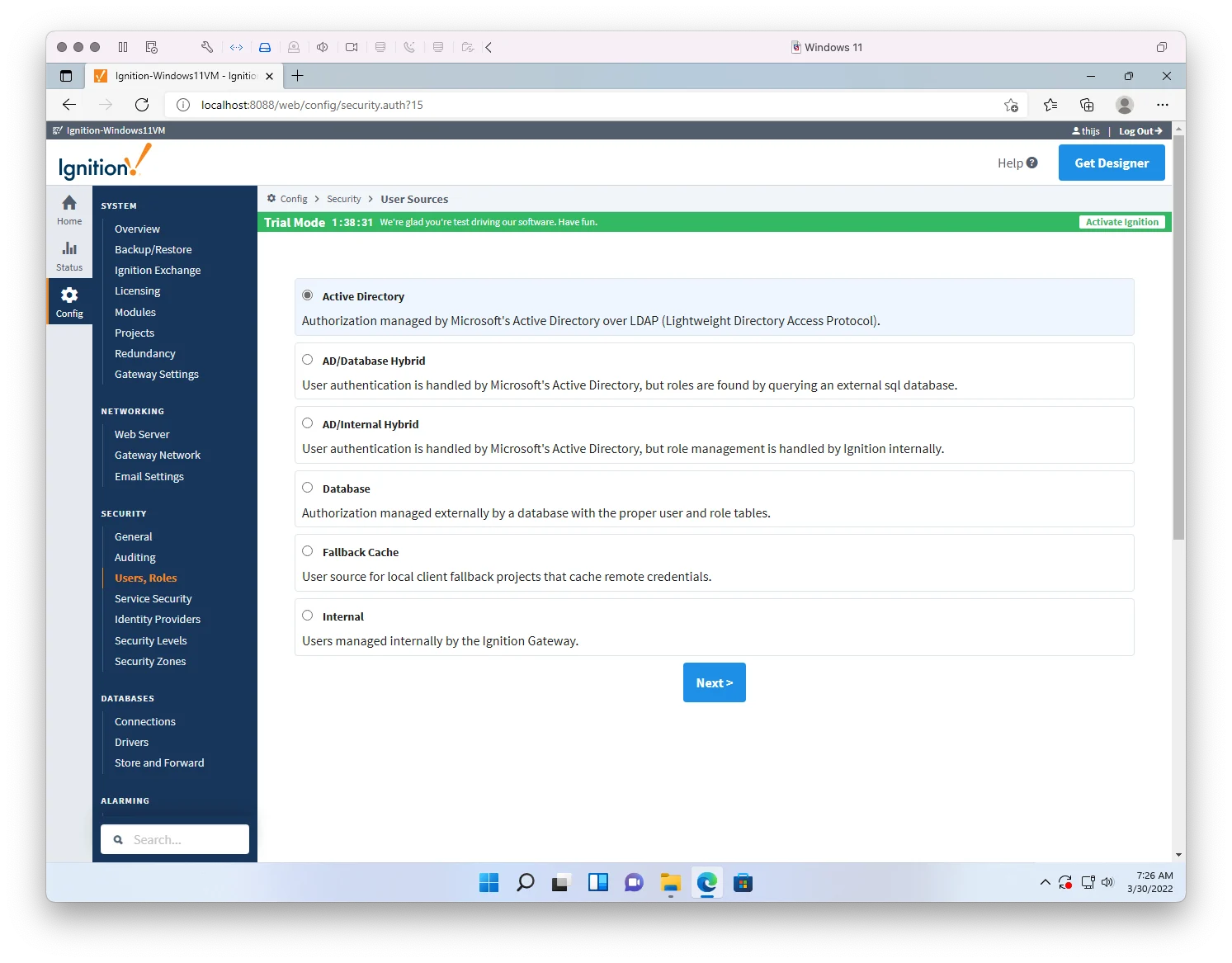
When an AD based user source is configured, it offers an option named "SSO Enabled".

Configuring an AD based user source requires the server to be set up with an AD account, the IP address of a domain controller and the Active Directory domain name. The AD account is used to establish an LDAP connection to the AD server for the application itself.
Setup
The exploit requires the server to be configured with AD authentication and SSO enabled. The researchers worked from the decompiled Java code of the gateway API, specifically Ignition/lib/core/gateway/gateway-api-8.1.16.jar, to understand how SSO authentication is handled.
Finding it
While reading the decompiled code for SSO handling in the gateway API, the researchers noticed that the function implementing SSO was much simpler than they expected. The relevant class is com.inductiveautomation.ignition.gateway.authentication.impl.ActiveDirectoryUserSource.class:
protected AuthenticatedUser authenticateAdSso(AuthChallenge challenge) throws Exception {
    String ssoUname = (String)challenge.get(User.Username);
    String ssoDomain = (String)challenge.get(ADSSOAuthChallenge.ADDomain);
    if (StringUtils.isBlank(ssoUname)) {
      this.log.debug("SSO username is blank.");
      return null;
    }
    if (StringUtils.isBlank(ssoDomain)) {
      this.log.debugf("SSO domain is blank for user '%s'", new Object[] { ssoUname });
      return null;
    }
    if (ssoDomain.equalsIgnoreCase(this.domain)) {
      User existingUser = this.userSource.findSSOUser(ssoUname);
      if (existingUser != null)
        return (AuthenticatedUser)new BasicAuthenticatedUser(existingUser, new Date());
      this.log.debug(String.format("Existing user was not found for username '%s'", new Object[] { ssoUname }));
    } else {
      this.log.debug(String.format("SSO domains did not match! Compared '%s' and '%s'", new Object[] { this.domain, ssoDomain }));
    }
    return null;
  }
The function receives an AuthChallenge object, which is essentially a JSON dictionary. It checks that the object contains a key for the username and a key for the SSO domain, then compares the submitted SSO domain value against the configured Active Directory domain name. If they match, it looks the username up over LDAP and, if the user exists, returns it as an AuthenticatedUser object.
There is no check for a password, token, signature or anything else. The only data that needs to be submitted is the username and the Active Directory domain name. In other words, there is no SSO implementation at all. The researchers note it is not even clear what type of SSO was intended here, probably Kerberos.
Exploitation
Step 1: Gather the three required values
To perform the attack, three pieces of information are needed:
- The name of a project using this authentication method.
- The name of an existing AD user.
- The name of the AD domain.
The first two turned out to be easy. An unauthenticated API endpoint on the admin interface returns the list of all projects:
http://<server IP>/data/perspective/projects
For the username, any existing AD user works, regardless of permissions in AD or Ignition. The researchers used "Administrator", since that user always exists in AD.
That leaves the AD domain name, which they did not find a way to obtain automatically from Ignition. In practice it should be easy to obtain when attacking a company, especially if the attacker is already on the internal network: in most cases it is the company's primary domain name, or it may leak in email headers, file metadata and similar sources.
Step 2: Bypass authentication
With the project name, an existing AD username and the AD domain name, the attacker submits an AuthChallenge containing the username and domain to the SSO authentication path. Because authenticateAdSso only compares the domain string and looks up the username over LDAP, a matching domain and an existing user are enough to be returned as an authenticated user. No password, token or signature is involved.
Step 3: Execute code on the server
To go from an authenticated user to code execution, the researchers used what they assume is intended functionality that evaluates Python on the server. There is a ScriptInvoke gateway API endpoint with an execute function. Authenticated users can submit Python code to this endpoint, which is executed on the server with the same privileges as the server itself, which on Windows is SYSTEM. Ignition Designer offers the ability to execute scripts on the server in response to specific events or at regular intervals. This does not appear to require any special role or permissions, so the design looks risky, but it does seem to function as designed.
Step 4: Get a shell
Finally, the researchers used a reverse shell implemented in Python to set up a connection back to their attacker machine.
Root cause
The mistake is in the design of the AD SSO authentication path. authenticateAdSso treats two attacker-supplied strings, the username and the domain name, as sufficient proof of identity. It validates that the domain matches the configured AD domain and that the user exists in LDAP, but it never verifies anything cryptographic: no password, token or signature. The (cryptographic) protocol for handling single sign-on appears not to be implemented at all.
The second half of the chain is the ScriptInvoke endpoint. Because it accepts Python from any authenticated user and runs it with the server's own privileges, any authentication bypass immediately becomes an RCE. The report notes that this functionality does not appear to require any special role or permissions, so a user with no explicitly assigned permissions or roles can still execute code.
Impact
Exploiting these vulnerabilities grants code execution on the machine hosting Ignition. An attacker could immediately manipulate or disrupt any process handled by or via the server, for example by taking over communication with PLCs. The SYSTEM privileges make the host a strong starting point for further attacks against other parts of the ICS or IT network.
In most cases the Ignition server is not exposed to the internet and is only available on the internal ICS network, so the vulnerability would need to be combined with other vulnerabilities or attacks that grant access to that network.
Fix
Inductive Automation addressed the vulnerability in versions 8.1.17 and 7.9.20 and assigned CVE-2022-35871. AD User Sources now disable the "SSO Enabled" setting automatically unless a specific flag is set on the server:
-Dignition.enableInsecureAdSso=true
In other words, Inductive Automation chose to deprecate the feature and documented that it is dangerous to use. This may seem like a disappointing fix, but implementing a secure SSO protocol would likely have taken much more time. This way the vulnerability can be avoided, and a secure SSO protocol could be implemented later without time pressure.
What happened, in plain words
In April 2022, researchers from Computest Sector 7 took part in Pwn2Own Miami, a contest where security researchers try to break into real products in front of an audience. One of their targets was Inductive Automation Ignition, a piece of software used in factories and industrial sites. They found a way to log in to it without knowing any password, and then to run their own code on the machine that runs it. The ZDI announcement credited Computest Sector 7 with using a missing authentication for critical function vulnerability to execute code on Ignition, winning $20,000 and 20 Master of Pwn points.
This article is the second in a series about the five vulnerabilities they demonstrated at that contest. It explains, from scratch, how the login check could be fooled and how that led to running code on the server.
Background: what Ignition is and where it sits
Inductive Automation Ignition competed in the "Control Server" category at Pwn2Own. A control server is software that supervises and communicates with lower-level devices, such as PLCs. A PLC (programmable logic controller) is the small computer that directly drives machinery on a factory floor: it opens valves, starts motors, reads sensors. The control server sits above those devices and coordinates them, which makes it a critical element in any ICS network. ICS stands for industrial control system: the collection of computers and devices that run a physical process, such as a water plant or a production line.
Ignition is organised into projects, which are managed through a web interface. Think of a project as a workspace: a set of screens, scripts and settings that together form one application, for example a dashboard showing the state of a machine.
Each project needs a user source. A user source is the part of the configuration that determines authentication and authorisation for that project. Authentication answers the question "who are you?", authorisation answers "what are you allowed to do?". A user source can be:
- internal, meaning the user list lives inside Ignition itself;
- backed by a database;
- based on Active Directory, and the AD option has sub-options that determine how authorisation is handled.
Active Directory (AD) is Microsoft's directory service: a central list of users, groups and their permissions that companies use so that people log in once with a company account and are recognised everywhere. A domain is the name that groups those accounts together, for example the company's own name.
Projects are then used from Ignition Perspective, a desktop application that talks to the Ignition server through the gateway API. An API (application programming interface) is the set of addresses and rules one program uses to ask another program to do something. The gateway API is therefore the door through which the Perspective application sends its requests to the Ignition server. A desktop application is simply a program installed on a computer, as opposed to a website opened in a browser.
When an AD based user source is configured, it offers an option named "SSO Enabled". SSO stands for single sign-on: the idea that a user who has already logged in to the company network should not have to type a password again for every application. The application trusts the fact that the company's login system has already checked the person.
Configuring an AD based user source requires the server to be set up with an AD account, the IP address of a domain controller and the Active Directory domain name. A domain controller is the AD server that holds the accounts and answers questions about them. The AD account is used to establish an LDAP connection to the AD server for the application itself. LDAP is the standard protocol for asking a directory service questions such as "does this user exist?".
Setup: what the researchers needed before starting
The exploit requires the server to be configured with AD authentication and SSO enabled. In other words, the attack only works against an Ignition installation that has been set up to trust Active Directory logins with the SSO option switched on.
The researchers worked from the decompiled Java code of the gateway API, specifically Ignition/lib/core/gateway/gateway-api-8.1.16.jar, to understand how SSO authentication is handled. Decompiling means taking the compiled program that the server actually runs and turning it back into readable source code, so you can see what the program does step by step. A JAR file is a package of Java code, and Java is the programming language Ignition is written in.
Finding it: reading the login code
While reading the decompiled code for SSO handling in the gateway API, the researchers noticed that the function implementing SSO was much simpler than they expected. A function is a named block of code that does one job; here the job is "check whether this person should be logged in via SSO". The relevant class is com.inductiveautomation.ignition.gateway.authentication.impl.ActiveDirectoryUserSource.class. A class is a named grouping of code in Java, and this name tells you it is the part of Ignition that handles Active Directory user sources.
protected AuthenticatedUser authenticateAdSso(AuthChallenge challenge) throws Exception {
    String ssoUname = (String)challenge.get(User.Username);
    String ssoDomain = (String)challenge.get(ADSSOAuthChallenge.ADDomain);
    if (StringUtils.isBlank(ssoUname)) {
      this.log.debug("SSO username is blank.");
      return null;
    }
    if (StringUtils.isBlank(ssoDomain)) {
      this.log.debugf("SSO domain is blank for user '%s'", new Object[] { ssoUname });
      return null;
    }
    if (ssoDomain.equalsIgnoreCase(this.domain)) {
      User existingUser = this.userSource.findSSOUser(ssoUname);
      if (existingUser != null)
        return (AuthenticatedUser)new BasicAuthenticatedUser(existingUser, new Date());
      this.log.debug(String.format("Existing user was not found for username '%s'", new Object[] { ssoUname }));
    } else {
      this.log.debug(String.format("SSO domains did not match! Compared '%s' and '%s'", new Object[] { this.domain, ssoDomain }));
    }
    return null;
  }
Line by line, in plain words:
protected AuthenticatedUser authenticateAdSso(AuthChallenge challenge)declares the function. It takes one input, calledchallenge, and promises to give back either anAuthenticatedUser(a logged-in user) or nothing.throws Exceptionmeans it is allowed to report an error upwards if something goes wrong.String ssoUname = (String)challenge.get(User.Username);takes the username out of the challenge and stores it in a text variable calledssoUname. The(String)part tells Java to treat the value as text.String ssoDomain = (String)challenge.get(ADSSOAuthChallenge.ADDomain);does the same for the domain name, storing it inssoDomain.if (StringUtils.isBlank(ssoUname))checks whether the username is empty or only spaces. If so, it writes a debug message ("SSO username is blank.") and returnsnull, meaning "not logged in".- The next
ifdoes the same check for the domain, logging "SSO domain is blank for user '%s'" with the username filled in, and again returnsnull. if (ssoDomain.equalsIgnoreCase(this.domain))compares the submitted domain with the domain configured on the server, ignoring upper and lower case. If they match, the code inside the block runs.User existingUser = this.userSource.findSSOUser(ssoUname);asks the user source, over LDAP, whether a user with that name exists, and stores the answer inexistingUser.if (existingUser != null)checks that the answer is not empty, meaning the user was found. If found,return (AuthenticatedUser)new BasicAuthenticatedUser(existingUser, new Date());hands back a logged-in user object, stamped with the current date and time.- If the user was not found, it logs "Existing user was not found for username '%s'" and falls through.
- If the domains did not match, the
elsebranch logs "SSO domains did not match! Compared '%s' and '%s'" with both values. - Finally,
return null;means: if none of the above succeeded, the person is not logged in.
The function receives an AuthChallenge object, which is essentially a JSON dictionary. JSON is a text format for structured data, and a dictionary is a list of labelled values, like a form with named fields. It checks that the object contains a key for the username and a key for the SSO domain, then compares the submitted SSO domain value against the configured Active Directory domain name. If they match, it looks the username up over LDAP and, if the user exists, returns it as an AuthenticatedUser object.
There is no check for a password, token, signature or anything else. A token is a piece of data that proves you logged in earlier, and a signature is a cryptographic stamp proving that a message really came from who it claims. Neither appears here. The only data that needs to be submitted is the username and the Active Directory domain name. In other words, there is no SSO implementation at all. The researchers note it is not even clear what type of SSO was intended here, probably Kerberos. Kerberos is a well-known protocol that uses cryptography to prove identity securely; none of that machinery is present in this function.
Exploitation
Step 1: Gather the three required values
To perform the attack, three pieces of information are needed:
- The name of a project using this authentication method.
- The name of an existing AD user.
- The name of the AD domain.
The first two turned out to be easy. An unauthenticated API endpoint on the admin interface returns the list of all projects. Unauthenticated means you do not need to log in to call it, and an endpoint is one specific address in an API, like one counter in a building.
http://<server IP>/data/perspective/projects
This is a URL, the same kind of address you type in a browser. http:// is the protocol used to fetch it, <server IP> is a placeholder for the address of the Ignition server on the network, and /data/perspective/projects is the path that asks for the list of projects. Because no login is required, anyone who can reach the server can read the project names.
For the username, any existing AD user works, regardless of permissions in AD or Ignition. The researchers used "Administrator", since that user always exists in AD. This matters because the check only asks whether the user exists, not what the user is allowed to do.
That leaves the AD domain name, which they did not find a way to obtain automatically from Ignition. In practice it should be easy to obtain when attacking a company, especially if the attacker is already on the internal network: in most cases it is the company's primary domain name, or it may leak in email headers, file metadata and similar sources. Email headers are the technical lines at the top of a message that record where it came from, and file metadata is information stored inside a document about who created it and in which organisation.
Step 2: Bypass authentication
With the project name, an existing AD username and the AD domain name, the attacker submits an AuthChallenge containing the username and domain to the SSO authentication path. Because authenticateAdSso only compares the domain string and looks up the username over LDAP, a matching domain and an existing user are enough to be returned as an authenticated user. No password, token or signature is involved. In everyday terms: the door asks for your name and your company's name, checks that the company name is on its list and that your name appears in the staff directory, and then lets you in without ever asking for proof that you are that person.
Step 3: Execute code on the server
To go from an authenticated user to code execution, the researchers used what they assume is intended functionality that evaluates Python on the server. Python is a popular programming language; "evaluating" it means the server reads the text and actually runs it as a program. There is a ScriptInvoke gateway API endpoint with an execute function. Authenticated users can submit Python code to this endpoint, which is executed on the server with the same privileges as the server itself, which on Windows is SYSTEM. SYSTEM is the most powerful account on a Windows machine, the one the operating system itself uses, so code running as SYSTEM can do anything on that computer.
Ignition Designer offers the ability to execute scripts on the server in response to specific events or at regular intervals. This does not appear to require any special role or permissions, so the design looks risky, but it does seem to function as designed. In other words, the feature is not a bug in itself; the problem is that it is available to a user who has no explicitly assigned rights.
Step 4: Get a shell
Finally, the researchers used a reverse shell implemented in Python to set up a connection back to their attacker machine. A shell is a way to type commands on a computer and see the results. A reverse shell is one where the compromised server makes the connection outwards to the attacker, rather than the attacker connecting inwards, which often slips past network defences because outgoing connections are usually allowed.
Root cause
The mistake is in the design of the AD SSO authentication path. authenticateAdSso treats two attacker-supplied strings, the username and the domain name, as sufficient proof of identity. It validates that the domain matches the configured AD domain and that the user exists in LDAP, but it never verifies anything cryptographic: no password, token or signature. The cryptographic protocol for handling single sign-on appears not to be implemented at all.
The second half of the chain is the ScriptInvoke endpoint. Because it accepts Python from any authenticated user and runs it with the server's own privileges, any authentication bypass immediately becomes an RCE. RCE stands for remote code execution: an attacker somewhere else on the network gets their own code running on the target machine. The report notes that this functionality does not appear to require any special role or permissions, so a user with no explicitly assigned permissions or roles can still execute code.
Impact
Exploiting these vulnerabilities grants code execution on the machine hosting Ignition. An attacker could immediately manipulate or disrupt any process handled by or via the server, for example by taking over communication with PLCs. The SYSTEM privileges make the host a strong starting point for further attacks against other parts of the ICS or IT network.
In most cases the Ignition server is not exposed to the internet and is only available on the internal ICS network, so the vulnerability would need to be combined with other vulnerabilities or attacks that grant access to that network.
Fix
Inductive Automation addressed the vulnerability in versions 8.1.17 and 7.9.20 and assigned CVE-2022-35871. A CVE is a public identifier for a known vulnerability, so people can refer to it unambiguously. AD User Sources now disable the "SSO Enabled" setting automatically unless a specific flag is set on the server:
-Dignition.enableInsecureAdSso=true
This is a startup option passed to the Java program that runs Ignition. The -D prefix sets a named setting, here called ignition.enableInsecureAdSso, and =true switches it on. The name itself says the feature is insecure, and it has to be turned on deliberately.
In other words, Inductive Automation chose to deprecate the feature and documented that it is dangerous to use. Deprecate means to mark as no longer recommended, while leaving it available for now. This may seem like a disappointing fix, but implementing a secure SSO protocol would likely have taken much more time. This way the vulnerability can be avoided, and a secure SSO protocol could be implemented later without time pressure.
Glossary
- Active Directory (AD): Microsoft's central directory of users, groups and permissions, used by companies so people log in once with a company account.
- API (application programming interface): the set of addresses and rules one program uses to ask another program to do something.
- Authentication: the process of proving who you are, for example with a password.
- Authorisation: the process of deciding what an identified user is allowed to do.
- AuthChallenge: the data object (essentially a JSON dictionary) that carries the login details a client submits to the server.
- Class: a named grouping of code in Java.
- Control server: software that supervises and communicates with lower-level industrial devices such as PLCs.
- CVE: a public identifier for a known vulnerability, so people can refer to it unambiguously.
- Decompiling: turning a compiled program back into readable source code so you can see what it does.
- Deprecate: mark a feature as no longer recommended, while leaving it available for now.
- Dictionary: a list of labelled values, like a form with named fields; JSON is a text format for such data.
- Domain: the name that groups Active Directory accounts together, for example a company's own name.
- Domain controller: the AD server that holds the accounts and answers questions about them.
- Endpoint: one specific address in an API, like one counter in a building.
- Function: a named block of code that does one job.
- Gateway API: the interface through which Ignition clients such as Perspective talk to the Ignition server.
- ICS (industrial control system): the collection of computers and devices that run a physical process, such as a water plant or a production line.
- Ignition: Inductive Automation's control server software, organised into projects and user sources.
- Ignition Designer: the part of Ignition that lets users build projects and scripts.
- Ignition Perspective: the desktop application that displays Ignition projects and talks to the server through the gateway API.
- JAR file: a package of Java code.
- Java: the programming language Ignition is written in.
- JSON: a text format for structured data, made of labelled values.
- Kerberos: a well-known protocol that uses cryptography to prove identity securely.
- LDAP: the standard protocol for asking a directory service questions such as "does this user exist?".
- PLC (programmable logic controller): the small computer that directly drives machinery on a factory floor.
- Project: in Ignition, a workspace of screens, scripts and settings that together form one application.
- Python: a popular programming language; here, the language the server can be asked to run.
- RCE (remote code execution): an attacker somewhere else on the network gets their own code running on the target machine.
- Reverse shell: a shell where the compromised server connects outwards to the attacker, rather than the attacker connecting inwards.
- ScriptInvoke: the gateway API endpoint with an
executefunction that runs submitted Python on the server. - Shell: a way to type commands on a computer and see the results.
- Signature: a cryptographic stamp proving that a message really came from who it claims.
- Single sign-on (SSO): the idea that a user already logged in to the company network does not have to type a password again for every application.
- SYSTEM: the most powerful account on a Windows machine, the one the operating system itself uses.
- Token: a piece of data that proves you logged in earlier.
- Unauthenticated: reachable without logging in.
- User source: the part of an Ignition project's configuration that determines authentication and authorisation.
- URL: the address of something on a network, the same kind of address you type in a browser.