How I access other domains in infinityfree.net using Directory Traversal
 Published on xkurtph.medium.com
Hi, it’s me again haha Kurt Russelle Marmol aka xkurtph, Web Developer (noobie) and Security Researcher.
The full write-up lives on its author's site
It belongs to its author, so we link to it rather than copy it. The other two tabs are our own rewrites, checked against it.
Context
InfinityFree is a US-based web hosting provider launched in 2016 that offers free hosting for an indeterminate period. The hosting itself is served by a third-party platform, and the researcher notes that the bug originated from that third-party website, which InfinityFree uses to serve its customers. The affected functionality is a PHP shell: a single PHP script placed on the hosting account that lets a user browse folders and open files through the browser by passing a path in the query string, instead of logging in over FTP.

The feature normally works like this: the shell receives a filesystem path in a path parameter and lists or opens whatever lives at that path. Because the path is supplied by the client, the script is only as safe as the checks it performs on that value.
Setup
The researcher had a hosting account on InfinityFree with the domain iamxkurtph.ml and a shell script at shell.php. The account's home directory sat under a shared volume path of the form /home/vol11_6/epizy.com/epiz_30774583/htdocs/, where epiz_30774583 is the account username. No special tools, roles or versions are described beyond a browser and the shell script itself. The precondition for the technique is that the target account lives on the same host/server as the attacker's account.
Finding it
The discovery was accidental. A friend wanted to access the researcher's files on the web hosting, and rather than hand over the FTP account, the researcher gave them the PHP shell, because the shell is quicker to use than logging in over FTP. The shell was reachable at:
iamxkurtph.ml/shell.php
Opening a folder or file through the shell produced a URL of this shape:
https://iamxkurtph.ml/shell.php?path=/home/vol11_6/epizy.com/epiz_30774583/htdocs/images
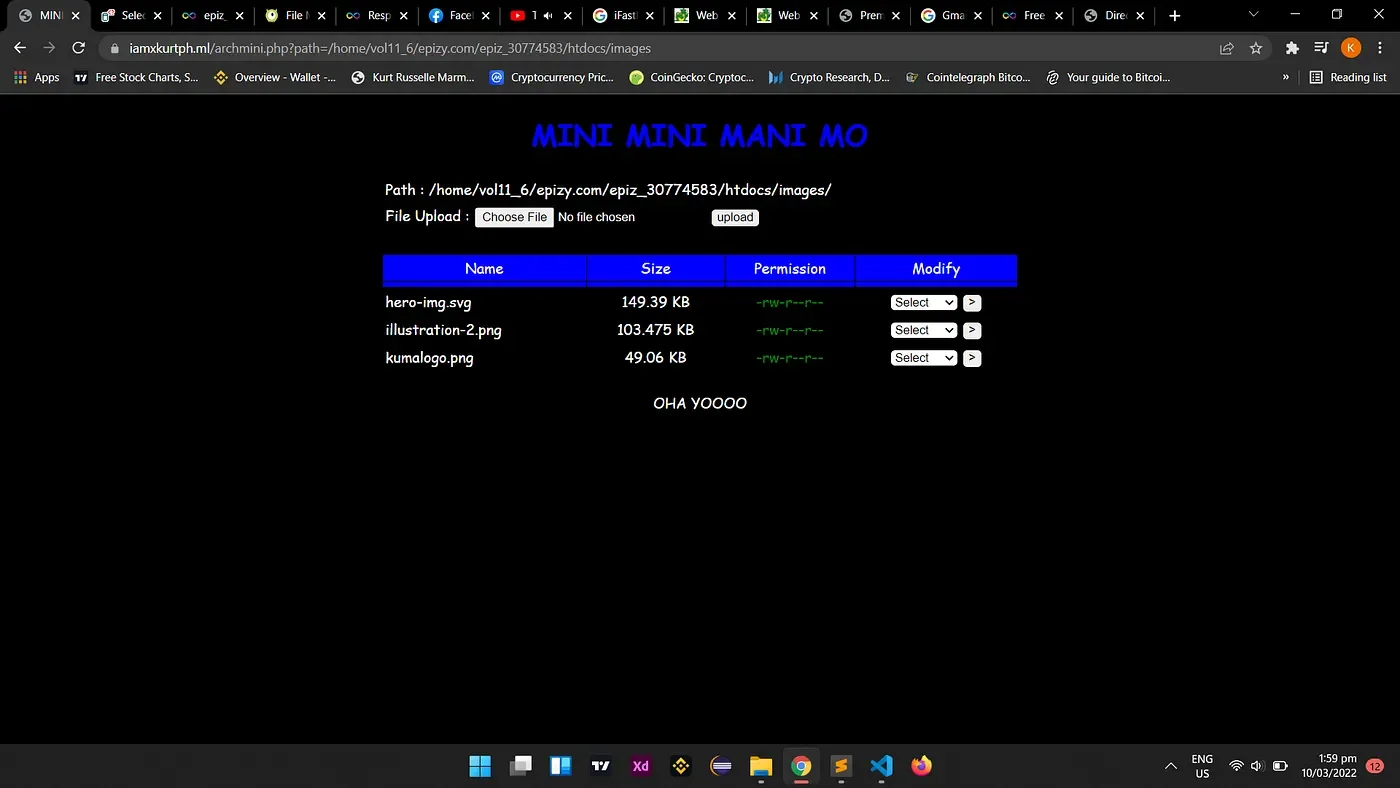
The clue is in the path: epiz_30774583 is the researcher's own username on the domain, and it appears as a plain directory name inside the shared /home/vol11_6/epizy.com/ tree. Since the shell accepts an arbitrary path and the account identifier is sequential, neighbouring accounts are reachable by changing that one component.
Exploitation
Step 1: Confirm the path layout
The shell URL exposes the full absolute path of the account's files, including the volume (vol11_6), the shared parent (epizy.com) and the account identifier (epiz_30774583). This tells the attacker exactly which part of the path identifies the account.
Step 2: Change the account identifier
The researcher changed the username incrementally, to epiz_30774584, epiz_30774585 or epiz_30774586, and pointed the shell at the resulting directory:
https://iamxkurtph.ml/shell.php?path=/home/vol11_6/epizy.com/epiz_30774584
The researcher states that this gave access to other domain files. The same approach works for the other incremented identifiers. The only condition is that the other domain must be on the same host/server as the attacker's account; accounts on a different server are not reachable this way.
A full demonstration video, titled "Directory Traversal using PHP Shells", was published alongside the write-up.
Root cause
The shell accepts a filesystem path in the path query parameter, and the report does not describe how that value is handled internally. The researcher's account sat under /home/vol11_6/epizy.com/ with an incremental username, and pointing the shell at a neighbouring identifier returned another domain's files. The report does not describe any specific validation, canonicalisation or open_basedir-style restriction that was present and bypassed, so the exact defensive gap is likely the absence of any check that the resolved path stays inside the caller's home directory.
Impact
Using the bug as a method could lead to breaching other domains and leaking the files and sensitive information they hold. The exposure is limited to accounts on the same host/server as the attacker's account, and it depends on the attacker having a shell script of this kind deployed on their own account.
Fix
The bug was reported to InfinityFree, who directed the researcher to iFastNet as the main provider hosting the domains. A bug was already reported and fixed at iFastNet. iFastNet does not run a bug bounty programme, but the researcher received a free .com domain as a reward.
Timeline as given:
| Date | Event |
|---|---|
| March 10, 2022 | Bug submitted and reviewed |
| March 13, 2022 | Bug fixed and rewarded |
Variants to test
- Other path parameters on shared hosting shells. Look for file managers, shells or preview scripts that accept a path, file or directory parameter. A positive result is a response that lists or returns content from a directory outside your own account, such as a sibling account directory under the shared parent.
- Sequential account identifiers. Where the account name appears in a path or URL, try incrementing and decrementing it. A positive result is another account's directory listing or file contents coming back.
- Traversal sequences in the same parameter. Try values containing
../to climb out of the intended directory. A positive result is content from a parent or unrelated directory being served. - Absolute paths. Supply a full filesystem path rather than a relative one. A positive result is the server honouring the absolute path and returning files from it.
- Same-server precondition. Repeat the tests against accounts known to be on the same host/server as yours, since the technique described here only works within one server.
What happened, in plain words
A security researcher had a free hosting account on InfinityFree, a service that lets people put a website online without paying. To share some files with a friend, he did not give the friend his FTP login (the username and password used to upload and manage files on a hosting account). Instead he put a small program called a PHP shell on his web space and gave the friend a link to it. That little program lets anyone who opens the link browse folders and read files through the browser, just by putting a folder path in the address bar.
The bug was found accidentally while he was sharing files with a friend through the shell. He changed that username to the next numbers, and by this method he could access other domain files on the same host/server. That is the whole bug: a program that is supposed to show you your own files will show you anyone's files if you simply type a different folder path.
This kind of mistake is called directory traversal, or path traversal. The name comes from the idea of walking out of the folder you are supposed to be in and into a neighbouring one. Think of a hotel where every room key is supposed to open only one door, but the lock actually opens any door whose number you say out loud. Nothing is forced; the door simply trusts you.
The researcher reported it to InfinityFree, who said the hosting itself is run by another company, iFastNet, and pointed him there. A bug was already reported and fixed there, and although iFastNet does not offer a bug bounty programme, he received a free .com domain as a reward.
The product and the feature
InfinityFree is a US-based web hosting provider launched in 2016. As the name suggests, it offers free hosting for an indeterminate period of time. The hosting is actually served by a third-party platform, and the researcher notes that the bug originated from that third-party website, which InfinityFree uses to serve its customers.
The feature at the centre of the story is a PHP shell. PHP is a programming language commonly used to build web pages; a PHP file is a small program that runs on the web server and produces a page for your browser. A PHP shell in this context is a single PHP script placed on a hosting account that lets a user browse folders and open files through the browser, instead of logging in over FTP. FTP, the File Transfer Protocol, is the older way of moving files to and from a web server: you connect with a username and password and then copy files back and forth.
The shell normally works like this: it receives a filesystem path in a path parameter and lists or opens whatever lives at that path. A parameter is simply a named value attached to the end of a web address, after a question mark. In example.com/page?colour=blue, the parameter is called colour and its value is blue. Because the path in this case is supplied by whoever visits the link, the script is only as safe as the checks it performs on that value. If it does not check, it will read whatever it is told to read.
Setting things up
The researcher had a hosting account on InfinityFree with the domain iamxkurtph.ml and a shell script at shell.php. A domain is the name people type to reach a website, such as example.com; .ml is simply one of the many endings a domain can have. The account's home directory sat under a shared volume path of the form /home/vol11_6/epizy.com/epiz_30774583/htdocs/, where epiz_30774583 is the account username.
A few words on that path, since it is the heart of the story. A path is the address of a file or folder on a computer, written as a chain of folders separated by slashes. The leading slash means "start from the very top of the disk". So /home is a top-level folder, vol11_6 is a folder inside it, epizy.com is a folder inside that, epiz_30774583 is the folder belonging to this one account, and htdocs is the folder where the website's public files live. Many accounts share the same parent folders; only the account folder differs.
No special tools, roles or versions are described beyond a browser and the shell script itself. The precondition for the technique is that the target account lives on the same host/server as the attacker's account. A server is the physical or virtual machine that stores the files and answers requests; accounts on different machines cannot see each other's disks at all.
How it was found
The discovery was accidental. A friend wanted to access the researcher's files on the web hosting, and rather than hand over the FTP account, the researcher gave them the PHP shell, because the shell is quicker to use than logging in over FTP. The shell was reachable at:
iamxkurtph.ml/shell.php
This is just the domain name followed by the name of the script file. Opening it in a browser runs the script, which then shows its interface for browsing files.
Opening a folder or file through the shell produced a URL of this shape:
https://iamxkurtph.ml/shell.php?path=/home/vol11_6/epizy.com/epiz_30774583/htdocs/images
Line by line, in plain words:
https://is the secure version of the protocol browsers use to fetch pages.iamxkurtph.mlis the domain, the site being visited./shell.phpis the script being run on that site.?marks the start of the parameters, the extra values being passed to the script.path=is the parameter name. It tells the script which piece of information this is./home/vol11_6/epizy.com/epiz_30774583/htdocs/imagesis the value: the full location of theimagesfolder inside this account.
The clue is in the path: epiz_30774583 is the researcher's own username on the domain, and it appears as a plain directory name inside the shared /home/vol11_6/epizy.com/ tree. In other words, the address bar was openly showing the naming scheme of every account on the server. Since the shell accepts an arbitrary path and the account identifier is sequential, neighbouring accounts are reachable by changing that one component. Sequential means the numbers go up one at a time, like house numbers on a street, so guessing the next one is trivial.
Exploitation
Step 1: Confirm the path layout
The shell URL exposes the full absolute path of the account's files, including the volume (vol11_6), the shared parent (epizy.com) and the account identifier (epiz_30774583). This tells the attacker exactly which part of the path identifies the account. The step matters because you cannot change the right piece of a path until you know which piece is yours. Here the answer is the last folder before htdocs.
Step 2: Change the account identifier
The researcher changed the username incrementally, to epiz_30774584, epiz_30774585 or epiz_30774586, and pointed the shell at the resulting directory:
https://iamxkurtph.ml/shell.php?path=/home/vol11_6/epizy.com/epiz_30774584
Line by line, in plain words:
https://iamxkurtph.ml/shell.phpis the same shell script as before, on the researcher's own site.?path=is the same parameter, still telling the script which folder to show./home/vol11_6/epizy.com/epiz_30774584is the value, and it is identical to the researcher's own path except that the final number has gone up by one. That folder belongs to a different customer.
The researcher states that this gave access to other domain files. The same approach works for the other incremented identifiers. The only condition is that the other domain must be on the same host/server as the attacker's account; accounts on a different server are not reachable this way, because their files are not on the same disk.
A full demonstration video, titled "Directory Traversal using PHP Shells", was published alongside the write-up.
Why it worked
The shell accepts a filesystem path in the path query parameter, and the report does not describe how that value is handled internally. Confining means checking that the requested location really sits inside the folder the visitor is allowed to see, and refusing anything else. The researcher's account sat under /home/vol11_6/epizy.com/ with an incremental username, and pointing the shell at a neighbouring identifier gave access to another domain's files. A sibling here means another account sitting in the same parent folder, like another flat on the same corridor.
The report does not describe any specific validation, canonicalisation or open_basedir-style restriction that was present and bypassed, so the exact defensive gap is likely the absence of any check that the resolved path stays inside the caller's home directory. Canonicalisation means tidying a path into one standard form before checking it, so that clever spellings of the same location cannot slip past. open_basedir is a PHP setting that restricts which folders a script may touch at all.
Impact
Using the bug as a method could lead to breaching other domains and leaking the files and sensitive information they hold. Leaking means information being read by someone who should not have it. The exposure is limited to accounts on the same host/server as the attacker's account, and it depends on the attacker having a shell script of this kind deployed on their own account. In other words, the attacker needs a foothold of their own on the same machine before they can look sideways at their neighbours.
The fix and the reward
The bug was reported to InfinityFree, who directed the researcher to iFastNet as the main provider hosting the domains. A bug was already reported and fixed at iFastNet. iFastNet does not run a bug bounty programme, but the researcher received a free .com domain as a reward. A bug bounty programme is a scheme where a company pays people for reporting security flaws responsibly.
Timeline as given:
| Date | Event |
|---|---|
| March 10, 2022 | Bug submitted and reviewed |
| March 13, 2022 | Bug fixed and rewarded |
Things worth trying elsewhere
These are the same ideas, phrased for someone starting out. Each one describes what to look for and what a positive result looks like.
- Other path parameters on shared hosting shells. Look for file managers, shells or preview scripts that accept a path, file or directory parameter. A positive result is a response that lists or returns content from a directory outside your own account, such as a sibling account directory under the shared parent.
- Sequential account identifiers. Where the account name appears in a path or URL, try incrementing and decrementing it. A positive result is another account's directory listing or file contents coming back.
- Traversal sequences in the same parameter. Try values containing
../to climb out of the intended directory. Two dots followed by a slash is the standard way of writing "go up one folder" in a path. A positive result is content from a parent or unrelated directory being served. - Absolute paths. Supply a full filesystem path rather than a relative one. A positive result is the server honouring the absolute path and returning files from it.
- Same-server precondition. Repeat the tests against accounts known to be on the same host/server as yours, since the technique described here only works within one server.
Glossary
- Bug bounty programme: a scheme where a company rewards people for reporting security flaws to it responsibly instead of exploiting them.
- Canonicalisation: converting a path or input into one standard form before checking it, so alternative spellings of the same thing cannot bypass the check.
- Directory traversal (path traversal): a flaw where an input meant to name a location inside an allowed folder can be made to point outside it, letting someone read other folders.
- Domain: the name people type to reach a website, such as
example.com. - FTP (File Transfer Protocol): an older method of connecting to a server with a username and password to upload and download files.
- Home directory: the folder on a server that belongs to one account and holds that account's files.
- Host / server: the machine that stores files and answers web requests; accounts on different machines cannot reach each other's disks.
htdocs: the folder inside a hosting account where a website's public files are kept.- iFastNet: the provider that runs the hosting platform behind InfinityFree, according to the report.
- InfinityFree: a US-based web hosting provider launched in 2016 offering free hosting for an indeterminate period.
open_basedir: a PHP setting that limits which folders a script is allowed to access.- Parameter: a named value attached to a web address after a question mark, such as
pathin?path=/some/folder. - Path: the address of a file or folder on a computer, written as folders separated by slashes; a leading slash means start from the top of the disk.
- PHP: a programming language commonly used for web pages; PHP files run on the server and produce pages for the browser.
- PHP shell: here, a single PHP script on a hosting account that lets a user browse folders and open files through the browser instead of using FTP.
- Query string: the part of a URL after the question mark that carries parameters.
- Sequential identifier: a name or number that increases by one for each new account, making neighbours easy to guess.
- Sibling directory: a folder that sits in the same parent folder as another, like another flat on the same corridor.
- Third-party platform: a separate company's system that another company uses to deliver its service.
- URL: the full address of a resource on the web, including protocol, domain, path and parameters.
- Validation: checking an input against rules before using it, and rejecting values that fail.
- Volume: a named storage area on a server, such as
vol11_6in the paths above.



