Image Upload Path Disclosure
When a user tries to add an SVG image as a background for a store list, the application returns an error message that includes the full server file path of the uploaded file. An attacker could use this path information to learn about the server's directory structure and potentially aid further attacks.

- Triaged in 6 days
- Fixed in 13 days
- Paid in 13 days
- Disclosed after 34 days
Hi,
Firstly,I couldn't see anything about Path Disclosure in your policy,so I've decided to report it.
Steps to reproduce :
1-Create a list for a store 2-Add background image from link (File has to be .svg) like aaa.com/aaa.svg 3-Then it will give an error
Let's take a look to that error
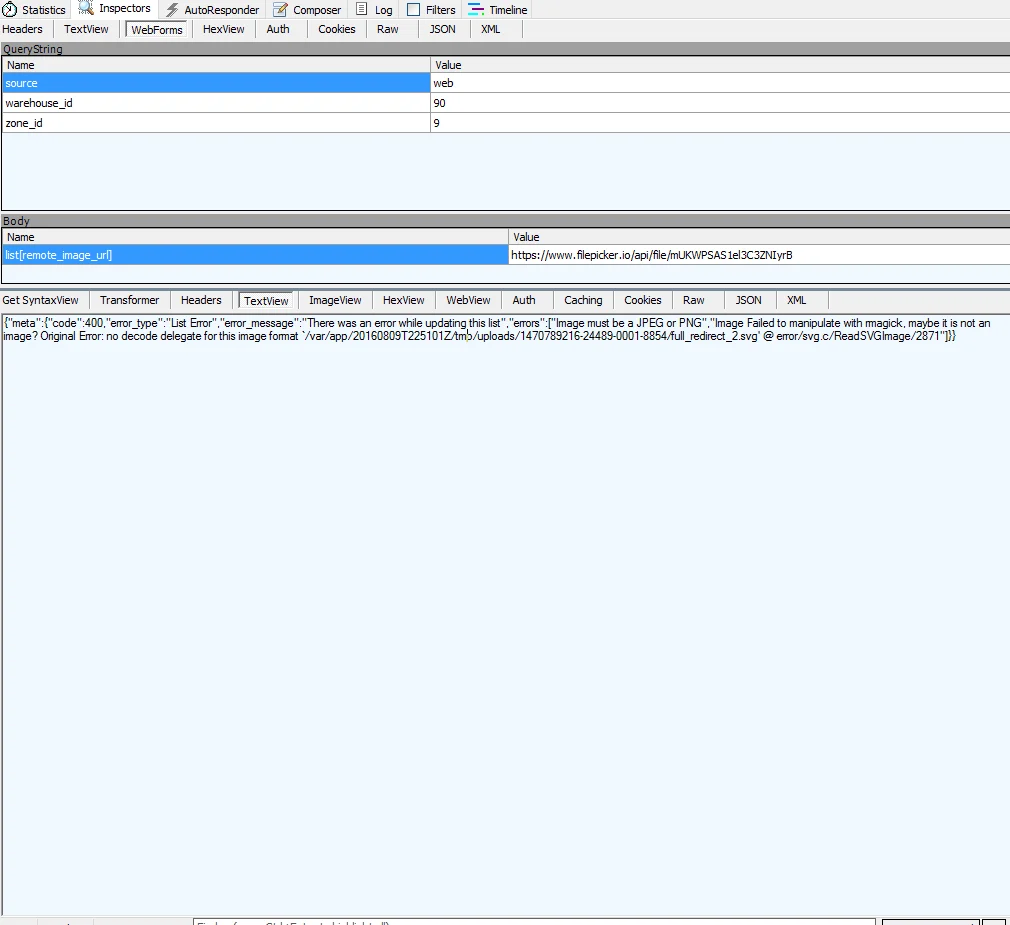
{"meta":{"code":400,"error_type":"List Error","error_message":"There was an error while updating this list","errors":["Image must be a JPEG or PNG","Image Failed to manipulate with rmagick, maybe it is not an image? Original Error: no decode delegate for this image format `/var/app/20160809T225101Z/tmp/uploads/1470789216-24489-0001-8854/full_redirect_2.svg' @ error/svg.c/ReadSVGImage/2871"]}}
As you can understand from error's Response this is the path disclosure
/var/app/20160809T225101Z/tmp/uploads/1470789216-24489-0001-8854/full_redirect_2.svg
I'm gonna add a screenshot from Request and Response for being more clear about it.
Thanks,Instacart.
Attachments
Context
Instacart lets a user create a list for a store and give that list a background image. The image can be supplied as a link rather than uploaded directly, and the server fetches and processes it. The report concerns that image-from-link flow and the error message it returns when the supplied file is not a format the image library can handle.
The researcher notes at the outset that the program policy said nothing about path disclosure, which is why the issue was reported as a discretionary finding rather than against a listed category.
Setup
No special tooling is described. The precondition is simply the ability to create a list for a store and to set its background image from a URL. The researcher controls the URL and therefore the file that the server fetches.
Finding it
The trigger is a file with the .svg extension. When the server tries to process it as an image, the image library fails and the application returns a JSON error body. That body contains more than a user-facing message: it includes the library's own exception text, which embeds the absolute filesystem path of the downloaded file on the server.
Exploitation
Step 1: Create a list for a store
A normal list is created through the application. This is the object whose background image will be set in the next step.
Step 2: Add a background image from a link
The background image is supplied as a URL pointing at an .svg file, for example aaa.com/aaa.svg. The report states that the file has to be .svg for the error to occur.
Step 3: Observe the error
The request fails and the response body is returned as JSON:
{"meta":{"code":400,"error_type":"List Error","error_message":"There was an error while updating this list","errors":["Image must be a JPEG or PNG","Image Failed to manipulate with rmagick, maybe it is not an image? Original Error: no decode delegate for this image format `/var/app/20160809T225101Z/tmp/uploads/1470789216-24489-0001-8854/full_redirect_2.svg' @ error/svg.c/ReadSVGImage/2871"]}}
The errors array carries two entries. The first is the intended validation message, that the image must be a JPEG or PNG. The second is the underlying library error, passed through verbatim. It names rmagick, reports that there is no decode delegate for the format, and quotes the path of the file it was asked to read:
/var/app/20160809T225101Z/tmp/uploads/1470789216-24489-0001-8854/full_redirect_2.svg
That path is the disclosure: it reveals the application's directory layout under /var/app, the naming scheme of a deployment or release directory (20160809T225101Z), and the structure of the temporary upload directory including the per-request subdirectory and the stored filename. The researcher includes a screenshot of the request and response to make the exchange clearer.
Root cause
The application validates the image type and returns a clean message for that check, but it also surfaces the raw exception from the image processing library in the same response. The library's message contains the absolute path of the file it was operating on, so internal filesystem detail reaches the client. The validation that should have stopped processing (the JPEG or PNG requirement) did not prevent the library from being invoked on the SVG, and the resulting exception was serialised into the API response rather than logged server-side only. The report does not describe the code itself, so the exact handling is likely a generic rescue that appends the exception message to the error list.
Impact
A user who can set a list background image can cause the server to return an absolute path on the filesystem. The disclosed information is limited to directory structure, a timestamped release directory name and the layout of the temporary upload area. The report does not claim any further use of the path, such as reading files or reaching other endpoints. The researcher's framing is that this is information disclosure.
Fix
The report does not state what was changed. The evident remedy is to stop returning the library's exception text to the client and to keep only the generic validation message, logging the detailed error server-side instead.
Variants to test
- Other image-processing failures: supply truncated, corrupt or mislabelled files (for example a PNG header on non-image data) to the same background-image field and check whether the error body again contains a library message with a path.
- Other file-consuming features: anywhere a URL is fetched and processed server-side (avatars, imports, previews), try a format the processor rejects and inspect the error body for paths, library names or version strings.
- Different extensions: the report says
.svgwas required here; try other extensions that reach the same processor to see whether the error text differs. - Error-shape probing: send malformed values to the same endpoint and look for stack traces,
Original Error:prefixes or backtick-quoted paths, which are the signature of a passed-through exception.
A positive result is an error response that contains an absolute server path, a release or deployment directory name, or other internal detail beyond the intended validation message.
Hunting notes
This kind of leak tends to sit behind features that accept a URL and process the fetched content: image resizing, thumbnails, document conversion, link previews. The signal during testing is an error body that reads like a library exception rather than an application message, especially wording such as Original Error, no decode delegate or a quoted path. The researcher demonstrated the issue by showing the raw response containing the absolute path.
What happened, in plain words
Instacart is a grocery shopping service. On its website you can build a shopping list for a particular store, and you can give that list a background image so it looks nicer. Instead of uploading a picture from your computer, you can paste a link to a picture somewhere on the internet, and Instacart's server goes and fetches that picture for you.
A security researcher named mefkan tried pasting a link to a file that was not really a picture the server could handle, and the server replied with an error message. That error message was not just a friendly "that did not work". It also contained a piece of the server's own internal file system, the private folder layout on the machine that runs Instacart. Showing that private layout to an ordinary user is called information disclosure: the site accidentally tells you something about itself that it should keep to itself.
The researcher also noted that the program's rules (its policy) did not mention this kind of leak at all, so they reported it as a finding of their own rather than matching a listed category.
Background ideas you need first
Before walking through the steps, here are the few ideas the report relies on.
- A list: inside Instacart, a list is just a named collection of grocery items tied to a store. It is a normal thing you create in the app.
- A background image: a picture shown behind the list, set by the user. The interesting part is that you can give it as a link instead of uploading a file.
- Server-side fetching: when you paste a link, your browser does not download the picture. Instacart's own computer (the server) does. Think of a restaurant: you do not walk into the kitchen, you tell the waiter what you want and the kitchen prepares it. Here the waiter is the website and the kitchen is the server.
- An API and a JSON response: the website's pages talk to the server through an API, a set of addresses the page sends requests to. The server often answers in JSON, a text format that looks like nested labels and values, for example
{"name": "value"}. It is just structured text a program can read easily. - An image library: a piece of software on the server whose job is to open, resize and convert pictures. The report names one called rmagick. Libraries like this understand only certain picture formats.
- A file path: the address of a file on a computer's disk, like a postal address for a file. On Linux servers paths look like
/var/app/..., with folders separated by slashes. These paths are internal details users normally never see. - An exception: what programmers call an error raised inside a program. An exception usually carries a technical message describing what went wrong, written for developers, not for visitors.
- Information disclosure: a weakness where the site reveals internal details (paths, software names, versions, folder names) through something a user can see, usually an error message.
Setting up
The report describes no special tools. You only need to be able to do two ordinary things in the app: create a list for a store, and set that list's background image from a link. Because you choose the link, you also choose which file the server will go and fetch. That control is the whole setup.
Finding it
The trigger is a file whose name ends in .svg. SVG is a picture format, but it is written as text describing shapes rather than as a grid of pixels like a photo. The image library on the server could not decode it, failed, and the application sent back a JSON error. That error body contained more than a user-facing sentence: it included the library's own technical message, and that message contained the full internal path of the downloaded file on the server.
Walking through the steps
Step 1: Create a list for a store
You make a normal list in the app. This is the object whose background image you will change in the next step. Nothing unusual happens here; the point is simply to have a list to attach an image to.
Step 2: Add a background image from a link
You set the background image by giving a URL that points at an .svg file, for example aaa.com/aaa.svg. The report states that the file has to be .svg for the error to happen. The reason for choosing this format is that the server will accept the link, download the file, and then hand it to the image library, which cannot process SVG and will fail in a way that produces a detailed message.
Step 3: Observe the error
The request fails and the server answers with this JSON body:
{"meta":{"code":400,"error_type":"List Error","error_message":"There was an error while updating this list","errors":["Image must be a JPEG or PNG","Image Failed to manipulate with rmagick, maybe it is not an image? Original Error: no decode delegate for this image format `/var/app/20160809T225101Z/tmp/uploads/1470789216-24489-0001-8854/full_redirect_2.svg' @ error/svg.c/ReadSVGImage/2871"]}}
Line by line, in plain words:
- The whole thing is one JSON object, a set of labelled values in braces.
"meta"is a label holding the details of the response."code":400is a numeric status. In web terms, 400 means the server judged the request to be bad, a client mistake rather than a server crash."error_type":"List Error"says which part of the app produced the error, here the list feature."error_message":"There was an error while updating this list"is the friendly sentence meant for you."errors"is a list (the square brackets) of more detailed messages. It holds two entries.- The first entry,
"Image must be a JPEG or PNG", is the intended validation message: the site is telling you the picture must be one of those two common photo formats. - The second entry is the interesting one. It begins
"Image Failed to manipulate with rmagick, maybe it is not an image?", which is the image library complaining. Then comesOriginal Error: no decode delegate for this image format, meaning the library has no built-in reader (a "delegate") for this format. Finally it quotes a path in backticks, and that path is the leak.
The path itself is:
/var/app/20160809T225101Z/tmp/uploads/1470789216-24489-0001-8854/full_redirect_2.svg
Reading it from left to right: /var/app is the folder where the application lives on the server. 20160809T225101Z looks like a timestamp, a date and time in a compact form, which suggests each release or deployment gets its own folder. Then tmp/uploads is a temporary area where downloaded files are stored. 1470789216-24489-0001-8854 is a per-request subfolder, and full_redirect_2.svg is the name the downloaded file was given. All of that is internal housekeeping that a visitor should never see.
The researcher included a screenshot of the request and the response so the exchange is easier to follow.
Why it happens
The application does check the image type and produces a clean message for that check, the Image must be a JPEG or PNG line. But in the same response it also passes through the raw error from the image library. That library message contains the absolute path of the file it was working on, so internal file system detail reaches the browser. The check that should have stopped processing did not stop the library from being called on the SVG, and the resulting error was written into the API response instead of being kept in the server's own logs. The report does not show the code, so the exact handling is not described; the likely pattern is a general error handler that appends the library's message to the list of errors.
What the impact is
A user who can set a list background image can make the server return an absolute path on its disk. What is revealed is limited to the folder structure, a timestamped release folder name, and the layout of the temporary upload area. The report does not claim any further use of that path, such as reading files or reaching other parts of the system. The researcher's framing is information disclosure.
How it would be fixed
The report does not say what was changed. The obvious remedy is to stop sending the library's error text back to the browser and keep only the generic validation message, while logging the detailed error on the server where only staff can see it.
Other places to try the same idea
- Other image failures: give the same background-image field truncated, corrupt or mislabelled files (for example a PNG header on data that is not a picture) and check whether the error body again contains a library message with a path.
- Other features that fetch files: anywhere a URL is fetched and processed on the server (avatars, imports, previews), try a format the processor rejects and look in the error body for paths, library names or version strings.
- Different extensions: the report says
.svgwas required here; try other extensions that reach the same processor and see whether the error text changes. - Probing the shape of errors: send malformed values to the same endpoint and look for stack traces, an
Original Error:prefix or backtick-quoted paths, which are the signature of an error that has been passed straight through.
A positive result is an error response containing an absolute server path, a release or deployment folder name, or other internal detail beyond the intended validation message.
Notes for someone hunting this
This kind of leak tends to sit behind features that accept a URL and then process what they fetch: image resizing, thumbnails, document conversion, link previews. The signal while testing is an error body that reads like a library error rather than an application message, especially wording such as Original Error, no decode delegate or a quoted path. The researcher showed the impact by displaying the raw response with the absolute path in it.
Glossary
- API: the set of addresses and rules a website's pages use to talk to its server, usually exchanging structured text.
- Background image: a picture displayed behind a list, which the user can set.
- Bounty: a payment a company gives a researcher for reporting a valid security problem.
- Exception: an error raised inside a program, usually carrying a technical message meant for developers.
- Information disclosure: a weakness where a site reveals internal details such as file paths, software names or versions to someone who should not see them.
- Image library: software on the server that opens, resizes and converts pictures; the report names rmagick.
- JSON: a text format for structured data, built from labels and values in braces and brackets.
- List: a named collection of grocery items tied to a store inside Instacart.
- Path: the address of a file or folder on a computer's disk, written with slashes, for example
/var/app/.... - Policy: a program's written rules describing what kinds of security reports it accepts.
- rmagick: the image processing library named in the error message.
- Server: the computer that runs the website and does work such as downloading and processing files.
- Server-side fetching: when the server, not your browser, downloads a file from a link you supplied.
- SVG: a picture format written as text describing shapes, rather than as a grid of pixels.
- Validation: a check that input meets the rules before it is used, for example that an image is a JPEG or PNG.
- 400: an HTTP status code meaning the server considers the request to be bad, a client-side mistake.





