CVE-2024–22720 / HTML Injection Vulnerability in Kanboard Group Management
The group name field in Kanboard accepted HTML tags, and those tags were rendered when a member viewed their group memberships on their profile. An attacker who could create or name a group could inject markup that redirects a victim to another site or shows a fake login page to steal credentials.

Today, I’m going to discuss HTML Injection, a vulnerability that may seem minor but can be exploited maliciously. Despite its seemingly low impact, it can be used to automatically redirect users to different domains and even facilitate credential theft.
The full write-up lives on its author's site
It belongs to its author, so we link to it rather than copy it. The other two tabs are our own rewrites, checked against it.
Context
Kanboard is project management software built around the Kanban methodology. Its main interface is a board divided into columns, each representing a stage of the workflow, such as "To Do", "In Progress" and "Done". Users create tasks as cards and move them between columns to reflect their current status, which helps teams limit work in progress and manage their workflow.

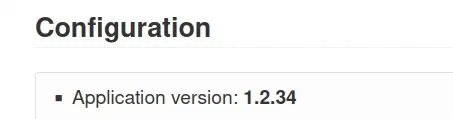
The feature under examination here is group management: the screen where an administrator creates a group and assigns users to it. Group names are entered by an administrator, stored, and later displayed back to users, for example in the 'Group membership(s)' field on a user's profile.
Setup
The test was carried out while logged into Kanboard as an administrator. The researcher's focus was on group management and, specifically, the process of creating a new group. A second account was used for verification: a test user named "Pentest", added to the newly created group. No tooling, version numbers or other preconditions are described in the write-up.
Finding it
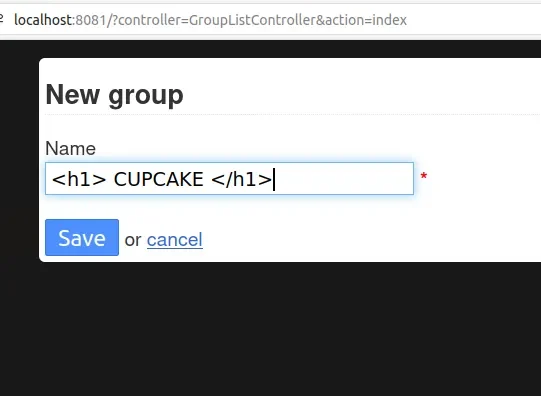
The researcher started by creating a new group and looking at the 'name' field. The first probe was a pair of <h1> tags, chosen so that the result would be visible: if the text rendered larger, the markup had been interpreted. After saving the group name, the tags were not executed, which suggested a potential issue rather than an immediate confirmation.
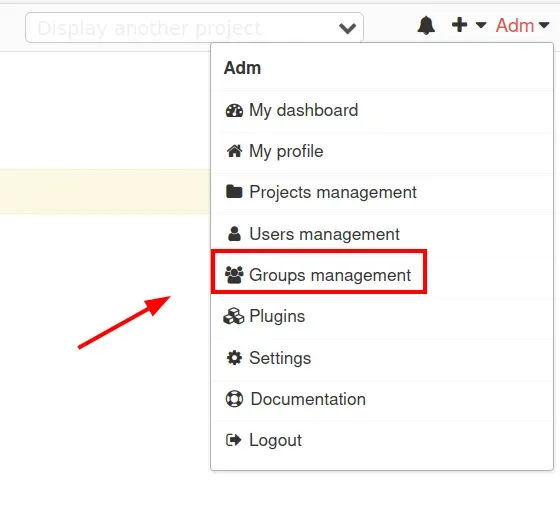
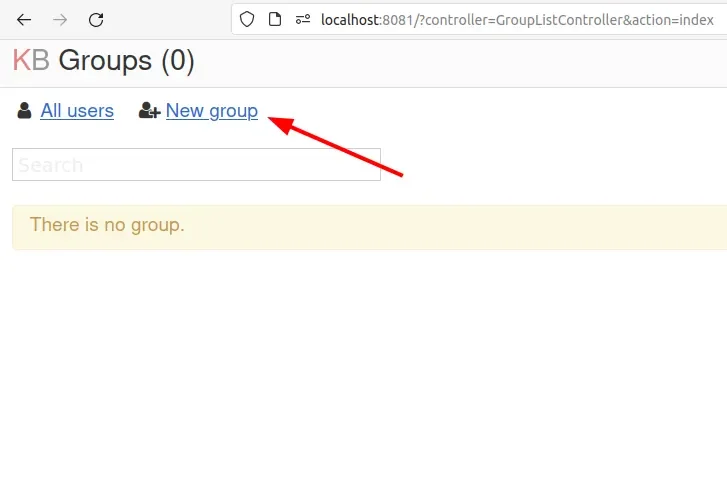
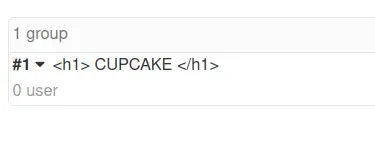
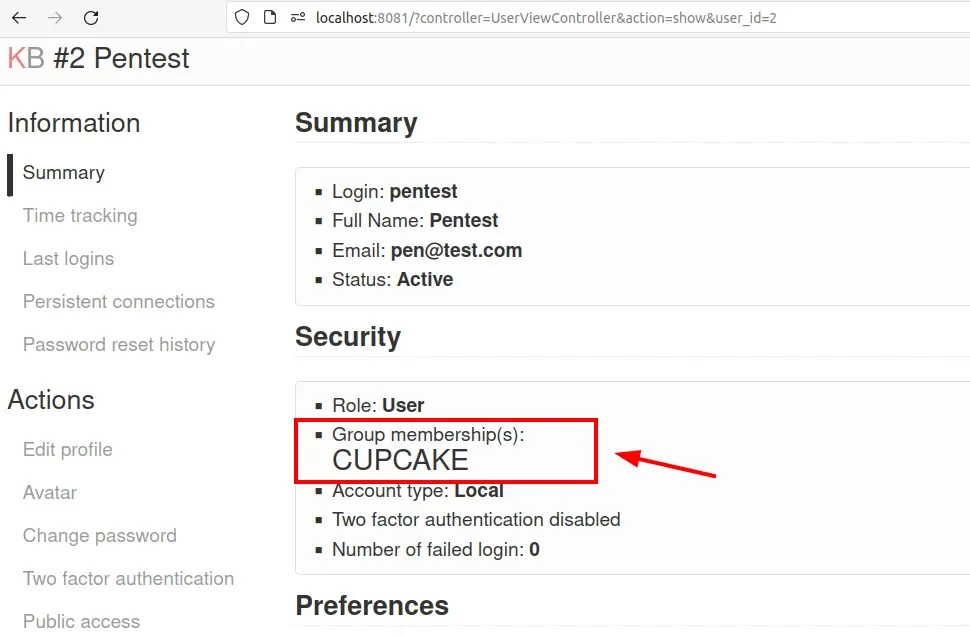
To see where the stored value actually surfaced, the researcher added the test user "Pentest" to the new group. The user was successfully included in the group.
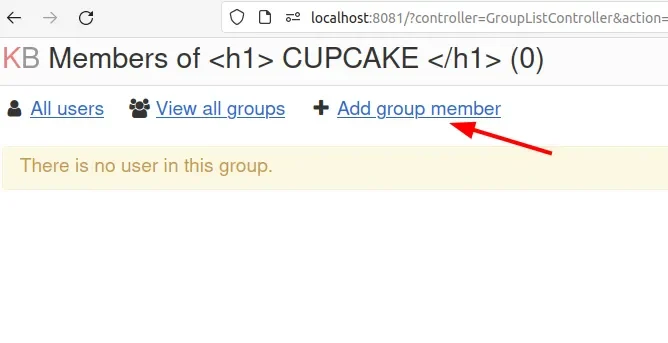
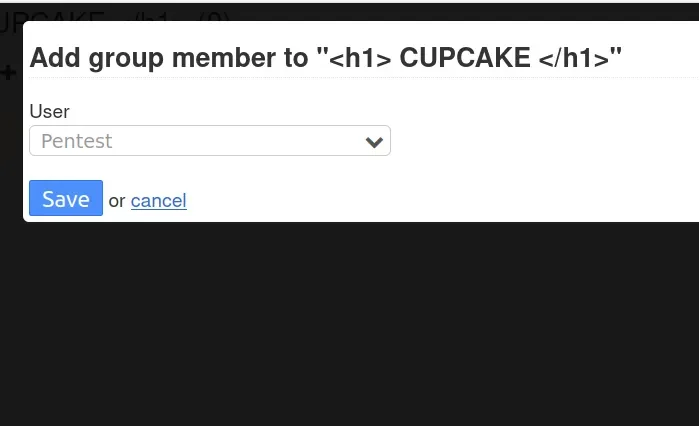
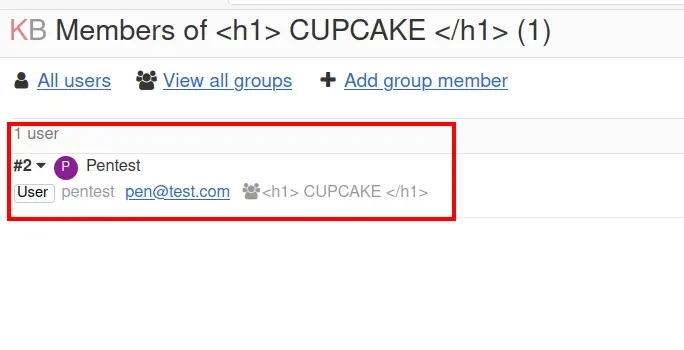
The decisive test was logging in as the "Pentest" user. In the 'Group membership(s)' field, the HTML tags were executed. That confirmed the vulnerability and, in the researcher's view, raised its criticality, because the injected markup is rendered to a different user from the one who supplied it.
Exploitation
Step 1: create a group with a markup payload in the name
As an administrator, create a new group and place HTML in the 'name' field. The first probe was:
On the group creation screen the tags did not execute. The value is stored and rendered later, in another view.
Step 2: add a user to the group
Add the test user "Pentest" to the group. The user is successfully included in the group, which is the condition needed for the stored value to be displayed on that user's profile.
Step 3: log in as the member and observe execution
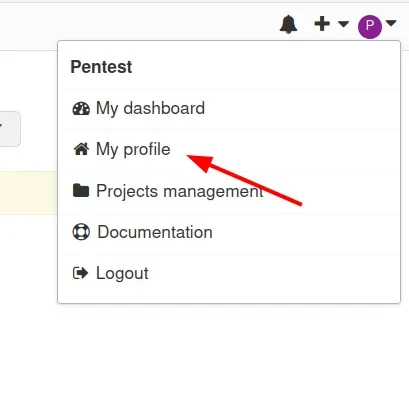
Log in as "Pentest" and open the profile. In the 'Group membership(s)' field the HTML tags execute, confirming stored HTML injection.
Step 4: automatic redirect
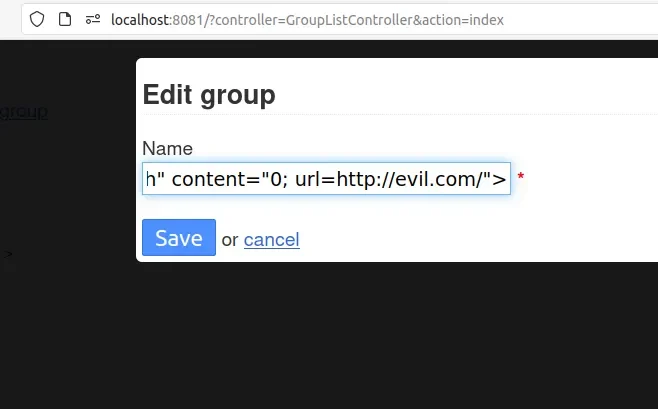
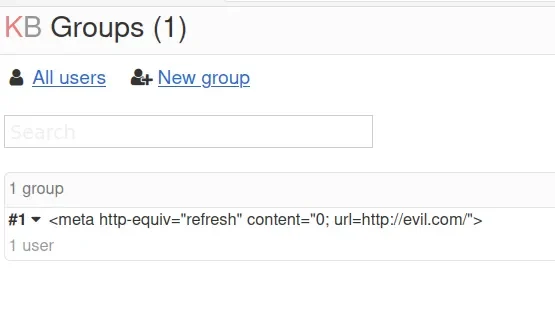
With execution confirmed, the researcher crafted a payload that automatically redirects any user accessing their profile to a malicious domain:
<meta http-equiv=”refresh” content=”0; url=http://evil.com/">
Any user who opens the affected profile is sent to that domain without further interaction. The write-up shows this in a gif.
Step 5: link to a credential-harvesting page
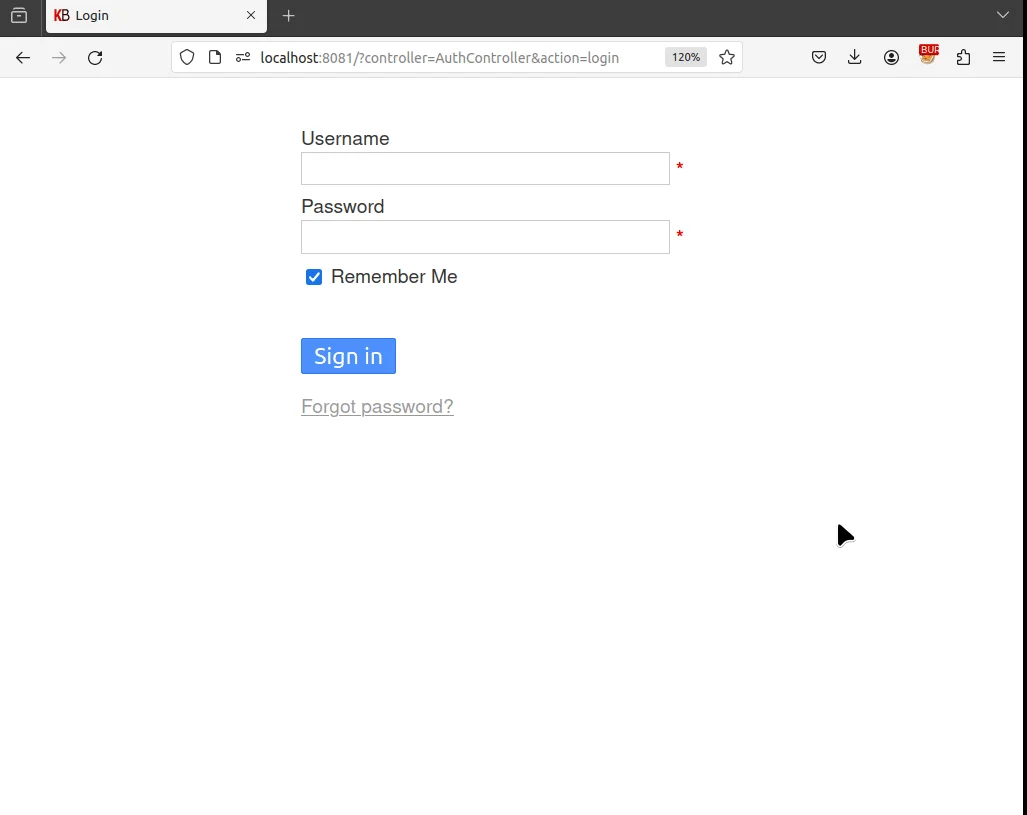
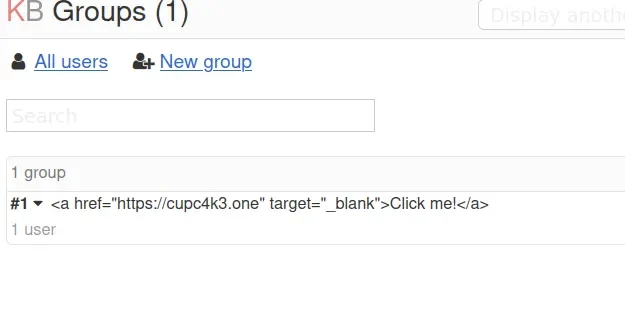
The researcher also experimented with other tags. In one instance, a link was injected that redirects users to a domain under the researcher's control when clicked. The fake page behind it prompted users to enter their username and password:
The visible text "Click me!" is what the victim sees in the 'Group membership(s)' field.
Root cause
The group name entered by an administrator was later interpreted as HTML in the 'Group membership(s)' field of the member's profile. The write-up does not describe the server-side code, so the exact location of the missing encoding is not stated.
Impact
In this test, HTML injection in a field shown on user profiles allowed a redirect payload and a link to a fake page requesting username and password. The researcher notes that HTML injection may seem minor but can be exploited maliciously despite its seemingly low impact, and that such issues are not limited to Kanboard but can affect numerous users in various scenarios. In this test the payload was planted through the administrator's group creation screen; the write-up does not describe a path for a lower-privileged user to set a group name.
Fix
The measure implied by the finding is to HTML-encode the group name wherever it is rendered, in particular in the 'Group membership(s)' field on the profile, so that stored markup is displayed as text rather than interpreted by the browser.
Variants to test
- Other administrative name fields. Create entities whose names are shown to other users (projects, categories, user display names) with
<h1>and check whether the size changes in every view where the value appears, not only the creation form. - Profile and membership views. After storing a payload, log in as a second, lower-privileged user and inspect each page that lists group membership. A positive result is the tag rendering as markup in that user's session.
- Redirect payloads. Store the
meta http-equiv="refresh"payload and open the profile in a fresh session. A positive result is an immediate navigation to the target URL with no click. - Link payloads. Store an anchor with
target="_blank"and confirm that the link is clickable and opens the external domain in a new tab. - Encoding contexts. Try payloads that break out of attribute values and other HTML contexts where the name is inserted, since a value that is safe in element content may not be safe in an attribute. A positive result is any change in page structure caused by the injected value.
What happened, in plain words
Kanboard is a piece of software that teams use to organise their work. Imagine a whiteboard divided into columns labelled "To Do", "In Progress" and "Done". Each task is a card, and you move the card from one column to the next as the work advances. That is the Kanban method, and Kanboard puts that whiteboard on a screen.
Like most such tools, Kanboard has an administrator: a person with extra rights who can create groups (for example "Support team" or "Design team") and put users into them. A group is a named collection of users.
The researcher was logged in as an administrator and looked at the group management screen, the place where a new group is created. When you create a group you type its name into a field called 'name'. That name is saved by the application and later shown back, for example in the 'Group membership(s)' field on a user's profile page.
The problem found is called HTML injection. To understand it, you need to know that web pages are written in a language called HTML, where text is wrapped in tags such as <h1> (a big heading) or <a> (a link). Your browser reads those tags and draws the page accordingly. Normally, when a website shows you something a person typed, it should treat that text as plain text: if someone types <h1>, you should see the literal characters <h1> on the page, not a giant heading. HTML injection happens when the site forgets to do that and lets the browser interpret what the user typed as real page structure. The browser cannot tell the difference between tags the site's own programmers wrote and tags that arrived as user input, so it obeys both.
This matters because HTML is not only about looks. Some tags make the browser do things: a <meta http-equiv="refresh"> tag tells the browser to jump to another web address on its own, and an <a> tag creates a clickable link. If an attacker can plant such tags in a page that other people view, the attacker controls where those people go. That is how a "minor" display bug turns into a way to send users to a fake login page and steal their username and password.
In this test the researcher planted the tags in a group name as an administrator, added a test user called "Pentest" to the group, and then logged in as that user. On the user's profile, in the 'Group membership(s)' field, the tags came to life. That confirmed the vulnerability.
The product and the feature
Kanboard is project management software built around the Kanban methodology. Its main interface is a board divided into columns, each representing a stage of the workflow, such as "To Do", "In Progress" and "Done". Users create tasks as cards and move them between columns to reflect their current status, which helps teams limit work in progress and manage their workflow.
The feature under examination here is group management: the screen where an administrator creates a group and assigns users to it. Group names are entered by an administrator, stored, and later displayed back to users, for example in the 'Group membership(s)' field on a user's profile.
Two words in that paragraph deserve a plain explanation. Stored means the application keeps the value in its database, the place where it remembers things between visits, so the value survives after you close the page. Displayed back means some other screen later reads that saved value and puts it into a page. The gap between the moment of saving and the moment of showing is exactly where this bug lives: the creation screen and the profile screen are two different pages, and they do not treat the same text the same way.
Setup
The test was carried out while logged into Kanboard as an administrator. The researcher's focus was on group management and, specifically, the process of creating a new group. A second account was used for verification: a test user named "Pentest", added to the newly created group. No tooling, version numbers or other preconditions are described in the write-up.
Why two accounts? Because the interesting question is not what the person who typed the text sees, but what a different person sees later. Using a separate account makes that difference visible. This is a common habit in security testing: you act as one user, then switch hats and look at the result as another.
Finding it
The researcher started by creating a new group and looking at the 'name' field. The first probe was a pair of <h1> tags, chosen so that the result would be visible: if the text rendered larger, the markup had been interpreted. After saving the group name, the tags were not executed, which suggested a potential issue rather than an immediate confirmation.
A probe here means a small, harmless test input whose only purpose is to reveal how the application handles it. <h1> is the HTML tag for a top-level heading, which browsers draw noticeably bigger and bolder than normal text. It is a good probe because the effect is obvious to the eye: either the group name appears in large letters (the tag was interpreted) or it appears as ordinary text, possibly showing the angle brackets themselves (the tag was treated as text).
On the creation screen nothing happened. That is not proof of safety. It only means that this particular page does not put the saved name back into the page in a way that lets the tag run. The value is stored and rendered later, in another view, so the next step is to find that other view.
To see where the stored value actually surfaced, the researcher added the test user "Pentest" to the new group. The user was successfully included in the group.
Adding a user to a group is the condition that makes the group name appear on that user's profile: the profile lists the groups the user belongs to, so the saved name is now pulled out of the database and placed into a page that the user themselves will open.
The decisive test was logging in as the "Pentest" user. In the 'Group membership(s)' field, the HTML tags were executed. That confirmed the vulnerability and, in the researcher's view, raised its criticality, because the injected markup is rendered to a different user from the one who supplied it.
"Executed" here means the browser acted on the tag instead of showing it as text. The important detail is the word different: the person who typed the tag (the administrator) and the person who sees its effect (the group member) are not the same. That is what turns a cosmetic quirk into a security problem, because it gives one person a way to influence what another person's browser does.
Exploitation
Step 1: create a group with a markup payload in the name
As an administrator, create a new group and place HTML in the 'name' field. The first probe was:
Line by line: <h1> is an opening heading tag. In a normal web page it would be paired with a closing </h1> and the text between the two would be drawn as a large heading. Here it is sent on its own, purely as a test: the researcher wants to see whether the application lets this tag through to the browser as a tag. A payload is simply the piece of input an attacker or tester deliberately crafts to trigger a behaviour.
On the group creation screen the tags did not execute. The value is stored and rendered later, in another view.
The moment of truth comes when some other page reads the name out and builds HTML around it. If that other page inserts the name without converting the special characters < and > into harmless codes, the browser will treat the name as page structure.
Step 2: add a user to the group
Add the test user "Pentest" to the group. The user is successfully included in the group, which is the condition needed for the stored value to be displayed on that user's profile.
This step exists to create a viewing context. Without a member, there is no profile page that lists the group, and so no page on which to observe the stored value being rendered.
Step 3: log in as the member and observe execution
Log in as "Pentest" and open the profile. In the 'Group membership(s)' field the HTML tags execute, confirming stored HTML injection.
Stored is the key word: the malicious text was saved once, earlier, and now runs every time the page is loaded. Compare that with a reflected attack, where the payload is carried in a link and only affects whoever clicks it. A stored attack sits in the application and waits.
Step 4: automatic redirect
With execution confirmed, the researcher crafted a payload that automatically redirects any user accessing their profile to a malicious domain:
<meta http-equiv=”refresh” content=”0; url=http://evil.com/">
Line by line:
<meta ...>is an HTML tag that carries information about the page itself rather than visible content. Browsers read it silently.http-equiv="refresh"tells the browser to treat this tag as an instruction to reload or navigate, the same kind of instruction a web server can send in an HTTP header. The name is a bit odd: "http-equiv" means "equivalent to an HTTP header".content="0; url=http://evil.com/"is the instruction's detail. The0is a delay in seconds, so zero means "immediately", andurl=gives the destination address.evil.comis a placeholder domain standing in for an attacker's site.- The closing
">finishes the tag.
The effect is that a user who opens the affected profile is sent to that domain without further interaction. The write-up shows this in a gif.
Why is this serious? Because the user trusts the application. They typed the address of their own project tool, logged in, and then suddenly find themselves somewhere else.
Step 5: link to a credential-harvesting page
The researcher also experimented with other tags. In one instance, a link was injected that redirects users to a domain under the researcher's control when clicked. The fake page behind it prompted users to enter their username and password:
Line by line:
<a ...>is the HTML tag for a hyperlink, the thing you click to go somewhere.href="https://cupc4k3.one"is the destination address the link points to. Here it is a domain controlled by the researcher.>Click me!</a>is the visible text of the link, followed by the closing tag. This is what the victim sees in the 'Group membership(s)' field: an ordinary-looking invitation to click.
Credential harvesting means collecting usernames and passwords by tricking people into typing them into a page that looks genuine but belongs to the attacker. The link itself does no stealing; it only delivers the victim to the fake page.
Root cause
The group name entered by an administrator was later interpreted as HTML in the 'Group membership(s)' field of the member's profile. The first probe on the creation screen showed nothing because the value is not rendered there; the missing output encoding only becomes visible in the consuming view. The write-up does not describe the server-side code, so the exact location of the missing encoding is not stated.
Two terms to unpack. Sanitisation means cleaning input before storing it, for example by removing or neutralising tags. HTML encoding (also called escaping) means converting the special characters that give HTML its meaning into safe stand-ins before putting text into a page: < becomes < and > becomes >. When a browser receives <h1>, it draws the characters <h1> on screen and does not treat them as a tag. Encoding at the point of output is the reliable defence, because the same stored value may be shown in several different pages, and each one must protect itself.
Impact
In this test, HTML injection in a field shown on user profiles allowed a redirect payload and a link to a fake page requesting username and password. The researcher notes that HTML injection may seem minor but can be exploited maliciously despite its seemingly low impact, and that such issues are not limited to Kanboard but can affect numerous users in various scenarios. In this test the payload was planted through the administrator's group creation screen; the write-up does not describe a path for a lower-privileged user to set a group name.
That last point is worth pausing on. The person who plants the payload here already has administrator rights. But the people who see the result are ordinary users, and they have no way to know that the group name they are looking at contains instructions for their browser.
Fix
The measure implied by the finding is to HTML-encode the group name wherever it is rendered, in particular in the 'Group membership(s)' field on the profile, so that stored markup is displayed as text rather than interpreted by the browser.
In everyday terms: the application should treat everything that came from a user as text to be displayed, never as instructions to be followed. The place to enforce that is the moment the text is placed into a page, not only the moment it is saved.
Variants to test
- Other administrative name fields. Create entities whose names are shown to other users (projects, categories, user display names) with
<h1>and check whether the size changes in every view where the value appears, not only the creation form. - Profile and membership views. After storing a payload, log in as a second, lower-privileged user and inspect each page that lists group membership. A positive result is the tag rendering as markup in that user's session.
- Redirect payloads. Store the
meta http-equiv="refresh"payload and open the profile in a fresh session. A positive result is an immediate navigation to the target URL with no click. - Link payloads. Store an anchor with
target="_blank"and confirm that the link is clickable and opens the external domain in a new tab. - Encoding contexts. Try payloads that break out of attribute values and other HTML contexts where the name is inserted, since a value that is safe in element content may not be safe in an attribute. A positive result is any change in page structure caused by the injected value.
A word on the last one. HTML has two kinds of place where text can land: between tags (element content) and inside a tag, between quotes (an attribute value). A defence that works in the first place may fail in the second, because the characters that end an attribute are different from the characters that open a tag. That is why testers try the same value in every spot where it appears.
Glossary
- Administrator: a user account with extra rights, able to create groups, manage users and change settings.
- Attribute: a setting written inside an HTML tag, such as
hrefortarget, usually in the formname="value". - Browser: the program you use to open web pages, which reads HTML and draws the page.
- Card: in Kanban, the visual representation of a task on the board.
- Credential harvesting: tricking people into typing their username and password into a fake page controlled by an attacker.
- Database: the place where an application stores information so it survives between visits.
- Element content: the text placed between an opening tag and its closing tag.
- Encoding (HTML encoding / escaping): converting special characters such as
<and>into safe stand-ins so a browser shows them as text instead of acting on them. - Executed (tag): a tag that the browser acted on rather than displaying as literal text.
- Group: a named collection of users, used to give several people the same permissions at once.
- Group management: the screen where an administrator creates groups and assigns users to them.
- HTML: the language web pages are written in, made of tags that describe structure and behaviour.
- HTTP header: a line of information a web server sends alongside a page, for example to instruct the browser to navigate elsewhere.
- Kanban: a way of managing work with a board divided into columns, where tasks move from one column to the next as they progress.
- Kanboard: project management software built around the Kanban methodology.
- Payload: the deliberately crafted piece of input used to trigger a behaviour in a test or attack.
- Probe: a small test input whose only purpose is to reveal how an application handles it.
- Reflected (attack): an attack where the payload travels in a link and only affects whoever clicks it, rather than being saved.
- Sanitisation: cleaning input, for example by removing or neutralising tags, before it is stored or used.
- Stored (attack): an attack where the payload is saved by the application and runs for every user who later views the affected page.
- Tag: a piece of HTML syntax in angle brackets, such as
<h1>or<a>, that tells the browser what to do. - Target (link): the attribute that decides where a link opens, for example in a new tab.
- Vulnerability: a weakness in an application that someone can use to make it behave in a way its owners did not intend.