Attacker can bypass authentication build on ingress external auth (`nginx.ingress.kubernetes.io/auth-url`)
The ingress-nginx controller passes manipulated X-Original-Url and X-Auth-Request-Redirect headers to an external authentication service when a request path contains an encoded traversal sequence. An attacker could bypass authentication that relies on those headers, gaining access to a protected service.

- Triaged in 39 days
- Paid in 3 months
- Disclosed after 7 months
Report Submission Form
Summary:
Sending request with <public-service>..%2F<protected-service> allows to manipulate headers:
- X-Original-Url
- X-Auth-Request-Redirect
due to that manipulation external auth service could make wrong decision and return 204 instead of 401/403. **To be clear: manipulation of those headers give no possibility to kubernetes user to make any proper decisions based on those headers. ** This way allowing anonymous access to public service and trying to protect access to protected-service by e.g. api-key is not possible.
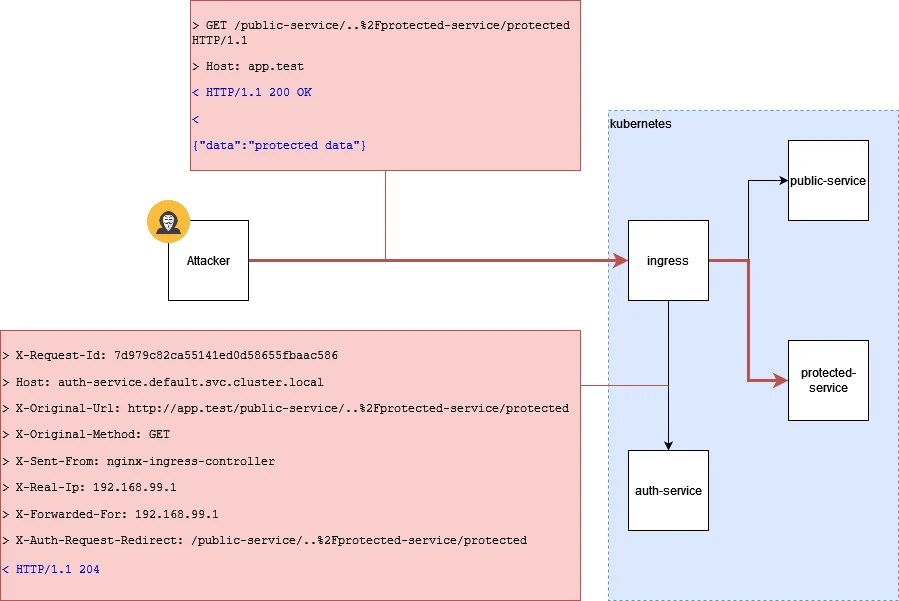
Example:
With this call curl -v http://app.test/public-service/..%2Fprotected-service/protected external auth configured on ingress using nginx.ingress.kubernetes.io/auth-url: http://auth-service.default.svc.cluster.local:8080/verify will get following headers:
X-Request-Id: 7d979c82ca55141ed0d58655fbaac586
Host: auth-service.default.svc.cluster.local
X-Original-Url: http://app.test/public-service/..%2Fprotected-service/protected
X-Original-Method: GET
X-Sent-From: nginx-ingress-controller
X-Real-Ip: 192.168.99.1
X-Forwarded-For: 192.168.99.1
X-Auth-Request-Redirect: /public-service/..%2Fprotected-service/protected
Connection: close
User-Agent: curl/7.75.0
Accept: */*
Both headers X-Original-Url and X-Auth-Request-Redirect are manipulated.
How this auth-service can parse request? Here is simple example of python and Flask:
api_key = request.headers.get('X-Api-Key')
request_redirect = request.headers.get('X-Auth-Request-Redirect')

if request_redirect and request_redirect.startswith("/public-service/"):
    return Response(status = HTTPStatus.NO_CONTENT)

if api_key == "secret-api-key":
    return Response(status = HTTPStatus.NO_CONTENT)

return Response(status = HTTPStatus.UNAUTHORIZED)
Kubernetes Version:
minikube v1.23.2 on Microsoft Windows 10 Pro 10.0.19043 Build 19043 Kubernetesa v1.22.2 on Docker 20.10.8
Component Version:
k8s.gcr.io/ingress-nginx/controller:v1.0.0-beta.3@sha256:44a7a06b71187a4529b0a9edee5cc22bdf71b414470eff696c3869ea8d90a695
Steps To Reproduce:
- Download project in attachment: F1469916
- Install minikube
- Enable addon ingress and ingress-dns
- Build docker images:
* `cd auth-service; docker build -t auth-service:0.0.4 .`
* `cd protected-service; docker build -t protected-service:0.0.1 .`
* `cd public-service; docker build -t public-service:0.0.1 .`
- push docker images into minikube:
* `minikube image load auth-service:0.0.4`
* `minikube image load protected-service:0.0.1`
* `minikube image load public-service:0.0.1`
- apply kubernetes configuration:
kubectl apply -f app.yaml
To access public service: curl -v http://app.test/public-service/public
To access protected service: curl -v http://app.test/protected-service/protected -H "X-Api-Key: secret-api-key"
To access protected service bypassing authentication: curl -v http://app.test/public-service/..%2Fprotected-service/protected
Supporting Material/References:
- in F1469916 - project consist of 2 services: public and protected. Access to public should be available for anyone and to protected only with
X-Api-Keyheader. auth-service is protecting access and configured as external auth on ingress.- app.yaml - whole configuration
- auth-service, protected-service, public-service - directories with Dockerfiles to build
Additional note
At first I have found this vulnerability in old version of ingress-nginx. It was 0.70.0. With this old version bypass was working without encoding of / to %2F.
e.g. curl -v http://app.test/public-service/../protected-service/protected
I was not able to reproduce it locally with minikube (couldn't install old ingress addon), but there is possibility that for some older versions of ingress-nginx you don't need to encode / to %2F.
Impact
Attacker can bypass authentication build on ingress external auth (nginx.ingress.kubernetes.io/auth-url).
Attacker can manipulate X-Original-Url and X-Auth-Request-Redirect headers. Due to this kubernetes user is not able to make safe assumption on those headers.
Context
The target is the Kubernetes ingress-nginx controller, the NGINX-based ingress controller for Kubernetes. The feature in question is external authentication: an ingress can be annotated with nginx.ingress.kubernetes.io/auth-url so that every request is first sent to an external auth service, which decides whether the request should be allowed. The controller forwards information about the original request to that auth service in headers, including X-Original-Url and X-Auth-Request-Redirect. An auth service is expected to be able to trust those headers when it makes its decision.
The report shows that a crafted request path lets an attacker control the content of those two headers, so an auth service that makes decisions based on them can be tricked into allowing a request it should deny.
Setup
The researcher reproduced the issue on a local cluster:
- minikube v1.23.2 on Microsoft Windows 10 Pro 10.0.19043 Build 19043
- Kubernetes v1.22.2 on Docker 20.10.8
k8s.gcr.io/ingress-nginx/controller:v1.0.0-beta.3@sha256:[redacted]
The test project contains three services:
public-service, which should be reachable by anyoneprotected-service, which should only be reachable with anX-Api-Keyheaderauth-service, configured as the external auth service on the ingress, which enforces that rule
The ingress is configured with:
nginx.ingress.kubernetes.io/auth-url: http://auth-service.default.svc.[redacted]:8080/verify
The steps to reproduce, as given in the report:
- Download the project attachment (F1469916).
- Install minikube.
- Enable the
ingressandingress-dnsaddons. - Build the Docker images:
cd auth-service; docker build -t auth-service:0.0.4 .
cd protected-service; docker build -t protected-service:0.0.1 .
cd public-service; docker build -t public-service:0.0.1 .
- Load the images into minikube:
minikube image load auth-service:0.0.4
minikube image load protected-service:0.0.1
minikube image load public-service:0.0.1
- Apply the Kubernetes configuration:
kubectl apply -f app.yaml
Finding it
The researcher noticed that sending a request whose path contains <public-service>..%2F<protected-service> changes the values of the X-Original-Url and X-Auth-Request-Redirect headers that the ingress controller passes to the external auth service. Because the auth service bases its decision on those headers, the manipulation can make it return 204 (allow) instead of 401/403 (deny).
The report is explicit about the scope of the problem: manipulating those headers gives no way for a Kubernetes user to make proper decisions based on them. The concrete consequence is that a setup where anonymous access is allowed to a public service and access to a protected service is guarded by, for example, an API key, cannot be made to work safely.
Exploitation
Step 1: Observe the forwarded headers
The researcher sends a request that reaches the public service path but uses ..%2F to point at the protected service:
curl -v http://app.test/public-service/..%2Fprotected-service/protected
The external auth service configured through nginx.ingress.kubernetes.io/auth-url: http://auth-service.default.svc.[redacted]:8080/verify receives the following headers:
X-Request-Id: [redacted]
Host: auth-service.default.svc.[redacted]
X-Original-Url: http://app.test/public-service/..%2Fprotected-service/protected
X-Original-Method: GET
X-Sent-From: nginx-ingress-controller
X-Real-Ip: [redacted]
X-Forwarded-For: [redacted]
X-Auth-Request-Redirect: /public-service/..%2Fprotected-service/protected
Connection: close
User-Agent: curl/7.75.0
Accept: */*
Both X-Original-Url and X-Auth-Request-Redirect carry the attacker-supplied path, including the ..%2F sequence. The auth service sees a request whose path still begins with the public service prefix.
Step 2: How a naive auth service is fooled
The report gives a simple Flask example of an auth service that parses the request as follows:
api_key = request.headers.get('X-Api-Key')
request_redirect = request.headers.get('X-Auth-Request-Redirect')

if request_redirect and request_redirect.startswith("/public-service/"):
    return Response(status = HTTPStatus.NO_CONTENT)

if api_key == "secret-api-key":
    return Response(status = HTTPStatus.NO_CONTENT)

return Response(status = HTTPStatus.UNAUTHORIZED)
This service allows any request whose X-Auth-Request-Redirect starts with /public-service/, and otherwise requires the correct API key. Because the manipulated header starts with /public-service/, the check passes and the service returns 204, which the ingress treats as authorisation to proceed. The auth service returns 204, which the ingress treats as authorisation to proceed.
Step 3: Compare the legitimate requests
The report lists the three requests that demonstrate the difference in behaviour:
curl -v http://app.test/public-service/public
Access to the public service, which should work for anyone.
curl -v http://app.test/protected-service/protected -H "X-Api-Key: secret-api-key"
Access to the protected service with the correct API key.
curl -v http://app.test/public-service/..%2Fprotected-service/protected
Access to the protected service while bypassing authentication, using the encoded traversal in the path.
Root cause
The report does not explain why the headers end up containing the encoded traversal. The auth service is then asked to make an authorisation decision on a value the client controls, and the two components disagree about which service the request belongs to.
The report notes that the manipulation gives no way for a Kubernetes user to make proper decisions based on those headers, which means any auth service that does so is exposed.
Impact
An attacker can bypass authentication built on ingress external auth (nginx.ingress.kubernetes.io/auth-url). By manipulating X-Original-Url and X-Auth-Request-Redirect, the attacker causes the auth service to make the wrong decision, returning 204 instead of 401/403. The report states that a Kubernetes user is therefore not able to make safe assumptions on those headers. The practical consequence is that a setup allowing anonymous access to a public service while protecting another service with, for example, an API key is not possible to secure in this configuration.
The platform records the severity as medium with a CVSS score of 6.5.
Fix
The report does not describe a fix or a change made in response.
Variants to test
The report includes an additional note: the researcher first found the vulnerability in an older version of ingress-nginx, 0.70.0, where the bypass worked without encoding the / as %2F:
curl -v http://app.test/public-service/../protected-service/protected
The researcher could not reproduce this locally with minikube because the old ingress addon could not be installed, but suggests that for some older versions of ingress-nginx the encoding may not be required.
- Send a request with a plain
../traversal between a public and a protected path and check whether the auth service receives a header that still points at the public path. A positive result is an auth service response of204where401/403is expected. - Send the same request with
..%2Fand compare theX-Original-UrlandX-Auth-Request-Redirectvalues the auth service receives. A positive result is that both headers contain the attacker-controlled path while the request is routed to the protected service. - Test other encodings of the traversal sequence and observe whether the headers and the routing diverge in the same way.
- Test auth services that match on prefixes of
X-Auth-Request-RedirectorX-Original-Url, since those are the checks the report shows being bypassed.
What happened, in plain words
Imagine a large office building with a receptionist at the front desk. Every visitor must stop at reception first. The receptionist looks at a note the visitor carries, which says which office they want to visit, and decides whether to let them through. If the note says "public office", anyone is waved through. If it says "protected office", the visitor must also show a special pass.
The problem in this report is that a visitor can write a confusing note. The note starts with the words "public office" so the receptionist waves them through, but the building's internal directions actually send them to the protected office. The receptionist and the directions disagree about where the visitor is going, and the visitor gets in without the pass.
In technical terms: the target is Kubernetes ingress-nginx, a piece of software that sits in front of websites and applications running on Kubernetes and decides how incoming web traffic is routed. Kubernetes is a system for running many small programs (called containers) across a group of computers. The ingress controller is the front door: it receives requests from the internet and forwards them to the right internal service.
The feature involved is external authentication. An administrator can configure the ingress so that before any request is passed to a service, it is first sent to a separate auth service (a small program whose only job is to say yes or no). The ingress forwards details about the original request to that auth service in headers. Headers are small labelled pieces of text that travel with every web request and response, like the address label on a parcel. Two of those headers are X-Original-Url (the full address the visitor asked for) and X-Auth-Request-Redirect (the path part of that address).
The auth service is supposed to be able to trust those headers. The report shows that a specially crafted request path lets an attacker control what those two headers contain, so an auth service that makes decisions based on them can be tricked into allowing a request it should deny.
The setup
The researcher reproduced the issue on a local test environment, not on a live production system. The versions recorded in the report are:
- minikube v1.23.2 on Microsoft Windows 10 Pro 10.0.19043 Build 19043
- Kubernetes v1.22.2 on Docker 20.10.8
k8s.gcr.io/ingress-nginx/controller:v1.0.0-beta.3@sha256:[redacted]
minikube is a tool that lets you run a small Kubernetes cluster on your own laptop, so you can experiment without paying for cloud servers. Docker is software that packages a program and everything it needs into a single unit called an image, which can then be run anywhere.
The test project contains three services:
public-service, which should be reachable by anyoneprotected-service, which should only be reachable with anX-Api-Keyheaderauth-service, configured as the external auth service on the ingress, which enforces that rule
An API key is a long secret string, like a password, that a program sends in a header to prove it is allowed in. The header name here is X-Api-Key; the value is the secret itself.
The ingress is configured with this annotation. An annotation in Kubernetes is a note attached to an object that changes how it behaves:
nginx.ingress.kubernetes.io/auth-url: http://auth-service.default.svc.[redacted]:8080/verify
This line tells the ingress: before you let any request through, send it to the auth service at that internal address, at the path /verify, and wait for its answer. The address auth-service.default.svc.[redacted] is an internal name that only exists inside the cluster; it is not reachable from the internet.
The steps to reproduce, as given in the report:
- Download the project attachment (F1469916).
- Install minikube.
- Enable the
ingressandingress-dnsaddons. An addon is an optional extra component you can switch on in minikube;ingressinstalls the ingress controller andingress-dnsmakes internal names likeapp.testresolve inside the cluster. - Build the Docker images:
cd auth-service; docker build -t auth-service:0.0.4 .
cd protected-service; docker build -t protected-service:0.0.1 .
cd public-service; docker build -t public-service:0.0.1 .
Line by line: cd auth-service moves into the folder holding the auth service's code, then docker build turns that folder into a runnable image. The -t flag gives the image a name and a version tag, here auth-service:0.0.4. The final . means "use the current folder as the build context". The same pattern is repeated for the other two services, each with its own name and version.
- Load the images into minikube:
minikube image load auth-service:0.0.4
minikube image load protected-service:0.0.1
minikube image load public-service:0.0.1
These commands copy the images you just built from your computer into the minikube cluster, so the cluster can actually run them. Without this step the cluster would not find the images, because they exist only on your machine.
- Apply the Kubernetes configuration:
kubectl apply -f app.yaml
kubectl is the command-line tool for talking to a Kubernetes cluster. apply -f app.yaml reads the file app.yaml, which describes all the services and the ingress rule, and makes the cluster match that description. This is the step that actually creates the three services and wires up the external auth.
Finding it
The researcher noticed that sending a request whose path contains <public-service>..%2F<protected-service> changes the values of the X-Original-Url and X-Auth-Request-Redirect headers that the ingress controller passes to the external auth service. Because the auth service bases its decision on those headers, the manipulation can make it return 204 (allow) instead of 401/403 (deny).
A quick word on those numbers: HTTP status codes are three-digit answers a server gives. 204 means "no content, but everything is fine", and in this setup the ingress reads it as "allowed". 401 means "you are not authenticated" and 403 means "you are authenticated but not allowed". Both are refusals.
The sequence ..%2F needs explaining. In a web address, .. means "go up one folder", the same as on your computer's file system. A single / separates folders. %2F is the URL-encoded form of /: when a character has a special meaning in a URL, it can be written as a percent sign followed by its two-digit code, so that software treats it as ordinary text rather than as a separator. Here the attacker writes ..%2F so that the path looks, to some parsers, like a single folder name rather than a step up and a step down.
The report is explicit about the scope of the problem: manipulating those headers gives no way for a Kubernetes user to make proper decisions based on them. The concrete consequence is that a setup where anonymous access is allowed to a public service and access to a protected service is guarded by, for example, an API key, cannot be made to work safely.
Exploitation
Step 1: Observe the forwarded headers
The researcher sends a request that reaches the public service path but uses ..%2F to point at the protected service:
curl -v http://app.test/public-service/..%2Fprotected-service/protected
curl is a command-line tool for sending web requests. The -v flag means "verbose": print the full request and response, including all headers, so you can see what is really happening. The address http://app.test/... is the local test hostname set up by the ingress-dns addon. The path is the interesting part: it starts with public-service, then ..%2F, then protected-service/protected.
The external auth service configured through nginx.ingress.kubernetes.io/auth-url: http://auth-service.default.svc.[redacted]:8080/verify receives the following headers:
X-Request-Id: [redacted]
Host: auth-service.default.svc.[redacted]
X-Original-Url: http://app.test/public-service/..%2Fprotected-service/protected
X-Original-Method: GET
X-Sent-From: nginx-ingress-controller
X-Real-Ip: [redacted]
X-Forwarded-For: [redacted]
X-Auth-Request-Redirect: /public-service/..%2Fprotected-service/protected
Connection: close
User-Agent: curl/7.75.0
Accept: */*
Line by line:
X-Request-Idis a unique identifier the ingress assigns to this request, so it can be traced in logs.Hostis the internal name of the auth service, because the request is now being sent to it.X-Original-Urlis the full address the visitor originally asked for, including the..%2Fsequence.X-Original-Methodrecords that the original request was aGET, the method browsers use when you simply open a page.X-Sent-Fromsays which component forwarded the request, here the ingress controller.X-Real-IpandX-Forwarded-Forcarry the visitor's address as seen by the ingress.X-Auth-Request-Redirectis the path part of the original address, again with..%2Fintact.Connection: closeasks that the connection be closed after this exchange.User-Agentidentifies the client software, here curl version 7.75.0.Accept: */*means the client will accept any content type in the response.
Both X-Original-Url and X-Auth-Request-Redirect carry the attacker-supplied path, including the ..%2F sequence. The auth service sees a request whose path still begins with the public service prefix. That gap between what the auth service is told and where the request actually goes is the whole vulnerability.
Step 2: How a naive auth service is fooled
The report gives a simple Flask example of an auth service that parses the request as follows. Flask is a small web framework for Python: a library that makes it easy to write a program that answers web requests. Python is a popular programming language.
api_key = request.headers.get('X-Api-Key')
request_redirect = request.headers.get('X-Auth-Request-Redirect')

if request_redirect and request_redirect.startswith("/public-service/"):
    return Response(status = HTTPStatus.NO_CONTENT)

if api_key == "secret-api-key":
    return Response(status = HTTPStatus.NO_CONTENT)

return Response(status = HTTPStatus.UNAUTHORIZED)
Line by line:
api_key = request.headers.get('X-Api-Key')reads theX-Api-Keyheader from the incoming request and stores its value in a variable. If the header is absent, the value is empty.request_redirect = request.headers.get('X-Auth-Request-Redirect')does the same for the redirect header, which is the path the ingress says the visitor asked for.if request_redirect and request_redirect.startswith("/public-service/")checks two things: that the header exists, and that its text begins with/public-service/.startswithis a simple text comparison: does this string begin with these characters?return Response(status = HTTPStatus.NO_CONTENT)answers with status204, which the ingress treats as "allowed".- The second
ifchecks whether the API key equals the expected secret,secret-api-key, and if so also answers204. - The final line answers
401(unauthorised) if neither check passed.
This service allows any request whose X-Auth-Request-Redirect starts with /public-service/, and otherwise requires the correct API key. Because the manipulated header starts with /public-service/, the check passes and the service returns 204, which the ingress treats as authorisation to proceed. The auth service returns 204, which the ingress treats as authorisation to proceed.
The lesson is about trust: the auth service is trusting a value that the visitor controls. A prefix check on a path is a very common pattern, and it is exactly the pattern this bug defeats.
Step 3: Compare the legitimate requests
The report lists the three requests that demonstrate the difference in behaviour:
curl -v http://app.test/public-service/public
Access to the public service, which should work for anyone. This is the normal, intended use: no key, no special path, and the auth service should allow it because the path really does start with /public-service/.
curl -v http://app.test/protected-service/protected -H "X-Api-Key: secret-api-key"
Access to the protected service with the correct API key. The -H flag adds a header to the request; here it supplies the API key. This is the intended way to reach the protected service, and the auth service allows it because the key matches.
curl -v http://app.test/public-service/..%2Fprotected-service/protected
Access to the protected service while bypassing authentication, using the encoded traversal in the path. No API key is sent. The path begins with /public-service/, so the auth service's prefix check passes, but the ingress routes the request to the protected service.
Root cause
The report does not explain why the headers end up containing the encoded traversal. Normalising means cleaning up a path so that .. and . segments are resolved and the result is the single, unambiguous path it really refers to. Because that cleanup does not happen before the headers are built, the auth service is asked to make an authorisation decision on a value the client controls, and the two components disagree about which service the request belongs to.
The report notes that the manipulation gives no way for a Kubernetes user to make proper decisions based on those headers, which means any auth service that does so is exposed.
Impact
An attacker can bypass authentication built on ingress external auth (nginx.ingress.kubernetes.io/auth-url). By manipulating X-Original-Url and X-Auth-Request-Redirect, the attacker causes the auth service to make the wrong decision, returning 204 instead of 401/403. The report states that a Kubernetes user is therefore not able to make safe assumptions on those headers. The practical consequence is that a setup allowing anonymous access to a public service while protecting another service with, for example, an API key is not possible to secure in this configuration.
The platform records the severity as medium with a CVSS score of 6.5. CVSS is a standard scoring system for the seriousness of a security flaw; 6.5 out of 10 falls in the medium band.
Fix
The report does not describe a fix or a change made in response.
Variants to test
The report includes an additional note: the researcher first found the vulnerability in an older version of ingress-nginx, 0.70.0, where the bypass worked without encoding the / as %2F:
curl -v http://app.test/public-service/../protected-service/protected
Here the path uses a plain ../ instead of ..%2F. The researcher could not reproduce this locally with minikube because the old ingress addon could not be installed, but suggests that for some older versions of ingress-nginx the encoding may not be required.
- Send a request with a plain
../traversal between a public and a protected path and check whether the auth service receives a header that still points at the public path. A positive result is an auth service response of204where401/403is expected. - Send the same request with
..%2Fand compare theX-Original-UrlandX-Auth-Request-Redirectvalues the auth service receives. A positive result is that both headers contain the attacker-controlled path while the request is routed to the protected service. - Test other encodings of the traversal sequence and observe whether the headers and the routing diverge in the same way.
- Test auth services that match on prefixes of
X-Auth-Request-RedirectorX-Original-Url, since those are the checks the report shows being bypassed.
Glossary
- API: a defined way for one program to talk to another, like a service counter with agreed questions and answers.
- API key: a secret string sent in a header to prove a program is allowed to use a service, like a membership card.
- Addon: an optional extra component that can be switched on in a tool such as minikube.
- Annotation: a note attached to a Kubernetes object that changes how it behaves.
- Auth service: a separate program whose only job is to answer yes or no to each incoming request.
- Container: a packaged program plus everything it needs to run, isolated from the rest of the machine.
- CVSS: a standard 0 to 10 score for the seriousness of a security flaw.
- Docker: software for building and running containers from images.
- Docker image: a packaged, runnable snapshot of a program and its dependencies.
- External authentication: a setup where the front door asks a separate service whether each request should be allowed.
- Flask: a small Python library for writing web programs.
- Header: a labelled piece of text sent with a web request or response, like an address label on a parcel.
- HTTP status code: a three-digit number a server returns to say what happened, such as 204 (fine, no content), 401 (not authenticated) or 403 (not allowed).
- Ingress: the front door of a Kubernetes cluster that receives outside traffic and forwards it to the right internal service.
- ingress-nginx: the NGINX-based implementation of a Kubernetes ingress controller.
- Kubernetes: a system for running and managing many containers across a group of computers.
- kubectl: the command-line tool for talking to a Kubernetes cluster.
- minikube: a tool that runs a small Kubernetes cluster on your own computer.
- Normalising a path: cleaning up a path so that
..and.segments are resolved into one unambiguous path. - Python: a popular programming language.
- URL encoding: writing a character as a percent sign plus a code, such as
%2Ffor/, so software treats it as text rather than a separator. X-Auth-Request-Redirect: the header in which the ingress tells the auth service the path the visitor asked for.X-Original-Url: the header in which the ingress tells the auth service the full address the visitor asked for.

