Stored XSS on laporbugid
A stored cross-site scripting vulnerability existed on the profile edit page of laporbug.id, where an attacker could upload a malicious file that executed script when viewed. The report does not state the exact impact or whether the issue was fixed.

The original lives on learn.hackersid.com
We do not hold its text, so we link to it rather than copy it. The other two tabs are our own rewrites, checked against it.
What the report shows
The target is LaporBug.id, and the feature involved is the profile editing page at:
https://laporbug.id/myprofile/edit
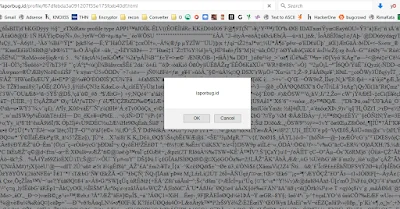
The researcher, rizal (@sayadarijawa), reports a stored cross-site scripting issue on that page. The write-up is very short: it names the page, shows a sequence of screenshots of the edit form and the result, and links to two external references on file-upload XSS and on bypassing an FCKeditor upload restriction with Burp. The report does not include the request, the payload, the parameter name, the response, a severity rating, a bounty amount or a fix.
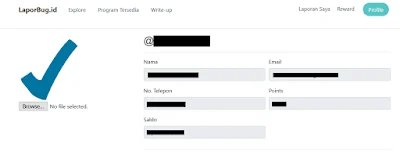
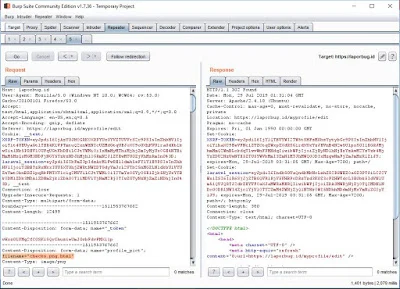
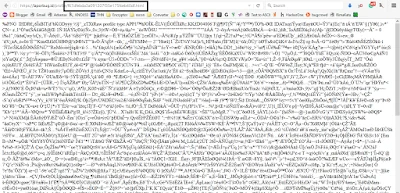
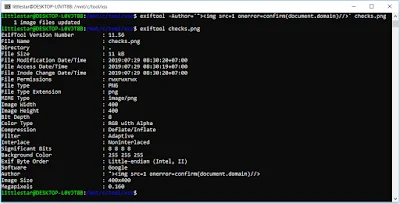
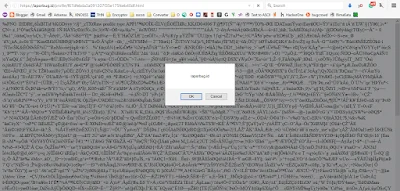
The report includes a series of screenshots after the profile edit URL. The two references at the end cover file-upload XSS and bypassing an FCKeditor upload restriction with Burp.
https://brutelogic.com.br/blog/file-upload-xss/
https://exploit.linuxsec.org/fckeditor-bypass-shell-upload-with-burp/
Because the text stops at the links, there is nothing further to report on validation, on which field persisted the payload, or on how the program responded.
Root cause
The report does not state the root cause. That is an inference from the shape of the report, not something the text confirms.
Impact
A stored XSS on a profile page executes in the browser of anyone who views the affected profile. The report itself makes no claim about impact, exploitation or affected users, so treat this as the general consequence of the bug class rather than a demonstrated result here.
How this kind of bug works
Stored XSS happens when input is persisted by the application and later included in an HTML response without context-appropriate encoding. The browser cannot tell data from markup, so any script the attacker placed in the stored value runs with the origin of the site. The dangerous sinks are anywhere stored data is echoed: profile pages, comment lists, admin review screens, support dashboards, exported reports.
A common variant is upload-based. The application accepts a file, stores it, and serves it back with a content type or disposition that lets the browser render it as HTML or SVG. Even when the upload endpoint checks the extension, the check can often be bypassed through the filename, the multipart part headers, a double extension, or an editor component that writes files to a predictable path.
The defences are the usual ones: encode output for the exact context (HTML body, attribute, JavaScript string, URL), validate and re-encode uploads, serve user files from a separate origin or with Content-Disposition: attachment and a restrictive Content-Type, and apply a Content Security Policy that blocks inline script.
How to test for it
- Map every place where your own input is shown back to you or to another role: profile fields, display names, bios, avatars, attachments, signatures, ticket bodies.
- Submit a benign marker first, such as a unique string, and confirm it is stored and rendered. This separates stored reflection from simple reflection.
- Replace the marker with a context-appropriate probe. In an HTML body a simple tag pair is enough; in an attribute, break out of the quotes; in a script block, close the string. Keep probes non-destructive.
- For uploads, try an image that is also valid HTML or SVG, and watch how the file is served: content type, disposition, and whether it sits on the same origin as the application.
- View the stored value as a second user or role, since the impact usually depends on who else sees it.
A positive result is your probe executing in the browser under the target origin, confirmed in the DOM or in a console callback you control. Common false positives are probes that are HTML-encoded on output (harmless), payloads that only fire in your own session because the page reflects rather than stores, and uploads that are served as text/plain or from a sandboxed domain. Check the response headers before claiming execution.
How it is fixed
Encode all stored values on output using the encoding appropriate to the sink. Validate uploads by content, not just extension, and serve them from a separate domain or with a download disposition and a safe content type. Apply a Content Security Policy. Where a rich-text editor is in use, sanitise its output against an allowlist of tags and attributes rather than trusting the editor.
Hunting notes
Stored XSS hides in features that mix user content with staff review: profile pages, support tickets, report forms, moderation queues. Recon signals include rich-text editors, file upload widgets, avatar handling, and any endpoint that returns user-supplied HTML. When you find one, show impact by demonstrating execution in a context a second party sees, and describe exactly which field stored the value and which page rendered it. Programs accept reports far more readily when the stored value is shown to reach another user rather than only the reporter.
What happened, in plain words
LaporBug.id is a website where people report bugs. It has a profile page where a user can edit their own details, at this address:
https://laporbug.id/myprofile/edit
A researcher called rizal (@sayadarijawa) reported a stored cross-site scripting (XSS) problem on that page. Stored XSS means the site saves something a user typed or uploaded, and later shows it back to other people in a way that makes their browser run it as code. Think of a guestbook where someone writes a note that looks like ordinary text but is actually a tiny instruction the next reader's browser follows without asking.
The write-up is very short. It names the page, shows a series of screenshots of the edit form and the stored result, and links to two outside articles. It does not include the request that was sent, the payload (the actual malicious input), the name of the field that stored it, the server's response, a severity rating, a bounty amount or a fix.
The report includes a series of screenshots after the profile edit URL. The two links at the end cover file-upload XSS and bypassing an FCKeditor upload restriction with Burp.
https://brutelogic.com.br/blog/file-upload-xss/
https://exploit.linuxsec.org/fckeditor-bypass-shell-upload-with-burp/
Because the text stops at those links, there is nothing more to say about how the input was validated, which field kept the payload, or how the program responded.
In general, how this kind of bug works
A web page is a document made of markup (HTML) that the browser turns into what you see. The browser cannot tell the difference between markup the site wrote on purpose and markup that came from a user, unless the site marks user data as plain text. When a site saves user input and later drops it into a page without that marking, the browser treats it as part of the page and runs any script inside it. That is XSS.
Stored XSS is the version where the input is kept in the site's database, so it fires for everyone who later views the page, not just the person who submitted it. The risky places are anywhere saved data is shown again: profile pages, comment lists, admin review screens, support dashboards, exported reports.
A common variant is upload-based. The site accepts a file, stores it, and serves it back in a way that lets the browser render it as a web page or an image format that can carry script. Even when the upload check looks at the file extension, it can often be worked around through the filename, the way the upload request is built, a double extension, or an editor component that writes files to a predictable location.
The usual defences are: encode output for the exact place it appears (page body, attribute, script string, URL); check uploads by their actual content, not just the name; serve user files from a separate domain or as a download with a safe content type; and add a Content Security Policy, a browser rule that blocks inline script.
In general, how to test for it
- List every place where your own input is shown back to you or to another role: profile fields, display names, bios, avatars, attachments, signatures, ticket bodies. You cannot test what you have not found.
- Submit a harmless marker first, such as a unique word, and confirm it is saved and shown. This tells you the value is stored rather than just echoed once.
- Replace the marker with a small probe suited to where it lands. In the page body a simple tag pair is enough; inside an attribute, break out of the quotes; inside a script block, close the string. Keep probes harmless.
- For uploads, try an image that is also valid HTML or SVG, and watch how the file comes back: its content type, whether the browser is told to download it, and whether it sits on the same domain as the site.
- View the stored value as a second user or role, because the impact usually depends on who else sees it.
A positive result is your probe running in the browser under the site's own address, confirmed in the page or through a callback you control. Common false positives are probes that get encoded on output (harmless), payloads that only fire in your own session because the page reflects rather than stores, and uploads served as plain text or from a sandboxed domain. Check the response headers before claiming execution.
In general, how it is fixed
Encode every stored value on output using the encoding that fits where it appears. Validate uploads by content, not just extension, and serve them from a separate domain or as a download with a safe content type. Apply a Content Security Policy. Where a rich-text editor is used, clean its output against an allowlist of tags and attributes rather than trusting the editor.
Glossary
- Stored XSS: a bug where user input is saved by the site and later shown to others in a way that makes their browser run it as code.
- Payload: the actual input an attacker submits to trigger a bug.
- Request: the message a browser sends to a server asking for a page or sending data.
- Response: the message a server sends back, containing the page or data and some headers.
- Header: a small labelled line in a request or response carrying extra information, such as the content type.
- Content type: the label telling the browser what kind of file it is receiving, for example HTML or an image.
- Content-Disposition: a header that tells the browser whether to show a file inline or download it.
- Output encoding: converting saved data so the browser treats it as plain text rather than markup.
- Sink: a place in a page where data ends up and could be interpreted as code.
- Reflection: input that is echoed back once in a response without being stored.
- SVG: an image format written in markup, which can carry script.
- Multipart: the format browsers use to send file uploads, splitting the request into labelled parts.
- Content Security Policy: a browser rule set by the site that restricts what script may run.
- Allowlist: a list of things that are permitted, with everything else rejected.
- DOM: the browser's in-memory model of the page, which you can inspect with developer tools.
- Session: the logged-in state a site keeps for you, usually tied to a cookie.
- Cookie: a small piece of data the browser stores for a site and sends back with each request.
- Origin: the combination of scheme, host and port that identifies a site to the browser.
- FCKeditor: an older rich-text editor component that some sites embed for writing formatted content.
- Burp: a tool for intercepting and editing web traffic between browser and server.



