Collecting Shells by the Sea of NAS Vulnerabilities
The Lenovo ix4-300d NAS device contained OS command injection vulnerabilities that required a valid user token, and reflected XSS vulnerabilities that could steal that token from local storage. An attacker could chain these to remotely execute commands as root on the device.
 Published on blog.securityevaluators.com
{{media:0}}
The full write-up lives on its author's site
It belongs to its author, so we link to it rather than copy it. The other two tabs are our own rewrites, checked against it.
Context
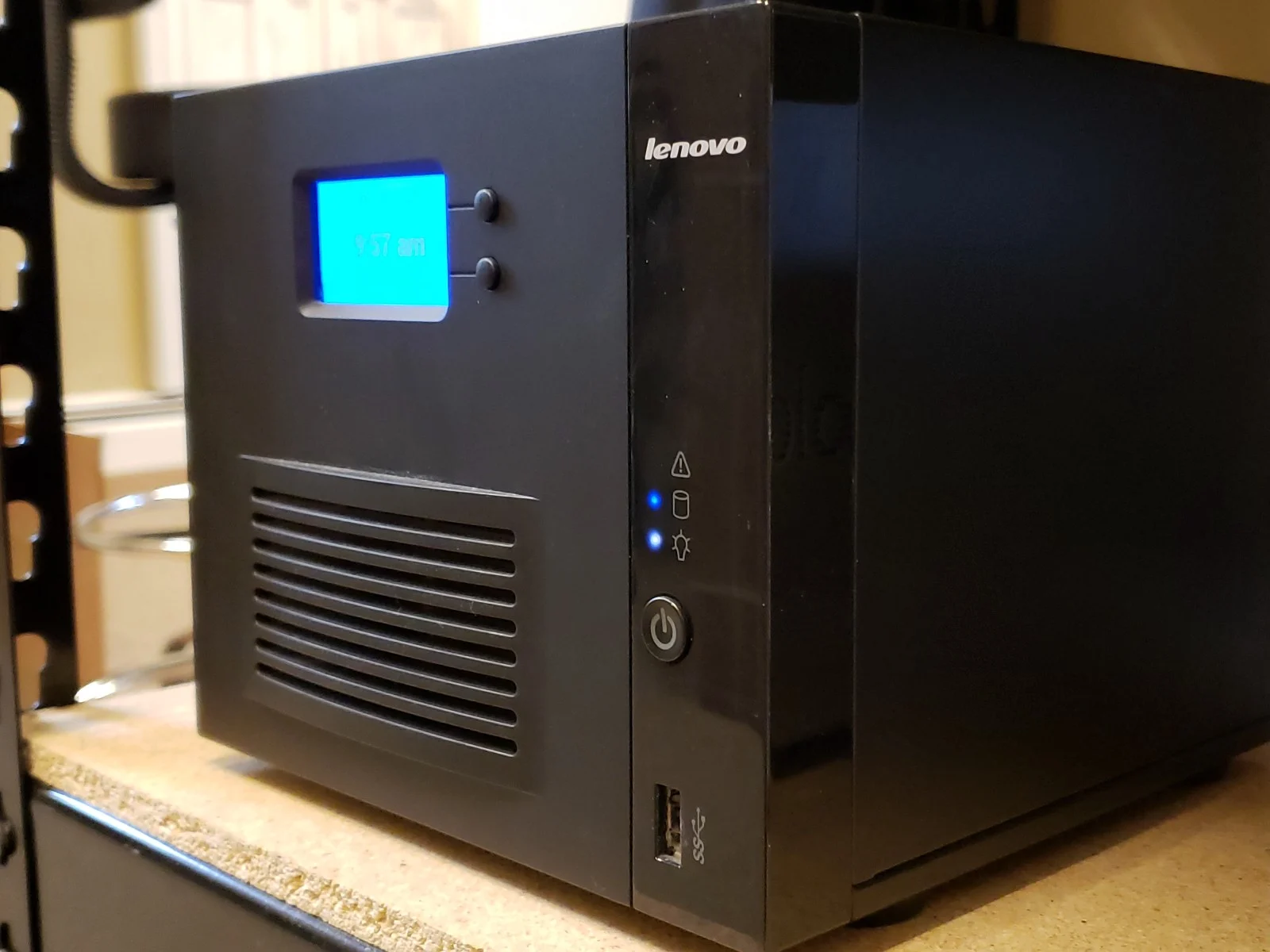
Over a couple of months, ISE Labs ran a research project looking into the security of embedded devices, focusing on vulnerabilities in network accessible services with the goal of finding issues that would let them weaponise a device. This write-up covers some of the vulnerabilities found in the Lenovo ix4-300d, an enterprise Network Attached Storage device (NAS).
The approach is bottom-up: first find a way to get a shell on the device, then hunt down the individual pieces needed to make that shell reachable remotely. The result is a chain that stacks several of the identified vulnerabilities to obtain a remotely accessible root shell.
Setup
The requests in the report are sent to hosts such as [redacted] and [redacted]. The requests in the report are sent to hosts such as [redacted] and [redacted], and the researcher's own account (rramgattie) is used in the payloads. For testing, the malicious script was hosted with Python's SimpleHTTPServer module, and the payload opens a netcat listener.
The important precondition for the whole chain is an authenticated victim: the command injection endpoints require the tokens of a valid logged-in user, and the XSS payloads fire in the context of an authenticated session.
Finding it
Step 1: OS command injection
Most of the devices audited during the research had some form of OS command injection, and the ix4-300d was no exception. The methodology was to start with functionality that has to interact with the operating system: features that let the owner ping devices, enable or configure other services, or read and write files. That approach produced a set of command injection issues tracked as CVE-2018-9074, CVE-2018-9075, CVE-2018-9076, CVE-2018-9077, CVE-2018-9078, CVE-2018-9079, CVE-2018-9080, CVE-2018-9081 and CVE-2018-9082.
A common setback applies to all of the command injections found on this device: they require both the __c and iomega tokens of a valid user. The cookie (iomega) requirement is easy to satisfy with cross-site request forgery (CSRF), but that does not solve the __c parameter in the URL. The __c parameter is generated when the user logs into the ix4-300d web application and is stored in the browser's Local Storage.
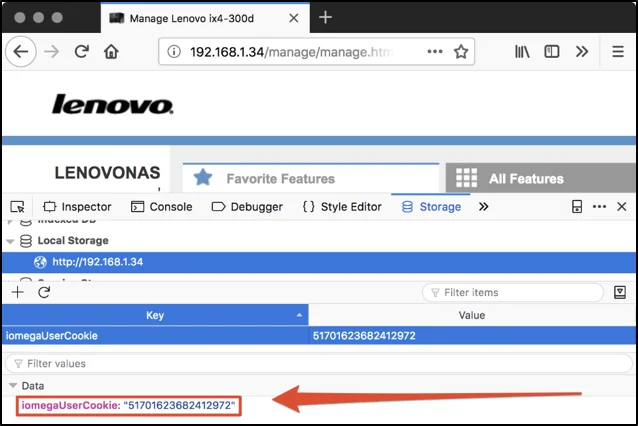
To exploit the command injection, the next problem is therefore either working out how these tokens are generated or getting access to the victim's iomegaUserCookie (__c) token. Values stored in the user's browser point to cross-site scripting (XSS), so the next step was to find some XSS.
Step 2: Reflected XSS
For reflected XSS the researcher went through the sitemap and collected all requests with parameters that end up in the server's response, then manually reviewed that subset for requests whose parameters are reflected without modification. This found many instances of XSS in the ix4-300d. Most of them made use of the cat URL parameter. The example below opens an alert box when visited by an authenticated user:
http://[redacted]/manage/security.html?cat=%22%3e%3cscript%3ealert(‘ISE’)%3c%2fscript%3e
To make the attack easier, the plan was to save the JavaScript payload into a script file and include it as the src of a script tag, hosted for testing with Python's SimpleHTTPServer module. The user's iomega cookie would also have been stolen, but it is set with the HTTPOnly flag, so JavaScript cannot read it. However, when the request is sent by the included malicious script, the browser sends the user's cookies along with it, which the Same-Origin Policy permits.
Exploitation
Combining the issues allows a remote attack against a targeted ix4-300d:
- Steal the user's
iomegaUserCookiefrom their localStorage through cross-site scripting by tricking the user into visiting the malicious URL. - Use the stolen
iomegaUserCookieas a URL parameter, where the lack of a proper CSRF mitigation lets the attackerPOSTa request to join a PersonalCloud. - Include the OS command injection payload in the
passwordfield.
The JavaScript file referenced in the report does all of this in a single file; its contents are not reproduced in the text.
Step 1: Command injection request (CVE-2018-9075)
The POST request below was used in CVE-2018-9075 to exploit one of the OS command injection vulnerabilities. In the password field the payload opens a netcat listener on port 9000; when a connection is made to the listener, the listening application (/bin/sh) is executed.
POST /cp/PersonalCloudJoin?v=2.3&__c=51701623682412972 HTTP/1.1Host: 192.168.1.34Content-Type: application/x-www-form-urlencodedContent-Length: 177Cookie: iomega=1766419671992842405Connection: close
client%3Acloudname=TEST&client%3Ausername=rramgattie&client%3Apassword=%2560nc%2520-lp%25209000%2520-e%2520%252Fbin%252Fsh%2560&client%3Adescription=%27&client%3Aencryption=none
The URL carries the __c token as a query parameter, and the iomega cookie carries the second token. The body is form-encoded: client:cloudname, client:username, client:password, client:description and client:encryption are the fields of the PersonalCloud join request. The client:password field carries the payload; the report does not explain its encoding. The client:description field is a single quote. The report does not show the server's response.
Step 2: Getting the tokens
Because the iomega cookie is HTTPOnly, the XSS cannot read it directly. The __c value lives in the browser's Local Storage. The malicious script is served from the attacker's host and included via a script tag; when it runs in the context of the ix4-300d page, requests it makes carry the user's cookies automatically. The report does not include the script's source.
Step 3: Chaining
With the iomegaUserCookie in hand, the attacker places it as the URL parameter and submits the PersonalCloud join request, relying on the missing CSRF protection to have the request accepted, with the command injection payload in the password field. The payload is intended to open a listener on port 9000 that hands out a shell when connected to.
Root cause
The chain rests on three separate weaknesses, as the conclusion states: the lack of CSRF protections, the lack of user input sanitisation when generating HTML, and the lack of user input sanitisation when building OS command line arguments.
The command injection exists because user input is not sanitised when building OS command line arguments. The XSS exists because parameters such as cat are reflected into the response without modification. The CSRF weakness means a cross-origin request can be made on the victim's behalf, and the HTTPOnly flag on the iomega cookie does not help because the browser attaches cookies to requests initiated by the injected script anyway. The __c token is stored in Local Storage rather than in an HTTPOnly cookie.
Impact
An attacker who can get an authenticated user to visit a malicious URL can obtain a root shell on the ix4-300d remotely. From there, an attacker can follow similar steps to steal or destroy personal or proprietary information stored on the targeted device, use it to pivot into an internal network, or add it to a botnet. The attack requires the victim to be logged in and to be tricked into visiting the malicious URL; the command injection endpoints themselves require valid __c and iomega tokens.
Fix
Lenovo published a patch on 20 September 2018 that addresses the issues identified.
Disclosure timeline
- August 3, 2018: vulnerability details sent to Lenovo.
- August 6, 2018: Lenovo responds and asks to extend the deadline.
- September 20, 2018: Lenovo publishes a patch that addresses the issues identified.
Variants to test
- Other OS-interacting features: ping, service enable/configure, and file read/write functions are the first places to look for command injection. A positive result is a field whose value reaches a shell, as with the listener payload.
- Other reflected parameters: enumerate requests whose parameters appear in the response and check for unmodified reflection. A positive result is a parameter such as
catthat renders a script when the URL is visited by an authenticated user. - Token placement: check where session tokens live (cookies versus Local Storage) and whether they are HTTPOnly. A positive result is a token readable by JavaScript, which an XSS can exfiltrate.
- CSRF on state-changing endpoints: look for POST endpoints that act on the user's behalf without a proper anti-CSRF token. A positive result is a request accepted from a cross-origin context.
- Cookie attachment from injected scripts: confirm whether requests made by an injected script carry the user's cookies. A positive result is an authenticated action performed without the script reading the cookie itself.

What happened, in plain words
A team of security researchers spent a couple of months looking at small computers that plug into a network and store files, the kind of box a small office buys so everyone can share documents. These boxes are called embedded devices: they run a small operating system and a web page you open in your browser to manage them. The researchers wanted to find weaknesses that would let an attacker take one over completely, not just read a file or two.
This article is about one of those boxes, the Lenovo ix4-300d, an enterprise Network Attached Storage device (NAS). A NAS is a hard drive with a small computer attached, sold to offices so staff can save and share files over the network instead of on their own laptops. The ix4-300d has a web application: you open a page in your browser, log in, and from there you can change settings, add users, and so on.
The researchers found several separate weaknesses in that web application. None of them, on its own, gives an attacker full control. But put them together in the right order and an attacker can get a root shell on the device. A shell is a text prompt where you type commands and the computer runs them; root is the all-powerful account on a Linux system, the one that can do anything. So a root shell means the attacker owns the box.
The article builds the attack from the bottom up. First it finds a way to run commands on the device. Then it works out what else is needed to make that reachable from far away, over the internet, rather than only from the same office network. The end result is a chain: a sequence of small weaknesses where each one unlocks the next.
The starting point
The requests in the article go to addresses such as [redacted] and [redacted], which are private addresses used inside a home or office network. The requests in the article go to addresses such as [redacted] and [redacted], which are private addresses used inside a home or office network, and the researcher's own account (rramgattie) appears in the payloads. For testing, the malicious script was hosted with Python's SimpleHTTPServer module, and the payload opens a netcat listener. netcat is a small utility that can open a network connection and, with the right options, hand whoever connects a command prompt.
One precondition matters for the whole chain: the victim has to be logged in. The command injection endpoints require the tokens of a valid logged-in user, and the cross-site scripting payloads only do their work inside an authenticated session. A token here is a short value the web application gives your browser after you log in, so that it can recognise you on every later request without asking for your password again. Think of it as the wristband you get at a festival: you show it once at the gate, and after that staff just glance at your wrist.
Step 1: finding a way to run commands
What OS command injection is
A web application often needs to ask the underlying operating system to do something: check whether a machine answers, start a service, read a file. It does this by building a command line and handing it to the system to run. If the application takes something the user typed and glues it into that command line without cleaning it first, the user can type extra characters that the system interprets as more commands. That is OS command injection: your input stops being data and becomes instructions.
A simple comparison: imagine a form that asks for a name and the application builds the sentence Hello, NAME. If you type Alice. Also, please open the safe, the application has just asked someone to open the safe. The computer is even more literal than a person.
How the researchers looked for it
Most of the devices audited during the research had some form of OS command injection, and the ix4-300d was no exception. The method was to start with features that have to talk to the operating system: letting the owner ping other devices, enable or configure other services, or read and write files. Those features are the natural places for a command line to be built, so they are the first places to test. This approach produced a set of command injection issues tracked as CVE-2018-9074, CVE-2018-9075, CVE-2018-9076, CVE-2018-9077, CVE-2018-9078, CVE-2018-9079, CVE-2018-9080, CVE-2018-9081 and CVE-2018-9082. A CVE is a public catalogue number given to a known vulnerability so people can refer to it unambiguously, like a case number for a bug.
The obstacle: two tokens
A common setback applies to all of the command injections found on this device: they require both the __c and iomega tokens of a valid user. The iomega token travels as a cookie. A cookie is a small piece of text a website asks your browser to store and send back with every request to that site; it is how a site remembers that you are logged in. The __c token travels as a parameter in the URL.
The cookie requirement is easy to satisfy with cross-site request forgery (CSRF). CSRF is a trick where a page on one site causes your browser to send a request to another site, and because your browser automatically attaches that site's cookies, the request arrives looking as if you made it yourself. The site cannot tell the difference. But CSRF does not solve the __c parameter in the URL, because that value has to be known and written into the request. The __c parameter is generated when the user logs into the ix4-300d web application and is stored in the browser's Local Storage. Local Storage is a small storage area inside the browser that a website can read and write with JavaScript; unlike a cookie, it is not sent automatically with requests, so an attacker has to find another way to read it.
So to exploit the command injection, the next problem is either working out how these tokens are generated or getting access to the victim's iomegaUserCookie (__c) token. Values stored in the user's browser point to cross-site scripting (XSS), so the next step was to find some XSS.
Step 2: finding cross-site scripting
What XSS is
Cross-site scripting is when a website takes something an attacker supplied and puts it into a page as if it were part of the site's own code. If the site puts your text into the page as text, you see your text. If it puts it in as HTML, the browser treats it as instructions: tags, scripts, formatting. An attacker who can get a script into the page can make the victim's browser run it, in the context of the vulnerable site, with the victim's session.
A comparison: a noticeboard where visitors pin notes. If the person in charge retypes your note onto an official form, it stays a note. If they simply staple your handwritten paper onto the official form, and you wrote it in the style of an official announcement, other visitors may believe it came from the office.
How the researchers looked for it
For reflected XSS, the researcher went through the sitemap and collected all requests with parameters that end up in the server's response, then manually reviewed that subset for requests whose parameters are reflected without modification. A sitemap here means the list of pages and requests the application offers, gathered while browsing it. Reflected means the value you sent comes straight back in the page you receive. The example below opens an alert box when visited by an authenticated user:
http://[redacted]/manage/security.html?cat=%22%3e%3cscript%3ealert(‘ISE’)%3c%2fscript%3e
Line by line, in plain words:
http://[redacted]/manage/security.htmlis the page on the device being visited.?cat=starts the query string, the part of a URL that carries parameters. The parameter is namedcat.%22is the URL encoding of a double quote character (").%3eis the URL encoding of>.%3cscript%3eis<script>.alert(‘ISE’)is a tiny piece of JavaScript that makes the browser show a pop-up box with the text ISE.%3c%2fscript%3eis</script>.
URL encoding exists because URLs cannot contain spaces and many punctuation characters directly; each one is written as a percent sign followed by two hexadecimal digits. When the device puts the cat value into the page without cleaning it, the browser sees a real <script> tag and runs the alert. That is the proof: the site let the attacker's text become code.
Why a separate script file
To make the attack easier, the plan was to save the JavaScript payload into a script file and include it as the src of a script tag, hosted for testing with Python's SimpleHTTPServer module. SimpleHTTPServer is a tiny web server built into Python: you run it in a folder and it serves the files in that folder over the network. The src attribute of a script tag is where the browser is told to fetch the script from. Putting the payload in a file made the attack easier.
The user's iomega cookie would also have been stolen, but it is set with the HTTPOnly flag, so JavaScript cannot read it. HTTPOnly is a setting on a cookie that tells the browser: send this cookie with requests, but never let page scripts see it. That blocks the obvious theft. However, when the request is sent by the included malicious script, the browser sends the user's cookies along with it, which the Same-Origin Policy permits. The Same-Origin Policy is the browser rule that stops a page from one site reading data from another site; it does not stop a page from sending a request to another site, and cookies ride along with requests automatically. So the script cannot read the cookie, but it can make the browser use it.
Step 3: putting the pieces together
Combining the issues allows a remote attack against a targeted ix4-300d:
- Steal the user's
iomegaUserCookiefrom their localStorage through cross-site scripting by tricking the user into visiting the malicious URL. - Use the stolen
iomegaUserCookieas a URL parameter, where the lack of a proper CSRF mitigation lets the attackerPOSTa request to join a PersonalCloud. - Include the OS command injection payload in the
passwordfield.
A POST request is the kind of request a browser sends when you submit a form: it carries data in its body rather than in the URL. The PersonalCloud join request sends a form with a cloud name, a username, a password, a description and an encryption setting. The JavaScript file referenced in the article does all of this in a single file; its contents are not reproduced in the text.
The command injection request
The POST request below was used in CVE-2018-9075 to exploit one of the OS command injection vulnerabilities. In the password field the payload opens a netcat listener on port 9000; when a connection is made to the listener, the listening application (/bin/sh) is executed. A listener is a program waiting for someone to connect to a numbered door (the port); /bin/sh is the standard Linux command shell.
POST /cp/PersonalCloudJoin?v=2.3&__c=51701623682412972 HTTP/1.1Host: 192.168.1.34Content-Type: application/x-www-form-urlencodedContent-Length: 177Cookie: iomega=1766419671992842405Connection: close
Line by line, in plain words:
POST /cp/PersonalCloudJoin?v=2.3&__c=51701623682412972 HTTP/1.1is the request line: the method (POST, sending data), the path on the device (/cp/PersonalCloudJoin, the PersonalCloud join feature), a query string with the API versionv=2.3and the__ctoken, and the HTTP version.Host: [redacted]says which machine the request is for.Content-Type: application/x-www-form-urlencodedsays the body is a form, encoded the way browsers encode forms.Content-Length: 177says how many bytes the body has.Cookie: iomega=1766419671992842405carries the second token, the one the browser attaches automatically.Connection: closeasks the server to close the connection after answering.
The body of the request is:
client%3Acloudname=TEST&client%3Ausername=rramgattie&client%3Apassword=%2560nc%2520-lp%25209000%2520-e%2520%252Fbin%252Fsh%2560&client%3Adescription=%27&client%3Aencryption=none
Line by line, in plain words:
- The body is a series of
name=valuepairs separated by&, exactly as a browser sends a filled-in form. client%3Acloudname=TESTsets the cloud name toTEST.%3Ais a colon, so the field name isclient:cloudname.client%3Ausername=rramgattiesets the username.client%3Apassword=%2560nc%2520-lp%25209000%2520-e%2520%252Fbin%252Fsh%2560is the interesting one. The value is encoded; the report does not explain the encoding. After decoding, the value is a backtick, thennc -lp 9000 -e /bin/sh, then a backtick. Backticks in a shell mean run what is between them and put the output here. So the password field, once it reaches the command line, runsnc -lp 9000 -e /bin/sh:ncis netcat,-lmeans listen,-p 9000means on port 9000, and-e /bin/shmeans hand the connecting client a shell.client%3Adescription=%27sets the description to a single quote (%27).client%3Aencryption=nonesets encryption to none.
The article does not show the server's response.
Getting the tokens
Because the iomega cookie is HTTPOnly, the XSS cannot read it directly. The __c value, however, lives in Local Storage, which JavaScript can read. The malicious script is served from the attacker's host and included via a script tag; when it runs in the context of the ix4-300d page, requests it makes carry the user's cookies automatically. The article does not include the script's source.
Chaining
With the iomegaUserCookie in hand, the attacker places it as the URL parameter and submits the PersonalCloud join request, relying on the missing CSRF protection to have the request accepted, with the command injection payload in the password field. The payload is intended to open a listener on port 9000 that hands out a shell when connected to.
Why it worked
The chain rests on three separate weaknesses, as the conclusion states: the lack of CSRF protections, the lack of user input sanitisation when generating HTML, and the lack of user input sanitisation when building OS command line arguments. Sanitisation means cleaning input before using it: escaping characters that have special meaning in HTML, or refusing characters that have special meaning in a shell.
The command injection exists because user input is not sanitised when building OS command line arguments. The XSS exists because parameters such as cat are reflected into the response without modification. The CSRF weakness means a cross-origin request can be made on the victim's behalf, and the HTTPOnly flag on the iomega cookie does not help because the browser attaches cookies to requests initiated by the injected script anyway. The __c token is stored in Local Storage rather than in an HTTPOnly cookie. The article does not describe the server-side code, so the exact construction of the command line is not shown.
What an attacker could do with it
An attacker who can get an authenticated user to visit a malicious URL can obtain a root shell on the ix4-300d remotely. From there, an attacker can follow similar steps to steal or destroy personal or proprietary information stored on the targeted device, use it to pivot into an internal network, or add it to a botnet. Pivoting means using the compromised machine as a stepping stone to reach other machines that were not directly reachable. A botnet is a collection of compromised machines controlled together, often used to send spam or attack other systems. The attack requires the victim to be logged in and to be tricked into visiting the malicious URL; the command injection endpoints themselves require valid __c and iomega tokens.
The fix
Lenovo published a patch on 20 September 2018 that addresses the issues identified. The article does not describe the contents of the patch.
Disclosure timeline
- August 3, 2018: vulnerability details sent to Lenovo.
- August 6, 2018: Lenovo responds and asks to extend the deadline.
- September 20, 2018: Lenovo publishes a patch that addresses the issues identified.
Where else to look
- Other OS-interacting features: ping, service enable/configure, and file read/write functions are the first places to look for command injection. A positive result is a field whose value reaches a shell, as with the listener payload.
- Other reflected parameters: list requests whose parameters appear in the response and check for unmodified reflection. A positive result is a parameter such as
catthat renders a script when the URL is visited by an authenticated user. - Token placement: check where session tokens live (cookies versus Local Storage) and whether they are HTTPOnly. A positive result is a token readable by JavaScript, which an XSS can exfiltrate.
- CSRF on state-changing endpoints: look for POST endpoints that act on the user's behalf without a proper anti-CSRF token. A positive result is a request accepted from a cross-origin context.
- Cookie attachment from injected scripts: confirm whether requests made by an injected script carry the user's cookies. A positive result is an authenticated action performed without the script reading the cookie itself.
Glossary
- API: a defined way for one piece of software to ask another to do something, usually over the network with requests and responses.
- Backtick: the ` character; in a shell it means run the command between two backticks and substitute its output.
- Botnet: a group of compromised machines controlled together by an attacker.
- Command line: the text a shell reads and executes, made of a program name and its arguments.
- Cookie: a small piece of text a website asks the browser to store and send back with later requests to that site.
- Cross-site request forgery (CSRF): making a victim's browser send a request to a site where they are logged in, so the request looks legitimate.
- CVE: a public catalogue number for a known vulnerability.
- Embedded device: a small computer built into a product, running a compact operating system and often a web interface.
- HTTPOnly: a cookie setting that hides the cookie from page scripts while still sending it with requests.
- Listener: a program waiting for incoming connections on a numbered port.
- Local Storage: a storage area inside the browser that a website's JavaScript can read and write; not sent automatically with requests.
- NAS (Network Attached Storage): a hard drive with a small computer attached, shared over a network for file storage.
- netcat: a small utility that opens network connections and can hand a connecting client a shell.
- OS command injection: user input being interpreted as extra commands by the operating system instead of as plain data.
- Parameter: a named value in a URL or form, such as
catorclient:password. - Patch: an update that fixes a vulnerability.
- Pivot: using one compromised machine as a stepping stone to reach others.
- Port: a numbered door on a machine that a program can listen on or connect to.
- POST: an HTTP request that sends data in its body, as a form submission does.
- Query string: the part of a URL after
?, carrying parameters. - Reflected: a value sent by the user that comes straight back in the response.
- Root: the all-powerful account on a Linux system.
- Same-Origin Policy: the browser rule that stops one site's page from reading another site's data, while still allowing requests to be sent.
- Sanitisation: cleaning input before use, for example escaping characters that have special meaning in HTML or a shell.
- Shell: a text prompt where you type commands and the computer runs them.
- SimpleHTTPServer: a tiny web server built into Python that serves the files in a folder.
- Sitemap: the list of pages and requests an application offers, gathered while browsing it.
- Token: a short value given to a browser after login so the site can recognise the user on later requests.
- URL encoding: writing characters in a URL as a percent sign plus two hexadecimal digits, such as
%20for a space. - Weaponise: turn a weakness into something an attacker can actually use against a device.



