Unauthenticated Cache Purge
A cache purge endpoint on a Lenovo subdomain accepted unauthenticated PURGE requests, allowing anyone to delete cached content. An attacker could repeatedly purge caches, degrading application performance and increasing bandwidth costs.
 Published on medium.com
Hello everyone, I am Priyansh and this is my first writeup. Today I will be discussing a vulnerability that I found in one of the subdomains of Lenovo.
The full write-up lives on its author's site
It belongs to its author, so we link to it rather than copy it. The other two tabs are our own rewrites, checked against it.
Hello everyone, I am Priyansh and this is my first writeup. Today I will be discussing a vulnerability that I found in one of the subdomains of Lenovo. The vulnerability was reported to Lenovo, and Lenovo responded promptly and took immediate action to fix the issue. The vulnerability name is Unauthenticated Cache Purge.
Let us first see what Cache is and what is the meaning of Cache Purge.

Context
Cached data is information from a website or app that is stored on your device to make the browsing process faster. Cached data save the loading time of a website or an app.
For example: If you visit a website for the first time, it loads the images, files, fonts, etc from the server. Now if this loading of images, files, etc is done every time you visit the website it increases the request traffic on the server, so to avoid this situation Caches are used. So caches help to reduce the request traffic on the website and load the website much faster whenever you visit the website again.
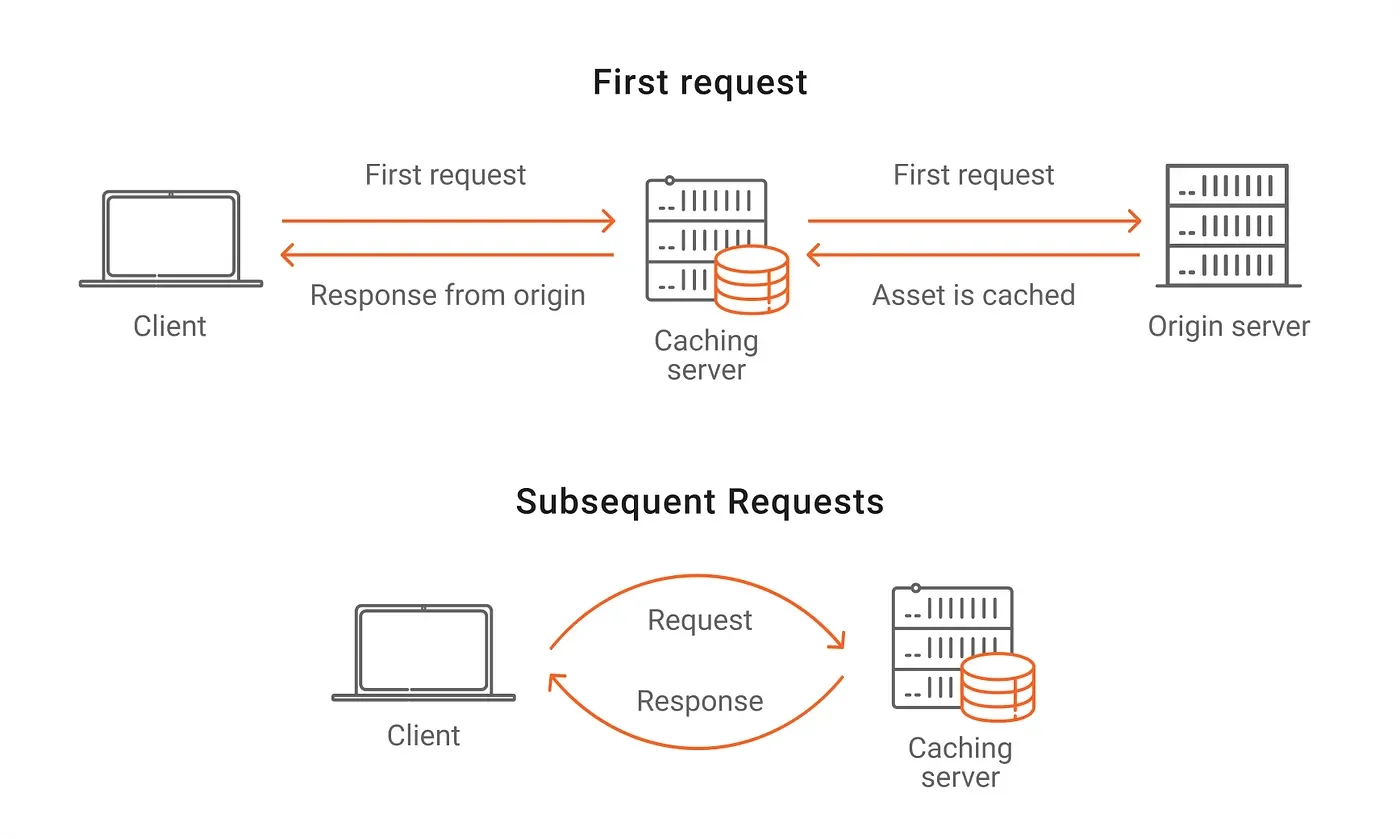
Visual Representation Of Caching
I hope the above image for the process of caching made it more clear how the process of Caching works. Now, let us talk about Cache Purging.
What is Cache Purge?
Cache Purge refers to the deletion of the stored cache. Whenever a Cache Purge request is made, it deletes the stored caches and when you open that website it again loads every file, font, image, etc like for the very first time.
Now let us talk about the vulnerability.
Setup
The writeup does not describe any account, role, tool version or precondition. The only requirement shown is the ability to send an HTTP request to the target, which the author does with a single CURL command from a terminal.
Finding it
The author does not describe how the subdomain was discovered or what first drew attention to it. The finding is presented as a general class of issue: if the Purge request is available to any user even to those who are not authenticated then they can delete the caches stored at a certain resource. This can lead to degraded application performance and an increase in bandwidth cost.
Exploitation
It is very easy to find, you just need to send a CURL command.
Step 1: Send a PURGE request
curl -X PURGE https://target.com
The command sends an HTTP request using the PURGE method to the target host. PURGE is the method cache servers use to invalidate a stored object.
Step 2: Read the response
If the website is vulnerable then the response on the terminal will be in the following format:
{ “status”: “ok”, “id”: “21750–1634079449–30319” }%
If the website is not vulnerable then in response you will get an error message.
Root cause
The report does not analyse the server-side code. What it describes is a design mistake: if the cache purge endpoint accepts requests from unauthenticated users, anyone who can reach it can invalidate stored objects. The report does not say which cache component was in use or how the endpoint was configured.
Impact
An unauthenticated user can delete the caches stored at a certain resource. According to the report this can lead to degraded application performance and an increase in bandwidth cost.
Fix
Remediation: Disallow cache purge requests or limit to authenticated users only. The author states that Lenovo responded promptly and took immediate action to fix the issue; the report does not describe the specific change that was made.
Reference
The author points to a reference report: https://hackerone.com/reports/154278
Variants to test
So this was all about today's writeup, hope you liked it. This is my first writeup, so do let me know how was the writeup.
Profile Links:
What happened, in plain words
Priyansh Bansal found a problem on one of the subdomains of Lenovo. A subdomain is a smaller site that belongs to a bigger one, the way shop.example.com belongs to example.com. On that subdomain, a special request could tell the site to throw away its stored copies, and the report describes this as an unauthenticated cache purge. No login, no password, no account was needed. The author calls this an Unauthenticated Cache Purge: "unauthenticated" means "without proving who you are", and "cache purge" means "delete the stored copies".
The report was sent to Lenovo, and Lenovo responded promptly and took immediate action to fix the issue. The author does not describe how the subdomain was found or what first drew attention to it, and does not say which cache component was in use or how the endpoint was configured. What follows explains the idea from zero, then the single command that shows the problem.
What is a cache?
When you open a website for the first time, your browser asks a server for everything the page needs: the text, the images, the fonts, the files. A server is the computer somewhere else that holds the website and answers those requests. If every visitor made the server send every image and font again on every visit, the server would be flooded with work. That flood is what the report calls request traffic.
To avoid this, sites keep caches. Cached data is information from a website or app that is stored on your device to make the browsing process faster. Cached data save the loading time of a website or an app.
A simple comparison: a library keeps a small shelf of the most requested books near the front desk. Fetching a book from the basement store every time is slow; handing it over from the front shelf is quick. The front shelf is the cache, and the basement is the origin, the place where the real, original content lives.
The report gives this example: if you visit a website for the first time, it loads the images, files, fonts, etc from the server. Now if this loading of images, files, etc is done every time you visit the website it increases the request traffic on the server, so to avoid this situation caches are used. So caches help to reduce the request traffic on the website and load the website much faster whenever you visit the website again.
Visual Representation Of Caching
The picture above shows the process of caching, so you can see how a request is answered from the stored copy instead of going all the way to the origin every time.
What is a cache purge?
A cache purge is the deletion of the stored cache. Whenever a cache purge request is made, it deletes the stored caches, and when you open that website it again loads every file, font, image, etc like for the very first time.
Purging is a normal and useful feature. If a site owner changes a page, the old copy in the cache is out of date, so the owner purges it and the next visitor gets the fresh version. The problem starts when the button that does the purging is reachable by people who should not be allowed to press it.
The vulnerability: unauthenticated cache purge
The report describes it like this: if the Purge request is available to any user even to those who are not authenticated then they can delete the caches stored at a certain resource. This can lead to degraded application performance and an increase in bandwidth cost.
In plain words: if the site has a "throw away the stored copies" instruction and accepts it from strangers, that is the problem. A stranger can therefore empty the shelf at the front desk whenever they like. Bandwidth is the amount of data moved over the network; more data moved means a bigger bill.
What you need before you start
The writeup does not describe any account, role, tool version or precondition. The only requirement shown is the ability to send an HTTP request to the target, which the author does with a single CURL command from a terminal.
Two terms in that sentence need unpacking:
- HTTP is the language browsers and servers use to talk to each other. Every time you load a page, your browser sends an HTTP request and the server sends back an HTTP response. A request has a method, a word that says what kind of action you want.
GETmeans "give me this page".POSTmeans "here is some data, please process it".PURGEis a method used by cache servers to mean "invalidate this stored object". - CURL is a small program that sends HTTP requests from a terminal, a text window where you type commands instead of clicking. It is useful here because a browser does not offer a button that sends a
PURGErequest, so you need a tool that lets you choose the method yourself.
Finding it
The author does not describe how the subdomain was discovered or what first drew attention to it. The finding is presented as a general class of issue: if the Purge request is available to any user even to those who are not authenticated then they can delete the caches stored at a certain resource.
Step 1: send a PURGE request
It is very easy to find, you just need to send a CURL command, the command is:
curl -X PURGE https://target.com
Line by line:
curlis the name of the program. Typing it tells the terminal to run CURL.-X PURGEsets the HTTP method toPURGE. Without this part, CURL would send a normalGET, which just asks for the page and does not ask the cache to delete anything. The-Xoption is how you override the default method.https://target.comis the address of the site being tested.httpsis the encrypted version of HTTP, so the conversation between your computer and the server cannot be read by someone in between. In the writeup this is a placeholder for the real Lenovo subdomain, which the report does not name.
Why this step: the whole question is whether the site accepts a purge instruction from someone who has not logged in. Sending the request is the simplest way to ask that question. If the site answers as though the purge succeeded, the answer is yes.
Step 2: read the response
If the website is vulnerable then the response on the terminal will be in the following format:
{ “status”: “ok”, “id”: “21750–1634079449–30319” }%
Line by line:
- The curly braces
{ }mark a JSON object, a common way for programs to send structured data as text. It is a list of labelled values, like a form with named fields. "status": "ok"is the field that matters most. It says the server accepted the request and carried it out.okhere means the purge happened."id": "21750–1634079449–30319"is an identifier for that particular purge. Servers often hand back an id so the request can be looked up later. The report does not explain what the parts of this id mean.- The
%at the end is the shell prompt coming back, not part of the server's answer.
If the website is not vulnerable then in response you will get an error message. An error here is the good outcome for the site: it means the server refused to purge for a stranger.
Why this step: the response is the evidence. A success message with no login involved is what turns a guess into a finding.
Why it happens
The report does not analyse the server-side code. What it describes is a design mistake: if the cache purge endpoint accepts requests from unauthenticated users, anyone who can reach it can invalidate stored objects. An endpoint is simply a specific address on a server that does one job, like a counter in a shop that handles one kind of request. The purge counter here has no lock on it.
What the impact is
An unauthenticated user can delete the caches stored at a certain resource. According to the report this can lead to degraded application performance and an increase in bandwidth cost. In the library comparison: a stranger can empty the front shelf as often as they like, and every visitor afterwards has to wait while staff walk down to the basement.
The fix
Remediation: Disallow cache purge requests or limit to authenticated users only.
In everyday terms, the fix is either to remove the purge instruction from public reach or to put a lock on it so only someone who has proved who they are can use it.
Reference
The author points to a reference report: https://hackerone.com/reports/154278
Other things to try
A path is the part of the address after the site name, such as /images/logo.png.
A session cookie is a small piece of data your browser stores after you log in and sends back with each request, so the site can recognise you. A token does the same job in a different form, usually a long string of characters.
So this was all about today's writeup, hope you liked it. This is my first writeup, so do let me know how was the writeup.
Profile Links:
Twitter: https://twitter.com/PriyanshB25
LinkedIn: www.linkedin.com/in/priyansh-bansal-b10570181
Glossary
- Bandwidth: the amount of data moved across a network; more data moved usually means a bigger cost for the site.
- Cache: a stored copy of content kept closer to the visitor so it can be served faster and with less work for the origin.
- Cache purge: the deletion of a stored cache entry, so the next request has to fetch the content fresh.
- CURL: a command-line program that sends HTTP requests, including requests with methods a browser does not offer.
- Endpoint: a specific address on a server that performs one particular job.
- HTTP: the language browsers and servers use to exchange requests and responses.
- HTTPS: HTTP carried over an encrypted connection, so the traffic cannot be read in transit.
- JSON: a text format for structured data, made of labelled fields inside curly braces.
- Method: the word in an HTTP request that says what action is wanted, such as
GET,POSTorPURGE. - Path: the part of a web address after the site name, pointing at a particular resource.
- PURGE: an HTTP method used by cache servers to invalidate a stored object.
- Request traffic: the volume of requests a server has to handle.
- Session cookie: a small piece of data stored by the browser after login and sent with later requests so the site recognises the user.
- Subdomain: a smaller site under a larger one, such as
shop.example.comunderexample.com. - Terminal: a text window where you type commands instead of clicking buttons.
- Token: a string used in place of a password to prove identity on later requests.
- Unauthenticated: done without proving who you are, with no login or credentials.
- Unauthenticated cache purge: a cache purge that anyone can trigger without logging in.
- Vulnerable: open to an attack because a protection is missing or can be bypassed.



