Exploiting Parameter Pollution in Golang Web Apps
Two authorization checks in Concourse CI fetched the team name from different parts of the HTTP request, so a body parameter could override the URL value for the second check. An attacker could expose a pipeline belonging to another team, bypassing horizontal authorization.
 Published on medium.com
Priority differences in common golang HTTP request argument fetchers can result in parameter pollution. Security checks based on these parameter fetching priority differences granted me the ability to bypass horizontal authorization checks and access resources outside of my team’s scope in Concourse CI.
The full write-up lives on its author's site
It belongs to its author, so we link to it rather than copy it. The other two tabs are our own rewrites, checked against it.
Context
Concourse CI is an open source continuous integration system. Its access model is built around "teams": a team owns pipelines, and the system needs to enforce both vertical authorization (what a user is allowed to do at all) and horizontal authorization (which team's resources a user may touch). The write-up below concerns the horizontal side, specifically the API routes that operate on a pipeline scoped to a team, such as exposing a pipeline.
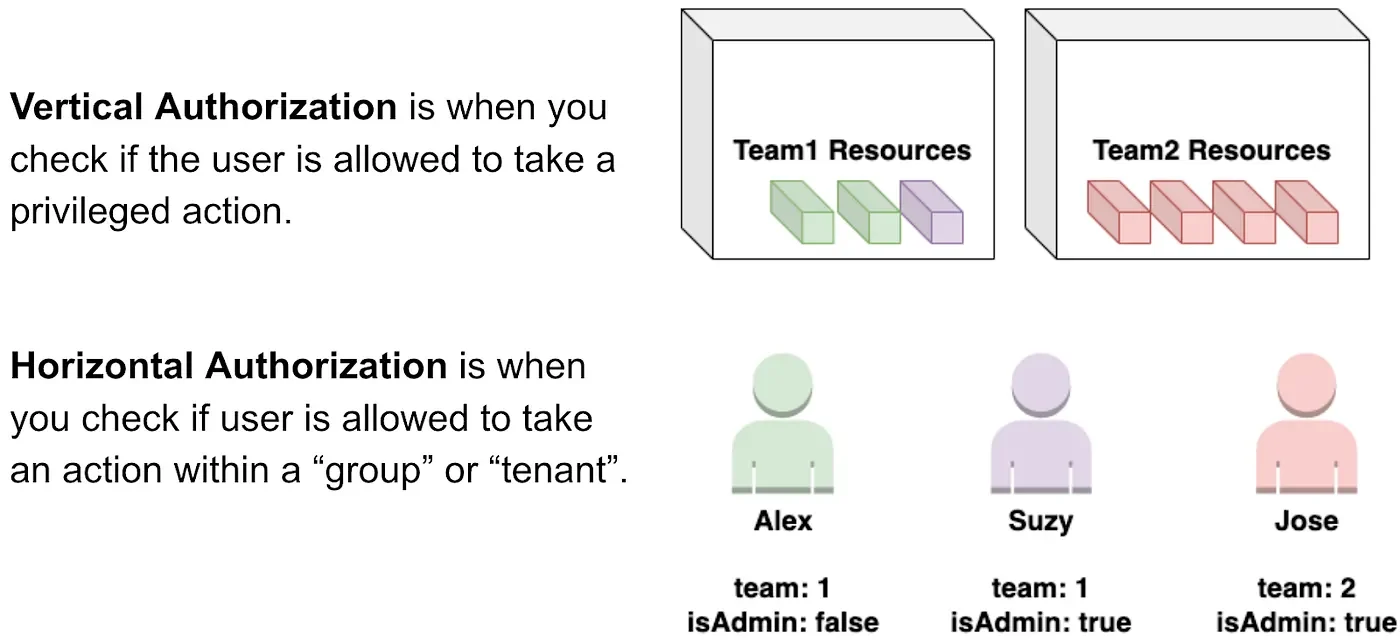
Figure 1. Horizontal vs. Vertical Authorization
The target was the Concourse CI codebase itself, run locally. The researcher's goal was to find a vulnerability in an open source Golang web application after reading Assetnote's blog and finishing Let's Go! by Alex Edwards.
Setup
The researcher cloned the Concourse CI repository and set it up locally with some users, teams and pipelines. Verbose mode was enabled on the CLI tool so that the requests it issued could be inspected. The scans run against the code were gokart, gosec and semgrep, and none of them surfaced anything of interest.
Finding it
With verbose mode on, the CLI showed that all parameters were being passed in the URL. The example request below exposes a pipeline called team1pipe1 while authenticated as a member of team1:
PUT /api/v1/teams/team1/pipelines/team1pipe1/expose HTTP/1.1
Host: localhost:8080
User-Agent: <USER_AGENT>
Authorization: bearer <AUTH_TOKEN>
Connection: close
Tracing that route through the code revealed two authorization checks:
checkAuthorizationHandler, which verifies the user's ability to access a team.pipelineScopedHandler, which verifies the team's access to the pipeline.
Figure 2. checkAuthorizationHandler code snippet
Figure 3. pipelineScopedHandler code snippet
The interesting part was how each handler obtained the team name. checkAuthorizationHandler used r.URL.Query().Get(":team_name"), while pipelineScopedHandler used r.FormValue(":team_name"). Reading the two functions side by side in the Go documentation showed a meaningful difference in priority.
URL.Query() parses RawQuery and returns the corresponding values, silently discarding malformed value pairs. Request.FormValue(key) returns the first value for the named component of the query, but POST and PUT body parameters take precedence over URL query string values. It calls ParseMultipartForm and ParseForm if necessary and ignores any errors they return, and returns the empty string if the key is absent.
Because the two handlers source the same logical parameter through functions with different precedence rules, a request can supply one value in the URL and a different value in the body. That is parameter pollution.
Exploitation
Step 1: Confirm the two sources disagree
The URL value of team_name is what checkAuthorizationHandler uses to check the owner of the auth token. The value used by pipelineScopedHandler to check the team's access to a pipeline comes from r.FormValue, so it can be supplied in the PUT body instead. The parameter name needs a colon prefix, which the framework had been adding automatically for the URL path parameter.
Step 2: Send the polluted request
PUT /api/v1/teams/team1/pipelines/team2pipe1/expose HTTP/1.1
Host: localhost:8080
User-Agent: <USER_AGENT>
Authorization: bearer <AUTH_TOKEN>
Content-Type: application/x-www-form-urlencoded
Connection: close
Content-Length: 16

:team_name=team2
The URL still names team1, so the first check sees a token belonging to team1. The body carries :team_name=team2, which r.FormValue prefers over the query string, and the pipeline team2pipe1 is exposed even though it belongs to another team. For the body parameter to be picked up, the request must carry the corresponding Content-Type and Content-Length headers.
Root cause
The two authorization checks that are meant to depend on each other read the same parameter through different APIs with different precedence. r.URL.Query().Get only looks at the raw query string, while r.FormValue merges form body values and gives them priority over the query string. The security decision in the first handler and the security decision in the second handler therefore operate on different values for the same request. The static analysis tools used during the initial scan did not flag this.
Impact
An authenticated user belonging to one team could bypass the horizontal authorization check and act on resources outside their team's scope, in the demonstrated case exposing a pipeline owned by another team. The attack requires a valid auth token and a request crafted with the right content type and length so the body parameter is parsed. The write-up demonstrates the expose action.
Fix
The Concourse team confirmed the issue as valid and remediated it by removing the use of r.FormValue, so that body parameters could no longer pollute the values used in the secondary authorization check. The advisory is GHSA-5jp2-vwrj-99rf, assigned CVE-2022-31683. The general lesson stated in the write-up is to stick to the same parameter-fetching functions throughout an application.
Variants to test
- Body versus query on PUT/POST routes. Send a team, tenant or owner identifier in the URL and a different one in an
application/x-www-form-urlencodedbody with a matchingContent-Length. A positive result is a response that reflects or acts on the body value while the authorization decision was made on the URL value. - Duplicate parameters in the query string. Supply the same key twice and see which occurrence each layer uses. A positive result is one handler acting on the first value and another on the last.
- Framework path parameters versus form values. Where a router injects path parameters into a request context or form, try overriding the injected name (here with a leading colon) in the body. A positive result is the override being honoured by one check but not the other.
- Mixed sources across chained middleware. Map every place a security-relevant identifier is read (
URL.Query,FormValue,PostFormValue, headers, cookies) and look for two checks on the same request that disagree. A positive result is any pair of handlers whose values can diverge for a single request.
What happened, in plain words
A security researcher found a way to make a web application check one thing while actually acting on something else. The application was Concourse CI, a tool that software teams use to build and test their code automatically. Concourse organises work into "teams": each team owns its own pipelines, and the system is supposed to stop one team from touching another team's pipelines.
The trick was that two separate security checks in the application read the same piece of information (the team name) from two different places in the incoming request. One check read it from the address of the request (the URL). The other check read it from the body of the request, and that second place wins when both are present. So the researcher sent a request that said "team1" in the URL and "team2" in the body. The first check saw team1, was happy, and let the request through. The second check read the body value, so a pipeline belonging to another team could be exposed. This kind of confusion, where the same parameter carries different values to different parts of an application, is called parameter pollution.
The researcher reported it to VMware, who maintained Concourse at the time. They confirmed it was a real vulnerability, fixed it, and published a security advisory with the identifier CVE-2022-31683.
The background you need first
Before the details make sense, here are the ideas the whole story rests on.
What an API is. An API (application programming interface) is the set of addresses and rules a program exposes so that other programs can talk to it. Think of a restaurant: the menu is the API. You do not walk into the kitchen; you order from the menu, and the kitchen decides what to do. In a web application, the API is usually a collection of URLs that accept requests and return answers, often in a machine-readable format rather than a web page.
What an HTTP request is. When your browser loads a page or a program talks to an API, it sends an HTTP request. A request has a few parts:
- A method, a verb such as GET (fetch something) or PUT (create or replace something).
- A path, the part of the URL that says which resource you mean, for example
/api/v1/teams/team1/pipelines/team1pipe1/expose. - Headers, small labelled lines of extra information, such as who you are or what format you are sending.
- Optionally a body, the payload that travels with the request.
What a token is. A token is a long random string that acts like a temporary pass. When you log in, the server gives you a token, and you attach it to later requests to prove who you are. It is like a wristband at an event: you show it at the door instead of your ID every time. In the requests below it appears as Authorization: bearer <AUTH_TOKEN>.
What a pipeline is. In Concourse, a pipeline is an automated sequence of build and test steps for a piece of software. It belongs to a team.
What horizontal and vertical authorization mean. Authorization is the process of deciding whether a user is allowed to do something. Vertical authorization is about rank: can a normal user do an admin-only action? Horizontal authorization is about peers: can a member of team1 touch team2's things? Both users have the same rank, but they should not reach each other's resources. The figure below illustrates the difference.
Figure 1. Horizontal vs. Vertical Authorization
What parameter pollution is. A parameter is a named value sent with a request, like team_name=team1. Parameter pollution means sending the same parameter more than once, or in more than one place, so that different parts of the application pick up different values. If one part makes a security decision based on one value and another part acts on a different value, the security decision no longer protects what it was meant to protect.
Why this target was chosen
The researcher had read a blog by Assetnote and had just finished a book called Let's Go! by Alex Edwards, which teaches the Go programming language. Go (often called Golang) is a popular language for building web services. Wanting to practise, the researcher picked an open source Go web application: Concourse CI. Open source means the code is public, so anyone can read it, which makes it a good place to learn.
Setting up a test environment
The researcher downloaded the Concourse CI code, ran it on their own computer, and created some users, teams and pipelines to play with. This is a common first step: you want a safe copy where you can break things without affecting anyone. They also turned on a verbose mode in the command-line tool that talks to Concourse, so that every request the tool sent was printed out and could be inspected.
Before reading the code closely, they ran three automated scanning tools over it: gokart, gosec and semgrep. These tools look for known dangerous patterns in source code, like a spell-checker for common mistakes. None of them found anything interesting. That is an important lesson in itself: automated scanners only catch patterns they know about, and this bug was not one of them.
Following the requests
With verbose mode on, the command-line tool showed that all the parameters were being sent in the URL rather than in a body. The example below exposes a pipeline called team1pipe1, and the person sending it belongs to team1:
PUT /api/v1/teams/team1/pipelines/team1pipe1/expose HTTP/1.1
Host: localhost:8080
User-Agent: <USER_AGENT>
Authorization: bearer <AUTH_TOKEN>
Connection: close
Line by line:
PUT /api/v1/teams/team1/pipelines/team1pipe1/expose HTTP/1.1is the request line.PUTis the method, meaning "create or replace". The path names the team (team1), the pipeline (team1pipe1) and the action (expose, which makes a pipeline publicly visible).HTTP/1.1is the version of the protocol being spoken.Host: localhost:8080says which server the request is for.localhostmeans this very computer, and8080is the port, a numbered door on that computer. This confirms the researcher was testing a local copy.User-Agent: <USER_AGENT>identifies the client software that sent the request. The actual value is not shown here.Authorization: bearer <AUTH_TOKEN>carries the pass that proves who is making the request.bearermeans "whoever holds this token is the user".Connection: closetells the server to close the network connection after answering.
There is no body in this request: everything the server needs is in the URL.
The two checks
Tracing that URL through the source code, the researcher found that two separate security checks run before the action is allowed:
checkAuthorizationHandlerverifies that the user behind the token is allowed to access the team.pipelineScopedHandlerverifies that the team is allowed to access the pipeline.
Figure 2. checkAuthorizationHandler code snippet
Figure 3. pipelineScopedHandler code snippet
The first check answers "is this person on this team?" and the second answers "does this team own this pipeline?". Together they should mean: you can only expose a pipeline that belongs to your own team. The bug was in how each check obtained the team name.
Why are we getting the "team_name" with two different functions?
The first check used r.URL.Query().Get(":team_name"). The second used r.FormValue(":team_name"). Both are standard Go functions for reading a value out of an incoming request, but they do not look in the same places. The researcher read the official documentation for both, side by side:
*func (u URL) Query() Values
Query parses RawQuery and returns the corresponding values. It silently discards malformed value pairs. To check errors use ParseQuery.
*func (r Request) FormValue(key string) string
FormValue returns the first value for the named component of the query. POST and PUT body parameters take precedence over URL query string values. FormValue calls ParseMultipartForm and ParseForm if necessary and ignores any errors returned by these functions. If key is not present, FormValue returns the empty string. To access multiple values of the same key, call ParseForm and then inspect Request.Form directly.
In plain words: URL.Query() looks only at the query string, the part of the URL after a question mark. FormValue looks at the query string too, but if the same name also appears in the body of a POST or PUT request, the body value wins. The documentation even says so in bold.
That difference in priority is the whole vulnerability. If the same parameter can be given one value in the URL and another in the body, the two checks can be made to see different team names. This is parameter pollution.
Exploiting parameter pollution
The plan follows directly from what the documentation said. The team name in the URL is what the first check uses to decide whether the token's owner may access the team. The team name used by the second check comes from FormValue, so it can be supplied in the PUT body instead. The parameter name needs a colon in front of it, because the web framework had been adding that colon automatically when it took the team name from the URL path.
Step 1: Confirm the two sources disagree
The researcher read the documentation for both functions and saw that they read from different places. That is why the next step is worth trying at all: if both functions had read the URL, there would be nothing to exploit.
Step 2: Send the polluted request
PUT /api/v1/teams/team1/pipelines/team2pipe1/expose HTTP/1.1
Host: localhost:8080
User-Agent: <USER_AGENT>
Authorization: bearer <AUTH_TOKEN>
Content-Type: application/x-www-form-urlencoded
Connection: close
Content-Length: 16

:team_name=team2
Line by line:
PUT /api/v1/teams/team1/pipelines/team2pipe1/expose HTTP/1.1is the request line. The URL still saysteam1, so the first check will see a team the token's owner belongs to. But the pipeline named in the path,team2pipe1, belongs to team2. That mismatch is the point.Host: localhost:8080is the same local server as before.User-Agent: <USER_AGENT>identifies the client.Authorization: bearer <AUTH_TOKEN>is the token of a user in team1.Content-Type: application/x-www-form-urlencodedtells the server how to interpret the body. This format is the same one a web form uses when you press submit: names and values joined by&, with special characters encoded.Connection: closecloses the connection after the response.Content-Length: 16states the exact size of the body in bytes. The server needs this to know where the body ends. Without the right content type and length, the body parameter would not be picked up at all.- The blank line separates headers from body.
:team_name=team2is the body. It sets the parameter:team_nametoteam2. The leading colon matches the name the framework uses for the team taken from the URL path.
What happens on the server: the first check reads the URL, sees team1, and confirms the token belongs to a member of team1, so it passes. The second check calls FormValue, which prefers the body and sees team2. The pipeline team2pipe1 is exposed even though the requester belongs to team1. The two checks were each doing their job correctly; they were simply looking at different values.
The root cause
The two authorization checks are meant to depend on each other, but they read the same parameter through different functions with different precedence. r.URL.Query().Get only looks at the raw query string. r.FormValue merges form body values and gives them priority over the query string. So the security decision in the first handler and the security decision in the second handler operate on different values for the same request.
The automated scanners did not flag this.
What the impact was
An authenticated user in one team could bypass the horizontal authorization check and act on resources outside their team's scope. In the demonstrated case, they could expose a pipeline owned by another team. The attack needs a valid token and a request crafted with the right content type and length so the body parameter is parsed. The write-up demonstrates the expose action.
How it was fixed
The researcher first reproduced the attack on their own local setup, then began responsible disclosure: telling the vendor privately so they can fix it before details go public. It took a while to find the right contact, but eventually the researcher reached the Concourse team at VMware. They responded shortly after being contacted, confirmed the vulnerability was valid, and fixed it by removing the use of r.FormValue, so body parameters could no longer pollute the values used in the secondary authorization check. The fix is documented in the advisory GHSA-5jp2-vwrj-99rf, which was assigned CVE-2022-31683. A CVE is a public catalogue number for a known vulnerability, so people can refer to it unambiguously.
The general lesson from the write-up: stick to the same parameter-fetching functions throughout an application. If every check reads a value the same way, no two checks can disagree about it.
Variants to test
If you are learning to look for this class of bug, these are the shapes it takes:
- Body versus query on PUT/POST routes. Send a team, tenant or owner identifier in the URL and a different one in an
application/x-www-form-urlencodedbody with a matchingContent-Length. A positive result is a response that reflects or acts on the body value while the authorization decision was made on the URL value. - Duplicate parameters in the query string. Supply the same key twice and see which occurrence each layer uses. A positive result is one handler acting on the first value and another on the last.
- Framework path parameters versus form values. Where a router injects path parameters into a request context or form, try overriding the injected name (here with a leading colon) in the body. A positive result is the override being honoured by one check but not the other.
- Mixed sources across chained middleware. Map every place a security-relevant identifier is read (
URL.Query,FormValue,PostFormValue, headers, cookies) and look for two checks on the same request that disagree. A positive result is any pair of handlers whose values can diverge for a single request.
Glossary
- API: the set of addresses and rules a program exposes so other programs can talk to it.
- Authorization: the process of deciding whether a user is allowed to perform an action.
- Horizontal authorization: checking that a user cannot touch resources belonging to a peer of the same rank, such as another team.
- Vertical authorization: checking that a user cannot perform actions above their rank, such as admin-only actions.
- Authentication: proving who you are, usually with a token or password. Authorization happens after it.
- Token: a long random string issued at login that acts as a temporary pass for later requests.
- Bearer token: a token where possession alone grants access, like a wristband.
- HTTP request: a message a client sends to a server, made of a method, a path, headers and optionally a body.
- Method: the verb of an HTTP request, such as GET or PUT.
- Header: a labelled line of extra information in a request or response, such as
Content-Type. - Body: the payload of a request, sent after the headers.
- URL: the address of a resource, including the path and optionally a query string.
- Query string: the part of a URL after a question mark, holding name-value pairs.
- Parameter: a named value sent with a request, such as
team_name=team1. - Parameter pollution: sending the same parameter in more than one place or more than once so different parts of an application see different values.
- Content-Type: a header stating the format of the body, such as
application/x-www-form-urlencoded. - Content-Length: a header stating the exact size of the body in bytes.
- application/x-www-form-urlencoded: the format a web form uses when submitted, names and values joined by
&. - Handler: a function in a web application that processes a particular request.
- Middleware: code that runs around a handler, often for checks like authorization.
- Go / Golang: a programming language popular for web services, created at Google.
- Concourse CI: an open source continuous integration system that builds and tests software automatically, organised around teams and pipelines.
- Pipeline: an automated sequence of build and test steps belonging to a team.
- Team: in Concourse, the grouping that owns pipelines and whose members share access to them.
- Open source: software whose source code is publicly available to read and modify.
- Static analysis: examining source code automatically for dangerous patterns without running it.
- gokart, gosec, semgrep: automated static analysis tools the researcher ran over the code.
- Verbose mode: a setting that makes a tool print every request it sends, for inspection.
- CLI: command-line interface, a tool operated by typing commands rather than clicking.
- localhost: the name a computer uses to refer to itself.
- Port: a numbered door on a computer that a service listens on, such as 8080.
- Responsible disclosure: telling a vendor privately about a vulnerability so it can be fixed before details are public.
- CVE: a public catalogue number for a known vulnerability, here CVE-2022-31683.
- Advisory: a public notice from a vendor describing a vulnerability and its fix, here GHSA-5jp2-vwrj-99rf.
- VMware: the company that maintained Concourse at the time of the report.
- Expose (a pipeline): a Concourse action that makes a pipeline publicly visible.