Punny code Detection Parsing should be implemented on Markdown
Links entered in the profile statement Markdown box are rendered on the public profile page without any punycode parsing, so a homograph URL using lookalike characters displays identically to a legitimate domain. An attacker could register such a lookalike domain and trick visitors into clicking through to a different site.

- Disclosed after 6 hours
Hello Liberapay Security Team,
#Description
When we insert any URL in Markdown Box in liberapay.com/profile_name/edit/statement, it reflects on our main profile page.
There was main issue which I discovered was about Punny code parsing method which was not enabled on Markdown.
#Step to Reproduce For demonstration, let's take two url. Normal Url - apple.com and Punny Code url - аррlе.com
- Go to liberapay.com/profile_name/edit/statement, and enter this url like this.
- Now looking at url,it's not distinguishable ,however another one is punny code.
[Note:Since hackerone report posts detects punnycode ,so I am not inserting https in both urls ,but you can try with this format in the below screenshot.]
- Go to markdown box and type in this format both the urls and save it.
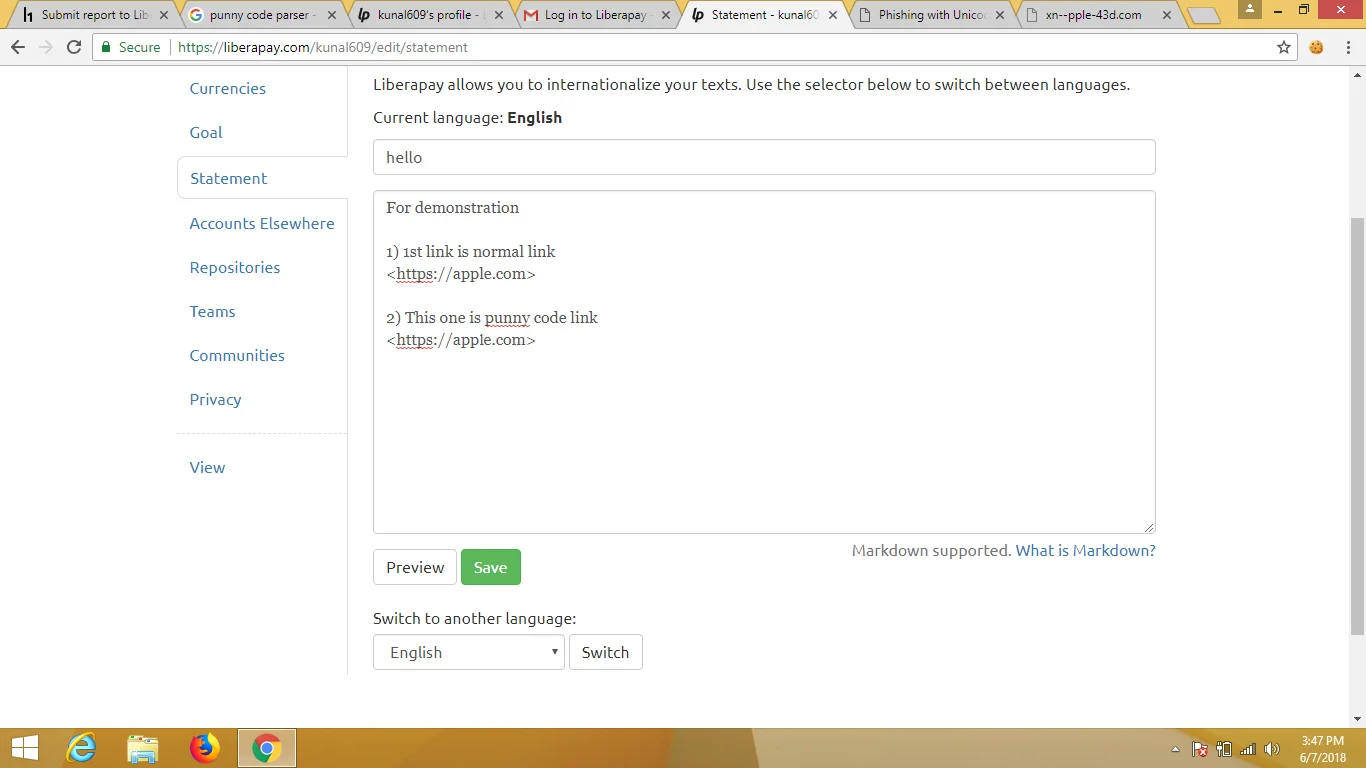
- After saving,move on to profile front page, liberapay.com/profile_name and check both the urls are displaying apple.com,however when person will click 1st link,it'll redirect to normal apple.com ,but second url on clicking will redirect to punny code url.
It's because both the urls have been decoded in the same way while in the markdown without any punny code parsing method.
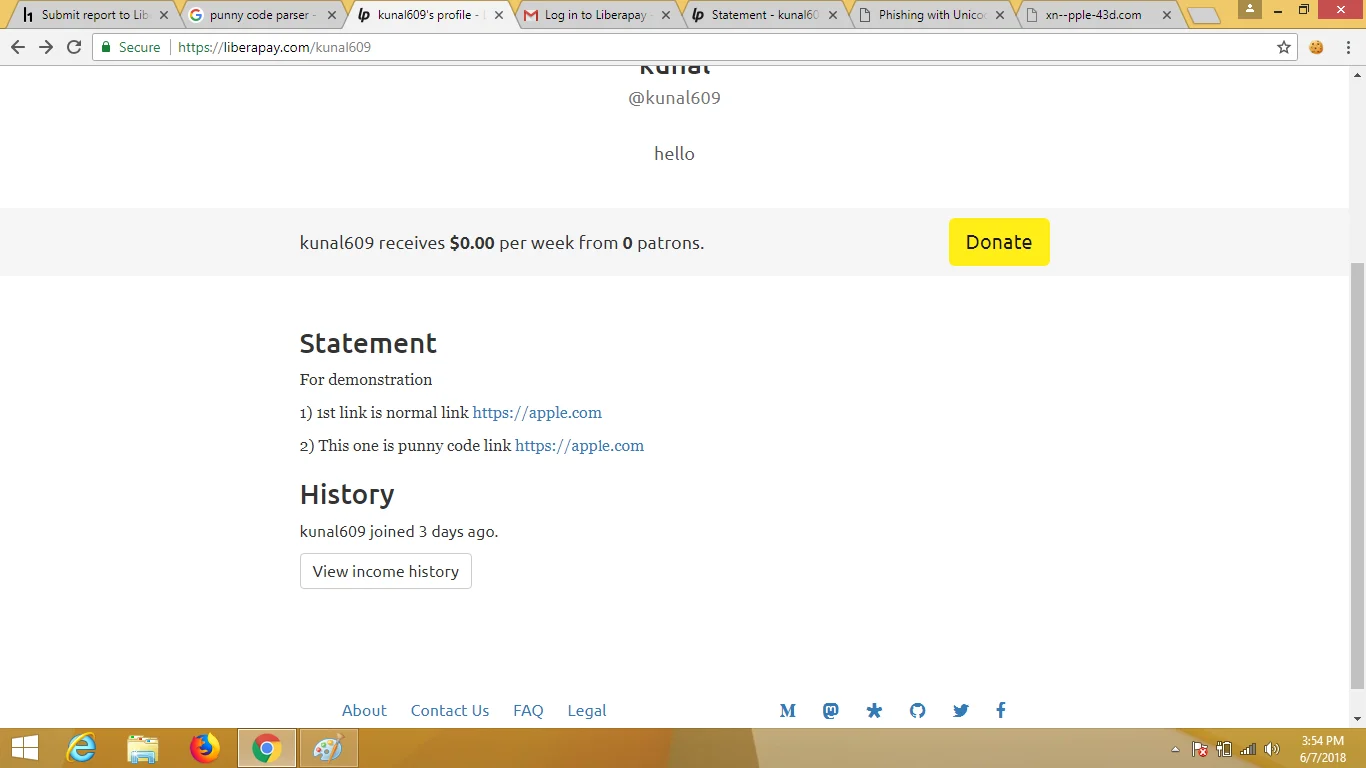
For verification,click on my profile link ,here I already mentioned both urls,check and verify. https://liberapay.com/kunal609
#Reason to Report
- Since punnycode is not detecting in markdown,then it'll look exactly the same,isn't it.
- Judging both the urls which I have mentioned,one can't differentiate between as they look exactly the same before submitting and after submitting in profile page.
- In this way, one can redirect to another domain.
- Also ,punny code url can be registered so a person can be redirect to other site.
#Solution
- We can initiate punny code parsing or warning link ,where when punny code will be inserted and rendered afterwards in Markdown then ,it should display their original Punny code URL in profile page.
- So before clicking any link,user can check that it's punny code url and not safe to click in the first place.
Thanks Kunal (Low impact,but still punny code parsing must be initiated in between Markdown Process for URL rendering)
Impact
As explained in reason
Not written yet. The AI write-up for this report has not been written yet. The Original tab links to the source.
How it worked
Root cause
Likely the Markdown renderer converts and displays link text and destinations without applying punycode/IDN normalisation or a warning, so lookalike domains render indistinguishably from the real one.
Impact
A visitor could be redirected to an attacker-controlled lookalike domain that appears identical to a trusted one; the reporter rates this as low impact.
What the attacker needed
A Liberapay account; ability to edit profile statement; victim clicks the crafted link
The fix
The Markdown rendering should apply punycode parsing or show a warning so the original punycode form of a link is displayed before a user clicks it.
How it was found
- Open the profile statement edit page and enter a normal URL and a lookalike-character URL in the Markdown box.
- Save the statement.
- View the public profile page and observe both links display as the same domain.
- Click each link and note the second one goes to the lookalike domain.
Explained by bugbounty.wiki with AI from the original and checked against quotes from it; it can still be wrong. Read the original before relying on a detail.
Not written yet. The AI write-up for this report has not been written yet. The Original tab links to the source.
Some letters in other alphabets look exactly like ordinary Latin letters, so a web address can be built from lookalike characters and appear identical to a real one. This is called a homograph or punycode trick. Here, the site showed such a link on a profile page without warning that it was not the plain domain it appeared to be, so a visitor could be sent somewhere unexpected.
What is Business logic?
The application works as coded but not as intended: a negative price, a skipped payment step, a limit that can be crossed.