Server-side Request Forgery in OpenID support
The OpenID URL field on the Libravatar profile page fetched user-supplied URLs without validation, allowing an attacker to make the server send requests to internal addresses. This could be used to probe internal services, as demonstrated by observing different error messages for open and closed ports.
 Published on medium.com
I just want find Bug at Liberapay but when i want to change Photo Profile the page will auto Redirect at libravatar.org .
The full write-up lives on its author's site
It belongs to its author, so we link to it rather than copy it. The other two tabs are our own rewrites, checked against it.
Context
Liberapay is a donation platform, and the researcher's starting point was a Liberapay profile page. When he tried to change his profile photo, the page redirected him to libravatar.org, the avatar service that Liberapay uses. The OpenID support he ended up testing belongs to Libravatar, and the write-up is filed under the Liberapay programme on HackerOne.
Libravatar lets a registered member attach OpenID identities to a profile. The feature takes a URL supplied by the user and asks the server to fetch it, to discover whether an OpenID service is published there. That server-side fetch is the interesting part: the URL is attacker-controlled, and the request is made from the Libravatar infrastructure rather than from the user's browser.
Setup
- Register an account on libravatar.org to become a member.
- Go to the profile page, where there is an Add a new OpenID menu, and click it.
- On that page a URL can be entered, and the researcher notes that the field accepts a URL "from everywhere".
The only tooling mentioned is Nmap, whose output is shown, and netcat, used to listen on a port on the researcher's own VPS. No versions are given.
Finding it
The researcher was originally looking for bugs on Liberapay, and the profile photo change redirected him to libravatar.org. Once registered there, the OpenID page stood out because it accepts an arbitrary URL and the server then goes and fetches it. A user-supplied URL that the server requests is the classic precondition for server-side request forgery, so the plan was to point it at loopback addresses and at a host he controlled.
Exploitation
Step 1: probe a closed loopback port
The first URL entered was:
http://[redacted]:31337
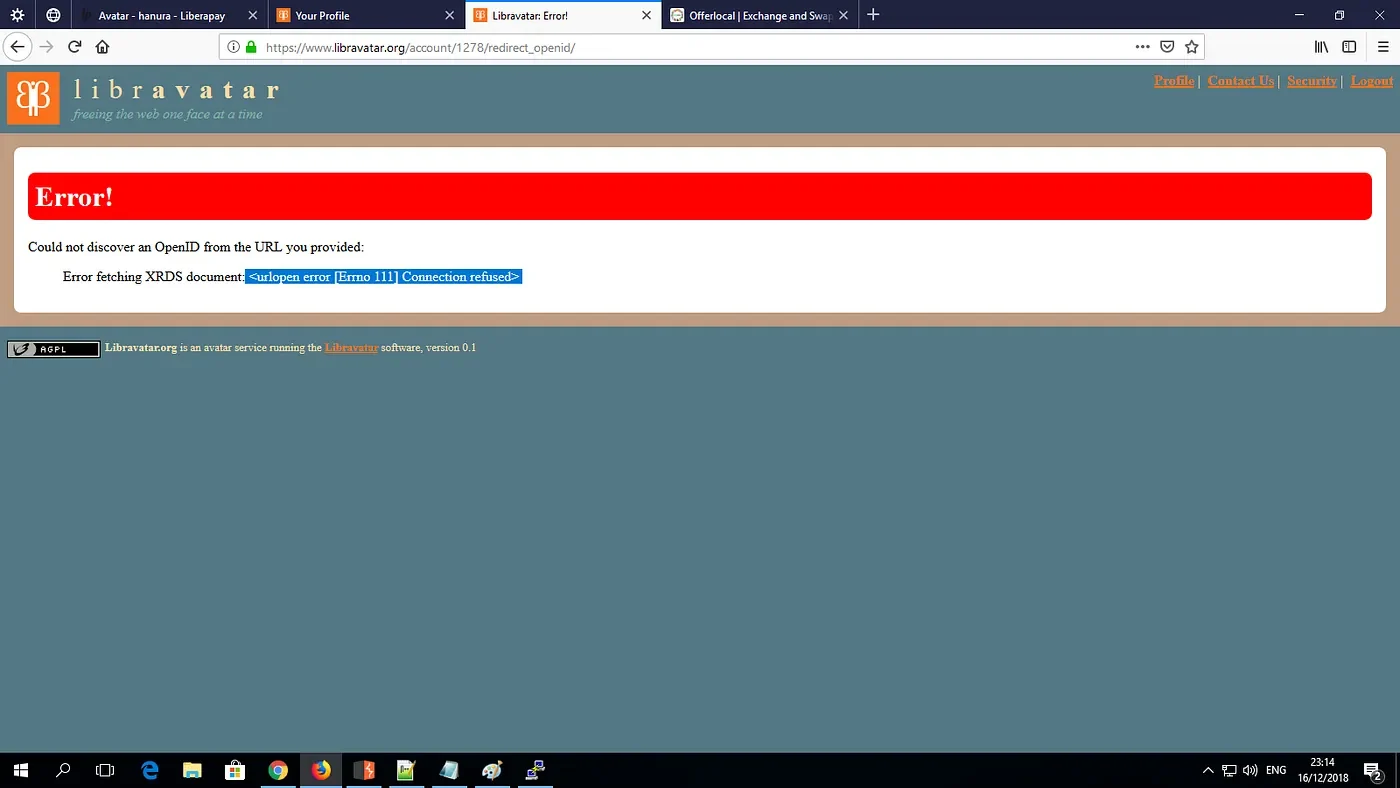
The page returned:
<urlopen error [Errno 111] Connection refused>
The error text is the important detail. It is a Python urlopen error, which shows that the application itself, not the browser, attempted the connection, and that the connection was refused because nothing was listening on port 31337 on the server's loopback interface. The error is reflected back to the user, which turns the feature into a port oracle.
Step 2: probe an open loopback port
Next the researcher used port 80 on loopback:
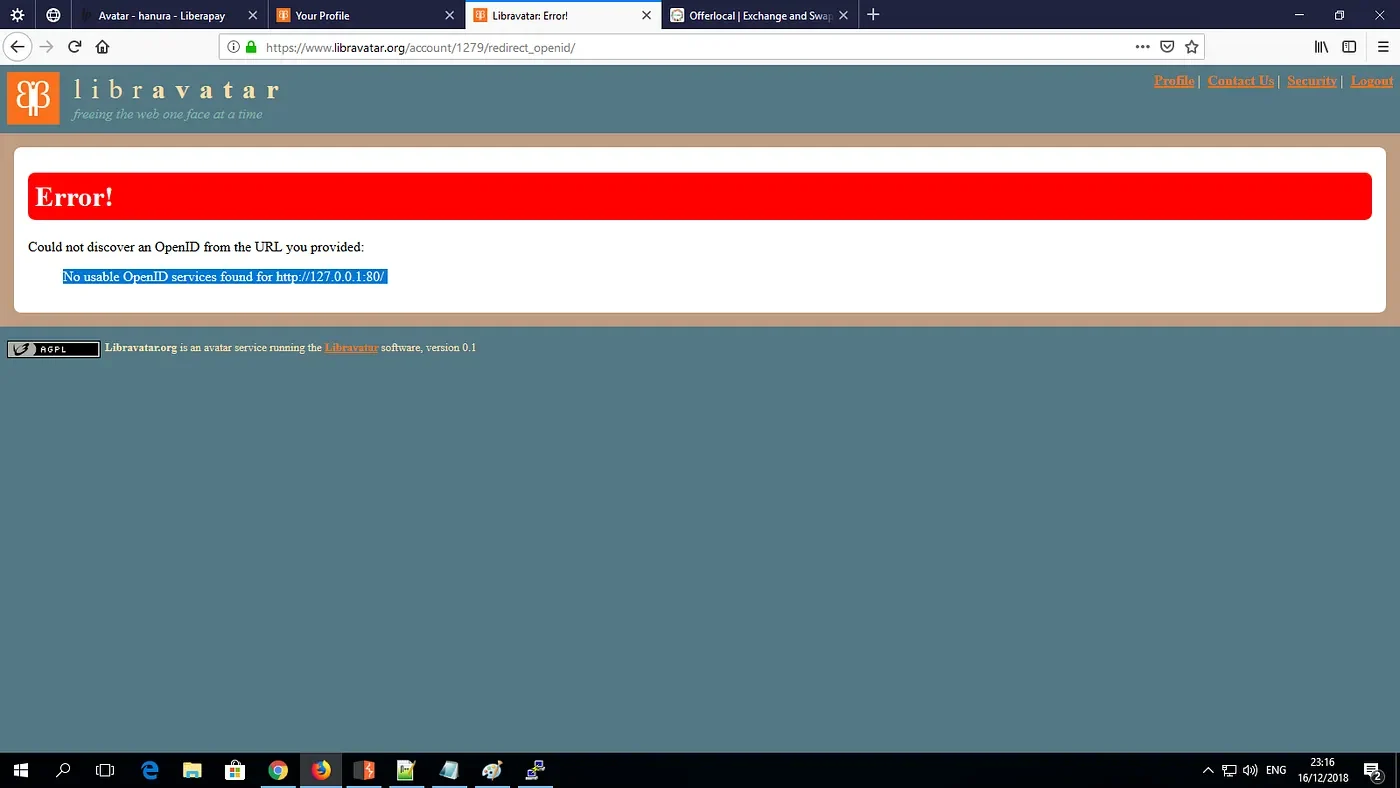
This time the page returned:
The different response indicates that the connection succeeded, since the page reported no usable OpenID services found. Comparing the two responses gives a reliable way to tell open ports from closed ones on the internal interface.
Step 3: confirm the open port externally
To corroborate the result, the researcher ran Nmap and got:
80/tcp open http Apache httpd
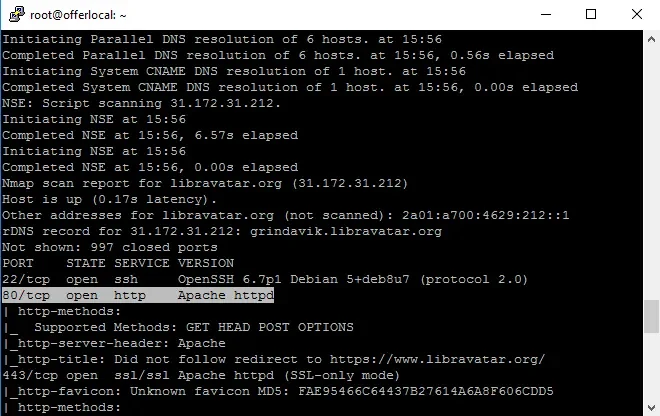
The Nmap output shows port 80 open and served by Apache httpd.
Step 4: receive the request on a controlled host
Finally, the researcher pointed the OpenID field at his own VPS and listened on the chosen port with netcat:
http://myvpsserver.example:31337
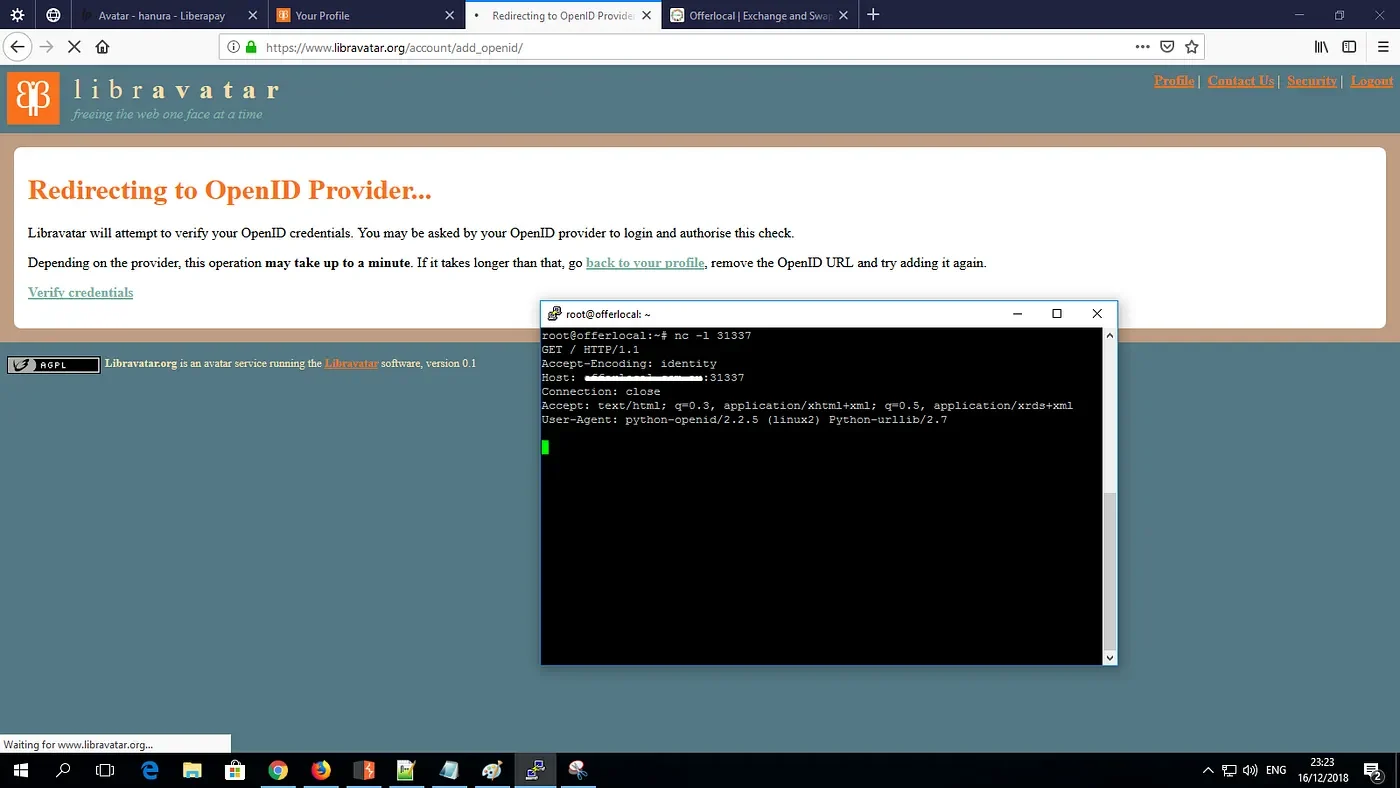
The request arrived on the netcat listener, which the researcher describes as working. The request arrived on the netcat listener, which the researcher describes as working, showing the server made an outbound request to a host and port chosen by the user.
Root cause
The OpenID feature accepts a user-supplied URL from everywhere, and the server fetches it. Loopback addresses are accepted, and the resulting connection errors and discovery messages are returned to the user. The report does not include the code, so the exact validation that was missing is not shown; likely there was no allowlist or blocklist for private and loopback address ranges, and no separation between the fetch and the response shown to the user.
Impact
As the report describes it, SSRF lets an attacker send crafted requests from the vulnerable web application. It is usually used to reach internal systems behind firewalls that are not accessible from the external network, and it can also be used to reach services on the same server that listen on the loopback interface ([redacted]). In this case the demonstrated effects are: confirming whether a loopback port is open, based on the difference between a connection error and a discovery message, and causing the server to make a request to an arbitrary external host and port. The report demonstrates only the connection behaviour and the error text.
Fix
The report links to the Libravatar bug tracker entry for the issue:
https://bugs.launchpad.net/libravatar/+bug/1808720
The report does not describe the change itself. The timeline records the report on 16 December 2018, Libravatar appreciating the researcher on 17 December 2018, and adding him to the Libravatar hall of fame on 24 December 2018.
Variants to test
- Other loopback forms. Try
http://[redacted]:PORT,http://localhost:PORTandhttp://[::1]:PORTin any feature that fetches a URL. A positive result is a connection error for a closed port and a different message, or actual content, for an open one. - Private ranges. Try addresses in
[redacted]/8,[redacted]/12and[redacted]/16. A positive result is any response that differs from the response to an unreachable public address. - Redirects. Host a URL on your own server that redirects to
http://[redacted]:PORT. If the application follows the redirect, the initial validation was bypassed. - DNS rebinding. Use a hostname you control that resolves first to a public address and then to a loopback address. A positive result is the server reaching the loopback target on the second resolution.
- Error reflection. Compare the error text for closed ports, open ports and non-HTTP services. Detailed errors such as Python
urlopenmessages reveal the internal stack and turn the feature into a scanner. - Out-of-band confirmation. Point the field at a listener you control, as in step 4, and check for the incoming request. This proves the fetch happens server-side even when the response gives nothing away.
What happened, in plain words
Liberapay is a website where people can collect donations. The researcher started there, on a normal profile page. When he tried to change his profile picture, the site sent him to a different website, libravatar.org, which is the service Liberapay uses to store and serve profile pictures (called avatars).
Once he was on libravatar.org, he registered an account and found a feature called OpenID. OpenID is a way to log in to many websites using one identity, a bit like showing the same membership card at several shops. To make OpenID work, Libravatar needs to know where a person's OpenID identity lives, so the feature lets a member type in a web address (a URL) and then the Libravatar server goes and fetches that address to see whether an OpenID service is published there.
That last part is the key. Normally, when you type an address into a website, your own browser fetches it. Here, the Libravatar server fetches it. The address is chosen by the user, but the request comes from Libravatar's own machines. When a website can be tricked into making requests to addresses the user chooses, that is called Server-Side Request Forgery, or SSRF. A simple comparison: imagine a hotel receptionist who will phone any number you give them. You cannot dial the staff-only extension yourself, but the receptionist can, and they will tell you what happened when they tried.
The researcher used this to make Libravatar's server try to connect to addresses on its own machine (the loopback address, [redacted], which always means "this same computer") and to a server he controlled himself. The different error messages he got back told him which internal ports were open. The write-up is filed under the Liberapay programme on HackerOne, the bug bounty platform.
The setup
Before testing anything, the researcher had to become a member of libravatar.org, because the OpenID feature is only available to registered members. The steps were:
- Register an account on libravatar.org to become a member.
- Go to the profile page, where there is an Add a new OpenID menu, and click it.
- On that page a URL can be entered, and the researcher notes that the field accepts a URL "from everywhere".
"From everywhere" means the field does not restrict which addresses you can type. You could enter a normal public website, or an address that points back at the server itself, or an address on a private network. That lack of restriction is what makes the test possible.
The only tools mentioned are Nmap, a program that scans a computer to see which network ports are open, and netcat, a small utility that can listen on a port and show anything that arrives. A port is like a numbered door on a computer: web traffic usually goes to door 80, and other services use other door numbers. No software versions are given in the report.
Finding it
The researcher was originally looking for bugs on Liberapay. The profile photo change redirected him to libravatar.org, and that is how he ended up looking at Libravatar's features. The OpenID page stood out because it accepts any URL and then the server fetches it. A user-supplied URL that the server requests is the classic precondition for SSRF, so the plan was to point it at the server's own loopback address and at a host he controlled.
Exploitation
Step 1: probe a closed loopback port
The first URL entered was:
http://[redacted]:31337
In plain words: [redacted] is the address a computer uses to refer to itself, and :31337 means port 31337 on that computer. The researcher entered port 31337 on the loopback address. The screenshot shows the OpenID form with this address filled in.
The page returned:
<urlopen error [Errno 111] Connection refused>
The error text is the important detail. urlopen is a function in the Python programming language that opens a URL, so this message shows that the application itself, not the browser, attempted the connection. Errno 111 and Connection refused mean the server tried to connect and was told there was nothing listening on port 31337 on its own loopback interface. Because that error is shown back to the user, the feature works like a port scanner: you can ask it about any port and read the answer.
Step 2: probe an open loopback port
Next the researcher used port 80 on loopback:
Port 80 is the standard port for web traffic, so this time something was expected to answer. The screenshot shows the result of this second attempt.
This time the page returned:
The different response indicates that the connection succeeded, since the page reported no usable OpenID services found. Comparing the two responses gives a reliable way to tell open ports from closed ones on the internal interface: a connection error means closed, and a discovery message means open.
Step 3: confirm the open port externally
To corroborate the result, the researcher ran Nmap and got:
80/tcp open http Apache httpd
Line by line: 80/tcp means port 80 over TCP, the protocol most web traffic uses. open means the port accepted a connection. http means the service on it speaks HTTP, the language of web pages. Apache httpd is the name of the web server software answering. The Nmap output shows port 80 open and served by Apache httpd. The screenshot shows the Nmap output.
Step 4: receive the request on a controlled host
Finally, the researcher pointed the OpenID field at his own VPS and listened on the chosen port with netcat:
http://myvpsserver.example:31337
A VPS is a virtual private server, a machine you rent on the internet and control completely. myvpsserver.example stands in for its address, and :31337 is the port netcat was told to listen on. The idea is simple: if the Libravatar server really fetches the URL, the request will arrive at the researcher's own machine, where he can see it. The screenshot shows the request arriving on the netcat listener.
The request arrived on the netcat listener, which the researcher describes as working. The request arrived on the netcat listener, which the researcher describes as working, showing the server made an outbound request to a host and port chosen by the user. Unlike the loopback tests, this cannot be explained by anything happening in the browser.
Root cause
The OpenID feature accepts a user-supplied URL from everywhere, and the server fetches it. Loopback addresses are accepted, and the resulting connection errors and discovery messages are returned to the user. The report does not include the code, so the exact validation that was missing is not shown. Likely there was no allowlist or blocklist for private and loopback address ranges, and no separation between the fetch and the response shown to the user. An allowlist is a list of things that are permitted; a blocklist is a list of things that are forbidden.
Impact
As the report describes it, SSRF lets an attacker send crafted requests from the vulnerable web application. It is usually used to reach internal systems behind firewalls that are not accessible from the external network, and it can also be used to reach services on the same server that listen on the loopback interface ([redacted]). A firewall is a filter that decides which network traffic is allowed in or out.
In this case the demonstrated effects are two: confirming whether a loopback port is open, based on the difference between a connection error and a discovery message, and causing the server to make a request to an arbitrary external host and port. The report demonstrates only the connection behaviour and the error text.
Fix
The report links to the Libravatar bug tracker entry for the issue:
https://bugs.launchpad.net/libravatar/+bug/1808720
Launchpad is a public bug tracking system, and this link is the record of the issue. The report does not describe the change itself. The timeline records the report on 16 December 2018, Libravatar appreciating the researcher on 17 December 2018, and adding him to the Libravatar hall of fame on 24 December 2018. A hall of fame is a public page where a project thanks the people who reported security issues.
Variants to test
These are the same ideas generalised, so you can look for the same weakness in other features that fetch a URL:
- Other loopback forms. Try
http://[redacted]:PORT,http://localhost:PORTandhttp://[::1]:PORTin any feature that fetches a URL.localhostis a name for the same machine, and[::1]is the same idea in the newer IPv6 addressing scheme. A positive result is a connection error for a closed port and a different message, or actual content, for an open one. - Private ranges. Try addresses in
[redacted]/8,[redacted]/12and[redacted]/16. These are address blocks reserved for private networks, the kind used inside companies and homes. A positive result is any response that differs from the response to an unreachable public address. - Redirects. Host a URL on your own server that redirects to
http://[redacted]:PORT. A redirect is an instruction from a web server telling the browser to go somewhere else. If the application follows the redirect, the initial validation was bypassed. - DNS rebinding. Use a hostname you control that resolves first to a public address and then to a loopback address. DNS is the system that turns names like example.com into numeric addresses; rebinding means changing the answer between checks. A positive result is the server reaching the loopback target on the second resolution.
- Error reflection. Compare the error text for closed ports, open ports and non-HTTP services. Detailed errors such as Python
urlopenmessages reveal the internal stack and turn the feature into a scanner. - Out-of-band confirmation. Point the field at a listener you control, as in step 4, and check for the incoming request. This proves the fetch happens server-side even when the response gives nothing away. "Out-of-band" means you learn the result through a separate channel, here your own server, rather than through the page's reply.
Glossary
- API: a defined way for one piece of software to talk to another, like a service counter with set requests you can make.
- Avatar: the small picture shown next to a person's name on a website.
- Blocklist: a list of things that are forbidden.
- Allowlist: a list of things that are permitted.
- Cookie: a small piece of data a website stores in your browser so it can recognise you on later requests.
- DNS: the system that translates human-readable names such as example.com into numeric IP addresses.
- DNS rebinding: changing the address a hostname resolves to between checks, so a name that looked safe points somewhere internal later.
- Firewall: a filter that decides which network traffic is allowed in or out.
- Hall of fame: a public page where a project thanks people who reported security issues.
- HTTP: the protocol browsers and servers use to exchange web pages and requests.
- IPv6: the newer version of the internet addressing scheme;
::1is its loopback address. - Launchpad: a public bug tracking system used by many open source projects.
- Libravatar: the avatar service that Liberapay uses, and the site where the OpenID feature was tested.
- Loopback address: the address a computer uses to refer to itself, usually [redacted] (or
::1in IPv6). - netcat: a small utility that can listen on a port and show anything that arrives.
- Nmap: a program that scans a computer to see which network ports are open.
- OpenID: a way to log in to many websites using one identity.
- Out-of-band: learning a result through a separate channel, such as your own server, rather than the page's reply.
- Port: a numbered door on a computer that a particular service listens on; web traffic usually uses port 80.
- Private address range: address blocks reserved for internal networks, such as
[redacted]/8,[redacted]/12and[redacted]/16. - Redirect: an instruction from a web server telling the client to go to a different address.
- SSRF (Server-Side Request Forgery): a weakness where a website can be made to send requests to addresses chosen by the user, including internal ones.
- TCP: the underlying protocol most web traffic uses to carry data reliably between machines.
- URL: a web address, such as
http://[redacted]:80. - urlopen: a Python function that opens a URL; its error messages appeared in the responses.
- VPS: a virtual private server, a machine you rent on the internet and control completely.



