CSRF at Network feature
The network settings page on Lichess could be changed by a cross-site request, so a malicious page could switch a victim's network routing option without their consent. An attacker could send a crafted link that, once clicked, altered the victim's routing setting.

- Triaged in 38 hours
- Fixed in 2 days
- Disclosed after 8 days
Summary:
A csrf vulnerability was found in the network feature, where an attacker can change Network Routing settings by sending a csrf script to the victim.
Steps To Reproduce:
- Prepare the csrf script as below.
<html><body><a href="https://lichess.org/account/network?usingAltSocket=false">click</a></script></body></html>
-
save the script above to your server. for example csrf.html
-
send to the victim registered in the Lichess application
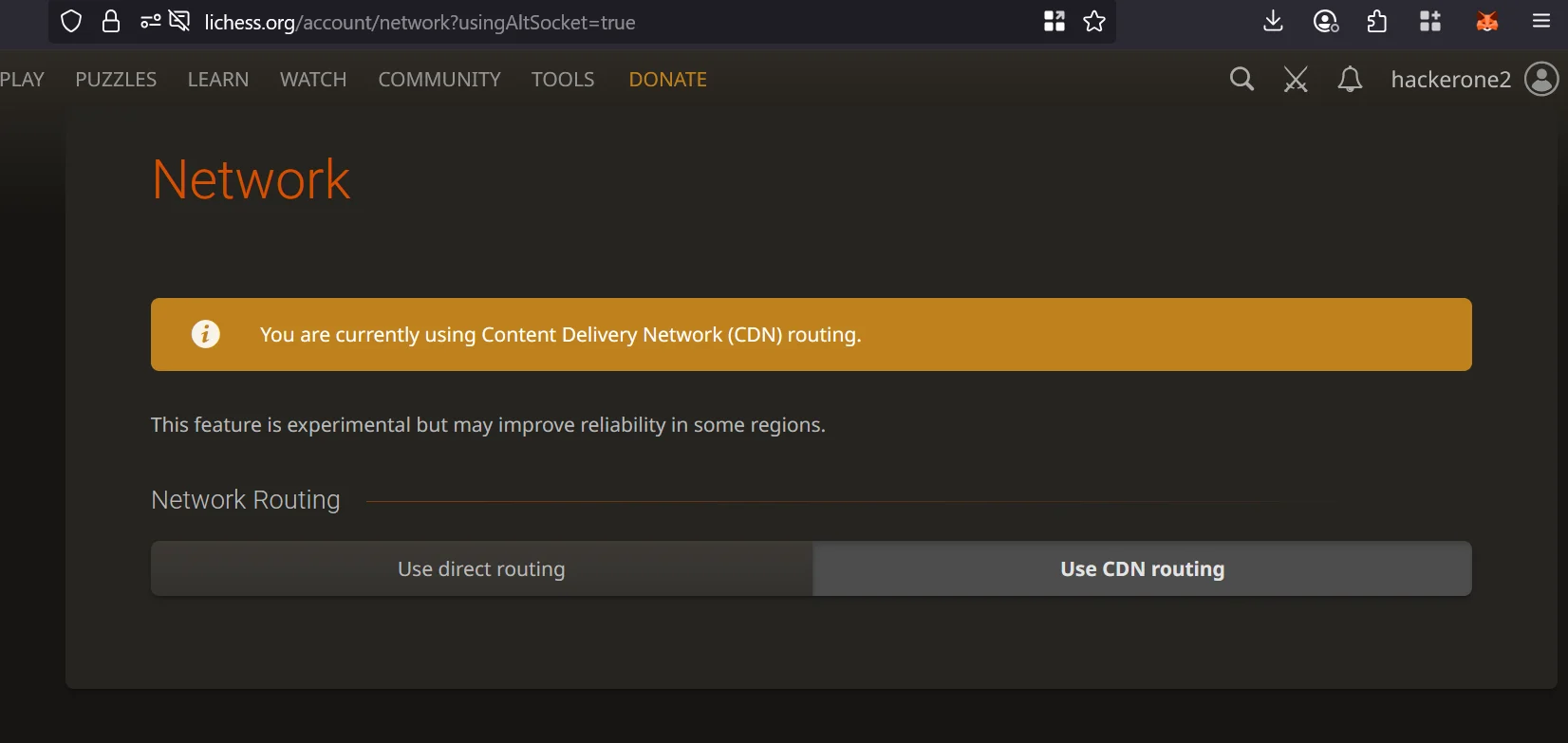
Proof : Victim set Network Routing feature to ==Use CDN Routing==:
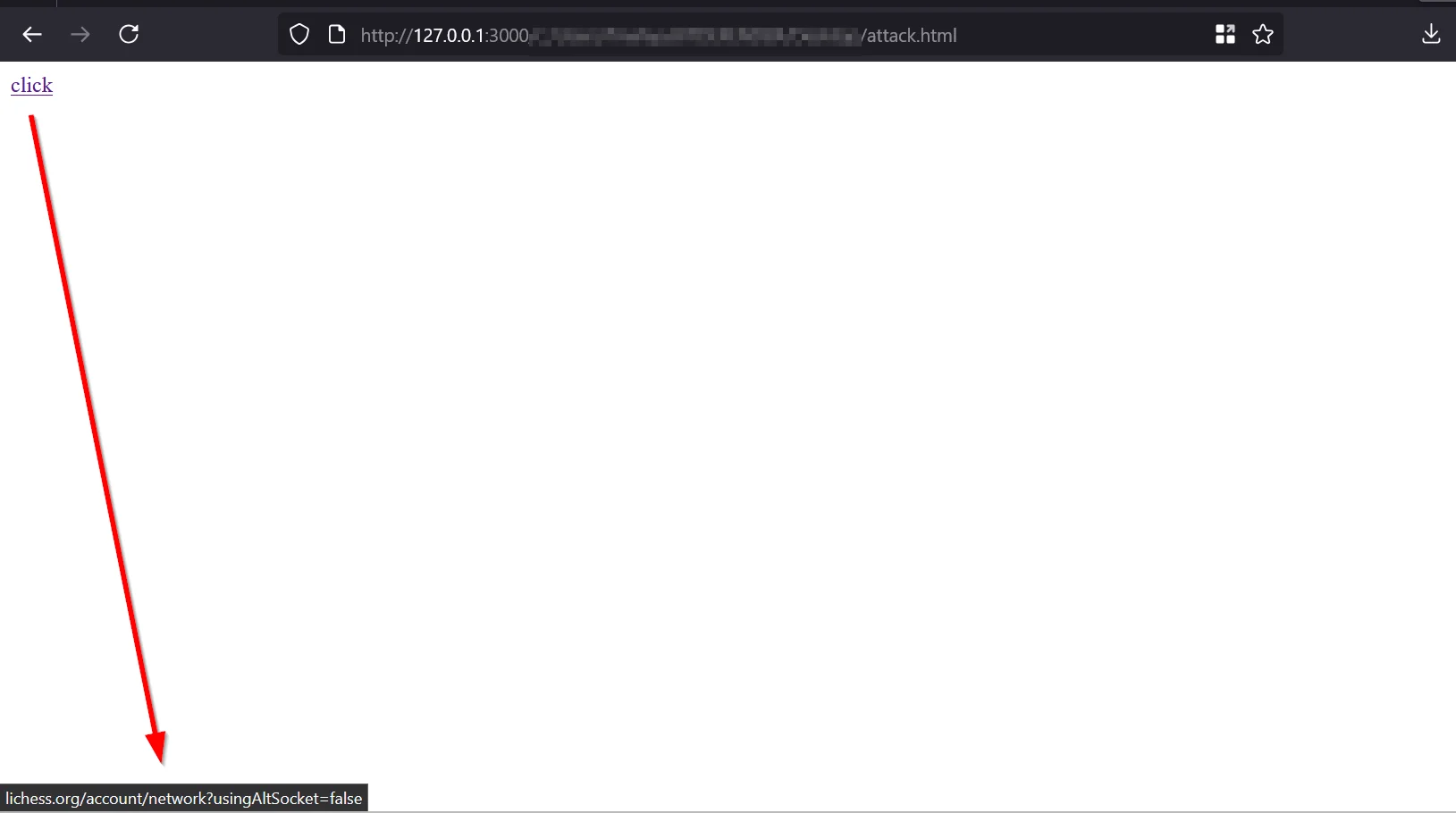
Attacker sent csrf to victim:
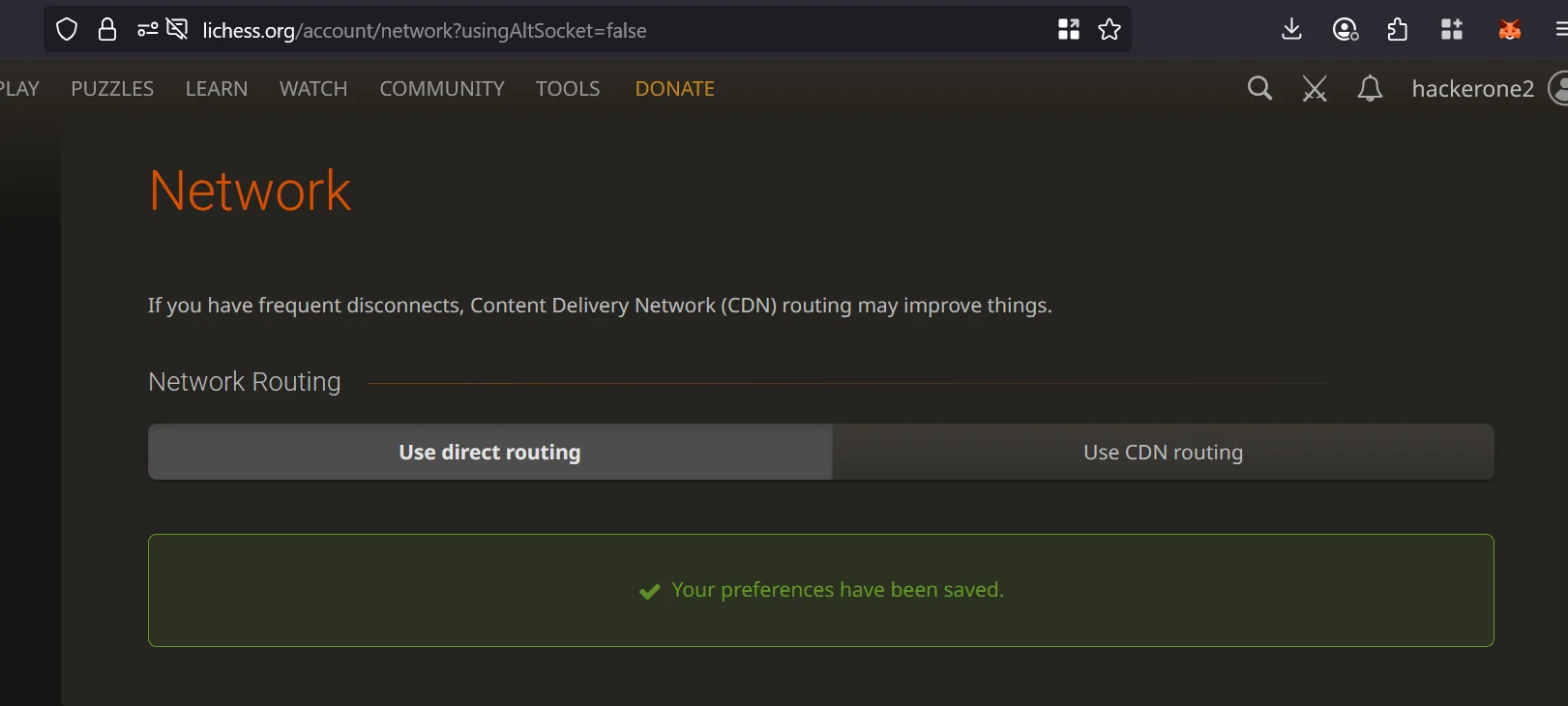
Victim visit the csrf link then pressing the click button from the csrf that the attacker sent
- [attachment / reference]
Impact
An irresponsible malicious user can change network routing settings by sending a csrf script to the victim.
What the report shows
This is a medium severity report against lichess.org, filed under Cross-Site Request Forgery (CSRF) with a CVSS score of 4.2. The researcher, psfauzi, found that the Network feature, which holds the Network Routing settings, could be changed on behalf of a logged-in user by getting that user to load an attacker-controlled page and click a link.
The reproduction is short. The researcher prepared a page containing a single link:
<html><body><a href="https://lichess.org/account/network?usingAltSocket=false">click</a></script></body></html>
The page is saved on the attacker's own server, for example as csrf.html, and the link is sent to a victim who is registered on Lichess. The proof follows the victim through three states. First, the victim has the Network Routing feature set to "Use CDN Routing":
Next, the attacker sends the CSRF page to the victim:
Finally, the victim visits the link and presses the click button on the page the attacker sent:
A screen recording of the same sequence is attached to the report:
The report does not describe the resulting state of the setting after the click, and it does not state a fix, a bounty amount or any back-and-forth with the maintainers. What it does state is the impact in the researcher's own words: an irresponsible malicious user can change network routing settings by sending a CSRF script to the victim.
Root cause
The report shows a link to https://lichess.org/account/network carrying the parameter usingAltSocket, which the victim clicks to trigger the change. Because the action is a navigable GET, any page on any origin can trigger it with an ordinary link, and the browser attaches the victim's cookies automatically. The report does not show the server-side handler, so whether the endpoint lacks a CSRF token entirely, accepts one but does not verify it, or verifies it only for some methods is not established here.
Impact
The only demonstrated effect is that the victim's Network Routing setting changes without their intent. The report frames the actor as an "irresponsible malicious user" and does not claim account takeover, data exposure or persistence beyond the setting itself. The practical consequence is that the victim's Network Routing setting can be changed without their intent. The report gives no evidence of what the alternative routing does to the victim's connection, so the wider consequences are not shown.
How this kind of bug works
CSRF abuses the fact that browsers attach a site's cookies to every request to that site, regardless of which page initiated the request. If the server decides who the user is purely from the session cookie and does not also require proof that the request came from its own pages, then a page on attacker.example can make the victim's browser issue a request to victim.example that the server treats as a deliberate action.
The classic vector is a cross-origin form POST or a top-level navigation to a GET URL. GET-based CSRF is the easier variant to miss because developers often treat GET as safe and read-only, so they add protections to POST handlers and leave state changes reachable by link, image tag or redirect. SameSite cookie attributes reduce the exposure, but a top-level navigation from an attacker page can still carry cookies under SameSite=Lax, which is exactly the shape of the proof above: the victim clicks a link and the browser performs a top-level GET with the session attached.
Defences work at two layers. The server should require an unpredictable, per-session token on every state-changing request and reject requests without it, and it should never perform state changes on GET. The browser layer, through SameSite cookies and origin checks such as Origin and Referer validation, adds depth but should not be the only control.
How to test for it
- Map the authenticated actions that change state: profile and account settings, email and password changes, linked identities, API token creation, privacy toggles, feature flags, and anything with a query string that looks like a setter.
- For each one, capture the legitimate request and note the method, the parameters and any token. Then replay it from a different origin: a page you host, or a local HTML file, that issues the same request as a top-level navigation, a form submission or a fetch.
- Remove the token parameter, or keep a token from a different session, and see whether the server still applies the change. A positive result is a state change visible in the victim's own account view after the cross-origin request, with no token or with a stale one.
- Test GET variants specifically. If the legitimate action is a POST, try the same parameters as a GET, and try method override parameters and alternate content types, since parsers sometimes accept what the front end never sends.
- Confirm with a second account and a fresh browser profile so cached state and existing cookies do not mislead you.
Common false positives: the endpoint returns 200 but silently ignores the change; the action requires a re-authentication prompt that the test skipped; the session cookie is SameSite=Strict, so the cross-site request arrives unauthenticated and the apparent success is really a login redirect; or the change is scoped to a value the attacker already controls and has no effect on the victim. Always verify the effect from the victim's session, not from the response body alone.
How it is fixed
Require a synchroniser or double-submit token on every state-changing request and reject requests that lack a valid one. Move state changes off GET entirely, so that a link cannot perform them. Set session cookies with SameSite=Lax at minimum, and Strict where the flow allows it, and validate the Origin or Referer header on sensitive endpoints as a secondary check. For endpoints that legitimately need cross-site invocation, use explicit, narrow exceptions rather than disabling the check globally.
Hunting notes
CSRF hides in features that were built as simple links or image-driven toggles: settings pages with query-string setters, one-click enable or disable controls, OAuth and identity linking callbacks, and anything an email link is expected to trigger. Recon signals include endpoints whose URLs read like verbs with parameters, forms that submit without a hidden token field, and JavaScript that builds request URLs by string concatenation. GraphQL and JSON APIs are worth checking too, since a permissive content-type parser can turn a simple form post into an accepted mutation.
To make a report land, show the before state, the cross-origin request, and the after state from the victim's own session, ideally with a recording. State the concrete consequence for the victim, and avoid overclaiming beyond what the setting controls. If the only effect is a preference change, say so plainly; programs still accept these when the proof is clean and the setting has a real security or privacy meaning.
What happened, in plain words
Lichess is a website for playing chess online. It has an account settings area, and inside it a Network feature that holds Network Routing settings. Those settings include an option called "Use CDN Routing".
The researcher, psfauzi, found that this setting could be changed on behalf of a logged-in user without that user meaning to do it. The trick is called Cross-Site Request Forgery, or CSRF. The idea is simple: when you are logged in to a site, your browser stores a small piece of data called a cookie and sends it with every request to that site. The site uses the cookie to recognise you. If the site also accepts a request that changes something without checking where the request came from, then a page on a completely different site can make your browser send that request for you.
A useful comparison is a signed form at a hotel desk. The signature (the cookie) proves who you are, but if the clerk accepts any piece of paper with your signature on it, someone else can write the paper and you never agreed to it.
The report is rated medium severity with a CVSS score of 4.2. CVSS is a standard scoring system that turns the characteristics of a bug into a number, where higher means more serious.
The reproduction, step by step
The researcher prepared a small web page containing one link:
<html><body><a href="https://lichess.org/account/network?usingAltSocket=false">click</a></script></body></html>
Line by line:
<html><body>opens a minimal page.<a href="...">click</a>is a hyperlink labelled "click". The address it points to ishttps://lichess.org/account/network?usingAltSocket=false. The part before the?is the page on Lichess that holds the network settings. The part after the?is a parameter, a named value passed to the site; here the parameter is calledusingAltSocketand its value isfalse.</script></body></html>closes the page. The stray</script>tag has no matching opening tag, which is sloppy markup but does not stop the link from working.
The page is saved on the attacker's own server, for example as csrf.html, and the link to it is sent to a victim who has a Lichess account. The link is sent to a victim who has a Lichess account, and the victim clicks it.
The proof follows the victim through three states. First, the victim has the Network Routing feature set to "Use CDN Routing":
Next, the attacker sends the CSRF page to the victim:
Finally, the victim visits the link and presses the click button on the page the attacker sent:
A screen recording of the same sequence is attached to the report:
Why each step matters: the first screenshot records the setting before anything happens, which is the baseline. The second shows the delivery of the malicious page, the part the attacker controls. The third shows the victim visiting the link and pressing the click button on the page the attacker sent.
The report does not describe the state of the setting after the click, and it does not state a fix, a bounty amount or any discussion with the maintainers. The impact is given in the researcher's own words: an irresponsible malicious user can change network routing settings by sending a CSRF script to the victim.
In general, how this kind of bug works
CSRF abuses the fact that browsers attach a site's cookies to every request to that site, no matter which page started the request. If the server decides who you are purely from the session cookie, and does not also require proof that the request came from its own pages, then a page on another site can make your browser send a request that the server treats as your deliberate action.
The classic route is a form on another site that posts to the target, or a link that navigates to a URL on the target. The link variant is easy to miss because developers often think of GET requests as safe and read-only, so they protect forms that submit data and leave settings changes reachable by a simple link. A cookie attribute called SameSite limits the exposure, but a top-level navigation, meaning the victim clicking a link and the browser loading a new page, can still carry cookies under SameSite=Lax. That is exactly the shape of the proof above.
Defences work at two layers. On the server, every request that changes something should require an unpredictable token tied to the user's session, and requests without it should be rejected. A token is a random value the site puts into its own pages; another site cannot guess it, so it cannot forge the request. State changes should also never happen on GET. On the browser side, SameSite cookies and checks of the Origin or Referer headers, which say where a request came from, add depth but should not be the only control.
In general, how to test for it
- List the actions that change something while logged in: profile and account settings, email and password changes, linked identities, API token creation, privacy toggles, and anything with a query string that looks like a setter.
- For each one, capture the legitimate request and note the method, the parameters and any token. Then replay it from a different origin: a page you host, or a local HTML file, that issues the same request as a link, a form submission or a fetch.
- Remove the token, or use a token from a different session, and see whether the server still applies the change. A positive result is a change visible in the victim's own account view after the cross-origin request.
- Test GET variants specifically. If the real action is a POST, try the same parameters as a GET, and try method override parameters and alternate content types, since parsers sometimes accept what the front end never sends.
- Confirm with a second account and a fresh browser profile so cached state and existing cookies do not mislead you.
Common false positives: the endpoint returns 200 but silently ignores the change; the action needs a re-authentication prompt the test skipped; the session cookie is SameSite=Strict, so the cross-site request arrives unauthenticated and the apparent success is really a login redirect; or the change is scoped to a value the attacker already controls. Always verify the effect from the victim's session, not from the response body alone.
In general, how it is fixed
Require a token on every state-changing request and reject requests that lack a valid one. Move state changes off GET entirely, so that a link cannot perform them. Set session cookies with SameSite=Lax at minimum, and Strict where the flow allows it, and validate the Origin or Referer header on sensitive endpoints as a secondary check. For endpoints that legitimately need cross-site invocation, use explicit, narrow exceptions rather than disabling the check globally.
In general, where to look
CSRF hides in features built as simple links or image-driven toggles: settings pages with query-string setters, one-click enable or disable controls, OAuth and identity linking callbacks, and anything an email link is expected to trigger. Signals include URLs that read like verbs with parameters, forms that submit without a hidden token field, and JavaScript that builds request URLs by string concatenation. GraphQL and JSON APIs are worth checking too, since a permissive content-type parser can turn a simple form post into an accepted mutation.
To make a report land, show the before state, the cross-origin request, and the after state from the victim's own session, ideally with a recording. State the concrete consequence for the victim, and avoid overclaiming beyond what the setting controls. If the only effect is a preference change, say so plainly; programs still accept these when the proof is clean and the setting has a real security or privacy meaning.
Glossary
- CSRF (Cross-Site Request Forgery): a bug where another website makes your browser send a request to a site you are logged in to, and the site treats it as your own action.
- Cookie: a small piece of data a site stores in your browser and receives back with each request, often used to recognise your logged-in session.
- Session: the period during which a site remembers that you are logged in, identified by a cookie.
- Request: a message your browser sends to a server asking for a page or asking it to do something.
- GET: the request type a browser uses when you open a link or type an address; it is meant to fetch something, not change it.
- POST: a request type normally used to submit data, such as a form.
- Parameter: a named value attached to a URL after a
?, such asusingAltSocket=false. - Token (anti-CSRF token): a random value the site places in its own pages and checks on each state-changing request, which another site cannot guess.
- SameSite: a cookie setting that controls whether the cookie is sent when the request comes from another site.
- Origin / Referer header: information the browser sends about which page a request came from, used by servers as a secondary check.
- CDN (content delivery network): a set of servers in many locations that deliver a site's content from one near the user.
- Network Routing: the Lichess setting that decides how the browser connects to the site.
- CVSS: a standard scoring system that turns a bug's characteristics into a number, where higher is more serious.
- Severity: a label such as low, medium or high describing how serious a bug is.
- False positive: a test result that looks like a bug but is not one.

